
How eZintegrations Connects Humanoid Robots to SAP Oracle & Enterprise Systems
March 25, 2026eZintegrations connects humanoid robots to SAP S/4HANA, SAP EWM, Oracle ERP Cloud, Oracle WMS, Salesforce Field Service, MES, HRIS, and any enterprise system with a REST or OData API, using a pre-built API catalog of 5,000+ endpoints and Automation Hub templates for the most common robot-to-ERP integration patterns. No custom development is required per connection: robot task dispatch, inventory write-back, quality flag routing, maintenance dispatch, and shift reporting all run on the same no-code canvas with bidirectional data flow between your robot fleet controllers and your enterprise stack.
TL;DR
Humanoid robots operating in enterprise environments need real-time connections to the systems that define their work and record their outcomes: SAP for production orders and warehouse management, Oracle for supply chain planning, Salesforce for field service routing, MES for assembly work orders, and HRIS for shift scheduling. SAP has published real-world ERP integrations with humanoid robots from NEURA Robotics, Humanoid, and Agibot at BITZER, Sartorius, and Martur Fompak, all running on SAP S/4HANA and SAP EWM. The technical integration architecture is established.
The question for your deployment is which platform provides it without a custom development sprint for every enterprise system connection. eZintegrations provides those connections via 5,000+ pre-built API endpoints, covering SAP EWM OData interfaces, Oracle ERP Cloud REST APIs, Salesforce REST API, and every fleet controller REST API. All robot integration patterns (task dispatch, inventory write-back, quality routing, maintenance dispatch, shift reporting) are available as Automation Hub templates. – This post maps every named enterprise system your humanoid robot needs to connect to, the specific API used for each connection, and how eZintegrations delivers all of them without requiring a separate integration engineering project for each system.
The Problem: Humanoid Robots Need Enterprise Data. Enterprise Systems Were Not Designed to Talk to Robots.
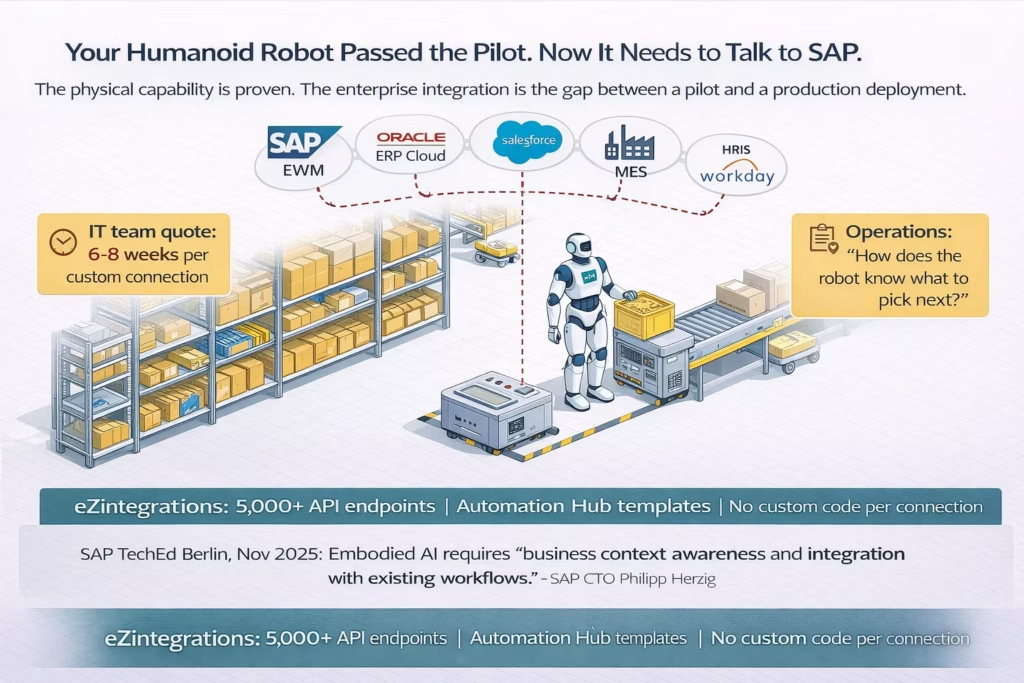
Your humanoid robot just completed its first successful pick in the pilot zone. The physical capability is there. Navigation, grasp, payload: all pass. Your IT team calls it a success.
Then your operations manager asks a simple question: “How do I know what the robot should pick next?”
The answer requires SAP EWM. The task queue lives there. The bin locations live there. The inventory records live there. Your robot’s fleet controller does not have native SAP connectivity. It has a REST API and it receives tasks from whatever system pushes them. Between SAP EWM and the fleet controller, there is a gap. Someone needs to bridge it.
Your IT team quotes six to eight weeks for a custom integration. The robot sits in the pilot zone.
This is the specific problem that most humanoid robot deployments encounter as they move from proof-of-concept to production. The physical hardware works. The enterprise systems hold the data the robot needs. The bridge between them is the missing piece.
SAP’s CTO Philipp Herzig said it directly at SAP TechEd Berlin in November 2025, announcing real-world integrations between SAP EWM and humanoid robots at three enterprise manufacturers: “Embodied AI represents a fundamental shift in how robots understand and respond to business needs. Humanoid robots can act as extensions of an organisation’s operations by providing business context awareness and integration with existing workflows.”
Business context awareness. Integration with existing workflows. Those two phrases describe the same technical challenge: connecting a robot’s fleet controller API to the enterprise systems that hold its task queue, its inventory data, its production orders, its quality specifications, and its maintenance records. Real-time. Bidirectional. Without custom development for each enterprise system connection.
The five most common enterprise systems a humanoid robot needs to connect to in a production deployment are: an ERP (SAP or Oracle), a WMS (standalone or embedded in the ERP), an MES, a CRM or field service platform (Salesforce or ServiceNow), and an HRIS (Workday or SAP SuccessFactors). Each system has its own API format, authentication method, and data schema. Without an integration platform that handles all of them from a shared catalog, each connection is a separate development project.
Early commercial humanoid robot deployments report ROI payback periods of 18-36 months (Robozaps 2026). The integration layer is what enables the full-shift autonomous operation that drives that ROI: robots that cannot receive tasks from SAP in real time and cannot write outcomes back to Oracle do not produce 24/7 value. They produce supervised-hour value.
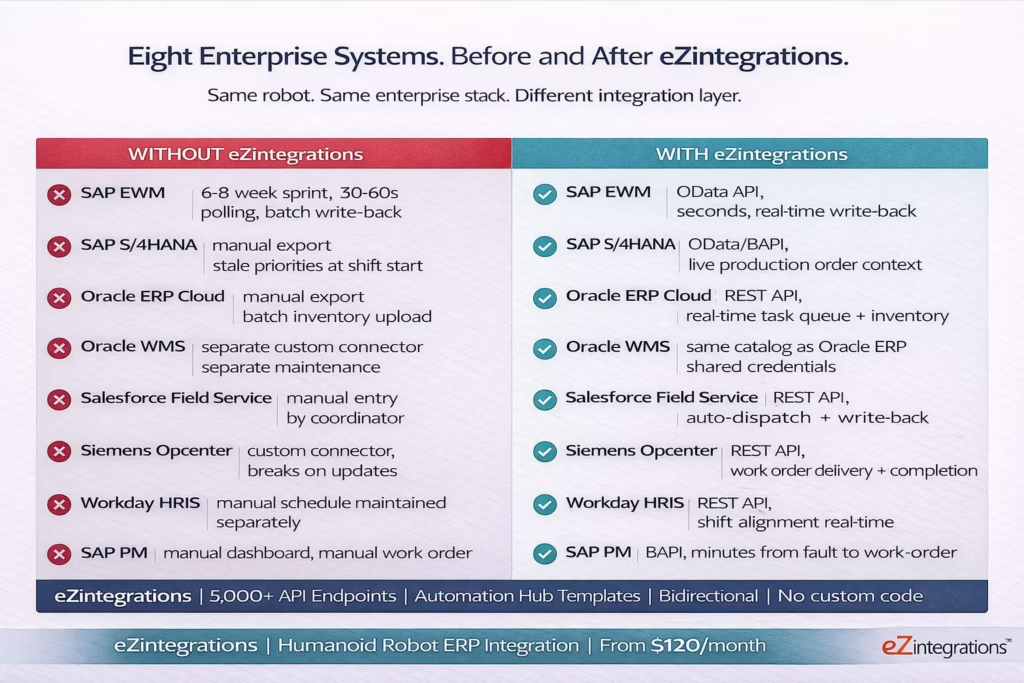
Before vs After: Disconnected Robots vs ERP-Connected Fleet
| Enterprise system | Without eZintegrations | With eZintegrations |
|---|---|---|
| SAP EWM (Warehouse Management) | Custom integration sprint (6-8 weeks). Polling-based task delivery (30-60s lag). Batch inventory write-back after each shift. | SAP EWM OData API connected in Automation Hub. Event-driven task dispatch in seconds. Real-time inventory write-back on robot task completion. |
| SAP S/4HANA (ERP / Production Orders) | Manual export of production order data to robot task file. Updated at shift start only. Robot works stale priorities. | SAP S/4HANA OData or BAPI interface connected. Robot receives live production order context for task prioritisation. |
| Oracle ERP Cloud (Supply Chain / WMS) | No API connection. Robot task data exported manually. Inventory updated via batch upload. | Oracle ERP Cloud REST API connected. Task queue pulled in real time. Inventory movement API called on every robot pick confirmation. |
| Oracle WMS (Warehouse Ops) | Separate custom integration from Oracle WMS to robot controller. Maintained separately. | Oracle WMS REST API connected in same catalog as Oracle ERP. Shared credential configuration. |
| Salesforce Field Service | No direct connection. Robot tasks entered manually by coordinator. | Salesforce REST API connected. Work orders dispatched automatically. Outcomes written back to case records. |
| Siemens Opcenter / MES | Custom MES-to-robot connector. High maintenance. Breaks on updates. | Siemens Opcenter REST API used. Work orders delivered to robot. Completion writes back to MES. |
| Workday / SAP SuccessFactors (HRIS) | Robot shift schedule maintained manually, separate from workforce schedule. | Workday or SAP SuccessFactors API connected. Robot deployment aligned with human shifts in real time. |
| SAP Plant Maintenance (SAP PM) | Robot faults logged locally. Manual SAP PM work order creation. | Fault event triggers SAP PM BAPI call. Work order created automatically within minutes. |
How eZintegrations Acts as the Enterprise Integration Brain
When SAP announced its humanoid robot integration partnerships at TechEd Berlin in November 2025, the technical architecture behind those deployments involved a specific combination: SAP S/4HANA as the ERP source of business logic, SAP EWM as the WMS delivering real-time task context to the robot, and SAP BTP as the middleware layer. The integration pattern is real. The enterprise integration brain concept is not abstract.
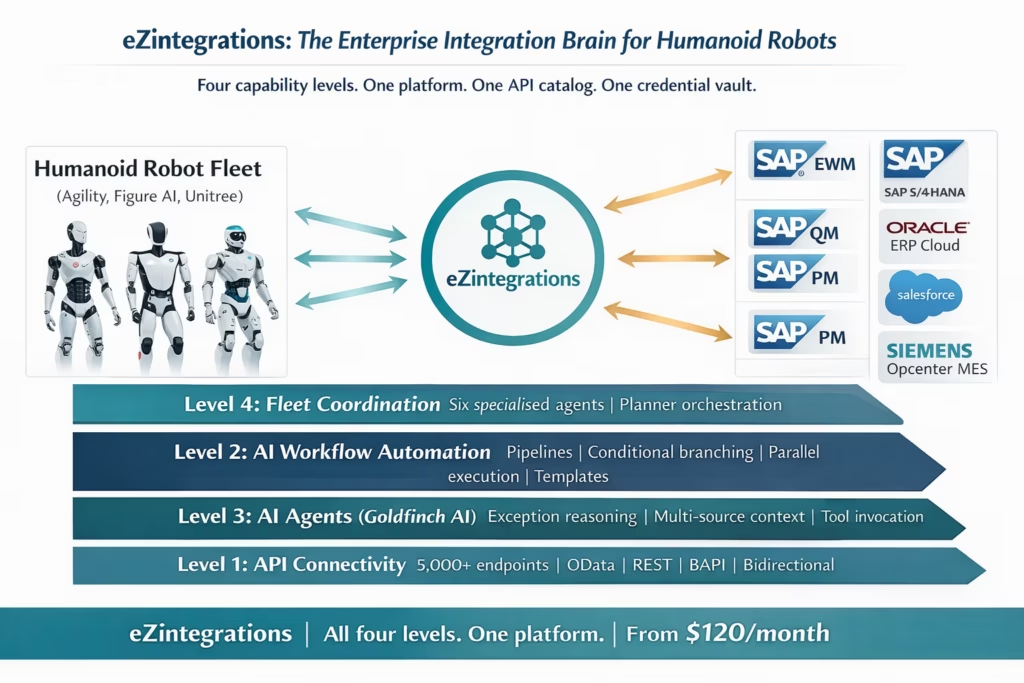
What makes eZintegrations the enterprise integration brain for humanoid robot deployments is a combination of four capabilities that work together across all four levels of the robotics integration stack.
Level 1: API connectivity (5,000+ pre-built endpoints)
Every enterprise system your humanoid robot needs to connect to exposes an API. SAP EWM exposes OData V4 services for transfer order management, bin inventory queries, and goods movement. SAP S/4HANA exposes OData V2 and V4 services for production orders, material management, and plant maintenance. Oracle ERP Cloud exposes REST APIs for warehouse management, supply chain, and inventory operations. Salesforce exposes the Salesforce REST API for CRM records, field service work orders, and case management. Siemens Opcenter exposes REST APIs for work order management and quality inspection. Workday exposes REST and SOAP APIs for workforce scheduling.
All of these are in the eZintegrations API catalog. Pre-built connections. Pre-mapped schemas. Credentials configured once, reused across every workflow that touches that system. Your robot fleet controller’s REST API is added via self-service API onboarding if it is not already in the catalog, in under an hour, without custom development.
Level 2: Workflow automation (the pipeline layer)
The API catalog provides the connections. The AI workflow automation layer provides the logic that runs between the robot event and the enterprise system response: task dispatch pipelines, inventory write-back pipelines, quality flag routing, maintenance fault dispatch, and shift scheduling alignment. Conditional branching, parallel API calls, error handling, and retry logic all run on the same no-code canvas. Five pipeline patterns, all available as Automation Hub templates.
Level 3: AI agents (the reasoning layer)
For exceptions and decisions that go beyond rule-based pipeline logic, Goldfinch AI provides the reasoning layer: agents that read live SAP and Oracle data as context, reason about what the robot should do next given current conditions, and invoke integration workflows as tools. The Goldfinch AI agent architecture is covered in the dedicated AI agents for humanoid robots post. For this post, the key point is that the same enterprise system API connections that power the workflow layer also power the agent layer: the integration brain and the reasoning brain share the same API catalog and credential vault.
Level 4: Fleet coordination (the orchestration layer)
For multi-robot fleets operating across heterogeneous vendor environments, Goldfinch AI’s Planner orchestration layer coordinates specialised agents, prevents duplicate exception responses, manages maintenance windows, and maintains fleet-wide shift intelligence. The agentic AI fleet platform post covers this in detail. Again: the same enterprise API connections underpin the fleet coordination layer.
The “enterprise integration brain” frame captures the unified architecture: one platform, one API catalog, one credential vault, four capability levels (connectivity, workflow, agents, fleet coordination), all working across the same enterprise system connections.
Named System Connections: SAP, Oracle, Salesforce, and Every System Your Robot Needs
This section maps each enterprise system your humanoid robot needs to connect to, the specific API interface used, and the integration patterns available in the Automation Hub. These are not generic descriptions. These are the named API interfaces your IT team will use to provision the connections.
SAP EWM (Extended Warehouse Management)
API interface: SAP EWM OData V4 services. Key service groups: WarehouseTask (transfer order creation, status update, confirmation), PhysicalInventoryDocument (cycle count management, bin inventory), and WhseGoodsMvt (goods movement posting).
Robot integration patterns: Task dispatch: eZintegrations Watcher monitors the WarehouseTask API for new transfer orders in the robot’s assigned work zone. When a task is created, the Watcher fires the dispatch workflow: task details (source bin, destination bin, material, quantity, weight) are mapped to the robot fleet controller’s task API format and pushed via REST call. Inventory write-back: on robot task completion, the WhseGoodsMvt API posts the goods movement. The SAP EWM transfer order status is updated to Confirmed via the WarehouseTask API. Cycle count coordination: the PhysicalInventoryDocument API is used by the AI agent exception handling layer to check bin hold status, count completion state, and variance before releasing blocked locations.
Supported robot vendors: Agility Robotics Arc, Figure AI fleet API, Boston Dynamics Scout, Apptronik, Unitree, any REST-connected fleet controller.
Automation Hub templates: WMS-to-robot task dispatch, robot-to-WMS inventory write-back, robot exception SAP EWM bin query.
SAP S/4HANA (ERP Core)
API interface: SAP S/4HANA OData V2 and V4 APIs. Key services: ProductionOrder (PP module, production order status and operations), MaterialDocuments (material movement and inventory), MaintenanceOrder (SAP PM work orders and notification), and QualityInspectionLot (SAP QM inspection results and defect records).
Robot integration patterns: – Production order context: robots performing assembly or kitting tasks read the production order API to understand component variants, assembly sequences, and urgency flags before starting a task. Material movement: every robot material handling action posts a material document via the MaterialDocuments OData service. Inventory is accurate in SAP in seconds, not at end-of-shift batch. – Maintenance dispatch: robot fault events trigger MaintenanceOrder API calls to create SAP PM notifications and work orders, classified by fault severity. Quality inspection: robot quality check results write to the QualityInspectionLot API. Out-of-tolerance readings create defect records and can trigger line holds via the MES connection.
Automation Hub templates: robot-to-SAP material movement, SAP production order to robot context, robot fault to SAP PM work order, robot quality result to SAP QM inspection lot.
Oracle ERP Cloud (Supply Chain and WMS)
API interface: Oracle ERP Cloud REST APIs. Key API groups: Receiving Management (purchase order receipts, put-away), Inventory Management (on-hand quantity, material transactions, location query), Work Order Management (work order status and completions for manufacturing), and Warehouse Management (task management for Oracle WMS deployments).
Robot integration patterns: – Task queue from Oracle WMS: Oracle Warehouse Management exposes task APIs for pick, put-away, and replenishment. The eZintegrations Watcher monitors for tasks assigned to the robot’s zone and dispatches via the fleet controller API. Inventory transaction write-back: robot completions call the Inventory Management material transaction API. On-hand quantity updated in Oracle in real time. Manufacturing work order context: for robots performing assembly tasks, Oracle Work Order Management provides the assembly operations, component requirements, and completion expectations.
Supported Oracle deployments: Oracle ERP Cloud, Oracle SCM Cloud, Oracle Fusion WMS, Oracle EBS (via EBS REST services and SOAP APIs also in catalog).
Automation Hub templates: Oracle WMS task dispatch to robot, robot completion to Oracle inventory transaction, robot fault to Oracle maintenance work order.
Salesforce (CRM and Field Service)
API interface: Salesforce REST API (v58.0 and above). Key objects: ServiceAppointment and WorkOrder (field service task routing), Case (service case records), Asset (equipment and robot asset records), and ServiceResource (resource availability and scheduling).
Robot integration patterns: – Field service routing: robots deployed for inspection, facility assessment, or customer-facing tasks receive work orders from Salesforce Field Service Lightning via the ServiceAppointment API. The work order details (location, task type, priority, SLA) are mapped to the robot fleet controller task format. Inspection outcome write-back: robot inspection findings (visual anomaly, measurement reading, environmental sensor data) write back to the Salesforce Case or Asset record via the REST API. Robot as a service resource: the robot is registered as a ServiceResource in Salesforce. Availability is managed via the eZintegrations HRIS-to-Salesforce alignment workflow, which updates robot resource availability based on fleet controller battery and task state.
Automation Hub templates: Salesforce FSL work order to robot dispatch, robot inspection outcome to Salesforce case, robot service completion to Salesforce work order close.
Siemens Opcenter (MES)
API interface: Siemens Opcenter REST API. Key resources: WorkOrder (manufacturing execution work orders), Operation (individual assembly operations within a work order), and QualityInspection (in-line inspection specifications and results).
Robot integration patterns: – Work order delivery: Opcenter work orders for robot-eligible operations are delivered to the robot fleet controller via the eZintegrations workflow. Operation details (station, component, assembly instructions, dwell time) are mapped to the robot’s task format. Completion acknowledgement: robot operation completion fires the Opcenter Operation completion API. Work order progress updated in MES within seconds of robot confirmation. Quality inspection: robot quality events write back to the Opcenter QualityInspection API. Out-of-tolerance events trigger the SAP QM connection simultaneously.
Additional MES platforms in catalog: Rockwell FactoryTalk, GE Proficy MES, Werum PAS-X (pharma), Dassault DELMIA Apriso.
Workday and SAP SuccessFactors (HRIS)
API interface: Workday REST API (Human Capital Management). Key services: WorkerSchedule (shift assignments and hours), PositionData (role and zone assignments), and OrgData (team structure for escalation routing). SAP SuccessFactors uses the SAP SuccessFactors OData API for equivalent data sets.
Robot integration patterns: Shift alignment: the HRIS shift schedule for the human workforce is read via the eZintegrations workflow. Robot deployment windows are aligned with human staffing to ensure coverage continuity and human-robot zone management. Escalation routing: the HRIS org data provides the contact information for the correct supervisor, quality lead, or maintenance technician for each exception type and zone. The escalation notification uses live HRIS data rather than a hardcoded contact list. Onboarding and deployment: when a new robot is added to a facility, the HRIS deployment record triggers the eZintegrations workflow to provision the robot’s zone assignments and schedule integration.
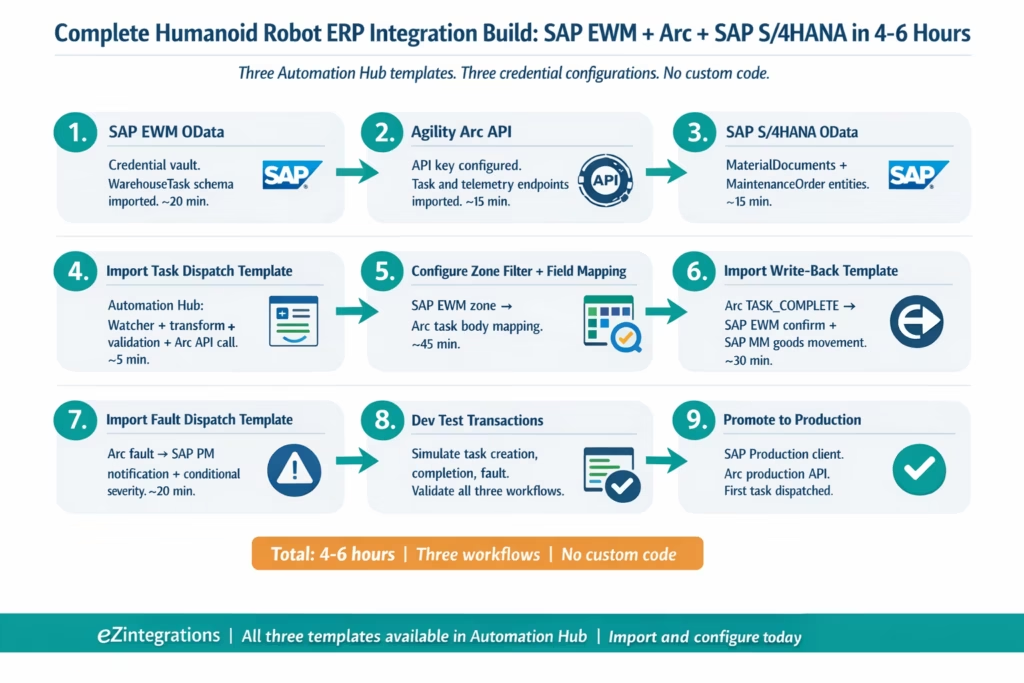
Step-by-Step: End-to-End Robot Integration Build (SAP EWM to Fleet Controller to SAP Write-Back)
This is the complete end-to-end integration build for a humanoid robot warehouse deployment: from an SAP EWM transfer order being created to the robot fleet controller receiving the task to the completed pick writing back to SAP. It covers both the SAP EWM connection and the SAP S/4HANA material document write-back, because warehouse operations always require both.
The example uses an Agility Robotics Digit fleet (Agility Arc API), SAP EWM as the WMS, and SAP S/4HANA as the ERP. The integration is built on eZintegrations.
Step 1: SAP EWM OData connection configured – In the eZintegrations canvas, the SAP EWM system is registered in the credential vault using the OData V4 service URL, client credentials, and the specific WarehouseTask entity set name for the deployment. eZintegrations connects to the SAP EWM OData metadata endpoint to validate the connection and import the entity schema. Credential configuration: approximately 20 minutes.
Step 2: Agility Arc API connection configured – The Agility Arc fleet management API endpoint is registered in the credential vault using the Arc API base URL and the API key or OAuth2 credentials provided by Agility Robotics. eZintegrations imports the Arc task creation and telemetry endpoint schemas. Credential configuration: approximately 15 minutes.
Step 3: SAP S/4HANA OData connection configured – The SAP S/4HANA system is registered using the S/4HANA OData V2 base URL and API key credentials. The MaterialDocuments API entity set is imported to support material movement write-backs. The MaintenanceOrder entity set is imported for fault dispatch. Both live in the same S/4HANA credential configuration. Additional configuration time: approximately 15 minutes.
Step 4: Import the WMS-to-robot task dispatch template from Automation Hub – The template is imported into the eZintegrations canvas. It arrives pre-structured with: a Watcher trigger (monitoring SAP EWM WarehouseTask for new tasks in a configurable work zone filter), a data transformation step (mapping SAP EWM task fields to the Agility Arc task API request body format), a validation step (checking robot availability and bin accessibility before dispatching), and an Arc API Task Create call. Total import time: under 5 minutes.
Step 5: Configure the work zone filter and field mapping – In the Watcher configuration, the SAP EWM work zone filter is set to the robot’s assigned zone (e.g., Warehouse Zone B, Warehouse Number 0001). In the transformation step, the SAP EWM fields are mapped to the Arc task body format: Source Storage Bin → source_location, Destination Storage Bin → destination_location, Material → item_barcode_reference, Quantity → expected_quantity. The SAP Transfer Order number is stored as a task_reference field in Arc for the write-back correlation. Configuration time: approximately 45 minutes including field mapping review.
Step 6: Import the robot-to-SAP inventory write-back template –The write-back template is imported. It contains: a Watcher trigger (monitoring the Agility Arc task completion API for the TASK_COMPLETE event type), a correlation step (retrieving the SAP Transfer Order number from the Arc task_reference field), a SAP EWM WarehouseTask confirmation call (marking the transfer order confirmed), and a SAP S/4HANA MaterialDocuments goods movement post (inventory movement from source to destination bin). A conditional step handles the exception path: if the Arc barcode scan result does not match the expected material, the SAP write-back is held and a discrepancy record is created. Configuration time: approximately 30 minutes.
Step 7: Configure the SAP PM fault dispatch workflow – A third template is imported: the robot fault-to-SAP PM maintenance dispatch template. The Watcher monitors the Agility Arc fault event API. On a fault event, the workflow calls the SAP S/4HANA MaintenanceOrder API to create a maintenance notification. A conditional step classifies the fault severity: critical faults create an immediate PM order with high priority; non-critical faults create a scheduled PM notification for planned maintenance. Configuration time: approximately 20 minutes.
Step 8: Run test transactions in Dev environment – Using the eZintegrations Dev environment, test transactions are run against all three workflows: a simulated SAP EWM transfer order creation, a simulated Arc task completion event, and a simulated Arc fault event. The Watcher fires on each simulation. The task dispatch, write-back, and maintenance dispatch each execute against the Dev credentials (SAP Dev client, Arc sandbox). Validation points: correct SAP WarehouseTask status after write-back, correct Arc task_reference correlation, correct SAP PM notification type based on fault severity.
Step 9: Promote to production – All three workflows are promoted from Dev to Production in the eZintegrations environment separation. The SAP EWM Watcher begins monitoring the production WarehouseTask API for the configured zone. The first production task is dispatched to the robot fleet. The first production write-back posts to SAP within seconds of the robot’s first task completion.
Total build time (experienced configuration team): approximately 4-6 hours for all three workflows, including Automation Hub template imports, field mapping, validation configuration, and Dev test runs. No custom code written.
Key Outcomes and Results
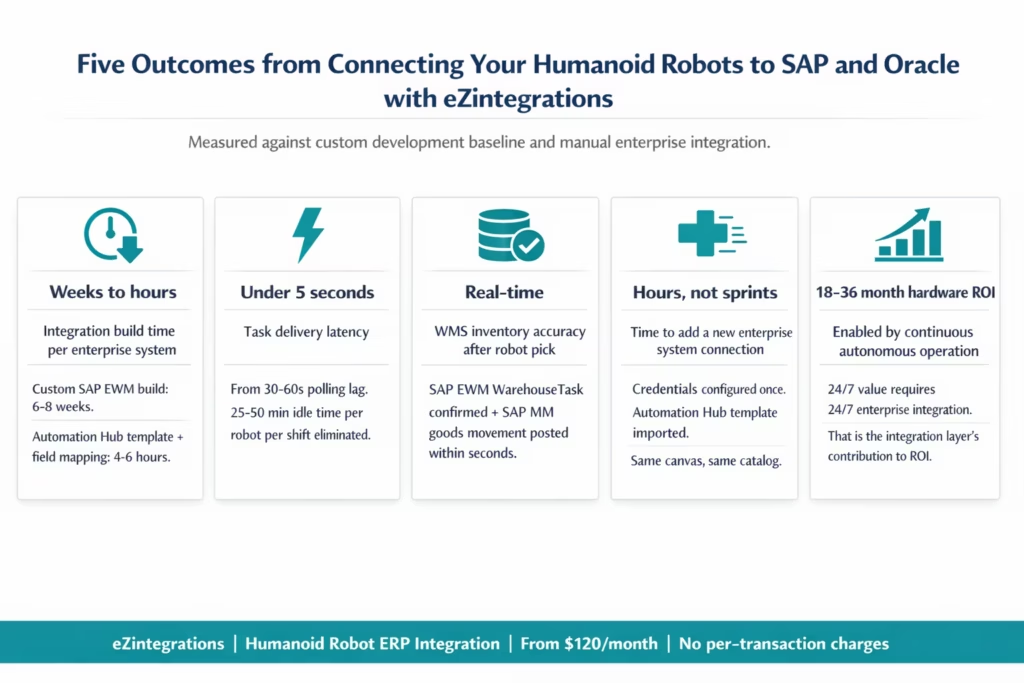
Integration build time: Weeks to hours – The most direct outcome of using eZintegrations for humanoid robot ERP integration is the elimination of the custom development timeline. A single SAP EWM-to-robot integration built custom by an IT team typically takes 6-8 weeks, including requirements, design, build, test, and deployment. An Automation Hub template import, field mapping configuration, and Dev test run takes 4-6 hours for all three core workflows (task dispatch, inventory write-back, fault dispatch). For a deployment requiring 7 enterprise system connections, the difference between custom development and eZintegrations templates is measured in months versus days.
Data latency: 30-60 seconds to under 5 seconds – Polling-based task delivery, where the fleet controller checks the WMS on a fixed schedule, creates 30-60 second average task assignment delays. Event-driven task delivery via eZintegrations Watcher Tools delivers task data to the robot’s queue within seconds of SAP EWM transfer order creation. At 50 tasks per 8-hour shift, the recoverable idle time from this latency reduction is 25-50 minutes per robot per shift.
Inventory accuracy: Batch drift eliminated – Without real-time write-backs, WMS inventory records lag behind robot completions by up to an hour for batch-synced deployments, creating the duplicate task assignment problem (two robots dispatched to an already-completed pick). eZintegrations real-time write-back via the SAP EWM WarehouseTask confirmation API and SAP MM goods movement post keeps inventory accurate within seconds of each robot pick. Duplicate tasks are eliminated because the WMS record is updated before the next assignment fires.
New system connections: Hours, not sprints – Once the initial enterprise system connections are configured in the eZintegrations credential vault, adding a new enterprise system to the robot’s integration layer uses the same platform, the same configuration model, and the Automation Hub template library. A new Oracle WMS connection, for an expanded facility, takes hours rather than requiring a new integration engineering project.
ROI timeline: Integration accelerates hardware ROI – Early commercial humanoid robot deployments report ROI payback periods of 18-36 months (Robozaps 2026), driven by labour cost savings and 24/7 operation capability. The 24/7 operation capability depends entirely on the enterprise integration layer: a robot that cannot receive tasks overnight or post write-backs without human intervention does not provide 24/7 value. The integration layer converts hardware investment into continuous autonomous productivity.
How to Get Started
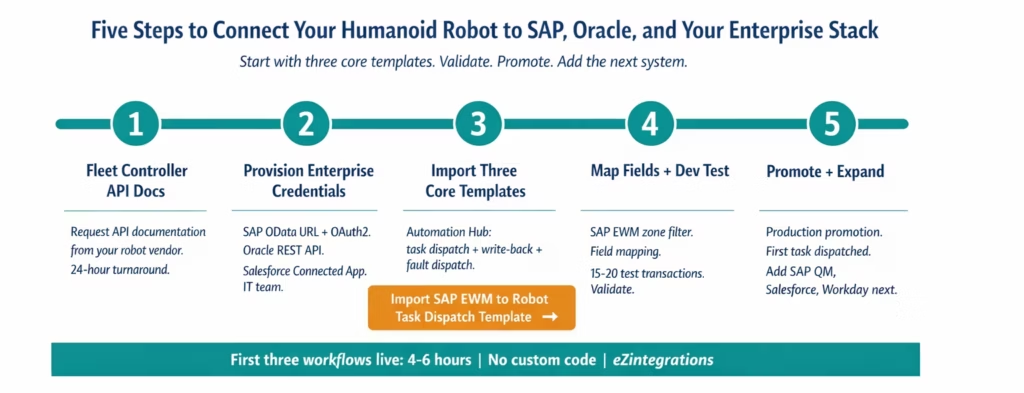
Step 1: Confirm your fleet controller’s API documentation – Request the REST API documentation for your humanoid robot’s fleet management platform: Agility Robotics Arc API, Figure AI fleet API, Boston Dynamics Scout, Apptronik, Unitree, or your vendor’s management interface. Confirm the task creation endpoint, the task completion event webhook or polling endpoint, and the fault/telemetry event API. Most vendors provide this documentation within 24 hours of deployment confirmation.
Step 2: Provision enterprise system API credentials Request the following from your IT team, depending on your enterprise stack:
For SAP deployments: SAP EWM OData V4 service URL and OAuth2 client credentials (or basic auth for legacy deployments), SAP S/4HANA OData service URL and API key, SAP PM notification creation endpoint.
For Oracle deployments: Oracle ERP Cloud REST API base URL, OAuth2 client credentials, and the specific API family access required (Inventory Management, WMS Tasks, Work Order Management).
For Salesforce: Salesforce Connected App client ID and client secret, REST API version.
For MES: Siemens Opcenter REST API base URL and API key, or equivalent for your MES vendor.
Step 3: Import the core robot integration templates from the Automation Hub Go to the Automation Hub and import the three core templates: WMS-to-robot task dispatch (SAP EWM version or Oracle WMS version, depending on your stack) . Robot-to-WMS inventory write-back . Robot fault-to-maintenance dispatch (SAP PM version or your CMMS)
Step 4: Configure field mapping and run Dev test transactions Configure the work zone filter in the Watcher, map your SAP EWM or Oracle WMS fields to your fleet controller’s task body format, and run 15-20 test transactions in the Dev environment. Validate task dispatch, write-back accuracy, and fault routing. Adjust field mapping as needed.
Step 5: Promote to production and add the next enterprise system Promote your first three workflows to production. Monitor the first 48 hours with your operations team to confirm data accuracy and latency. Then add the next enterprise system connection: SAP QM for quality integration, Salesforce for field service routing, Workday for shift scheduling alignment. Each additional connection uses the same credential vault and the same canvas.
Ready to start the integration build? Book a free demo and bring your fleet controller API documentation and your enterprise system list (SAP, Oracle, or custom stack). We will walk through the Automation Hub templates in the session and identify your build sequence.
Frequently Asked Questions
1. How do enterprises use eZintegrations to connect humanoid robots to SAP and Oracle
Enterprises use eZintegrations to bridge humanoid robot fleet controllers including Agility Robotics Arc Figure AI Boston Dynamics Scout Apptronik and Unitree to enterprise systems such as SAP EWM SAP S 4HANA Oracle ERP Cloud Salesforce and MES platforms. Integration patterns include real time task dispatch from WMS to robots task completion write back to ERP fault to maintenance routing quality flag propagation to SAP QM and shift schedule alignment from HR systems to robot deployment windows.
2. How long does it take to set up the first SAP or Oracle connection for a humanoid robot
The first enterprise system connection takes approximately four to six hours from template import through credential configuration field mapping testing and production deployment. API credential provisioning from IT teams typically takes one to three business days. Most teams complete initial workflows including task dispatch write back and fault routing in a single working session after credentials are available.
3. Does eZintegrations work with SAP ECC legacy systems as well as SAP S 4HANA
Yes, SAP ECC connects via BAPI interfaces and in some cases OData services through SAP Gateway while SAP S 4HANA uses modern OData V4 APIs. eZintegrations supports both simultaneously allowing organisations to run integrations across ECC and S 4HANA during migration phases without disruption.
4. Does eZintegrations support Oracle EBS as well as Oracle ERP Cloud
Yes, Oracle E Business Suite connects through REST APIs or SOAP services depending on system version while Oracle ERP Cloud uses modern REST APIs. Both deployment types are supported within the same API catalog and can operate together in a single eZintegrations environment.
5. Can eZintegrations handle real time humanoid robot task dispatch and write back at scale
Yes, eZintegrations runs on a cloud native event driven architecture where each robot task generates an independent workflow execution. Multiple robots operating simultaneously produce parallel write back calls to SAP or Oracle systems without queue bottlenecks. Task dispatch from WMS systems is triggered within seconds of task creation ensuring real time execution at fleet scale.
6. Is Goldfinch AI included in the same platform or separate
Goldfinch AI is built directly into the eZintegrations platform and uses the same workflow engine API catalog and credential vault. AI agents and integration workflows share the same canvas and infrastructure so there is no separate AI platform to deploy or manage alongside eZintegrations.
Conclusion
SAP has documented real-world humanoid robot integrations with SAP EWM and SAP S/4HANA at three enterprise manufacturers, announced at TechEd Berlin in November 2025. BMW, GXO, Mercedes-Benz, and dozens of other enterprises are running production pilots. The integration architecture for humanoid robots connecting to enterprise ERPs is established, validated, and increasingly expected by the market.
The question for your deployment is not whether the integration architecture exists. It is which platform provides it without requiring a custom engineering project for every enterprise system connection.
eZintegrations provides the enterprise integration brain: 5,000+ pre-built API endpoints covering SAP EWM OData, SAP S/4HANA OData and BAPI, Oracle ERP Cloud REST, Salesforce REST, Siemens Opcenter, Workday, and every robot fleet controller REST API. Automation Hub templates for all core robot integration patterns. A no-code canvas that any operations or IT team can configure without custom development. And the same platform scales from individual workflow pipelines to Goldfinch AI agents to fleet-wide agentic coordination, as your deployment grows.
One platform. One API catalog. Every enterprise system your robot needs to connect to.
Import the SAP EWM to robot task dispatch template from the Automation Hub and begin the integration build today. Or book a free demo with your fleet controller API documentation and your enterprise system list. We will map the integration architecture and identify your starting template in the session.

