Updated product description
", "variants": [{ "id": {variant_id}, "sku": "WIDGET-BLUE-L", "price": "29.99", "compare_at_price": "34.99" }] } } ```### Shopify Inventory Update ``` POST https://{shop}.myshopify.com/admin/api/2024-01/inventory_levels/set.json Authorization: Bearer {shopify_access_token} Content-Type: application/json { "location_id": {location_id}, "inventory_item_id": {inventory_item_id}, "available": {new_qty} } ```To get the `inventory_item_id` from a SKU: ``` GET /admin/api/2024-01/variants.json?sku=WIDGET-BLUE-L ```Returns `variants[0].inventory_item_id`. --- ## Inventory Sync: The Most Time-Critical Data Flow Inventory sync is the most time-critical product data sync because it directly determines whether customers can place orders. An out-of-stock item that shows as available on one channel creates fulfilled-order failures and negative reviews. ### The Inventory Sync Architecture The inventory sync problem is more complex than simple one-way push because inventory changes occur on multiple channels simultaneously: - An Amazon order ships: Amazon inventory decrements (Amazon handles this automatically for FBA, but for FBM it needs a confirmation) - A Walmart order ships: Walmart inventory must be decremented on all other channels - A Shopify order ships: all channels must reflect the reduced stock - A warehouse receiving event: all channels should increment simultaneously **Inventory source of truth:** most companies use the ERP or WMS as the inventory source of truth. The ERP inventory count is the authoritative number. All channels are brought into alignment with the ERP count, not with each other. **Event-driven inventory sync:** ``` TRIGGER: ERP inventory changes │ ├─ Shopify: POST /inventory_levels/set (set available = erp_qty) ├─ Amazon: PATCH /listings/{sku} fulfillment_availability qty = erp_qty └─ Walmart: PUT /v3/inventory qty = erp_qty ```**Safety stock logic:** Level 2 applies a configurable safety stock buffer before publishing inventory to channels: ``` channel_qty = max(0, erp_qty - safety_stock_buffer) # For a safety stock buffer of 5: # erp_qty = 47 → channel_qty = 42 (5 units held in reserve) # erp_qty = 3 → channel_qty = 0 (publish as out of stock) ```This prevents overselling in the window between an order being placed and the ERP inventory count being updated. --- ## Price Sync: Validating Before Publishing Pushing a price update from ERP to three channels simultaneously without validation creates risk: a data entry error in the ERP (e.g., $2.99 instead of $29.99 due to a decimal error) would immediately publish to all three channels, potentially resulting in orders at a 90% discount. Level 2 runs three price validation checks before any price is published to any channel: ### Check 1: Price Delta Threshold ``` price_change_pct = abs(new_price - current_channel_price) / current_channel_price * 100 if price_change_pct > 25: FLAG: "Price change of {price_change_pct}% exceeds threshold. Review before publishing." ROUTE: price_review_queue ```For a normal price increase of $2 on a $27.99 item (7.2%): proceed. For an accidental change from $29.99 to $2.99 (90% decrease): blocked and flagged. ### Check 2: MAP (Minimum Advertised Price) Compliance For brands with MAP policies, Level 2 checks each new price against the MAP table: ``` if new_price < map_policy[sku]: FLAG: "Price ${new_price} is below MAP (${map_policy[sku]}). Cannot publish." ALERT: brand_manager ```### Check 3: Channel Price Parity Level 2 checks that the updated price does not create a cross-channel pricing violation: - Walmart’s price parity requirement: the Walmart price must be ≤ the lowest price on any other channel - Amazon’s fair pricing policy: Amazon may suppress listings if the price is significantly above market or significantly below cost 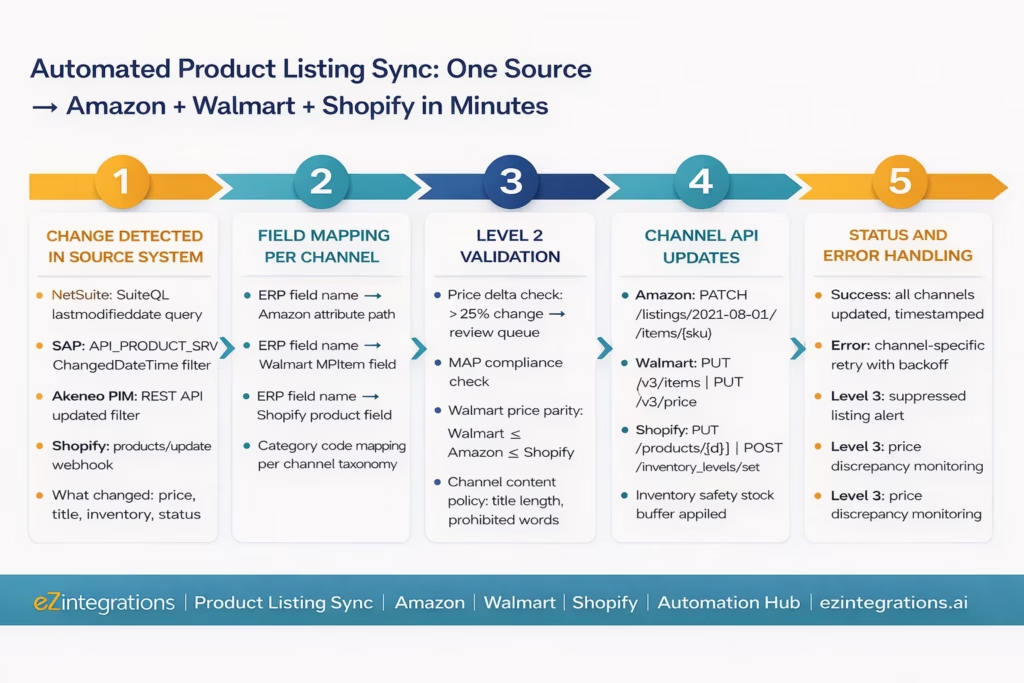 --- ## New Product Launches: Creating Listings Across All Channels at Once When a new SKU is added to the ERP or PIM, the automation creates the listing on all three channels automatically, using the appropriate channel-specific template for each. ### Amazon New Listing Creation Creating a new product listing on Amazon requires the full product type schema (obtained from the Amazon Product Type Definitions API): ``` POST /listings/2021-08-01/items/{sellerId}/{newSku} ?marketplaceIds=ATVPDKIKX0DER { "productType": "HOME_IMPROVEMENT", "requirements": "LISTING", "attributes": { "item_name": [{ "value": "Blue Widget Professional - 2-Pack, Size Large", "marketplace_id": "ATVPDKIKX0DER", "language_tag": "en_US" }], "brand": [{ "value": "WidgetCo", "marketplace_id": "ATVPDKIKX0DER", "language_tag": "en_US" }], "model_number": [{ "value": "WG-BL-L", "marketplace_id": "ATVPDKIKX0DER" }], "bullet_point": [ { "value": "Professional grade widget for home improvement projects", "marketplace_id": "ATVPDKIKX0DER", "language_tag": "en_US" }, { "value": "Pack of 2, Size Large", "marketplace_id": "ATVPDKIKX0DER", "language_tag": "en_US" } ], "purchasable_offer": [{ "marketplace_id": "ATVPDKIKX0DER", "currency": "USD", "our_price": [{ "schedule": [{ "value_with_tax": 29.99 }] }] }], "fulfillment_availability": [{ "fulfillment_channel_code": "DEFAULT", "quantity": 100 }] } } ```### Walmart New Item Creation ``` POST https://marketplace.walmartapis.com/v3/items { "MPItem": { "sku": "WIDGET-BLUE-L-NEW", "productName": "Blue Widget Professional - 2-Pack, Size Large", "category": "Home Improvement", "brand": "WidgetCo", "price": 29.99, "currency": "USD", "condition": "New", "shortDescription": "Professional grade widget for home improvement. 2-pack, size large.", "keyFeatures": { "keyFeat": ["Professional grade", "Pack of 2", "Size Large", "Home improvement use"] }, "mainImageUrl": "https://cdn.widgetco.com/images/widget-blue-l.jpg", "productTaxCode": "2038710" } } ```### Shopify New Product Creation ``` POST https://{shop}.myshopify.com/admin/api/2024-01/products.json { "product": { "title": "Blue Widget Professional - 2-Pack, Size Large", "body_html": "Professional grade widget for home improvement projects.
", "vendor": "WidgetCo", "product_type": "Home Improvement", "tags": "widget, professional, large, 2-pack", "variants": [{ "option1": "Large", "price": "29.99", "sku": "WIDGET-BLUE-L", "inventory_management": "shopify", "inventory_quantity": 100, "weight": 0.5, "weight_unit": "lb" }], "images": [{ "src": "https://cdn.widgetco.com/images/widget-blue-l.jpg" }] } } ```--- ## Before vs After: Manual Multi-Channel Product Management vs Automated | Product Data Task | Manual Multi-Channel Process | Automated with eZintegrations | | --- | --- | --- | | Price change (47 SKUs) | 2.5 hours across 3 channels, flat files | Minutes: ERP change triggers all 3 channels | | Price validation | None: errors published immediately | Level 2: delta check, MAP check, parity check | | Inventory update | Manual per channel: lags 2-8 hours | Real-time: ERP change triggers all channels | | Oversell prevention | None: each channel updated separately | Safety stock buffer + simultaneous update | | Title/description update | Separate upload per channel, different formats | One source change → all channels via field mapping | | New product launch | Listed on 1-2 channels, others missed | All channels created simultaneously from PIM/ERP | | Channel format differences | Manual: re-map every time | Field mapping config: done once, applied always | | Flat file errors | Common: column mismatches, value format errors | Near-zero: structured API calls, validated fields | | Walmart price parity | Manual check: often missed | Level 2: automatic parity check before Walmart push | | Amazon listing suppression | Discovered days later | Level 3: suppression detected within minutes | | Out-of-sync detection | Manual audit: done occasionally | Level 3: daily listing health scan, discrepancy alerts | | Product status (discontinue) | Manual: must remove from each channel separately | One ERP status change → deactivated on all channels | | After-hours updates | Queued to next business day | 24/7: ERP change propagates immediately | | Time per price update cycle | 2-4 hours (47 SKUs, 3 channels) | Under 5 minutes (same 47 SKUs) | | Error rate on channel updates | 5-15%: flat file format errors | Near-zero: API calls with structured field validation | --- ## Step-by-Step: A Price Change Propagating to All Three Channels Here is the complete automated flow for a price change affecting 47 SKUs at Meridian Commerce, using NetSuite as the ERP and selling on Amazon (MFN), Walmart, and Shopify. **Setup:** NetSuite SuiteQL query runs every 15 minutes checking for `lastmodifieddate` changes. Amazon SP-API, Walmart Marketplace API, and Shopify Admin API all connected. Level 2 price validation configured: 25% delta threshold, MAP policy table loaded, Walmart parity check enabled. **Friday 4:47 PM: Product manager updates 47 prices in NetSuite.** Prices updated in the NetSuite item master. `lastmodifieddate` updated on all 47 items. **Friday 5:00 PM: SuiteQL query detects changes.** 47 items with `lastmodifieddate >= 4:45 PM`. All 47 retrieved with new prices. **Friday 5:00 PM: Level 2 validation (12 seconds across 47 items).** - Price delta check: 46 items have price changes between 4-12%. Within 25% threshold. Proceed. - Item 23 (SKU: GADGET-PRO-XL): price changed from $49.99 to $4.99 (90% decrease). BLOCKED. Flagged as likely data entry error (decimal point missing). Alert sent to product manager. - MAP check: all 46 remaining items above MAP. Proceed. - Walmart parity check: 3 items have Amazon prices slightly lower than the new Walmart price. Flagged for review. 43 items pass parity check. **Friday 5:00 PM: Parallel channel updates begin.** For 43 items passing all checks: **Amazon (43 items):** ``` PATCH /listings/2021-08-01/items/{sellerId}/{sku} (Repeated for each SKU, batch submitted via Amazon Feeds API) ```Amazon Feeds job submitted: 43 items. Confirmed within 3 minutes. **Walmart (43 items):** ``` PUT /v3/price (repeated per SKU) ```All 43 Walmart prices updated within 2 minutes. **Shopify (43 items):** ``` PUT /admin/api/2024-01/products/{product_id}.json (Repeated for each product variant) ```All 43 Shopify prices updated within 2 minutes. **Friday 5:01 PM: Exception handling.** 4 items (1 data error + 3 parity issues) sent to the product manager’s Slack with specific details: - GADGET-PRO-XL: “Price change from $49.99 to $4.99 (90% decrease). Possible decimal error. Please confirm.” - 3 SKUs: “New Walmart price ($X) exceeds Amazon price ($Y). Walmart may suppress. Please review.” **Friday 5:01 PM: Product manager addresses exceptions.** She confirms GADGET-PRO-XL was a typo. Updates the correct price ($44.99) in NetSuite. The next 15-minute SuiteQL query picks up the correction. All three channels updated by 5:15 PM. For the 3 parity items: she lowers the Walmart price by $0.01 below Amazon. All channels updated by 5:15 PM. **By 5:15 PM Friday: all 47 items are correctly priced on all three channels.** **Previous process:** 2.5 hours of manual work with 2 items still wrong Monday morning. --- ## Key Outcomes and Results **Update cycle time:** manual price updates across 3 channels for 47 SKUs take 2-4 hours (including flat file export, format mapping, upload, error resolution, and re-upload). Automated update cycle: under 5 minutes for the same number of SKUs. **Error rate:** flat file channel uploads have error rates of 5-15% per upload (column name mismatches, value format errors, invalid category codes, character encoding issues). Automated API calls with structured field mapping and pre-validation achieve near-zero error rates. **Oversell incidents:** manual inventory sync lags by 2-8 hours per channel, creating a window during which the same unit can be sold on multiple channels. Real-time simultaneous inventory sync eliminates this lag. Safety stock buffers add an additional protection layer. **Price accuracy across channels:** manual processes result in 1-3% of listings having a price discrepancy at any given time (old price on one channel, new price on others). Automated sync reduces this to near-zero, with Level 3 monitoring for any remaining discrepancies. **New product listing rate:** products added to the ERP or PIM that were not listed on all channels within 7 days represent missed revenue. Automated new product creation on all channels simultaneously, triggered by the ERP new item event, eliminates multi-week listing gaps. **Channel compliance:** Level 2 Walmart price parity checks prevent the listing suppressions that result from parity violations. Level 3 monitoring of Amazon listing suppression status detects and alerts on any suppression within minutes, rather than the typical 24-48 hour manual discovery window. 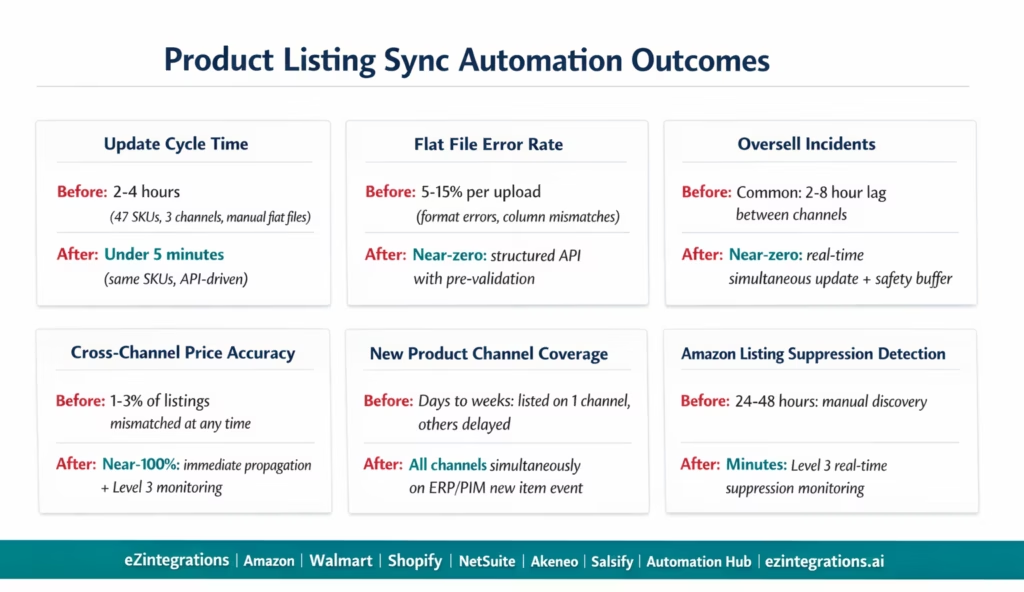 --- ## How to Get Started ### Step 1: Identify Your Source of Truth and Change Detection Method Decide which system is the authoritative source for product data: ERP (NetSuite, SAP, Dynamics 365), PIM (Akeneo, Salsify), or a spreadsheet. For each source, confirm: does it have a `last_modified` timestamp field to detect changes? Can you query for items changed since a specific time? For Shopify-first brands: configure Shopify product webhooks as the source trigger. This clarity determines the change detection architecture. ### Step 2: Build Your Channel Field Mapping Tables For each channel (Amazon, Walmart, Shopify), document the mapping between your internal field names and the channel’s required field names. ERP field `salesprice` maps to Amazon’s `/attributes/purchasable_offer/our_price`, Walmart’s `priceAmount`, and Shopify’s `variants[].price`. This mapping table is configured once in eZintegrations and applied to every update. Allow 2-4 hours to build comprehensive field mappings for 3 channels. ### Step 3: Import the Product Listing Sync Template Go to the [Automation Hub](https://ezintegrations.ai/automate-nowhttps://ezintegrations.ai/automate-now) and [explore the eCommerce automation templates](https://ezintegrations.ai/automate-now). Import the Product Listing Sync template for your source system (NetSuite, SAP, Akeneo, or Shopify) and channels. The template includes: change detection query or webhook, field mapping engine, Level 2 price validation (delta check, MAP check, parity check), parallel channel API updates, safety stock buffer for inventory, error handling and retry logic, and Level 3 listing health monitoring. ### Step 4: Configure Validation Rules, API Credentials, and Test Connect your source system API credentials. Connect Amazon SP-API (LWA OAuth), Walmart Marketplace API (HMAC authentication), and Shopify (private app token). Configure the Level 2 price validation thresholds (delta %, MAP policy table, channel parity rules). Set the safety stock buffer for inventory. Run a test with 5-10 items across all data types (price, title, inventory, new SKU). Validate that each channel receives the correct data in the correct format. **Total configuration time: 2-4 days for 3 channels and 1 source system.** --- ## FAQs ### 1. How does eZintegrations automate product listing sync across Amazon, Walmart, and Shopify? eZintegrations monitors your source system (ERP, PIM, or spreadsheet) for product data changes using a scheduled query or webhook. When a change is detected (price, title, description, inventory, or status), it is mapped to each channel's required field format using your configured field mapping table. Level 2 validates the change (price delta check, MAP compliance, Walmart price parity) before publishing. Validated changes are pushed simultaneously to Amazon (Listings Items API PATCH), Walmart (Item API PUT and Price API PUT), and Shopify (Products API PUT and Inventory Levels API). Errors are retried with exponential backoff, and persistent errors alert your product team. ### 2. How long does product listing sync automation take to set up? 2-4 days for 3 channels and 1 source system. Key steps: source system change detection configuration (2-4 hours), channel field mapping tables (2-4 hours for 3 channels), API credential setup (1-2 hours per channel), Level 2 validation rule configuration (1-2 hours), template import and connection (2-4 hours), and test validation with 5-10 items across all data types (1-2 days). ### 3. Does eZintegrations work with Amazon SP-API, Walmart Marketplace API, and Shopify? Yes, Amazon: SP-API Listings Items API (PATCH for updates, POST for new listings, Feeds API for bulk updates), LWA OAuth 2.0 authentication. Walmart: Item API (PUT /v3/items), Price API (PUT /v3/price), Inventory API (PUT /v3/inventory), HMAC-SHA256 authentication. Shopify: Products API (PUT /products/{id}), Inventory Levels API (POST /inventory\_levels/set), private app OAuth. Also supports WooCommerce, Magento 2, BigCommerce, and eBay on the channel side, and NetSuite, SAP S/4HANA, Dynamics 365, Akeneo, and Salsify on the source side. Pre-built templates for the major combinations are available in the Automation Hub. ### 4. How does the price validation prevent accidental pricing errors from publishing? Level 2 runs three checks before publishing any price to any channel. First: delta threshold check, where a price change exceeding a configured percentage (default 25%) is blocked and routed to a review queue with an alert. Second: MAP compliance check, where prices below the configured Minimum Advertised Price for that SKU are blocked and the brand manager is notified. Third: Walmart price parity check, where the Walmart price is verified to be at or below the lowest price on any other channel (Walmart's policy requirement). Prices failing any check are held in the review queue rather than published, preventing the customer complaints and channel penalties that result from incorrect prices going live. ### 5. How does real-time inventory sync prevent overselling across channels? When inventory changes in the ERP or WMS (due to a shipment, a return, or a stock adjustment), eZintegrations simultaneously updates the available quantity on Amazon, Walmart, and Shopify. Before publishing, Level 2 applies a configurable safety stock buffer (e.g., 5 units): the published quantity is ERP quantity minus safety stock buffer, so a small reserve is always held back. If ERP quantity is less than or equal to the safety stock buffer, the channel quantity is published as zero (out of stock). This simultaneous update with safety buffer prevents the overselling that occurs when channels are updated sequentially (where the same units might be sold on two channels before the inventory decrement propagates). --- ## The Price Is Now $29.99 on All Three Channels. Not Just One. Manual multi-channel product data management has a predictable failure pattern: someone updates one channel promptly, another channel is updated later in the day, and the third is updated sometime the following week when someone remembers. The result is three different product truths, each slightly wrong in a different direction. The automated version has one truth: the ERP or PIM. Every change flows from there to all three channels within minutes. The price change that took 2.5 hours of manual work with 2 items still wrong on Monday now takes 5 minutes and reaches all 47 items correctly on all three channels by the time the product manager closes her laptop. **[Explore the Product Listing Sync Templates](https://ezintegrations.ai/automate-now)** in the Automation Hub. Or **visit the [Automation Hub](https://ezintegrations.ai/automate-now)** to import the template for your source system and channel combination. For the related multi-channel order fulfilment automation that handles the downstream order routing after customers buy from the correctly-synced listings, see the [multi-channel order fulfilment automation guide](https://ezintegrations.ai/automate-order-fulfilment-amazon-walmart-multi-channel). ## Topics **Categories:** [Workflow Automation](https://ezintegrations.ai/wp-content/uploads/wp-mfa-exports/taxonomy/category/workflow-automation.md) **Entity Types:** [Article](https://ezintegrations.ai/wp-content/uploads/wp-mfa-exports/taxonomy/wl_entity_type/article.md)