
AI Agents for Humanoid Robots: The Intelligence Layer That Bridges Robot and Enterprise Data
March 21, 2026An AI agent for humanoid robots acts as the intelligence layer between the robot’s physical actions and the enterprise systems that define its work: it reads live data from SAP, WMS, MES, and CRM in real time, reasons about what the robot should do next given current conditions, and invokes integration workflows as tools to retrieve task context, validate actions, log outcomes, and escalate exceptions without waiting for human instruction. Goldfinch AI from eZintegrations provides this agent layer, with 9 native tools covering knowledge base search, document intelligence, data analysis, web crawling, API calls, integration workflows, and MCP endpoints, all accessible from inside the robot’s decision loop.
TL;DR
A humanoid robot without an AI agent is a capable physical machine operating on static instructions. An AI agent without a robot is a reasoning system with no way to affect the physical world. The combination is what enterprise teams are actually trying to build in 2026: a robot that reads live enterprise data, reasons about it, and acts accordingly, without a human in every decision loop. – The International Federation of Robotics named Agentic AI as one of the top five global robotics trends for 2026, specifically for its role in driving the next level of autonomous robot operation. – The specific problem is not the robot’s capability. It is the reasoning gap: what does the robot do when the situation it faces does not match the static task it was assigned? A rule-based workflow can branch. An AI agent can reason. – Goldfinch AI from eZintegrations provides the enterprise-facing agent layer for humanoid robot deployments: 9 native tools, integration workflows as callable tools, MCP endpoints for external AI agent invocation, and a no-code configuration model that connects your robot’s fleet controller to your SAP, WMS, MES, and CRM data without custom AI development.
The Problem: Robots Can Act. They Cannot Yet Reason About Enterprise Context.
Your humanoid robot navigates to the pick location. The bin is empty. Not the item you were expecting to find, not a label discrepancy, not a weight anomaly. The bin is physically empty.
The robot generates an exception code: SOURCE_BIN_EMPTY.
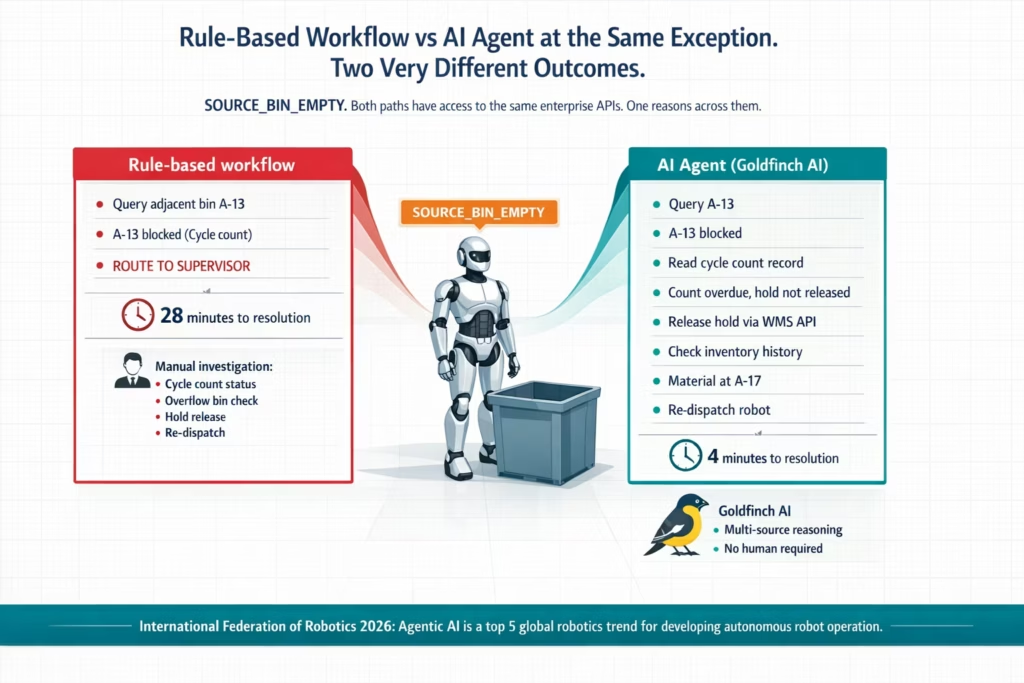
A rule-based workflow handles this reasonably. It queries the WMS for adjacent bins, finds the material at Bin A-13, re-dispatches the robot. Clean. Eighty percent of the time, that is exactly what happens.
Then comes the other twenty percent.
The WMS shows the material at A-13, but A-13 is flagged as a blocked location because of an ongoing cycle count. The workflow’s conditional logic routes to the supervisor notification path. The supervisor arrives, checks the cycle count status, checks two additional bins, confirms the material is actually at A-17 (a temporary overflow location created during the previous shift), releases the cycle count hold, and re-dispatches the robot. Twenty-eight minutes from exception to resolution.
The rule-based workflow did everything it was supposed to do. It hit the edge of what rule-based logic can cover. At that edge, a human stepped in.
Now consider what an AI agent would have done at the same decision point.
The agent reads the SOURCE_BIN_EMPTY exception. It queries the WMS for adjacent bins and finds A-13 blocked. Instead of routing immediately to a supervisor, it reads the cycle count record for A-13: the count was initiated 47 minutes ago, the variance threshold has not been breached, and the expected completion time was 40 minutes ago. The count is overdue. The agent queries the cycle count status API: the count is complete but the hold has not been released (a manual oversight). The agent checks the inventory movement history for the material: it was transferred to A-17 as overflow two hours ago. The agent has now assembled the complete picture. It releases the A-13 hold via the WMS API, retrieves the A-17 location, and re-dispatches the robot. No human required. Four minutes from exception to robot moving again.
The difference between those two outcomes is not the integration layer. Both paths had access to the same APIs. The difference is the reasoning layer: the ability to read multiple data sources, interpret them in context, identify that the cycle count hold is the root cause (not the empty bin), resolve the actual problem (release the stale hold), and act on the derived insight rather than the surface symptom.
That is what an AI agent does between a humanoid robot and enterprise data.
The International Federation of Robotics, in its published Top 5 Global Robotics Trends for 2026, specifically identified Agentic AI as a critical driver of the next level of autonomous robot operation, noting that “a key trend to further develop autonomy in robotics is Agentic AI.” The IFR distinguishes between analytical AI (pattern detection, predictive insights) and generative/agentic AI (self-evolving systems that can learn new tasks and handle novel situations). For enterprise humanoid robot deployments, the distinction is practical: analytical AI improves the robot’s physical capabilities; agentic AI extends its decision-making authority into the enterprise data layer.
Boston Dynamics’ Atlas began its first field test at Hyundai’s manufacturing facility near Savannah, Georgia in January 2026. Deloitte’s Physical AI analysis describes the broader shift: “AI integration and component scalability are turning humanoids from complex prototypes into deployable machines with measurable ROI.” The physical capability threshold has been crossed for most commercial use cases. The reasoning threshold is where the next deployment gap lives.
Before vs After: Static Task Execution vs AI Agent-Driven Autonomous Operation
| Scenario | Without AI Agents | With Goldfinch AI Agent Layer |
|---|---|---|
| Bin empty exception with blocked adjacent location | Rule routes to supervisor. Human investigates cycle count status, overflow bin, hold release. 20–30 minutes. | Agent reads cycle count record, identifies stale hold, releases via WMS API, retrieves overflow location from inventory movement history. 3–5 minutes. No human. |
| Partial pick (fewer items than expected in bin) | Exception fires. Supervisor manually checks SAP MM inventory, decides whether to short-pick or hold order. 15–20 minutes. | Agent reads SAP MM inventory, checks backlog urgency and alternative bins. Makes decision based on priority. Supervisor notified of context, not decision. |
| Robot quality flag: reading outside tolerance | Workflow creates SAP QM defect and MES hold. Human decides disposition. Hours for full cycle. | Agent checks defect history. If isolated, triggers re-inspection. Confirms before creating defect. Reduces false positives and improves accuracy. |
| Robot fault code with ambiguous severity | Fault logged. Maintenance reviews dashboard manually. Risk of misclassification. | Agent queries manufacturer database, cross-checks maintenance history, classifies severity, and creates correct SAP PM work order. |
| Fleet rebalancing with multiple tasks and robots | Supervisor manually redistributes tasks after imbalance appears. 10–20 min lag. | Agent continuously monitors queue, robot state, and ERP priorities. Rebalances instantly using multi-variable decision logic. |
| New shift start: robot task prioritisation | Static priority list assigned. Becomes outdated as production changes. | Agent builds dynamic priority queue using ERP, WMS, and MES data. Refreshes every 30 minutes. |
| Escalation routing for complex exception | All exceptions go to supervisor. Manual triage and rerouting required. | Agent routes directly to correct expert (quality, maintenance, inventory) with full context attached. |
What an AI Agent Actually Does Between Robot and Enterprise Data
An AI agent in this context is not a chatbot connected to a robot. It is a reasoning system that has access to tools, reads enterprise data as context, formulates a plan for what to do next, executes steps in that plan, evaluates the results, and continues until the goal is achieved or it needs human input.
Here is the specific chain of actions a Goldfinch AI agent executes at the interface between a humanoid robot event and enterprise systems:
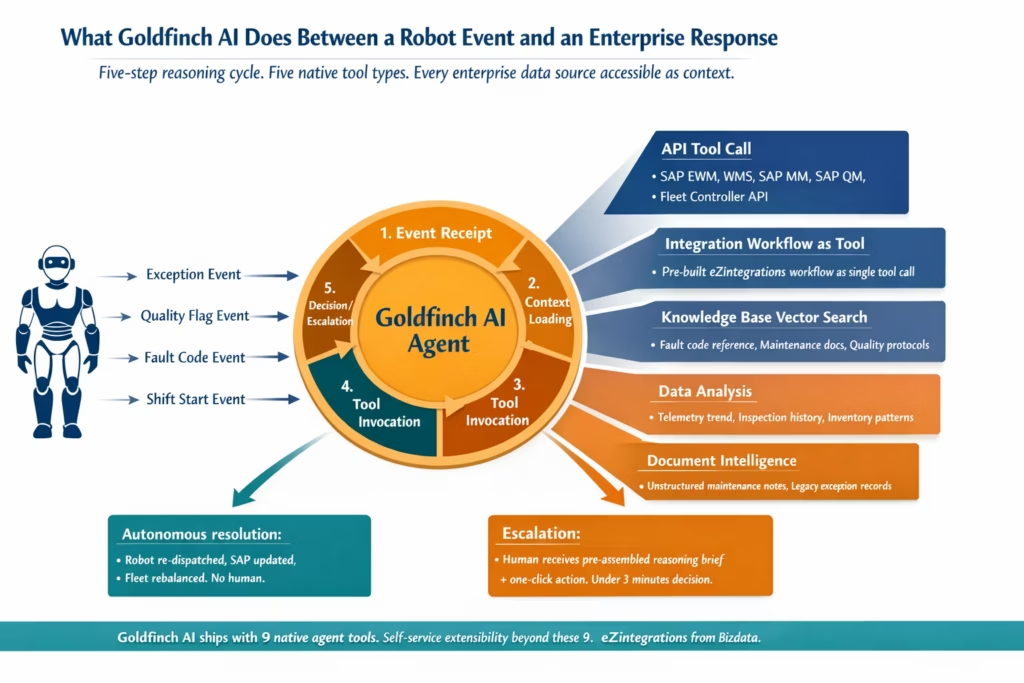
1. Event receipt and context loading When a robot event fires (exception, quality flag, fault code, shift start), the agent receives the event payload and immediately loads context from relevant enterprise systems. For an exception, context loading might include: the current WMS task record, the bin inventory history, the robot’s last 10 task outcomes, and the current production order from the ERP. This context is not passed by a human. The agent queries it autonomously using its API Tool Call and Integration Workflow as Tool capabilities.
2. Reasoning about the loaded context With context loaded, the agent reasons about the situation. What does the combination of these data points indicate? Is the empty bin a one-time discrepancy or a pattern (check inventory history: has this bin been consistently short for three shifts)? Is the cycle count hold stale (check completion timestamp versus hold release status)? Is the overflow location active (check inventory movement records from the past 12 hours)?
This reasoning step is where the AI agent differs from a rule-based workflow. A rule checks predefined conditions. An agent interprets a situation. IEEE’s survey on AI and humanoid robotics in 2026 describes this capacity precisely: “Generative AI models, particularly large language models, can help robots reason about context. A robotic assistant could generate multiple possible sequences to complete a task and simulate outcomes before deciding which is safest or most efficient.”
3. Tool invocation for action After reasoning, the agent invokes tools to act. In the Goldfinch AI platform, tools for humanoid robot deployments include:
API Tool Call: Direct API calls to WMS, SAP EWM, SAP MM, SAP QM, MES, or the robot fleet controller. The agent calls the WMS API to release a stale cycle count hold. It calls the SAP MM API to check a material’s current inventory across all storage locations. It calls the fleet controller API to re-dispatch the robot to a corrected location.
Integration Workflow as Tool: Any eZintegrations workflow becomes a callable tool for the agent. The agent invokes a pre-built “check inventory across all bins” workflow as a single tool call rather than constructing the multi-step API sequence from scratch each time. This is the integration layer serving the intelligence layer.
Knowledge Base Vector Search: The agent searches a knowledge base containing robot maintenance documentation, fault code reference guides, quality disposition procedures, and exception handling protocols. When classifying an ambiguous fault code, it queries the knowledge base to find similar historical cases and their resolutions.
Data Analysis: The agent runs structured data analysis on robot telemetry, maintenance history, or quality inspection records to identify patterns before making a recommendation. Telemetry drift over the past 48 hours before classifying a fault severity.
Document Intelligence: For exceptions where the agent needs to interpret unstructured content (a maintenance technician’s handwritten inspection notes, a non-standard exception record from a legacy system), Document Intelligence processes the content and extracts the relevant data points.
4. Decision and outcome The agent produces a decision and executes it. Re-dispatch the robot to A-17. Create a scheduled SAP PM ticket for the motor torque reading. Short-pick the high-priority order and hold the low-priority order pending replenishment. The decision is documented with the reasoning chain that produced it, so supervisors can review how the agent reached its conclusion.
5. Escalation with context When the agent reaches a decision point that genuinely requires human judgement (safety event, budget threshold, policy exception), it escalates with the full reasoning chain pre-assembled. The human receives not just the exception but everything the agent already checked, what it concluded, and what it needs the human to decide. Decision time for escalated items drops from 15-20 minutes of manual investigation to under 3 minutes of reviewing a pre-assembled context brief.
Goldfinch AI as the Intelligence Layer for Humanoid Robot Deployments
Goldfinch AI from eZintegrations is the agentic AI platform purpose-built for enterprise integration environments. For humanoid robot deployments, it provides the intelligence layer that sits between the robot’s event stream and the enterprise systems that need to respond.
Here is what makes Goldfinch AI specifically suited to the humanoid robot use case:
9 native out-of-the-box agent tools, enterprise-ready
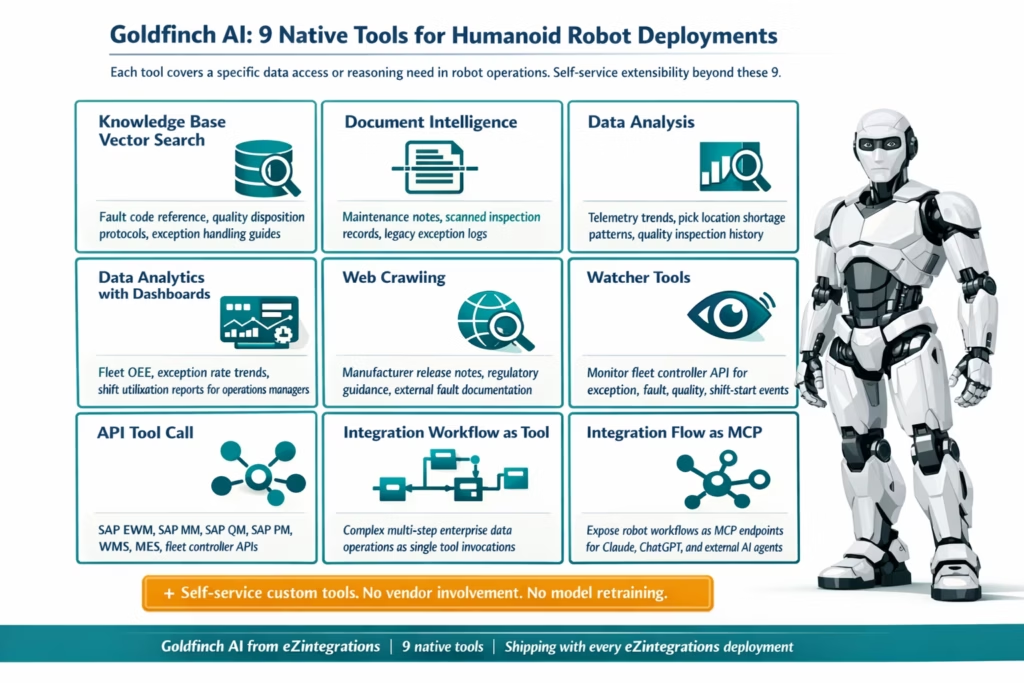
Goldfinch AI ships with nine tools that cover the data access and reasoning requirements of robot deployments without custom AI development:
- Knowledge Base Vector Search: Index your robot maintenance documentation, fault code reference guides, quality disposition protocols, and exception handling procedures. The agent queries this knowledge base when it needs to interpret an ambiguous fault code or determine the correct escalation path for an exception category it has not seen before.
- Document Intelligence: Process unstructured content from maintenance technicians’ inspection notes, scanned quality records, or legacy exception logs. Extract structured data from these sources and incorporate them into the agent’s reasoning context.
- Data Analysis: Run structured analysis on robot telemetry streams, quality inspection records, and inventory movement data. Identify trends (is this fault code appearing more frequently?) and patterns (is this pick location consistently short across multiple shifts?) before making a recommendation.
- Data Analytics with Charts/Graphs/Dashboards: Generate visual analytics from fleet performance data, exception rate trends, and OEE metrics for operations managers who need a visualisation of fleet health without pulling data manually from three systems.
- Web Crawling: Access public technical documentation, manufacturer release notes, or regulatory guidance when the agent needs context that is not in your internal knowledge base.
- Watcher Tools: Monitor robot fleet controller APIs and enterprise system event streams for the specific event types that should trigger the agent’s reasoning cycle. The Watcher fires the agent when the right events occur.
- API Tool Call: Direct API calls to any enterprise system in the API catalog. SAP EWM for WMS data. SAP MM for inventory. SAP QM for inspection specifications. SAP PM for maintenance records. Fleet controller APIs for task management and telemetry. All accessible as native tool calls within the agent’s reasoning cycle.
- Integration Workflow as Tool: Any workflow built on eZintegrations becomes a callable tool for the Goldfinch AI agent. The agent invokes “check all bins for material X” as a single tool call, where the underlying workflow handles the multi-step API sequence. Complex enterprise data operations become simple tool calls in the agent’s plan.
- Integration Flow as MCP: Any eZintegrations workflow can be exposed as an MCP (Model Context Protocol) server endpoint. This means external AI systems, including Claude, ChatGPT, and other enterprise AI agents, can invoke your robot integration workflows as native tools in their own reasoning cycles. The physical AI layer (your humanoid robot) and the digital AI layer (your enterprise AI agent platform) connect through the same integration infrastructure.
Self-service extensibility beyond the 9 native tools
Every robot deployment has unique requirements that no fixed tool set can fully anticipate. Goldfinch AI allows teams to add custom tools beyond the 9 native ones, without platform vendor involvement and without custom AI model development. If your deployment uses a robot vendor’s proprietary analytics API that is not in the standard API catalog, you add it as a custom tool through self-service onboarding.
No-code agent configuration
The Goldfinch AI agent is configured on the same no-code canvas as the rest of the eZintegrations platform. You define the agent’s goal (resolve this class of robot exception autonomously), the tools it has access to, the context sources it should query, and the escalation threshold above which it routes to a human. No AI model training. No prompt engineering expertise required. The agent configuration uses the same credential vault and API connections as your existing integration workflows.
Integration with the Automation Hub
Pre-built agent configurations for the most common humanoid robot exception scenarios are available as Automation Hub templates. Import the agent template for your highest-priority exception type, connect it to your fleet controller and enterprise system APIs, configure the escalation threshold, and run test events in the Dev environment. Your first Goldfinch AI agent handling robot exceptions goes live in hours, not weeks.
Step-by-Step: AI Agent Handling a Multi-Condition Robot Exception (SAP, WMS, and Fleet)
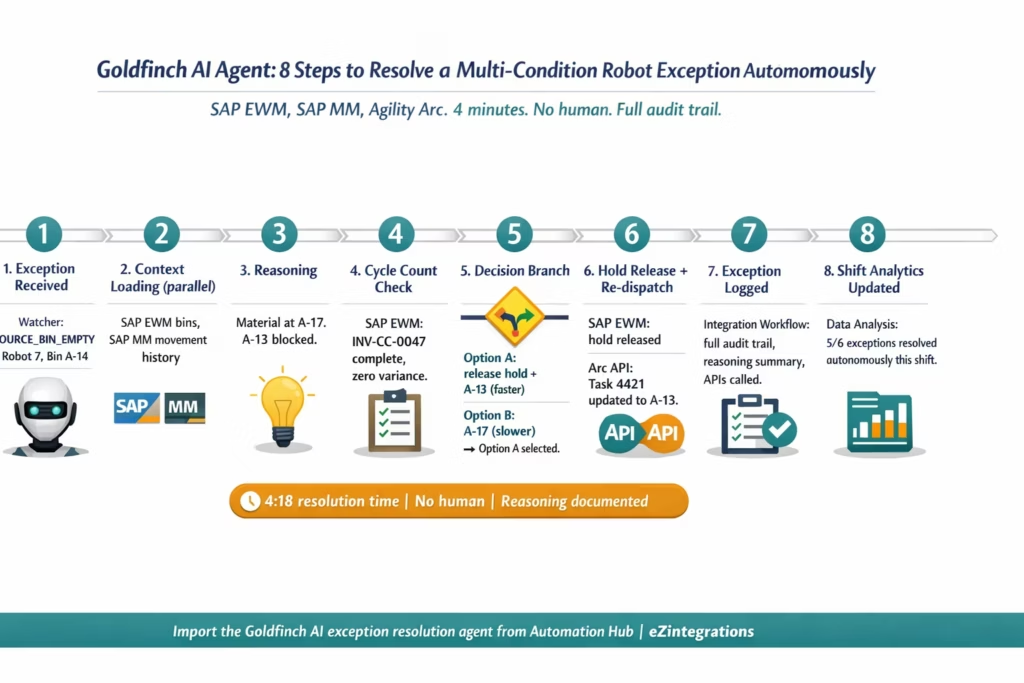
This example shows the full Goldfinch AI reasoning cycle for the multi-condition exception described in the opening section: SOURCE_BIN_EMPTY with a blocked adjacent location, stale cycle count hold, and an overflow bin created during the previous shift.
The robot is Agility Robotics Digit. The enterprise stack is SAP EWM as WMS, SAP S/4HANA as ERP, and the Agility Arc platform as fleet controller.
Step 1: Event receipt (Watcher Tool) Goldfinch AI’s Watcher monitors the Agility Arc API for exception event types. The SOURCE_BIN_EMPTY event fires from Robot Unit 7, Task ID 4421, Source Bin A-14. The Watcher delivers the event payload to the Goldfinch AI agent. The agent’s goal: resolve this exception autonomously if possible. Escalate with full context if not.
Step 2: Initial context loading (Parallel API Tool Calls) The agent fires three simultaneous API Tool Calls to load context:
- SAP EWM API: retrieve inventory status for Bin A-14 and adjacent bins A-13 and A-15.
- SAP MM API: retrieve the inventory movement history for Material 1000047 in the past 24 hours.
- Agility Arc API: retrieve Robot Unit 7’s current task queue and last 5 task outcomes.
Results: A-14 empty confirmed. A-13 shows inventory but carries a cycle count hold. A-15 empty. Material 1000047 was moved to A-17 (overflow staging, flagged as temporary) at 06:14 this morning. Robot Unit 7 has completed 22 tasks successfully this shift with no prior exceptions.
Step 3: Reasoning about the loaded context The agent reasons: the material is not truly missing. It was moved to an overflow location during the morning shift. Bin A-13 has the correct material but is under a cycle count hold. Before routing to A-17, the agent needs to evaluate whether A-13 can be released faster than routing to the overflow location.
Step 4: Cycle count investigation (API Tool Call) The agent calls the SAP EWM Cycle Count API: retrieve the status of the active cycle count for Bin A-13.
Result: Cycle count INV-CC-0047, initiated at 08:31. Completion expected by 09:15. Current time: 10:43. The cycle count is complete (all items counted, no variance found) but the system hold was not released. This is a manual oversight: the counter marked the count complete but did not release the location hold.
Step 5: Decision branching The agent evaluates two options:
Option A: Release the A-13 hold (cycle count is complete, no variance, release is valid) and dispatch to A-13. This is the faster path if the release API call is permitted by the agent’s configured permissions.
Option B: Route the robot to A-17 (overflow location, confirmed active). Slower navigation path but requires no system hold change.
The agent checks its configured permission scope: releasing a cycle count hold for a zero-variance completed count is within its authorised action set. It proceeds with Option A.
Step 6: Hold release and re-dispatch (API Tool Calls) Two parallel API calls:
- SAP EWM Cycle Count API: release hold on Bin A-13. Reason logged: “Count complete INV-CC-0047, zero variance, hold release via Goldfinch AI agent, Task 4421 resolution.”
- Agility Arc API: update Task 4421 source location from A-14 to A-13. Re-dispatch Robot Unit 7.
Step 7: Post-action logging (Integration Workflow as Tool) The agent invokes the “Exception Resolution Log” workflow as a tool. The workflow writes the full exception record to the operations log database: exception type, original location, reason identified, actions taken, APIs called, resolution time, and the agent’s reasoning summary. Available for supervisor review or audit.
Step 8: Shift summary update (Data Analysis Tool) The exception resolution is included in the running shift analytics. At shift end, the Goldfinch AI agent’s Data Analysis tool compiles: 6 exceptions this shift, 5 resolved autonomously, 1 escalated to supervisor (a Tier 3 safety event from Robot Unit 3). Autonomous resolution rate: 83.3%. Average resolution time: 4.2 minutes. Available in the operations dashboard.
Time from SOURCE_BIN_EMPTY exception to Robot Unit 7 re-dispatched: 4 minutes, 18 seconds. No human involved.
Key Outcomes and Results
The outcomes of deploying an AI agent as the intelligence layer between humanoid robots and enterprise data divide into three categories. Each reflects the gap between a robot deployment that is supervised and one that is genuinely autonomous.
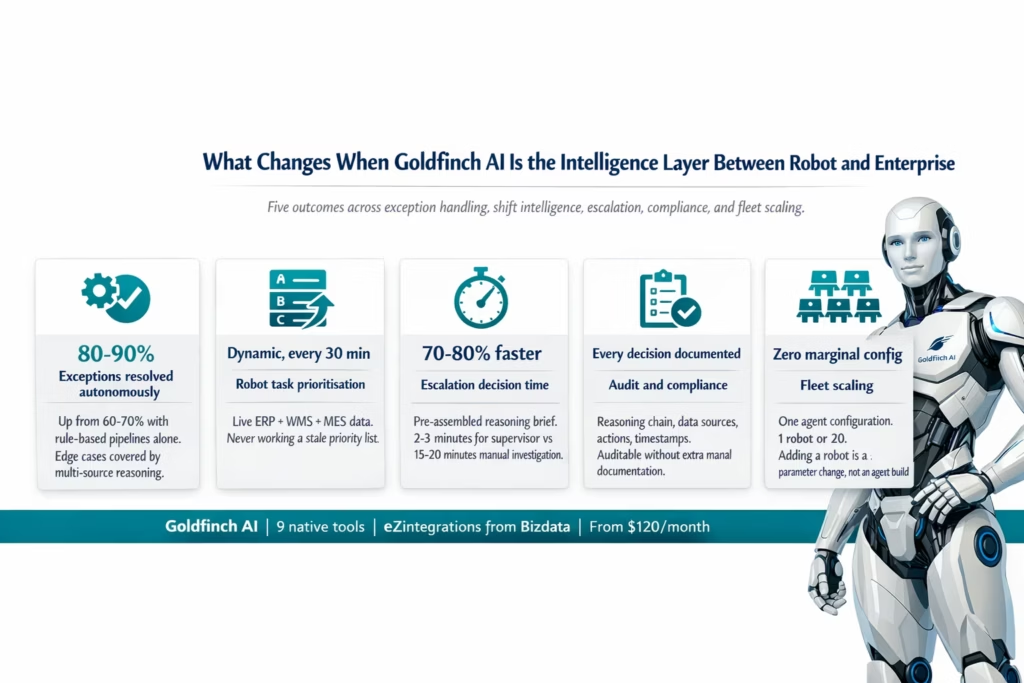
Exception resolution: 80-90% autonomous, minutes not hours In deployments with standard exception classification pipelines (as described in the AI workflow automation companion post), Tier 1 exceptions are auto-resolved by rule-based logic. An AI agent extends autonomous resolution to the edge cases that rule-based logic cannot cover: multi-condition exceptions, exceptions requiring cross-system data interpretation, and exceptions where the correct action depends on context that no predefined rule encodes. Across a typical warehouse shift, 80-90% of exceptions can be resolved autonomously with an AI agent versus 60-70% with rule-based pipelines alone. The remaining 10-20% are escalated with pre-assembled context, reducing human decision time by 70-80%.
Shift start intelligence: Dynamic over static A robot given a static priority list at shift start begins to diverge from real operational priorities within the first hour as production conditions change. A Goldfinch AI agent that generates a dynamic priority queue from live ERP, WMS, and MES data at shift start, and refreshes it every 30 minutes, keeps the robot aligned with current operational priorities throughout the shift. The value of this alignment compounds across a fleet: 10 robots working the right priorities versus stale priorities represents a significant productivity difference by end of shift.
Escalation quality: Decision time reduced 70-80% When escalation is genuinely required, the Goldfinch AI agent sends the human a reasoning brief, not a raw alert. The brief contains what the agent queried, what it found, what it considered, and what decision it needs the human to make. A supervisor who previously spent 15-20 minutes gathering context to make a decision now spends 2-3 minutes reviewing the pre-assembled brief and making the call. Across a shift, this reduction in escalation handling time represents a significant recovery of supervisory capacity.
Audit and compliance: Every decision documented In regulated environments (pharma, automotive quality, food production), every decision that affects a production batch or a quality record needs to be documented with its rationale. A Goldfinch AI agent documents its reasoning chain for every decision it makes: what data it read, what it concluded, what action it took, and the timestamp of each step. This makes the agent’s decisions auditable to the same standard as human decisions recorded in an electronic batch record, without additional manual documentation effort.
Fleet scaling: Agent configuration does not multiply with fleet size A fleet of one robot with a Goldfinch AI agent uses the same agent configuration as a fleet of twenty robots. Each robot’s exceptions are handled by the same agent, with the same tools, the same reasoning logic, and the same escalation thresholds. Adding a new robot to the fleet is a parameter change (fleet controller robot ID) in the integration layer. It does not require configuring a new agent instance. The intelligence layer scales with the fleet at near-zero marginal configuration cost.
Market context: The agentic AI moment for physical machines The agentic AI market is projected to grow from $5.2 billion in 2024 to $200 billion by 2034 (Kersai, January 2026). For humanoid robot deployments, this growth is not abstract: it reflects the practical reality that the robots entering production deployments in 2026 need a reasoning layer that can navigate real enterprise environments, not just execute pre-programmed tasks. Goldman Sachs reported that humanoid robot manufacturing costs dropped 40% between 2023 and 2024, making deployment economics increasingly viable. The integration and intelligence layer is what converts that hardware economics advantage into operational productivity.
How to Get Started
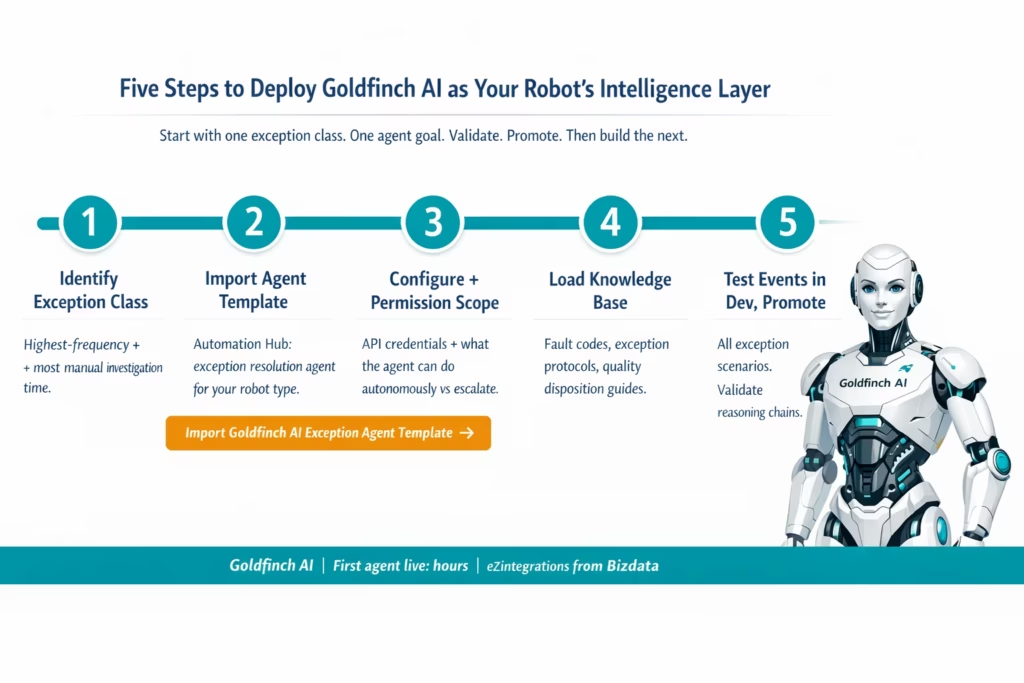
Deploying Goldfinch AI as the intelligence layer for your humanoid robot fleet follows the same five-step model as the broader eZintegrations deployment pattern, with one additional consideration: defining the agent’s permission scope and escalation threshold before running test events.
Step 1: Identify your highest-impact exception class Review your fleet controller logs for the past two weeks. Which exception class has the highest frequency of supervisor involvement? Which class takes the most manual investigation time? That is the starting point for the first Goldfinch AI agent configuration. Start with one exception class and one agent goal. Not five exception classes and five agents simultaneously.
Step 2: Import the exception resolution agent template from the Automation Hub Go to the Automation Hub and search for the Goldfinch AI exception resolution agent template for your robot deployment type. Import the template into the Goldfinch AI canvas. The template includes pre-configured tool selections (API Tool Call, Integration Workflow as Tool, Knowledge Base Vector Search), a Watcher trigger configuration for your exception event type, and a default escalation threshold.
Step 3: Configure tools and permission scope Add your enterprise system API credentials to the tool configurations: SAP EWM OData endpoint, SAP MM inventory API, SAP QM inspection API, and your fleet controller API endpoint. Define the agent’s permission scope: which API actions is the agent authorised to execute autonomously (releasing a completed cycle count hold: yes; creating a production order: no). The permission scope prevents the agent from taking actions that require human authorisation.
Step 4: Load your knowledge base If your agent configuration includes Knowledge Base Vector Search, load the relevant documentation: your fault code reference guide, your exception handling procedure manual, and any quality disposition protocols. The knowledge base populates once and the agent queries it on every relevant reasoning cycle. Structured documents load in minutes via drag-and-drop in the knowledge base configuration interface.
Step 5: Run test events, validate reasoning, promote In the Dev environment, generate test exception events that represent each scenario in your exception class: simple bin empty, bin empty with blocked adjacent, bin empty with overflow relocation, bin empty with no material found anywhere. Validate that the agent reasons correctly through each scenario, takes the right action, and escalates the right cases. Review the reasoning chains for each test run. When validation passes, promote to production.
Ready to configure your first exception resolution agent? Book a free demo and bring your fleet controller API documentation and your top exception type. We will walk through the Goldfinch AI canvas and build the first agent configuration in the session.
Frequently Asked Questions
1. How do enterprises use AI agents for humanoid robot operations
Enterprises use AI agents as the intelligence layer between humanoid robot fleet controllers and enterprise systems such as SAP EWM WMS MES SAP QM and SAP PM. Common use cases include multi condition exception resolution dynamic shift task prioritisation predictive fault classification quality flag disposition support and escalation improvement where agents send structured reasoning briefs instead of raw alerts.
2. How long does it take to set up a Goldfinch AI agent for humanoid robot exception handling
Configuring a Goldfinch AI agent typically takes 4 to 8 hours including tool configuration permission scope definition knowledge base loading and test validation. Knowledge base setup may take 1 to 2 hours and permission validation 2 to 3 hours. Most teams deploy their first agent to production within one to two working days.
3. Does Goldfinch AI work with Agility Robotics Boston Dynamics and SAP simultaneously
Yes. Goldfinch AI connects to robot fleet controllers and enterprise systems through API Tool Calls and Integration Workflow as Tool. Agility Robotics Arc Boston Dynamics Scout SAP EWM SAP S 4HANA and other systems with REST APIs can all be used together within a single agent configuration with the agent dynamically calling required systems during execution.
4. What is the difference between Goldfinch AI and rule based workflows for robot exception handling
Rule based workflows handle predefined scenarios with known outcomes while Goldfinch AI handles complex context dependent scenarios requiring reasoning across multiple data sources. Workflows branch based on rules whereas agents analyse context evaluate multiple factors and determine the optimal resolution path. Most deployments use workflows for standard cases and AI agents for complex exceptions.
5. Can Goldfinch AI be invoked by external AI systems like Claude or ChatGPT
Yes. Goldfinch AI supports Integration Flow as MCP which exposes workflows as MCP server endpoints. External AI systems including Claude ChatGPT and enterprise AI agents can invoke these workflows as tools enabling seamless interaction between digital AI systems and physical robot operations through a unified integration layer.
Conclusion
The humanoid robot hardware threshold has been crossed for most commercial use cases. Boston Dynamics’ Atlas began field testing at Hyundai’s manufacturing facility in January 2026. BMW, GXO, Mercedes-Benz, and dozens of other enterprises are running production pilots. Goldman Sachs reported a 40% reduction in humanoid robot manufacturing costs between 2023 and 2024. The economics of deployment are improving every quarter.
What turns a capable hardware deployment into a genuinely autonomous operation is the intelligence layer between the robot’s physical actions and the enterprise systems that define its work. That layer needs to do more than connect systems. It needs to read enterprise data as context, reason about what the robot should do next given current conditions, resolve edge cases that no static rule can cover, and escalate the genuinely difficult decisions with the context a human needs to act quickly.
Goldfinch AI provides that layer. Nine native tools covering every data access and reasoning requirement of enterprise robot deployments. No custom AI model development. No AI expertise required to configure. The same no-code platform as the rest of your eZintegrations environment.
The International Federation of Robotics named Agentic AI as one of the top five global robotics trends for 2026. For enterprise humanoid robot deployments, it is not a trend. It is the operating infrastructure that separates supervised pilots from autonomous production fleets.
Import the Goldfinch AI exception resolution agent template from the Automation Hub and run your first test exception through the reasoning cycle today. Or book a free demo and bring your top exception class. We will build the agent configuration together in the session.

