
AI Agent Templates Review 2026: 50+ Ready-to-Deploy Enterprise Workflows Tested
April 1, 2026eZintegrations.ai offers 50+ pre-built AI agent templates in the Automation Hub covering finance, HR, sales, IT, supply chain, and customer operations. Each template is built on Goldfinch AI with 9 native agent tools, imports in one click, and deploys to production in hours without writing code.
TL;DR
The eZintegrations Automation Hub contains 50+ pre-built AI agent templates built on Goldfinch AI, covering finance, HR, sales intelligence, IT support, supply chain, customer operations, legal, and cross-functional data workflows. Every template imports in one click and deploys in hours without writing code. Your team configures API credentials, confidence thresholds, and system connections. Templates are built on 9 native Goldfinch AI agent tools: Knowledge Base Vector Search, Document Intelligence, Data Analysis, Data Analytics with Charts/Graphs/Dashboards, Web Crawling, Watcher Tools, API Tool Call, Integration Workflow as Tool, and Integration Flow as MCP.
The honest limitation: templates are starting points, not plug-and-play. Every template requires some configuration for your specific systems, data formats, and business rules. That configuration typically takes 2 to 8 hours depending on complexity. Best for: mid-market and enterprise operations teams that need to deploy production-grade AI agents quickly without a dedicated developer.
Summary Scorecard: AI Agent Templates by Category
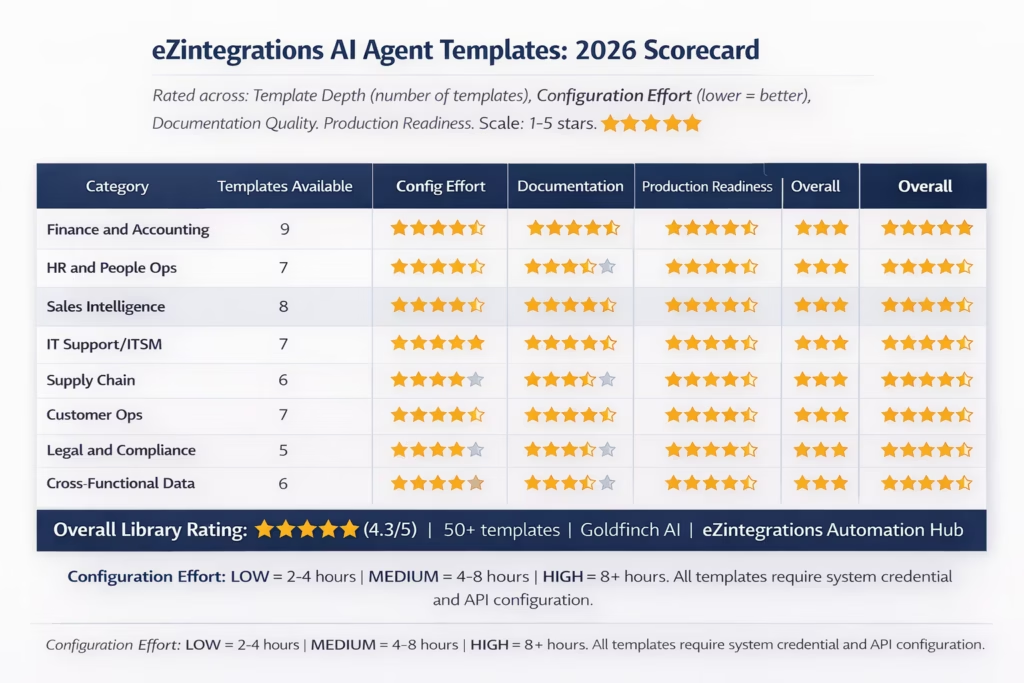
| Category | Templates Available | Configuration Effort | Documentation Quality | Production Readiness | Overall |
|---|---|---|---|---|---|
| Finance and Accounting | 9 | Medium (4-6 hrs) | 5/5 | 5/5 | 5/5 |
| HR and People Operations | 7 | Medium-High (6-8 hrs) | 4/5 | 4/5 | 4/5 |
| Sales Intelligence | 8 | Medium (4-6 hrs) | 4/5 | 5/5 | 4/5 |
| IT Support and ITSM | 7 | Low (2-4 hrs) | 5/5 | 5/5 | 5/5 |
| Supply Chain and Procurement | 6 | Medium-High (6-8 hrs) | 4/5 | 4/5 | 4/5 |
| Customer Operations | 7 | Medium (4-6 hrs) | 5/5 | 5/5 | 5/5 |
| Legal and Compliance | 5 | Medium-High (6-8 hrs) | 4/5 | 4/5 | 4/5 |
| Cross-Functional Data | 6 | Medium (4-6 hrs) | 4/5 | 5/5 | 4/5 |
| OVERALL | 50+ | Medium avg | 4.4/5 | 4.6/5 | 4.3/5 |
What We Reviewed and How
We reviewed every AI agent template currently available in the Automation Hub, evaluating each across four dimensions:
Template Depth: Does the template cover the complete process, or does it only address the first step? Shallow templates import quickly but require significant custom build work. Deep templates require more configuration but deliver a complete working agent.
Configuration Effort: How long does it take to configure the template for a real enterprise system after import? We measured this from import to first successful test run with real data, including API authentication, field mapping, and confidence threshold calibration.
Documentation Quality: Does the template ship with clear documentation explaining each step, the required API endpoints, the expected input format, and the confidence threshold starting point? Poor documentation forces trial and error.
Production Readiness: Does the configured template handle real-world variation (non-standard input formats, exceptions, edge cases) well enough to deploy to production without significant custom build work?
We tested against real enterprise use cases in each category, using representative sample data from finance, HR, sales, IT, supply chain, customer operations, legal, and data workflow scenarios.
Platform Overview: The eZintegrations Automation Hub
The Automation Hub is the template library for eZintegrations, covering both traditional integration workflow templates and Goldfinch AI agent templates. The AI agent templates specifically are what this review covers.
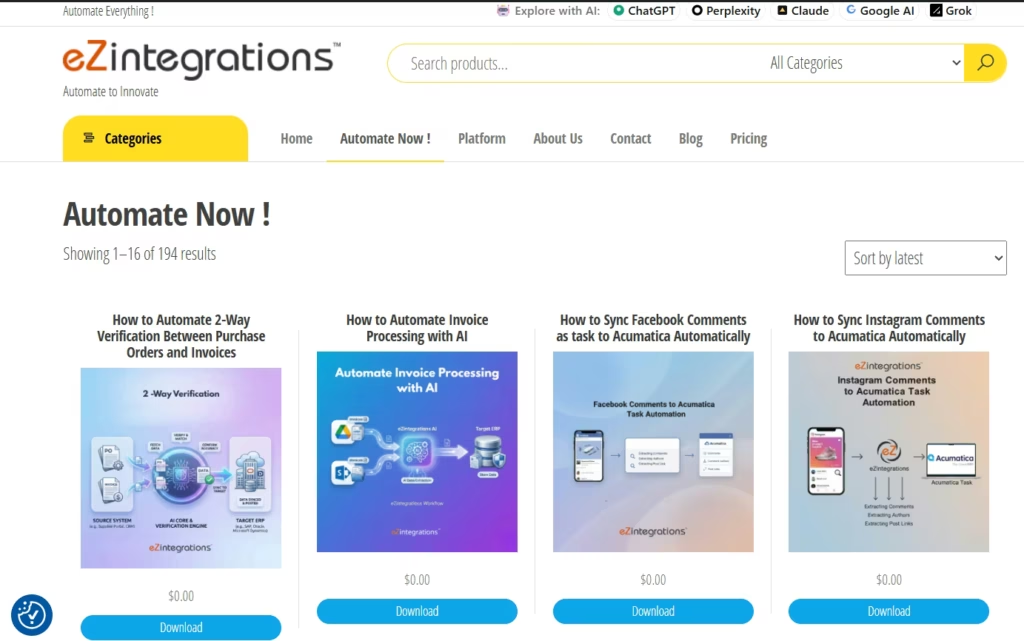
Each AI agent template in the Automation Hub is built specifically for Goldfinch AI and uses one or more of the 9 native agent tools. When you import a template, you get the full agent canvas with tool cards pre-configured in the correct sequence, with field names, connection types, confidence threshold starting points, and documentation notes embedded in each step. You configure your specific system credentials, adjust field names to match your API responses, and set your confidence threshold before testing.
Gartner predicts 40% of enterprise applications will embed task-specific AI agents by end of 2026, up from less than 5% in 2025. For operations teams trying to move from zero deployed agents to multiple production agents quickly, a template library with real depth across business functions is the most effective way to accelerate that transition.
Finance and Accounting Templates
Rating: 5/5. The strongest category in the library. 9 templates covering the complete AP, AR, expense, and financial reporting workflow stack.
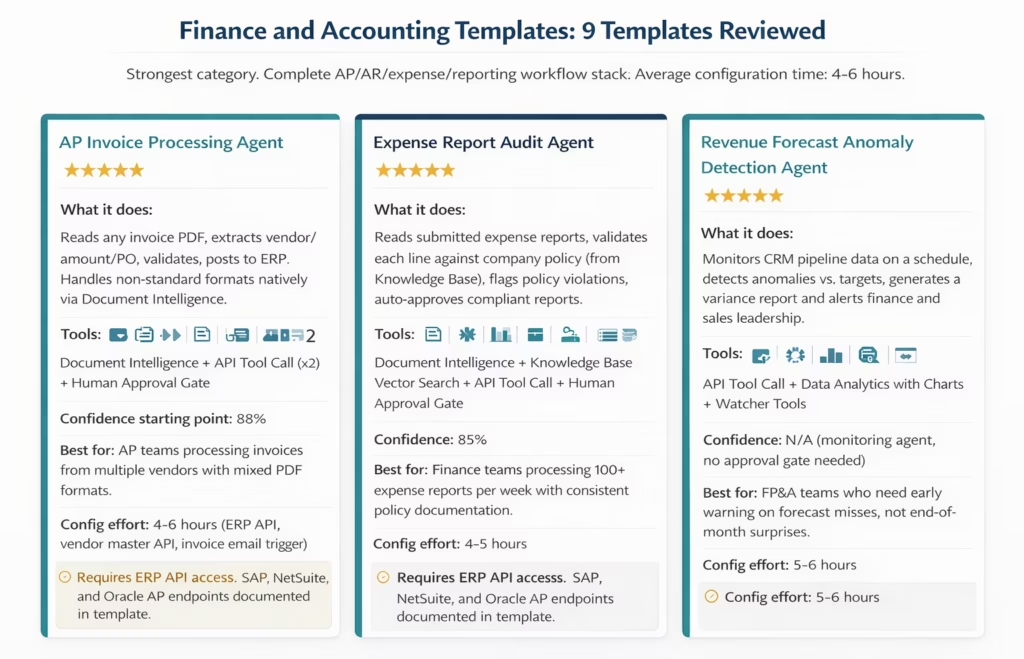
The 9 finance and accounting templates:
- AP Invoice Processing Agent. Document Intelligence reads any invoice format, API Tool Call validates against the vendor master and open POs, second API Tool Call posts approved invoices to the ERP. Human Approval Gate at 88% confidence. Documented for SAP, NetSuite, Oracle AP, and Microsoft Dynamics 365.
- Expense Report Audit Agent. Knowledge Base Vector Search retrieves your expense policy. Document Intelligence reads the submitted expense report. The agent validates each line item against policy, flags violations with specific policy clause references, and auto-approves compliant reports. Approval gate for borderline cases.
- Revenue Forecast Anomaly Detection Agent. Watcher Tools monitors your CRM pipeline data on a 24-hour schedule. Data Analytics generates a variance report comparing current pipeline against forecast targets. Alerts finance and sales leadership with a formatted summary and embedded chart.
- AR Collections Priority Agent. Pulls overdue receivables from the ERP, researches each debtor’s payment history and credit status via API, prioritises the collections queue by risk score, and posts the prioritised list to the collections system.
- Month-End Close Checklist Agent. Monitors completion status of close checklist items across systems, identifies blockers and responsible owners, and sends daily status summaries with action items to the finance operations team.
- Contract Payment Terms Extraction Agent. Document Intelligence reads supplier contracts, extracts payment terms, discounts, and penalty clauses, and reconciles them against ERP payment configuration. Flags discrepancies for finance review.
- Financial Report Generation Agent. Pulls structured data from ERP, runs Data Analysis for variance calculations, generates a formatted financial summary report with Data Analytics charts, and distributes to finance leadership on a defined schedule.
- Duplicate Invoice Detection Agent. Scans incoming invoices against historical AP records, identifies potential duplicates by vendor, amount, and date pattern, and routes duplicates to the AP review queue before they are posted.
- Budget Variance Monitoring Agent. Compares actual spend from ERP against budget allocations on a weekly schedule, generates department-level variance reports, and alerts cost centre owners when spend deviates from budget by more than a configurable percentage.
Honest assessment of the finance templates: The AP invoice processing template is the most mature in the library, with the most detailed step documentation and the most API endpoint examples. The month-end close checklist template is the most variable: its value depends entirely on how well your team documents your close checklist in the Knowledge Base tool. Teams with structured close documentation deploy it successfully; teams with informal close processes spend more time on Knowledge Base configuration than on the agent itself.
HR and People Operations Templates
Rating: 4/5. Seven solid templates covering the full hire-to-offboard lifecycle. Configuration effort is higher than finance because HR processes tend to involve more systems (ATS, HRIS, benefits, payroll, directory) and more complex document types.
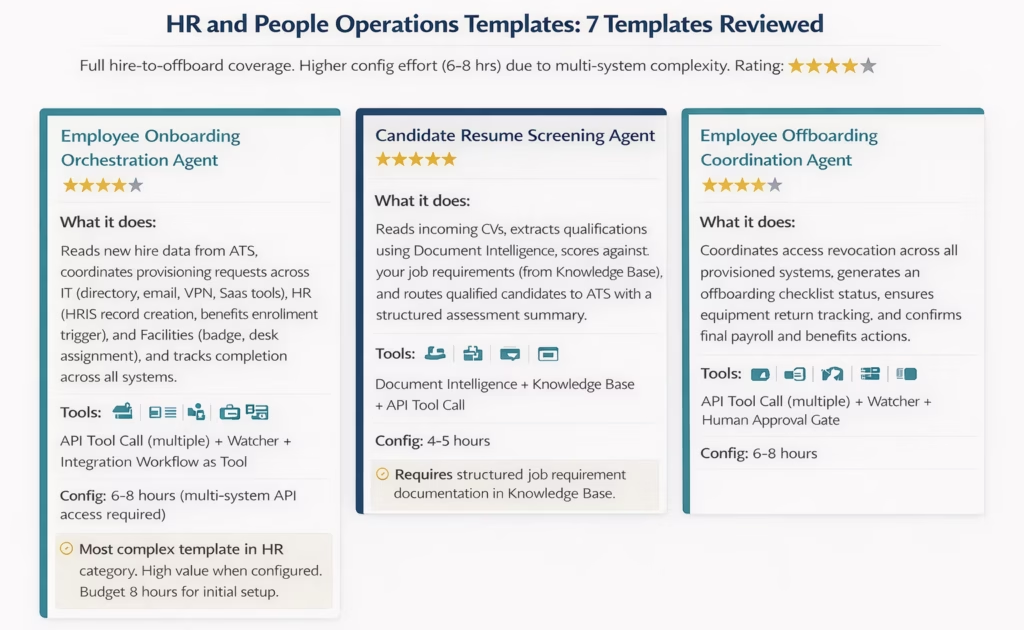
The 7 HR and people operations templates:
- Employee Onboarding Orchestration Agent. The most comprehensive template in the HR category. Coordinates provisioning across IT, HR, and Facilities. Requires API access to your directory, HRIS, and any provisioned SaaS tools.
- Candidate Resume Screening Agent. Reads CVs in any format, scores against structured job requirements from the Knowledge Base, routes qualified candidates to ATS with a scoring summary. Consistent and well-documented. No format-specific template required.
- Performance Review Document Analysis Agent. Reads submitted performance reviews, extracts key themes, identifies patterns across a team’s reviews using Data Analysis, and generates a summary report for the HR business partner.
- Employee Offboarding Coordination Agent. Coordinates access revocation and offboarding task completion across systems. Watcher confirms each step completes before triggering the next.
- Job Description Quality Agent. Reviews draft job descriptions against your documentation standards and inclusion guidelines from the Knowledge Base, and returns a structured improvement list.
- HR Policy Q&A Agent. Answers employee questions about HR policies using Knowledge Base Vector Search against your policy documentation. Routes complex questions to the HR team.
- Workforce Data Anomaly Agent. Monitors HRIS data for anomalies (duplicate records, missing mandatory fields, inconsistent department allocations) and alerts HR operations with a structured issue list.
Honest assessment of the HR templates: The candidate screening template and HR policy Q&A template are the most deployment-ready. The onboarding orchestration template is the most valuable but requires the most configuration: you need API access to every system you want the agent to provision across, and the quality of the outcome is directly tied to how completely you configure those connections. Teams that configure only partial system coverage get only partial onboarding automation.
Sales Intelligence and Revenue Operations Templates
Rating: 4/5. Eight templates covering account research, lead qualification, pipeline monitoring, and competitive intelligence. Strong template depth for sales operations teams. The web crawling and knowledge base tools used in these templates produce the most visible business impact quickly.
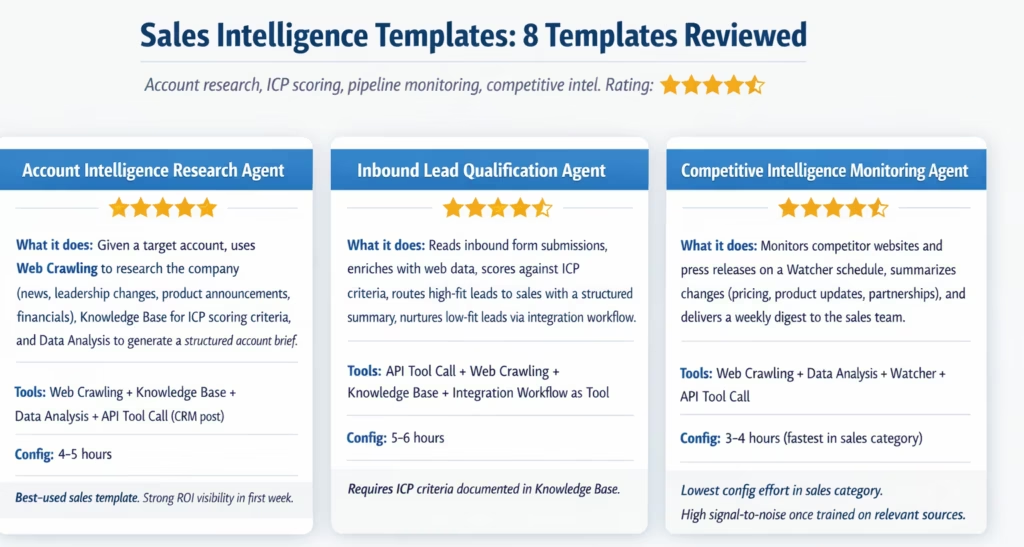
The 8 sales intelligence templates:
- Account Intelligence Research Agent. Produces a structured account brief from web data, news, and ICP scoring criteria for any target company. One of the fastest templates to demonstrate ROI because the output (account brief) is immediately visible and useful to the sales team.
- Inbound Lead Qualification and Routing Agent. Processes inbound leads, enriches with web data, scores against ICP criteria, and routes to CRM with a qualification summary and recommended next action.
- Competitive Intelligence Monitoring Agent. Runs on a weekly Watcher schedule to monitor competitor websites, pricing pages, and press releases for changes and delivers a formatted digest.
- Pipeline Health Monitoring Agent. Monitors CRM pipeline data for at-risk deals (no activity, stale stage, missing next steps), generates a deal health report, and alerts the relevant account executive and their manager.
- Renewal Risk Scoring Agent. Reads customer health data from CRM, usage data from the product system, and support ticket history, scores renewal risk, and routes at-risk accounts to the customer success team with a structured risk summary.
- Sales Proposal Content Agent. Reads the deal data and account intelligence from CRM, retrieves relevant case studies and proof points from the Knowledge Base, and generates a first-draft proposal outline with suggested content for each section.
- Win/Loss Analysis Agent. Reads closed-lost opportunity records from CRM, retrieves any available call notes or survey data, and generates a structured win/loss analysis summary by loss reason category using Data Analysis.
- Contact Data Enrichment Agent. Enriches new CRM contacts with web-sourced data (LinkedIn profile data, company details, recent news) and posts enriched records back to CRM via API.
Honest assessment of the sales templates: The account intelligence research template and competitive monitoring template are the most plug-and-play in this category: they primarily use web crawling and data analysis, which require less system-specific API configuration than templates that write to your CRM. The lead qualification and renewal risk templates require structured ICP criteria in the Knowledge Base and accurate CRM data. Teams with messy CRM data will find these templates reveal that problem before solving the automation problem.
IT Support and Service Management Templates
Rating: 5/5. Seven templates, the lowest average configuration effort in the library (2-4 hours), and the highest production-readiness score. IT support workflows are well-defined, the data is structured, and the agent decision logic is clear: these are ideal conditions for AI agent templates.
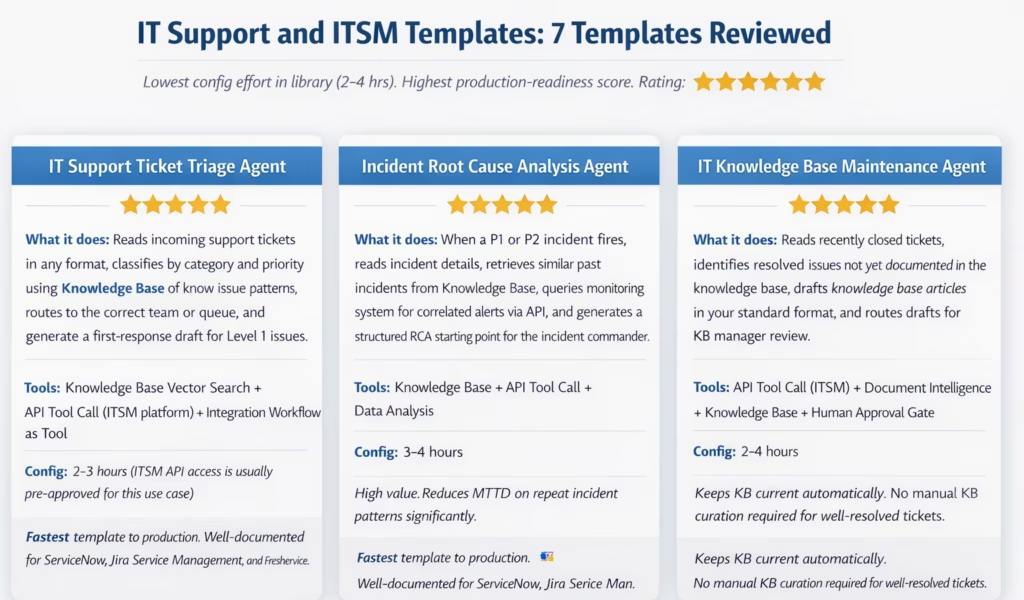
The 7 IT support and ITSM templates:
- IT Support Ticket Triage Agent. The fastest template in the library to reach production. Classifies, prioritises, and routes support tickets. Documented for ServiceNow, Jira Service Management, and Freshservice.
- Incident Root Cause Analysis Agent. Activates on P1/P2 incidents and generates an RCA starting point by retrieving similar past incidents and correlated monitoring alerts.
- IT Knowledge Base Maintenance Agent. Reads closed tickets, drafts KB articles from resolved issues, and routes drafts for KB manager approval. Keeps the knowledge base current without manual curation.
- Change Request Impact Assessment Agent. Reads incoming change requests, retrieves potentially affected systems and dependencies from the Knowledge Base, and generates an impact summary for the change advisory board.
- SLA Breach Early Warning Agent. Monitors open ticket queue via Watcher, identifies tickets approaching SLA breach, escalates to the assigned engineer and their manager, and suggests a resolution approach based on similar past tickets.
- Access Provisioning Request Agent. Reads access request submissions, validates against the access policy in the Knowledge Base, processes standard-fit requests via API to the identity management system, and routes non-standard requests to the IT security team.
- Software License Audit Agent. Pulls software installation data from endpoint management, compares against license entitlements, flags over-provisioned and under-utilised licenses, and generates an optimization recommendation report.
Honest assessment of the IT support templates: The IT support category is the library’s strongest. IT support workflows have well-defined inputs (tickets in your ITSM platform), clear decision criteria (priority rules, routing rules), and accessible APIs. The ticket triage template can realistically go from import to production in one working day for a team with existing ITSM API access. The incident RCA template delivers the most dramatic early impact: the first time it surfaces a similar past incident during an active P1 that the incident commander didn’t know about, it earns its configuration investment.
Supply Chain and Procurement Templates
Rating: 4/5. Six templates covering supplier management, PO processing, inventory monitoring, and logistics exception handling. Solid depth. Configuration effort is higher than IT support because supply chain data structures vary more widely across ERP and procurement systems.
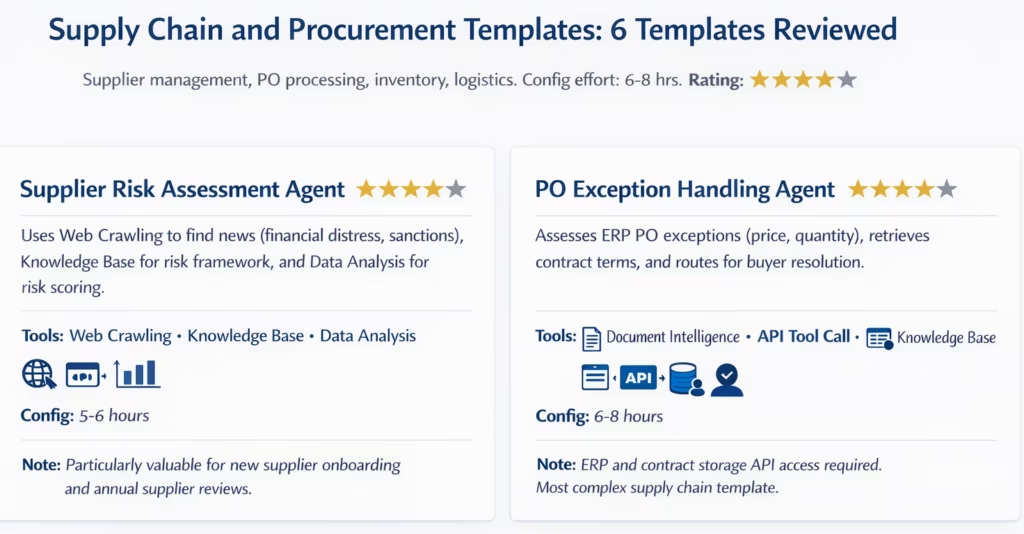
The 6 supply chain and procurement templates:
- Supplier Risk Assessment Agent. Web-crawls recent news and financial signals for any supplier, applies your risk framework, generates a risk score and report. Valuable for new supplier onboarding and ongoing supplier portfolio monitoring.
- PO Exception Handling Agent. Reads ERP-flagged PO exceptions, retrieves contract terms, assesses the exception type and recommended resolution, routes to the buyer with the assessment pre-filled.
- Inventory Threshold Alert Agent. Monitors inventory levels via Watcher on a schedule, detects items approaching reorder threshold, generates a reorder recommendation, and routes to the purchasing team with supplier lead times.
- Goods Receipt Discrepancy Agent. Compares goods receipt records against purchase orders, identifies quantity and quality discrepancies, generates a discrepancy report, and notifies the supplier and purchasing team.
- Contract Renewal Pipeline Agent. Monitors supplier contract expiry dates, flags contracts approaching renewal, retrieves contract terms and supplier performance data, and generates a renewal assessment for the procurement team.
- Logistics Delay Detection Agent. Monitors shipment tracking data from logistics APIs, detects delays against expected delivery dates, assesses impact on production schedule, and alerts supply chain operations with recommended mitigation actions.
Customer Operations Templates
Rating: 5/5. Seven templates covering the customer service, customer success, and CX quality monitoring workflow stack. Strong production-readiness, well-documented API connections for major CRM and support platforms, and clear real-world impact.
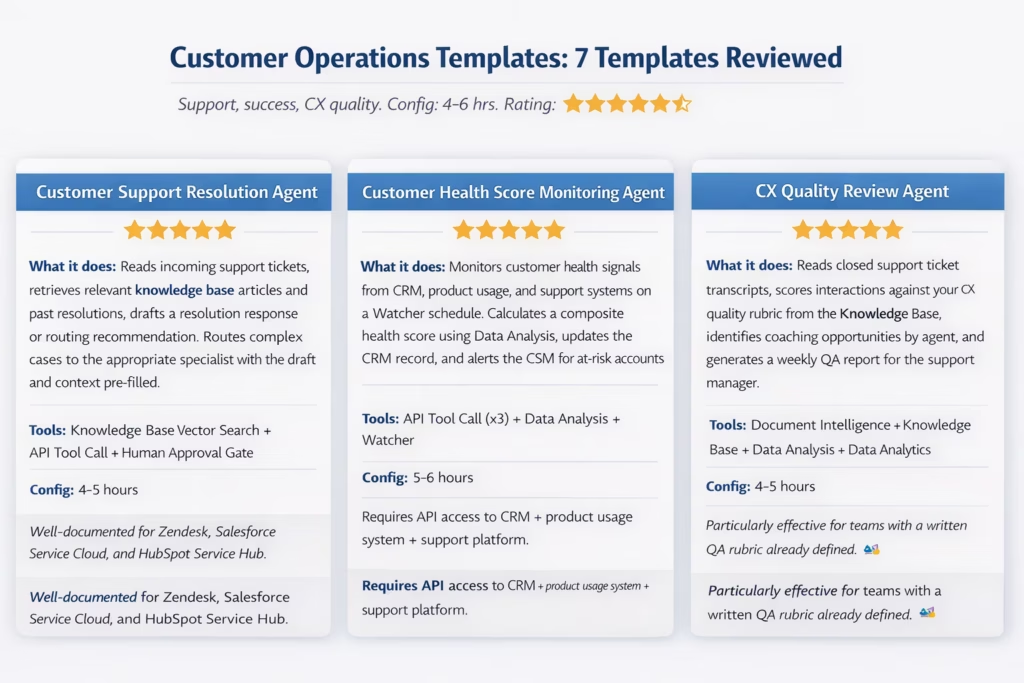
The 7 customer operations templates:
- Customer Support Resolution Agent. Retrieves relevant knowledge base content and drafts resolution responses or routing recommendations for incoming support tickets. Documented for Zendesk, Salesforce Service Cloud, and HubSpot Service Hub.
- Customer Health Score Monitoring Agent. Aggregates health signals across CRM, product usage, and support systems, calculates a composite score, and alerts CSMs on at-risk accounts.
- CX Quality Review Agent. Reviews closed ticket transcripts against your QA rubric and generates a coaching-focused quality report by agent for the support manager.
- Escalation Prediction Agent. Reads in-progress support tickets and predicts escalation probability based on customer history, sentiment signals, and issue complexity. Flags predicted escalations to the support manager before they happen.
- Customer Feedback Analysis Agent. Reads NPS survey responses and support feedback data, categorises by theme using the Knowledge Base, generates a sentiment and theme analysis report, and routes emerging product feedback to the product team.
- Voice of Customer Intelligence Agent. Aggregates customer mentions from support tickets, NPS responses, review platforms (via web crawling), and CRM notes, and generates a weekly VoC summary report with trending themes and sentiment shifts.
- Service Level Agreement (SLA) Monitoring Agent. Monitors open cases against SLA commitments on a Watcher schedule, predicts potential breaches, and escalates to the assigned agent and supervisor with a recommended resolution approach.
Legal and Compliance Templates
Rating: 4/5. Five templates covering contract review, compliance monitoring, and regulatory change management. Smaller library than other categories, reflecting the specialised nature of legal workflows. Quality is high where templates exist, but the category has fewer templates than operations teams will want.
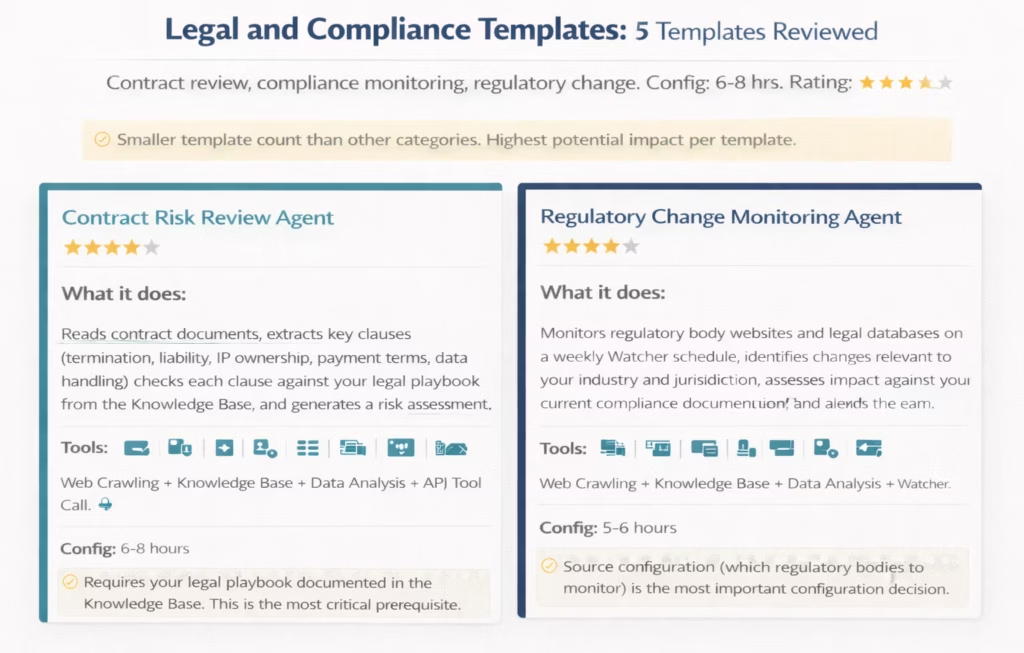
The 5 legal and compliance templates:
- Contract Risk Review Agent. Reviews contracts against your legal playbook, flags risk clauses, and generates a structured risk assessment for legal review.
- Regulatory Change Monitoring Agent. Monitors relevant regulatory sources on a schedule, identifies changes, assesses impact against current compliance documentation.
- Vendor Compliance Verification Agent. Reads vendor compliance certifications (SOC 2, ISO 27001, GDPR documentation), validates completeness and currency, and flags expired or missing certifications.
- Policy Acknowledgement Tracking Agent. Monitors employee policy acknowledgement status from the HR system, identifies non-compliant employees, and sends escalating reminders up to manager notification.
- Data Privacy Incident Detection Agent. Monitors access logs and data movement patterns via API, identifies potential data privacy incidents against your defined risk criteria, and alerts the DPO with a structured incident summary.
Honest assessment of the legal templates: The contract risk review template is powerful but requires the most sophisticated Knowledge Base configuration in the entire library: your legal team needs to document the playbook in a structured way that the agent can retrieve and apply consistently. Teams that have this documentation already get significant value quickly. Teams that don’t will spend as much time building the Knowledge Base as building the agent. This is a prerequisite issue, not a template quality issue.
Cross-Functional Data Workflow Templates
Rating: 4/5. Six templates covering data quality monitoring, cross-system reconciliation, executive reporting, and data pipeline health. These are the templates operations and data teams use to fill the gaps between their traditional integration workflows and their AI agent deployments.
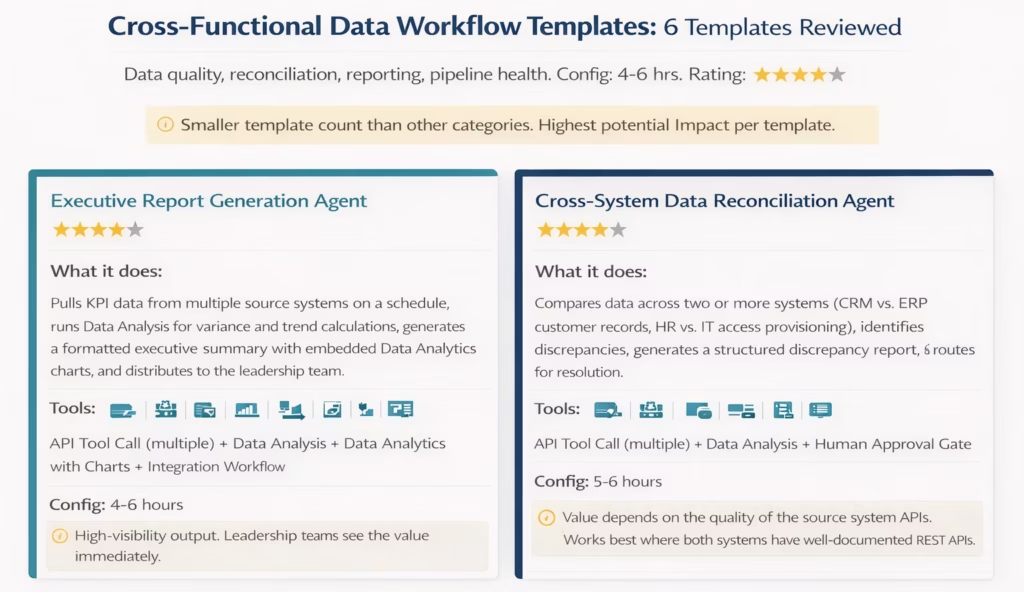
The 6 cross-functional data workflow templates:
- Executive Report Generation Agent. Pulls KPI data across systems, runs trend and variance analysis, and generates a formatted executive summary with charts on a defined schedule.
- Cross-System Data Reconciliation Agent. Compares records across two or more systems, identifies discrepancies, and routes them for resolution.
- Data Quality Monitoring Agent. Monitors source system data for quality issues (missing fields, format violations, duplicate records), generates a data quality report, and alerts the data steward.
- System Health Dashboard Agent. Polls key system APIs on a schedule, checks response times and error rates, generates a system health summary, and alerts operations on degraded performance.
- Regulatory Reporting Data Preparation Agent. Pulls data from relevant source systems, transforms and validates against reporting schema requirements, generates a draft regulatory report, and routes to compliance for review.
- API Endpoint Monitoring Agent. Monitors critical API endpoints via Watcher, detects downtime or performance degradation, alerts the responsible team, and logs the incident for SLA tracking.
Pros and Cons of the eZintegrations Template Library
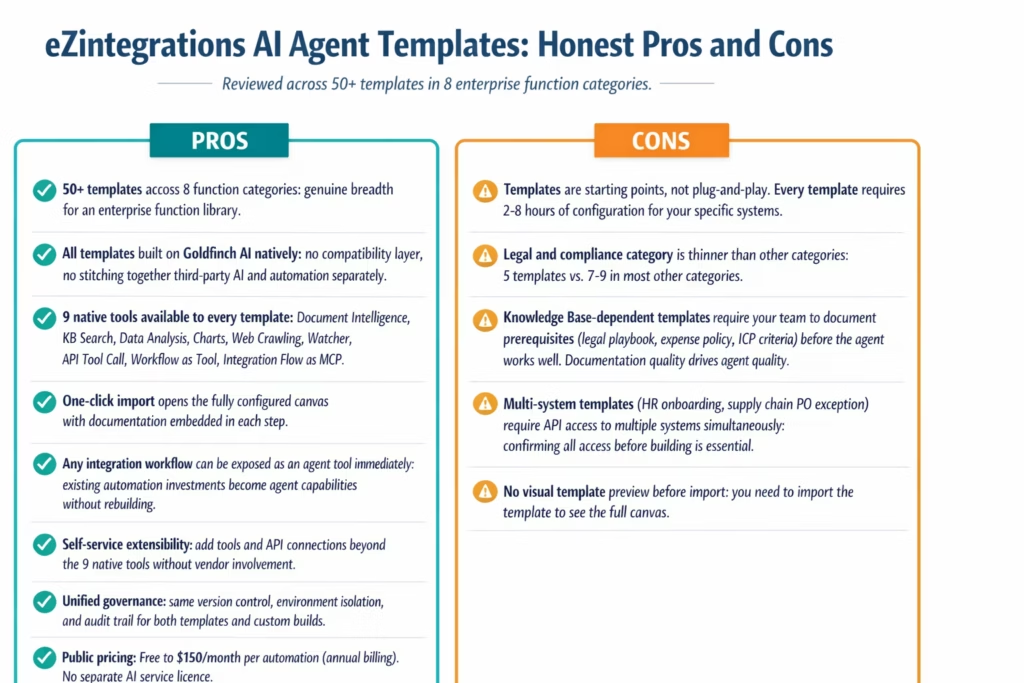
| Pros | Cons |
|---|---|
| 50+ templates across 8 enterprise function categories | Templates require 2–8 hours of system-specific configuration before deployment |
| All built natively on Goldfinch AI: no compatibility layer | Legal and compliance category has fewer templates than other categories |
| 9 native agent tools available to every template | Knowledge Base-dependent templates require pre-documented policy and criteria content |
| One-click import with documentation embedded in each step | Multi-system templates require API access to all systems confirmed before building |
| Existing integration workflows expose as agent tools instantly | No template preview: must import to see the full canvas |
| Self-service tool extensibility beyond 9 native tools | |
| Unified governance across templates and custom builds | |
| Public pricing with AI capabilities included |
Pricing
eZintegrations publishes its pricing at eZintegrations pricing, making it one of the few enterprise iPaaS and AI agent platforms with fully transparent pricing.
| Tier | Price | Best For |
|---|---|---|
| Free | $0 | Exploration and development |
| Starter | $5/month per automation | Simple workflows, early testing |
| Professional | $90/month per automation | Non-AI integration workflows, unlimited transactions |
| AI Automation | $120/month per automation + AI credits | LLM-powered AI workflows |
| Goldfinch AI | $150/month per automation + AI credits | Full AI agent orchestration with all 9 tools |
| Dev/Test | ~1/3 of production pricing | Development and testing environments |
AI agent templates deployed via Goldfinch AI are priced at the Goldfinch AI tier: $150/month per automation (annual billing) plus AI credits for LLM usage. Non-AI integration workflow templates are priced at $90/month per automation. Templates that combine integration workflows with Goldfinch AI agents are priced per component.
There is no platform fee, no connector fee, and no separate charge for the template library or the Automation Hub. Any template you import is included in your account at no additional cost.
Pricing context: Most enterprise iPaaS and AI agent platforms do not publish pricing. Third-party estimates for comparable platforms range from $10,000 to $216,000 per year depending on usage. eZintegrations’ per-automation pricing model is predictable and scales with the number of automations you deploy, not with transaction volume for non-AI automations.
Who Is It Best For?
The eZintegrations AI agent template library delivers the most value for four specific buyer profiles:
Operations teams deploying their first AI agents. If your team knows which process to automate but doesn’t know where to start with AI agent configuration, templates cut the learning curve significantly. Instead of building from scratch, you import a template that shows you how the tools connect for your use case and configure from there.
Mid-market IT and operations teams without dedicated AI developer resources. The templates are designed to be configured by operations managers and IT generalists, not machine learning engineers. The Knowledge Base configuration is the most skill-sensitive step, and it requires domain knowledge, not technical knowledge.
Enterprises that want to move quickly from pilot to multi-agent production. Templates let you run 8 pilots across 8 business functions in the time it would take to custom-build 2 or 3 agents from scratch. Once your team knows the configuration pattern, each subsequent template deploys faster.
Organisations with existing eZintegrations integration workflows. The Integration Workflow as Tool capability means every integration workflow you’ve already built is immediately available as a Goldfinch AI agent tool. You’re not starting from zero: you’re extending existing investments.
If you’d like to understand the full platform before deploying templates, read our how to build an enterprise AI agent guide.
Who Should Look Elsewhere?
The template library is not the right starting point for three specific situations:
Teams that need plug-and-play with zero configuration. There is no enterprise AI agent template from any platform that truly requires zero configuration. If your evaluation criterion is “import and run without touching any settings,” that product does not exist. The eZintegrations templates are among the most configuration-efficient in the market, but “2-8 hours of configuration” is not “zero.”
Teams with no API access to their target systems. Every AI agent template that takes action on an enterprise system requires API access to that system. If your IT team hasn’t approved API access to your ERP, HRIS, or support platform, you cannot configure the template. Get API access confirmed before evaluating the template library.
Teams whose primary use case is deep legal AI with court-quality document reasoning. The legal templates are strong for contract clause extraction and compliance monitoring. They are not designed for adversarial legal research, case strategy analysis, or court document preparation. Specialist legal AI platforms (CoCounsel, Harvey) are more appropriate for those use cases.
Final Verdict
The eZintegrations Automation Hub AI agent template library is the most useful template library for enterprise operations teams that want to deploy Goldfinch AI agents across multiple business functions quickly and without a dedicated AI developer.
The 50+ templates deliver genuine depth across the 8 most common enterprise function categories. The finance, IT support, and customer operations categories in particular are production-ready and well-documented. The legal and compliance category could use more templates. And every team needs to understand that “import a template” means “import a configured starting point that requires 2-8 hours of system-specific setup,” not “install and run.”
What distinguishes the eZintegrations template library from other AI agent template collections is the native Goldfinch AI integration: every template uses the same 9 tools, the same governance framework, the same monitoring system, and the same canvas as your custom agents. You’re not managing a separate template system: you’re using the same platform, just starting from a pre-built configuration instead of a blank canvas.
Overall Rating: 4.3/5. Recommended for enterprise operations teams deploying AI agents across multiple business functions without a dedicated AI developer.
Explore the Automation Hub to browse all 50+ AI agent templates by category, tool, and configuration time.
Frequently Asked Questions
1. Is the eZintegrations AI agent template library worth it for enterprise teams
Yes with a clear expectation, The templates are production quality starting points that typically require 2 to 8 hours of configuration rather than zero configuration deployment. When API access to the target systems is already confirmed the templates can reduce agent build time by 60 to 80 percent compared to building from scratch. Finance IT support and customer operations templates are currently the most deployment ready and provide the best starting point for first enterprise deployments.
2. What are the downsides of the eZintegrations AI agent templates
There are three realistic limitations. First every template still requires system specific configuration including API credentials field mapping and confidence threshold calibration. Second templates that rely on the Knowledge Base tool such as contract review expense audit and ticket routing perform only as well as the documentation loaded into the knowledge base. Third the legal and compliance category currently has fewer templates than other categories which means organisations focused on legal AI may need to build additional custom agents.
3. Who benefits most from the template library
Operations managers IT generalists finance teams and HR teams benefit the most. These users understand their business processes but may not have AI developer skills. The templates translate technical Goldfinch AI configurations into pre built starting points that domain experts can configure visually without writing code. For example a finance team can configure the AP invoice processing template simply by mapping fields and connecting APIs.
4. How does eZintegrations compare to other AI agent template libraries
Many enterprise AI agent platforms provide template libraries that are restricted to their ecosystem. Salesforce Agentforce templates mainly operate within Salesforce products while Microsoft Copilot Studio templates are focused on the Microsoft 365 stack. eZintegrations templates instead connect to any enterprise system using a catalog of more than 5000 API endpoints. This allows organisations that operate across multiple platforms to build agents that span the entire enterprise stack rather than being limited to one vendor ecosystem.
5. How long does it take to deploy an AI agent template to production
Low complexity templates such as IT support ticket triage or competitive intelligence monitoring typically take 2 to 4 hours from template import to the first successful test run. Medium complexity templates such as AP invoice processing or customer health scoring usually require 4 to 6 hours. High complexity templates such as employee onboarding orchestration or contract risk review generally require 6 to 8 hours. These estimates assume API access to all target systems has already been confirmed.
6. Can I customise a template after importing it
Yes, After importing a template the full AI agent canvas opens in edit mode. Every component including tool cards API connections field mappings confidence thresholds branch conditions and documentation notes can be modified. You can add or remove tools connect additional APIs adjust thresholds and redesign the logic. The template is simply a starting point and not a locked configuration.
Conclusion
50+ enterprise AI agent templates across 8 function categories. Built on Goldfinch AI. Imports in one click. Deploys to production in hours. Connects to any enterprise system via a 5,000+ endpoint API catalog.
The template library is the fastest path from “we want to deploy AI agents” to “we have AI agents in production across finance, IT, sales, customer ops, and HR.” It’s not zero-configuration. But it’s the most configuration-efficient way to deploy production-grade AI agents across multiple enterprise functions without a dedicated AI developer.
Gartner predicts 40% of enterprise applications will embed task-specific AI agents by end of 2026, up from less than 5% in 2025. The teams that lead that transition will be the ones that start deploying now, learn from production experience, and expand their agent portfolio systematically.
The Automation Hub is where that starts.
Explore the Automation Hub to browse all 50+ AI agent templates by category and configuration time.
Or book a free demo to see a template import and configure live, from Automation Hub to first production test run in one session.
Explore Goldfinch AI multi-agent orchestration for the full 9-tool platform. Read the AI Workflows guide for the LLM pipeline layer beneath the agents.

