
AI Workflow Automation: How to Build Intelligent Enterprise Pipelines in 2026
March 14, 2026AI workflow automation uses artificial intelligence to execute, route, and adapt multi-step enterprise processes without manual intervention. It goes beyond rule-based automation by making decisions based on data context, natural language, and learned patterns. In 2026, enterprise teams build AI workflows by connecting LLM-powered steps to their ERP, CRM, and API systems through no-code platforms with agentic orchestration.
TL;DR
The global workflow automation market reached $21.17 billion in 2025 and is growing at 14.3% CAGR. AI-powered workflows are the fastest-growing segment. AI workflow automation differs from rule-based automation: it makes decisions based on data context, adapts to variation, and handles exceptions without manual configuration. The five layers of an enterprise AI workflow pipeline are: data ingestion, AI processing, decision logic, system action, and monitoring with feedback loop. Building enterprise AI workflows in 2026 requires a no-code orchestration layer, LLM integration, agentic tool calling, and a connected API catalog for system actions. eZintegrations delivers all five layers in one platform: AI Workflows for LLM-integrated pipelines, Goldfinch AI for multi-agent orchestration, and a 5,000+ endpoint API catalog for system connectivity.
Introduction
Sixty percent of businesses have already automated at least one workflow. But most of those automations are rule-based: if X happens, do Y. No judgment. No context awareness. No ability to handle a case that doesn’t fit the rule.
In 2026, the competitive gap isn’t between companies that automate and companies that don’t. It’s between companies that automate with intelligence and companies that automate with rules. The difference shows up in exception handling rates, data quality, cycle time, and the number of humans required to watch the automation run.
AI workflow automation puts intelligence into the pipeline. It connects your data, your models, and your enterprise systems into pipelines that can read a document, classify an intent, enrich a record, make a routing decision, take an action in your ERP, and adapt the next run based on what happened this time.
This guide explains what AI workflow automation is, how enterprise pipelines are structured, where the implementation mistakes happen, and how eZintegrations delivers the full stack in one platform.
What Is AI Workflow Automation?
AI workflow automation is the use of artificial intelligence, specifically machine learning models, large language models, and autonomous agents, to execute multi-step enterprise processes with adaptive decision-making, not just rule-based triggers.
The global workflow automation market reached $21.17 billion in 2025, growing at a CAGR of 14.3% according to Research Nester. The AI-powered segment is accelerating faster than the overall market: 78% of global organisations already use some form of AI in daily operations, and 85% of those have started integrating AI agents into their workflows.
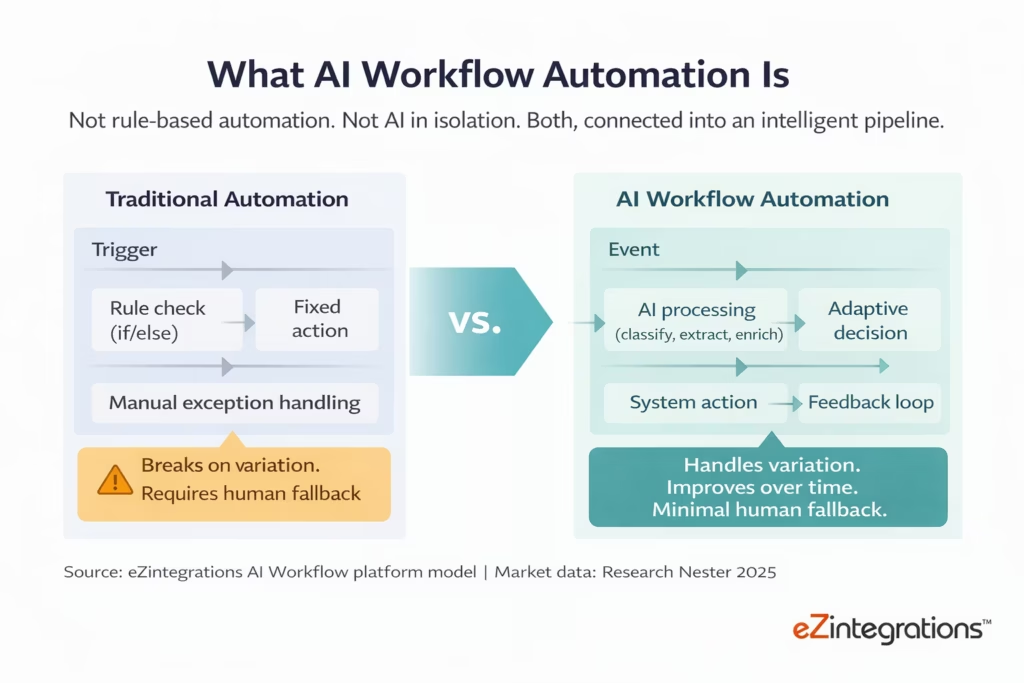
The definition matters because “workflow automation” is used to describe everything from Zapier zaps to enterprise orchestration platforms. AI workflow automation specifically adds three things that rules-based automation cannot do.
First, it handles unstructured inputs. A rule-based automation can process a structured JSON payload from a webhook. An AI workflow can read a PDF invoice, extract the vendor name, total amount, and line items, and post them to your ERP, even if the invoice format changes each time.
Second, it makes probabilistic decisions. A rule routes a support ticket to the billing queue if it contains the word “invoice.” An AI model routes the same ticket based on the full intent of the message, the customer’s history, and the likelihood of escalation.
Third, it adapts. A rule-based automation runs the same logic on run 10,000 as on run 1. An AI workflow that incorporates feedback from previous runs gets better. Classification accuracy improves. Routing decisions become more precise. Exception rates decline over time.
How AI Workflow Automation Differs from Traditional Rule-Based Automation
Rule-based automation executes a fixed logic sequence. AI workflow automation executes an adaptive logic sequence where the model determines the appropriate action based on the data it receives at runtime.
Only 4% of businesses have fully automated hands-free operations, despite 60% having automated at least one workflow. The gap between “some automation” and “full automation” is almost entirely explained by the inability of rule-based systems to handle variation. The moment a record arrives that doesn’t match the expected format, or a decision falls outside the predefined rules, a human has to intervene.

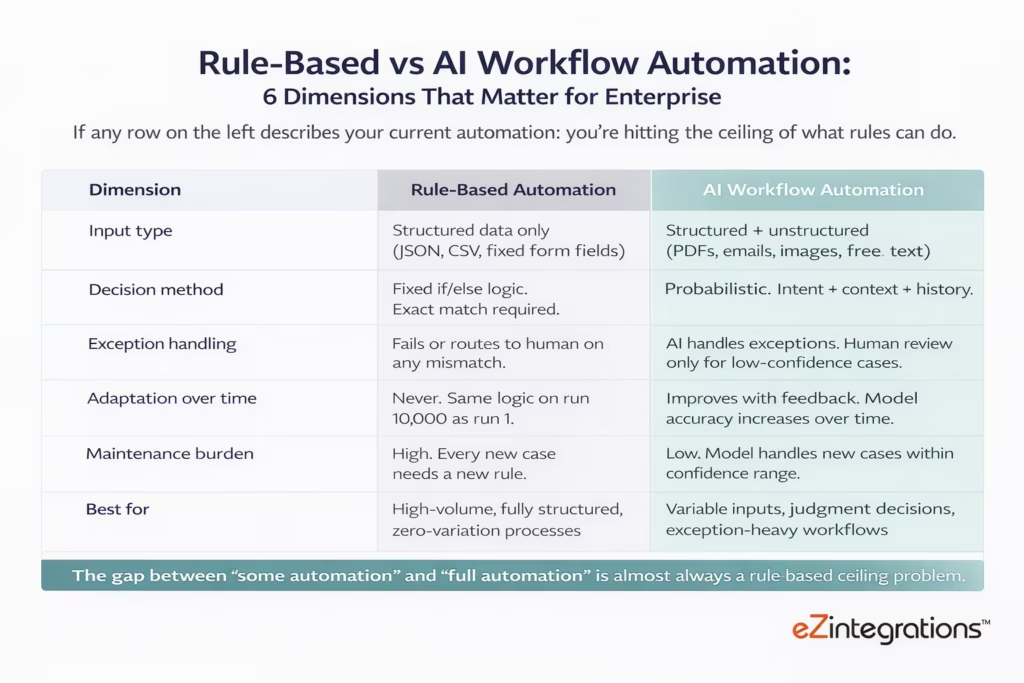
The clearest example of where rule-based automation fails is invoice processing. A rule can extract a total amount from a field named “Total” in a structured invoice form. It cannot extract the same amount from a PDF where the total is labelled “Amount Due,” placed on page 3, and formatted as a table cell with a currency symbol that changes by country. An AI model trained on invoice formats handles all of these variations without a rule for each one.
The clearest example of where AI workflow automation excels is any process that involves natural language, document understanding, classification, or judgment. Customer support routing. Contract review. Expense categorisation. Sales lead scoring. Fraud risk assessment. Compliance document review. In each case, the variation in inputs makes rule-based automation brittle and AI workflow automation effective.
This doesn’t mean rule-based automation is obsolete. High-volume, fully structured, zero-variation processes (nightly batch data transfers between two systems with identical schemas, for example) run efficiently on rules and don’t benefit from AI overhead. The practical answer for enterprise teams is to use both: rules for deterministic steps, AI for steps that involve judgment or unstructured input.
The 5 Layers of an Enterprise AI Workflow Pipeline
A well-architected enterprise AI workflow pipeline has five distinct layers, and gaps in any one of them produce the reliability, governance, and integration failures that cause AI automation projects to stall after the pilot.
Gartner predicts that by 2025, 70% of newly developed enterprise applications will use low-code or no-code technologies. The enterprise AI workflow pipeline is the architecture that makes those applications work at scale.
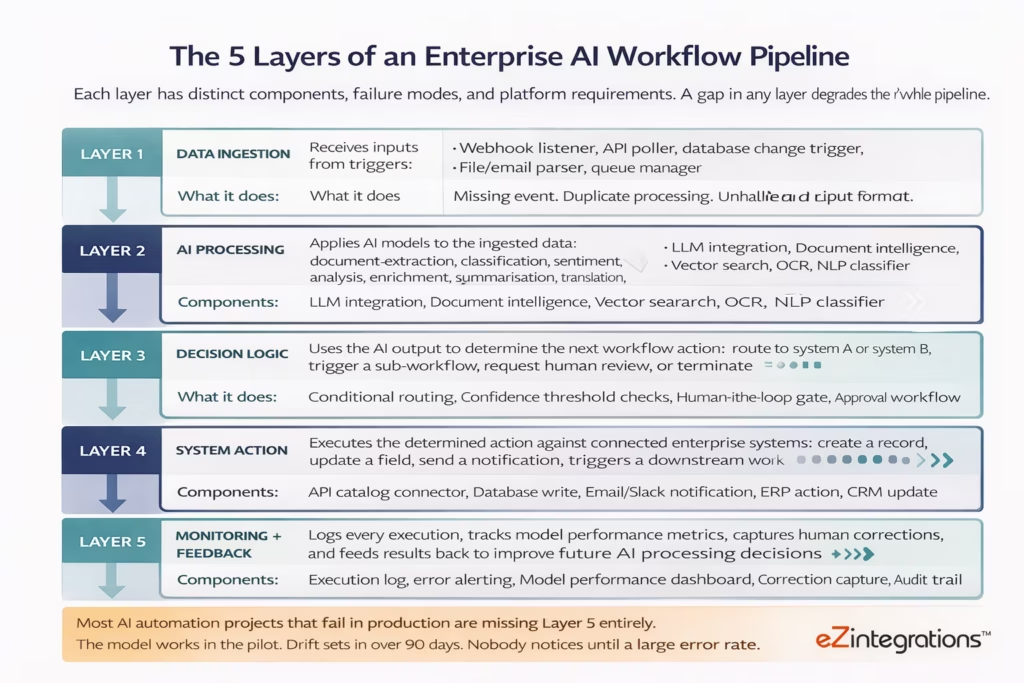
Layer 1: Data ingestion is where the pipeline receives its inputs. This includes webhook listeners that catch real-time events from your applications, scheduled API polls that check for new records at defined intervals, database change triggers that fire when a specific table is updated, file parsers that process uploads from email attachments or SFTP, and queue managers that handle high-volume event streams without data loss.
Layer 2: AI processing is where the intelligence lives. The input from Layer 1 is passed to one or more AI models: a large language model to extract structured data from an unstructured document, a classification model to assign a category or priority, a vector search to find relevant knowledge base entries, or a generation model to draft a response or summary. Each step in Layer 2 produces an output that becomes the input to Layer 3.
Layer 3: Decision logic uses the AI output to determine what happens next. If a document was classified as “Invoice” with 95% confidence, route to the AP workflow. If confidence is below 70%, route to human review. If the extracted amount exceeds $50,000, trigger an approval gate. Decision logic is where AI workflow automation connects intelligence to action.
Layer 4: System action is where the workflow reaches into your enterprise systems and does something. Create a record in your ERP. Update a field in Salesforce. Post a message in Slack. Trigger a downstream workflow in your logistics platform. This layer requires a broad, reliable API catalog that can reach any system your enterprise runs.
Layer 5: Monitoring and feedback is the layer that makes AI workflow automation improve over time rather than degrade. Every execution is logged. Every human correction is captured. Model performance metrics are tracked. When a model’s accuracy on a specific document type starts declining (model drift), the monitoring layer surfaces the signal before it becomes a production incident.
The 6 Most Valuable AI Workflow Use Cases for Enterprise Teams in 2026
The six highest-ROI AI workflow use cases in 2026 share a common characteristic: they involve variable, unstructured, or judgment-heavy inputs that defeat rule-based automation but yield strongly to AI-powered processing.
Automated accounts payable processing cuts invoice cost from $12.44 per invoice to $4.98, a 60% saving per transaction. That’s one data point. Across the six use cases below, the pattern holds: AI workflow automation delivers the most measurable ROI on the processes where rules-based automation breaks and humans currently fill the gap.
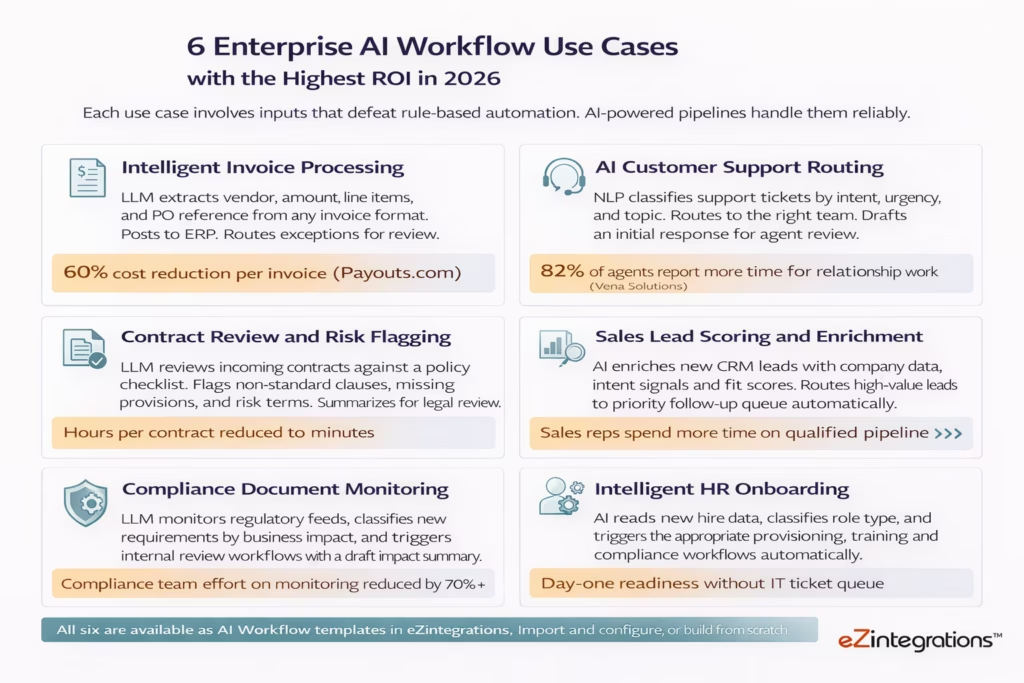
Intelligent invoice processing is the most commonly cited AI workflow use case because the ROI is immediate and measurable. Invoices arrive in dozens of formats from hundreds of vendors. A rule-based system requires a format template for each one. An AI-powered document intelligence step reads any invoice, extracts the relevant fields, validates against your vendor master, posts to your ERP, and routes exceptions to a human reviewer. The exception rate for a well-configured AI invoice workflow is typically under 5%.
AI customer support routing uses natural language understanding to classify incoming tickets by intent, urgency, customer segment, and topic, and routes them to the appropriate team with a draft response generated for the agent to review. The classification is more accurate than keyword-based routing and adapts to new issue types without requiring new routing rules.
Contract review and risk flagging uses an LLM to review incoming contracts against a policy checklist, flag non-standard clauses, identify missing required provisions, and produce a structured risk summary for legal review. The AI doesn’t replace legal review: it ensures that every contract gets a consistent first-pass review before a human reads it, and that legal teams spend their time on the flagged issues rather than the full read-through.
Sales lead scoring and enrichment uses AI to take a new lead from your CRM, enrich it with third-party company data and intent signals, score it against your ideal customer profile, and route high-value leads to a priority follow-up queue without waiting for a sales manager to manually grade them.
Compliance document monitoring uses an LLM to monitor regulatory feeds (SEC filings, GDPR guidance, industry standards updates), classify each new document by business impact category, and trigger an internal review workflow with a draft impact summary attached. Compliance teams that previously read every new regulatory document to determine relevance now review the classified summaries the AI produces.
Intelligent HR onboarding uses AI to read new hire data from your HRIS, classify the role type, location, and department, and trigger the appropriate downstream provisioning chain: SaaS application accounts, training paths, compliance certifications, payroll setup, and manager notifications. Each new hire gets the correct set of actions automatically, based on their role classification, not a manual checklist that varies by HR coordinator.
How to Build an AI Workflow: A Step-by-Step Framework
Building an enterprise AI workflow that works reliably in production requires six specific steps, and the order matters: skipping the data quality and confidence threshold steps is the most common cause of AI workflow failures after initial deployment.
65% of organisations are expanding their automation initiatives, but only 13% are implementing intelligent automation at scale. The gap between those numbers is the implementation difficulty. The six-step framework below is designed to close that gap for enterprise teams.
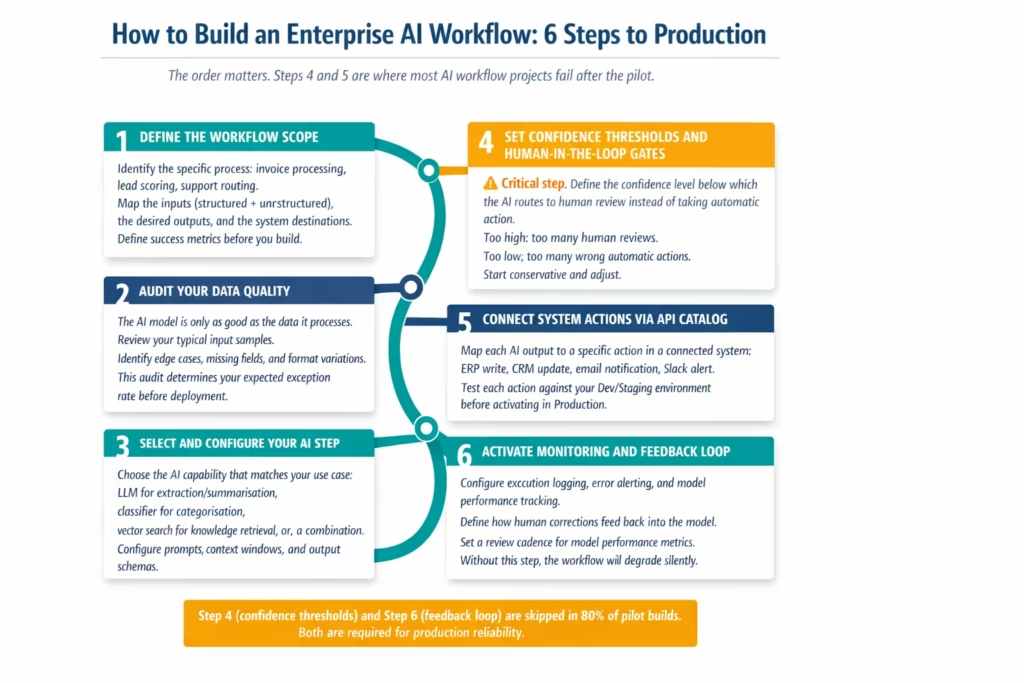
Step 1: Define the workflow scope before touching any platform. Write down the specific process you’re automating, every type of input it receives, what a correct output looks like for each input type, which systems the output goes into, and how you’ll measure success. Teams that skip this step discover scope creep after they’ve built half the workflow.
Step 2: Audit your data quality. Pull a representative sample of the actual inputs your workflow will process. 100 real invoices. 200 real support tickets. 50 real contracts. Map the variation in format, field names, and edge cases. This audit gives you the expected exception rate before you’ve written a single workflow step. If 30% of your invoices are in non-standard formats, your exception rate will be at least 30% without AI processing designed to handle that variation.
Step 3: Select and configure your AI step. The most common mistake is choosing a general-purpose LLM prompt when a specialised capability would perform better. Document intelligence extracts structured fields from documents more reliably than a general LLM for invoice processing. A trained classifier routes support tickets more accurately than a prompted LLM for high-volume routing. Use the right tool for each step.
Step 4: Set confidence thresholds. This is the step that determines whether your AI workflow helps or harms your operation. Every AI model outputs a confidence score with its prediction. Below a defined threshold, the record should route to human review rather than being acted on automatically. Set the threshold too high and you route everything to human review. Set it too low and the model takes automatic actions on low-confidence outputs, introducing errors into your systems. Start conservative (85%+ for automatic action), run for two weeks, and adjust based on the human review queue size and error rate.
Step 5: Connect system actions via API catalog. Map each AI output to the specific action it should trigger in your connected systems. High-confidence invoice extraction posts to ERP. Low-confidence routes to a human review queue in your BPM tool. Approved invoice triggers an AP payment workflow. Each of these actions requires a reliable connection to the relevant system, with proper error handling for API timeouts, auth failures, and schema mismatches.
Step 6: Activate monitoring and feedback loop. Log every execution. Alert on every error. Track the model’s confidence distribution over time. Capture every human correction. Define a monthly review cadence for model performance metrics. This step is what makes AI workflow automation improve over time instead of degrade.
What to Look For in an AI Workflow Automation Platform
Enterprise AI workflow platforms must provide five non-negotiable capabilities: LLM integration at the step level, a broad API catalog for system actions, agentic orchestration for multi-step reasoning, version control and governance, and a monitoring layer with feedback capture.
88% of executives say they are either piloting or scaling the use of autonomous agents. The enterprise platform that enables this is not a single tool: it’s a platform that combines AI model integration, workflow orchestration, and enterprise system connectivity in one governed environment.
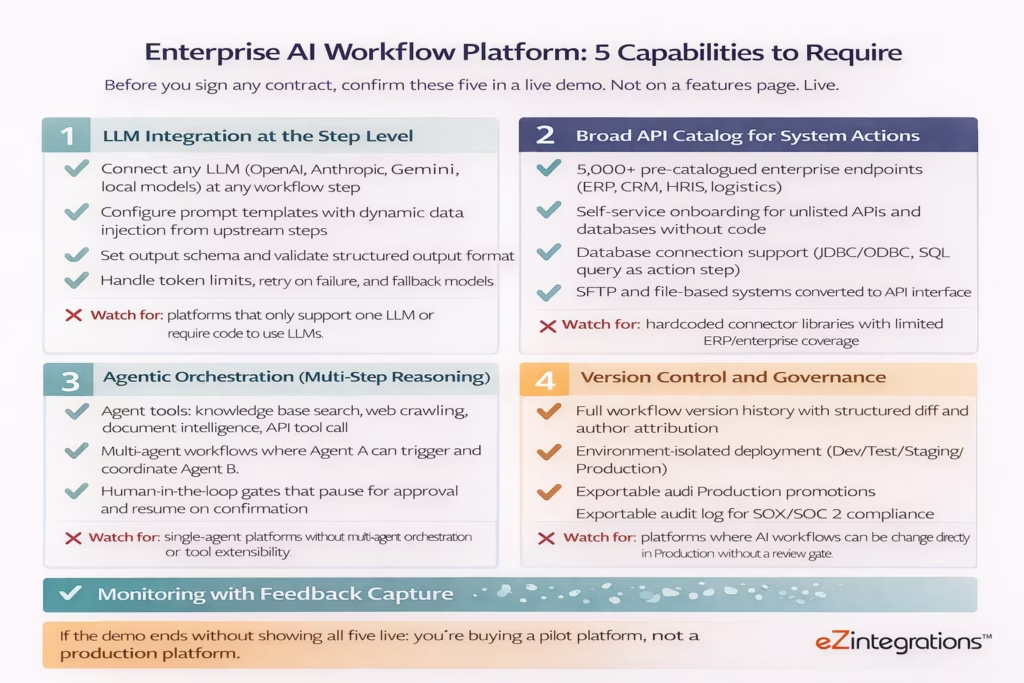
LLM integration at the step level means your workflow platform lets you call any large language model at any step in any workflow, with a configurable prompt that can reference data from previous steps, and a structured output schema that the downstream steps can rely on. This is different from platforms that have “AI features” built into specific templates: it means AI is a first-class step type that you can place anywhere in any workflow.
A broad API catalog means your AI workflow can actually reach the systems you need to act on. An AI that classifies an invoice correctly but can’t post it to your SAP instance is a pilot, not a production automation. The catalog needs to cover ERP, CRM, HRIS, logistics, communication, and database systems, and provide self-service onboarding for systems not in the catalog.
Agentic orchestration means the platform supports autonomous agents that can use tools (web search, document intelligence, knowledge base retrieval, API calls) to reason through multi-step problems without a predefined execution path. Goldfinch AI in eZintegrations ships with 9 native out-of-the-box agent tools: Knowledge Base Vector Search, Document Intelligence, Data Analysis, Data Analytics with Charts/Graphs/Dashboards, Web Crawling, Watcher Tools, API Tool Call, Integration Workflow as Tool, and Integration Flow as MCP. Users can add more tools as self-service beyond these 9.
Version control and governance means every AI workflow configuration is versioned, promotable through environments with approval gates, and auditable. This is not optional for enterprise AI deployments: the workflows that touch your ERP, CRM, and financial systems need the same change management rigour as your application code.
Monitoring with feedback capture means the platform tracks not just execution success and failure, but the AI model’s performance over time. Confidence score distributions. Exception rates by document type. Human correction patterns. This data is what prevents model drift from silently degrading a workflow that worked in the pilot.
How eZintegrations Delivers Enterprise AI Workflow Automation
eZintegrations delivers all five layers of an enterprise AI workflow pipeline in one platform: AI Workflows for LLM-integrated automation, Goldfinch AI for multi-agent orchestration, a 5,000+ endpoint API catalog for system connectivity, and native version control with compliance-grade audit trails.
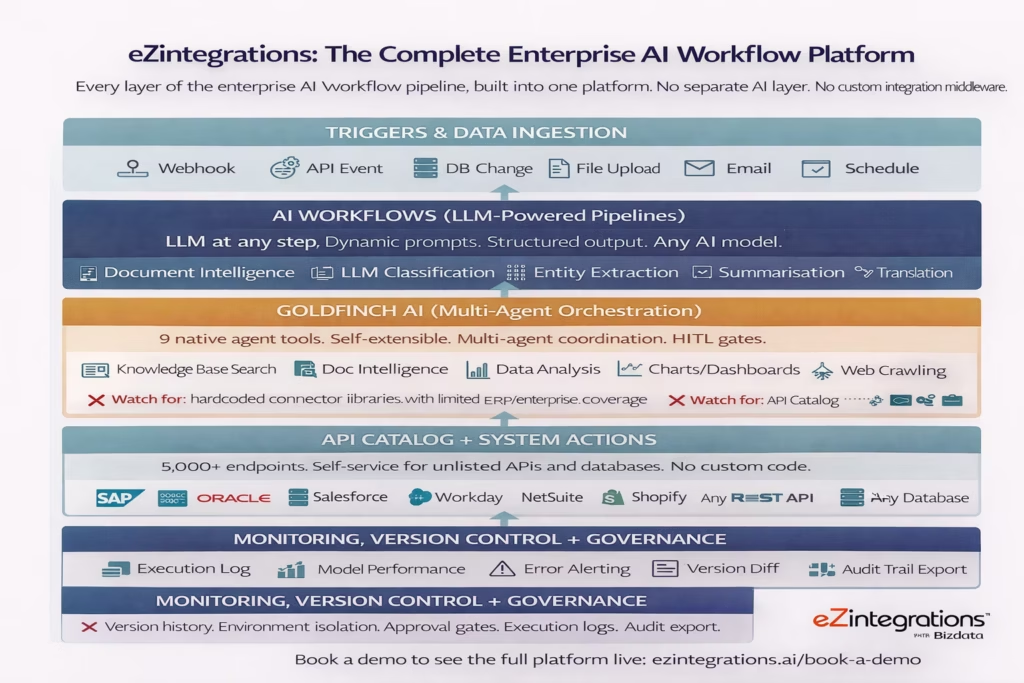
AI Workflows is the LLM-powered pipeline layer. Every automation you build in eZintegrations can include AI steps: call an LLM with a dynamic prompt that references upstream data, extract structured output from documents, classify records, enrich data from a knowledge base, or generate content. The AI step is a first-class workflow element. No separate AI integration required. No code to connect your LLM to your workflow engine.
Goldfinch AI is the multi-agent orchestration layer. When your AI workflow needs to reason through a multi-step problem rather than follow a predefined path, Goldfinch AI agents use their tool library to investigate, retrieve, decide, and act autonomously. Goldfinch AI ships with 9 native out-of-the-box agent tools: Knowledge Base Vector Search, Document Intelligence, Data Analysis, Data Analytics with Charts/Graphs/Dashboards, Web Crawling, Watcher Tools, API Tool Call, Integration Workflow as Tool, and Integration Flow as MCP. Users can add more tools as self-service beyond these 9, without platform vendor involvement.
The 5,000+ endpoint API catalog is the system action layer. Every AI workflow can reach any enterprise system in your stack through the catalog. SAP, Oracle ERP, NetSuite, Salesforce, Workday, Shopify, and any REST API or database you run. When the AI workflow decides to post an invoice to your ERP, create a record in your CRM, or trigger a downstream process, the API catalog provides the connection without custom code.
Version control and governance is native. Every AI workflow configuration is versioned with full history and structured diff. Promotions from Dev to Staging to Production are approval-gated. Every deployment event is logged with author attribution and exportable for SOX and SOC 2 audits.
The Automation Hub includes 1,000+ pre-built templates, many of which combine AI Workflow steps with API catalog actions. Import an intelligent invoice processing template, configure it for your ERP and document formats, set your confidence thresholds, and go live. Your first AI workflow in production can be measured in days, not quarters.
Frequently Asked Questions
1. What is AI workflow automation
AI workflow automation uses artificial intelligence including large language models classification models and autonomous agents to execute multi step enterprise processes with adaptive decision making. Unlike rule based automation which follows fixed logic AI workflow automation can process unstructured inputs make probabilistic decisions and adapt based on feedback. It acts as the layer between raw AI capability and enterprise systems such as ERP CRM and e commerce platforms.
2. What is the difference between AI workflow automation and RPA
Robotic Process Automation RPA executes deterministic rule based sequences typically by mimicking user interface actions on structured data. AI workflow automation uses machine learning and large language models to interpret unstructured data classify intent and make contextual decisions that RPA alone cannot handle. In mature enterprise automation architectures RPA is often used for deterministic system steps while AI workflows manage tasks that involve judgment natural language or variable data formats.
3. How long does it take to build an enterprise AI workflow
Using pre built templates from the eZintegrations Automation Hub a standard AI workflow such as intelligent invoice processing or support ticket routing can typically move from template import to production deployment in two to five business days. A custom multi agent AI workflow involving multiple systems and routing rules generally takes two to four weeks. Organizations building comparable solutions with custom code and independent AI integrations often report development timelines of three to six months.
4. What is agentic AI workflow automation
Agentic AI workflow automation uses autonomous AI agents capable of selecting tools such as web search knowledge base retrieval API calls and document analysis to reason through multi step problems without a predefined execution path. The agent receives a goal determines which tools are required executes them evaluates the results and then performs an action. This differs from traditional AI workflows that follow a fixed sequence of steps. Goldfinch AI of eZintegrations provides the agentic orchestration layer for the platform.
5. What data security and compliance controls apply to AI workflows
Enterprise AI workflow platforms must address several compliance dimensions. Data governance determines which data is transmitted to which LLM and whether the usage aligns with data processing agreements. Workflow change management ensures AI workflow updates are version controlled approval gated and auditable for frameworks such as SOX SOC 2 or GDPR. Output auditability requires logging each AI decision including input data model response confidence score and resulting action. eZintegrations supports these requirements through native version control approval workflows and exportable execution logs.
6. Does eZintegrations support on premises or private LLM deployment for AI workflows
eZintegrations is cloud native but can connect to LLMs across multiple deployment models including public API based LLM services such as OpenAI Anthropic and Google Gemini private cloud hosted models and self hosted or on premises models accessible through REST APIs. Enterprises with strict data residency requirements that prohibit sending data to public LLM providers can configure integrations with private model endpoints for AI workflow execution.
Conclusion
The workflow automation market is on track for $80+ billion by 2035. The gap between organisations that capture that value and organisations that don’t is not technology access: it’s implementation discipline.
AI workflow automation works when you build the five layers correctly, set confidence thresholds before you go live, connect AI output to real system actions, and maintain a monitoring and feedback loop that prevents model drift. It fails when teams skip the architecture, set no thresholds, and forget that AI models change behaviour over time.
The platforms that make this tractable for enterprise teams are those that deliver all five layers natively, without requiring you to stitch together a separate LLM API, a separate integration middleware, and a separate monitoring tool. eZintegrations delivers AI Workflows, Goldfinch AI multi-agent orchestration, a 5,000+ endpoint API catalog, and native governance in one platform.
Your next intelligent enterprise pipeline doesn’t need to wait for a six-month implementation project.
Book a free demo to see eZintegrations AI Workflows live and walk through an intelligent document pipeline from template import to production in one session.
Explore AI Workflows to see the LLM integration layer. Explore Goldfinch AI to see multi-agent orchestration. Visit the Automation Hub to browse 1,000+ pre-built templates including AI-powered workflow starters.

