
Integration Version Control: The Problem MuleSoft & Boomi Haven’t Solved
March 13, 2026Integration version control means storing every change to an integration flow with a complete history, diff capability, and rollback: treating flows as versioned software artifacts rather than live configurations. MuleSoft requires external Git tooling and certified developer setup. Boomi’s native Git integration for Data Integration was still listed as a roadmap item in Q3 2025. Enterprise iPaaS platforms that treat version control as native architecture solve this problem from day one.
TL;DR
Version control for integration flows is not the same as version control for application code, and most iPaaS platforms confuse or conflate the two. MuleSoft requires external Git setup, certified developer configuration, and Maven-based build pipelines. It doesn’t version integration flows natively inside the platform. Boomi’s native Git integration for its Data Integration product was still listed as a roadmap item in its Q3 2025 roadmap publication. The version control gap produces a predictable set of failures: production outages from undocumented changes, compliance audit findings, and integration logic drift between environments. eZintegrations treats every automation as a versioned artifact with full commit history, structured diff, one-click rollback, and environment-scoped promotion built into the platform core.
Introduction
Ask your MuleSoft architect how they version-control integration flows. They’ll describe a Git repository, a Maven build pipeline, Anypoint Exchange, and a deployment process that a certified MuleSoft developer had to set up over several days. Ask how a non-developer rolls back a broken production flow at 2am. Silence.
Ask your Boomi admin the same question. They may reference process version history inside AtomSphere. Ask whether that history includes a structured diff showing which field mappings changed and why. Probably not.
Version control for integration flows is one of the most commonly cited governance gaps in enterprise iPaaS deployments. The iPaaS market is growing at 25.9% CAGR and is projected to reach $78.28 billion by 2032. But the platforms that dominate it still treat integration flows as live configurations rather than versioned software artifacts. That design decision produces a predictable set of production incidents and compliance failures.
This post explains exactly where the version control gap sits, why the two largest iPaaS platforms haven’t closed it, and what enterprise-grade integration version control actually requires.
What Is Integration Version Control?
Integration version control is the practice of storing every change to an integration flow as a discrete, tracked, and restorable version, with a full history of what changed, who changed it, and when.
In application development, version control through Git is a foundational practice. Every developer understands that code lives in a repository, changes are committed with messages explaining what changed, and the full history of any file is available to any team member. Rolling back a broken change is a known, documented, repeatable action.
Integration version control applies the same principle to integration flows: the orchestration logic, field mappings, transformation rules, error handling, and connector configurations that define how data moves between your ERP, CRM, e-commerce, and logistics systems.

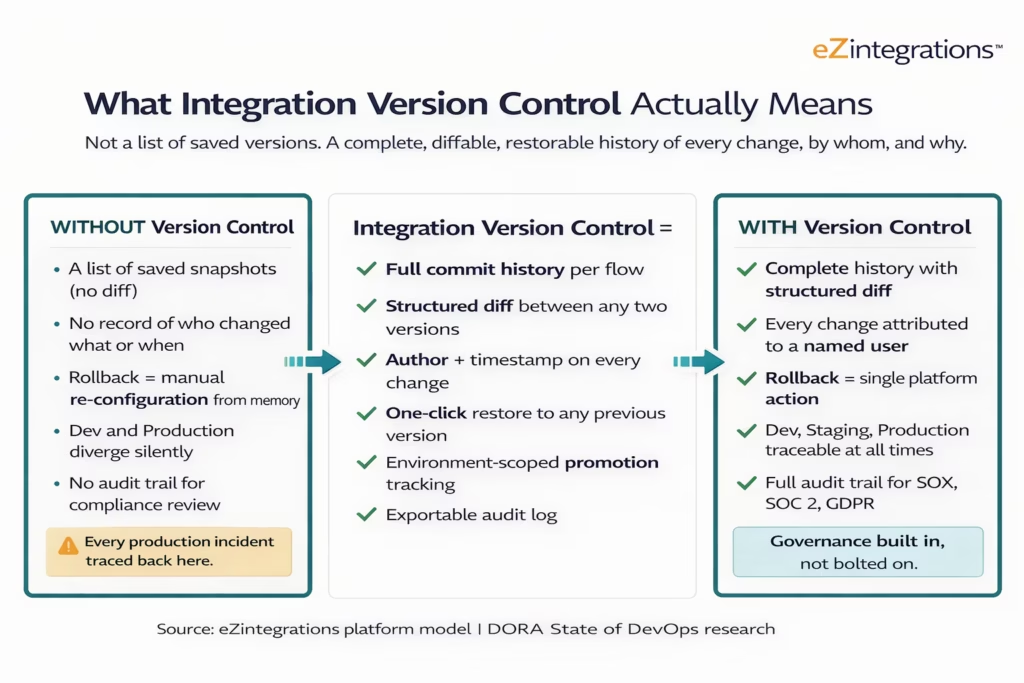
The phrase “version control” is used loosely by many iPaaS platforms to describe a feature that is, at best, a numbered save history. True integration version control means you can answer these questions at any point in time: What exactly changed in the flow between version 12 and version 13? Who made that change and when did they make it? What did the field mapping look like six weeks ago before the last two updates? If this production flow needs to be restored to the version that was running on March 1st, how long does that take?
A numbered save history answers none of these questions. Enterprise-grade version control answers all of them.
Why Integration Version Control Is Different from Code Version Control
Integration flows carry state and external dependencies that pure application code does not, which makes version history, diff capability, and rollback more complex and more consequential than in a standard Git repository.
When a software developer commits a change to a Python function, the change lives in a text file. The diff is a line-by-line text comparison. Rollback means checking out a previous commit. The function has no external dependencies at the version-control level; those are handled by the runtime environment.
An integration flow is different. It contains orchestration logic, field-level mappings between systems with different schemas, connector configurations, authentication references, error handling rules, conditional routing, and transformation expressions. A “diff” between two versions of an integration flow is not a text comparison: it’s a structured comparison of visual canvas elements, configuration values, and connection bindings.
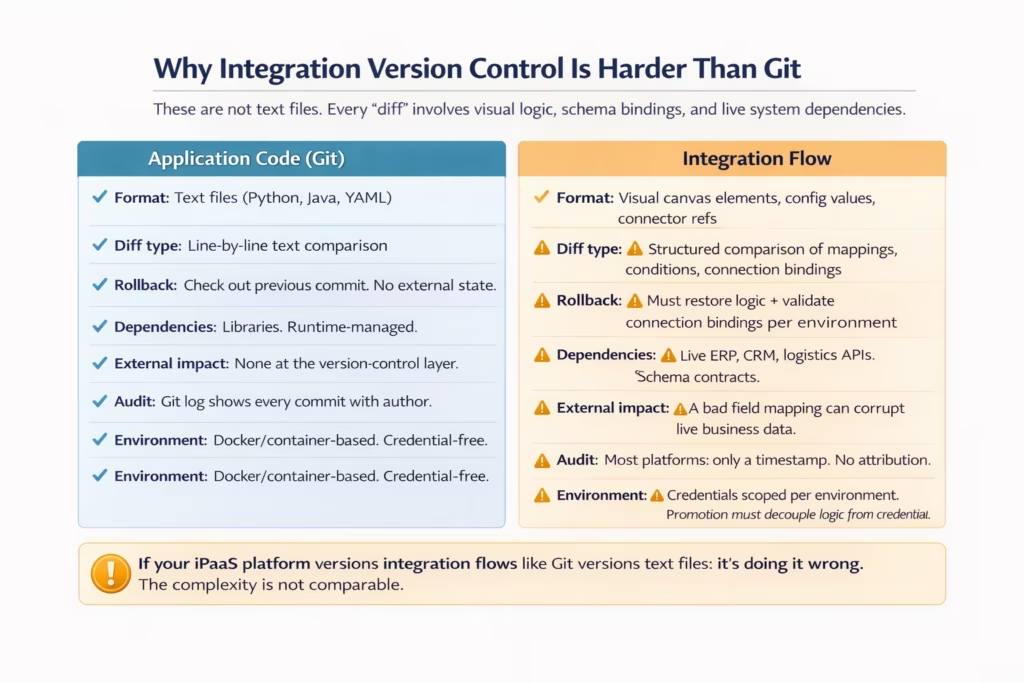
Three specific differences make integration version control harder than code version control.
First, the diff is visual, not textual. An integration flow is built on a visual canvas with drag-and-drop elements. A “change” might be a moved connector step, an updated field mapping expression, a new conditional branch, or a modified error handler. Diffing two versions of this requires the platform to compare structured canvas state, not text lines.
Second, rollback has external implications. Rolling back a Git commit restores a text file to a previous state with no side effects on running systems. Rolling back an integration flow version means the next execution of that flow uses the previous mapping logic, potentially affecting live records in your ERP and CRM. Rollback needs to be preceded by a validation that the restored version’s connector bindings still match the target environment’s current external system state.
Third, the audit requirement is more specific. Application code version history is useful for development productivity. Integration flow version history is required for regulatory compliance. SOX-regulated enterprises need to demonstrate that every change to a business-process-critical integration was made by an authorised individual, was reviewed before going live, and is attributable to a specific person on a specific date. Git log handles this for application code. Most iPaaS platforms do not generate a comparable audit-grade record for integration flows.
How MuleSoft Handles (and Doesn’t Handle) Version Control
MuleSoft doesn’t version-control integration flows natively inside the Anypoint Platform. Version control for MuleSoft projects requires setting up an external Git repository, configuring Anypoint Studio as a Git client, and managing Maven build pipelines, which is developer infrastructure work that requires MuleSoft specialist skills.
The standard MuleSoft approach to version control is: export your Mule application project from Anypoint Studio, commit the XML project files to a Git repository on GitHub, GitLab, or Bitbucket, and manage deployments through a CI/CD pipeline using Jenkins, Azure DevOps, or GitHub Actions. The flow logic is stored as XML in the Git repository, and version history is managed by the Git tooling, not by the Anypoint Platform itself.
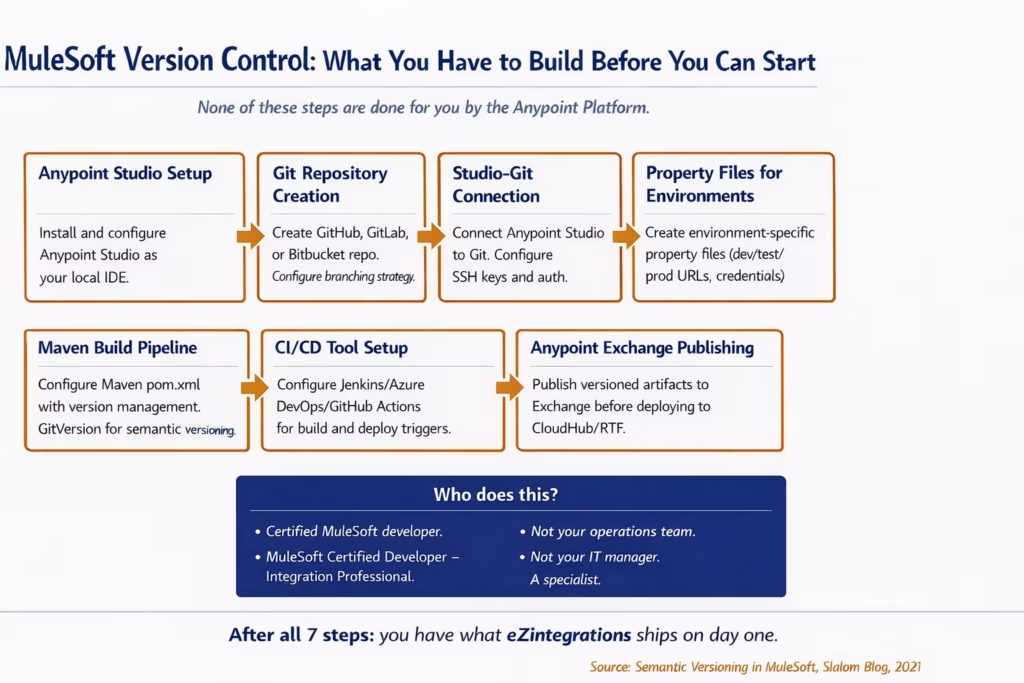
This architecture works. MuleSoft is used successfully at enterprise scale by organizations with the engineering resources to build and maintain this DevOps infrastructure. But three limitations are significant from a version control governance standpoint.
First, the version history lives outside the platform. Flow changes are tracked in Git, not in Anypoint. To see what changed between two versions of an integration flow, you need Git access, knowledge of MuleSoft’s XML project structure, and the ability to read diff output on Mule XML. That’s a technical skill barrier for IT managers, operations leaders, and compliance auditors who need to review flow changes without developer involvement.
Second, every small change triggers a release cycle. Because MuleSoft integration flows are application artifacts, any change, no matter how minor, needs to go through the full build-test-deploy pipeline before it reaches Production. This is the correct behaviour from a change management standpoint. But it makes the iteration cycle slower than platforms where a flow can be updated and promoted without a full Maven build.
Third, rollback is a re-deployment. To restore a previous version of a MuleSoft integration, you re-deploy the previous version from Anypoint Exchange. This is a developer action, not a platform UI action. At 2am during a production incident, “re-deploy from Exchange” requires a developer with the right permissions, not an on-call IT admin.
How Boomi Handles (and Doesn’t Handle) Version Control
Boomi AtomSphere includes process revision history and a branch-and-merge feature for AtomSphere integration processes, but as of the Q3 2025 Boomi roadmap, native Git integration for Data Integration was still listed as a future capability rather than a delivered feature.
Boomi’s native version control for AtomSphere integration processes provides a revision history within the platform, where you can view previous versions of a process and restore an earlier one. The platform added branching and merge capabilities in 2024 as an early access feature. Process fragments can be independently versioned and promoted across environments.
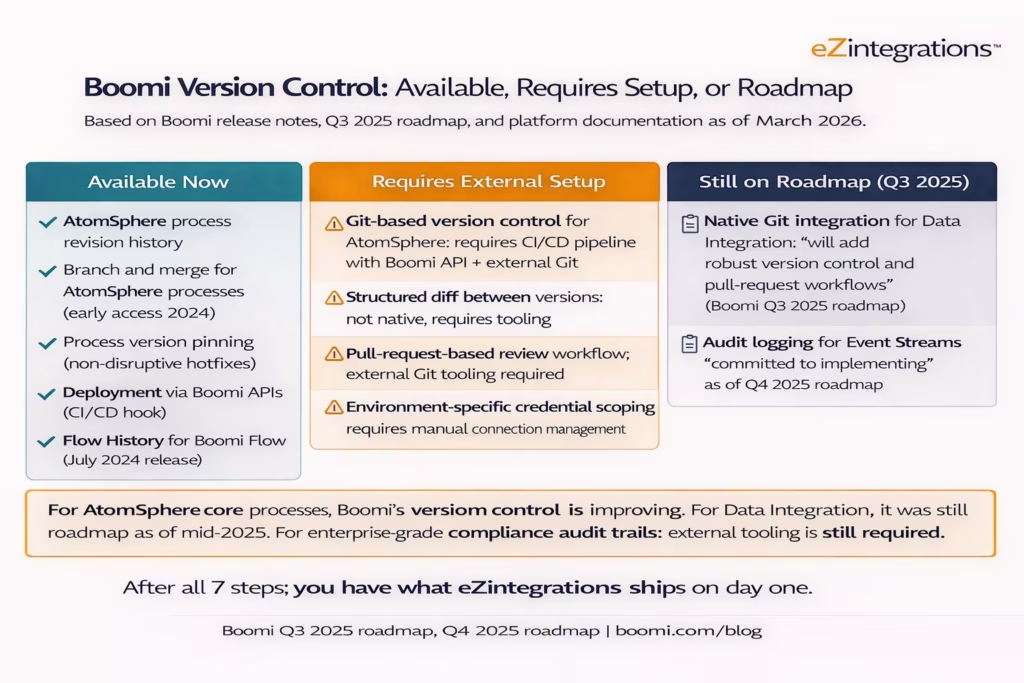
There are two important nuances in how Boomi handles version control.
For AtomSphere integration processes, Boomi has made genuine progress. Revision history, branch-and-merge capability, and process version pinning give teams a reasonable baseline for change management within the platform. The July 2024 release added Flow History with environment detail and change comparison for Boomi Flow. These are real capabilities, not marketing claims.
The gap is in structured diff and audit attribution. Boomi’s revision history shows you which version was active when. It does not show you, in a structured diff format, exactly which field mappings changed between version 12 and version 13 and who made each change. For compliance use cases where an auditor needs to review the specific content of a change and its approver, this gap matters.
For Boomi Data Integration (the Rivery acquisition, integrated in 2024), the Q3 2025 roadmap explicitly stated that native Git integration was forthcoming, using the phrase “native Git integration will add robust version control and pull-request workflows.” If native Git integration for Data Integration was still a roadmap item in Q3 2025, that product line did not have enterprise-grade version control as a current delivery.
The broader pattern: Boomi turns even small fixes into what one third-party analysis called “mini release cycles” with retesting and redeployment across environments. This structural friction with any change management creates an incentive for teams to batch changes, which creates larger, riskier deployments rather than small, controlled ones.
What Enterprise-Grade Integration Version Control Requires
Enterprise-grade integration version control requires seven specific capabilities, and the absence of any one of them produces a compliance gap, a production risk, or an operational bottleneck.
The benchmark for enterprise version control is not “we have revision history.” It’s “our integration changes are managed with the same rigour as our application deployments.” That requires seven things to be true simultaneously.
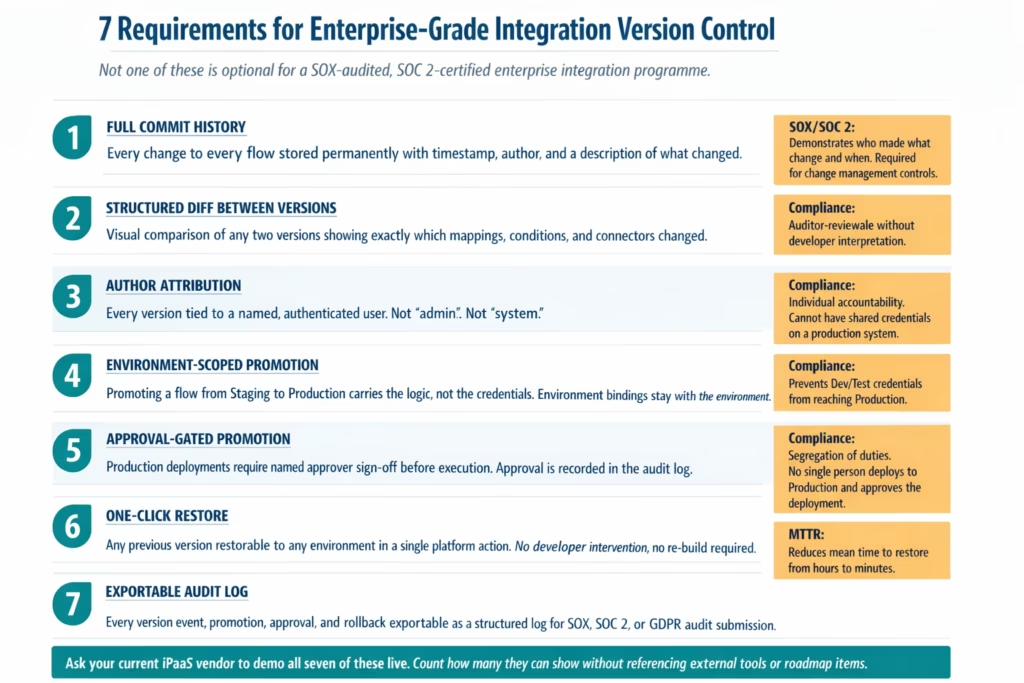
Requirement 1: Full commit history. Every change to every flow stored permanently. Not cleared on a rolling window. Not summarised to “last 10 versions.” The full history of every integration from first creation to current state.
Requirement 2: Structured diff. The ability to select any two versions of any flow and see a structured, human-readable comparison of what changed. Field mapping X changed from “Order.CustomerID” to “Order.Customer.ExternalID”. Conditional branch Y was added. Connector configuration Z was updated. Not a text file diff. A structured comparison of the visual and logical elements of the flow.
Requirement 3: Author attribution. Every version explicitly attributed to the authenticated user who made the change. “Admin” is not an author. A named individual with a traceable identity is an author.
Requirement 4: Environment-scoped promotion. When a flow is promoted from Staging to Production, the promotion carries the flow logic. The connection credentials stay scoped to the target environment. This prevents the most common class of “wrong environment” production incidents.
Requirement 5: Approval-gated promotion. A named approver must review and approve any promotion to Production. The approval is a platform action, not an email. The approver can see the structured diff before approving. The approval is logged in the audit trail.
Requirement 6: One-click restore. Any previous version of any flow can be restored to any environment in a single platform action. This is a UI action, not a developer rebuild. The mean time to restore from a bad deployment should be under 10 minutes.
Requirement 7: Exportable audit log. Every version event, promotion, approval, rollback, and change description is exportable as a structured log suitable for direct submission to a SOX or SOC 2 auditor. No manual compilation. No interpretation. A structured export from the platform.
The Business Consequences of Poor Integration Version Control
Poor integration version control produces three categories of business damage: production incidents, compliance failures, and knowledge loss, each of which compounds over the life of the integration programme.
This is not a theoretical risk. It is the set of incidents that IT teams experience repeatedly on platforms without enterprise-grade version control, and the pattern is consistent enough to predict.
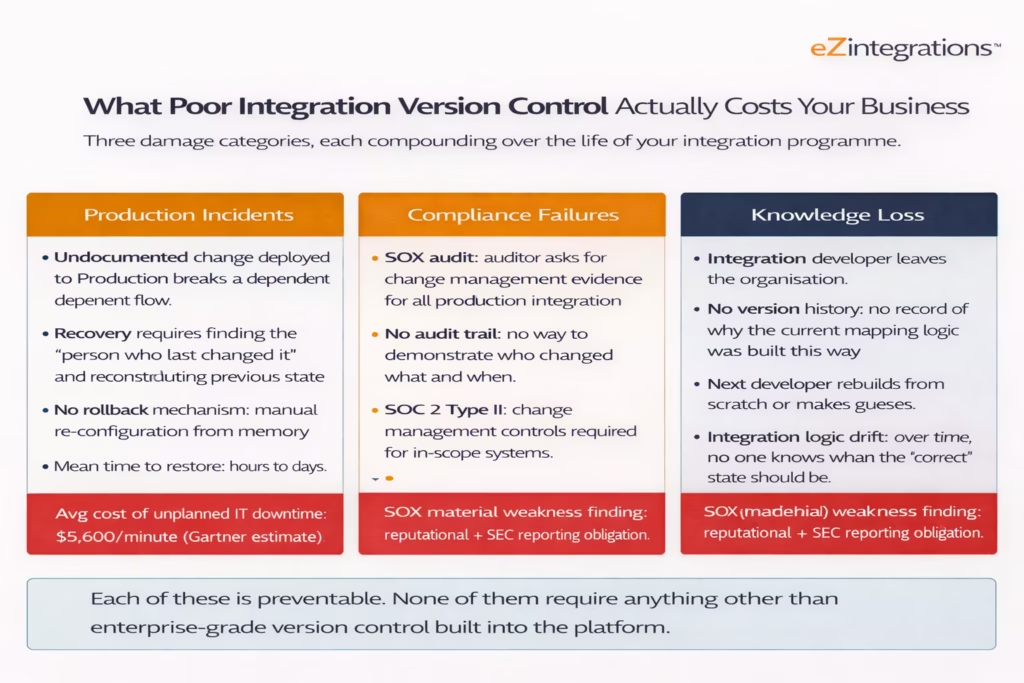
Production incidents from version control gaps follow a consistent pattern. A developer changes a field mapping in what they believe is the Dev environment. The change deploys to Production because the environment promotion step was skipped or the environment scoping was misconfigured. The order-to-cash flow starts rejecting records. The first task in the incident is to find out what changed and restore the previous state. With no version history, that means finding the person who made the change, reconstructing their memory of what the previous mapping looked like, and manually re-configuring the flow. Mean time to restore in this scenario is measured in hours.
Compliance failures from integration version control gaps are increasingly expensive. SOX Section 404 requires enterprises to maintain effective controls over financial reporting systems, which includes the integration flows that move financial data between ERP, banking, and reporting systems. A SOX auditor asking for evidence of change management controls over production integration flows and receiving “we don’t have a formal version history” has found a material weakness. That finding requires disclosure and remediation. The cost of a material weakness finding exceeds the cost of any enterprise iPaaS platform.
Knowledge loss from integration version control gaps is a slow-burning problem. Integration flows built without version history accumulate business logic that lives only in the memory of the developers who built them. When those developers leave, the organisation loses the understanding of why the current flow logic was built the way it was. Subsequent teams make changes based on their best guesses about intent, which introduces bugs. Over a three-to-five-year horizon, integration flows without version history become unmaintainable black boxes.
How eZintegrations Approaches Integration Version Control
eZintegrations treats every automation as a versioned artifact from creation, with full commit history, structured diff, author attribution, approval-gated promotion, and exportable audit trail built into the platform core, not into an external toolchain.
The eZintegrations version control model starts from the premise that integration flows are business-critical infrastructure and must be managed with the same rigour as regulated application code. The seven requirements in Section 5 are not aspirational targets: they are the baseline of what the platform delivers.

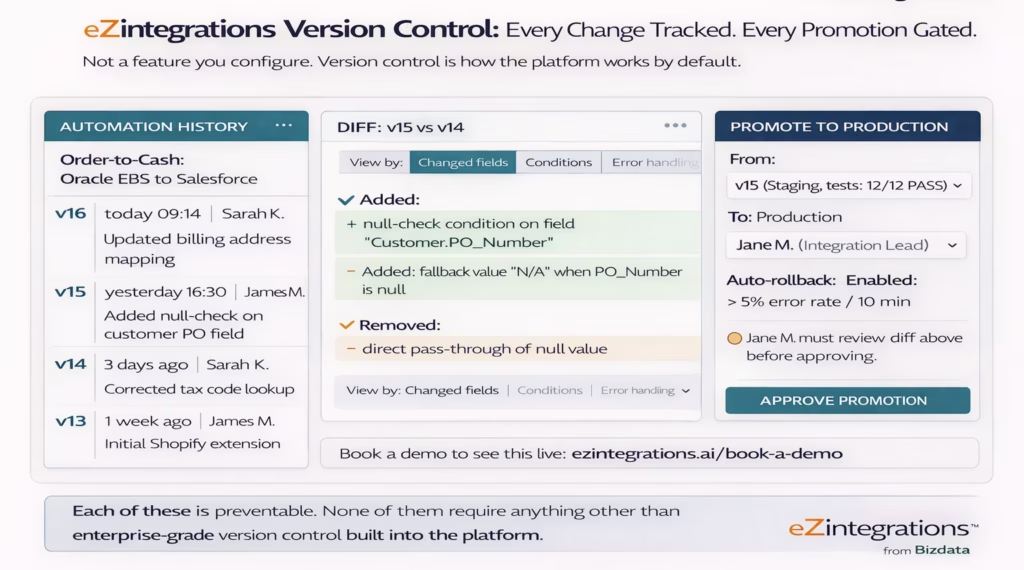
Version history in eZintegrations is continuous and permanent. Every change to every automation is stored with the author’s identity, the timestamp, and a description of what changed. The history is not cleared by upgrades, not limited to a rolling window, and not dependent on external Git configuration. It exists from the moment the automation is created.
Structured diff means that selecting any two versions of any automation shows a structured comparison of exactly which elements changed: which field mappings were added, removed, or modified; which conditions were added or changed; which connector configurations were updated. This comparison is readable by an IT manager or compliance auditor without developer interpretation.
Approval-gated promotion means that no automation can be promoted to Production without a named approver reviewing the structured diff and explicitly approving the promotion. This approval is a platform action. It is recorded in the audit log with the approver’s identity, the timestamp, and the version that was approved. Segregation of duties between the developer who built the change and the approver who authorised the deployment is enforced by the platform, not by a team agreement.
Automated rollback means that every Production automation has a configurable error threshold. If that threshold is breached after a promotion, eZintegrations automatically restores the previous version, logs the rollback event, and sends an alert. Recovery from a bad deployment does not require waking up a MuleSoft-certified developer at 3am.
Exportable audit log means every event in the version history, including promotions, approvals, rollbacks, and change descriptions, is exportable as a structured log for direct submission to SOX, SOC 2, or GDPR audits. No manual compilation. No developer involvement in preparing audit evidence.
The eZintegrations Automation Hub includes 1,000+ pre-built templates, all of which enter your version control history the moment you import them. Your first production-ready integration flow has a complete version history from day one. For AI Workflows and Goldfinch AI agentic automation, the same version control model applies: every LLM workflow configuration and every Goldfinch AI agent definition is versioned, diffable, approval-gated, and rollback-capable.
For teams building full CI/CD discipline around their integration programme, the version control model described here connects directly to the deployment pipeline capabilities covered in the CI/CD for integration pipelines guide.
Frequently Asked Questions
1. Does MuleSoft have built in version control for integration flows
MuleSoft does not provide native version control for integration flows directly inside the Anypoint Platform. Version control typically requires an external Git repository such as GitHub GitLab or Bitbucket combined with Anypoint Studio configured as a Git client and a Maven based build pipeline. Flow changes are stored as XML project files within the Git repository rather than as native Anypoint versioned artifacts. Setting up and maintaining this workflow usually requires MuleSoft certified developer expertise.
2. Does Boomi have version control for integration processes
Boomi AtomSphere provides process revision history and introduced branch and merge capability as an early access feature in 2024. For Boomi Data Integration the Rivery product line integrated into Boomi in 2024 native Git integration appeared on the Boomi roadmap in Q3 2025 as a forthcoming capability. However enterprise grade structured diff capabilities and compliance level audit logging across the full platform typically require additional external tooling.
3. What is the difference between version history and version control
Version history is a chronological list of saved states of a system or artifact with timestamps. Version control expands on version history by adding structured differences between versions author attribution approval workflows and an exportable audit trail. Many iPaaS platforms provide simple version history but enterprise grade version control requires all these components. The difference is important because version history alone generally does not meet SOX change management requirements or allow reliable rollback during production incidents.
4. What happens to integration version history when you switch iPaaS vendors
Version history stored within a proprietary iPaaS platform is usually not portable. When organizations migrate from MuleSoft Boomi or another platform the historical version record of integration flows remains in the previous platform environment. This means migration projects often require rebuilding integrations and starting a new version history record in the new platform. As a result the historical change log of integrations typically does not transfer between vendors.
5. What compliance standards require integration version control
Several regulatory frameworks require strong change management controls over systems that process enterprise data. SOX Section 404 requires documented change management controls for systems generating processing or storing financial data including integrations between ERP banking accounts payable and reporting systems. SOC 2 Type II requires evidence of controlled change management for systems within scope. GDPR Article 30 requires records of processing activities which may include documentation of major changes to integrations handling personal data. HIPAA audit controls standard 45 CFR 164.312 b applies to systems managing protected health information including healthcare data integrations.
6. Can eZintegrations export version history for a SOX or SOC 2 audit
Yes, eZintegrations allows export of every version event promotion approval rollback and change description as a structured audit log. The export includes the author identity timestamp version numbers approval record and a diff summary of the changes made. This audit record is designed for direct submission to SOX or SOC 2 auditors without requiring manual documentation or developer interpretation.
Conclusion
The version control problem in enterprise integration is not a matter of technical sophistication. It’s a matter of design priorities. MuleSoft was designed for developer-built API-led connectivity. Version control is something you configure externally. Boomi was designed for low-code connectivity. Version control has been improving, but native Git for Data Integration was still a roadmap item in Q3 2025.
eZintegrations was designed for enterprise automation governance. Version control is how the platform works, not something you configure. Every automation has a full commit history, a structured diff, author attribution, approval-gated promotion, automated rollback, and an exportable audit log from the moment it’s created.
Your integration flows connect your ERP to your CRM, your order management to your fulfilment, your HRIS to your payroll. A change management gap in that infrastructure is a production incident, a compliance finding, and a knowledge loss risk all at once. You don’t need to accept that risk.
Book a free demo with the eZintegrations team and ask us to walk through the version control model live: flow history, structured diff, approval gate, automated rollback, and audit log export. All in 30 minutes.
Explore the Automation Hub to see how 1,000+ pre-built templates enter your version history from day one. Check eZintegrations pricing for per-automation annual costs with no platform fee.

