
CI/CD for Integration Pipelines: Why Most iPaaS Platforms Get It Wrong
March 11, 2026CI/CD for integration pipelines means automating how you build, test, and deploy integration flows across Dev, Test, and Production environments using version control, automated testing, and environment-specific promotion gates. Most iPaaS platforms lack native Git integration, automated rollback, and environment-isolated testing, which forces teams to deploy manually and break production integrations with every change.
TL;DR
CI/CD integration pipelines. Most iPaaS platforms were built for connectivity, not for software delivery discipline. CI/CD was added as an afterthought, if at all. Elite software delivery teams deploy multiple times per day with a change failure rate under 15%. Most integration teams deploy manually, once per sprint, with no automated rollback. The core CI/CD gaps in legacy iPaaS: no native Git integration, no environment promotion gates, no automated integration testing, and no rollback on deployment failure. eZintegrations treats every automation as a versioned, promotable artifact with environment-isolated deployment, audit trails, and team-level access controls built in. If your team is still copying integration flows between environments by hand, this post is for you.
Introduction
Your application developers have CI/CD pipelines. Your infrastructure team runs GitOps. Your data engineers use dbt with version-controlled transforms and automated test suites.
Then there’s your integration team. Logging into a GUI, making changes directly in Production, hoping nothing breaks.
That gap is not a minor inconvenience. It is a structural delivery risk that shows up as production outages, undocumented changes, and integration bugs that take days to trace back to a specific release. The DORA State of DevOps research consistently shows that elite performing teams deploy on demand, recover from failures in under an hour, and maintain change failure rates below 15%. Integration pipelines, running on platforms that were designed for connectivity rather than delivery discipline, rarely get close to those benchmarks.
This post explains what proper CI/CD for integration pipelines actually looks like, why most iPaaS platforms fail to deliver it, and what your team should demand from any platform managing enterprise integration flows in 2026.
What Is CI/CD for Integration Pipelines?
CI/CD for integration pipelines is the practice of applying the same automated build, test, and deployment disciplines to your integration flows that software engineering teams apply to application code.
In application CI/CD, every code commit triggers an automated pipeline: build, unit test, integration test, staging deploy, and then a controlled promotion to production. The DORA research program defines four key metrics for measuring this: deployment frequency, lead time for changes, change failure rate, and mean time to restore. Elite teams hit deployment frequency of multiple times per day and change failure rates under 15%.
Integration CI/CD applies the same model to the flows, workflows, and automation logic running between your enterprise applications. When an integration developer changes a mapping rule, adds a new transformation, or updates a connector configuration, that change should go through a controlled pipeline rather than being applied directly to a running production instance.

The critical distinction between CI/CD for applications and CI/CD for integrations: integration flows have external dependencies. An application’s unit tests run in isolation. An integration flow connects a live ERP, a live CRM, and a live logistics API. Testing it requires mocking those external endpoints, validating payload contracts, and confirming that schema changes upstream don’t break downstream mappings. That complexity is exactly why most iPaaS platforms never built proper CI/CD support. It was hard to do, and most early iPaaS buyers didn’t ask for it.
Why Integration CI/CD Is Different from Application CI/CD
Integration pipelines have a testing problem that application code doesn’t: every external dependency is a potential failure point that you don’t control.
When an application developer writes a unit test, they mock every external call. The test suite runs in milliseconds with no network dependency. When an integration engineer tests an order-to-cash flow connecting Oracle ERP, Salesforce, and a 3PL logistics API, they’re testing behaviour across three systems with different schemas, different auth models, and different rate limits. The test either reaches those live systems (risky in a shared Dev environment) or requires a mock layer that most iPaaS platforms don’t provide natively.

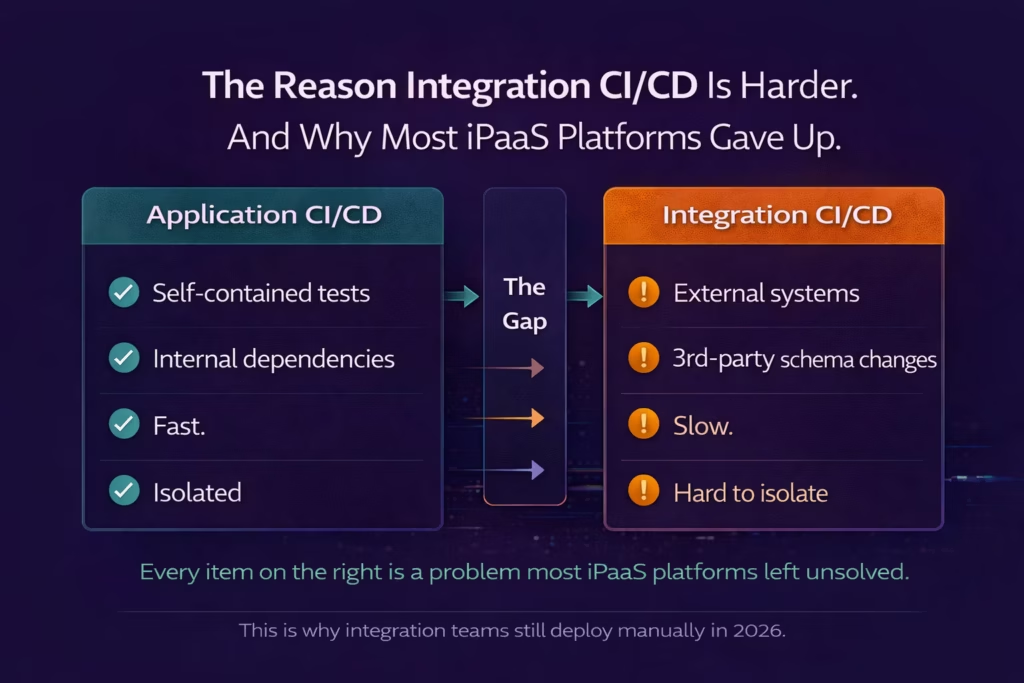
Four specific differences make integration CI/CD harder to implement than application CI/CD.
First, environment isolation requires separate credential sets. Your Dev integration instance needs its own Salesforce sandbox credentials, its own Oracle ERP Dev environment access, and its own staging database connection. Most iPaaS platforms store credentials at the platform level rather than the environment level, which means promoting a flow from Dev to Production requires manually re-pointing connections. That’s a manual step. Manual steps break.
Second, schema changes propagate silently. If a Salesforce administrator adds a required field to an Account object, every integration that creates or updates Account records will fail. Application CI/CD catches this at the contract test stage. Integration platforms without schema contract validation catch it in Production, after business data has already been corrupted.
Third, rollback for integrations is stateful. Rolling back an application deployment means re-deploying a previous container image. Rolling back an integration deployment means re-promoting a previous flow version, which may have already processed records that the new version would have handled differently. Rollback for integration flows requires version-aware state management, not just binary image swaps.
Fourth, integration testing requires mock infrastructure. End-to-end integration tests against live systems are destructive. Creating a test order in a live ERP, posting a test record to a live CRM, and triggering a test shipment in a live logistics system is not safe to do on every code commit. Proper integration CI/CD requires a mock layer for external system responses, which most iPaaS platforms have never built.
The 5 Ways Most iPaaS Platforms Fail at CI/CD
Most iPaaS platforms fail CI/CD on five specific dimensions, and each failure compounds into a predictable set of production incidents.
Legacy iPaaS platforms were designed in an era when “integration” meant building a point-to-point connection between two systems and leaving it running indefinitely. The idea of treating an integration flow as a versioned software artifact, subject to the same delivery discipline as application code, was not in the original design brief. The five failure modes below are the direct consequence of that design choice.
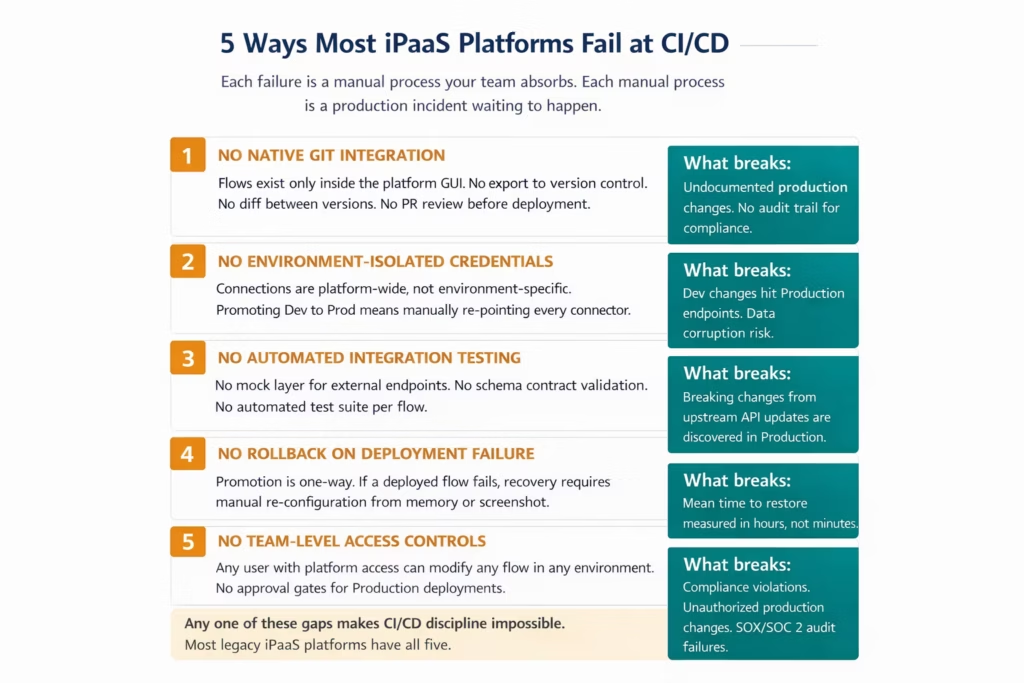
Failure 1: No native Git integration. The flow exists inside the iPaaS GUI. You can see the current version. You cannot see what it looked like six weeks ago. You cannot run a diff between what’s in Dev and what’s in Production. You cannot require a pull request review before a flow change goes live. Without Git integration, integration flows are not software artifacts. They’re configurations. And configurations that live only in a vendor’s cloud have no version history.
Failure 2: No environment-isolated credentials. Connections in most iPaaS platforms are stored at the platform level. A “Salesforce connection” in your platform points to one Salesforce org. When you promote a flow from Dev to Production, you have to manually re-configure every connection to point at the correct Production endpoints. Every manual step in a deployment pipeline is a failure mode waiting to activate.
Failure 3: No automated testing layer. This is the most expensive failure. Without a mock layer for external endpoints and an automated test suite per flow, the only way to know if a promoted flow works is to run it in Production and see what happens. Upstream API changes, schema updates, and payload format changes from third-party systems are discovered as production failures rather than CI test failures.
Failure 4: No rollback capability. Deployments in most iPaaS platforms are forward-only. If you promote a broken flow to Production, recovery means manually re-configuring the previous version from memory, documentation (if it exists), or a screenshot taken before the promotion. The DORA research shows elite teams restore from production failures in under an hour. Manual iPaaS rollback typically takes hours.
Failure 5: No team-level access controls with approval gates. In most iPaaS platforms, any user with access to the Production environment can modify any flow at any time without approval. This is not just a CI/CD failure: it’s a compliance failure. SOX-regulated enterprises, SOC 2-certified organisations, and GDPR-compliant teams cannot accept direct Production modification without an audit trail and an approval workflow. Yet most iPaaS platforms provide exactly that as their default deployment model.
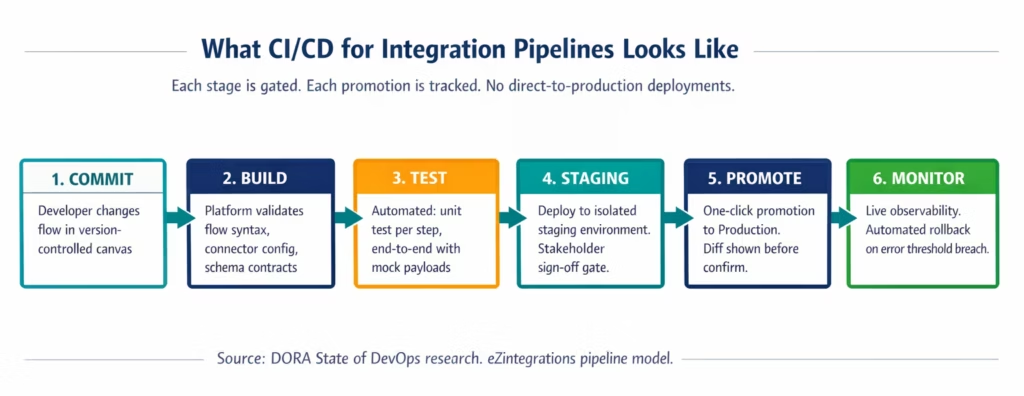
What Good Integration CI/CD Looks Like in Practice
A properly implemented integration CI/CD pipeline has six components, and every one of them must be native to the platform for the system to work reliably at enterprise scale.
The six components are: version-controlled flow storage, environment-isolated connection management, automated integration testing with mock endpoints, staged promotion with explicit gates, automated rollback on failure thresholds, and a full audit trail for every deployment event. None of these are exotic requirements. They are standard in application CI/CD. They are absent in most integration platforms.
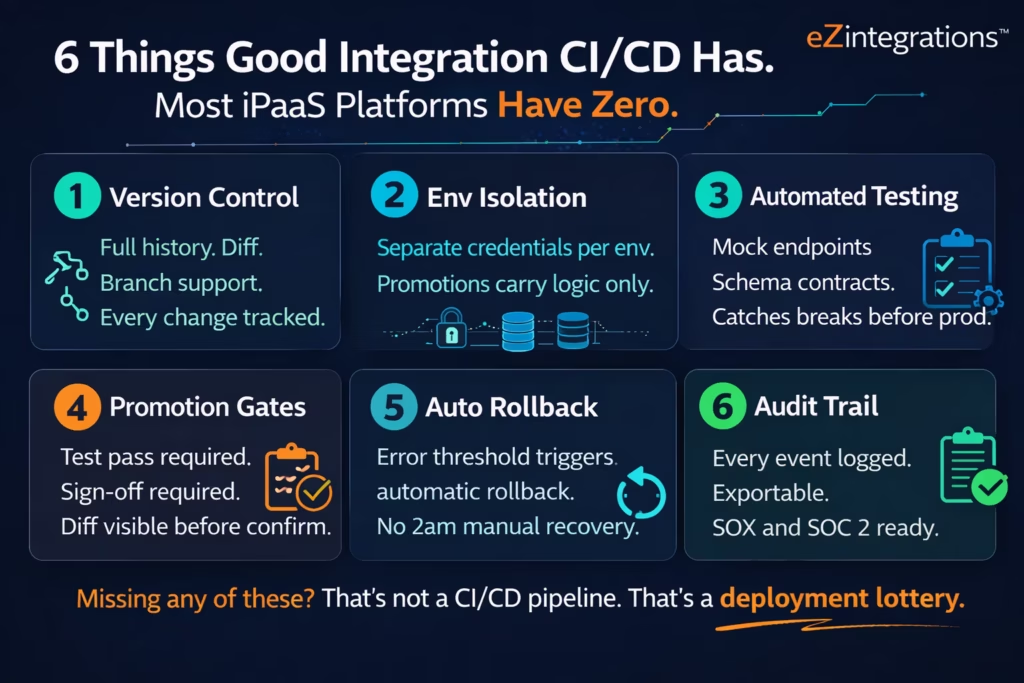
Version control for integration flows means every flow version is stored with a full commit history, comparable to a Git repository. You can see exactly what changed between version 12 and version 13 of your order-to-cash flow, who changed it, and when. You can branch a flow for parallel development, test the branch independently, and merge changes with a review gate.
Environment-isolated connections mean your Dev environment uses Salesforce sandbox credentials, your Staging environment uses a Staging org, and your Production environment uses the Production org. Promoting a flow from Staging to Production carries the flow logic, the mapping rules, and the transformation code. It does not carry the credentials. Credentials are bound to environments, not to flows.
Automated testing with mock endpoints means your CI pipeline doesn’t need to reach live external systems to validate a flow change. When a developer updates a mapping in the Oracle ERP-to-Salesforce account sync flow, the automated test suite fires with mocked Oracle ERP and Salesforce responses, validates the transformation logic, confirms the output schema matches what Salesforce expects, and reports pass or fail in under 60 seconds.
Staged promotion gates mean that a flow cannot move from Dev to Staging until its automated test suite passes. It cannot move from Staging to Production until a designated approver has reviewed the diff and clicked approve. These gates are enforced by the platform, not by a team agreement that everyone ignores when there’s a deadline.
Automated rollback means that if a newly promoted flow in Production starts generating errors above a defined threshold (say, 5% error rate over 10 minutes), the platform automatically promotes the previous known-good version back, sends an alert, and logs the rollback event. Your on-call engineer wakes up to “rollback completed” rather than “Production is down, go fix it manually at 3am.”
Full audit trail means every deployment event is logged with a complete record: who initiated the promotion, what version was promoted, what tests passed, what approval was given, and what the diff showed. This log is exportable for SOX, SOC 2, and GDPR compliance audits.
How to Evaluate Any iPaaS Platform for CI/CD Readiness
When evaluating an iPaaS platform’s CI/CD capability, ask nine specific questions. If any answer is “not natively supported” or “requires a custom script,” that gap will become your team’s manual process.
This evaluation framework was built from the five failure modes in Section 3 and the six components in Section 4. Use it as a checklist in any integration platform RFP or demo.
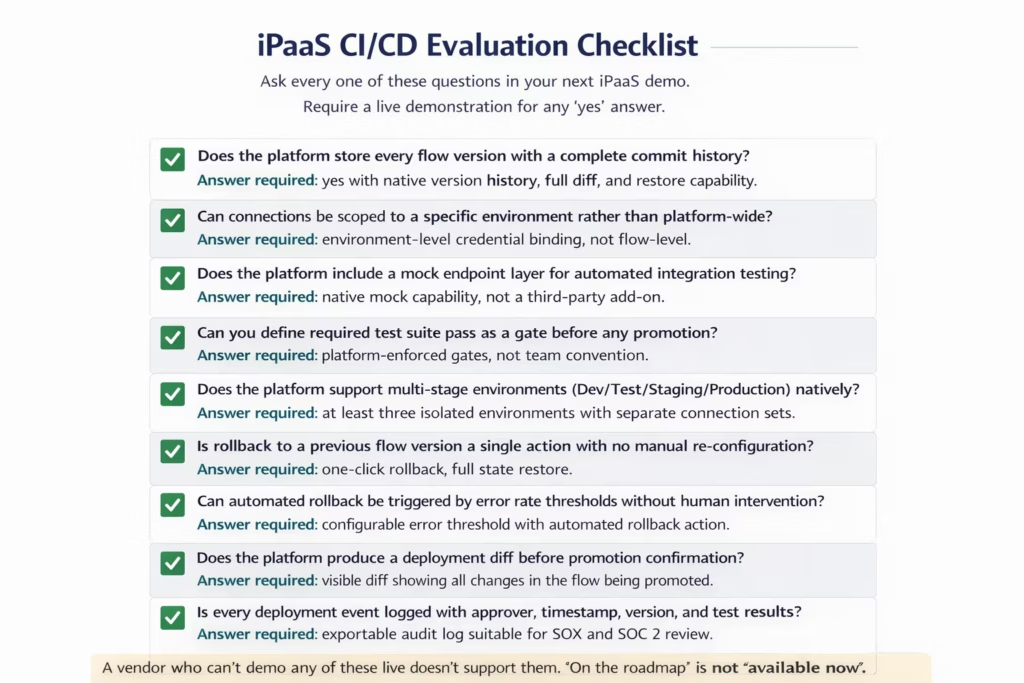
Three of these questions expose the most common gaps quickly.
Ask “Can you show me the commit history for this flow?” in the live demo. Most platforms will show you a list of saved versions with timestamps. That’s not commit history. Commit history means you can see exactly which field mappings changed, which conditions were added, and which connector configuration was updated between any two versions, presented as a structured diff.
Ask “Show me how you promote this flow from Staging to Production with a required approval.” Most platforms will show you a “deploy to Production” button with no approval gate. A genuine CI/CD-capable platform will show you an approval workflow where the deployment is queued, a notification goes to the designated approver, and the flow cannot be promoted until that approval is granted.
Ask “What happens if I deploy a broken flow to Production right now?” Most platforms will say “you re-deploy the previous version.” A CI/CD-capable platform will either prevent the deployment if automated tests have not passed, or will automatically roll back if the error rate threshold is breached after deployment.
How eZintegrations Handles Integration CI/CD
eZintegrations treats every automation flow as a versioned, promotable artifact from the moment it’s created, with environment-isolated deployment, approval gates, and automated rollback built into the platform core.
The eZintegrations approach to integration CI/CD starts from the premise that production integration flows are critical business infrastructure. The same discipline your engineering team applies to application deployments applies to the integration flows running your order-to-cash, procure-to-pay, and hire-to-retire processes.
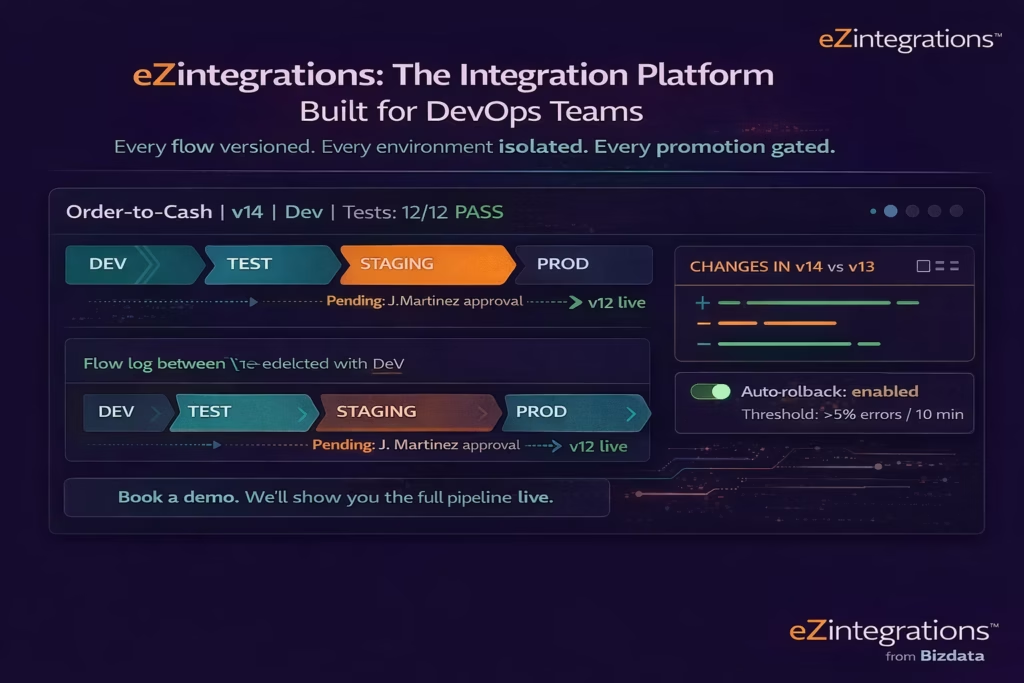
Version control in eZintegrations means every automation has a full version history with a structured diff between any two versions. You can see exactly what changed between the version running in Production and the version your developer is working on in Dev. You can restore any previous version in a single action.
Environment isolation means Dev, Test, Staging, and Production each have their own connection sets. Promoting a flow from Staging to Production carries the logic, not the credentials. Your Production Salesforce org credentials are never touched during a Dev or Staging deployment. That eliminates the category of production incidents caused by a Dev environment pointing at a Production endpoint.
Approval gates mean a designated approver must review and approve any promotion to Production. The approver sees the full version diff before approving. They can reject, comment, or approve. A flow cannot reach Production without that approval being granted. This is enforced at the platform level, not by team convention.
Automated rollback means you configure an error threshold for each production flow. If a promoted flow starts generating errors above that threshold (for example, more than 5% of executions failing within a 10-minute window), eZintegrations automatically rolls back to the previous version, logs the event, and alerts your team. Your on-call rotation covers real incidents, not recoverable deployment errors.
Audit trail means every deployment event (who promoted, when, what version, what tests passed, what approval was given, and what diff was reviewed) is logged and exportable. This log supports SOX, SOC 2 Type II, and GDPR compliance documentation without additional tooling.
eZintegrations’ Automation Hub includes 1,000+ pre-built automation templates, each versioned and promotable through the same CI/CD pipeline. Your team doesn’t start from scratch: you import a production-ready template, customise it for your environment, and push it through the pipeline. That first production deployment can happen in days, not months.
For AI-powered workflows and agentic automation, AI Workflows and Goldfinch AI of eZintegrations follow the same CI/CD model. Every agentic flow, every LLM-integrated workflow, and every Goldfinch AI agent configuration is versioned, promotable, and subject to the same approval gates as standard integration flows.
Frequently Asked Questions
1. What does CI/CD mean for integration pipelines
CI CD for integration pipelines means every change to an integration flow passes through an automated build test and controlled deployment process before reaching production. This includes version control for flows automated testing with mock endpoints environment isolated credentials staged promotion gates and automated rollback on failure. The approach applies the same disciplined software delivery practices used by application engineering teams to integration logic.
2. Why do most iPaaS platforms lack proper CI/CD support
Most iPaaS platforms were originally designed when integrations were primarily point to point connections that once deployed remained unchanged for long periods. Treating integration flows as versioned software artifacts was not part of the original platform design. Full CI CD capability requires native Git integration mock testing infrastructure environment isolation and automated rollback mechanisms which require significant platform engineering investment. As a result many vendors added only partial CI CD capabilities later which often feel bolted on rather than fundamental.
3. What is the biggest CI/CD risk in a legacy iPaaS deployment
The largest operational risk is direct modification of production integrations. Many legacy iPaaS platforms allow users with production access to change integration flows without approval gates automated testing or a reliable audit trail. This creates multiple risks including production outages caused by unreviewed changes compliance exposure in regulated environments such as SOX or SOC 2 and integration logic drift where production and development environments gradually diverge with no clear record of when or why changes were introduced.
4. How does environment isolation work in integration CI/CD
Environment isolation ensures that each deployment environment such as development testing staging and production uses its own connection credentials and external system endpoints. For example a development integration flow may connect to Salesforce sandbox environments a staging database and mock ERP endpoints while the production deployment connects to live Salesforce production databases and the production ERP. The promotion process moves only the integration logic between environments while credentials remain tied to each environment preventing development or test processes from accidentally writing data to production systems.
5. What DORA metrics should an integration team target
DORA defines four key metrics used to measure software delivery performance. For integration teams operating with a mature CI CD pipeline deployment frequency should occur at least weekly while elite teams deploy on demand. Lead time for changes should be under one day with elite teams achieving under one hour. Change failure rate should remain under fifteen percent while elite teams maintain a range of zero to fifteen percent. Mean time to restore service after failure should remain under one day with elite teams restoring in under one hour. Teams operating without CI CD often deploy monthly and experience restoration times measured in hours or days.
6. Can eZintegrations integrate with GitHub, GitLa, or Azure DevOps
eZintegrations provides native version control for all integration flows within the platform including complete commit history change comparison and branching capabilities. For organizations that require integration with external Git providers such as GitHub GitLab or Azure DevOps as part of a broader DevOps toolchain teams can request a product demonstration to review current capabilities and discuss roadmap alignment with their existing CI CD infrastructure.
Conclusion
The phrase “CI/CD for integration pipelines” should not be a specialist concern. It should be a standard requirement on every integration platform procurement checklist.
Every production outage traced to an undocumented integration change, every SOX finding generated by a direct Production modification, every 3am incident caused by a promoted flow with no automated rollback: these are not bad luck. They are the predictable consequences of running integration infrastructure on platforms that were not designed for software delivery discipline.
The good news is that the gap is closable. Version control for flows, environment isolation, automated testing, promotion gates, automated rollback, and audit trails are not exotic features. They’re table-stakes DevOps practices applied to integration logic. The platforms that treat them as core architecture rather than bolt-on add-ons are identifiable in a 30-minute demo.
Your integration flows run your order-to-cash, your procure-to-pay, and your employee onboarding. They deserve the same delivery rigour your application developers apply to every code change.
Book a free demo with the eZintegrations team and ask us to walk through the full CI/CD pipeline live: version diff, promotion gate, approval workflow, and automated rollback. We’ll show you all of it in 30 minutes.
Explore the Automation Hub to see how 1,000+ pre-built templates accelerate your first production-ready integration through the pipeline.

