
Agentic AI Platform: The Next Frontier of Enterprise Automation
March 9, 2026Agentic AI for enterprise, delivered through eZintegrations Goldfinch AI, is a multi-agent system where a Planner Agent creates a project plan with tasks and milestones, specialist sub-agents execute tasks in parallel or serial using defined dependencies, a Critic Agent monitors progress and triggers human review, and an Aggregator Agent synthesizes the final output with enterprise guardrails applied across ERP, SCM, PLM, and CX systems.
TL;DR
Agentic AI is the fourth and most advanced level of enterprise automation. A single Master Agent coordinates multiple specialist sub-agents working in parallel to deliver a finished business outcome autonomously. eZintegrations Agentic AI, powered by Goldfinch AI, uses a four-agent architecture: Planner Agent, Specialist Sub-Agents, Critic Agent, and Aggregator Agent. Each plays a specific role in delivering the outcome. Task dependencies between sub-agents are managed using project plan logic: Finish-to-Start, Finish-to-Finish, Start-to-Start, and Start-to-Finish. No other enterprise platform manages multi-agent coordination this way. The Critic Agent monitors progress, checks milestones, and triggers Human-in-the-Loop notifications when human review is needed. It is built into the architecture, not added as an afterthought. eZintegrations Agentic AI works in two modes: as a conversational Chat Interface where users interact with the Master Agent directly, and as a Workflow Component where the entire multi-agent system is callable inside an integration pipeline.
What is Agentic AI for Enterprise? A Precise Definition
Agentic AI for enterprise is a multi-agent system where a coordinating intelligence breaks a complex business objective into a structured plan, assigns tasks to specialist agents with defined dependencies, monitors execution in real time, and delivers a finished, validated outcome across enterprise systems without requiring human orchestration.
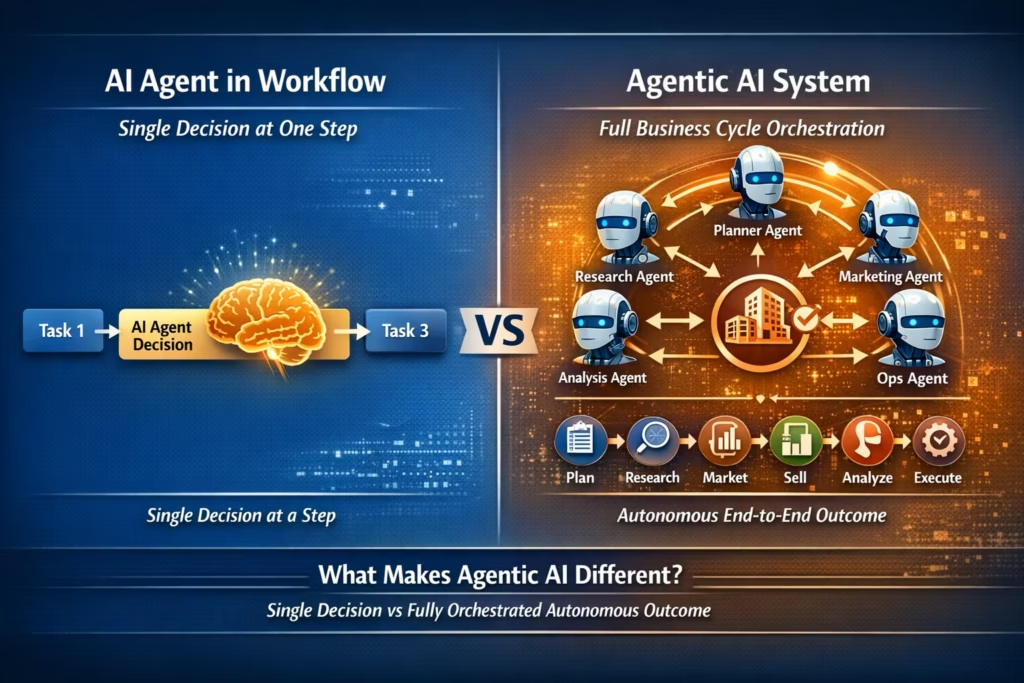
This definition separates Agentic AI from everything that came before it. A single AI agent makes a decision at one workflow step. Agentic AI coordinates a team of agents, each working on their part of a larger objective simultaneously, with full awareness of how their outputs feed into each other and into the final result.
Think of it as the difference between hiring one specialist and running a full project team. A single AI agent is the specialist who handles invoice approval decisions. An Agentic AI system is the project team that takes a procurement requisition and delivers an approved, matched, and reconciled purchase cycle autonomously, across SAP, Salesforce, and your supplier APIs, with every step logged, every milestone checked, and every exception escalated to the right human at the right moment.
According to Gartner, by 2028 at least 15% of day-to-day enterprise business decisions will be made autonomously by Agentic AI systems, up from less than 1% in 2024. The enterprises building Agentic AI infrastructure now are establishing a compounding advantage that will be extremely difficult for late movers to close.
The Four Levels of Enterprise Automation: Why Agentic AI is Level 4
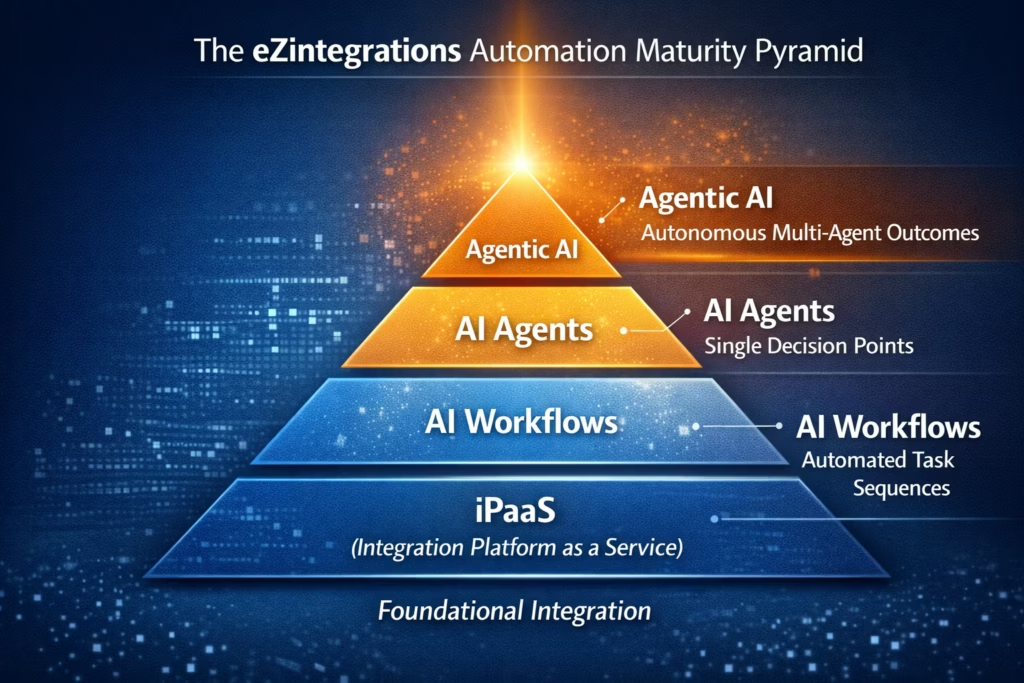
Agentic AI is the fourth level of a precise automation maturity model, and understanding what the first three levels do is essential for understanding why the fourth level is categorically different from all of them.
eZintegrations is built on a four-level automation architecture. Most enterprises are somewhere between Level 1 and Level 2. Level 4 represents the frontier of what enterprise automation can deliver today.
Level 1: Workflows (iPaaS)
Structured data moves between systems using defined rules. SAP syncs with Salesforce. Your WMS sends inventory records to your demand planning system. The data is always structured, the rules are always defined.
Level 2: AI Workflows
One or more pipeline steps need to handle unstructured data. Emails become purchase orders. EDIFACT files become JSON. PDFs become structured ERP records. Document Intelligence handles the conversion step.
Level 3: AI Agents
One or more pipeline steps require a human-like decision. An agent activates at that step, uses its tools to gather context, reasons across the available data, and decides what to do next. One workflow can have multiple agent decision steps.
Level 4: Agentic AI
A complex business objective requires multiple agents working in coordination, each handling their specialist domain, with task dependencies managed across the team, progress monitored in real time, and a finished, validated outcome delivered autonomously. That’s what this blog covers.
The progression matters because it tells you exactly where to start. You don’t deploy Agentic AI before you’ve solved structured integration. You build up through the levels as your automation maturity grows.
The eZintegrations Agentic AI Architecture: Four Agents, One Outcome
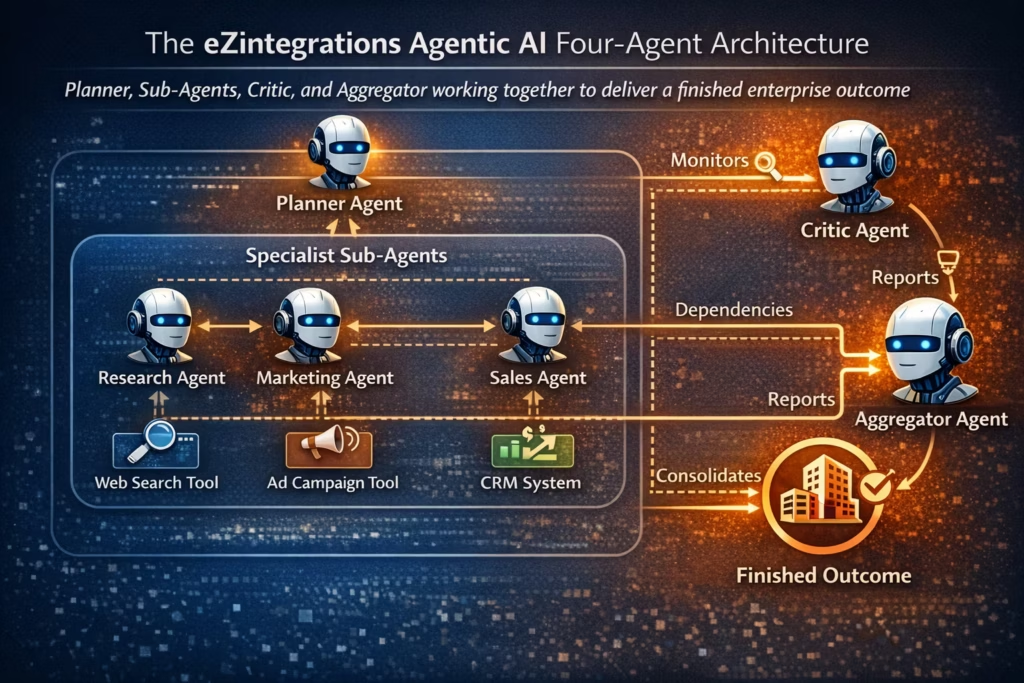
The eZintegrations Agentic AI architecture, delivered through Goldfinch AI, uses four distinct agent roles that work together in a coordinated system: the Planner Agent creates the execution plan, Specialist Sub-Agents execute the tasks, the Critic Agent monitors progress and quality, and the Aggregator Agent synthesizes and validates the final output.
This four-agent architecture is more structured, more auditable, and more enterprise-ready than any competing Agentic AI platform available in 2026. Here is exactly what each role does.
The Planner Agent: Creating the Execution Blueprint
The Planner Agent is the first agent to activate when a business objective is received by Goldfinch AI. Its job is to decompose the objective into a structured project plan with phases, tasks, milestones, and tool assignments.
The Planner Agent produces a complete execution blueprint: every task the system needs to complete, which specialist sub-agent and which tools handle each task, what the dependencies are between tasks, and what milestones mark critical checkpoints in the execution. The Planner doesn’t execute. It designs the execution.
This approach mirrors how the best human project managers work. Before anyone starts doing, the plan defines what needs to happen, in what order, with what resources, and what success looks like at each stage.
Specialist Sub-Agents: Executing the Tasks
Each task in the Planner’s project plan is executed by a specialist sub-agent equipped with the tools that task requires. A sub-agent handling supplier verification might use Web Crawling and API Tool Calls. A sub-agent handling invoice validation uses Document Intelligence and Data Analytics. A sub-agent handling compliance checking uses Knowledge Base Vector Search and Integration Workflow as a Tool.
Sub-agents work autonomously within their task scope. They don’t need to know what the other sub-agents are doing. They receive their task, execute it using their assigned tools, and return their output. The dependency model determines when each sub-agent can start and what it needs from other sub-agents before it can proceed.
The Critic Agent: Monitoring, Evaluating and Escalating
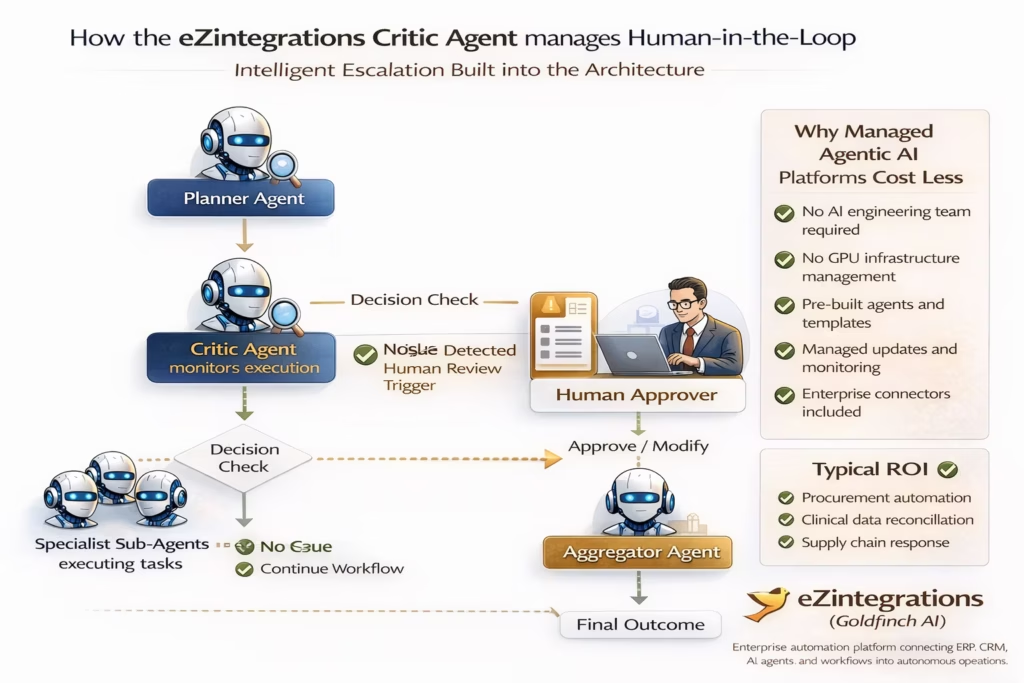
The Critic Agent runs continuously throughout execution. It monitors every sub-agent’s progress against the Planner’s project plan, checks milestone completion, evaluates output quality at each stage, and makes a critical determination: is the project on track, does it need adjustment, or does it need a human?
When the Critic Agent determines that a human decision is required, it triggers a Human-in-the-Loop notification immediately. The right person receives a notification with full context: what the agents have completed so far, what decision or input is needed, and what happens next once the human responds. Execution pauses at that point and resumes automatically when the human input is received.
The Critic Agent is not an optional add-on. It’s a core architectural component of Goldfinch AI. Every Goldfinch AI deployment has a Critic Agent running throughout execution.
The Aggregator Agent: Synthesizing the Finished Outcome
When all sub-agent tasks are complete, the Aggregator Agent takes over. Its job is to collect every output from every sub-agent, synthesize them into the finished business outcome, and apply enterprise guardrails before delivering the result.
Guardrails at this stage mean: role-based access controls applied to the output data, privilege validation ensuring the outcome respects data governance rules, consistency checking across all sub-agent outputs for conflicts or gaps, and quality re-verification against the original objective. The Aggregator Agent works across enterprise datasets from SAP, Oracle, Infor, and other ERP, SCM, PLM, and CX systems natively.
The output the Aggregator delivers is not a collection of raw agent results. It’s a finished, validated, enterprise-grade business outcome ready for the next action in your workflow.
How Task Dependencies Work in Multi-Agent Systems: The Project Plan Model
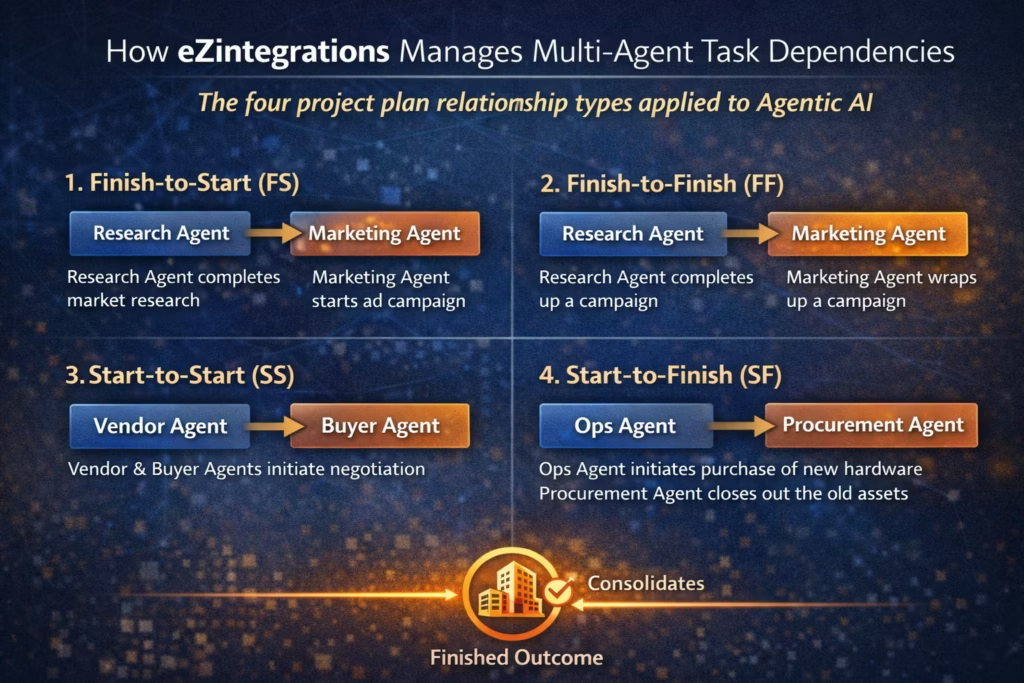
eZintegrations manages task dependencies between sub-agents using the same four relationship types used in professional project management: Finish-to-Start, Finish-to-Finish, Start-to-Start, and Start-to-Finish, making it the only enterprise platform that manages multi-agent coordination with project plan precision.
Most competing Agentic AI platforms execute agents either fully in parallel (everything runs at once, regardless of dependencies) or fully in sequence (one agent finishes before the next starts). Both approaches create problems at enterprise scale. Full parallelism creates dependency failures when an agent needs another agent’s output to proceed. Full sequencing is slow and misses the efficiency gains of parallel execution.
eZintegrations solves this with a dependency model your project managers already understand:
Finish-to-Start (FS): The Most Common Dependency
Sub-Agent B cannot start until Sub-Agent A has finished. Use this when Agent B’s task requires Agent A’s output as its input. In a procurement cycle, the invoice validation agent cannot start until the goods receipt confirmation agent has finished and returned its result.
Finish-to-Finish (FF): Parallel Completion
Sub-Agent B cannot finish until Sub-Agent A has also finished. Both can run simultaneously, but neither delivers its output until both are complete. Use this when two agents are working on related tasks that need to be synchronized at completion. In a compliance check, the regulatory validation agent and the contract terms agent run in parallel but both must complete before the Aggregator receives either output.
Start-to-Start (SS): Synchronized Launch
Sub-Agent B cannot start until Sub-Agent A has started. Both run in parallel from a coordinated launch point. Use this when two agents need to begin working at the same time but don’t depend on each other’s outputs. In a supply chain disruption response, the inventory analysis agent and the supplier availability agent both start simultaneously the moment the disruption signal is detected.
Start-to-Finish (SF): Least Common, Highest Control
Sub-Agent B cannot finish until Sub-Agent A has started. Use this for handoff control scenarios where you want Agent B to keep running until Agent A is ready to take over. In a patient onboarding scenario, the insurance verification agent continues running until the identity confirmation agent has started, ensuring coverage validation doesn’t finalize before identity is confirmed.
The Planner Agent sets all dependency relationships when it builds the project plan. The Critic Agent enforces them throughout execution. Your team defines the objective. The agents figure out the most efficient path to it.
According to IDC, enterprises that implement structured multi-agent dependency management achieve 2.8 times higher task completion accuracy compared to unstructured parallel agent deployments, because dependency management eliminates the downstream errors caused by agents acting on incomplete upstream outputs.
Human-in-the-Loop: How the Critic Agent Keeps Humans in Control
Human-in-the-Loop in eZintegrations Agentic AI is not a manual pause button your team adds to a workflow. It’s an intelligent escalation capability built into the Critic Agent that activates automatically when execution reaches a decision point that exceeds the defined autonomous authority threshold.
This distinction matters enormously for enterprise adoption. Most Agentic AI platforms treat Human-in-the-Loop as an optional override: if something goes wrong, a human can intervene. eZintegrations treats it as a governance mechanism: the Critic Agent continuously evaluates whether the current state of execution is within the parameters your team defined for autonomous action.
When the Critic Agent determines that a human decision is required, it does four things simultaneously. It pauses the relevant sub-agent tasks that depend on the human input. It assembles a full context package: what has been completed, what decision is needed, what the options are, and what the downstream impact of each option looks like. It routes the notification to the right person based on your defined escalation rules. And it resumes execution automatically the moment the human response is received, without requiring anyone to manually restart the workflow.
Human-in-the-Loop triggers are configurable at the workflow level. Common trigger conditions include: output confidence below a defined threshold, decision value above a defined financial limit, regulatory flag requiring human sign-off, and milestone completion requiring management approval before the next phase begins.
According to Forrester Research, 73% of enterprise decision-makers cite lack of human oversight as their primary concern about deploying autonomous AI systems. The Critic Agent architecture directly addresses this concern by making human oversight a designed feature of the execution model rather than an emergency brake.
Two Deployment Modes: Chat Interface and Workflow Component
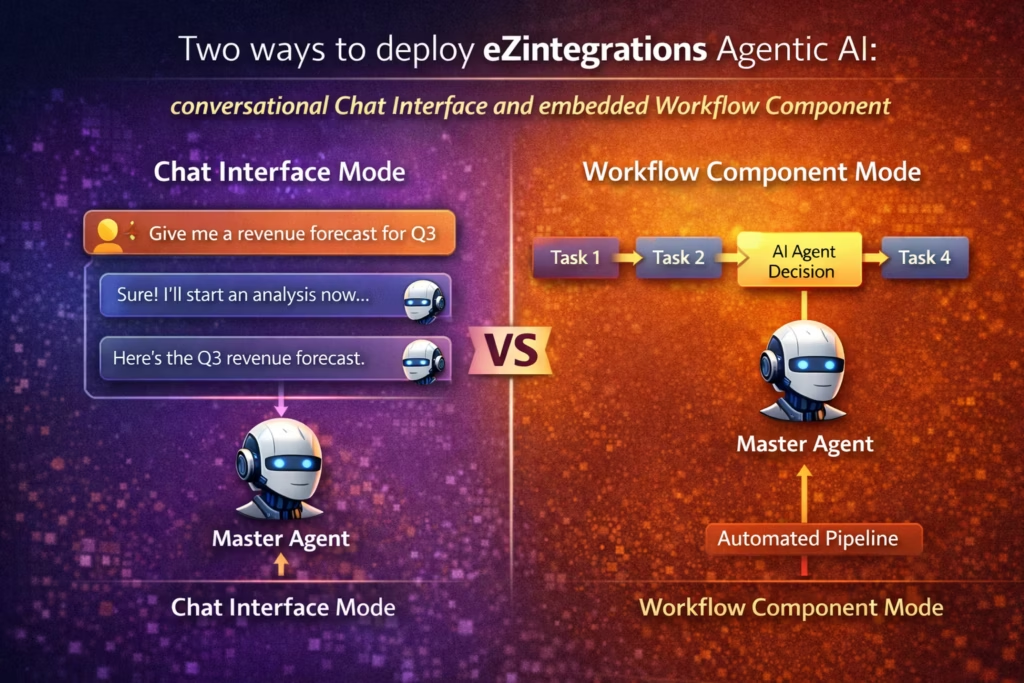
Goldfinch AI, the Agentic AI feature inside eZintegrations, deploys in two distinct modes that serve different enterprise use cases: a conversational Chat Interface where users interact directly with the Master Agent, and a Workflow Component mode where the entire multi-agent system is callable as a single step inside an integration pipeline.
Most Agentic AI platforms offer only one deployment mode. Chat-first platforms are excellent for interactive use cases but can’t be embedded inside automated business processes. Workflow-first platforms are powerful for automation but require a technical team to trigger and monitor. eZintegrations is the only enterprise platform that delivers both natively.
Chat Interface Mode: Conversational Agentic AI
In Chat Interface mode, a business user opens the Goldfinch AI chat UI and types their objective in natural language. “Run a full procurement cycle for these 47 requisitions against our SAP vendor master and return approved POs by end of day.” The Master Agent receives the objective, the Planner Agent creates the execution plan, sub-agents begin working, the Critic Agent monitors progress, and the user sees real-time status updates in the chat interface as milestones complete.
The user can ask questions mid-execution: “How many requisitions have been matched so far?” The Master Agent responds with current status from the Critic Agent’s monitoring data. If a Human-in-the-Loop notification arrives, it appears directly in the chat as a prompt for the user’s input. When execution completes, the Aggregator Agent delivers the final output into the chat with a full summary and supporting analytics.
This mode is designed for operational teams who need to trigger complex multi-agent workflows without touching a workflow builder canvas. No technical knowledge required. The Master Agent handles all the complexity behind the conversation.
Workflow Component Mode: Embedded Agentic AI
In Workflow Component mode, Goldfinch AI is callable as a single node, step, or operation inside a standard eZintegrations integration workflow. The entire Master Agent system (Planner, Sub-Agents, Critic, and Aggregator) runs behind that single workflow step. Your automated pipeline reaches a step that requires Agentic AI capability, calls the Master Agent component, passes the relevant context, and receives the finished output when execution completes.
This mode enables Agentic AI to run as part of fully automated business processes with no human initiation required. A nightly workflow that processes all outstanding supplier invoices calls the Master Agent as one of its steps. The Master Agent runs the full multi-agent invoice reconciliation cycle, returns the approved, matched, and escalated results, and the workflow continues to its next step with that output.
Integration flows can also be converted to MCP servers, making them callable as tools by the Master Agent itself. Your existing eZintegrations integration workflows become part of the Agentic AI tool ecosystem, creating a composable automation architecture where every workflow asset is reusable across every level of the maturity model.
Ready to see both deployment modes in action? Explore 1,000+ Agentic AI templates including pre-built multi-agent workflows for procurement, clinical trials, and supply chain disruption response.
How eZintegrations Agentic AI Differs from Competing Platforms
eZintegrations Agentic AI has six architectural differentiators that no competing enterprise platform replicates in combination: structured Planner-Critic-Aggregator architecture, project plan task dependency management, enterprise guardrails in the Aggregator Agent, dual deployment modes, MCP-enabled workflow tool calls, and Human-in-the-Loop built into the Critic Agent as a governance mechanism.
The Agentic AI market in 2026 includes several platforms making strong claims. Here is a precise comparison against the approaches your team will encounter in evaluations:
Microsoft Copilot Studio
Microsoft’s approach is chat-first and Microsoft-ecosystem-first. Copilot Studio builds agents that work excellently within Microsoft 365, Azure, and Dynamics environments. Outside that ecosystem, connectivity requires custom connectors. There is no Planner-Critic-Aggregator architecture. Task dependencies between agents are not managed using project plan logic. Human-in-the-Loop is a manually configured approval step, not an intelligent Critic Agent monitoring execution quality continuously. And Copilot Studio has no native integration with SAP, Oracle, or Infor ERP systems without custom development.
Salesforce Agentforce
Agentforce is powerful within the Salesforce CRM and Service Cloud ecosystem. It excels at customer-facing agent workflows. Outside Salesforce data, connectivity is limited. There is no multi-agent Planner architecture. Agents operate with predefined action sets rather than dynamic tool selection. Human-in-the-Loop escalation works within Salesforce’s case management system but doesn’t reach into SAP, Oracle ERP, or supply chain systems natively. And Agentforce has no workflow component mode: it is chat and CRM interface only.
LangChain and AutoGen Custom Builds
LangChain and AutoGen are open-source frameworks that give engineering teams maximum flexibility to build any agent architecture they want. The trade-off is that everything is custom: agent coordination logic, tool integrations, Human-in-the-Loop mechanisms, guardrails, and deployment infrastructure. Building a production-grade Agentic AI system on LangChain for enterprise ERP workflows typically requires 6 to 18 months of AI engineering time and ongoing maintenance as models and APIs change. There is no managed infrastructure, no 99.9% uptime SLA, and no pre-built enterprise integration templates.
eZintegrations: The Structured Enterprise Approach
| Capability | Copilot Studio | Agentforce | LangChain/AutoGen | eZintegrations (Goldfinch AI) |
|---|---|---|---|---|
| Planner-Critic-Aggregator architecture | No | No | Custom build | Yes, native |
| Project plan task dependencies (FS/FF/SS/SF) | No | No | Custom build | Yes, native |
| Human-in-the-Loop as Critic Agent governance | Manual step | Manual step | Custom build | Built-in architecture |
| Dual mode: Chat + Workflow Component | Chat only | Chat only | Custom build | Both native |
| Integration flows as MCP tool calls | No | No | Partial | Yes, native |
| Enterprise guardrails in Aggregator Agent | Partial | Partial | Custom build | Yes, native |
| SAP, Oracle, Infor native connectivity | No | No | No | Yes, native |
| Fully managed, zero maintenance | Partial | Partial | No | Yes, Bizdata managed |
| 99.9% uptime SLA | No published SLA | No published SLA | No | Yes |
| Pre-built enterprise agent templates | Limited | Limited | No | 1,000+ |
Three Enterprise Agentic AI Use Cases in Depth
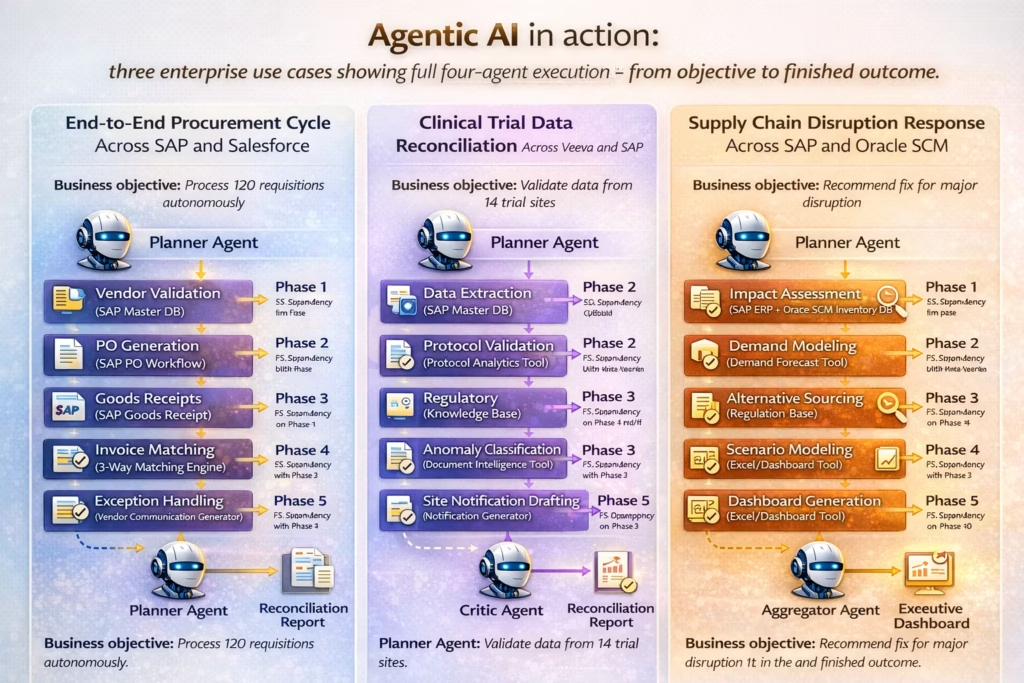
The clearest way to understand what enterprise Agentic AI actually delivers is to walk through complete execution scenarios showing all four agents working together, from objective received to finished outcome delivered.
Each scenario below shows the objective, the Planner’s project plan, the sub-agent task assignments with dependencies, the Critic Agent’s monitoring role, and the Aggregator’s final output.
Use Case 1: End-to-End Procurement Cycle Across SAP and Salesforce
Business objective
Process 120 outstanding procurement requisitions autonomously. Match each to approved vendors, generate purchase orders in SAP, confirm goods receipts, run 3-way invoice matching, and return a completed reconciliation report by end of business day.
Planner Agent execution plan
Phase 1: Vendor validation
(Sub-Agent A: API Tool Call to SAP vendor master, Knowledge Base Vector Search for approved vendor list)
Phase 2: PO generation
(Sub-Agent B: Integration Workflow Tool Call to SAP PO creation workflow)
FS dependency on Phase 1
Phase 3: Goods receipt monitoring
(Sub-Agent C: Watcher Tool on SAP goods receipt queue)
SS dependency with Phase 2
Phase 4: Invoice matching
(Sub-Agent D: Document Intelligence + Data Analytics for 3-way match)
FS dependency on Phase 3
Phase 5: Exception handling
(Sub-Agent E: generates vendor communication for mismatches)
FF dependency with Phase 4
Milestones
Milestone 1: All POs generated and confirmed
Critic Agent checks: are all 120 requisitions matched to valid vendors?
Milestone 2: All goods receipts confirmed
Critic Agent checks: are any receipts more than 48 hours overdue?
Milestone 3: Invoice matching complete
Critic Agent checks: exception rate above 5% triggers Human-in-the-Loop to AP manager.
Aggregator Agent output
Complete reconciliation report with 120 PO statuses, matched invoice summary, exception log with vendor communications attached, and analytics dashboard showing processing time, match rate, and exception breakdown by vendor and category.
Delivered directly into the SAP workflow and into the AP manager’s dashboard simultaneously.
Result
A procurement cycle that previously required 3 AP team members working a full day completes autonomously in 2 to 4 hours. Human effort focuses on the exception cases flagged by the Critic Agent, typically 3 to 8% of total volume.
Use Case 2: Clinical Trial Data Reconciliation Across Veeva and SAP
Business objective
Reconcile all patient data submissions from the last 30 days across 14 trial sites. Validate against protocol tolerances, check regulatory compliance requirements, identify anomalies requiring site notification, and generate an audit-ready reconciliation report for regulatory submission.
Planner Agent execution plan
Phase 1: Data extraction
Sub-Agent A: Integration Workflow Tool Call to Veeva Vault data export
Sub-Agent B: Integration Workflow Tool Call to SAP clinical data warehouse
SS dependency, both start simultaneously
Phase 2: Protocol validation
(Sub-Agent C: Data Analytics tool queries patient measurements against protocol tolerance ranges across all 14 sites)
FS dependency on Phase 1
Phase 3: Regulatory compliance check
(Sub-Agent D: Knowledge Base Vector Search against regulatory submission requirements)
FS dependency on Phase 1
FF dependency with Phase 2
Phase 4: Anomaly classification
(Sub-Agent E: Document Intelligence re-processes flagged submissions to distinguish data entry errors from genuine clinical signals)
FS dependency on Phase 2
Phase 5: Site notification drafting
(Sub-Agent F: generates site coordinator notifications for correction requests)
FS dependency on Phase 4
Milestones
Milestone 1: All site data extracted and ingested
Critic Agent checks completeness across all 14 sites.
Milestone 2: Protocol validation complete
Critic Agent checks: any systemic anomaly pattern across multiple sites triggers Human-in-the-Loop to Clinical Data Manager.
Milestone 3: Regulatory compliance check complete
Any regulatory notification requirement triggers Human-in-the-Loop to Regulatory Affairs team immediately.
Aggregator Agent output
Audit-ready reconciliation report with full patient data validation status across all 14 sites, anomaly classification log, regulatory compliance summary, site notification package, and a data quality dashboard with charts by site and time period.
Guardrails applied:
Only authorized regulatory affairs roles receive the compliance summary.
Site coordinators receive only their site’s notification package.
Result
A 30-day data reconciliation that previously required a 5-person clinical data management team working 3 to 4 days completes in 4 to 6 hours. The Regulatory Affairs team receives only the genuine regulatory signals. Site coordinators receive targeted correction requests with full context.
Use Case 3: Supply Chain Disruption Response Across SAP and Oracle SCM
Business objective
A major supplier serving 23% of a critical component’s supply has just announced a 6-week production halt. Assess the full impact across all affected products, model alternative sourcing scenarios, evaluate inventory positions at all warehouses, and deliver a recommended action plan with executive dashboard within 4 hours.
Planner Agent execution plan
Phase 1: Impact assessment
Sub-Agent A: Integration Workflow Tool Call to SAP ERP for affected product list and open order book
Sub-Agent B: API Tool Call to Oracle SCM for current inventory positions across all warehouses
SS dependency, both run simultaneously
Phase 2: Demand modeling
(Sub-Agent C: Data Analytics tool runs demand forecast for all affected products across next 8 weeks against current inventory position)
FS dependency on Phase 1
Phase 3: Alternative sourcing research
Sub-Agent D: Web Crawling for alternative suppliers in the same component category
Sub-Agent E: API Tool Call to approved vendor database for qualified alternatives
SS dependency with Phase 2
Phase 4: Scenario modeling
(Sub-Agent F: Data Analytics tool models three alternative sourcing scenarios against cost, lead time, and volume capacity)
FS dependency on Phase 3
Phase 5: Executive dashboard generation
(Sub-Agent G: Data Analytics with Charts generates impact dashboard, scenario comparison, and recommended action plan)
FS dependency on Phase 4
Milestones
Milestone 1: Full impact scope confirmed
Critic Agent checks: is the impact above the defined financial threshold for executive escalation?
If yes, Human-in-the-Loop notification to CPO and CFO immediately.
Milestone 2: Alternative sourcing options identified
Critic Agent checks: are any alternatives already qualified vendors?
If none found, Human-in-the-Loop to procurement team for manual sourcing input.
Milestone 3: Scenario modeling complete
Critic Agent checks: does the recommended scenario require budget approval above defined limits?
If yes, Human-in-the-Loop to CFO before finalizing recommendation.
Aggregator Agent output
Executive action plan with:
Full impact assessment
Three alternative sourcing scenarios with cost and lead time comparisons
Recommended scenario with justification
Inventory bridge analysis showing how long current stock covers demand during the disruption
Executive dashboard with charts for the CPO and CFO
Guardrails applied:
Financial figures visible only to authorized executive roles
Operational details routed to procurement and supply chain managers separately
Result
A disruption response that previously required a cross-functional team working 2 to 3 days to assemble delivers a complete executive briefing in under 4 hours. Decision-makers receive the recommendation with full supporting analysis rather than raw data to interpret themselves.
How Fast Can Enterprise Agentic AI Be Deployed?
Enterprise Agentic AI deployment on eZintegrations takes 2 to 6 weeks for most production use cases, compared to 6 to 18 months for custom-built multi-agent systems on open-source frameworks or legacy platforms.
The speed advantage comes from four things working together. Pre-built Agentic AI templates eliminate architectural design time. Native tool integrations eliminate external AI service configuration. The no-code Planner canvas eliminates agent orchestration coding. And full management by Bizdata eliminates infrastructure setup and ongoing maintenance entirely.
Here’s what realistic deployment timelines look like across use cases:
| Agentic AI Use Case | Custom Build (LangChain/AutoGen) | Legacy Platform + Custom | eZintegrations |
|---|---|---|---|
| Single-phase multi-agent workflow (3 to 5 sub-agents) | 3 to 6 months | 4 to 8 months | 1 to 2 weeks |
| End-to-end procurement cycle (5 to 7 sub-agents) | 6 to 10 months | 8 to 12 months | 2 to 4 weeks |
| Clinical trial data reconciliation (6 to 8 sub-agents) | 8 to 14 months | 10 to 16 months | 3 to 5 weeks |
| Supply chain disruption response (7 to 9 sub-agents) | 10 to 18 months | 12 to 18 months | 4 to 6 weeks |
| Full enterprise multi-domain Agentic AI deployment | 18+ months | 18+ months | 2 to 4 months |
The procurement cycle use case is the most common first Agentic AI deployment for eZintegrations customers. It delivers immediate, measurable ROI (processing time from days to hours), it has a well-defined scope that constrains the initial build, and the Critic Agent’s Human-in-the-Loop governance gives finance leaders the confidence to let the system run autonomously on real transaction volume from day one.
What Does an Enterprise Agentic AI Platform Actually Cost?
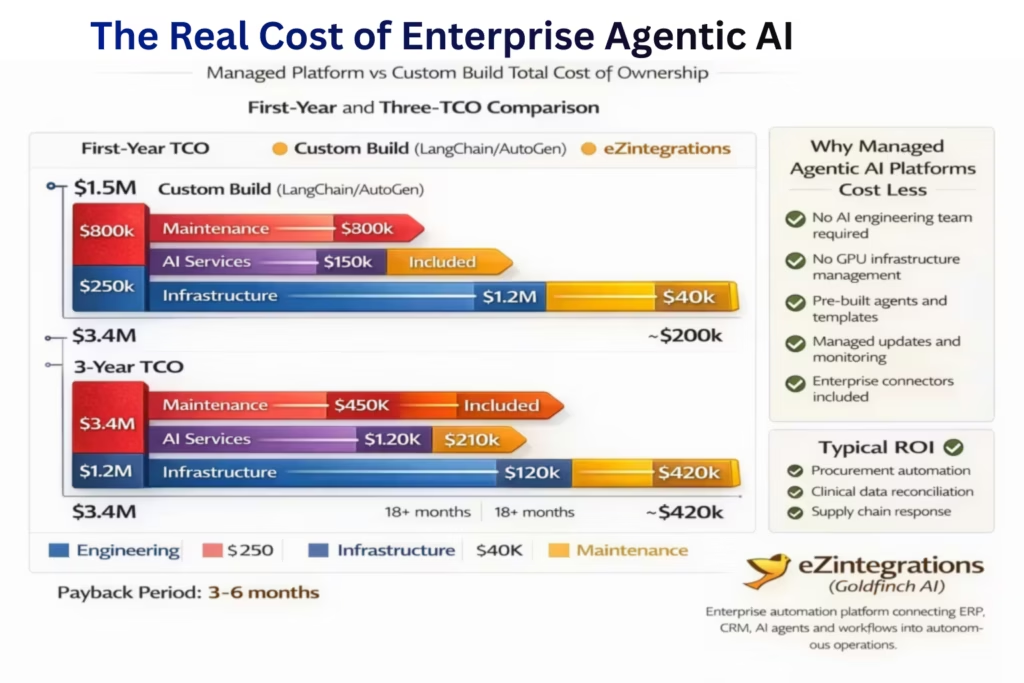
The total cost of enterprise Agentic AI depends almost entirely on whether you build the multi-agent architecture from scratch or deploy it on a managed platform with pre-built orchestration, native tool integrations, and enterprise guardrails already in place.
Building production-grade Agentic AI on LangChain, AutoGen, or a custom framework requires an AI engineering team to build the orchestration layer, a separate infrastructure team to manage the compute and vector databases, external AI service subscriptions for each tool capability, and ongoing model maintenance as the system evolves. The cost compounds rapidly as the number of sub-agents and tool integrations grows.
Here’s a realistic cost comparison for a mid-to-large enterprise deploying 3 to 5 Agentic AI workflows:
Custom Build on Open-Source Framework: AI/ML engineering team: $400,000 to $800,000 per year – Infrastructure (compute, vector databases, model hosting): $80,000 to $200,000 per year. External AI service subscriptions: $60,000 to $180,000 per year. Custom enterprise integration development (SAP, Oracle, Infor): $100,000 to $400,000 per deployment. Ongoing maintenance and model updates: 40 to 50% of engineering team capacity. Realistic first-year TCO for 3 to 5 Agentic AI workflows: $800,000 to $2,000,000+
eZintegrations Agentic AI: Full Planner-Critic-Aggregator architecture included in platform pricing. All nine agent tools included, no external AI service subscriptions required. Native SAP, Oracle, Infor, Veeva connectivity included. 1,000+ pre-built templates replace custom development. Fully managed by Bizdata: zero infrastructure overhead, zero model maintenance. 99.9% uptime SLA with zero downtime updates. Transparent pricing at ezintegrations.
According to G2 reviews of enterprise AI automation platforms, the total cost gap between managed platforms and custom builds widens by an average of 40% after year one, as custom builds accumulate technical debt, maintenance overhead, and model drift remediation costs that managed platforms absorb internally.
Want to understand the real cost for your organization? View eZintegrations pricing and compare the true total cost of ownership before your next platform investment decision.
FAQs
1. What is Agentic AI for enterprise
Agentic AI for enterprise delivered through eZintegrations Goldfinch AI is a multi agent system where a Planner Agent creates a structured execution plan specialist sub agents execute tasks in parallel or serial using defined dependencies a Critic Agent monitors progress and triggers human review when needed and an Aggregator Agent synthesizes and validates the final outcome with enterprise guardrails applied across ERP SCM PLM and CX systems.
2. What is the difference between AI agents and Agentic AI
A single AI agent makes a decision at one workflow step using its tools. Agentic AI coordinates multiple specialist agents working together on a shared objective with task dependencies managed between them progress monitored by a Critic Agent and a finished outcome synthesized by an Aggregator Agent. One is a decision. The other is an autonomous business outcome.
3. How does Human in the Loop work in eZintegrations Agentic AI
Human in the Loop is built into the Critic Agent architecture. The Critic Agent monitors execution continuously and triggers human notifications automatically when it detects a decision point that exceeds defined autonomous authority thresholds. The right person receives full context execution pauses at the relevant step and resumes automatically when the human input is received.
4. Can eZintegrations Agentic AI connect to SAP Oracle and Infor natively
Yes, eZintegrations connects natively to SAP ERP Oracle ERP and SCM Infor Veeva Salesforce and all major enterprise platforms through pre built integration templates. The Aggregator Agent applies guardrails across all connected enterprise datasets respecting the roles and privileges defined in each system.
5. What is the difference between Chat Interface mode and Workflow Component mode
Chat Interface mode lets business users interact with the Master Agent conversationally in natural language. The full multi agent system executes behind the conversation and delivers results directly in the chat. Workflow Component mode embeds the entire Master Agent system as a callable step inside an automated integration pipeline enabling Agentic AI to run as part of fully automated business processes with no human initiation.
6. What are FF FS SS and SF dependencies in Agentic AI
These are task dependency types from project management applied to multi agent coordination. Finish to Start FS means Agent B starts after Agent A finishes. Finish to Finish FF means both agents must finish together. Start to Start SS means both agents start simultaneously. Start to Finish SF means Agent B keeps running until Agent A starts. eZintegrations uses all four to manage sub agent execution timing with project plan precision.
7. How is eZintegrations Agentic AI different from Microsoft Copilot Studio or Salesforce Agentforce
Copilot Studio is Microsoft ecosystem first with no structured Planner architecture and no native SAP or Oracle connectivity. Agentforce is Salesforce CRM first with no multi agent project plan coordination. Neither platform has a Critic Agent monitoring execution quality project plan task dependencies between agents or an Aggregator Agent applying enterprise guardrails. eZintegrations delivers all six differentiators natively through Goldfinch AI on a fully managed platform with a 99.9 percent uptime SLA.
Conclusion: The Frontier of Enterprise Automation is Here
Every previous level of automation made your processes faster or cheaper. Agentic AI makes them autonomous.
Not partially autonomous. Not “automated with human review at every step.” Fully autonomous for the 92 to 97% of execution that falls within defined parameters, with intelligent escalation to the right human for the 3 to 8% that genuinely needs judgment beyond the system’s defined scope.
That’s what Goldfinch AI delivers. The Planner-Critic-Aggregator architecture that powers every autonomous outcome on eZintegrations. A procurement cycle that took three people a full day, completed in 2 to 4 hours with human effort focused only on genuine exceptions. A clinical trial reconciliation that took a five-person team 3 to 4 days, delivered in 4 to 6 hours with regulatory signals isolated automatically from data entry noise. A supply chain disruption response that took a cross-functional team 2 to 3 days to assemble, delivered as an executive briefing in under 4 hours with full supporting analytics.
The world’s largest FMCG company is running on eZintegrations. A global Industrial Goods leader is running on eZintegrations. A recognized global Pharma company is running on eZintegrations. They built up through the four automation levels: from Workflows, through AI Workflows and AI Agents, to Agentic AI. Each level built on the one before it. Each level delivered compounding returns.
You don’t have to start at Level 4. But you do need to know where you’re building toward. eZintegrations is the only platform that takes you from Level 1 to Level 4 on a single managed architecture, without rebuilding your integration stack at each step.
The most valuable hour your team can spend right now is seeing the four-agent architecture running on a real enterprise use case.
Or start by exploring 1,000+ production-ready Agentic AI templates and see how fast your first multi-agent workflow can go live.

