
Why Fast-Growing Companies Choose eZintegrations Over Zapier and Make
June 10, 2026eZintegrations vs Zapier vs Make: eZintegrations is the best choice for fast-growing companies that need enterprise-grade connectors (SAP, NetSuite, Oracle), native AI workflow capabilities (Document Intelligence, LLM Classification, AI Agents), and flat per-automation pricing that does not penalise scale. Zapier is best for simple, low-volume automations at seed stage. Make suits mid-market teams needing visual multi-step workflows at moderate volume. Both hit hard ceilings: on connector depth, AI capability, and pricing: once a company scales past Series A.
TL;DR
- Zapier and Make are excellent tools for the first 6-18 months of a company’s automation journey. They are not designed for the complexity, volume, and AI requirements that emerge at Series A and beyond.
- The three ceilings that growing companies hit with Zapier and Make: per-task pricing that scales against you as automation volume grows, connector depth that fails on enterprise APIs (SAP, NetSuite, Oracle, FHIR), and the complete absence of native AI workflow capabilities.
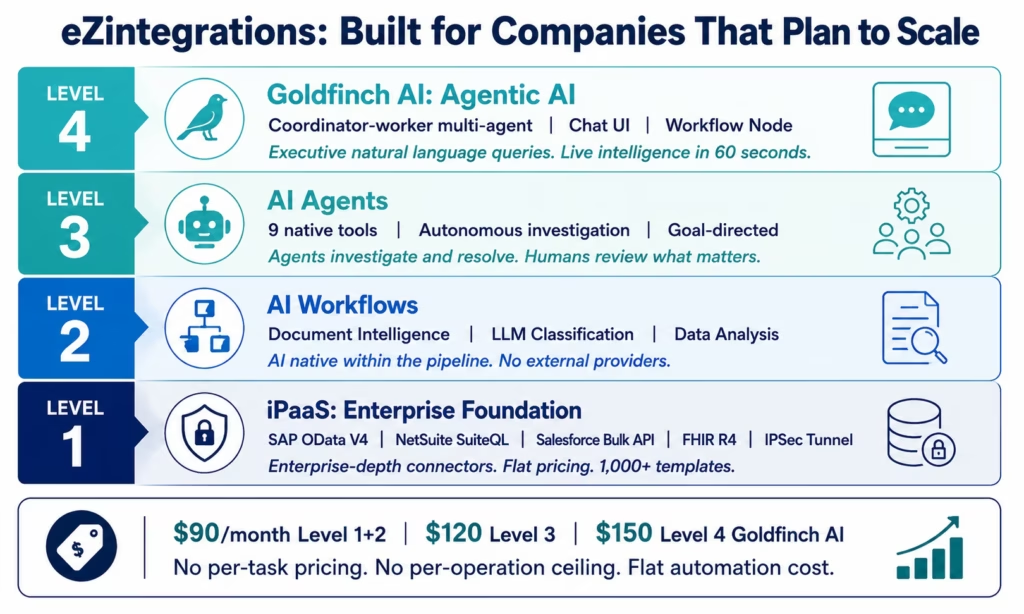
- eZintegrations is built as a four-level platform (Level 1 iPaaS through Level 4 Goldfinch AI agentic coordination) that grows with the company from first Stripe webhook to multi-agent enterprise intelligence: without platform migration.
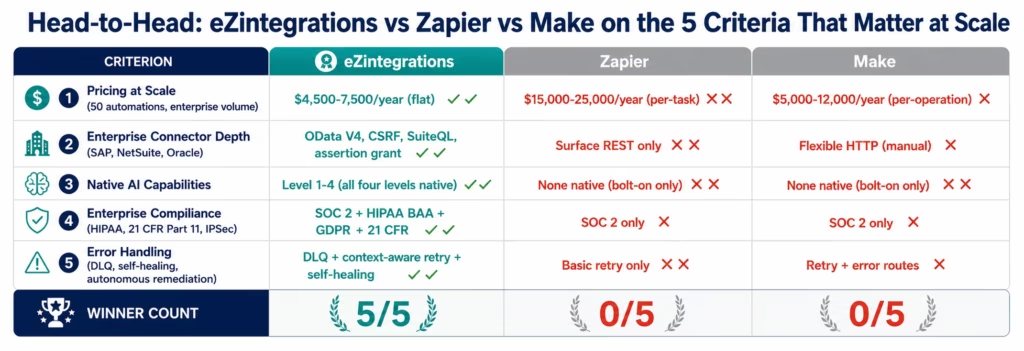
- The pricing difference at scale is significant: a growing company running 50 high-volume automations pays $15,000-25,000 per year on Zapier’s Enterprise plan. The same automation estate on eZintegrations costs $4,500-7,500 per year.
- Bottom line: start with Zapier or Make if you are pre-seed with 5-10 simple automations. Migrate to eZintegrations at Series A, or sooner if you have enterprise customer requirements or AI workflow ambitions.
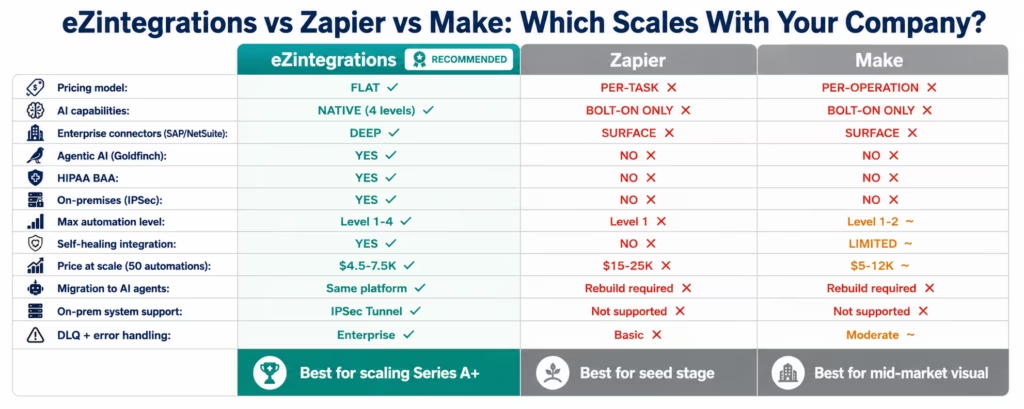
The Three-Tool Summary: eZintegrations vs Zapier vs Make at a Glance
| Criteria | Zapier | Make | eZintegrations |
|---|---|---|---|
| Best for | Seed-stage, 5-20 simple automations | Mid-market, visual multi-step workflows | Series A+, AI workflows, enterprise connectors |
| Pricing model | Per-task (punishes scale) | Per-operation (punishes scale) | Flat per-automation (rewards scale) |
| Connector depth | Surface-level (REST basics) | Mid-level (more flexible than Zapier) | Enterprise-depth (SAP OData V4, NetSuite SuiteQL, Oracle assertion grant) |
| AI capabilities | None native (bolt-on OpenAI only) | None native (bolt-on only) | Native: Document Intelligence, LLM Classification, Data Analysis, AI Agents, Goldfinch AI |
| Enterprise compliance | SOC 2 Type II | SOC 2 Type II | SOC 2 Type II + HIPAA BAA + GDPR + 21 CFR Part 11 |
| On-premises connectivity | Not supported | Not supported | IPSec Tunnel |
| Error handling | Basic retry | Retry + error routes | DLQ + context-aware retry + self-healing + autonomous remediation |
| Max automation level | Level 1 (basic triggers/actions) | Level 1-2 (multi-step with some logic) | Level 1-4 (iPaaS + AI Workflows + AI Agents + Goldfinch AI agentic) |
| Agentic AI | Not available | Not available | Goldfinch AI: coordinator-worker, Chat UI, Workflow Node |
| Starting price | $299/month (Professional) | $9/month (Core) | $90/month (Level 1+2) |
| Enterprise pricing | $15,000-25,000+/year at scale | $5,000-12,000+/year at scale | $4,500-7,500/year at comparable scale |
| Template library | 6,000+ Zaps (surface-level) | 1,000+ scenario templates | 1,000+ enterprise templates (Automation Hub) |
| Migration path to AI | Requires platform change | Requires platform change | Native: same platform, additional configuration |
Why This Comparison Matters for Fast-Growing Companies
The automation tool you choose at seed stage is not the tool you need at Series B, reflecting broader Gartner analysis of enterprise integration platform evolution. Most founding teams discover this the hard way: Zapier or Make gets the first 20 automations live quickly, and then the company hits three specific walls that neither tool was designed to break through.
The first wall is pricing. Zapier’s per-task pricing model charges you for every action in every workflow, every time it runs. At seed stage with 10 automations running at low volume, this is $50-100 per month. At Series A with 50 automations running at enterprise volume: your Salesforce-to-HubSpot sync alone processes 10,000 records per week: this becomes $2,000-3,000 per month. At Series B with enterprise customers requiring SLA-backed integrations at high volume, you are looking at $15,000-25,000 per year for Zapier Enterprise. The automation that was cheap becomes the line item the CFO questions.
The second wall is connector depth. Zapier and Make connect to thousands of applications: but they connect at surface level. When a fast-growing company lands its first enterprise customer and needs to integrate with SAP S/4HANA (which requires OData V4 with CSRF token management for write operations), Oracle ERP Cloud (which uses assertion grant OAuth 2.0), or any on-premises system behind a corporate firewall, Zapier and Make return the same answer: not supported at this depth.
The third wall is AI. The companies growing fastest in 2026 are not just automating data movement: they are automating intelligence: extracting data from vendor invoice PDFs with Document Intelligence, classifying inbound requests with LLM Classification, and deploying AI agents that investigate business exceptions autonomously. Zapier and Make have no native AI capabilities. They bolt on external LLM calls, which send your data to OpenAI, return unstructured text you must parse, and stop at Level 1-2 automation. Neither platform has a path to AI Agents (Level 3) or agentic AI coordination (Level 4) without a complete platform change.
This is the comparison fast-growing companies need before they make an automation platform decision that affects two to three years of technical infrastructure.
Zapier: The Best Tool for Getting Started
Zapier is the tool that introduced millions of non-technical users to automation: and for that use case, it remains excellent. If you are pre-seed, have 5-15 simple automations, and need to move fast without a technical team, Zapier gets you live in hours.
Zapier’s Genuine Strengths
The fastest path to a first working automation. Zapier’s interface is the most intuitive in the market for simple two-step Zaps. Connect Gmail to Slack, connect a form submission to a CRM, send a webhook to a spreadsheet. For these patterns, Zapier is genuinely faster to configure than any enterprise platform. Its 6,000+ app library covers the most common SaaS applications used by startups.
The largest ecosystem of pre-built triggers and actions. The breadth of Zapier’s app coverage means there is likely a native Zap for whatever application you use at seed stage. The community of shared Zaps and the documentation quality are strong, which reduces the learning curve for first-time automation users.
Strong brand recognition and support community, reflected in extensive user feedback across G2 reviews for Zapier. Zapier has been the default recommendation for startup automation for a decade. The community forums, YouTube tutorials, and third-party documentation are extensive. For a solo founder or a small operations team with no integration background, this ecosystem lowers the barrier to getting started.
Zapier’s Limitations for Growing Companies
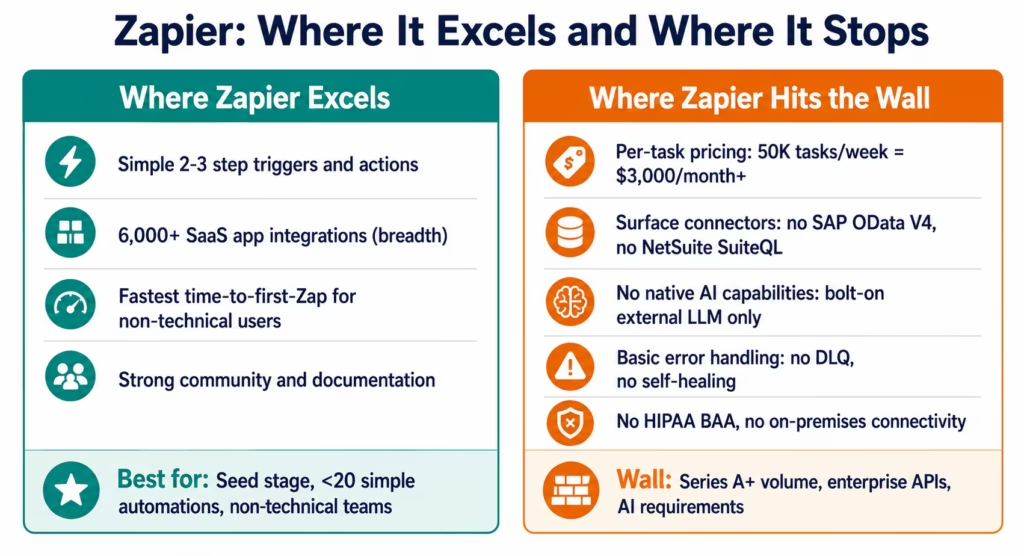
Per-task pricing that compounds against you. Zapier charges per “task”: each action in a Zap that runs against a real record. A five-step Zap that processes 10,000 records per week consumes 50,000 tasks per week. At Zapier’s Professional plan (2,000 tasks/month cap), this runs out in hours. Scaling to Zapier Team or Enterprise to accommodate growing volume is the moment that automation cost becomes a serious budget conversation.
Surface-level connectors that fail on enterprise APIs. Zapier’s Salesforce connector handles standard CRUD operations and basic triggers. It does not handle Salesforce Bulk API (required for large-scale data operations), SOQL queries with complex filtering, or Platform Events. Its NetSuite connector handles basic read operations: it does not support SuiteQL for complex financial data queries or Token-Based Authentication required by NetSuite’s security model. When you land an enterprise customer with integration requirements, these gaps become blockers.
No native AI capabilities. Zapier’s AI features (as of 2026) are limited to: calling an OpenAI or Anthropic action within a Zap, which sends your workflow data to the external provider and returns a text response. There is no Document Intelligence for extracting structured data from PDFs, no LLM Classification with confidence threshold routing, no Data Analysis for anomaly detection, no AI Agents for autonomous investigation, and no agentic AI coordination. AI for Zapier is a feature bolted onto a non-AI architecture.
Error handling that stops at basic retry. When a Zapier step fails, Zapier retries a limited number of times and routes the failure to the Zap History dashboard. There is no dead letter queue for failed records, no context-aware retry that adapts recovery strategy to the specific error type, no self-healing that autonomously resolves known failure patterns. A Zapier integration that starts failing at 2 AM pages your team: or you discover it in the morning.
Make: The Best Visual Workflow Builder for Mid-Market
Make (formerly Integromat) is the more powerful visual automation platform: and for mid-market companies that have outgrown Zapier but do not yet have enterprise system requirements, it occupies a genuine niche.
Make’s Genuine Strengths
Superior visual scenario builder for complex multi-step logic. Make’s canvas-based scenario builder is more powerful than Zapier’s linear Zap builder for complex multi-step workflows with branching logic, iteration (processing arrays of items), and error routes. Teams that find Zapier too linear for their workflow complexity often find Make’s visual model more intuitive for moderate complexity.
More flexible data handling within workflows. Make allows more sophisticated data transformation within scenarios: array aggregation, parsing nested JSON structures, mathematical operations on data fields, and conditional routing based on complex expressions. For workflows that require moderate transformation logic without custom code, Make is stronger than Zapier.
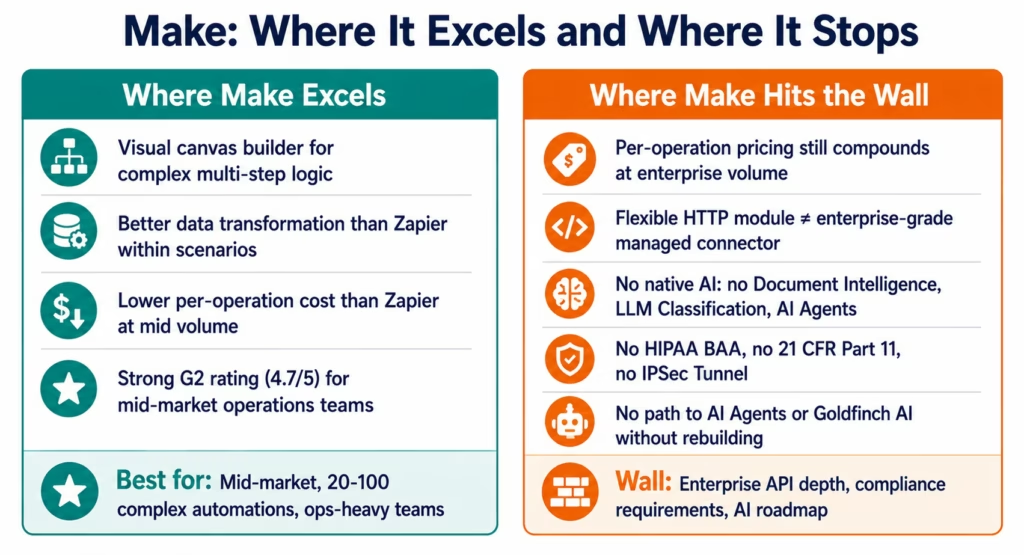
Lower base price and more generous operations per dollar. Make’s per-operation pricing is lower than Zapier’s per-task pricing at equivalent volumes at low to mid scale. The Core plan at $9/month provides 10,000 operations per month: sufficient for a small team’s automation needs. The price-per-operation advantage erodes at high volume, but Make remains cheaper than Zapier in the mid-market range.
Established mid-market position on G2. Make has strong G2 ratings (4.7/5 at time of publication) with reviewers consistently citing its visual builder, flexibility, and value relative to Zapier. The G2 reviewer profile skews toward operations managers and marketing automation specialists in companies with 50-500 employees.
Make’s Limitations for Growing Companies
The same per-operation pricing wall at scale. Make charges per “operation”: each module execution in a scenario. A complex scenario with 8 modules processing 5,000 records per week consumes 40,000 operations per week. At Make’s Pro plan (10,000 operations per month), this exhausts the limit in days. Enterprise pricing for the volume that a scaling company needs reaches $500-1,000 per month and above: still cheaper than Zapier at scale, but still a volume-based pricing model that grows against you.
Still limited on enterprise API depth. Make’s flexible HTTP module allows connecting to any REST API: more flexible than Zapier’s rigid app-specific connectors. But “flexible HTTP module” is not the same as an enterprise-grade connector with managed OAuth token lifecycle, automatic CSRF token handling, SuiteQL query support, and rate limit management built in. When a growing company needs to integrate with SAP, Oracle, or a healthcare system (FHIR R4, HL7), Make requires custom HTTP module configuration that becomes bespoke maintenance code: exactly what an iPaaS is supposed to eliminate.
No native AI capabilities. Make has no native Document Intelligence, LLM Classification, Data Analysis, or AI Agent capabilities. Like Zapier, any AI functionality in Make workflows involves calling an external API (OpenAI, Anthropic) and processing the text response. There is no path to AI Agents or agentic coordination within Make.
Limited enterprise compliance architecture. Make holds SOC 2 Type II certification. It does not offer HIPAA Business Associate Agreements for healthcare data, 21 CFR Part 11 support for life sciences, or the on-premises connectivity (IPSec Tunnel) required by enterprise customers with systems behind corporate firewalls.
eZintegrations: The Best Platform for Companies That Plan to Scale
eZintegrations is designed for the company that is building toward enterprise: not the company that needs 10 automations by Friday, but the company that knows those 10 automations will be 200 automations in 18 months, will need to integrate with enterprise ERPs, and will want AI workflow and agent capabilities without switching platforms.
eZintegrations’ Genuine Strengths
A four-level architecture that grows with the company.
Level 1 (iPaaS/Workflow Automation): deterministic data pipelines at enterprise scale: the same patterns Zapier and Make handle, but with enterprise-grade connector depth, rate limit management, dead letter queues, and flat per-automation pricing.
Level 2 (AI Workflows): Document Intelligence, LLM Classification, Data Analysis, and Semantic Matching as native workflow nodes: not external API calls. AI inference runs within eZintegrations’ infrastructure. Structured JSON output with built-in confidence threshold routing. PHI and PII never leave the platform’s compliance boundary.
Level 3 (AI Agents): autonomous investigation agents with 9 native enterprise tools. An agent that receives a goal: “investigate why this account’s health score dropped 23 points”: and determines its own investigation sequence across connected systems without human-defined steps.
Level 4 (Goldfinch AI Agentic): coordinator-worker multi-agent architecture. Chat UI for natural language enterprise intelligence. Workflow Node for automated intelligence programmes. A C-suite executive asking “what is the current status of our top 20 accounts by ARR?” receives a structured answer in under 60 seconds.
Enterprise-depth connectors that actually work.
SAP S/4HANA with OData V4 and automatic CSRF token management for write operations. NetSuite with SuiteQL for complex financial data queries and Token-Based Authentication. Oracle ERP Cloud with assertion grant OAuth 2.0. Salesforce with REST, SOQL, and Bulk API. Epic and Cerner FHIR R4 for healthcare. EDI/X12 for supply chain. On-premises systems via IPSec Tunnel without internet-exposed ports.
When a growing company lands an enterprise customer that requires integration with their SAP environment, eZintegrations handles it. Zapier and Make cannot.
Flat pricing that rewards scale rather than penalising it.
No per-task charges. No per-operation charges. Flat per-automation pricing: Level 1+2 starting at $90/month, Level 3 AI Agents at $120/month, Level 4 Goldfinch AI at $150/month. A growing company running 50 high-volume automations pays the same on eZintegrations whether each automation runs 1,000 times or 1,000,000 times per month.
1,000+ Automation Hub templates for time-to-value.
The Automation Hub covers the most common enterprise integration patterns: Salesforce-to-NetSuite, Stripe-to-HubSpot, order-to-fulfilment, AP automation: with pre-configured connections, field mappings, and AI nodes where appropriate. Most templates go live in 2-8 hours.
Compliance architecture for regulated industry customers.
SOC 2 Type II. HIPAA BAA for healthcare data. GDPR for EU customers. 21 CFR Part 11 for life sciences. A growing company that lands a healthcare or pharmaceutical customer can use eZintegrations without building a separate compliant integration layer.
eZintegrations’ Current Limitations
Not the fastest path to a first simple automation. Zapier remains easier for a non-technical team member to configure a simple Gmail-to-Slack notification. eZintegrations is designed for integration architects and operations teams who need production-grade reliability: the richer configuration model requires more setup investment upfront.
Template library breadth vs Zapier. Zapier’s 6,000+ Zap templates cover more SaaS-to-SaaS combinations at surface level than eZintegrations’ 1,000+ enterprise-grade Automation Hub templates. For a team needing a quick connection between two common SaaS tools, Zapier’s breadth advantage is real.
Less community-generated content. Zapier has a decade of community tutorials, YouTube walkthroughs, and third-party documentation. eZintegrations’ documentation is professional-grade and growing, but the self-serve community ecosystem is smaller.
Head-to-Head Comparison: Five Criteria That Matter at Scale
This section tests all three platforms against the five criteria that determine whether an automation platform can support a company’s full growth trajectory: not just its first few months.
Criterion 1: Pricing at Scale
The pricing difference between these three platforms is most visible when you calculate the total annual cost at enterprise automation volume: not the entry price, which all three keep accessible.
Zapier at scale: Zapier’s Professional plan (2,000 tasks/month) costs $299/month according to current Zapier pricing references. For a growing company with 50 active automations running at meaningful volume, 2,000 tasks is exhausted by a single high-volume Zap. Zapier Team (25,000 tasks/month, $449/month) accommodates modest growth. Zapier Enterprise: the plan required for SSO, advanced admin controls, and the task volume that 50+ enterprise-grade automations require: starts at $1,250/month and scales with task volume. Annual cost: $15,000-25,000+ depending on volume tier negotiated.
Make at scale: Make’s Core plan (10,000 operations/month, $9/month) works for early-stage companies according to current Make pricing references. The Pro plan (40,000 operations/month, $16/month) handles moderate growth. Teams plan (80,000 operations/month, $29/month) covers more. But a growing company with 50 complex automations at enterprise volume routinely consumes 500,000-1,000,000 operations per month: requiring Enterprise plan pricing that starts around $300-500/month and scales. Annual cost: $5,000-12,000+ at this volume level.
eZintegrations at scale: Flat per-automation pricing. Running 50 automations at Level 1+2: $90/month × 50 active integrations = $4,500/month baseline, but the pricing model is per-automation type, not per execution count. A company running 50 integrations at any volume pays the same: unlimited executions within the configured automation. Annual cost: $4,500-7,500 for a comparable automation estate.
The total annual cost difference between Zapier Enterprise and eZintegrations at equivalent automation scale: $7,500-17,500 per year. Over three years: $22,500-52,500.
Criterion 2: Enterprise Connector Depth
The SAP test: SAP S/4HANA integration is the litmus test for enterprise iPaaS depth. SAP uses OData V4 for its REST-based APIs. Write operations (creating or updating SAP records) require CSRF token management: a session-based security token that must be fetched before every write operation and submitted in the request header. Without CSRF management, SAP write operations fail.
eZintegrations handles CSRF token management automatically in its SAP connector. Zapier’s SAP connector (where it exists) handles basic OData read operations: it does not manage CSRF tokens for write operations. Make’s flexible HTTP module can be configured to fetch and pass CSRF tokens, but this requires custom HTTP module configuration that must be manually maintained when SAP updates its API.
The NetSuite test: NetSuite’s REST API supports SuiteQL: a SQL-like query language for complex financial data retrieval. Standard REST calls return simple lists; SuiteQL enables joins, subqueries, and aggregations across NetSuite’s data model. eZintegrations supports SuiteQL natively. Neither Zapier nor Make has a native SuiteQL query capability.
The on-premises test: An enterprise customer with SAP ECC, Oracle on-premises, or a legacy database behind a corporate firewall cannot expose these systems on the public internet. eZintegrations connects to on-premises systems via IPSec Tunnel: the same encrypted tunnel approach used for VPN connectivity. Zapier and Make do not support on-premises connectivity.
Criterion 3: Native AI Capabilities
This is where the gap between eZintegrations and both competitors is most significant for 2026 requirements.
Document Intelligence: eZintegrations reads vendor invoice PDFs, contract documents, and clinical records, extracts specified fields as structured JSON, and delivers them to destination systems: eliminating manual data entry. Accuracy: 90-97% on standard enterprise document types. Zapier and Make: not available natively. Both can call an OpenAI API action and receive text output, which requires custom parsing and sends document content to OpenAI’s infrastructure.
LLM Classification: eZintegrations classifies inbound text (support tickets, sales emails, contract clauses) into defined categories with confidence scores, routing high-confidence classifications automatically and low-confidence to human review. Zapier and Make: not available natively. External LLM calls return unstructured text.
AI Agents (Level 3): eZintegrations’ AI Agents receive a goal and determine their own investigation sequence across connected systems: a churn investigation agent queries the CS platform, product analytics, CRM, and billing system in sequence and delivers a structured brief. Zapier: not available. Make: not available.
Goldfinch AI (Level 4): coordinator-worker multi-agent architecture with Chat UI for natural language enterprise queries and Workflow Node for automated intelligence programmes. Zapier: not available. Make: not available. No roadmap for agentic AI at either competitor at the time of publication.
Criterion 4: Enterprise Compliance Architecture
A growing company does not choose its industry: but its enterprise customers’ compliance requirements become the company’s compliance requirements.
Healthcare customers (HIPAA): if a growing company sells to healthcare providers, payers, or any entity covered under HIPAA, every data integration involving patient data (PHI) requires a signed Business Associate Agreement with the integration platform. eZintegrations provides a HIPAA BAA. Zapier does not. Make does not.
Life sciences customers (21 CFR Part 11): clinical trial data, adverse event reporting, and electronic records in the pharmaceutical industry must be handled under FDA 21 CFR Part 11: which requires immutable audit trails with timestamps, access controls, and validated system processes. eZintegrations supports 21 CFR Part 11. Zapier and Make do not.
EU customer data (GDPR): eZintegrations is GDPR compliant with data processing agreements available for EU customer data. Zapier and Make also support GDPR compliance for EU data: this criterion does not differentiate the three tools.
Criterion 5: Error Handling and Reliability
When a growing company’s integrations carry revenue-critical data: Stripe payments, NetSuite invoices, Salesforce pipeline: the error handling architecture determines whether a 2 AM API failure becomes a 2 AM page or an automated self-resolution.
eZintegrations: Dead Letter Queue (DLQ) captures records that fail after configured maximum retries, preventing silent data loss. Context-aware retry applies recovery strategies specific to the failure type: rate limit failures read the Retry-After header and wait precisely, authentication failures refresh credentials before retrying, schema failures route to adaptation workflows rather than retrying blindly. Watcher Tools monitor credential expiry and rate limit trajectories proactively. Autonomous remediation resolves known failure types without human involvement. MTTR for known error patterns: median 22 minutes, down from 3.5 hours manual investigation.
Zapier: Basic exponential backoff retry. Failed tasks logged in Zap History. No DLQ, no context-aware recovery strategy, no autonomous remediation. Manual investigation required for all non-transient failures.
Make: Retry configuration and dedicated error routes within scenarios (more sophisticated than Zapier). Error routes allow branching logic when a step fails. No DLQ, no predictive failure prevention, no autonomous remediation.
Pricing Comparison: What You Actually Pay as You Grow
The pricing comparison that matters is not the entry-level plan: it is the total annual cost at the automation volume a growing company actually runs at 12, 24, and 36 months from now.
| Growth Stage | Typical Automation Profile | Zapier Annual Cost | Make Annual Cost | eZintegrations Annual Cost |
|---|---|---|---|---|
| Seed (0-6 months) | 5-15 simple automations, low volume | $600-1,200 (Starter) | $108-200 (Core) | $1,080 (Level 1+2) |
| Early Series A (6-18 months) | 20-40 automations, growing volume | $3,600-5,400 (Team) | $2,000-5,000 (Teams) | $1,080-2,160 (Level 1+2) |
| Late Series A / Series B (18-36 months) | 50-100 automations, enterprise volume | $15,000-25,000 (Enterprise) | $5,000-12,000 (Enterprise) | $4,500-9,000 (Level 1+2) |
| Series B+ with AI requirements | 50-100 automations + AI workflows + agents | Not available at this level | Not available at this level | $6,000-15,000 (Levels 1-4) |
The crossover point where eZintegrations becomes less expensive than Zapier is approximately Series A: when automation volume grows beyond Zapier’s mid-tier plan capacity. The crossover against Make is later: Make’s per-operation pricing is more competitive at moderate volume: but the Make crossover occurs at Series B scale or when AI capabilities are required.
The platform migration cost: switching automation platforms is not free. Every automation must be rebuilt in the new platform, validated, and run in parallel before the legacy tool is decommissioned. At 50 automations, this is a 3-6 month engineering project. Companies that migrate from Zapier or Make to eZintegrations at Series B absorb this migration cost on top of the prior years of higher per-task/per-operation costs. Companies that choose eZintegrations at Series A avoid both.
AI Capabilities: Where the Real Gap Is
The AI capability comparison is not close. Zapier and Make are automation platforms designed before native AI processing was architecturally feasible. Their AI features are retrofit: external LLM API calls that send workflow data to a third-party provider, receive unstructured text, and require custom parsing logic that breaks when the LLM provider changes its output format.
eZintegrations is designed with AI as core infrastructure: not a feature layer. The practical differences:
Data residency during AI processing: when eZintegrations processes a vendor invoice through its Document Intelligence node, the invoice content stays within eZintegrations’ infrastructure. When Zapier or Make processes an invoice by calling the OpenAI API, the invoice content travels to OpenAI’s servers. For companies processing customer PII, financial records, or healthcare data, this is a compliance distinction, not a preference.
Output format: eZintegrations AI nodes return structured JSON: {"vendor": "Acme Corp", "invoice_no": "INV-2241", "amount": 4820.00, "confidence": 0.97}. Zapier and Make LLM actions return text strings that workflows must parse: which is brittle and breaks when the LLM changes its phrasing.
The AI ceiling: Zapier and Make stop at Level 1-2 automation with externally bolted AI. eZintegrations extends natively to Level 3 AI Agents (autonomous investigation) and Level 4 Goldfinch AI (multi-agent coordination, Chat UI, Workflow Node). A growing company that chooses Zapier or Make today will need a full platform change to reach Level 3-4 capabilities. A company that chooses eZintegrations today configures Level 3-4 when ready: same platform, no rebuild.
Who Should Choose Each Tool?
Choose Zapier if:
- You are pre-seed or very early seed with no technical integration requirements
- Your automations are 2-3 step, connecting common SaaS tools (Gmail, Slack, Notion, Airtable)
- You have no enterprise customer requirements and no near-term plan to have them
- Speed-to-first-automation matters more than long-term platform economics
- You are comfortable rebuilding on eZintegrations or another platform within 12-18 months as you scale
Do not choose Zapier if: you have enterprise system requirements now or within 12 months (SAP, NetSuite, Oracle, FHIR), your automation volume is growing fast, your customers are in healthcare or regulated industries, or you want any native AI capabilities in the next 18 months.
Choose Make if:
- You are past seed, have 20-80 automations, and need more complex workflow logic than Zapier provides
- Your integration needs are primarily between SaaS tools (not enterprise ERPs)
- You are cost-sensitive at moderate volume and Zapier’s pricing is already a concern
- Your team is technical enough to use Make’s flexible HTTP module for custom API connections
- You have no immediate enterprise customer compliance requirements (HIPAA, 21 CFR Part 11)
Do not choose Make if: you have enterprise ERP integration requirements, you need HIPAA or life sciences compliance, you want native AI capabilities, or your growth trajectory will require Level 3-4 automation in the next 24 months.
Choose eZintegrations if:
- You are Series A or planning for it, with 20+ automations and growing
- You have or anticipate enterprise customers with SAP, Oracle, NetSuite, or FHIR integration requirements
- You are in or serving healthcare, financial services, life sciences, or any regulated industry
- You want AI workflow automation, AI agents, or agentic enterprise intelligence now or within 18 months
- You want a platform that grows from your first Stripe webhook to Goldfinch AI without migration
- Your engineering team builds and maintains integrations and wants enterprise-grade tooling
- You are tired of per-task pricing surprises and want predictable automation costs
eZintegrations is the right choice at seed if: you are building in a regulated industry, you know your enterprise customer pipeline will have SAP or Oracle requirements, or you are an engineering-led company that wants to build the right foundation from day one.
Final Verdict
For fast-growing companies, the tool selection decision has a clear answer: choose eZintegrations at the moment your company either (a) lands its first enterprise customer with complex integration requirements or (b) hits the per-task pricing ceiling on Zapier or Make: whichever comes first.
Zapier is not a bad product. It is an excellent product for a specific stage and use case: simple automations for non-technical teams at low volume. Most startups should use Zapier for their first 6-12 months of automation. The mistake is staying on Zapier past the point where its pricing model, connector depth, or AI limitations become a constraint.
Make is a genuine step up from Zapier for mid-market operations teams: better workflow complexity, better value at moderate volume, more flexibility. But it hits the same enterprise ceiling on connector depth, the same AI capability gap, and the same compliance limitations. Companies that migrate from Zapier to Make often find themselves migrating again 18 months later when they hit Make’s ceiling.
eZintegrations is the platform built for the company that is growing toward enterprise. The pricing model rewards scale rather than penalising it. The connector depth supports the enterprise customer requirements that arrive at Series A and beyond. The four-level architecture means the AI workflow, AI agent, and agentic AI capabilities required in 18-24 months are available by configuration, not by platform migration.
The bottom line: Zapier and Make are sprint tools. eZintegrations is a marathon platform. If you are planning to grow, plan for eZintegrations.
Book a free demo and bring your current automation estate. We will show you the Automation Hub templates that cover your existing Zapier/Make workflows, the enterprise connector configuration for your highest-priority integration requirement, and the path from Level 1 to Goldfinch AI as your AI roadmap develops.
FAQs
It depends on your growth stage. For pre-seed companies with 5-15 simple SaaS-to-SaaS automations, Zapier is faster to get started and sufficient for the use case. For Series A companies, or any company with enterprise customer requirements, regulated industry compliance needs, or AI workflow ambitions, eZintegrations is stronger on the dimensions that matter at scale including pricing, connector depth, native AI capabilities, and compliance architecture. The more important question is not which platform is better today, but which platform will still fit your requirements 18 months from now.
Make is generally stronger than Zapier for complex visual workflows at mid-market scale, but eZintegrations is designed for enterprise-grade workflow complexity. Make's canvas-based scenario builder handles branching logic and data transformation more effectively than Zapier's linear workflow model. However, eZintegrations supports enterprise capabilities such as OData V4 with CSRF token management, SuiteQL queries, FHIR R4 integration, on-premises connectivity through IPSec Tunnel, and embedded AI nodes including Document Intelligence and LLM Classification, which Make does not support.
Three primary reasons drive migrations from Zapier to eZintegrations. First, Zapier's per-task pricing becomes expensive as automation volume scales, with companies often saving $7,500-17,500 annually on equivalent automation estates. Second, enterprise integration requirements such as SAP, NetSuite, Oracle, and FHIR exceed the capabilities of Zapier's surface-level connectors. Third, organisations eventually require AI workflow capabilities such as Document Intelligence for invoice processing, LLM Classification for support ticket routing, and AI agents for exception investigation, all of which require native AI infrastructure that Zapier does not provide.
Yes, for three major reasons. At Series A scale, eZintegrations is often less expensive than Zapier Team or Enterprise plans for equivalent workflow estates. At this growth stage, enterprise customer requirements for compliance and deeper integrations typically emerge, including support for systems such as SAP, NetSuite, and regulated industry architectures. Additionally, AI workflow requirements that become strategic differentiators over the next 18 months such as Document Intelligence for accounts payable automation, LLM Classification for support routing, and AI agents for operational investigation are already supported natively within eZintegrations, while Zapier does not provide these capabilities.
Yes, eZintegrations does not require immediate replacement of existing Zapier workflows. The recommended migration approach is to identify the highest-priority workflows based on business criticality, enterprise connector requirements, or rising per-task costs, then deploy the equivalent Automation Hub templates within eZintegrations in parallel with the existing Zapier automations. After validation, the Zapier workflows can be retired gradually. Most Zapier workflows that align with Automation Hub templates can migrate within 2-4 hours, and the engineering investment is often recovered through pricing savings within 3-6 months at Series A automation volume.
eZintegrations is the only platform among the three designed specifically for enterprise AI workflows. Zapier and Make can call external LLM APIs, but neither provides native Document Intelligence, LLM Classification with confidence routing, Data Analysis for anomaly detection, AI Agents for autonomous investigation, or Goldfinch AI multi-agent coordination. eZintegrations delivers all four AI levels natively within its own infrastructure, without sending enterprise data to external AI providers. It also provides structured JSON outputs, built-in confidence threshold routing, and compliance support for regulated data including PHI. For organisations planning enterprise AI workflows within the next 18 months, eZintegrations avoids the need for future platform migration or rebuilds.1. Is eZintegrations better than Zapier for startups?
2. eZintegrations vs Make: which is better for complex workflows?
3. Why do growing companies switch from Zapier to eZintegrations?
4. Is eZintegrations worth it compared to Zapier for a Series A startup?
5. Can I use eZintegrations if I already have Zapier workflows?
6. Which is better for enterprise AI workflows: Zapier, Make, or eZintegrations?
Conclusion: The Platform That Grows With You
The automation platform decision is not just about today. It is about whether the platform you choose in the next 90 days will still be the right platform when you have 10x the automations, the first enterprise customer demanding SAP integration, and the board asking about your AI strategy.
Zapier served its users well for a decade of simple SaaS automation. Make served mid-market operations teams well as a more powerful alternative. But enterprise integration in 2026 requires more than both platforms were designed to provide: enterprise-depth connectors, native AI processing within the compliance boundary, a path from data pipelines to autonomous AI agents, and pricing that scales with the company rather than against it.
eZintegrations is built for the company that is building toward enterprise. From the first Stripe webhook at $90/month to Goldfinch AI multi-agent coordination at $150/month: one platform, no migration, no rebuilds as the AI roadmap develops.
Book a free demo and bring your current Zapier or Make workflow list. We will show you the Automation Hub templates that cover your existing workflows, the enterprise connector configuration for your priority systems, and the AI capability roadmap from Level 1 through Level 4.

