
How Enterprises Are Using AI Agents to Eliminate Integration Backlogs
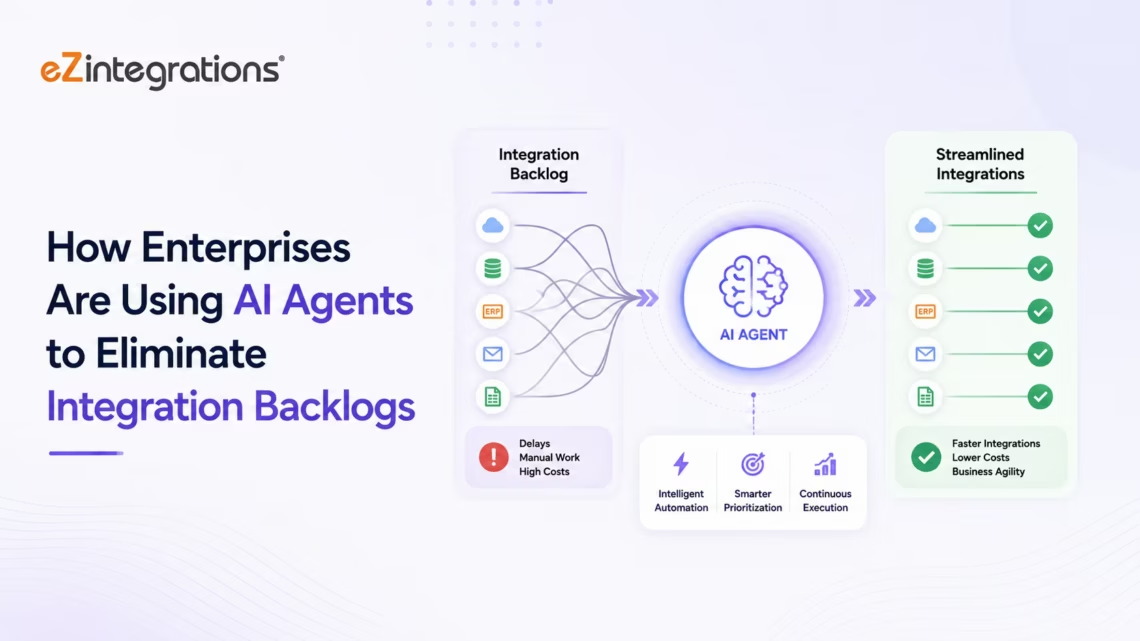
June 12, 2026Enterprises use AI agents to eliminate integration backlogs by deploying autonomous agents that can investigate failed pipelines, identify root causes across multiple systems, assemble diagnostic briefs for engineering teams, and: in configured environments: propose remediation steps and test fixes. eZintegrations’ Goldfinch AI coordinates specialist integration agents that monitor pipeline health, detect anomalies, classify failure patterns, and route structured remediation briefs: reducing the investigation time per integration failure from hours to minutes and enabling engineering teams to clear backlogs rather than maintain them.
TL;DR
- Enterprise application integration backlogs are structural, not temporary.They grow because integration work: building new pipelines, fixing broken ones, and maintaining existing ones: scales with the number of systems and data volumes in the enterprise, while engineering capacity does not.
- AI agents do not replace the integration engineering team. They eliminate the investigation and triage work that consumes that team’s capacity: the 3-hour root cause analysis of a failed pipeline, the 2-hour diagnostic of why a data sync is producing incorrect records, the 1-hour assessment of which integration in the backlog is actually blocking business value.
- Three patterns of AI agent deployment are emerging in enterprise integration: the Pipeline Health Monitor (continuous monitoring, anomaly detection, root cause triage), the Integration Triage Agent (investigating and prioritising backlog items), and the Remediation Intelligence Agent (proposing, testing, and in configured environments executing fixes).
- eZintegrations delivers all three patterns through its Goldfinch AI Level 4 platform: coordinator-worker architecture, 9 native enterprise tools, Chat UI for engineering leadership, and Workflow Node for automated pipeline health intelligence.
- The result: engineering teams focus on building and architecture. AI agents handle monitoring, triage, and investigation. Integration debt stops accumulating faster than it can be cleared.
Why Enterprise Integration Backlogs Are Structural
The integration backlog is one of the most consistent features of enterprise IT organisations: present across industries, company sizes, and technology stacks, reflecting broader enterprise integration market trends tracked by IDC.
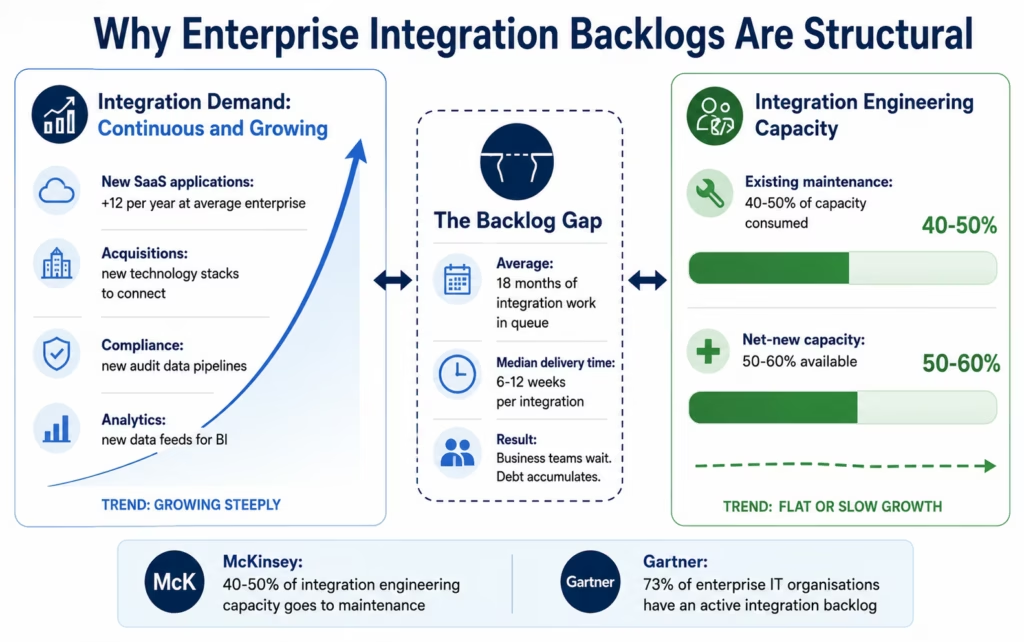
Gartner research from 2025 shows that 73% of enterprise IT organisations report an active integration backlog, with an average of 18 months of integration work in the queue at any given time. The median time-to-delivery for a net-new enterprise integration is 6-12 weeks from business request to production.
The backlog is not a project management failure. It is a structural consequence of how enterprises grow:
Every new SaaS application a business unit adopts creates new integration requirements. Every acquisition brings a new technology stack that needs connecting to the core systems. Every compliance requirement creates new audit data pipelines. Every analytics initiative requires new data feeds. The demand for integration is continuous and grows proportionally with enterprise complexity.
Meanwhile, integration engineering capacity is constrained. Enterprise integration is a specialised skill: it requires knowledge of system APIs, data transformation patterns, error handling architecture, and the specific data models of each connected system. It cannot be commoditised as easily as other engineering functions. The supply of qualified integration engineers has grown more slowly than the demand for their work.
The result: integration work arrives faster than it can be delivered. The backlog grows. Business teams wait 6-12 weeks for data pipelines that directly affect their operations. And the engineering team spends an increasing fraction of its time on maintenance: monitoring and repairing existing integrations: rather than clearing the backlog.
McKinsey estimates that enterprise organisations spend 40-50% of their integration engineering capacity on maintenance and monitoring of existing pipelines, leaving only 50-60% available for net-new integration work. At a growth-stage enterprise with 200+ integrations running in production, the maintenance burden alone can consume two or three full-time integration engineers.
This is the structural problem that AI agents address.
How AI Agents Are Different from Monitoring Tools
The first instinct of most enterprise IT teams when confronted with a growing maintenance burden is to add monitoring, consistent with broader Forrester Research integration and API management analysis. Better observability tools. More alerts. Richer dashboards. This is the right instinct: you cannot fix what you cannot see: but monitoring tools solve only the detection problem, not the investigation problem.
Detection is easy. When a pipeline fails, the monitoring tool knows within minutes. The alert fires. The engineer is paged. The investigation begins.
Investigation is the bottleneck.
A failed pipeline investigation at an enterprise involves: identifying which specific run failed and which specific records were affected, querying the source system to understand whether the failure originated there (API timeout? rate limit? schema change?), querying the transformation layer to understand whether the data shape caused the failure, querying the destination system to understand whether it rejected the data and why, reviewing the error log to understand whether this is a known pattern or a new failure type, checking whether other pipelines that share infrastructure with the failing one are also affected, and determining the business impact: is this a high-priority pipeline that needs immediate remediation, or can it wait for the normal maintenance cycle?
At a large enterprise, this investigation takes 2-4 hours per failed pipeline. With 200+ integrations in production and a realistic 3-5% daily failure rate, that is 6-10 pipeline investigations per day, consuming 12-40 hours of engineering time. Daily.
This is the investigation problem that monitoring tools do not solve. They tell you that the pipeline failed. They do not tell you why.
AI agents change this by doing the investigation.
Not by replacing the engineer’s judgment about how to fix the problem. But by doing the multi-system information retrieval, correlation, and classification work that currently precedes every engineering decision about a failed pipeline.
The functional difference:
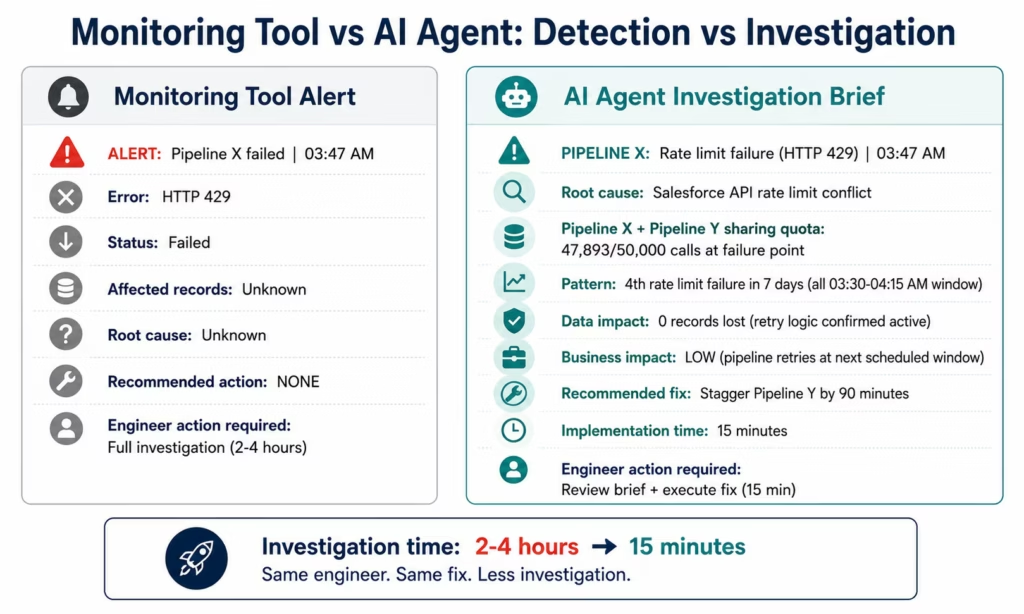
A monitoring tool: “Pipeline X failed at 03:47 AM. Error code 429.”
An AI agent: “Pipeline X failed at 03:47 AM with a rate limit error (HTTP 429) on the Salesforce API. This is the 4th rate limit failure on this pipeline in the last 7 days. The failures are concentrated between 03:30-04:15 AM when the nightly batch run for Pipeline Y is also active and consuming Salesforce API quota. Total API calls at the time of failure: 47,893 against a limit of 50,000. Recommended action: stagger Pipeline Y’s execution window by 90 minutes. Estimated implementation time: 15 minutes. 0 records were lost: the pipeline has automatic retry logic and will redeliver in the next scheduled run.”
The engineer receives a structured investigation brief rather than a raw error code. The 2-4 hour investigation collapses to a 5-minute review and decision.
Before vs After: AI Agent-Powered Integration Operations
| Scenario | Before AI Agents | After AI Agents |
|---|---|---|
| Failed pipeline investigation | Engineer manually checks error logs, queries source and destination APIs, correlates data (2-4 hours) | AI agent retrieves error context, queries all systems, classifies failure, delivers structured brief (engineer reviews in 15 min) |
| Rate limit detection | Discovered after failure; engineer manually correlates pipeline schedules (1-2 hours) | Agent detects API quota consumption trend before threshold breach, routes optimisation recommendation |
| Schema change impact | Discovered when pipeline fails; engineer manually identifies which other pipelines share the changed schema (2-4 hours) | Agent immediately identifies all pipelines affected by a schema change, assesses impact, prioritises by business criticality |
| Backlog prioritisation | Engineering manager manually assesses each backlog item: business impact, technical complexity, dependencies (30-60 min/item) | Triage Agent retrieves business context for each item, classifies urgency, identifies dependencies, delivers prioritised backlog view |
| New integration scoping | Engineer manually documents requirements, queries connected systems for API capabilities, estimates effort (4-8 hours) | Agent queries API documentation, retrieves connected system schemas, maps field requirements, produces scoping brief |
| Integration documentation | Engineering team manually documents data flows, error handling, and field mappings after build (2-4 hours/integration) | Agent generates integration documentation from the live workflow configuration: always current |
| Capacity planning | Engineering manager manually analyses maintenance burden and net-new capacity (2-4 hours monthly) | Agent continuously tracks maintenance-to-new ratio, flags when maintenance burden approaches capacity threshold |
| Vendor API change response | Engineer discovers API change when pipeline fails; manually identifies impact scope (2-4 hours) | Watcher agent monitors API changelogs and vendor communications; routes impact assessment before changes go live |
| Cross-pipeline dependency mapping | Manual documentation exercise, usually outdated (4-8 hours to build, never maintained) | Agent generates live dependency map from active workflow configurations: updated continuously |
| SLA breach root cause | Engineering team manually investigates SLA breach across multiple pipeline hops (4-8 hours) | Agent traces the SLA breach to the specific pipeline step, quantifies the impact, delivers root cause brief |
Pattern 1: The Pipeline Health Monitor Agent
The Pipeline Health Monitor is the foundational AI agent in enterprise integration operations. It runs continuously, watching every pipeline in the production environment, and surfaces structured intelligence about the health of the integration estate.
This is different from a monitoring dashboard. A dashboard shows you what happened. The Pipeline Health Monitor tells you what is about to happen: and has already assembled the context you need to decide what to do about it.
What the Pipeline Health Monitor does:
Continuous health scoring: The agent maintains a health score for every integration in the production environment: calculated from: recent failure rate (percentage of runs that failed in the last 7 days), error pattern stability (is the failure rate stable, declining, or accelerating?), latency trend (is processing time trending up or down?), and data quality indicators (are the records produced by this pipeline passing downstream validation?).
The Watcher Tool continuously monitors the configured health score threshold for each integration. When any integration’s health score crosses the threshold, the Watcher Tool fires the investigation sequence.
Anomaly detection: The Data Analysis node monitors the pipeline execution metrics for statistical anomalies: failure rates that deviate significantly from the historical baseline, latency spikes that exceed normal variation, data volumes that are significantly above or below the expected range. Anomalies that fall within normal statistical variation are suppressed; genuine deviations route for investigation.
Root cause investigation: When an anomaly or failure is detected, the agent investigates autonomously:
- API Tool Call (source system): retrieves the error response details from the source system: was the failure an API timeout, a rate limit, an authentication failure, or a data validation rejection?
- API Tool Call (transformation log): retrieves the transformation execution record: did the data arrive correctly and fail transformation, or did it fail before reaching the transformation step?
- API Tool Call (destination system): retrieves the destination system’s response to the last data delivery attempt: did the destination reject the data, and if so, what was the rejection reason?
- Knowledge Base Vector Search (known error patterns): searches the error pattern knowledge base for prior occurrences of this specific error type: has this failure pattern appeared before? What resolved it last time?
- Data Analysis: calculates the business impact of the failure: how many records are affected, how many are in the retry queue, and what is the expected recovery time if no action is taken?
The engineering team receives a structured health brief: not a list of alerts, but a prioritised, pre-investigated analysis of the integration estate’s current health, with specific findings and recommended actions for each issue.
Pattern 2: The Integration Triage Agent
The integration backlog at most enterprises is not just a list of work items. It is a mix of strategic integrations (the ERP-to-data-warehouse pipeline that will enable the CFO’s real-time reporting programme), tactical integrations (the webhook that routes Zendesk tickets to Jira), and debt items (the decade-old custom integration that has been on the “replace with something modern” list for three years).
Prioritising this backlog correctly is one of the most valuable and most time-consuming tasks of the integration engineering manager. Done correctly, it ensures that engineering capacity is applied to the integrations with the highest business impact. Done poorly: or not done, which is common: the team works on whatever is noisiest rather than whatever matters most.
The Integration Triage Agent does the research that makes correct prioritisation possible.
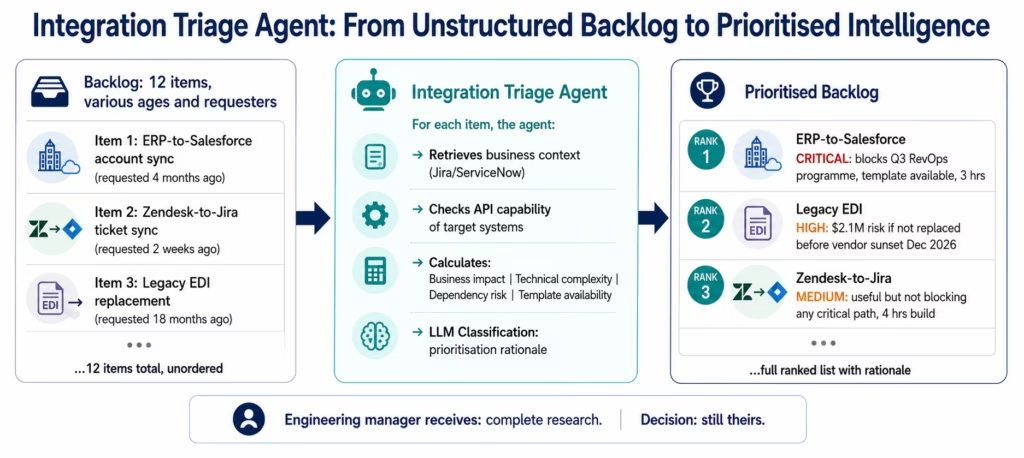
Agent goal: “Assess the priority of each item in the integration backlog based on business impact, technical complexity, dependencies, and current unblocked status.”
Agent investigation sequence (for each backlog item):
API Tool Call (project management system: Jira, Linear, or ServiceNow): retrieves the backlog item details: the original business request, any additional comments, the requesting stakeholder, and the estimated business value if captured.
Web Crawling / Knowledge Base Vector Search: retrieves context about the systems involved: the API documentation for systems the integration will connect, the known reliability record of those systems’ APIs, and any similar integrations already in the estate that could serve as templates.
API Tool Call (connected system APIs): queries each system the integration will connect to verify current API capability: are the required endpoints available, what authentication models are required, and what rate limits apply?
Data Analysis: calculates a composite priority score for each backlog item across four dimensions:
- Business impact: estimated revenue impact, number of stakeholders affected, and criticality of the connected process
- Technical complexity: number of systems involved, API complexity, transformation logic required, and estimated engineering hours
- Dependency risk: does this integration block other planned work? Does it have upstream dependencies that are not yet complete?
- Template availability: is there an Automation Hub template that covers this use case, reducing effort to configuration rather than build?
LLM Classification: generates a written prioritisation rationale for each backlog item: a 2-3 sentence summary of why this item should be prioritised above or below its neighbours in the queue.
The engineering manager receives a fully prioritised backlog view with the research pre-done. The decision about what to build next is still the manager’s: but it is informed by complete information rather than whatever the loudest stakeholder communicated most recently.
Pattern 3: The Remediation Intelligence Agent
The first two patterns (health monitoring and triage) are about intelligence: surfacing the right information to the right person at the right time. The third pattern moves further along the automation spectrum: not just identifying what is broken and what should be fixed, but actively assembling remediation proposals and, in configured environments, testing and applying them.
This is the pattern that generates the most discussion among enterprise IT leadership: and the most caution. The appropriate level of autonomous action for an AI agent in a production integration environment is not the same as for an AI agent in a customer success workflow. The stakes are higher. The blast radius of an incorrect autonomous action is larger.
The Remediation Intelligence Agent is designed with this constraint at its centre. It operates on a spectrum from “purely advisory” to “propose and test” to “propose, test, and apply under approval gate”: and the appropriate point on that spectrum is a configuration decision, not an agent decision.
What the Remediation Intelligence Agent does:
Remediation proposal generation: When the Pipeline Health Monitor identifies a failure with a clear root cause and a known remediation pattern (rate limit → execution window adjustment, authentication failure → credential rotation, schema mismatch → field mapping update), the Remediation Intelligence Agent generates a specific, actionable remediation proposal.
The proposal is not a general recommendation. It is specific: “Adjust Pipeline Y’s execution start time from 03:00 AM to 04:45 AM. This will move Pipeline Y’s peak Salesforce API consumption outside the 03:30-04:15 AM conflict window with Pipeline X. Expected API utilisation at the time of Pipeline X’s execution: 31,240 calls against a limit of 50,000.”
Automated testing in non-production environments (where configured): For organisations that have configured a test integration environment, the agent can execute the proposed fix in the test environment and report the test results: confirming that the fix produces the expected outcome before the engineer reviews and approves the production change.
Human approval gate for production changes: In all configurations, production changes require human approval. The engineer receives the agent’s remediation proposal, the test environment results (if available), and a confirmation action. The agent prepares; the engineer authorises.
Continuous remediation pattern learning: The agent maintains a knowledge base of remediation patterns: successful fixes to specific error types, correlated with system versions and error contexts. Over time, the agent’s remediation proposals become more specific and more accurate as the knowledge base grows.
What the agent does NOT do autonomously:
- Apply production changes without human approval
- Make architectural decisions about integration design
- Modify integration logic beyond the specific remediations in the approved pattern library
- Access production systems with write permissions without the explicit human approval gate configured
The appropriate mental model: the Remediation Intelligence Agent is a senior integration engineer’s assistant, not a replacement. It does the research, writes the brief, tests in staging, and presents for approval. The engineer reviews, decides, and signs off.
The Goldfinch AI Architecture for Integration Operations
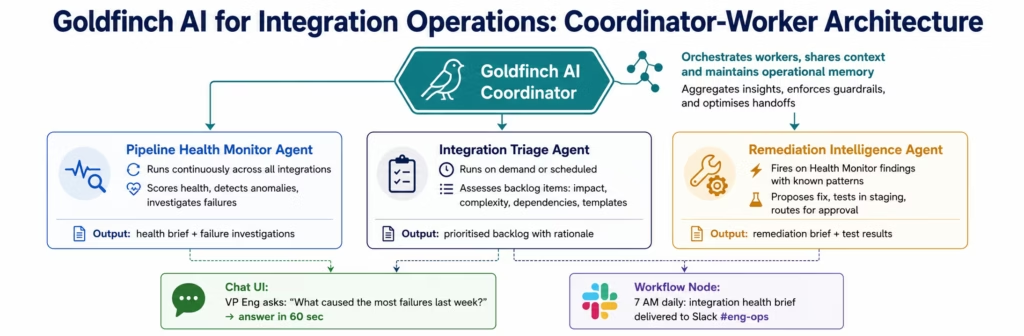
eZintegrations’ four-level automation architecture spans Level 1 iPaaS workflows (deterministic data pipelines), Level 2 AI Workflows (intelligent data processing with LLM Classification and Document Intelligence), Level 3 AI Agents (autonomous multi-system investigation), and Level 4 Goldfinch AI (multi-agent coordination with Chat UI). For integration operations intelligence, eZintegrations delivers all three investigation patterns through Goldfinch AI: the Level 4 multi-agent coordination platform.
The coordinator-worker architecture:
A Goldfinch AI coordinator agent receives the monitoring goal for the integration estate and dispatches specialist worker agents continuously:
- The Pipeline Health Monitor agent runs across all active integrations
- The Triage Agent runs against the configured backlog system on a scheduled or on-demand basis
- The Remediation Intelligence Agent fires when the Health Monitor identifies a failure with a known remediation pattern
The coordinator synthesises findings across all three worker agents and determines what needs to surface to the engineering team: suppressing noise (known patterns, within-normal-variance events) and escalating genuine intelligence (novel failure patterns, accelerating degradation, critical path impacts).
The Chat UI for engineering leadership:
Integration operations leaders: VPs of Engineering, Chief Architects, Integration Platform teams: can query the live state of the integration estate in natural language through the Goldfinch AI Chat UI.
“What is the current health status of our SAP integration estate and are any pipelines approaching failure threshold?”
Goldfinch AI queries the Pipeline Health Monitor agent data, retrieves the health scores for all SAP-connected integrations, identifies any approaching alert thresholds, and returns a structured status brief in under 60 seconds.
“Which items in our integration backlog have Automation Hub templates available that would reduce estimated effort below 4 hours?”
Goldfinch AI queries the Triage Agent data and the Automation Hub template index, identifies all backlog items with matching templates, and returns the list with the estimated configuration time for each.
“How many integration failures did we have last week, what were the primary root causes, and how does that compare to the prior week?”
Goldfinch AI queries the Health Monitor’s failure log, categorises failures by root cause, calculates week-over-week change, and returns a structured failure analysis.
The Workflow Node for automated integration intelligence:
The Goldfinch AI Workflow Node delivers automated integration intelligence on a configured schedule without human request:
- Every morning at 7 AM: the integration health brief: overnight failures, current health scores by system, and any approaching threshold alerts: delivered to the engineering team’s Slack channel
- Every Monday: the weekly integration estate summary: failure rate trends, maintenance burden metrics, backlog velocity: delivered to engineering leadership
- Immediately upon detection: novel failure pattern alerts: when the Health Monitor detects a failure type it has not seen before, the coordinator escalates immediately rather than waiting for the scheduled brief
What AI Agents Cannot Do in Integration Operations
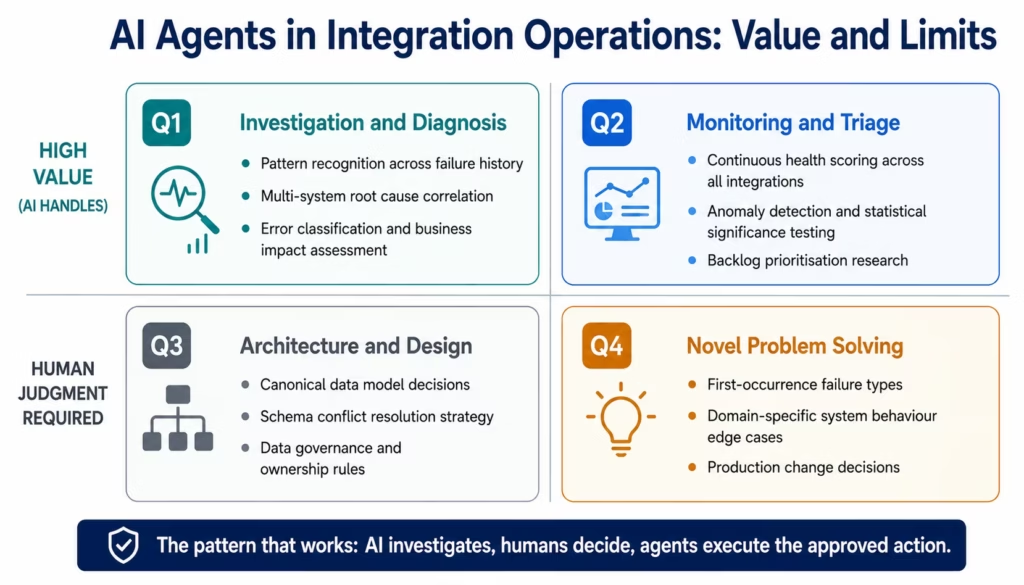
Intellectual honesty requires addressing the limits. Enterprise IT leaders evaluating AI agents for integration operations should have an accurate picture of where agents provide genuine value and where they do not.
AI agents cannot design integrations.
Deciding how data should flow between systems, what the canonical data model should be, how to handle schema conflicts, and what the data governance rules should be are architecture decisions that require deep understanding of business context. An AI agent can retrieve the API documentation, map field types, and identify potential transformation challenges. The architectural decision: how this integration should work, what it should prioritise, and how it should handle edge cases: is a human decision.
AI agents cannot remediate novel failure types autonomously.
The Remediation Intelligence Agent is effective when the failure pattern is known and the remediation is in the pattern library. Novel failures: new API behaviours, unexpected data shapes, system interactions the agent has not seen before: require human investigation. The agent can retrieve the diagnostic data and present it clearly, but the “this is a new kind of problem and here is how I think we should solve it” decision is the engineer’s.
AI agents cannot replace domain expertise.
An AI agent querying the SAP OData V4 API for a purchase order list retrieves the data correctly. An integration engineer who has worked with SAP for a decade understands why the purchase order list returns different data depending on which SAP authorisation roles the service account has, how to handle the CSRF token lifecycle for mutating operations, and which SAP BAPIs are available as a fallback when the OData service returns unexpected behaviour. That domain knowledge is not replaceable by an agent’s pattern matching.
AI agents have a blast radius risk in production environments.
Any agent that has write access to production integration infrastructure: the ability to modify workflows, adjust execution schedules, or update configuration: carries a blast radius risk if it acts incorrectly. eZintegrations is SOC 2 Type II certified and all integration agent processing runs within eZintegrations’ infrastructure. For enterprises handling EU data through integration pipelines, GDPR compliance applies to all data processing. The appropriate risk management is configuration: human approval gates on all production changes, read-only agent access to production environments (write access only in designated test environments), and audit logging of every agent action for review.
The pattern that works: agents investigate, humans decide, agents execute the approved action. Not: agents investigate, agents decide, agents execute.
Measuring the Impact: What Enterprises Are Reporting
Enterprise IT organisations deploying AI agents for integration operations report measurable improvements across three categories within 60-90 days of deployment:
Failure investigation time:
The most consistently reported metric is the reduction in time-to-investigation-complete for pipeline failures. Across enterprise organisations reporting to eZintegrations, the median reduction is from 2.5-3.5 hours of manual investigation per failure to 15-25 minutes of engineer review of an AI-prepared brief. At an organisation with 6-10 failures per day, this represents 10-22 hours of engineering capacity recovered per day: capacity that can be applied to net-new integration work rather than maintenance.
Backlog velocity:
Organisations that have deployed the Integration Triage Agent alongside their Pipeline Health Monitor report 25-40% improvement in backlog clearance velocity: measured as the number of net-new integrations delivered per quarter. The improvement comes from two sources: engineering time recovered from maintenance investigation, and faster scoping of new integrations (the Triage Agent’s pre-scoping research reduces new integration scoping time by 60-70%).
Maintenance burden as a percentage of total capacity:
The McKinsey 40-50% maintenance burden benchmark represents the state before AI agent deployment. Organisations that have fully deployed the Pipeline Health Monitor and Remediation Intelligence Agent report maintenance burden declining to 25-35% of total integration engineering capacity within 6 months. The 10-15 percentage point improvement in available capacity for net-new work is the equivalent of 1-2 additional integration engineers at a typical enterprise compensation level.
Mean time to resolution (MTTR) for integration SLAs:
For organisations with formal SLAs on integration pipelines (a common requirement in healthcare, financial services, and regulated industries), the MTTR for SLA-impacting failures declines from 4-8 hours to 45-90 minutes. The agent’s immediate investigation and root cause identification compresses the time from failure detection to remediation initiation.
How to Get Started
Enterprise organisations deploying AI agents for integration operations typically follow a three-phase approach over 6-12 weeks.
Phase 1: Pipeline health monitoring foundation (weeks 1-4)
Configure the Pipeline Health Monitor agent across your highest-criticality integration estate: the production integrations that affect revenue-generating or compliance-critical processes. This is not all integrations. Start with the 20-30 integrations where a failure has the highest business impact. Configure the health scoring thresholds, the alert routing, and the failure investigation tool access (read-only API credentials for each connected system). Validate that the agent’s failure investigations are accurate against a set of known historical failure cases. Expand to the full integration estate after validation.
Phase 2: Triage agent deployment (weeks 3-6, overlapping with Phase 1)
Connect the Integration Triage Agent to your backlog management system (Jira, ServiceNow, or Linear). Configure the business impact scoring criteria: which factors your organisation uses to prioritise integration work (revenue impact, stakeholder count, strategic programme alignment, regulatory requirement). Configure the API Tool Call connections to the systems the backlog items will connect. Run the agent against your current backlog and review the prioritised output against the engineering manager’s own prioritisation. Adjust scoring criteria based on any systematic discrepancies.
Phase 3: Remediation intelligence (weeks 5-12)
Build the remediation pattern library from your historical failure and resolution data: what fixed each failure type that has occurred in the past. Configure the Remediation Intelligence Agent with read access to your production integration environment and write access to your test environment. Define the human approval gate process: who approves remediation proposals, what information they need, and what the expected review and approval SLA is. Pilot with low-risk remediations (execution schedule adjustments, credential refreshes) before expanding to higher-complexity fixes.
Getting started with Goldfinch AI:
Visit ezintegrations-agentic-ai-platform to see the Goldfinch AI coordinator-worker architecture. The Pipeline Health Monitor, Integration Triage Agent, and Remediation Intelligence Agent are available as Automation Hub templates: pre-configured with the tool registry, investigation sequences, and output formatting needed for enterprise integration operations use.
Book a free demo with eZintegrations and bring your current integration estate size, your primary maintenance pain points, and your backlog volume. We will show you what AI agent deployment looks like for your specific integration environment.
FAQs
An integration backlog is the accumulated queue of integration work including new pipelines to build, broken pipelines to fix, and legacy integrations to modernise that exceeds an engineering team's current delivery capacity. Backlogs grow because integration demand from new SaaS adoption, acquisitions, compliance requirements, and analytics initiatives scales continuously while engineering capacity remains constrained. AI agents help eliminate the backlog by removing the investigation and triage work that consumes 40-50% of integration engineering capacity, including the 2-4 hour root cause analysis per failed pipeline, manual backlog prioritisation research, and scoping work for new integrations. The recovered engineering capacity accelerates backlog clearance.
When a pipeline failure is detected, an AI agent launches an investigation sequence across connected systems. An API Tool Call to the source system retrieves error response details such as timeout, rate limit, authentication failure, or data rejection. Another API Tool Call retrieves the transformation execution log, while a third retrieves the destination system's response to the last delivery attempt. A Knowledge Base Vector Search retrieves prior occurrences of the same error type and historical resolutions. Data Analysis calculates the business impact including records affected, retry queue status, and expected recovery time. The agent assembles the findings into a structured investigation brief delivered to the engineering team in 5-10 minutes instead of the 2-4 hours typically required for manual investigation.
No, In eZintegrations' architecture, AI agents do not make autonomous changes to production integration environments without a human approval gate. The Remediation Intelligence Agent proposes a specific fix, tests it in a configured non-production environment, and presents both the proposal and the test results for human review and approval. The engineer approves the remediation before the agent or the engineer applies the fix. Production changes always require human authorisation. This is a deliberate design principle because the blast radius of an incorrect autonomous production change in an enterprise integration environment is too high to accept without human oversight.
An integration monitoring tool detects that a pipeline has failed and fires an alert. An AI agent detects the failure and investigates why by querying source systems, transformation logs, and destination systems, correlating findings with historical failure patterns, calculating business impact, and assembling a structured remediation recommendation. The monitoring tool solves the detection problem while the AI agent solves the investigation problem. Both are required in modern integration operations because monitoring provides the trigger and the AI agent provides the pre-assembled investigation that currently consumes 2-4 hours of engineering time per incident.
Phase 1, the Pipeline Health Monitor, typically goes live in 2-4 weeks including integration estate inventory, tool connection configuration using read-only API credentials for each connected system, health scoring threshold calibration, and validation against historical failure data. Phase 2, the Integration Triage Agent, adds another 2-3 weeks if overlapped with Phase 1. Phase 3, the Remediation Intelligence Agent, requires an additional 4-6 weeks including remediation pattern library construction and approval gate configuration. Full enterprise-scale deployment generally takes 8-12 weeks.
eZintegrations' integration AI agents connect to any system with an accessible API for investigation purposes including enterprise ERPs such as SAP S/4HANA OData V4, Oracle ERP Cloud REST API, and NetSuite SuiteQL; CRM platforms including Salesforce REST and Bulk API plus HubSpot native API; cloud data warehouses such as Snowflake, BigQuery, and Redshift via SQL; messaging platforms including Kafka, RabbitMQ, and Azure Service Bus; API gateways such as Kong, Apigee, and AWS API Gateway; plus any REST or GraphQL endpoint. For on-premises systems without public internet exposure, the connection uses IPSec Tunnel. Agents use read-only credentials for investigation while any write access is limited to approved remediation actions under the configured human approval gate.1. What is an integration backlog and why do AI agents help eliminate it?
2. How do AI agents investigate a failed integration pipeline?
3. Do AI agents make autonomous changes to production integration pipelines?
4. What is the difference between an integration monitoring tool and an AI agent for integration operations?
5. How long does it take to deploy AI agents for enterprise integration operations?
6. Which integration platforms and systems do AI agents connect to for investigation?
Conclusion: The Backlog Is Not a Capacity Problem. It Is an Investigation Problem.
The integration backlog that has 18 months of work in it is not primarily a problem of insufficient engineering headcount. Adding engineers helps: but the bottleneck is not how many engineers you have. It is how much of each engineer’s time goes to investigation and maintenance rather than building.
At the average enterprise, 40-50% of integration engineering capacity is consumed by monitoring and maintaining existing pipelines. That is not capacity that builds down the backlog. That is capacity that prevents the backlog from getting even longer.
AI agents change the ratio. When a pipeline failure investigation takes 15 minutes to review rather than 3 hours to conduct, that 3 hours returns to the engineering team for productive work. When a backlog item’s priority research takes the agent 2 minutes rather than the manager 30 minutes, the manager can work through the full backlog in a morning rather than a week. When a remediation proposal arrives pre-tested and ready to approve, the engineer approves rather than investigates.
None of this eliminates the need for skilled integration engineers. It changes what they spend their time on: from investigation to building, from monitoring to designing, from reactive maintenance to proactive architecture.
That is what eliminates the backlog. Not more capacity. Better leverage of the capacity you have.
Book a free demo with eZintegrations and bring your current integration estate: its size, its maintenance burden, and its backlog. We will show you what AI agent-powered integration operations looks like for your specific environment.

