
Webhook Integration Platform: Event-Driven Architecture for Enterprise
May 16, 2026To integrate webhooks into enterprise workflows with eZintegrations, following Webhooks implementation standards, generate a unique webhook endpoint URL from the eZintegrations platform, configure your source system (Shopify, Salesforce, Stripe, GitHub, or any webhook-capable application) to POST events to that URL, define your payload parsing rules and field extraction, add filtering conditions to route events to the correct downstream workflow, and connect your destination systems (SAP, Oracle, NetSuite, Salesforce, or any REST API in the API Catalog). Your webhook events are received, validated, transformed, and routed in real time: typically in under 500 milliseconds from event to downstream action.
TL:DR
- Receive, validate, transform, and route webhook events from platforms like Shopify, Salesforce, Stripe, GitHub, and 1,000+ systems in real time without building custom servers or polling infrastructure.
- eZintegrations generates secure HTTPS webhook endpoints with built-in HMAC signature verification, payload parsing, filtering, transformation, retry handling, and fan-out routing to ERP, CRM, analytics, and ITSM systems.
- Automate order processing, CRM events, payment workflows, DevOps notifications, incident management, and enterprise event-driven architecture with sub-500ms processing latency.
- Webhook events can trigger Level 2 AI Workflows, Level 3 AI Agents, and Level 4 Goldfinch AI multi-agent orchestration for autonomous business process execution and real-time decisioning.
- With pre-built Automation Hub templates and workflow-based pricing, most webhook integrations go live in under 20–30 minutes without scaling costs tied to event volume.
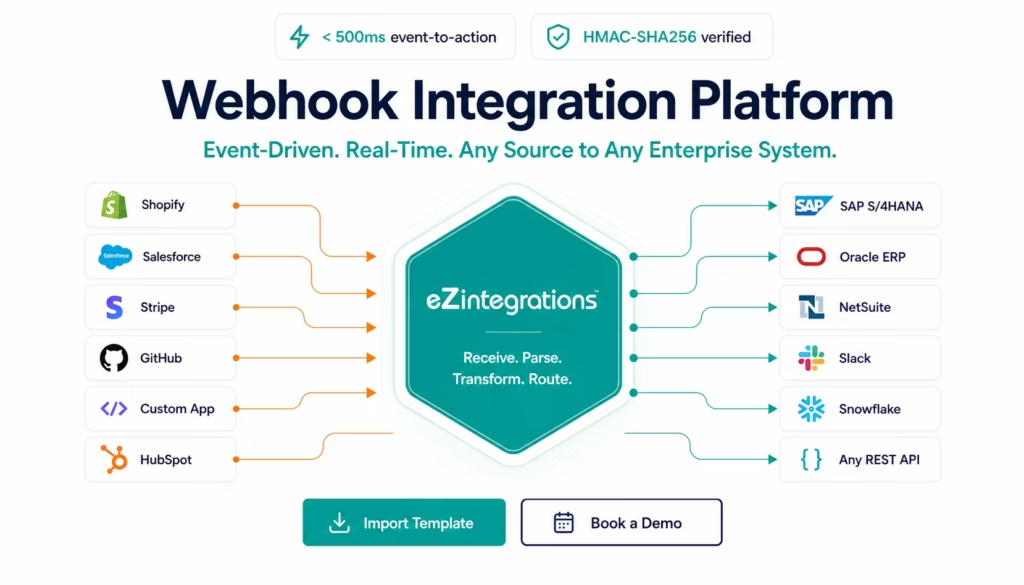
Receive any webhook, from any system. Transform, filter, and route the event to any downstream enterprise system in real time. No custom servers. No polling. No code.
eZintegrations generates a unique, authenticated webhook endpoint for every workflow. Your source system POSTs events to that URL. eZintegrations handles reception, signature verification, payload parsing, transformation, conditional routing, and downstream delivery: across SAP, Oracle, NetSuite, Salesforce, Shopify, and 1,000+ systems in the API Catalog.
Import a Webhook Template from the Automation Hub and go live in minutes. Or book a free webhook integration session and we will configure your first event-driven workflow in the demo.
What You Can Do
Real-Time Order and eCommerce Event Processing
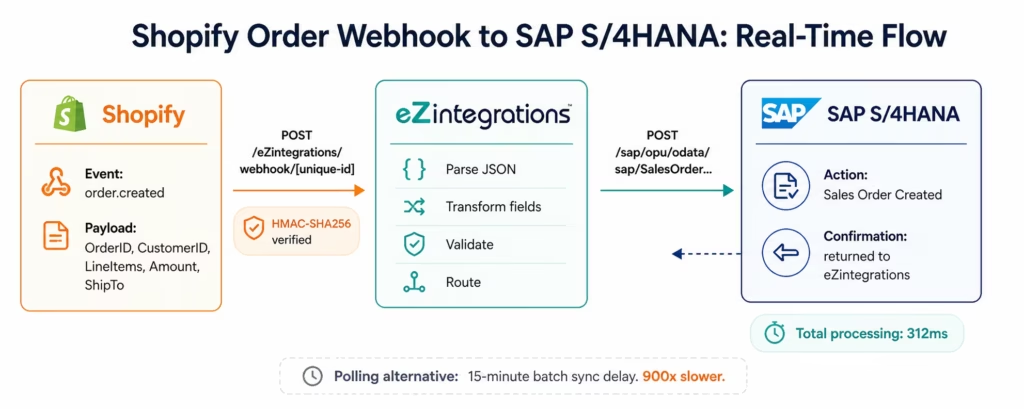
When a customer places an order in Shopify, Magento, BigCommerce, or WooCommerce, the platform fires a webhook immediately. eZintegrations receives the webhook, extracts the order data, transforms it to your ERP’s required format, and creates the sales order in SAP, Oracle, or NetSuite: typically within 500 milliseconds of the order being placed.
No polling. No 15-minute scheduled sync delay. No batch window that leaves your ERP 4 hours behind your eCommerce platform. The event fires, the order posts, the fulfilment process begins.
Supported eCommerce webhook events: order created, order updated, order cancelled, payment processed, refund issued, inventory level updated, product created, product updated, customer created.
CRM and Sales Event Automation
Trigger downstream workflows the moment a Salesforce opportunity closes, a HubSpot deal moves stage, or a new contact is created in your CRM. Post a purchase order to your ERP when a deal closes. Trigger an onboarding workflow in your HRIS when a new enterprise customer signs. Create a Zendesk account when a Salesforce lead converts.
Salesforce supports webhook delivery via outbound messages and platform events. HubSpot fires webhooks on object creation, property change, and deal stage transitions. eZintegrations receives and routes all of these without any intermediate infrastructure.
Payment and Financial Event Processing
Stripe, Braintree, PayPal, and Adyen all fire webhooks for payment events: payment intent succeeded, invoice paid, subscription created, refund processed, dispute opened. eZintegrations receives these events, validates the HMAC signature, extracts the relevant financial data, and routes it to your accounting system (QuickBooks, Xero, NetSuite, SAP Financial Accounting) in real time.
Revenue recognition does not wait for a nightly batch. The moment Stripe fires invoice.paid, your accounting system posts the revenue line.
IT Operations and DevOps Events
GitHub, GitLab, Jira, PagerDuty, and Datadog all use webhooks for system events: pull request merged, deployment triggered, incident created, alert fired. eZintegrations receives these events and routes them to Slack for notification, Jira for ticket creation, ServiceNow for incident management, or any other downstream system.
Automate your deployment pipeline notifications. Create Jira tickets from PagerDuty incidents. Update your Salesforce account record when a customer’s Datadog alert fires. All triggered by the original webhook event, with no polling and no delay.
AI Agent and Agentic AI Triggers
Webhook events work across all four automation levels. Level 1 (iPaaS Workflows) uses webhooks for rule-based event-driven automation: the order fires, the ERP posts. Level 2 (AI Workflows) adds Document Intelligence and LLM classification to webhook payloads: a document submission webhook triggers AI extraction before posting to the ERP. Webhook events are also a primary trigger for Level 3 AI Agent workflows. When a new invoice arrives via email webhook, the AP Exception Agent fires immediately. When a vendor contract is submitted via a form webhook, the Contract Clause Extraction Agent processes it in real time. When a support ticket is created via Zendesk webhook, the Customer Complaint Investigation Agent begins researching root cause.
Level 4 Goldfinch AI multi-agent workflows are also webhook-triggered. A Shopify order above a threshold value fires a webhook that triggers a Goldfinch AI coordinator to run a credit check agent, a fraud detection agent, and a fulfilment routing agent in parallel before posting the order to the ERP.
How It Works
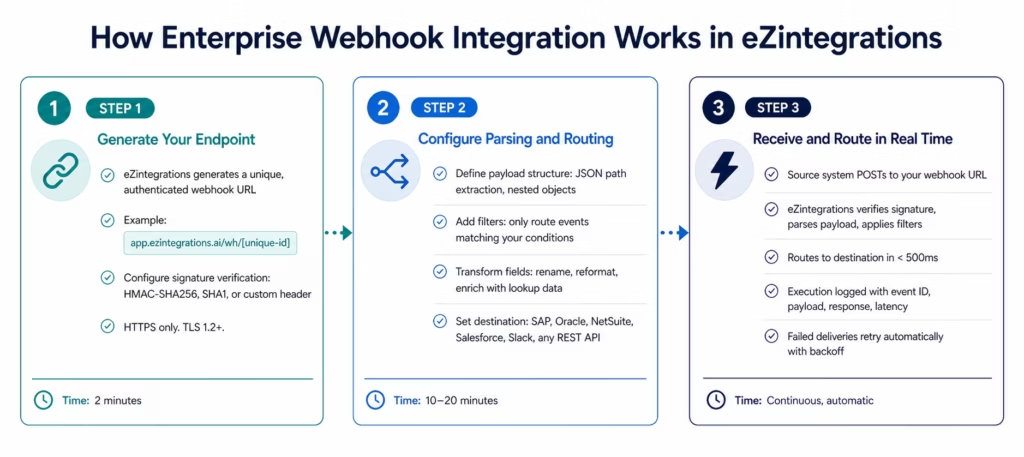
Three steps from webhook URL to live enterprise automation.
Step 1: Generate Your Webhook Endpoint
In eZintegrations, create a new workflow and select Webhook as the trigger type. The platform generates a unique HTTPS endpoint URL:
https://app.ezintegrations.ai/wh/[your-unique-id]
Configure signature verification: HMAC-SHA256 (Shopify, Stripe, GitHub standard), SHA1 (older systems), or custom header token (for systems that use a fixed secret in a header). Every webhook event is verified against your signature before processing. Malformed or unsigned events are rejected automatically.
Copy the endpoint URL and paste it into your source system’s webhook configuration. eZintegrations is ready to receive immediately.
Step 2: Configure Payload Parsing and Routing
When the first test event arrives, eZintegrations displays the full JSON payload in the event inspector. Use the visual payload mapper to:
Extract fields: click any field in the event payload to reference it downstream. For nested objects (event.data.object.line_items[0].price), use the JSONPath extractor or click the field in the visual tree.
Add filters: route only specific events. For example: only process orders above $500, only process events from a specific country, only process cancelled orders if the cancellation reason is “customer request.” Filters use a visual condition builder: no code, no regex.
Transform fields: rename fields, reformat dates, concatenate strings, apply lookup tables (convert Shopify variant IDs to SAP material numbers), or call an enrichment API to add data not present in the original payload.
Set the destination: select your destination from the API Catalog (SAP, Oracle, NetSuite, Salesforce, Slack, Snowflake, or any REST API). Map the transformed fields to the destination system’s required format.
Step 3: Receive and Route in Real Time
Once activated, every webhook event posted to your endpoint is processed automatically. The execution log shows every event: the event ID, the raw payload, the transformed output, the destination response, and the total processing latency.
For events that fail (destination system unavailable, validation error, rate limit): automatic retry with exponential backoff (3 attempts by default, configurable). Failed events after all retries go to the dead letter queue for manual review and reprocessing.
High-volume webhook scenarios: eZintegrations handles concurrent webhook delivery at scale. If your Shopify store fires 500 webhook events in a 60-second burst (a flash sale scenario), the platform processes them concurrently without dropping events.
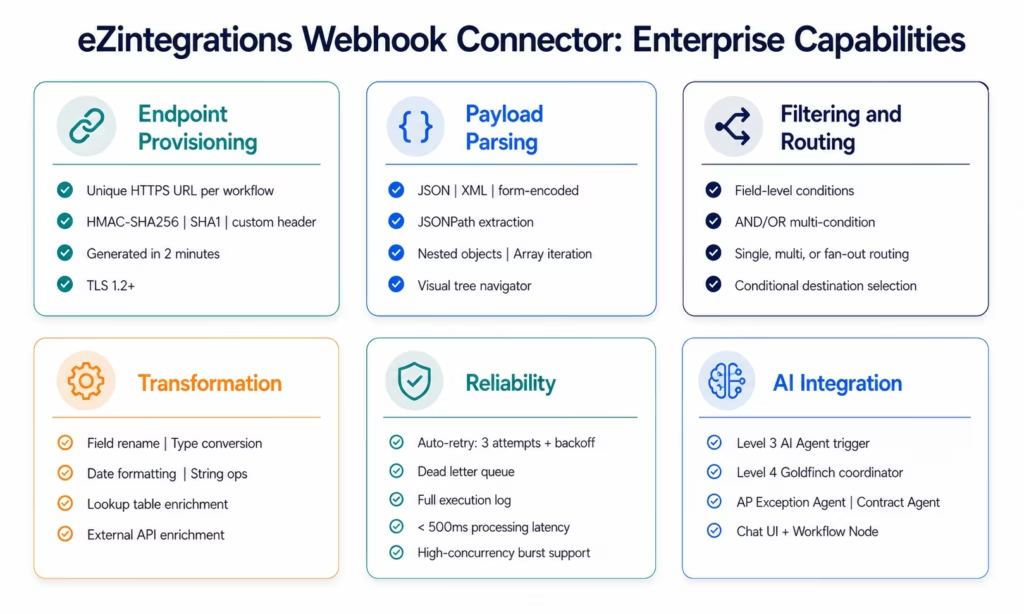
Webhook Connector Capabilities
| Capability | eZintegrations Webhook Integration |
|---|---|
| Endpoint provisioning | Unique HTTPS endpoint per workflow, generated instantly |
| Signature verification | HMAC-SHA256, SHA1, SHA256, custom header token |
| Supported event sources | Any system that POSTs HTTP events, based on HTTP Semantics, including Shopify, Salesforce, Stripe, GitHub, GitLab, HubSpot, Zendesk, PagerDuty, Datadog, Jira, and custom applications |
| Payload formats | JSON (primary), XML, form-encoded, multipart |
| Payload parsing | JSONPath extraction, nested object traversal, array iteration |
| Filtering | Field-level conditions (equals, contains, greater than, exists), multi-condition AND/OR logic |
| Transformation | Field rename, type conversion, date formatting, string operations, lookup table enrichment, external API enrichment |
| Routing | Single destination, conditional multi-destination, fan-out to multiple destinations simultaneously |
| Destination systems | SAP S/4HANA, Oracle ERP, NetSuite, Salesforce, HubSpot, Shopify, Slack, Snowflake, any REST API (1,000+ in API Catalog) |
| Processing latency | Under 500ms event-to-downstream for standard workflows |
| Throughput | High-concurrency burst handling: no event dropping on volume spikes |
| Retry logic | Automatic retry: 3 attempts with exponential backoff (configurable) |
| Dead letter queue | Failed events after retry held for manual review and reprocessing |
| Execution logging | Full event log: event ID, raw payload, transformed payload, destination response, latency |
| Security | TLS 1.2+, HMAC signature verification, credential vault, HIPAA, GDPR, SOC 2 Type II |
| On-premises delivery | Route webhook events to on-premises ERP via IPSec Tunnel |
| AI integration | Webhook as trigger for Level 3 AI Agents and Level 4 Goldfinch AI coordinator workflows |
| Pre-built templates | Automation Hub templates for Shopify, Salesforce, Stripe, GitHub, HubSpot, PagerDuty, and 50+ webhook sources |
Why eZintegrations for Enterprise Webhook Integration
No Custom Webhook Servers to Build or Maintain
Receiving enterprise webhooks without a dedicated platform means building an HTTP server, deploying it somewhere, managing SSL certificates, writing signature verification code, handling payload parsing, building retry logic, and monitoring the whole stack. That is 2-4 weeks of engineering work before any business logic is implemented.
eZintegrations generates an authenticated, monitored, highly available webhook endpoint in two minutes. No server. No deployment. No SSL configuration. No monitoring setup. The endpoint is live the moment you create the workflow.
Signature Verification for Every Source
Webhooks without signature verification are a security gap. Any actor who discovers your endpoint URL can POST arbitrary payloads. eZintegrations verifies the HMAC signature from every major webhook source before processing: Shopify’s X-Shopify-Hmac-SHA256, Stripe’s Stripe-Signature, GitHub’s X-Hub-Signature-256, and any custom HMAC or header token your system uses. Unsigned events are rejected at the edge before reaching any processing step.
Real-Time, Not Near-Real-Time
Polling-based integration reads your source system on a schedule (every 5 minutes, every 15 minutes, every hour). Between polls, your downstream systems are out of sync. A customer who cancels an order at 2:03 PM might have that cancellation processed at 2:15 PM if you poll every 15 minutes. In the meantime, your warehouse has picked and packed the order.
Webhook-driven integration processes the event in under 500 milliseconds. The cancellation fires, eZintegrations receives it, and your ERP receives the cancellation update before the warehouse management system has started the pick process.
Fan-Out Routing to Multiple Destinations
A single webhook event often needs to trigger actions in multiple downstream systems simultaneously. A Shopify order might need to: create a sales order in SAP, send a Slack notification to the fulfilment team, update the customer record in Salesforce, and add a row to your Snowflake order analytics table.
eZintegrations routes one webhook event to multiple destinations simultaneously (fan-out routing). Each destination receives the event and processes it independently. A failure in the Snowflake write does not block the SAP sales order creation.
Webhook Events as AI Agent Triggers
Every webhook event in eZintegrations can trigger a Level 3 AI Agent workflow. The event payload becomes the agent’s input. The agent uses its tool set (Document Intelligence, API Tool Call, Knowledge Base Vector Search, Data Analysis) to research and process the event, then routes a result to the downstream system.
A Zendesk ticket created webhook triggers the Customer Complaint Investigation Agent. A Stripe dispute webhook triggers the Dispute Research Agent. A contract PDF submission webhook triggers the Contract Clause Extraction Agent. All triggered in real time by the source webhook, processed autonomously by the agent, with human review only for low-confidence cases.
Level 4 Goldfinch AI workflows use webhooks as coordinator triggers. A high-value order webhook triggers a Goldfinch coordinator that runs a credit check worker agent, a fraud detection worker agent, and a fulfilment routing worker agent in parallel before committing the order to the ERP. The Chat UI and Workflow Node allow business users to monitor and interact with these coordinator workflows in natural language.
Pricing That Handles Webhook Volume
Webhook events can arrive in high volumes. Flash sales generate thousands of order webhooks in minutes. A busy Salesforce instance fires hundreds of deal webhooks per day. Payment processors fire webhooks for every transaction.
eZintegrations charges per automation workflow, not per webhook event received. A workflow that processes 100 Shopify order webhooks per day costs the same as one that processes 10,000. Your bill does not grow with your sales volume. See the transparent per-automation pricing.
Import a Webhook Integration Template
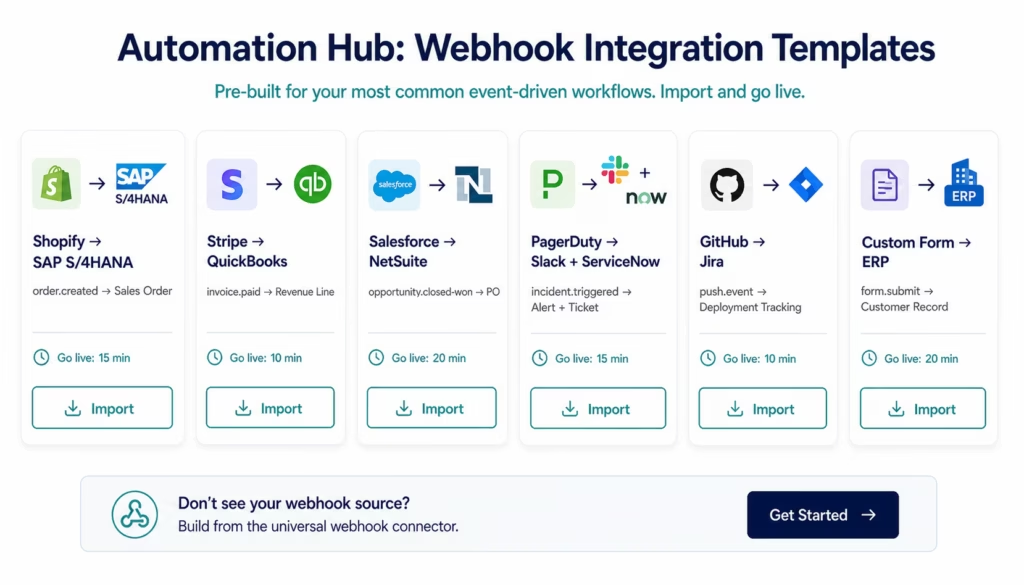
The Automation Hub contains pre-built webhook integration templates for the most common enterprise event-driven use cases. Each template includes the webhook endpoint configuration, payload parsing, field transformation, and destination routing: ready to customise and activate.
Popular webhook integration templates:
- Shopify order.created to SAP S/4HANA sales order (real-time)
- Shopify order.cancelled to SAP S/4HANA cancellation
- Stripe invoice.paid to QuickBooks revenue recognition
- Stripe payment.failed to Slack + CRM notification
- Salesforce opportunity.closed-won to NetSuite purchase order
- HubSpot deal.stage-changed to Salesforce activity log
- GitHub push event to Jira deployment tracking
- PagerDuty incident.triggered to Slack + ServiceNow ticket
- Zendesk ticket.created to Salesforce case creation
- Custom form webhook to ERP new customer record
Browse all webhook templates in the Automation Hub
Import the template for your source and destination pair. Enter your webhook signature secret and destination credentials. Activate. Most webhook templates go live in under 20 minutes.
FAQs
1. How do I integrate webhooks with eZintegrations?
Create a new workflow in eZintegrations and select Webhook as the trigger. The platform generates a unique HTTPS endpoint URL immediately. Configure signature verification (HMAC-SHA256 for Shopify, Stripe, and GitHub; SHA1 or custom header for other systems). Paste the endpoint URL into your source system's webhook settings. When the first event arrives, use the payload inspector to map fields, apply filters, and configure your destination system. Activate the workflow. Total setup time: 15-30 minutes for standard webhook sources using an Automation Hub template, 30-60 minutes for custom webhook sources.
2. Does eZintegrations support my specific webhook source?
eZintegrations receives webhooks from any system that POSTs HTTP events to a URL: which covers every modern SaaS application. Pre-built templates and payload parsers exist for Shopify, Salesforce, Stripe, HubSpot, GitHub, GitLab, Zendesk, PagerDuty, Datadog, Jira, Intercom, and 50+ webhook sources. For custom webhook sources (your own applications, IoT devices, or less common SaaS tools), the universal webhook connector accepts any JSON, XML, or form-encoded payload with any authentication method.
3. How long does webhook integration take in eZintegrations?
Generating the endpoint URL: 2 minutes. Configuring your source system to POST to the endpoint: 5 minutes. For a standard webhook source with an Automation Hub template (Shopify, Stripe, Salesforce, GitHub): 15-20 minutes total from endpoint creation to live production. For a custom webhook source with no existing template: 30-60 minutes depending on payload complexity and destination configuration.
4. Is there a free webhook integration template?
Yes, The Automation Hub contains pre-built webhook integration templates for Shopify, Stripe, Salesforce, HubSpot, GitHub, PagerDuty, Zendesk, and more. Each template is included in all eZintegrations subscription tiers at no additional charge. Browse and import at ezintegration.ai/automation-hub. Every template includes pre-configured signature verification, payload parsing, and destination routing.
5. How does eZintegrations handle webhook signature verification?
Every webhook endpoint in eZintegrations supports signature verification before processing. HMAC-SHA256 is supported natively for Shopify (X-Shopify-Hmac-SHA256), Stripe (Stripe-Signature), GitHub (X-Hub-Signature-256), and other systems using the same standard. SHA1 is supported for older systems. Custom header token verification is supported for systems that send a fixed secret in a custom header. Events that fail signature verification are rejected at the edge and logged as rejected: they never reach the payload parsing or routing steps. No valid payload is processed from an unverified source.
6. What happens if the destination system is unavailable when a webhook event arrives?
eZintegrations does not drop webhook events when the destination is temporarily unavailable. The event is received and held. Retry logic fires automatically: 3 retry attempts with exponential backoff (default: 30 seconds, 2 minutes, 10 minutes: configurable). If all retries fail, the event moves to the dead letter queue where it is visible in your dashboard for manual review and one-click reprocessing when the destination is restored. The source system receives an HTTP 200 acknowledgment immediately upon receipt, before any destination processing, so the source system does not experience a timeout or consider the delivery failed.
7. Can webhook events trigger AI Agent and Goldfinch AI workflows?
Yes, Webhook events are a primary trigger for Level 3 AI Agent workflows. The webhook payload becomes the agent's input goal. The agent uses its 9 native enterprise tools (Document Intelligence, API Tool Call, Knowledge Base Vector Search, Data Analysis, Web Crawling, Watcher Tools, Integration Workflow as Tool, Integration Flow as MCP, Data Analytics with Charts/Graphs/Dashboards) to research and process the event autonomously. Level 4 Goldfinch AI workflows are also webhook-triggered: a webhook event fires the coordinator, which decomposes the task and assigns sub-tasks to specialised worker agents running in parallel. The Chat UI and Workflow Node give business users natural language access to webhook-triggered agentic processes.
8. How does eZintegrations handle high-volume webhook bursts?
eZintegrations handles concurrent webhook delivery at scale without dropping events. High-volume burst scenarios (a flash sale generating 5,000 Shopify order webhooks in 60 seconds, a payment processor firing 1,000 payment events simultaneously) are processed with concurrency controls that maintain order processing without overloading destination systems. Each destination has a configurable concurrency limit: you define how many events are delivered to SAP simultaneously, which protects your ERP from overload during volume spikes.
Turn Every Enterprise Event Into Automated Action
Every system your enterprise uses fires events. Orders placed, deals closed, payments processed, employees onboarded, incidents triggered, deployments completed. Most of those events sit idle until a human checks a system or a batch job runs hours later.
Webhook integration turns every event into an immediate action. The order fires, the ERP posts. The deal closes, the contract process starts. The payment arrives, the revenue posts. The incident triggers, the ticket opens.
eZintegrations handles the reception, verification, parsing, transformation, filtering, and routing: for every webhook event, from every source, to every enterprise system in your stack.
Import a webhook template from the Automation Hub and have your first event-driven workflow live today.
Book a free demo and we will configure your specific event-driven architecture in the demo.

