
AI Workflow Automation for Healthcare: Intelligent Clinical & Operational Pipelines
May 12, 2026AI workflow automation for healthcare applies machine learning, document intelligence, and autonomous AI agents to high-exception clinical and operational processes within Clinical workflow systems: prior authorisation, claims denial management, clinical document processing, credentialing, and patient data quality. eZintegrations delivers HIPAA-compliant AI workflow automation at Level 2 (AI Workflows), Level 3 (AI Agents), and Level 4 (Goldfinch AI), turning manual healthcare exception queues into automated pipelines that complete in minutes, not days.
TL;DR
- Healthcare generates more unstructured, exception-heavy administrative work than almost any other industry, operating across fragmented systems that require HealthIT.gov interoperability standards. Prior authorisations, claims denials, credentialing packets, clinical documentation, and patient data quality exceptions all land in human queues that move at human speed.
- AI workflow automation changes this. Not by replacing clinical judgment, but by handling the research, extraction, classification, and packaging that surrounds every clinical and operational decision, so the humans who make those decisions work from complete, pre-assembled information rather than raw data scattered across five systems.
- eZintegrations’ Level 2 AI Workflows and Level 3 AI Agents are built for healthcare’s specific requirements: HIPAA-compliant native AI inference (no data leaving the platform to external AI providers), Document Intelligence for clinical and payer documents, and AI Agent architecture with configurable confidence thresholds and human-in-the-loop gates.
- The results are measurable: prior authorisation processing time reduced by 40-70%, claims denial appeal preparation time reduced by 60-80%, credentialing exception handling automated for 70-85% of standard cases.
- CTA: Book a demo or import a healthcare AI workflow template from the Automation Hub.
The Problem: Healthcare’s Administrative Exception Economy
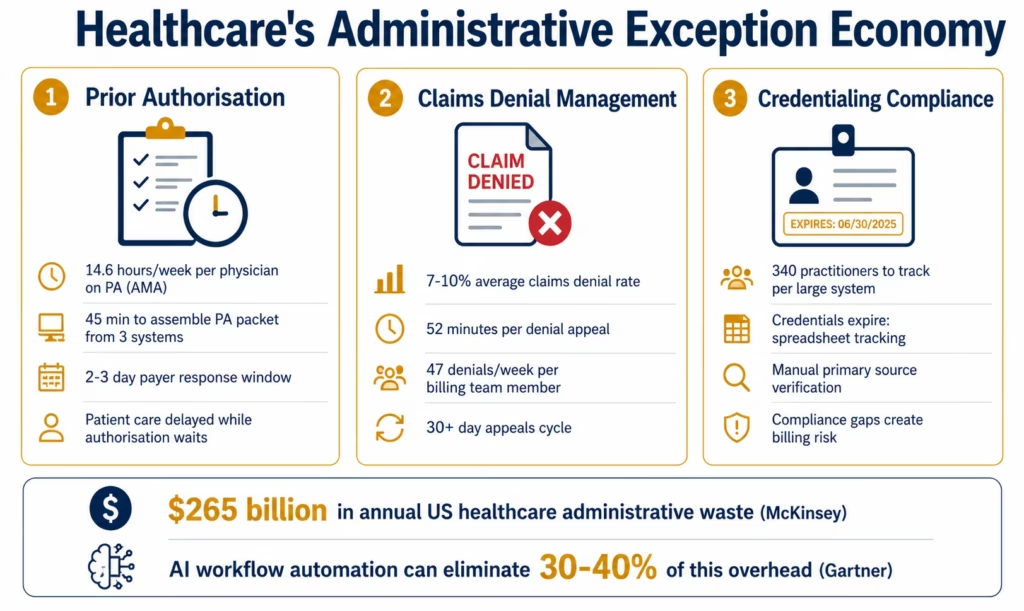
Dr. Sarah Chen is a hospitalist at a regional medical centre. On Tuesday afternoon, she wants to order an MRI for a patient presenting with new-onset neurological symptoms. The clinical indication is clear. The urgency is moderate. She clicks the order.
Two hours later, her medical assistant flags her: the payer requires prior authorisation. The PA process requires: the clinical indication documented in a specific format, the patient’s relevant diagnosis history, evidence of conservative treatment already attempted, and a supporting statement from the ordering physician. Assembling this takes the medical assistant 45 minutes across three systems. It goes to the payer. The payer’s response comes back in 2-3 days. The patient waits.
Meanwhile, in the billing department, Marcus is reviewing the denial queue. 47 claims denied this week. Each denial requires: retrieving the original encounter from the Epic, reading the denial reason code from the payer’s remittance advice, finding the supporting clinical documentation, drafting the appeal letter, attaching the evidence, and submitting through the payer’s portal. Average time per denial: 52 minutes. Marcus handles 8 per day. The other 39 wait for tomorrow.
In credentialing, the compliance team is tracking 340 practitioners across the system. 23 have credentials expiring in the next 90 days. Someone needs to contact each one, collect the renewal documentation, verify with the primary source, and update the credentialing system. This is a manual tracking exercise running on spreadsheets and calendar reminders.
This is healthcare’s administrative exception economy: billions of dollars of staff time spent not on care, but on the bureaucratic scaffolding around care.
The American Medical Association reports that physicians and their staff spend an average of 14.6 hours per week on prior authorisation alone. McKinsey estimates that up to $265 billion in annual US healthcare spending is wasteful administrative cost that technology could eliminate or reduce. Gartner projects that by 2027, organisations using AI-augmented healthcare workflows will reduce administrative overhead by 30-40%.
AI workflow automation does not eliminate the need for clinical judgment in these processes. It eliminates the manual research, data gathering, extraction, and packaging that currently precedes every decision. The physician still approves the prior auth. The billing specialist still reviews the appeal. The credentialing officer still verifies the practitioner. But they do these things in minutes, from complete pre-assembled information, instead of spending hours building the information package themselves.
Before vs After: AI Workflow Transformation in Healthcare
| Process | Before AI Workflows | After AI Workflows |
|---|---|---|
| Prior authorisation assembly | Medical assistant spends 45 min across 3 systems | AI extracts clinical indication, diagnosis history, and treatment notes in under 3 minutes. Staff reviews and submits. |
| PA status tracking | Phone calls to payer, daily manual portal checks | AI Watcher Tool monitors payer portal for status changes, auto-alerts on approval/denial/additional info required |
| Claims denial research | Billing specialist manually retrieves encounter, reads denial code, hunts for supporting documents (52 min) | AI Agent retrieves encounter, reads denial, finds supporting evidence, drafts appeal structure in under 4 minutes |
| Denial appeal letter | Written from scratch per denial | AI drafts appeal from denial reason + clinical evidence, human reviews and approves |
| Credential expiry tracking | Spreadsheet with calendar reminders, manual follow-up | AI Watcher monitors expiry dates, triggers renewal workflows 90/60/30 days before expiry |
| Primary source verification | Manual calls or portal checks for each credential element | AI Web Crawling checks primary source databases, extracts verification status |
| Clinical note coding assistance | Coder reads full note, selects codes (20-35 min per note) | Document Intelligence reads note, suggests CPT and ICD-10 codes with confidence scores, coder reviews |
| Patient duplicate detection | Manual review when suspected duplicates flagged | Semantic duplicate detection AI compares records across EHR, billing, and registration systems, flags with confidence score |
| Discharge summary processing | Transcription team keys data from dictated notes | Document Intelligence extracts structured data from discharge summaries, posts to downstream systems |
| Vendor contract compliance | AP team manually reviews contract terms against invoices | AI Workflow extracts contract terms and invoice data, flags variances automatically |
How eZintegrations AI Workflows Work in Healthcare
Traditional healthcare integration automation (even good iPaaS automation) operates on structured, deterministic data: if this field equals this value, do this action. That covers a lot of ground. But healthcare’s most labour-intensive processes are exception-heavy precisely because the inputs are unstructured or require interpretation.
Prior authorisation packets contain clinical notes written in natural language. Denial letters contain payer-specific codes and reason text that must be interpreted in context. Credentialing documents come in different formats from different issuing authorities. Clinical notes vary in structure, completeness, and terminology across physicians.
This is where eZintegrations’ AI automation layers become relevant.
Level 1 (iPaaS Workflows): deterministic, rule-based automation for structured data flows: EHR-to-billing transfer, staff provisioning, lab result routing, and scheduling sync. These are covered in the healthcare integration platform guide.
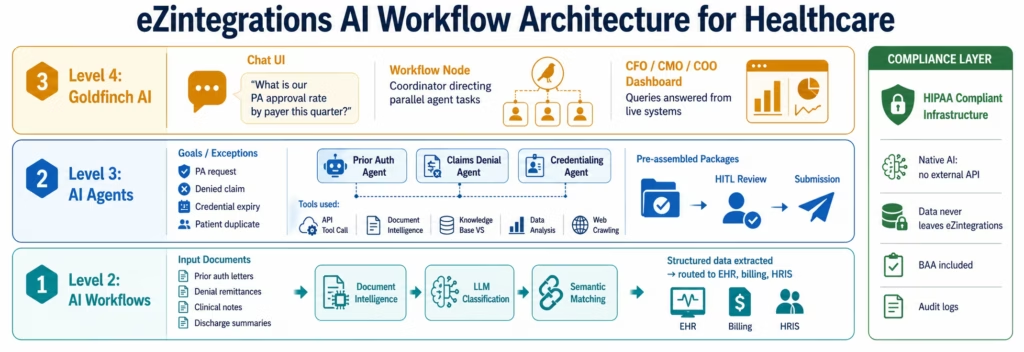
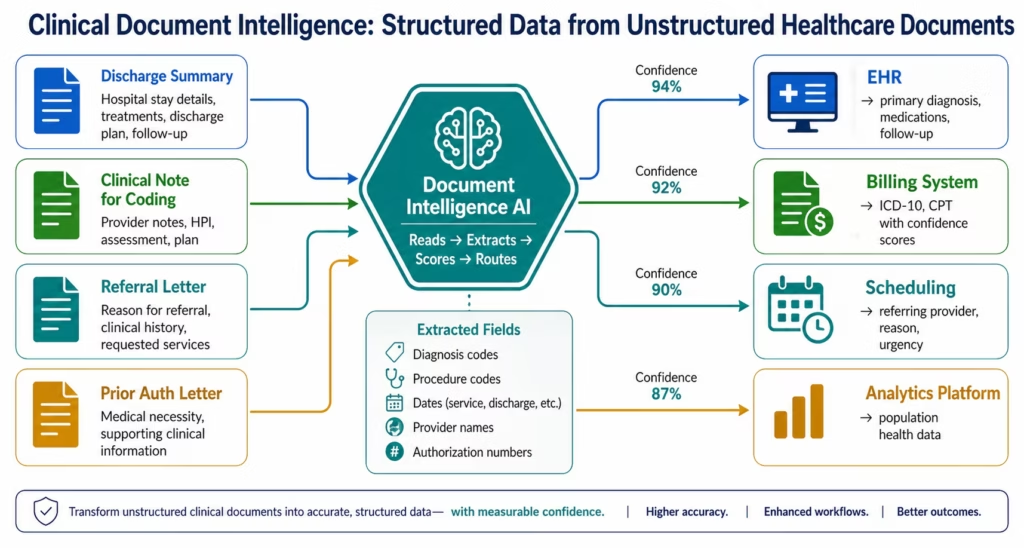
Level 2 (AI Workflows): AI workflow nodes embedded in integration pipelines. Document Intelligence reads the input (a prior auth letter, a denial remittance, a clinical note, a discharge summary, a vendor invoice) and extracts structured fields with confidence scores. LLM Classification categorises the document type, urgency, and routing destination. Semantic Matching detects duplicates across datasets with different formatting conventions. These are native workflow nodes: no external AI API call, no data leaving eZintegrations’ HIPAA-compliant infrastructure.
Level 3 (AI Agents): autonomous multi-step agents that receive a goal and use tools to achieve it. The Prior Authorisation Agent receives a PA request, queries the EHR for the patient’s diagnosis history and treatment record via API Tool Call, retrieves the clinical indication from the physician’s documentation via Document Intelligence, searches the payer’s clinical criteria knowledge base via Knowledge Base Vector Search, and assembles the complete PA packet with confidence scoring. A human clinical staff member reviews and submits: but the 45-minute assembly task is now a 3-minute review task.
The Claims Denial Exception Agent receives a denied claim, retrieves the original encounter from the EHR, reads the denial reason from the payer remittance via Document Intelligence, searches for supporting clinical documentation via Knowledge Base Vector Search, runs a Data Analysis step to compare the denial reason against successful appeal patterns for that denial code, and drafts the appeal structure. The billing specialist reviews and approves: but the 52-minute research task is now a 4-minute review task.
Level 4 (Goldfinch AI): multi-agent coordination for complex healthcare analytics. The CFO asks: “What is our prior authorisation approval rate by payer and service line this quarter, and where are we seeing the longest delays?” Goldfinch AI queries the relevant systems via the Workflow Node and returns a formatted answer with the supporting breakdown.
AI Workflow 1: Prior Authorisation Automation
Prior authorisation is one of the most universally despised administrative processes in US healthcare. The AMA’s 2024 survey found that 94% of physicians reported delays in care due to prior authorisation, and 89% said the burden had increased over the prior five years.
The automation opportunity is significant: the process is information-intensive but not inherently complex. The PA criteria for most procedures are documented by each payer. The clinical evidence exists in the EHR. The connection between them is a research and packaging task that AI handles faster and more consistently than a human medical assistant.
The Prior Authorisation AI Workflow in eZintegrations:
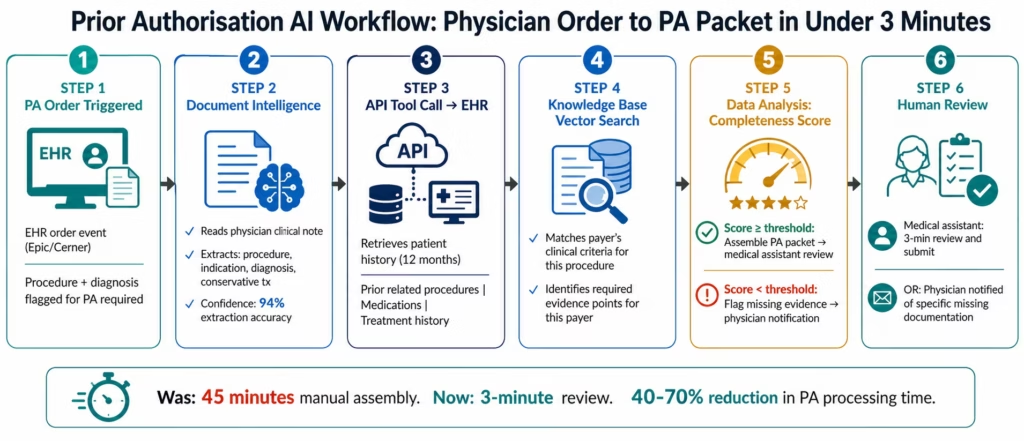
When a physician orders a procedure requiring PA in the EHR, the order event triggers the PA AI workflow:
-
Document Intelligence reads the physician’s clinical note and order documentation to extract: the procedure requested, the primary diagnosis, the clinical indication in the physician’s words, and any documented conservative treatment attempts.
-
API Tool Call queries the patient’s EHR record for: relevant diagnosis history (past 12 months), prior related procedures, current medications, and documented treatment history: the evidence the payer requires.
-
Knowledge Base Vector Search retrieves the payer’s specific clinical criteria for the requested procedure from the payer criteria knowledge base, identifying which evidence points are required for this specific payer and procedure combination.
-
Data Analysis compares the available clinical evidence against the payer’s criteria requirements, scoring completeness and flagging any criteria where evidence is insufficient.
-
If completeness score exceeds the confidence threshold: the AI assembles the complete PA packet (clinical summary, diagnosis history, treatment history, criteria documentation mapping) and routes it to the medical assistant for 3-minute review before submission.
-
If completeness score falls below threshold: the AI routes a structured information request to the physician, identifying exactly what additional documentation is needed and why.
The medical assistant’s role shifts from 45-minute information assembly to 3-minute review and submission. The physician’s role shifts from hunting through notes to reviewing a pre-structured notification when additional documentation is needed.
AI Workflow 2: Claims Denial Management
The US healthcare system processes approximately 3 billion claims per year. The average first-pass denial rate is 7-10%. That is 200-300 million denied claims annually: each one requiring research, documentation, and resubmission.
Most healthcare organisations appeal only 40-60% of denials because the manual labour cost of researching and preparing an appeal exceeds the reimbursement value for lower-dollar claims. AI automation changes this economics: when the research and preparation takes 4 minutes instead of 52, the breakeven threshold for pursuing an appeal drops significantly.
The Claims Denial Exception Agent in eZintegrations:
When a claim denial arrives via the payer’s 835 remittance advice or their direct portal:
-
Document Intelligence reads the denial: extracts the claim number, denial reason code (CARC/RARC), denial reason description, and any additional information requested by the payer.
-
API Tool Call retrieves the original encounter from the EHR: diagnosis codes, procedure codes, place of service, rendering provider, service date, and the original clinical documentation.
-
Knowledge Base Vector Search searches the appeals knowledge base: successful appeal patterns for this denial code, payer-specific appeal requirements, and applicable coding guidelines or clinical criteria.
-
Data Analysis compares the claim information against the denial reason, identifying: whether the denial is a coding error (correctable on resubmission), a clinical necessity challenge (requires clinical evidence), a timely filing issue (may be unappealable), or an eligibility issue (requires patient contact).
-
Document Intelligence (second call) reviews the clinical documentation to identify supporting evidence for the appeal and any documentation gaps.
-
The agent assembles: a categorised denial summary, a recommended appeal strategy, a draft appeal letter structure, and the supporting evidence package. All routed to the billing specialist for 4-minute review.
-
The billing specialist reviews, adjusts the appeal letter tone if needed, and submits.
What this does to denial economics:
- Research time per denial: 52 minutes → 4 minutes
- Billing specialist capacity: 8 denials/day → 35-50 denials/day (if appeals are warranted)
- Appeal rate for low-dollar denials: previously economically unviable → now viable for claims above $150-200 (down from $600-800 breakeven)
- First-pass appeal success rate: improved through consistent application of successful appeal patterns
AI Workflow 3: Clinical Document Intelligence
Healthcare generates enormous volumes of unstructured clinical documents: discharge summaries, operative reports, clinical notes, radiology reads, pathology reports, and referral letters. Extracting structured data from these documents for downstream systems is a significant manual effort: and a significant source of data quality problems when done manually.
Document Intelligence applications in eZintegrations:
Discharge summary processing: when a patient is discharged, the discharge summary (dictated or typed) arrives as an unstructured document. Document Intelligence extracts: primary diagnosis, secondary diagnoses, procedures performed, discharge medications, follow-up instructions, and referring physician. This structured data posts to the patient’s ongoing care record, the billing system for coding, and the population health analytics platform.
Coding assistance: Document Intelligence reads the full clinical note and identifies the diagnoses and procedures documented with supporting evidence. It suggests ICD-10 and CPT codes with confidence scores. The coder reviews the AI suggestions rather than reading the full note from scratch, reducing average coding time by 40-60% and improving coding accuracy by reducing missed secondary diagnoses.
Referral letter processing: incoming referral letters are read by Document Intelligence, extracting the referring physician, the reason for referral, the patient’s relevant history, and any urgency indicators. This data pre-populates the scheduling system and the new patient intake form, eliminating manual data entry by the scheduling coordinator.
Prior auth letter processing: payer prior authorisation approval and denial letters are read by Document Intelligence, extracting the authorisation number, approved procedure, approved date range, and any conditions. This data posts directly to the scheduling system to confirm appointment scheduling and to the billing system to confirm auth for claim submission.
AI Workflow 4: Credentialing and Compliance Automation
Healthcare credentialing is a compliance-critical process. Practitioners must maintain current credentials (medical licences, board certifications, DEA registrations, malpractice insurance) to practice and to bill. When credentials lapse, the organisation faces billing denials, compliance violations, and patient safety risks.
Most healthcare organisations track credentials in a credentialing system or (more commonly) in spreadsheets and SharePoint folders. Primary source verification: confirming a credential with the issuing authority: is done manually: calling state medical boards, checking the NPDB (National Practitioner Data Bank), verifying with certifying bodies.
The Credentialing AI Workflow in eZintegrations:
Proactive expiry monitoring: the AI Watcher Tool monitors the credentialing system and HRIS for credential expiry dates across all practitioners. 90 days before expiry: automated renewal initiation packet sent to the practitioner with the required renewal documentation checklist. 60 days: escalation alert if renewal is incomplete. 30 days: urgent escalation to the credentialing manager with a risk flag.
Primary source verification automation: when a renewal document arrives, the AI Web Crawling tool checks the primary source:
- Medical licence status: state medical board licence lookup
- Board certification: ABMS (American Board of Medical Specialties) certification verification
- DEA registration: DEA registration lookup
- NPDB check: NPDB self-query facilitation
- Malpractice coverage: extraction from uploaded insurance certificate
Results from each primary source verification are consolidated into a structured verification summary. The credentialing officer reviews the summary and approves rather than executing each lookup manually.
Privileging workflow automation: when a new practitioner joins the system, the Level 3 Credentialing Agent receives the onboarding event from Workday, initiates the primary source verification workflow, tracks document collection status, routes incomplete requests to the practitioner, and flags the file for credentialing officer review when complete. The credentialing officer reviews a complete, verified file rather than tracking document collection manually.
AI Workflow 5: Patient Data Quality and Matching
Healthcare data quality problems cascade. A patient registered under two different MRNs receives care that is documented in two separate records. A claim is denied because the patient name on the claim does not exactly match the name on the insurance card. A population health analytics query returns inflated patient counts because of duplicate records. A referral goes to the wrong patient.
The underlying cause of most healthcare data quality problems is the same: information entered manually at multiple touchpoints (registration, scheduling, admission, billing, referrals) with inconsistent formatting, abbreviation, and transcription.
Semantic Duplicate Detection in eZintegrations:
Level 2 AI Workflows include native semantic duplicate detection. Unlike rule-based matching (which requires exact or near-exact field matches), semantic matching evaluates the probability that two records represent the same patient based on fuzzy name matching, date of birth proximity, address similarity, and contact information overlap.
When a new patient record is created in the EHR, the semantic duplicate detection AI workflow:
- Compares the new record against existing records using semantic similarity across name, DOB, address, and phone
- Returns a confidence-scored list of potential matches
- Routes high-confidence matches (above 95%) to automatic merge review queue
- Routes medium-confidence matches (75-95%) to a registration specialist for manual review with the candidate match pre-displayed
- Processes low-confidence records as genuinely new patients
Patient data synchronisation across systems:
When a patient updates their address, phone number, or insurance information in the patient portal, the AI workflow detects the change, validates the update against the existing record for consistency, and propagates the update to the EHR, billing system, scheduling system, and analytics platform: maintaining a single, consistent patient record across all systems.
Key Outcomes and Results
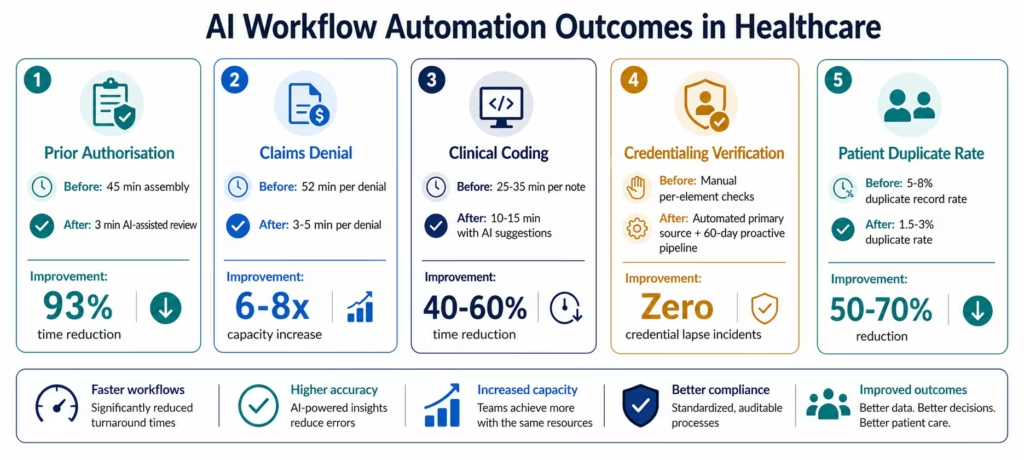
Healthcare organisations implementing AI workflow automation across prior auth, claims denial, credentialing, and document processing report measurable improvements within 60-90 days of deployment:
Prior Authorisation:
- PA packet assembly time: 45 minutes → under 3 minutes (40-70% total process reduction)
- PA completion rate: higher throughput from same staff headcount
- PA-related care delay: reduced for procedures with complete clinical evidence
- Physician administrative time on PA: reduced by 30-50% (AI handles evidence assembly, physician handles review of exceptional cases only)
Claims Denial Management:
- Per-denial research and preparation time: 52 minutes → 3-5 minutes
- Billing specialist daily denial capacity: 8 denials → 35-50 denials
- Low-dollar denial appeal rate: previously uneconomical denials now appended
- First-pass appeal success rate: 15-25% improvement from consistent pattern application
Clinical Document Processing:
- Coding time per clinical note: reduced by 40-60%
- Coding accuracy: 10-20% improvement in secondary diagnosis capture
- Discharge summary processing: manual data entry eliminated for standard fields
- Referral letter intake: scheduling pre-population eliminates 15-20 minutes of coordinator data entry per referral
Credentialing:
- Credential lapse incidents: near-zero (proactive 90-day automated pipeline)
- Primary source verification time: reduced by 60-80% per credential element
- New practitioner credentialing cycle time: reduced by 30-50%
Patient Data Quality:
- Duplicate record creation rate: reduced by 50-70% (semantic matching at point of registration)
- Patient data synchronisation lag: from 24-48 hours (batch) to real-time
HIPAA Compliance for Healthcare AI Workflows
Healthcare AI automation introduces a compliance question that standard AI platforms cannot answer satisfactorily: where does the PHI go when the AI processes it?
Most AI workflow tools work by sending your healthcare data to an external AI provider’s API. The clinical note goes to OpenAI. The denial letter goes to Anthropic. The patient demographics go to a third-party AI service. Each external AI call is a potential HIPAA exposure: data leaving your platform’s compliance boundary, entering a third-party AI environment with its own data handling policies, and potentially being used to train AI models.
eZintegrations’ native AI approach:
eZintegrations’ Document Intelligence, LLM classification, semantic matching, and AI Agent reasoning all run as native inference within eZintegrations’ infrastructure. Clinical notes, patient records, denial letters, and prior authorisation packets are processed within the platform: the same platform that holds your signed HIPAA BAA, maintains SOC 2 Type II certification, and generates immutable audit logs for every data access event.
No PHI travels to OpenAI, Anthropic, or any external AI provider when eZintegrations’ native AI processes it. The AI inference happens inside the compliance boundary, not outside it.
AI-specific HIPAA safeguards in eZintegrations:
- AI inference within the platform: Document Intelligence, LLM classification, semantic matching, and agent reasoning all run as native platform operations. No external AI API calls for PHI-containing documents.
- Confidence threshold gates: Level 3 AI Agents have configurable confidence thresholds. Any agent action on PHI-containing cases below the confidence threshold routes to a human reviewer rather than proceeding autonomously. A physician or clinical staff member always reviews before the AI-prepared output is submitted or acted upon.
- Minimum necessary principle in AI workflows: AI workflows extract only the specific fields required for each use case. A prior authorisation AI workflow does not retrieve the patient’s full medical history: it retrieves the specific diagnosis and treatment fields relevant to the requested procedure.
- Audit trail for AI decisions: every AI agent decision is logged: which documents were processed, which tools were used, what data was accessed, what output was produced, and which human reviewed and approved. This audit trail satisfies HIPAA’s requirement for access activity recording and supports your organisation’s AI governance policies.
How to Get Started
Step 1: Identify your highest-volume exception queue
Where does your clinical or administrative team spend the most time on research, assembly, and preparation tasks? Prior authorisation? Claims denial? Clinical coding? This is your AI workflow starting point: the use case with the highest ROI for automation.
Step 2: Browse the Automation Hub for healthcare AI workflow templates
Visit the Automation Hub and filter by Healthcare AI Workflows. You will find Level 2 and Level 3 templates for prior authorisation processing, claims denial management, clinical document extraction, credentialing monitoring, and patient data quality.
Step 3: Import the template and configure your connections
Import the template for your target use case. Configure your EHR connection (Epic, Cerner, or Athenahealth FHIR R4), your payer or clearinghouse connection (for denial management), and your credentialing system connection. For document Intelligence workflows, upload sample documents to train the extraction model on your specific document formats.
Step 4: Configure confidence thresholds and human review routing
Set the confidence threshold for autonomous action versus human review routing. For prior authorisation: set the threshold at which the AI assembles and routes for human review versus pauses to request additional clinical documentation. For claims denial: set the threshold for automatic appeal preparation versus manual triage for complex denials.
Step 5: Validate with a representative sample
Run the AI workflow against a sample of real cases from the past month. Compare AI outputs against the manual outcomes for the same cases. Measure extraction accuracy, classification accuracy, and the rate of cases routed correctly to human review. Adjust thresholds based on validation results before full production activation.
Import a healthcare AI workflow template and start automating your highest-exception clinical process this week.
FAQs
AI workflow automation in healthcare uses three AI layers applied to clinical and operational exception processes. Level 2 AI Workflows embed Document Intelligence and LLM classification as steps in integration pipelines: the AI reads a clinical note, extracts structured fields, classifies the document type, and routes the structured data to downstream systems. Level 3 AI Agents handle goal-directed multi-step tasks: the agent receives a goal (assemble a PA packet, research a denied claim, verify a practitioner's credentials), uses enterprise tools (API calls to EHR, document reading, knowledge base search, data analysis) to gather and process information, and routes a pre-assembled package for human review. Level 4 Goldfinch AI provides natural language access to aggregated clinical and operational data for healthcare leaders. All three levels operate within eZintegrations' HIPAA-compliant infrastructure with signed BAA.
Level 2 AI Workflow templates (document extraction, classification, duplicate detection): 5-10 days to production, including document sample upload for extraction model configuration and testing against representative cases. Level 3 AI Agent workflows (prior authorisation agent, claims denial agent, credentialing agent): 10-15 days to production, including knowledge base configuration with payer criteria or appeal patterns, EHR API connection validation, and confidence threshold calibration. Full healthcare AI workflow programme (5-7 use cases): 8-14 weeks.
Yes, eZintegrations uses native FHIR R4 connectors with SMART on FHIR OAuth 2.0 for Epic, Cerner, and Athenahealth. AI Agent workflows use the API Tool Call tool to retrieve specific FHIR resources (Patient, Encounter, Condition, Procedure, DiagnosticReport, MedicationRequest) during agent execution. For HL7 v2 clinical data sources (lab information systems, legacy clinical systems), the HL7 v2 connector feeds data into AI Workflow processing steps. The platform handles both modern FHIR and legacy HL7 v2 data within the same AI workflow.
Yes, eZintegrations' Document Intelligence, LLM classification, semantic matching, and AI Agent reasoning all run as native inference within eZintegrations' HIPAA-compliant infrastructure. Clinical notes, patient records, denial letters, and prior authorisation packets are processed within the platform: no PHI is sent to external AI providers (OpenAI, Anthropic, or others). A signed HIPAA BAA is provided for all healthcare customers. Every AI decision generates an immutable audit log satisfying HIPAA's access activity recording requirements.
eZintegrations automates five prior authorisation workflow components: clinical evidence assembly: Document Intelligence and EHR API calls retrieve and package the clinical indication, diagnosis history, and treatment documentation; payer criteria matching: Knowledge Base Vector Search matches the clinical evidence against the payer's specific criteria for the requested procedure; completeness scoring: Data Analysis identifies evidence gaps and routes either a complete PA packet for human review or a targeted information request to the physician; status monitoring: the AI Watcher Tool monitors payer portals for PA status changes and triggers alerts on approval, denial, or additional information requests; denial and appeal initiation: when a PA is denied, the AI agent initiates the appeal workflow automatically.
When a claim denial arrives via 835 remittance or payer portal: Document Intelligence reads the denial and extracts the claim number, denial reason code (CARC/RARC), and reason description. API Tool Call retrieves the original encounter from the EHR including diagnosis codes, procedure codes, rendering provider, and service date. Knowledge Base Vector Search searches for successful appeal patterns for the specific denial code, payer-specific appeal requirements, and applicable coding guidelines. Data Analysis categorises the denial type (coding error, clinical necessity challenge, timely filing, eligibility) and identifies the optimal appeal strategy. Document Intelligence reviews the clinical documentation for supporting evidence. The agent assembles a categorised denial summary, recommended strategy, draft appeal letter structure, and evidence package. The billing specialist reviews in 3-5 minutes and submits. Research time drops from 52 minutes to under 5 minutes per denial. 1. How does AI workflow automation work in healthcare?
2. How long does it take to set up a healthcare AI workflow?
3. Does eZintegrations AI work with Epic, Cerner, and Athenahealth clinical data?
4. Is eZintegrations AI HIPAA compliant for processing clinical data?
5. What prior authorisation workflows can eZintegrations automate?
6. How does the claims denial AI agent work?
Conclusion: From Exception Queues to Intelligent Pipelines
Healthcare’s administrative exception economy is not inevitable. It is the product of systems that do not share data, documents that require manual interpretation, and processes designed for humans to execute tasks that AI can now handle faster and more consistently.
Dr. Chen’s MRI prior authorisation should not take 45 minutes of staff time and 2-3 days of patient waiting. Marcus’s denial queue should not cap at 8 cases per day because each case takes 52 minutes. The credentialing team should not be managing a spreadsheet of expiring credentials with calendar reminders.
AI workflow automation does not change what decisions need to be made in healthcare. Physicians still authorise care. Billing specialists still review appeals. Credentialing officers still verify practitioners. What changes is the quality and speed of the information those people work from. Instead of spending their professional capacity on information gathering and document assembly, they spend it on judgment, review, and patient care.
eZintegrations delivers this transformation with HIPAA-compliant native AI at all four automation levels, pre-built templates that go live in days, and a platform that scales from individual AI workflow steps to coordinated multi-agent orchestration as your programme matures.
Book a free demo and bring your highest-exception clinical or operational process. We will show you what AI automation looks like for your specific use case and map a deployment path that has your first AI workflow live within two weeks.
Import a healthcare AI workflow template and start today.

