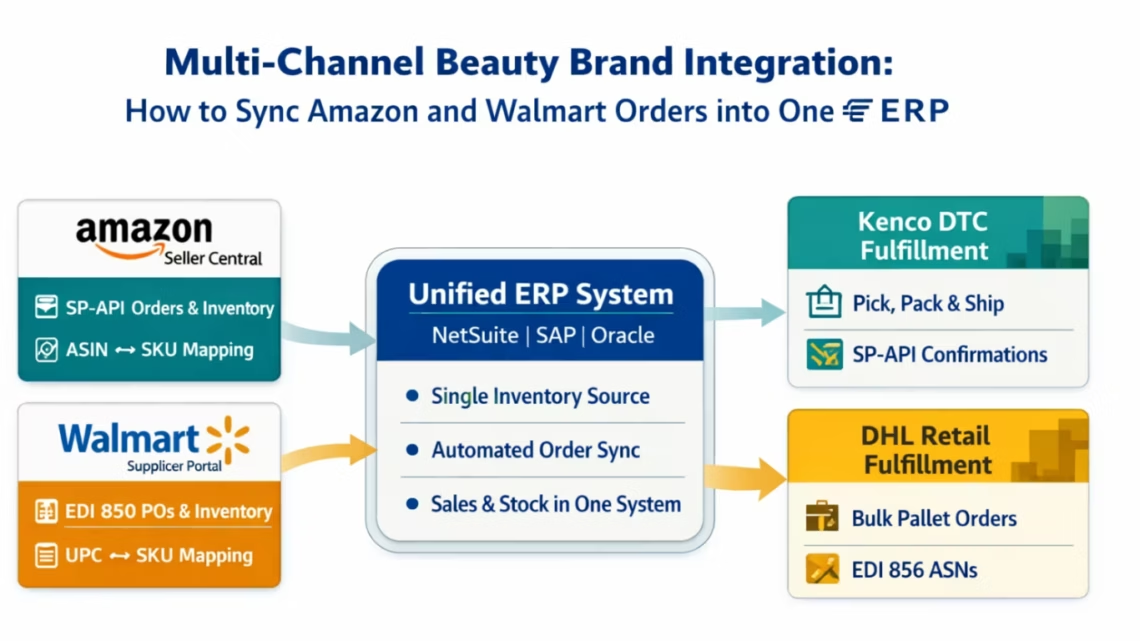
Multi-Channel Beauty Brand Integration: How to Sync Amazon and Walmart Orders into One ERP
April 21, 2026To sync Amazon and Walmart orders into one ERP for a multi-channel beauty brand, eZintegrations connects Amazon via the Selling Partner API (SP-API) using GET /orders/v0/orders with 2-5 minute polling and Walmart via EDI 850 (purchase order) received over AS2, maps both order formats to a unified ERP sales order structure, creates the sales order in NetSuite, SAP, or Oracle, routes the fulfilment request to the correct 3PL warehouse, and returns tracking and inventory updates back to both marketplaces automatically. The ERP becomes the single source of truth for inventory: one available quantity number feeds both Amazon (via SP-API Feeds) and Walmart (via EDI 846 inventory update), preventing overselling across either channel.
TL;DR
- Amazon orders use the SP-API (REST, OAuth 2.0,
GET /orders/v0/orderspolling every 2-5 minutes). Walmart store supplier orders use EDI 850 (ANSI X12, AS2 protocol). They are architecturally different. Your ERP needs to receive both as structured sales orders. - The ERP is the single source of truth for inventory. A unit sold on Amazon must be deducted from the same pool that feeds Walmart fulfilment. If your ERP does not know about the Amazon sale within minutes, you can commit those same units to Walmart.
- The five integration flows that must be automated: order sync (both channels to ERP), inventory sync (ERP to both channels), fulfilment routing (ERP to 3PL), shipment confirmation (3PL to ERP to both channels), and returns (both channels to ERP).
- The single most common failure point for multi-channel beauty brands: inventory divergence between the two marketplaces. A unit is sold on Amazon. The ERP does not update fast enough. Walmart receives an available inventory update (EDI 846) that still shows the unit as available. Walmart places an order. You are oversold.
- eZintegrations handles both channel connectors and the ERP integration in one platform. No separate tools for Amazon, Walmart, and ERP sync.
- Automation Hub templates for Amazon SP-API + Walmart EDI + ERP. 5-8 business days for full multi-channel setup.
The Multi-Channel Inventory Problem No Spreadsheet Can Solve
It is Monday morning. Your brand had a strong weekend: 847 Amazon orders and 3 Walmart replenishment POs. Your NetSuite ERP is showing the same inventory numbers it showed Friday afternoon.
The Amazon orders are in Amazon Seller Central, waiting for your fulfilment team to export them to a spreadsheet and send to your 3PL. The Walmart POs arrived as EDI 850s, but your EDI team does not check the inbox until Tuesday. NetSuite thinks you have 4,200 units of Velvet Foundation in stock. Your 3PL’s WMS has already allocated 1,800 of those to the Amazon weekend orders.
You have 2,400 actual available units. You have Walmart POs for 2,160 units. You have Amazon orders still sitting unfulfilment for 847 units. Do the math: you cannot fill everything.
You find out on Wednesday.
This is not a volume problem. This is an architecture problem. Amazon and Walmart are running as silos. Your ERP does not know what either channel has sold until someone manually tells it. Your inventory is a lie until you reconcile it.
The fix is not a bigger spreadsheet. The fix is connecting both channels to one ERP in real time, so the ERP always knows what each channel has committed, and both channels always see the same available quantity.
Why Amazon and Walmart Use Different Integration Architectures
Before designing the unified integration, it is important to understand why Amazon and Walmart cannot be connected the same way.
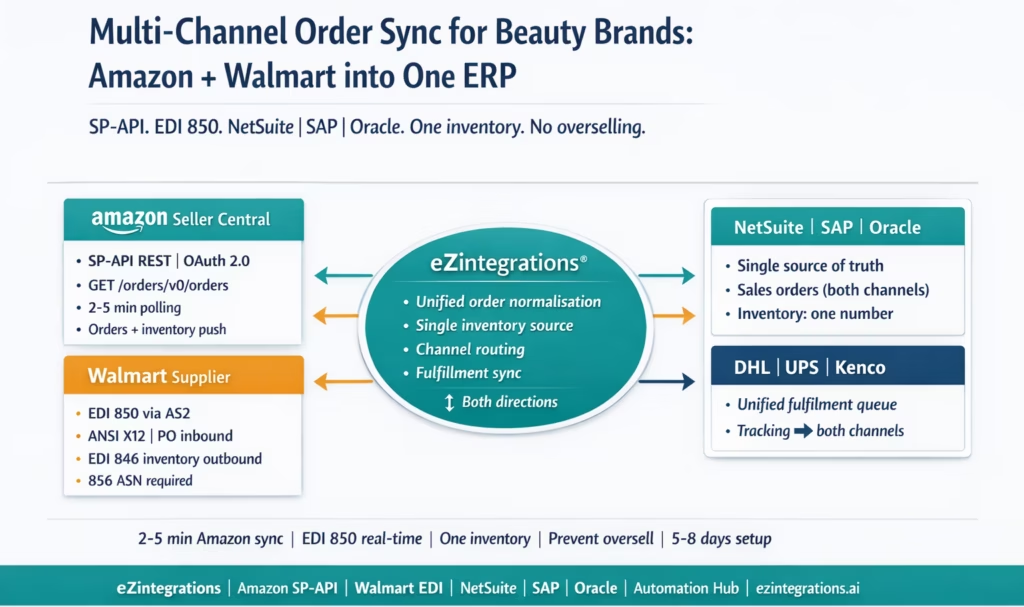
Amazon Selling Partner API (SP-API): REST, pull-based. Amazon’s SP-API is a modern REST API. Your integration polls Amazon for new orders using GET /orders/v0/orders with a CreatedAfter timestamp parameter, every 2-5 minutes. Amazon pushes nothing: you ask for orders, Amazon responds. Authentication uses OAuth 2.0 with LWA (Login with Amazon) and AWS Signature V4. The integration is always available, the API is well-documented, and the latency from Amazon order placement to your ERP is 2-5 minutes at most.
For a Vendor Central beauty brand (selling to Amazon wholesale, not as a marketplace seller), the flow is different: Amazon Vendor Central uses EDI for purchase orders (similar structure to Walmart), but Seller Central uses the SP-API.
Walmart Supplier EDI: structured documents, push-based. Walmart sends purchase orders as EDI 850 documents via AS2. You do not poll for them: Walmart transmits them to your AS2 endpoint and your system receives them. The EDI 850 contains the PO number, shipping destination (Walmart DC), items by UPC/GTIN, quantities, prices, and the MABD (Must Arrive By Date). You respond with an EDI 855 acknowledgment within 24 hours. You must send an EDI 856 ASN before the shipment arrives. You must send an EDI 810 invoice within 24 hours of shipment. Walmart’s EDI requirements (850, 855, 856, 810) follow strict compliance rules for timing and structure.
The two architectures require different integration approaches, different authentication methods, and different message formats. A platform that handles only REST APIs cannot process Walmart EDI 850s. A platform that handles only EDI cannot call the Amazon SP-API.
eZintegrations handles both natively at Level 1: REST polling for Amazon orders and AS2 EDI document receipt for Walmart POs, both transforming into the same ERP sales order structure.
The Single Source of Truth: ERP as the Inventory Master
The root cause of every multi-channel oversell is the same: there is no single authoritative number for available inventory that both channels read from simultaneously.
Without an integrated ERP:
- Amazon reads inventory from your Seller Central listing quantity (updated manually or via a spreadsheet upload)
- Walmart reads inventory from your EDI 846 (Inventory Inquiry/Advice) which you send on a schedule
When you sell 100 units on Amazon at 11 PM on a Saturday, neither Walmart’s system nor your ERP knows about those units until Monday morning. If Walmart places a 200-unit PO on Sunday based on your Friday 846 inventory update, you are committed to 300 units when you only have 200.
With an integrated ERP:
- The ERP holds the true available inventory for all channels
- Every Amazon order reduces available inventory in the ERP within 2-5 minutes
- Every Walmart PO confirmation reduces available inventory in the ERP when the 855 is sent
- The inventory number fed to Amazon (via SP-API Feeds) and the number sent to Walmart (via EDI 846) come from the same ERP field
The ERP is the single source of truth, a principle central to modern multi-channel inventory management systems. Both channels read from it. The ERP never lies about available inventory because it knows about every committed unit from every channel in real time.
Which ERP field is “available inventory” for beauty brands?
- NetSuite:
quantityAvailableon the Inventory Item record, per location (each 3PL warehouse is a separate location in NetSuite) - SAP S/4HANA: Available-to-Promise (ATP) quantity from the
AVAILABILITY_CHECK_01API or theMD_ATP_CALCULATEfunction - Oracle Fusion Cloud: Available to Promise (ATP) quantity from the
GET /inventoryTransactionsor the Inventory Availability API
The integration queries this field in real time before confirming any channel order and after posting any new order from either channel.
The Five Integration Flows for Multi-Channel Beauty Brands
The full multi-channel integration requires five automated flows. These are the same five flows described in the 3PL integration guide, applied across both sales channels.
Flow 1: Order Sync (Amazon and Walmart to ERP) Amazon orders from SP-API and Walmart EDI 850 POs both create sales orders in the ERP. The order format differs: Amazon orders have individual shipping addresses (DTC), Walmart orders have DC addresses (B2B). Both are normalised to the ERP’s sales order structure with channel tags (source: Amazon or source: Walmart) for downstream routing.
Flow 2: Inventory Sync (ERP to Amazon and Walmart) After every order from either channel (and after every 3PL fulfilment event), the ERP’s available quantity is pushed back to both channels: Amazon via SP-API Feeds API (inventory update feed), Walmart via EDI 846. The same number reaches both channels within a configurable window (typically 15-30 minutes).
Flow 3: Fulfilment Routing (ERP to 3PL) Sales orders from both channels create fulfilment requests routed to the correct 3PL warehouse. Amazon DTC orders typically route to a 3PL DTC fulfilment centre (Kenco or similar). Walmart retail POs route to the retail DC fulfilment 3PL (DHL Supply Chain). The routing logic in Level 1 reads the source tag on the ERP sales order.
Flow 4: Shipment Confirmation (3PL to ERP to Both Channels) When the 3PL ships:
- For Amazon: SP-API
POST /orders/v0/orders/{orderId}/shipmentwith tracking number. This marks the Amazon order as shipped and closes the fulfilment obligation. - For Walmart: EDI 856 ASN transmitted via AS2 within 30 minutes of carrier scan (Walmart’s requirement). The 856 must arrive before the physical shipment.
Both shipment confirmation flows trigger from the same 3PL push event. One 3PL shipment confirmation → two different downstream actions (Amazon API call + Walmart EDI 856 transmission).
Flow 5: Returns (Both Channels to ERP) Amazon returns go through the SP-API Returns and Refunds process. Walmart returns come back as deductions or return merchandise via Retail Link. Both return events must update ERP inventory: returned units restocked via the 3PL must flow back to the ERP as inventory adjustments, and the restocked quantity must propagate to the Amazon and Walmart inventory feeds.
Amazon SP-API: Order Ingestion and Inventory Push
Order Polling
eZintegrations polls Amazon SP-API for new orders every 2-5 minutes:
GET https://sellingpartnerapi-na.amazon.com/orders/v0/orders
    ?MarketplaceIds=ATVPDKIKX0Der
    &OrderStatuses=Unshipped
    &CreatedAfter=2026-03-30T08:00:00Z
Authorization: Bearer {lwa_access_token}
x-amz-access-token: {lwa_access_token}
Response: array of order objects. Each order includes AmazonOrderId, PurchaseDate, OrderStatus, ShipServiceLevel, and nested OrderItems (from a separate call to /orders/v0/orders/{orderId}/orderItems).
Key Amazon order fields for ERP mapping:
AmazonOrderId→ ERP external order referenceOrderItems[].ASIN→ map to ERP SKU via ASIN-to-SKU tableOrderItems[].QuantityOrdered→ order line quantityOrderItems[].ItemPrice.Amount→ unit priceShippingAddress→ fulfilment ship-to addressShipServiceLevel→ fulfilment SLA (standard vs expedited)
ASIN-to-SKU Mapping
Amazon identifies products by ASIN. Your ERP uses internal SKU codes. For beauty brands with many shade variants, this mapping table is the most maintenance-intensive part of the Amazon integration: every new ASIN (new shade launch, reformulation, bundle creation) must be added to the mapping table before the first order arrives.
eZintegrations maintains the ASIN-to-SKU mapping as a reference dataset. New ASINs are added without modifying the order polling workflow.
Inventory Push to Amazon
After every fulfilment event (or on a schedule), eZintegrations pushes updated inventory to Amazon via the SP-API Feeds API:
POST https://sellingpartnerapi-na.amazon.com/feeds/2021-06-30/feeds
{
  "feedType": "POST_INVENTORY_AVAILABILITY_DATA",
  "marketplaceIds": ["ATVPDKIKX0Der"],
  "inputFeedDocument": { ... }
}
The inventory feed document uses a tab-delimited format with sku, quantity, and fulfillment-channel fields. The quantity value comes directly from the ERP’s quantityAvailable for the corresponding SKU.
Shipment Confirmation to Amazon
When the 3PL ships an Amazon order:
GET https://sellingpartnerapi-na.amazon.com/orders/v0/orders
  ?MarketplaceIds=ATVPDKIKX0Der
  &OrderStatuses=Unshipped
  &CreatedAfter=2026-03-30T08:00:00Z

Authorization: Bearer {lwa_access_token}
x-amz-access-token: {lwa_access_token}
This closes the Amazon order on the marketplace and triggers the shipping notification to the customer.
Walmart EDI: 850 Order Ingestion and 846 Inventory Update
EDI 850 Purchase Order Receipt
Walmart transmits EDI 850 POs to your AS2 endpoint. The 850 is parsed and mapped to the ERP sales order:
| EDI 850 Field | ERP Sales Order Field |
|---|---|
| BEG03 (PO Number) | External Order Reference |
| BEG05 (PO Date) | Order Date |
| DTM (Ship window, MABD) | Required Ship Date, Required Delivery Date |
| N1/N3/N4 (Ship-to DC) | Shipping Address |
| PO1 (line: UPC, quantity, price) | Order Line: SKU (via UPC mapping), Quantity, Unit Price |
Note: The UPC in the Walmart 850 maps to your ERP SKU via a UPC-to-SKU table (different from the Amazon ASIN-to-SKU table, but maintained in the same reference dataset).
EDI 855 Acknowledgment
Within 24 hours of 850 receipt, the 855 is auto-generated with the acknowledged quantities. The acknowledged quantity is the ERP’s quantityAvailable for the ordered SKU at the time of 850 receipt: not the ordered quantity, but what you can actually commit.
EDI 855 key segments:
BAK*00*AC*{PO_Number}*{AckDate}~
PO1*1*{AcknowledgedQty}*EA*{Price}**UP*{UPC}~
If available quantity is less than ordered quantity: the 855 acknowledges the lower number. This prevents the in-full OTIF violation that occurs when you acknowledge full quantity and ship short.
EDI 846 Inventory Update
The 846 (Inventory Inquiry/Advice) sends Walmart your current available quantity per SKU. eZintegrations generates and transmits an 846 after every inventory-affecting event (Amazon order received, 3PL shipment posted, 3PL goods receipt posted) and on a scheduled basis (every 4 hours):
EDI 846 key segments:
BIA*00*{Date}*{Time}~
LIN**UP*{UPC}~
QTY*1*{AvailableQty}~
The quantity in the 846 comes directly from the ERP’s quantityAvailable for the SKU mapped to that UPC. It reflects every Amazon order, every Walmart PO commitment, and every 3PL movement that has already posted to the ERP.
EDI 856 ASN: The Most Critical Walmart Compliance Document
When the 3PL ships a Walmart order, the EDI 856 must be transmitted before the physical shipment arrives at the Walmart DC, within 30 minutes of carrier scan. The 856 carton-level detail (SSCC-18 GS1-128 labels, items per carton) comes from the 3PL shipment confirmation. The shipment confirmation event from the 3PL triggers both the ERP item fulfilment update and the Walmart EDI 856 transmission simultaneously.
Multi-Channel Inventory Logic: Preventing the Oversell
The oversell scenario is the most important problem to design against. Here is the precise logic.
The oversell scenario without unified ERP:
- Friday 5 PM: ERP and both channels show 4,200 units of Rose Gloss available
- Friday 6 PM: 500 Amazon orders arrive (weekend surge)
- Friday 6 PM: Amazon inventory shows 3,700 (Amazon deducted from Seller Central listing)
- Friday 6 PM: ERP still shows 4,200 (Amazon orders not yet posted to ERP)
- Friday 6 PM: Walmart 846 still shows 4,200 (sent from ERP on last schedule)
- Saturday 9 AM: Walmart places 850 for 800 units, sees 4,200 available on Friday’s 846
- Monday: You realise you have 4,200 – 500 (Amazon) – 800 (Walmart) = 2,900 actual available vs 1,300 committed to pending fulfilment
- The 800-unit Walmart PO has already been acknowledged. You are oversold by 500 units if total orders exceed available stock.
The fix with unified ERP:
- Friday 5 PM: ERP shows 4,200 units. Amazon and Walmart both read from ERP.
- Friday 6 PM: 500 Amazon orders arrive. SP-API polling runs at 6:03 PM.
- Friday 6:03 PM: eZintegrations ingests 500 Amazon orders, posts ERP sales orders, and decrements ERP available quantity: 4,200 – 500 = 3,700.
- Friday 6:05 PM: Inventory sync triggers. SP-API Feeds updates Amazon listing to 3,700. EDI 846 sent to Walmart with 3,700.
- Saturday 9 AM: Walmart places 850 for 800 units. Their system sees the Friday evening 846: 3,700 available.
- Saturday 9:05 AM: 850 arrives at eZintegrations AS2. Level 2 inventory check: ERP shows 3,700 available, Walmart ordered 800. Available: sufficient. 855 acknowledges 800 units. ERP commits 800: 3,700 – 800 = 2,900 remaining.
- Saturday 9:06 AM: Inventory sync fires. New EDI 846 sent to Walmart (2,900). Amazon listing updated to 2,900.
- Oversell: zero.
The timing window that matters: the gap between an Amazon order arriving and the ERP inventory updating (and propagating to Walmart) is the oversell risk window. With 2-5 minute Amazon polling and immediate inventory sync on order receipt, this window is under 10 minutes. Walmart issues POs on a cycle (typically daily), not continuously, so a 10-minute window is effectively zero risk for Walmart oversell.
Fulfilment Routing to Your 3PL
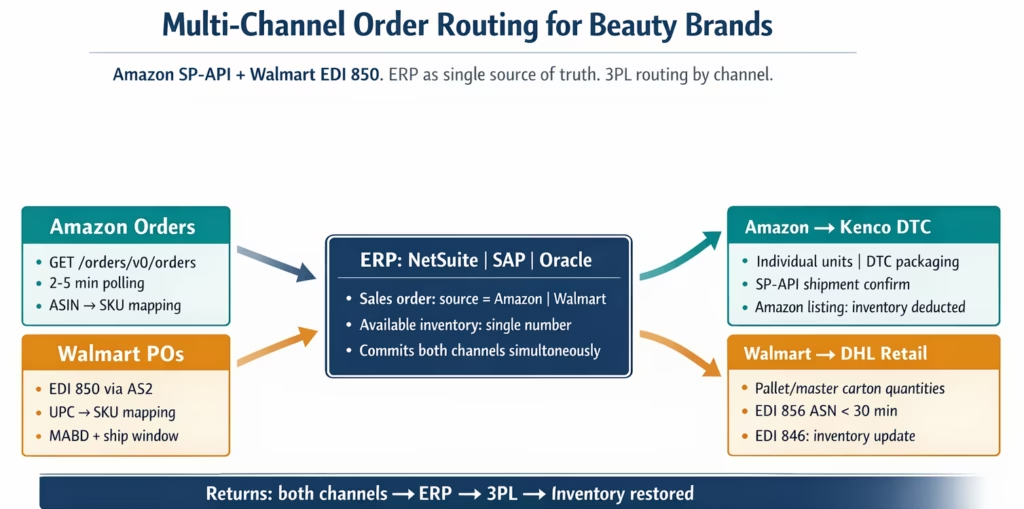
Both Amazon and Walmart orders create ERP sales orders, but they route to different fulfilment workflows:
Amazon DTC orders:
- Go to the DTC fulfilment 3PL (Kenco, or whichever 3PL handles your DTC channel)
- Typically individual units shipped in DTC packaging (not display-ready cases)
- SP-API shipment confirmation with tracking required within the SLA window
Walmart retail orders:
- Go to the retail DC fulfilment 3PL (DHL Supply Chain or similar)
- Pallet-level quantities, master cartons, GS1-128 SSCC-18 labels required
- EDI 856 ASN required within 30 minutes of carrier scan
The Level 1 routing logic reads the source tag on the ERP sales order:
Level 4 (Goldfinch AI) orchestrates the entire multi-channel cycle as a Workflow Node, enabling fully autonomous order processing from SP-API poll through 3PL fulfilment to channel confirmation. The Goldfinch AI Chat UI gives ops managers a natural language window into the combined order pipeline: “How many Amazon orders are pending fulfilment at Kenco this morning?”, “What Walmart POs have ASNs not yet transmitted?”, or “Which SKUs are below our inventory buffer across both channels?” No report navigation required.
IF sales_order.source = 'Amazon' THEN
  route to Kenco_DTC_workflow;
  SLA = ShipServiceLevel (from SP-API order);

ELSE IF sales_order.source = 'Walmart' THEN
  route to DHL_Retail_workflow;
  SLA = MABD (from EDI 850);
  EDI_856_required = true;

END IF;
For beauty brands also using Amazon FBA (where Amazon warehouses and ships the product), the flow is different: Walmart retail orders go to your 3PL, Amazon FBA orders are fulfilled by Amazon directly. The integration still posts the Amazon FBA orders to the ERP for inventory accounting, but does not send a fulfilment request to the 3PL (Amazon handles fulfilment). The ERP updates on the FBA sell-through via SP-API FBA inventory reports.
Before vs After: Disconnected Multi-Channel vs Unified ERP
| Process Step | Disconnected Multi-Channel | Unified ERP with eZintegrations |
|---|---|---|
| Amazon order receipt | Seller Central dashboard export; manual ERP entry | SP-API polling every 2–5 min; auto-posted to ERP |
| Walmart PO receipt | EDI team checks inbox once/day; manual ERP entry | AS2 received instantly; auto-posted to ERP |
| Inventory source of truth | Three places: Amazon listing, Walmart 846, ERP | One place: ERP. Both channels read from ERP |
| Inventory update to Amazon | Manual spreadsheet upload; weekly or daily | SP-API Feeds: triggered by every order or 3PL event |
| Inventory update to Walmart | EDI 846 emailed/batched; weekly or daily | EDI 846: triggered by every order or 3PL event |
| Oversell risk window | 24–48 hours (lag between Amazon sale and Walmart 846 update) | Under 10 minutes |
| ASIN-to-SKU mapping | Manual spreadsheet; breaks on new launches | Managed reference dataset; new ASINs added without workflow change |
| UPC-to-SKU mapping | Separate spreadsheet; maintained manually | Same reference dataset; consistent with Amazon mapping |
| Fulfilment routing | Manual: ops team decides per order | Level 1 routing rule: source tag → 3PL |
| Amazon shipment confirm | Manual SP-API call or Seller Central entry | Auto-triggered from 3PL shipment event |
| Walmart EDI 856 timing | Manual generation after shipment notification: risk of late ASN | Auto-triggered from 3PL event within 15 minutes |
| Returns reconciliation | Manual: separate process per channel | Both channels: returns post to ERP and 3PL automatically |
| Weekend/holiday coverage | Orders accumulate until Monday; chargeback risk accumulates | 24/7 polling and AS2 receipt; orders processed same day |
| Multi-channel reporting | Requires pulling data from multiple systems | ERP is single source: all channel orders and inventory in one report |
Step-by-Step: A Day in the Life of a Beauty Brand’s Multi-Channel Order Flow
Here is 24 hours in the automated multi-channel integration for Lumière Cosmetics, a beauty brand selling on Amazon Seller Central and Walmart stores.
Products: Velvet Foundation (12 shades), Rose Gloss (6 shades), Setting Spray (2 sizes).
ERPs: NetSuite.
3PLs: DHL Supply Chain Memphis (Walmart retail), Kenco Atlanta (Amazon DTC).
Starting inventory: 3,400 units of Rose Gloss LGLOSS-04 across all shades.
6:00 AM: Morning inventory position. NetSuite shows 3,400 units of Rose Gloss available. Level 3 automatically triggers:
- EDI 846 to Walmart with
QTY*1*3400for Rose Gloss UPC 847654321001. - SP-API Feeds inventory update to Amazon:
sku: LGLOSS-04-ROSE, quantity: 3400. Both channels start the day with the accurate number.
8:14 AM: Walmart EDI 850 arrives. Walmart transmits PO 4500882411 via AS2: 960 units of Rose Gloss (160 units across 6 shades). eZintegrations receives the 850, parses it, maps UPC to NetSuite SKU, and creates NetSuite sales order SO-WM-2026-5091 within 30 seconds. Level 2 inventory check per line: 3,400 available, 960 ordered. Sufficient. NetSuite commits 960 units: available drops to 2,440.
8:14 AM: Immediate inventory cascade. Within 90 seconds of the Walmart 850 posting:
- EDI 846 sent to Walmart:
QTY*1*2440for Rose Gloss. - SP-API Feeds update to Amazon:
quantity: 2440. Amazon shoppers now see the updated available quantity. Walmart’s system shows the updated 846.
8:15 AM: EDI 855 sent. Auto-generated 855 acknowledges 960 units (full quantity, sufficient stock). Walmart acknowledges the PO.
9:03 AM: Amazon order batch arrives (SP-API poll). eZintegrations polls SP-API. 47 Amazon orders for Rose Gloss from overnight (US East and Central time zones). 47 units across shades. ERP posts 47 sales orders. NetSuite available: 2,440 – 47 = 2,393.
9:03 AM: Inventory cascade again. SP-API Feeds: quantity: 2393. EDI 846 to Walmart: QTY*1*2393.
9:15 AM: Fulfilment routing fires.
- SO-WM-2026-5091 (Walmart, 960 units): Level 1 routes to DHL Supply Chain Memphis. REST API call posts fulfillment order to DHL.
- 47 Amazon DTC orders: Level 1 routes to Kenco Atlanta. REST API calls post individual fulfilment orders to Kenco.
2:17 PM: Kenco DTC shipments confirmed. Kenco processes and ships the 47 Amazon orders. Kenco push API fires shipment events (one per order). eZintegrations receives all 47 events:
- For each order: SP-API
POST /orders/v0/orders/{orderId}/shipmentwith tracking number. Amazon order marked as shipped. Customer notified. - NetSuite item fulfilment posted for each Amazon order.
- 47 units deducted from 3PL WMS inventory.
4:47 PM: DHL ships Walmart order. DHL packages and ships SO-WM-2026-5091 (Walmart 960 units). DHL push API fires shipment event at 4:47 PM with SSCC-18 labels and tracking.
4:47 PM: EDI 856 auto-triggered. Within 12 minutes of DHL push event: EDI 856 ASN transmitted to Walmart via AS2. 40 carton records with SSCC-18 GS1-128 labels. Pre-transmission validation: 856 carton totals match 855 acknowledged quantities. All pass. 856 transmitted at 4:59 PM. Walmart MABD: next Thursday. On-time.
4:47 PM: NetSuite item fulfilment posted. 960 units deducted from NetSuite. Available: 2,393 – 960 = 1,433.
5:00 PM: End-of-day inventory cascade. SP-API Feeds: quantity: 1433 for Rose Gloss. EDI 846 to Walmart: QTY*1*1433. Both channels end the day seeing the same accurate available quantity.
EDI 810 invoice triggered (Day +1). NetSuite invoicing fires 24 hours post-shipment. EDI 810 auto-generated and transmitted to Walmart.
Total ops team involvement: zero manual touchpoints. The only human intervention occurred when the ops team approved the morning inventory report at 6:15 AM.
Key Outcomes and Results
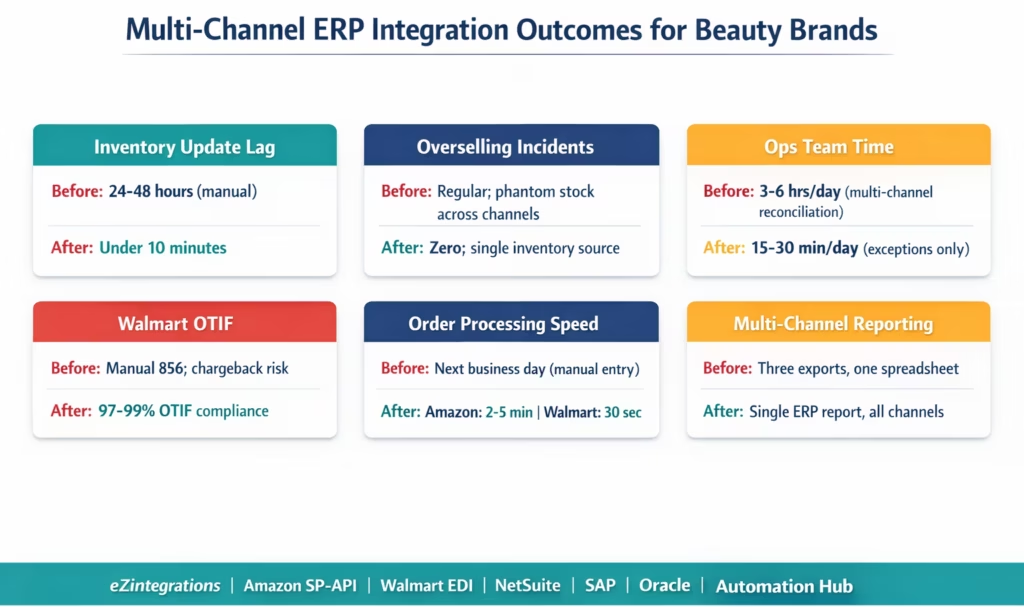
Oversell elimination: the gap between an Amazon order and the Walmart 846 inventory update drops from 24-48 hours (manual) to under 10 minutes. Beauty brands report eliminating overselling incidents completely within the first 30 days of live multi-channel integration.
Order processing speed: Amazon orders ingested within 2-5 minutes of placement (SP-API polling). Walmart 850 POs processed within 30 seconds of AS2 receipt. No Monday morning order backlog.
Walmart OTIF compliance: automated 856 timing (within 15-30 minutes of carrier scan) eliminates late ASN chargebacks. Automated 855 inventory-validated acknowledgment eliminates in-full OTIF violations from over-commitment. Beauty brands reach 97-99% OTIF within the first full quarter.
Ops team time: multi-channel order entry and reconciliation typically consumes 3-6 hours per day for a beauty brand managing both channels manually. Full automation reduces this to 15-30 minutes of exception review per day.
Multi-channel reporting: with all orders in one ERP, reporting across channels is a single NetSuite, SAP, or Oracle report. No more consolidating Amazon Seller Central exports with Walmart Retail Link exports in a spreadsheet.
Weekend and holiday coverage: the integration runs 24/7. Weekend Amazon orders are processed and fulfilled, and Walmart 850s received during weekends or holidays post to the ERP immediately. No Monday backlog.
Scale readiness: adding a third channel (Target, TikTok Shop, DTC Shopify) uses the same ERP integration backbone. The new channel adds its order connector; the ERP inventory logic and 3PL routing layer already exist.
How to Get Started
Step 1: Map Your Channel Architecture
Before importing a template, document the following: which Amazon seller account (or Vendor Central account) you are connecting, which Walmart supplier ID and AS2 credentials you have, which ERP you are using (NetSuite, SAP, or Oracle), which 3PL(s) handle fulfilment for each channel, and how your SKUs are identified on each platform (ASIN on Amazon, UPC/GTIN on Walmart, internal SKU in the ERP).
If you have both Amazon Seller Central and Amazon Vendor Central accounts, confirm which one the integration should cover. Seller Central uses the SP-API (covered in this guide). Vendor Central uses EDI (similar structure to Walmart, but with Amazon’s specific EDI requirements).
Step 2: Build Your SKU Mapping Tables
Two mapping tables are required before any orders can be processed:
ASIN-to-SKU: export your Amazon Seller Central inventory to get all active ASINs. Export your ERP item list. Map each ASIN to the corresponding ERP SKU. For a beauty brand with 80 ASINs (multiple shades, bundles, and sample kits), this takes 2-4 hours to complete correctly.
UPC-to-SKU: export the UPC/GTIN values from Walmart’s item setup (available in Retail Link). Map each UPC to the corresponding ERP SKU. For a brand with 40 items at Walmart (fewer than Amazon, as Walmart retail listings are typically fewer), this takes 1-2 hours.
Both mapping tables are uploaded to the eZintegrations reference dataset and used across all order, inventory, and ASN workflows.
Step 3: Import the Multi-Channel ERP Integration Template
Go to the Automation Hub and import the Multi-Channel ERP Integration template. Configure your Amazon SP-API credentials (LWA Client ID and Secret, Seller ID, Marketplace ID), Walmart AS2 credentials (Supplier ID, AS2 endpoint), and ERP credentials (NetSuite TBA, SAP BTP, or Oracle OAuth). Upload your ASIN-to-SKU and UPC-to-SKU mapping tables. Configure your 3PL connections for each channel. Set the inventory sync trigger rules (on order, on schedule, or both) and the inventory buffer (a safety quantity below which you stop committing to new channel orders).
Step 4: Run the Inventory Synchronisation First
Before processing any live orders, run the initial inventory sync: push ERP available quantities to both Amazon (via SP-API Feeds) and Walmart (via EDI 846). This establishes the ERP as the baseline for both channels. Once confirmed, both channels are reading from the correct starting number.
Step 5: Go Live with One Channel, Then Add the Second
If this is a new multi-channel integration, go live with your higher-volume channel first (typically Amazon). Run for 3-5 business days to validate order ingestion, inventory sync, fulfilment routing, and shipment confirmation. Then activate the Walmart EDI flows. Running one channel first allows you to isolate any ERP mapping issues before they affect both channels simultaneously.
Total implementation timeline: 5-8 business days from template import to both channels live, including mapping table build and test validation.
FAQs
1. How does multi channel ERP integration work for beauty brands using Amazon and Walmart
eZintegrations connects Amazon via SP API and Walmart via EDI over AS2 and normalises both into ERP sales orders. The ERP acts as the single source of truth for inventory which is updated after each order and pushed back to both channels. Fulfilment is routed to the correct 3PL and shipment confirmations are sent back to Amazon and Walmart. All key flows including orders inventory fulfilment shipment and returns are automated.
2. How long does it take to set up Amazon and Walmart order sync with an ERP
Setup typically takes 5 to 8 business days including SKU mapping credential configuration ERP connection routing setup and testing. Walmart EDI certification may take an additional 1 to 3 weeks if not already completed.
3. Does eZintegrations work with Amazon Seller Central Walmart suppliers and ERP systems simultaneously
Yes, eZintegrations connects Amazon Seller Central via SP API Walmart via EDI and ERP systems such as NetSuite SAP and Oracle in a single workflow using the ERP as the inventory master with both channel integrations operating in parallel.
4. What is the main risk without ERP based multi channel integration
The main risk is overselling caused by inventory mismatches between channels. Without integration inventory updates are delayed creating a window where one channel can sell stock already sold on another channel. eZintegrations reduces this risk by synchronising inventory in near real time across all channels.
5. How does the integration handle Amazon FBA and Walmart store supplier orders differently
Amazon FBA orders are fulfilled by Amazon so they are recorded in the ERP for accounting without 3PL routing while inventory is synced from Amazon. Walmart store supplier orders follow the full EDI cycle and are fulfilled through the 3PL. For mixed fulfilment models routing logic determines whether orders are handled by Amazon or the 3PL based on fulfilment channel.
One ERP. Two Channels. No More Monday Morning Reconciliation.
Amazon and Walmart are architecturally different: REST API vs EDI, pull-based vs push-based, DTC vs retail. But from your ERP’s perspective, they are both sales channels that draw from the same inventory pool. The ERP should know about every order from both channels within minutes of placement. Every channel should read from the same available quantity. Every fulfilment should confirm back to both channels without manual intervention.
eZintegrations connects both channels to your ERP in a single platform. No separate Amazon connector tool. No separate EDI provider. No manual reconciliation spreadsheet. One integration, two channels, one ERP.
Import the Multi-Channel ERP Integration Template from the Automation Hub and start the channel mapping process. Or book a free demo with your Amazon Seller ID, Walmart Supplier ID, ERP type, and current channel mix. We will walk through the ASIN/UPC mapping and inventory sync configuration in the session.
For channel-specific deep dives: see the Amazon Seller Central integration guide for beauty brands, the Walmart EDI integration guide, and the 3PL integration guide.