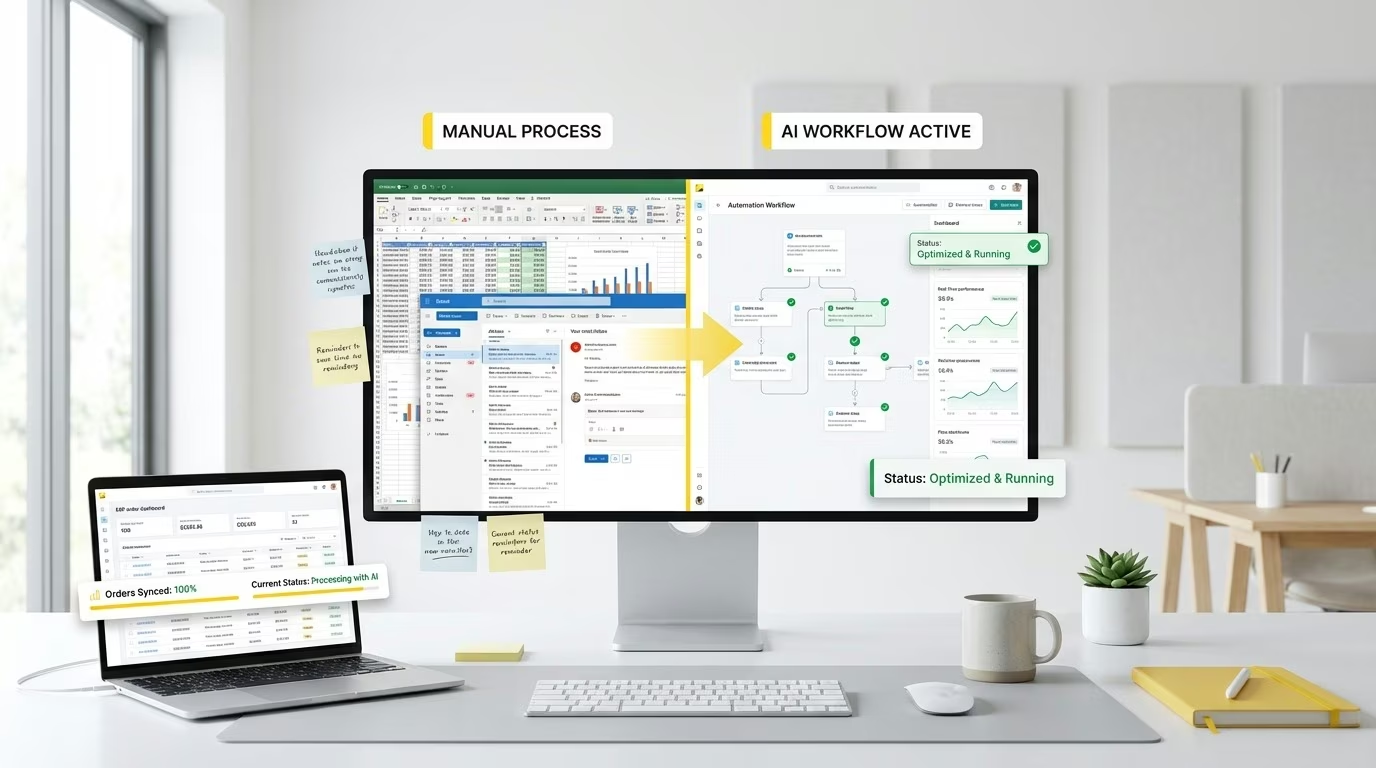
3PL Integration for Beauty Brands: How to Connect DHL, UPS, and Kenco to Your ERP
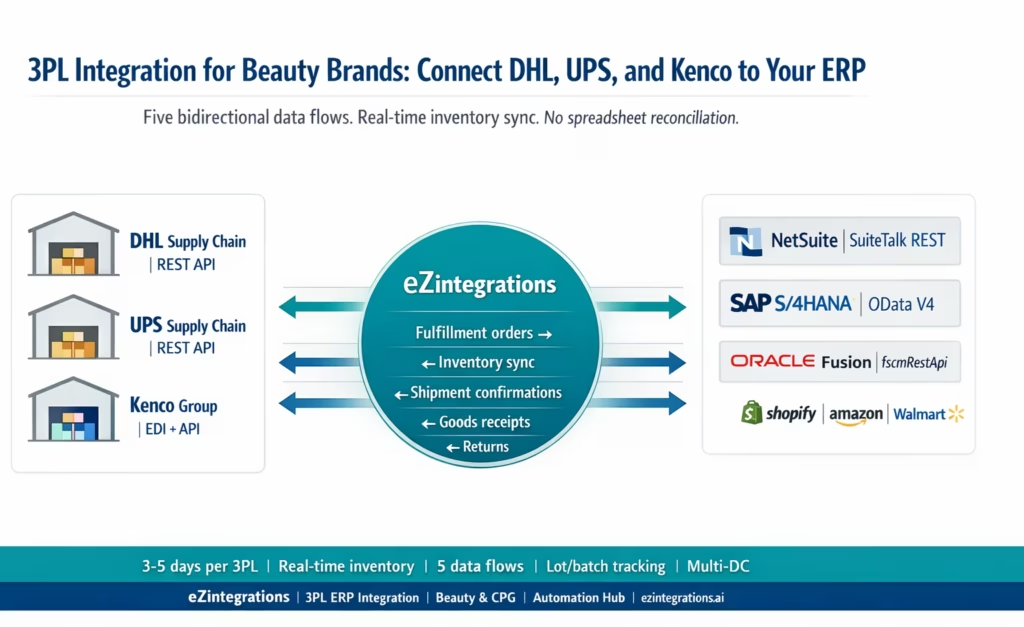
April 20, 20263PL integration for beauty brands connects the warehouse management system (WMS) of your logistics provider (DHL Supply Chain, UPS Supply Chain, or Kenco) to your ERP (SAP, NetSuite, or Oracle) via five bidirectional data flows: outbound fulfillment orders from ERP to WMS, shipment confirmations and tracking back to ERP, real-time inventory sync to prevent overselling, inbound goods receipt posting, and return processing. eZintegrations handles all five flows using each 3PL’s published API or EDI interface and the ERP’s REST API, eliminating the manual spreadsheet reconciliation and 24-48 hour inventory lag that cause stockouts, overselling, and retailer chargebacks for beauty brands.
TL;DR
- 3PL integration connects your third-party logistics provider’s warehouse management system (WMS) to your ERP bidirectionally: orders flow out, inventory and fulfillment confirmations flow back.
- The five data flows every beauty brand must automate: outbound fulfillment orders (ERP to WMS), shipment confirmation and tracking (WMS to ERP), inventory sync (WMS to ERP), goods receipt (WMS to ERP on inbound stock), and returns (ERP to WMS and back).
- DHL Supply Chain: REST API with OAuth 2.0. Key endpoints:
/inventory/detail(inventory levels), outbound logistics orders (fulfillment), ASN/inbound logistics orders, push API for shipment event notifications. - UPS Supply Chain Solutions: REST/OAuth 2.0 order management, inventory, and tracking APIs.
- Kenco: EDI-based (ANSI X12) and API connectivity via their integration middleware. CPG-focused with Walmart/Target retailer compliance capabilities.
- ERP targets: NetSuite (SuiteTalk REST), SAP S/4HANA (OData V4), Oracle Fusion Cloud (fscmRestApi).
- Beauty-specific: lot/batch tracking with expiry dates, multi-SKU shade variant mapping, multi-DC routing (retail DC vs DTC vs Amazon FBA prep), gift set bundle handling.
- Automation Hub templates for DHL Supply Chain, UPS SCS, and Kenco connections. 3-5 days per 3PL integration.
What Is 3PL Integration and Why Beauty Brands Need It
Your lip gloss collection just landed a Walmart placement. Your DTC brand is scaling on Shopify. Your Amazon FBA inventory is running low. All three channels are fulfilling from the same physical stock at your DHL Supply Chain warehouse in Memphis.
Your NetSuite ERP shows 14,200 units of Rose Gloss available. Your DHL WMS shows 11,800 units. The difference: 2,400 units that shipped to Amazon last week, whose fulfillment confirmation never made it back to NetSuite.
A customer places an order on your Shopify store. NetSuite allocates stock. DHL ships. But NetSuite did not know about the 2,400 Amazon units. You are now 200 units short on a Shopify order that NetSuite already confirmed. A customer gets a cancellation email on a product they already paid for.
This is the inventory visibility gap. It is the most common and most expensive consequence of unintegrated 3PL operations for beauty brands. And it is entirely preventable.
3PL integration connects your logistics provider’s WMS to your ERP in real time, a model widely adopted in modern ERP-driven supply chain architectures. Your ERP’s inventory is always accurate. Every channel selling from that inventory sees the correct available quantity. No manual reconciliation. No cancellations from phantom stock.
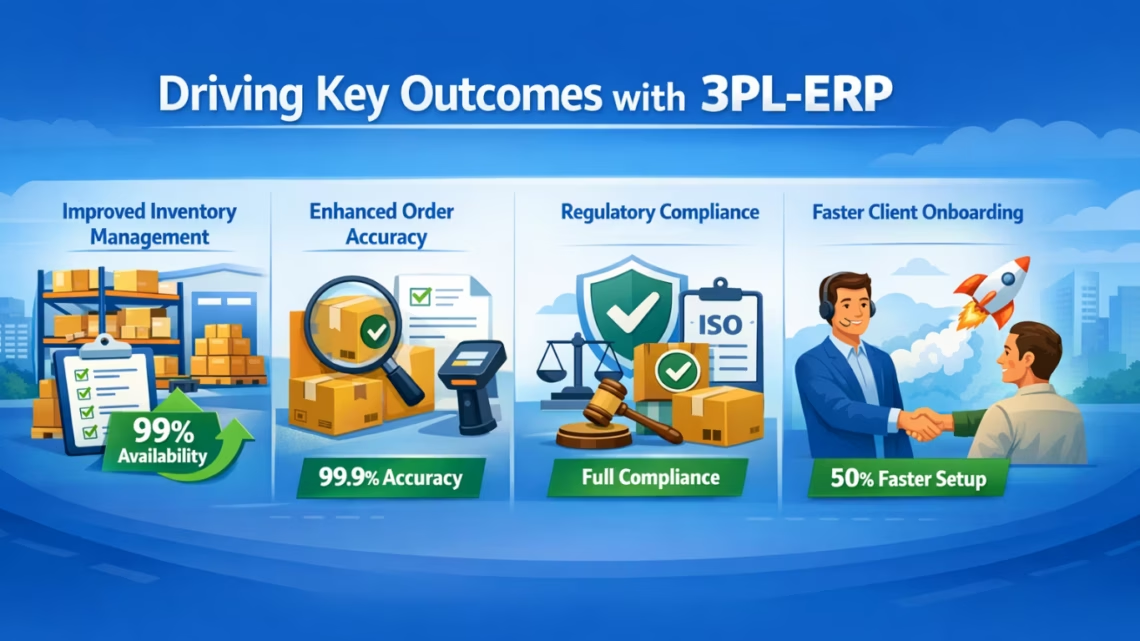
What Is 3PL Integration and Why Beauty Brands Need It
A third-party logistics (3PL) provider operates the warehouse, manages the inventory, and fulfils the orders on behalf of your brand. The 3PL’s warehouse management system (WMS) is the authoritative record of what stock physically exists in the warehouse: exact units by SKU, lot, and location. Your ERP is the authoritative record for orders, financials, and inventory value. When these two systems are not connected, every transaction at the warehouse requires manual reconciliation to keep them aligned.
For a beauty brand, this reconciliation problem is acute because:
Volume scales quickly with channel expansion. A brand that adds Walmart stores, Target stores, and Amazon FBA simultaneously may triple its order volume in a single quarter. Manual reconciliation that was manageable at 500 orders per month becomes impossible at 5,000.
Shade variants multiply the SKU count. A foundation line with 12 shades, 3 finishes, and 2 sizes is 72 unique SKUs from a single product. Every shade variant has its own UPC and its own inventory position in the WMS. Manual reconciliation of 72 SKUs across 3 channels and 2 warehouses is a full-time job.
Retailer compliance depends on inventory accuracy. Walmart OTIF and Amazon Vendor Central chargebacks are triggered when you commit to quantities you cannot fulfil. If your ERP shows available stock that has already shipped (because the WMS event never made it to the ERP), you commit to an order you cannot fill and receive a chargeback.
Expiry dates matter in beauty. Cosmetics have shelf-life requirements: typically 12-36 months. Retailers require minimum remaining shelf life on receipt (Walmart and Target both enforce this). Your ERP needs to know which lot numbers are at the warehouse, with their expiry dates, to prevent shipping near-expired stock to retail channels.
The Five Data Flows in a Beauty Brand’s 3PL-ERP Integration
Every 3PL-ERP integration must handle five bidirectional data flows, consistent with standard integration architectures used in SAP-driven supply chains. These are the minimum viable integration: missing any one creates a gap that reintroduces manual work.
Flow 1: Outbound Fulfillment Order (ERP to 3PL WMS) When an order is placed (Shopify, Amazon, Walmart EDI 850, or B2B wholesale), your ERP creates a sales order or fulfillment request. That order must be transmitted to the 3PL WMS so the warehouse can pick, pack, and ship. Without this flow: the warehouse does not know about the order until someone manually sends them a spreadsheet or portal entry.
Flow 2: Shipment Confirmation and Tracking (3PL WMS to ERP) When the warehouse ships the order, it generates a tracking number and shipment confirmation. This must return to the ERP to close the sales order, trigger invoicing, and update the channel (mark the Shopify order as shipped, send the Walmart EDI 856 ASN). Without this flow: the ERP shows open orders that have already shipped; invoice triggering is delayed; Walmart gets no ASN.
Flow 3: Inventory Sync (3PL WMS to ERP) The WMS is the live record of physical stock. Every pick, receipt, and adjustment changes the WMS inventory. Your ERP must reflect the same counts in near-real-time to prevent overselling. Without this flow: the ERP’s available-to-promise quantity drifts from physical reality. Beauty brands with high-velocity DTC channels frequently oversell by allocating stock already committed to another channel.
Flow 4: Goods Receipt / Inbound ASN Confirmation (3PL WMS to ERP) When inbound stock arrives at the 3PL warehouse (a new production run, a transfer from another DC, a supplier delivery), the WMS posts the receipt. That receipt must update the ERP: increase on-hand quantity, close the purchase order line, and update the lot/batch record with expiry date and quantity received. Without this flow: the ERP purchase order remains open; on-hand quantity does not increase until someone manually enters the receipt.
Flow 5: Returns Processing (ERP to WMS and back) Customer returns on DTC and retail channels generate a return merchandise authorisation (RMA) in the ERP. The RMA must be sent to the 3PL WMS so the warehouse knows to expect the return and how to process it (restock, quarantine, destroy). When the WMS receives and processes the return, the result (restocked quantity, quarantine quantity, destroyed quantity) must come back to the ERP to adjust inventory. Without this flow: returned stock sits in the warehouse with no ERP visibility; the brand neither recovers the inventory value nor knows what happened to the units.
Why Manual 3PL Reconciliation Fails Beauty Brands
Beauty brands attempting to reconcile 3PL WMS and ERP data manually follow one of three approaches, all of which break at scale.
Approach 1: Daily warehouse inventory reports by spreadsheet. The 3PL emails a daily inventory report. The brand’s ops team compares it to the ERP inventory and manually enters adjustment journals. Time per reconciliation: 1-3 hours. Accuracy: depends entirely on the person doing the comparison. Lag: 24+ hours. MaryRuth Organics, a fast-growing wellness brand, documented 48-hour inventory lag between warehouse receipts and their selling channel updates before integration, resulting in customer complaints about split shipments not being tracked.
Approach 2: Portal-based order entry. The ops team logs into the 3PL’s customer portal and manually enters each order. They export shipment confirmations from the portal and manually update the ERP. For a brand processing 200 DTC orders per day plus 3 Walmart EDI POs, this is 3-5 hours per day of pure manual data transfer.
Approach 3: Semi-automated file transfers (SFTP flat files). The ERP exports order files to an SFTP server. The 3PL picks them up on a schedule. Inventory update files come back on a schedule. This is better than fully manual, but: files are batched (not real-time), mapping errors are common (the 3PL’s item codes do not match the ERP SKU codes), and exception handling requires manual intervention.
All three approaches share the same failure mode: they cannot keep up with multi-channel volume growth. Adding a new retail channel (Target, Costco) or a new 3PL location doubles the reconciliation workload. The more channels and warehouses a beauty brand adds, the faster manual reconciliation breaks down.
How Each 3PL Connects: DHL, UPS, and Kenco
DHL Supply Chain
DHL Supply Chain’s Warehouse Management APIs cover Item Master (product setup), Inventory Management (current inventory levels with pagination), Outbound Logistics Orders (fulfillment orders), and Inbound Logistics Orders (ASN and goods receipt). All APIs use REST architecture with OAuth 2.0 authentication and JSON over HTTPS. (see official API reference)
Key DHL Supply Chain WMS endpoints:
Inventory query (with pagination for large catalogues):
GET https://{dhl-instance}/wms/api/v1/inventory/detail
  ?page=1
  &pageSize=100

Authorization: Bearer {access_token}
Response includes: SKU, lot number, expiry date, available quantity, on-hold quantity, warehouse location. The page parameter enables large beauty catalogues (hundreds of shade variants) to be fetched without timeout.
Outbound order creation (send fulfillment order to DHL warehouse):
POST https://{dhl-instance}/wms/api/v1/outbound/order

Content-Type: application/json
Authorization: Bearer {access_token}

{
  "customerOrderNumber": "SO-2026-7842",
  "shippingAddress": {
    ...
  },
  "orderLines": [
    {
      "itemNumber": "LGLOSS-04-ROSE",
      "quantity": 24
    },
    {
      "itemNumber": "LGLOSS-07-BERRY",
      "quantity": 12
    }
  ]
}
Push API for shipment events: DHL Supply Chain’s push API sends shipment confirmation events to a registered webhook URL when orders ship. This eliminates polling: the ERP receives the tracking number and shipment confirmation within seconds of the warehouse scanning the shipment.
UPS Supply Chain Solutions
UPS Supply Chain Solutions (UPS SCS) provides REST APIs for order submission, inventory query, shipment tracking, and returns. Authentication uses OAuth 2.0 in the same pattern as DHL.
Order submission:
POST /oms/api/v1/orders with order details and line items.
Inventory query: GET /wms/api/v1/inventory with SKU filter.
Shipment tracking: GET /tracking/api/v1/shipments/{trackingNumber} for status updates.
UPS SCS is commonly used by beauty brands for DTC fulfilment (direct from their regional distribution centres) and Amazon FBA prep (receiving bulk production runs, applying FNSKU labels, and forwarding to Amazon FCs).
Kenco Group
Kenco uses integration middleware (built on Boomi) to support over 30 trading partners. Their WMS supports EDI-based connectivity (ANSI X12) and API-based connectivity for customers including Blue Yonder and Koerber WMS platforms.
For beauty brands, Kenco’s EDI connectivity uses the standard ANSI X12 transaction sets:
- EDI 940 (Warehouse Shipping Order):
– brand sends fulfillment orders to Kenco - EDI 945 (Warehouse Shipping Advice):
– Kenco sends shipment confirmation back - EDI 944 (Warehouse Stock Transfer/Receipt Advice):
– goods receipt confirmation from Kenco - EDI 846 (Inventory Inquiry/Advice):
– inventory snapshot from Kenco to brand
For brands with API connectivity, Kenco exposes REST endpoints via their integration middleware, mapped to the same functional flows as the EDI transaction sets.
Kenco is a CPG-focused 3PL with documented Walmart and Target retailer compliance experience, making them a common choice for beauty brands building out mass retail distribution. Their integration with UPS as a carrier partner means UPS tracking data is typically available through the Kenco integration as well.
Beauty-Specific 3PL Integration Requirements
Lot and Batch Tracking with Expiry Dates
Cosmetics have regulatory and retailer-imposed shelf-life requirements. Retailers specify minimum remaining shelf life on receipt: typically 30-50% of the product’s total shelf life must remain when received at the DC. A foundation with a 24-month shelf life must have at least 12 months remaining when it arrives at Walmart.
Your 3PL WMS tracks inventory at the lot level: each production lot has a lot number and an expiry date. Your ERP must receive this lot-level data when goods are received at the 3PL warehouse, so that the ERP knows:
- Which lots are at the warehouse with their expiry dates
- Which lots to allocate to retail channels (furthest from expiry) versus DTC channels (closer to expiry is acceptable)
- Which lots must be quarantined or returned to the supplier before they reach the near-expiry threshold
eZintegrations maps the WMS lot/batch data to the ERP’s equivalent field: NetSuite’s lotNumber and expirationDate on the inventory item, SAP’s batch management (CHARG and MHD1/MHD2 manufacturing and expiry dates), or Oracle’s lot attributes in the Inventory Management module.
Multi-SKU Shade Variant Mapping
A beauty brand’s ERP SKU codes rarely match the 3PL WMS item codes. The ERP might have SKU FDN-12-WARM-SAND-1OZ; the 3PL WMS might have item code W1234-FDN-WS. Without a cross-reference table (item master mapping), orders and inventory updates fail with unrecognised item codes.
eZintegrations maintains the SKU-to-WMS-item-code mapping table as a reference dataset. When an order goes out (ERP SKU → WMS item code) or inventory comes back (WMS item code → ERP SKU), the transformation layer translates in both directions. New shade launches or reformulations that create new SKUs are added to the mapping table without modifying the workflow.
Multi-DC Routing
A beauty brand scaling across multiple channels often uses different 3PL partners for different fulfilment channels:
- DHL Supply Chain: retail distribution (Walmart, Target, wholesale)
- Kenco: DTC and specialty retailer fulfilment
- UPS SCS: Amazon FBA prep and forward
Orders must be routed to the correct 3PL based on fulfilment channel. A Walmart 850 EDI purchase order goes to DHL (retail DC location). A Shopify DTC order goes to Kenco. An Amazon restocking transfer order goes to UPS SCS.
eZintegrations Level 1 routing logic:
IF order_channel = 'Walmart' THEN
  route to DHL Supply Chain workflow;

ELSE IF order_channel = 'Shopify' THEN
  route to Kenco workflow;

ELSE IF order_channel = 'Amazon_FBA' THEN
  route to UPS SCS workflow;

END IF;
Gift Set Bundle Handling
Seasonal beauty gift sets (a mascara + liner bundle, a holiday lip kit) are typically assembled at the 3PL as a kitting operation. In the ERP, the gift set is a single BOM (bill of materials) item: Gift Set GTIN assembles from 1× mascara + 1× lip liner + 1× box. The 3PL WMS manages the component inventory and the assembled gift set as separate item records.
The integration must handle the BOM explosion: when the ERP sends an order for 120 gift sets to the 3PL, the integration translates the ERP’s gift-set SKU into a kitting instruction for the WMS (assemble 120 units of Gift-Set-GTIN from component items). When the WMS reports gift set inventory, the integration reconciles the component items back to the ERP’s BOM.
How eZintegrations Connects Your 3PL to Your ERP
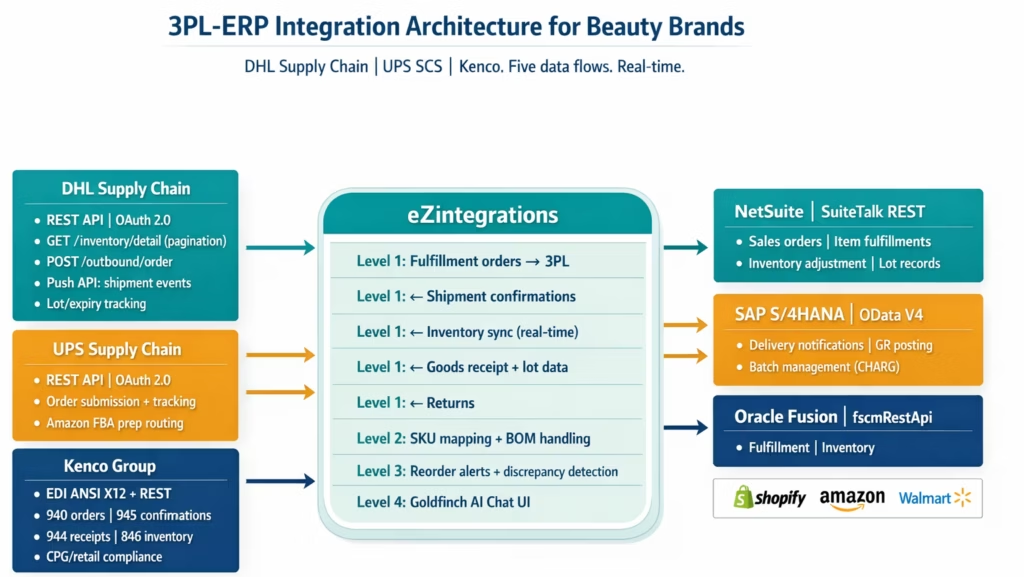
eZintegrations uses all four platform levels to manage the full 3PL-ERP integration for beauty brands.
Level 1 (iPaaS Workflows): handles all five data flows (fulfillment orders, shipment confirmations, inventory sync, goods receipts, returns) for each 3PL connection. Manages DHL Supply Chain REST API authentication and pagination, Kenco EDI document transmission (940/945/944/846), and UPS SCS REST API. Manages ERP posting for NetSuite (SuiteTalk REST), SAP S/4HANA (OData V4), and Oracle Fusion Cloud. Handles SKU-to-WMS item code translation and channel-based 3PL routing.
Level 2 (AI Workflows): handles transformation edge cases that structured mapping cannot resolve: non-standard item code formats from new 3PL partners, reformulated SKUs that have changed codes, gift set BOM validation. For inbound goods receipt documents (especially from EDI-based 3PLs that send flat files), Goldfinch AI Document Intelligence extracts structured data from non-standard formats.
Level 3 (AI Agents): monitors inventory levels across all connected 3PL warehouses and alerts when any SKU crosses a configurable reorder threshold. Detects inventory discrepancies between WMS and ERP and routes them for review. Monitors ASN timing compliance for retail channels (Walmart 856 timing, Amazon ASN requirements). Watcher for return processing: monitors RMA status and updates ERP when WMS resolves the return.
Level 4 (Goldfinch AI): orchestrates multi-3PL routing as a Workflow Node. Provides Goldfinch AI Chat UI for ops managers: “What is the current inventory for Rose Gloss across all warehouses?”, “Which Walmart POs have shipment confirmations not yet posted to NetSuite?”, “Are any SKUs within 60 days of expiry at DHL Memphis?”
Before vs After: Manual 3PL Reconciliation vs Automated
| Data Flow | Manual Process | Automated with eZintegrations |
|---|---|---|
| Order to 3PL | Email/portal order entry or spreadsheet upload | Level 1 auto-routes sales order to correct 3PL (DHL/UPS/Kenco) on creation |
| Order routing | Manual: ops team determines which 3PL per order | Level 1 routing rule: channel-based automatic routing |
| Shipment confirmation | 3PL emails tracking number; ops team manually updates ERP | DHL push API / Kenco 945 / UPS tracking → auto-posts to ERP item fulfillment |
| Inventory sync | Daily spreadsheet from 3PL, manual ERP adjustment | Level 3 Watcher: continuous WMS inventory sync to ERP (15–60 min interval) |
| Inventory discrepancy detection | Discovered at month-end or when overselling occurs | Level 3: auto-detected and routed for review |
| Goods receipt | 3PL emails receipt confirmation; AP team manually closes PO | Kenco 944 / DHL ASN confirmation push → auto-posts goods receipt to ERP |
| Lot/expiry tracking | Manually recorded in ERP from 3PL report | WMS lot + expiry data extracted and posted to ERP lot records automatically |
| SKU code translation | Manual: ops maintains a lookup spreadsheet | Level 1/2: SKU-to-WMS item code mapping table, updated without workflow changes |
| Returns | RMA emailed to 3PL; WMS outcome emailed back; manual ERP update | Level 1: RMA transmitted to WMS; WMS return outcome posts to ERP automatically |
| Gift set BOM handling | Manual kitting instructions to 3PL; manual component deduction in ERP | Level 2: BOM explosion on outbound, component reconciliation on inventory sync |
| Multi-DC routing | Manual: ops decides which warehouse per order | Level 1 routing: channel → 3PL rule applied automatically |
| Retailer ASN compliance | Shipment confirmation arrives late → manual 856 → chargeback risk | Shipment event auto-triggers 856 via Walmart EDI flow within 15 minutes |
| Ops team time | 2–5 hours/day on 3PL reconciliation | Near-zero: exception-based review only |
Step-by-Step: A Walmart Replenishment Order Through the Full 3PL Cycle
Here is the complete automated 3PL data flow for a Walmart beauty replenishment PO fulfilled from a DHL Supply Chain warehouse.
The scenario: Walmart issues PO 4500882011 to Lumière Cosmetics for 960 units of Velvet Foundation across 8 shades (120 units per shade). Lumière’s ERP is NetSuite. Their retail fulfilment 3PL is DHL Supply Chain in Memphis. This PO was triggered automatically by the EDI 850 workflow from the Walmart integration.
Step 1: Walmart EDI 850 arrives and creates a NetSuite sales order. (Day 1, 9:14 AM) The EDI 850 is ingested (via the Walmart EDI integration from Row 146). NetSuite sales order SO-WM-2026-4882 created with 8 line items (8 shade UPCs, 120 units each). MABD: February 5. Ship window: January 29-31. Time: under 5 seconds.
Step 2: NetSuite sales order auto-routed to DHL Supply Chain. (Day 1, 9:14 AM) Level 1 routing logic: order_channel = 'Walmart' → DHL Supply Chain Memphis workflow. Level 1 calls the DHL WMS API:
POST https://{dhl-instance}/wms/api/v1/outbound/order

Content-Type: application/json
Authorization: Bearer {access_token}

{
  "customerOrderNumber": "SO-WM-2026-4882",
  "shippingAddress": {
    "name": "Walmart DC #6094 Kansas City",
    "address": "..."
  },
  "orderLines": [
    {
      "itemNumber": "WFDN-01-IVORY",
      "quantity": 120
    },
    {
      "itemNumber": "WFDN-02-SAND",
      "quantity": 120
    },
    ...
    (8 lines total)
  ],
  "requiredShipDate": "2026-01-30",
  "requiredDeliveryDate": "2026-02-05"
}
Note: ERP SKUs (FDN-01-IVORY-30ML) are translated to DHL item codes (WFDN-01-IVORY) via the mapping table. DHL WMS confirms the order is received. Time: 2-3 seconds.
Step 3: DHL inventory check before allocation. (Day 1, 9:15 AM) Level 3 queries DHL inventory via:
GET /wms/api/v1/inventory/detail?itemNumber=WFDN-03-TAN&page=1
Returns: available: 118, onHold: 0, lotNumber: LOT-2025-0441, expiryDate: 2027-08.
118 available, 120 ordered. 2-unit shortage detected on shade WFDN-03-TAN.
Level 3 flags the shortage to the ops team. Ops adjusts the DHL order to 118 for that shade and updates the NetSuite sales order. Walmart 855 acknowledgment updated accordingly.
Step 4: Warehouse picks, packs, and ships. (Day 2, January 30) DHL warehouse picks and packs the order: 40 master cartons, each with 24 units. SSCC-18 GS1-128 labels applied per carton. UPS freight carrier picks up at 1:47 PM. DHL WMS records the shipment event.
Step 5: DHL push API fires shipment confirmation. (Day 2, 1:52 PM) Within 5 minutes of carrier scan, DHL’s push API sends a shipment event to eZintegrations:
{
  "customerOrderNumber": "SO-WM-2026-4882",
  "shipmentDate": "2026-01-30",
  "trackingNumber": "1Z9W4872...",
  "carrierCode": "UPSF",
  "cartons": [
    {
      "sscc": "00845678901234567891",
      "itemNumber": "WFDN-01-IVORY",
      "qty": 24
    },
    ...
    (40 carton records)
  ]
}
Step 6: NetSuite item fulfillment posted. (Day 2, 1:52 PM) Level 1 receives the DHL push event and calls NetSuite SuiteTalk REST:
POST /services/rest/record/v1/itemFulfillment

Content-Type: application/json

{
  "createdFrom": {
    "id": "SO-WM-2026-4882",
    "type": "salesOrder"
  },
  "tranDate": "2026-01-30",
  "shipStatus": {
    "id": "C"
  },
  "trackingNumbers": [
    {
      "trackingNumber": "1Z9W4872..."
    }
  ]
}
NetSuite marks the Walmart sales order as fulfilled. Inventory is decremented from NetSuite available stock. The lot records are updated: lot LOT-2025-0441 quantity reduced by the shipped amount. Time: under 3 seconds after the DHL push event arrives.
Step 7: Walmart EDI 856 ASN auto-triggered. (Day 2, 1:52 PM) The DHL shipment confirmation simultaneously triggers the Walmart EDI 856 workflow (from the Walmart EDI integration): the 856 with 40 SSCC-18 carton records is transmitted to Walmart via AS2 within 15 minutes of the DHL push event. Pre-transmission validation checks 856 carton totals against the sales order. All pass.
Step 8: Walmart EDI 810 invoice triggered. (Day 3) NetSuite’s invoicing workflow fires 24 hours post-shipment. The EDI 810 is auto-generated from the NetSuite invoice and transmitted to Walmart.
Step 9: Real-time inventory sync continues. (Ongoing) Level 3 Watcher polls DHL inventory every 30 minutes for all SKUs. Any changes (other orders shipping, new receipts arriving) are reflected in NetSuite inventory within 30 minutes. No daily spreadsheet reconciliation.
Total ops team involvement in this Walmart cycle: reviewing the shade 03 shortage flag in Step 3 (2 minutes). Everything else was automated.
Key Outcomes and Results
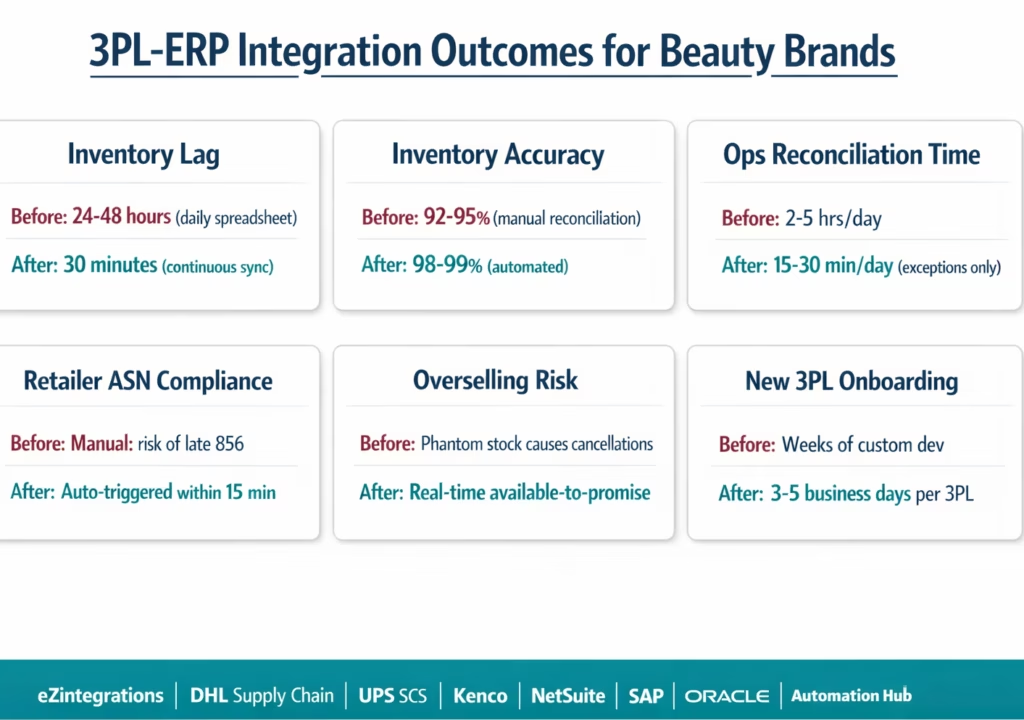
Inventory accuracy: automated real-time sync between 3PL WMS and ERP eliminates the 24-48 hour inventory lag documented in manual-process beauty brands. Inventory accuracy targets of 98-99% (from 92-95% with manual reconciliation) are achievable within the first 30 days of live integration.
Ops team time recovery: manual 3PL reconciliation typically consumes 2-5 hours per day for a beauty brand managing 1-2 3PLs and 3-5 channels. Full automation reduces this to exception-based review: 15-30 minutes per day.
Retailer compliance: automated shipment confirmation → ERP update → EDI 856 ASN chain keeps Walmart, Target, and Amazon ASN timing requirements. The 856 fires within 15 minutes of the DHL push event, not hours after a manual ops team notification.
Overselling prevention: real-time inventory sync ensures no channel over-allocates stock already committed to another channel. Shopify, Amazon, and wholesale orders all read from the same accurate available-to-promise quantity in the ERP.
Lot/expiry tracking: near-expiry inventory is visible in the ERP immediately after the WMS goods receipt. Beauty brands can enforce FEFO (First Expiry First Out) allocation rules via the Level 3 allocation logic, routing near-expiry stock to DTC (where brands control the channel and can price-discount to clear) rather than to retail (where minimum remaining shelf life requirements may cause rejection).
Multi-3PL onboarding time: each additional 3PL added to the integration (new warehouse partner, seasonal peak capacity 3PL) uses the same eZintegrations template with new credentials. New 3PL connections: 3-5 business days to configure and test.
How to Get Started
Step 1: Inventory Your Data Flows and 3PL Connectivity Options
Before importing a template, document which 3PLs you use (DHL Supply Chain, UPS SCS, Kenco, or others), which ERP each 3PL ships inventory on behalf of, and which channels each 3PL serves (retail, DTC, Amazon). Confirm which connectivity option each 3PL supports: DHL Supply Chain and UPS SCS support REST APIs; Kenco supports EDI (ANSI X12 940/945/944/846) and API. Contact your 3PL account manager to request API credentials or EDI trading partner onboarding materials.
Step 2: Import the 3PL ERP Integration Template
Go to the Automation Hub and import the 3PL ERP Integration template for your combination (DHL + NetSuite, DHL + SAP, Kenco + NetSuite, etc.). The template includes all five data flows, SKU mapping table configuration, lot/batch data handling, multi-DC routing logic, and retailer ASN compliance triggers.
Step 3: Configure API Credentials, SKU Mapping, and Routing Rules
Upload 3PL API credentials (OAuth client ID and secret for DHL or UPS SCS; EDI sender/receiver IDs for Kenco). Connect your ERP (NetSuite TBA, SAP BTP Communication Arrangement, or Oracle Azure AD OAuth). Build the SKU-to-WMS item code mapping table: export your ERP item list and your 3PL item master and map the two. Configure channel-based routing rules: which order sources route to which 3PL. Set inventory sync frequency (default: 30 minutes) and reorder alert thresholds per SKU.
Step 4: Configure Lot Tracking and Expiry Date Rules
Map the WMS lot number and expiry date fields to ERP lot records. Set the minimum remaining shelf life threshold per retail channel (e.g., Walmart: 12 months minimum; DTC: 6 months minimum). Configure FEFO allocation: the Level 3 allocation agent routes orders by earliest-expiry-first unless overridden. Configure near-expiry alerts: notify the ops team when any lot crosses within 90 days of expiry at the warehouse.
Step 5: Test Each Data Flow and Promote to Production
Test each of the five data flows in the 3PL’s test environment (if available) or with a low-risk live order: send a test fulfillment order, receive a simulated shipment confirmation, trigger a manual inventory sync, process a test goods receipt, and simulate a return. Verify NetSuite/SAP/Oracle records are updated correctly at each step. Verify the retailer ASN flow (Walmart 856 or Amazon ASN) fires correctly from the shipment confirmation. Promote to production.
Total configuration time: 3-5 business days per 3PL connection, including test validation.
FAQs
1. What is 3PL integration and how does it work for beauty brands
3PL integration connects a third party logistics provider WMS with an ERP through bidirectional data flows including order dispatch shipment confirmation inventory sync goods receipt and returns processing. For beauty brands eZintegrations connects DHL UPS and Kenco with ERP systems such as NetSuite SAP and Oracle while supporting lot and expiry tracking shade variant mapping multi DC routing and retailer ASN compliance.
2. How long does it take to integrate a 3PL with an ERP
Integration typically takes 3 to 5 business days per 3PL including API credential setup SKU mapping routing configuration lot tracking setup and testing. Additional 3PL integrations can be completed faster usually within 1 to 2 days using the same template and configuration model.
3. Does eZintegrations work with DHL Supply Chain UPS Supply Chain and Kenco
Yes, eZintegrations connects to DHL and UPS via REST APIs and to Kenco via EDI or API enabling full warehouse order inventory and shipment integration. It also supports any 3PL that provides REST or EDI connectivity.
4. What is the inventory lag without 3PL ERP integration and how is it improved
Without integration inventory lag is typically 24 to 48 hours due to manual spreadsheet updates leading to overselling and cancellations. eZintegrations reduces this lag to near real time typically under 30 minutes for API based systems and scheduled intervals for EDI systems improving inventory accuracy.
5. How does 3PL integration handle lot tracking and expiry dates for cosmetics
The system extracts lot and expiry data from the 3PL WMS and maps it to ERP batch records. It enforces FEFO allocation logic and validates minimum shelf life requirements before fulfillment ensuring compliance with retailer standards and reducing waste.
The Spreadsheet Reconciliation Era Is Over for Beauty Brands
Two DHL warehouses. A Kenco DTC fulfilment centre. UPS SCS Amazon FBA prep. 80 active SKUs. Three retailer EDI connections. Without integration, your ops team spends 3-5 hours every day copying numbers between systems, hoping nothing drifts enough to cause an oversell or a Walmart chargeback.
With integration, the five data flows run automatically. NetSuite or SAP always reflects what DHL, UPS, and Kenco actually have on hand. Orders route to the right 3PL without manual intervention. Shipment confirmations post to the ERP before your ops team even knows the truck has left. The 856 fires to Walmart within 15 minutes. Lot expiry dates are in your ERP the moment the goods receipt is posted.
eZintegrations connects all three 3PLs to any supported ERP in 3-5 days per connection. Automation Hub templates for DHL Supply Chain, UPS SCS, and Kenco are pre-built and ready to import.
Explore the 3PL ERP Integration Templates in the Automation Hub. Or book a free demo with your 3PL names, ERP type, and channel mix. We will walk through the SKU mapping and routing configuration for your specific 3PL setup.
For retailer compliance context: see the Walmart EDI integration guide for beauty brands and the Amazon Seller Central integration guide.