How to Automate Email Purchase Orders to JD Edwards ERP
$0.00
|
Table of Contents
Description
| Problem Before: | Purchase orders received via email required manual forwarding and manual data entry into JD Edwards, causing delays and data entry errors. |
|---|---|
| Solution Overview: | An email parser extracts purchase order information from incoming emails and automatically posts structured purchase order records to JD Edwards ERP |
| Key Features: | Email content extraction; purchase order parsing; JD Edwards API integration; validation rules. |
| Business Impact: | Improves procurement efficiency and reduces errors in purchase order processing. |
| Productivity Gain: | Eliminates manual purchase order entry from email attachments and messages. |
| Cost Savings: | Reduces operational effort and labor costs associated with manual purchase order processing. |
| Security & Compliance: | Encrypted email transmission and secure JD Edwards authentication |
Email to JD Edwards – Purchase Order Automation
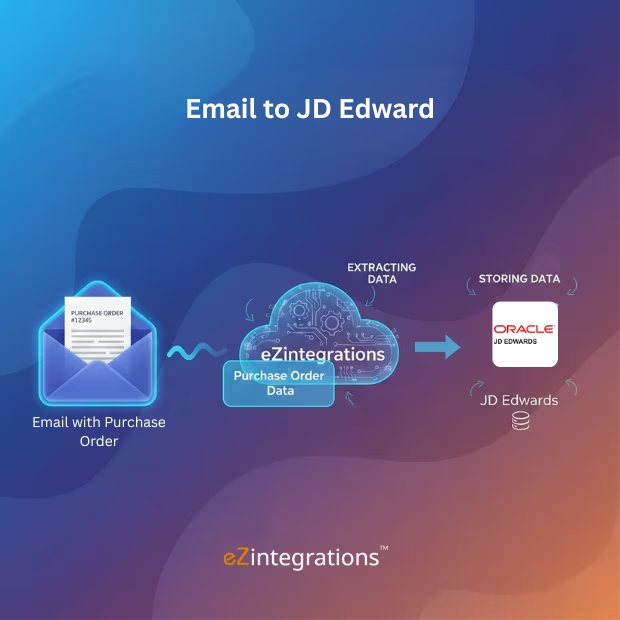
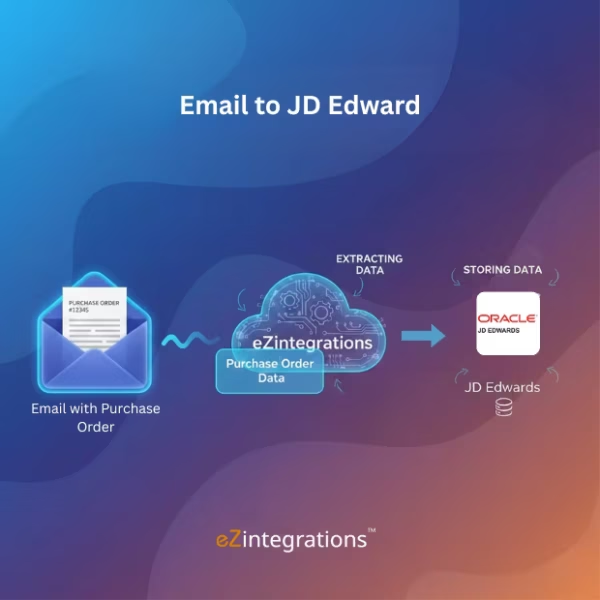
The Email to JD Edwards Purchase Order workflow automatically extracts purchase order information from incoming emails and creates purchase order records directly inside JD Edwards ERP. This automation eliminates manual email forwarding and data entry, allowing procurement teams to process orders more quickly and accurately.
Automated Email-to-ERP Purchase Order Integration
The workflow monitors email inboxes, extracts purchase order data using intelligent email parsing, validates the extracted fields, and posts structured records into JD Edwards in near real time. Purchasing and finance teams gain improved operational efficiency, reduced errors, and faster procurement processing
Watch Demo
| Video Title: | Collect data from any Webhook and send to any Data Targets in Real Time |
|---|---|
| Duration: | 5:25 |
Outcome & Benefits
| Time Savings: | Reduces manual purchase order entry time by up to 80% |
|---|---|
| Cost Reduction: | Lower procurement processing costs through automated data capture |
| Accuracy: | Improved purchase order accuracy with automated validation rules |
| Productivity: | Faster purchase order processing for procurement teams |
Industry & Function
| Function: | Purchase Order Automation |
|---|---|
| System Type: | Email to ERP Workflow |
| Industry: | Manufacturing |
Functional Details
| Use Case Type: | Purchase Order Automation |
|---|---|
| Source Object: | |
| Target Object: | ERP Purchase Order |
| Scheduling: | Real-time or batch |
| Primary Users: | Procurement teams |
| KPI Improved: | Purchase Order processing time; accuracy |
| AI/ML Step: | Optional AI-assisted email content extraction |
| Scalability Tier: | Enterprise |
Technical Details
| Source Type: | |
|---|---|
| Source Name: | Purchase Order Emails |
| API Endpoint URL: | JD Edwards API |
| HTTP Method: | POST |
| Auth Type: | OAuth / ERP Credentials |
| Rate Limit: | ERP-based |
| Pagination: | – |
| Schema/Objects: | Purchase Order fields |
| Transformation Ops: | Format validation; mapping |
| Error Handling: | Invalid Purchase Order flagged for review |
| Orchestration Trigger: | On email received |
| Batch Size: | Single or multiple Purchase Orders |
| Parallelism: | Multi-Purchase Order processing |
| Target Type: | ERP |
| Target Name: | JD Edwards |
| Target Method: | API / Connector |
| Ack Handling: | ERP response logged |
| Throughput: | High Purchase Order volume |
| Latency: | Seconds per Purchase Order |
| Logging/Monitoring: | Purchase Order processing logs |
Connectivity & Deployment
| On-Premise Supported: | Yes |
|---|---|
| Supported Protocols: | SMTP; API |
| Security & Compliance: | Encrypted email transmission and secure JD Edwards authentication |
FAQ
1. What is the 'Email to JD Edwards – Purchase Order' workflow?
It is an automated workflow that extracts purchase order details from incoming emails and posts them directly into JD Edwards ERP, eliminating manual entry and accelerating processing.
2. How does the workflow process purchase orders from email?
The workflow monitors incoming emails, extracts purchase order information using AI-based document understanding, validates it, and automatically posts the orders into JD Edwards ERP.
3. What purchase order information is extracted?
It extracts PO number, vendor details, line items, quantities, prices, taxes, delivery dates, and other relevant metadata needed for ERP posting.
4. Who typically uses this workflow?
Purchasing and Finance teams use this workflow to speed up purchase order processing and reduce manual effort.
5. What are the benefits of automating PO transfer via email?
Automation ensures faster and more accurate purchase order processing, minimizes errors, improves compliance, and enhances operational efficiency.
6. Can this workflow handle multiple purchase orders in a single email?
Yes, the workflow can process multiple purchase orders from a single email if the documents are formatted consistently.
7. Is validation applied before posting to ERP?
Yes, configurable validation rules ensure all extracted purchase order data is complete and accurate before posting to JD Edwards ERP.
8. What systems does this workflow integrate with?
The workflow integrates with JD Edwards ERP and enterprise email systems to enable automated purchase order ingestion.
Case Study
| Customer Name: | Mid-size Manufacturing Company |
|---|---|
| Problem: | Purchase orders received through email were manually entered into JD Edwards, leading to delays and occasional data entry errors |
| Solution: | An automated workflow was implemented to extract purchase order data from incoming emails and create purchase order records directly within JD Edwards ERP. |
| ROI: | Reduced processing effort and improved procurement efficiency. |
| Industry: | Manufacturing |
| Outcome: | Procurement teams eliminated manual data entry and significantly accelerated purchase order processing. |