
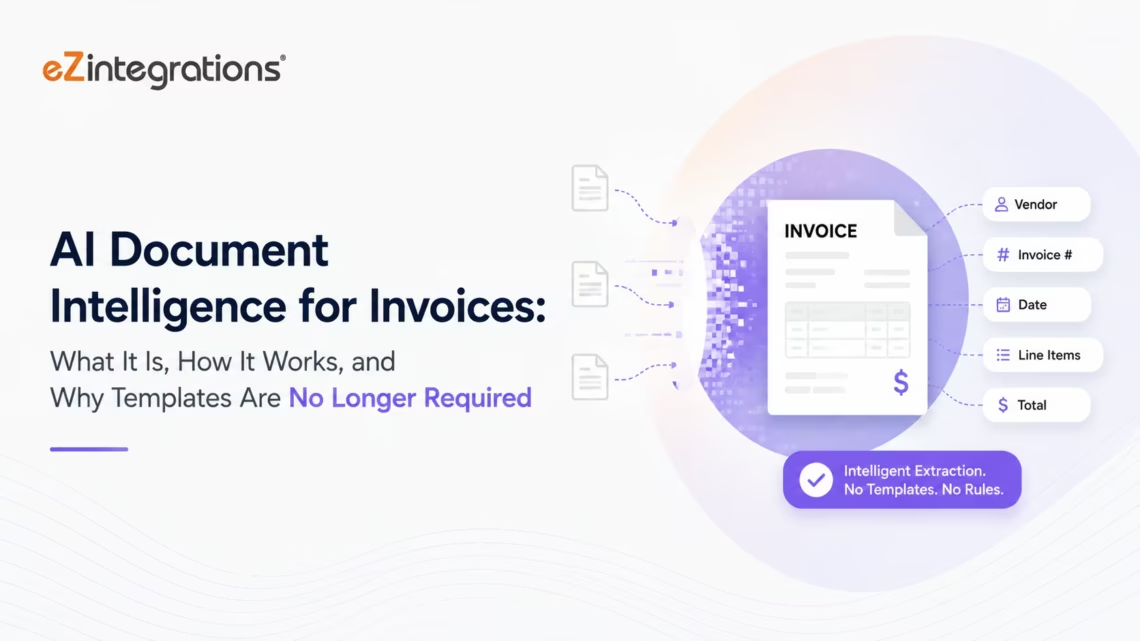
AI Document Intelligence for Invoices: What It Is, How It Works, and Why Templates Are No Longer Required
March 27, 2026AI document intelligence for invoices is the technology that extracts structured data (vendor name, invoice number, line items, quantities, prices, totals, payment terms) from supplier invoice PDFs, scanned images, and email attachments without requiring a pre-defined template per vendor format. Unlike legacy OCR which needs a layout template for each supplier, AI document intelligence uses large language models and vision AI to understand invoice content contextually, handling new supplier formats, poor scan quality, multi-language invoices, and complex line-item tables on the first attempt. In eZintegrations, Goldfinch AI Document Intelligence is the Level 2 AI Workflows capability that provides this extraction, feeding structured invoice data to Level 3 AI Agents for 3-way matching, ERP posting, and exception routing.
TL;DR
AI document intelligence extracts structured data from invoice PDFs and scanned images without vendor-specific OCR templates. It differs from legacy OCR in one critical way: AI understands invoice content contextually rather than recognising fixed pixel positions on a page. When a vendor changes their invoice layout, AI document intelligence adapts. Template-based OCR breaks. In eZintegrations, Goldfinch AI Document Intelligence operates at Level 2 of the 4-level automation architecture, feeding extracted invoice data to Level 3 AI Agents for matching, approval, and ERP posting. Enterprise benchmarks in 2026: 95-99%+ field-level accuracy on standard invoices, 90% time savings on invoice handling, and up to a 400% increase in invoices processed per full-time equivalent. 63% of Fortune 500 companies have implemented advanced intelligent document processing (IDP) solutions. 34% of businesses still process invoice data manually. The AP Invoice Processing template in the Automation Hub includes Goldfinch AI Document Intelligence pre-configured for invoice extraction and connects directly to your ERP for matching and posting.
The Invoice Format Problem Nobody Talks About
Your accounts payable team processes invoices from 200 suppliers. No two of them look the same.
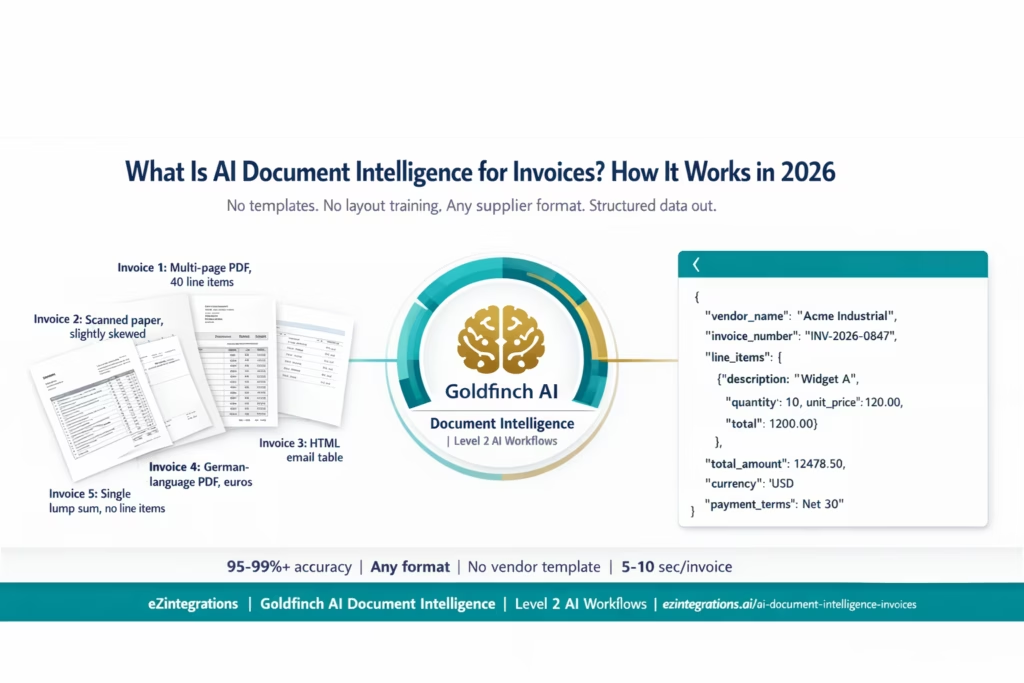
Your primary steel supplier sends a multi-page PDF with 40 line items, each with a part number, description, quantity, unit price, and an obscure discount code only your procurement team understands. Your cleaning services vendor sends a scanned paper form, slightly crooked, with a handwritten total. Your SaaS vendors send HTML emails with an embedded table. Your European freight forwarder sends invoices in German with amounts in euros.
Your legacy OCR system has a template for each supplier. You trained those templates when you first onboarded each vendor. Three months later, your steel supplier updated their invoice design. The template broke. Your AP team spent two days rebuilding it. Then the freight forwarder added a new fee line. Template broke again.
This is the invoice format problem. It is not an edge case. It is the operating condition of every enterprise AP team.
AI document intelligence does not use templates. This guide explains what it uses instead, how it works, and what it means for your invoice processing workflow.
What Is AI Document Intelligence?
AI document intelligence is a category of technology that uses artificial intelligence, specifically large language models (LLMs), vision AI (computer vision), and natural language processing (NLP), to extract structured data from unstructured or semi-structured documents.
Applied to invoices, AI document intelligence reads a supplier invoice in the same way a knowledgeable person would: it understands the document’s structure from context, identifies what each section contains based on meaning rather than position, and extracts the relevant fields into a structured output (typically JSON or XML) that downstream systems can process.
The key difference from traditional OCR is that AI document intelligence does not need to be told where the invoice number is on the page. It understands that a string like “INV-2026-0847” near the top of the document, adjacent to a date, is probably the invoice number, regardless of whether it appears in the top-left corner or the top-right corner, at 10-point font or 14-point font, in a box or free-standing.
This is called context-aware extraction. And it is what allows AI document intelligence to handle invoice format variability without breaking.
The industry has moved decisively in this direction. Research from Artificio shows that 67% of enterprise document processing initiatives are now specifically evaluating agentic and AI-based approaches over traditional OCR-plus-rules stacks, up from 23% just two years ago. The shift is not incremental. It reflects a fundamental recognition that template-based systems cannot scale in real-world enterprise environments.
How Legacy OCR Works (and Why It Keeps Breaking)
To understand why AI document intelligence is different, it helps to understand what you are replacing.
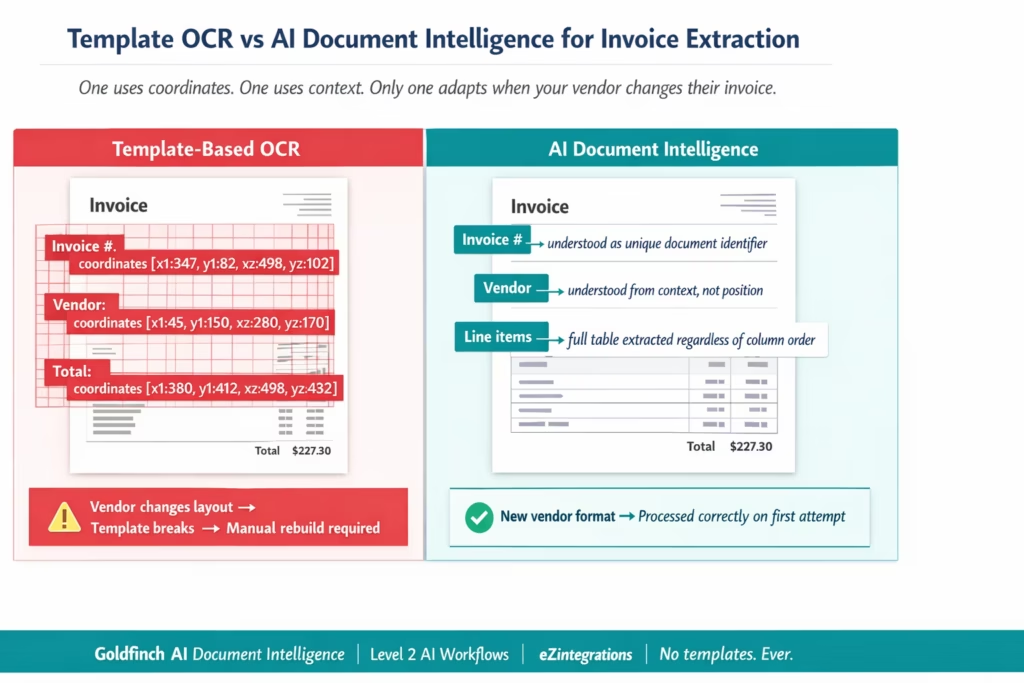
Legacy OCR (Optical Character Recognition) works by recognising text characters in document images. A basic OCR engine converts a scanned image into machine-readable text. The text is then processed by extraction rules that look for specific patterns in specific locations.
Template-based OCR takes this further by defining a spatial map of each document layout. You tell the system: “The invoice number is always in the top-right corner of this vendor’s invoice, in a box between coordinates X1,Y1 and X2,Y2. Extract whatever text appears there and call it the invoice number.”
This works well for fixed-format documents that never change: government forms with consistent layouts, identity documents with standardised fields, tax forms with mandatory structure.
It works poorly for supplier invoices. Here is why.
Vendors change their invoice designs. A supplier updates their billing software, their logo, their contact address, or their template and the invoice number moves 2 centimetres to the left. Your OCR template now extracts the wrong field or nothing. Your AP team discovers the extraction has been failing for three weeks when they notice the ERP has received invoices with null values in the invoice number field.
Every vendor uses a different layout. A 200-supplier enterprise needs 200 templates. Building each template requires a sample invoice, layout analysis, field coordinate configuration, and testing. Each new supplier adds to the template library. Each supplier update potentially breaks an existing template.
Scanned invoices are never perfectly aligned. A scanned paper invoice from a field office is slightly rotated, slightly under-exposed, with a coffee stain on the corner. The OCR coordinates are now off. Field extraction fails or returns garbage.
Line-item tables are structurally complex. A 40-line-item invoice with merged cells, variable-length description fields, and multi-row line items does not fit neatly into a coordinate grid. Template-based OCR struggles with table extraction at this level of complexity.
The result: your AP team spends significant time managing template failures, rebuilding broken configurations, and manually intervening on the invoices that OCR could not handle.
How AI Document Intelligence Works Differently
AI document intelligence replaces the spatial template approach with contextual understanding. Instead of asking “what is in location X on this page?”, it asks “what does this document say, and where are the relevant fields?”
This is accomplished through a combination of:
Vision AI (Computer Vision): Converts the invoice image or PDF into a representation that the AI model can analyse, recognising text, tables, checkboxes, borders, logos, and layout elements even in scanned or skewed documents.
Large Language Model (LLM) Reasoning: The LLM reads the extracted text and layout representation and applies semantic understanding to identify fields. It knows that “Due Date,” “Payment Due,” “Date d’Échéance,” and “Fälligkeitsdatum” all refer to the invoice payment due date, regardless of the language or the exact wording a particular vendor uses.
Structured Output Generation: The LLM generates a structured JSON output mapping each extracted value to the correct field schema. For invoices, the schema includes vendor name, invoice number, invoice date, purchase order reference, line items (description, quantity, unit of measure, unit price, discount, line total), subtotal, tax amount, total amount due, currency, payment terms, vendor bank details, and any other fields present in the invoice.
Confidence Scoring: For each extracted field, the model assigns a confidence score. High-confidence extractions (typically 0.90+) are accepted automatically. Lower-confidence extractions (below a configurable threshold) are flagged for human review with the specific uncertain field highlighted. This is the human-in-the-loop design that makes AI document intelligence reliable in production.
No training per vendor: Because the model uses general reasoning rather than layout-specific rules, a new supplier’s first invoice is processed correctly without any template configuration. The model reasons through the new format the same way a human AP clerk would on their first day: by reading the document and understanding its content.
What AI Document Intelligence Extracts from Invoices
A complete AI document intelligence extraction from a supplier invoice produces the following structured fields:
Invoice Header Fields: – Vendor name and address – Vendor tax identification number (VAT number, EIN, GST number) – Invoice number (unique per vendor per invoice) – Invoice date – Purchase order reference number – Remittance address (if different from vendor address) – Currency – Total amount due – Subtotal (before tax) – Tax amount and tax rate(s) – Discount amount (if applied) – Payment terms (Net 30, Net 60, 2/10 Net 30, etc.) – Payment due date (computed or stated) – Bank details (sort code, account number, IBAN, SWIFT)
Line Item Fields (per line): – Line number or position – Item description or service description – Product code or SKU (if present) – Quantity – Unit of measure (each, kg, hours, etc.) – Unit price – Discount per line (if applied) – Tax code or tax rate per line – Line total
Document Metadata: – Number of pages – Document language – Document quality score (for scanned invoices) – Extraction confidence score per field – Original file reference
What it handles that template OCR cannot: – Invoices where line items span multiple rows per item (wrapped text descriptions) – Invoices with merged table cells or non-standard column ordering – Invoices in multiple languages on the same document – Invoices with tables that continue across page breaks – Invoices with embedded images or logos that obscure text – Invoices with non-standard field labels (different vendors label “Invoice Date” as “Bill Date,” “Tax Point Date,” “Date of Issue,” etc.) – Scanned invoices with rotation, skew, or low resolution
AI Document Intelligence vs OCR: Side-by-Side Comparison
| Dimension | Template Based OCR | AI Document Intelligence |
|---|---|---|
| How it locates fields | Fixed pixel coordinates on the page | Contextual understanding of document content |
| Vendor template required | Yes one per vendor layout | No first invoice from any vendor processed correctly |
| Handles vendor layout changes | Breaks requires template rebuild | Adapts automatically |
| New vendor onboarding | Template build thirty minutes to two hours | Zero configuration first invoice processed immediately |
| Multi language invoices | Requires language specific template | Handles any language via LLM reasoning |
| Scanned or skewed document handling | Accuracy degrades with poor alignment | Robust to rotation skew and moderate image quality issues |
| Line item table extraction | Struggles with complex multi row tables | Extracts complex tables with merged cells and wrapped text |
| Confidence scoring | Limited or absent | Per field confidence score with configurable threshold for review |
| Header only vs line item extraction | Header reliable line items often fail on complex invoices | Full line item extraction including multi row descriptions |
| Accuracy on standard invoices | 95 to 98 percent for known template vendors | 95 to 99 percent plus including unknown vendors and formats |
| Template maintenance overhead | Continuous with each vendor layout change | None |
| Training data requirement | Per vendor labelled sample set | None uses general AI reasoning |
| Exception rate | Higher due to template failures and new vendors | Lower due to contextual understanding |
| Best use case | Fixed format documents with stable layouts | Variable format enterprise documents such as invoices contracts and GRNs |
Where AI Document Intelligence Sits in eZintegrations: The 4-Level Architecture
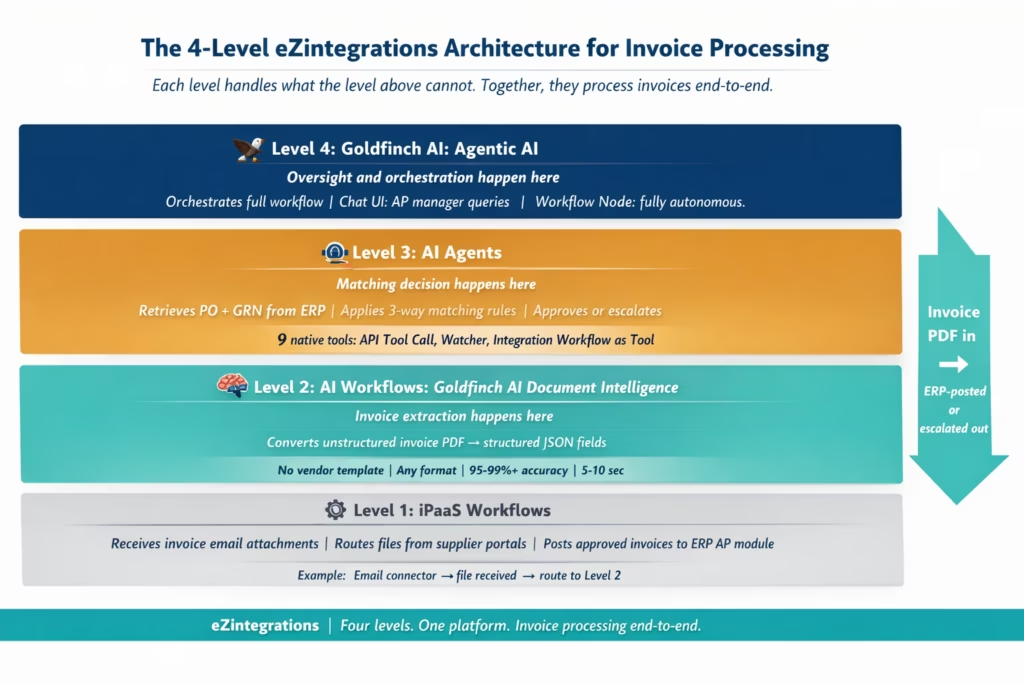
Understanding how Goldfinch AI Document Intelligence fits into the eZintegrations platform requires understanding the 4-level automation architecture:
Level 1: iPaaS Workflows handles the structured connectivity layer: receiving invoice email attachments via the email connector, routing files from supplier portals, polling shared inboxes, and calling ERP APIs to post approved invoices. Level 1 moves structured data between systems.
Level 2: AI Workflows handles the unstructured data layer. This is where Goldfinch AI Document Intelligence operates. An invoice PDF is unstructured data: the ERP cannot consume it directly. Level 2 converts the unstructured PDF into structured JSON data that Level 1 can route and Level 3 can act on. Document Intelligence, classification, anomaly detection, and AI-based data enrichment all live at Level 2.
Level 3: AI Agents handles autonomous decision-making. Once the invoice is extracted (Level 2), the Level 3 AI Agent retrieves the matching PO and GRN from the ERP, applies the 3-way matching rules, assesses the confidence of the match, and decides: auto-approve and post, hold for human review, or escalate. The agent uses 9 native tools including API Tool Call, Integration Workflow as Tool, and Watcher Tools.
Level 4: Goldfinch AI is the Agentic AI orchestration engine that coordinates the overall invoice processing workflow. It deploys in two ways: as a Chat UI for AP manager oversight (query exception status, investigate specific invoices in natural language) and as a Workflow Node embedded in the integration workflow for fully autonomous end-to-end processing.
In the invoice processing context: Document Intelligence = Level 2. Matching and decision logic = Level 3. Orchestration and oversight = Level 4.
How Goldfinch AI Document Intelligence Handles Invoice Extraction
Goldfinch AI Document Intelligence at Level 2 of eZintegrations handles the full invoice extraction cycle without vendor templates. Here is the technical process in plain language.
Stage 1: Document Ingestion The invoice arrives as a PDF attachment to an email, an upload via a supplier portal, an SFTP file drop, or an API submission from a procurement system. Level 1 (iPaaS Workflows) receives the document and passes it to Level 2 for processing. Supported formats: PDF (digital-native and scanned), TIFF, JPEG, PNG, and XML/EDI structured formats where present.
Stage 2: Vision AI Processing For PDF and image-format invoices, vision AI (computer vision model) processes the document to produce a layout-aware text representation. This preserves spatial relationships: which text is in a table, which text is a header, which text is a footnote. Scanned invoices with up to 15-degree rotation and moderate image degradation are handled without preprocessing.
Stage 3: LLM Field Extraction The LLM receives the layout-aware text representation and the target extraction schema (invoice header fields and line-item fields). It reasons through the document: “This document appears to be a supplier invoice. The string ‘INV-2026-0847′ near the top, adjacent to the date ’14 March 2026,’ is consistent with an invoice number. The table below contains line items: description, quantity, unit price, and calculated totals.” The LLM extracts each field, including the complete line-item table with all rows and all columns.
For multi-language invoices, the LLM handles translation implicitly: “Rechnungsnummer” in German, “Numéro de facture” in French, and “Invoice Number” in English all map to the same invoice number field in the output schema.
Stage 4: Confidence Scoring and Validation Each extracted field receives a confidence score from 0.0 to 1.0 based on the model’s certainty about the extraction. Fields scoring above the configurable threshold (typically 0.85-0.95 depending on use case) are accepted automatically. Fields below the threshold are flagged for human review with the specific uncertain field and the extracted value highlighted. This threshold is configurable per field: you may require higher confidence for total_amount than for vendor_address.
Stage 5: Structured JSON Output The extraction produces a structured JSON record with all header fields, the complete line-item array, confidence scores per field, the document metadata, and the source file reference. This JSON is passed to Level 3 (AI Agents) for matching, or directly to Level 1 (iPaaS Workflows) for ERP routing if no matching step is required.
Stage 6: Audit Logging The full extraction record is logged: source document, extraction timestamp, model version, field-by-field values and confidence scores, and any fields that were flagged for human review. This audit record is the traceability layer required for finance audit and compliance purposes.
Step-by-Step: From PDF Invoice to Structured ERP-Ready Data
Here is exactly what happens from the moment a supplier sends an invoice to the moment structured data is ready for ERP posting or 3-way matching.
Step 1: Invoice email arrives. Your freight supplier sends an invoice as a PDF attachment to your AP inbox. The email arrives at 9:14 AM. The eZintegrations email connector detects the attachment, identifies it as an invoice based on subject line pattern matching, and routes the PDF to the Level 2 Document Intelligence processing queue. Time: 2-3 seconds.
Step 2: Vision AI processes the PDF. The invoice is a 3-page PDF with a header, a 28-line-item table, and a summary page. The vision AI processes all three pages, preserving the table structure across the page break between pages 2 and 3. Layout-aware text representation generated. Time: 3-5 seconds.
Step 3: LLM extracts all fields. The LLM processes the layout representation and extracts:
Header:
vendor_name: "Westfield Freight Ltd"
invoice_number: "WFL-2026-02847"
invoice_date: "2026-03-15"
po_reference: "PO-2026-1189"
currency: "USD"
subtotal: 18420.00
tax_amount: 1842.00
total: 20262.00
payment_terms: "Net 30"
due_date: "2026-04-14"
Line items: 28 rows extracted with description, quantity, unit of measure, unit price, and line total for each. Rows spanning two lines in the PDF (long descriptions) are correctly consolidated into single line-item records.
Confidence scores: all header fields above 0.95. Line item descriptions on rows 14 and 22 scored 0.87 (flagged for review due to truncated text in the PDF). Time: 5-8 seconds.
Step 4: Structured JSON output produced. Complete JSON record with all extracted fields, line-item array, confidence scores, and source file reference. Fields at or above threshold: 52. Fields flagged for review: 2 (line item descriptions on rows 14 and 22). Time: under 1 second.
Step 5: Flagged fields routed to AP clerk for confirmation. The AP clerk receives a notification: “Invoice WFL-2026-02847 extracted. 2 line item descriptions require confirmation. Please verify.” The clerk views the original PDF alongside the extracted values, corrects the two descriptions, and confirms. Time for clerk: approximately 2 minutes.
Step 6: Complete structured data passed to Level 3 AI Agent for 3-way matching. The JSON record with all 28 line items, confirmed and corrected, is passed to the Level 3 matching agent. The agent retrieves PO-2026-1189 from the ERP and the corresponding GRN. The matching cycle runs. Time from confirmed extraction to matching decision: under 5 seconds.
Total time from invoice email arrival to matching decision: under 2 minutes, with 2 minutes of clerk time for the two uncertain fields. Compare this to the manual process: 15-25 minutes per invoice including opening the email, reading the PDF, keying all 28 line items into the ERP, verifying, and submitting.
Key Outcomes and Results
Enterprise AP teams deploying Goldfinch AI Document Intelligence for invoice extraction achieve the following outcomes. These figures are from independent industry benchmarks and reflect enterprise deployments across financial services, manufacturing, and distribution.
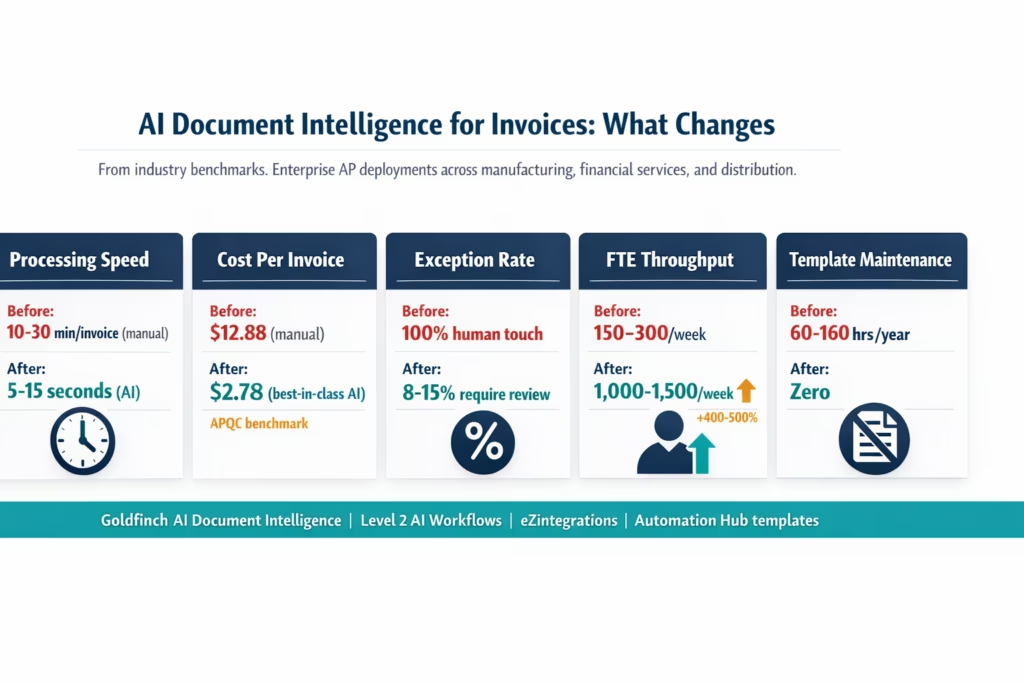
Field-level accuracy: 95-99%+ on standard digital-native invoices. 85-95% on scanned invoices with moderate quality degradation. The meaningful metric is not raw accuracy but exception rate: the percentage of invoices where any field requires human review. Best-in-class deployments achieve exception rates of 8-15% (compared to 100% human touch in manual processes).
Processing speed: AI document intelligence processes a standard invoice (header + 10-20 line items) in 5-15 seconds. A 40-line-item complex invoice may take 15-30 seconds. Compare this to manual data entry: 10-30 minutes per invoice. APQC benchmarks show best-in-class automated AP teams achieve invoice processing times of 3.1 days total cycle time, compared to 17.4 days for manual processing.
Cost per invoice: APQC best-in-class automated: $2.78 per invoice versus $12.88 for manual. For a team processing 1,000 invoices per month, automation reduces annual AP processing costs by approximately $121,200 per year on invoice data entry alone.
Volume scaling: A manual AP team processes an average of 150-300 invoices per full-time equivalent per week. With AI document intelligence plus Level 3 matching agents, the same FTE oversees exception resolution at 1,000-1,500 invoices per week, a 400-500% increase in effective throughput.
Template maintenance eliminated: For enterprise AP teams maintaining 100-500 vendor OCR templates, AI document intelligence eliminates the template maintenance cycle entirely. At an average of 2-4 hours per template rebuild (triggered by vendor layout changes), and assuming 15-20% of templates require rebuilding per year, a 200-vendor template library generates 60-160 hours per year of template maintenance. AI document intelligence replaces this with zero ongoing template overhead.
New vendor onboarding: Template-based OCR: 30 minutes to 2 hours to build and test a template for a new vendor’s first invoice. AI document intelligence: zero. The first invoice from a new vendor is processed correctly on arrival.
Before vs After: Manual Invoice Entry vs AI Document Intelligence
| Dimension | Manual Invoice Data Entry | Goldfinch AI Document Intelligence |
|---|---|---|
| New vendor first invoice | AP clerk keys all fields manually | Processed correctly on first attempt zero configuration |
| Vendor layout change | No impact manual is layout agnostic but slow | No impact AI adapts to new layout automatically |
| Multi language invoice | AP clerk reads and translates | Extracted directly in any language |
| 40 line item invoice | 20 to 30 minutes of manual keying | 15 to 30 seconds automated extraction |
| Scanned paper invoice | Manual reading and keying | Vision AI handles rotation skew and moderate degradation |
| Confidence in extracted data | Depends on clerk attention | Per field confidence score uncertain fields flagged |
| Template maintenance | Not applicable | Not applicable no templates to maintain |
| Volume scaling | Add headcount to scale | Scale volume with no additional headcount |
| Audit trail | Manual entry records limited | Field level extraction log confidence scores and source file |
| Error rate | 1 to 5 percent manual keying errors | Below 1 percent on digital invoices 5 to 15 percent exception flagging on scans |
| Cost per invoice | 12.88 dollars APQC all industries | 2.78 dollars APQC best in class automated |
| Integration with matching | Separate manual step | Automatic extraction output feeds directly to matching agent |
How to Get Started
Step 1: Import the AP Invoice Processing Template from the Automation Hub
Go to the Automation Hub and import the AP Invoice Processing template. It includes Goldfinch AI Document Intelligence pre-configured for invoice extraction with the standard invoice field schema, the confidence threshold settings, and the exception routing for fields below threshold.
Step 2: Connect Your Invoice Ingestion Channel
Add credentials for your invoice ingestion source: Gmail API or Microsoft Graph for email attachment ingestion, SFTP credentials for file drop-based suppliers, or an API endpoint for suppliers using structured submission. The Level 1 iPaaS workflow routes incoming invoices to the Level 2 Document Intelligence processing step automatically.
Step 3: Configure Your Extraction Schema and Confidence Thresholds
The default extraction schema covers all standard invoice fields. If your organisation uses custom fields (specific PO format, internal cost centre codes, project references), add these to the extraction schema. Set your confidence thresholds: the field-level score below which an extracted value is flagged for human review (typically 0.90 for total_amount, 0.85 for line item descriptions).
Step 4: Connect to Your ERP for Matching and Posting
Add your ERP credentials (SAP, Oracle Fusion Cloud, NetSuite, or any ERP in the API catalog) to the eZintegrations credential vault. The Level 3 AI Agent uses these credentials to retrieve PO and GRN data for 3-way matching and to post approved invoices to the ERP AP module. For a full walkthrough of the 3-way matching configuration, see What Is 3-Way Matching in Accounts Payable.
Step 5: Run Dev Tests and Promote to Production
Test with a representative sample of your actual invoices, including: a standard digital PDF from a known vendor, a scanned invoice from a paper-based supplier, a multi-language invoice if applicable, and a complex multi-page invoice with 20+ line items. Validate extraction accuracy on each. Adjust confidence thresholds based on what your team observes. Promote to production.
Total time from template import to production: 3-5 hours for the extraction configuration. The matching and ERP posting configuration adds 2-3 hours.
FAQs
Extract Every Invoice, From Every Supplier, Without Building a Single Template
Your supplier base sends invoices in dozens of formats. That is not going to change. What can change is how your AP team handles those formats: not by maintaining a template library that breaks whenever a vendor updates their billing system, but by using AI document intelligence that reads every invoice the way a knowledgeable person would.
Goldfinch AI Document Intelligence at Level 2 of the eZintegrations architecture converts any invoice, in any format, from any supplier, into structured JSON in 5-30 seconds. Level 3 AI Agents run the 3-way matching against your ERP data. Level 4 Goldfinch AI orchestrates the process and gives your AP manager a direct interface for oversight and exception investigation.
The AP Invoice Processing template in the Automation Hub combines all three levels for a complete invoice-to-ERP workflow. Import in one click. Configure your ingestion channel, extraction schema, and ERP connection. Go live in 3-5 hours.
For the broader AI agent context across finance, HR, IT, and operations, see the top 20 enterprise AI agent templates.
Import the AP Invoice Processing Template from the Automation Hub and start extracting invoices today. Or book a free demo to see Goldfinch AI Document Intelligence extract your actual invoice samples in the session.

