
ERP Integration Platform: Connect SAP, Oracle, and NetSuite Without Custom Code
March 15, 2026To integrate SAP, Oracle ERP, or NetSuite with eZintegrations: connect your ERP via its REST, SOAP, or database API through eZintegrations’ 5,000+ endpoint catalog, import a pre-built ERP automation template from the Automation Hub, configure your field mappings in the no-code canvas, and go live in days, not months. No custom code. No middleware. No per-connector licensing fees.
Last Updated: March 2026
Stop coding ERP integrations from scratch. Start automating in days.
Your ERP is the system of record for your business. Every order, every invoice, every inventory movement, every employee record runs through it. But it doesn’t talk to your CRM, your e-commerce platform, your 3PL, or your analytics tools without someone building and maintaining the connection.
Custom API code breaks when the ERP updates. Native connectors lock you into vendor ecosystems. Point-to-point integrations multiply into an unmaintainable web of dependencies. And every time your ERP vendor releases a new API version, your integration team spends weeks rebuilding.
eZintegrations connects your ERP to every system in your enterprise stack through a 5,000+ endpoint API catalog, a no-code workflow canvas, and 1,000+ pre-built automation templates ready to import today.
Import an ERP Integration Template from the Automation Hub. Book a Free Demo to See Your ERP Connected Live
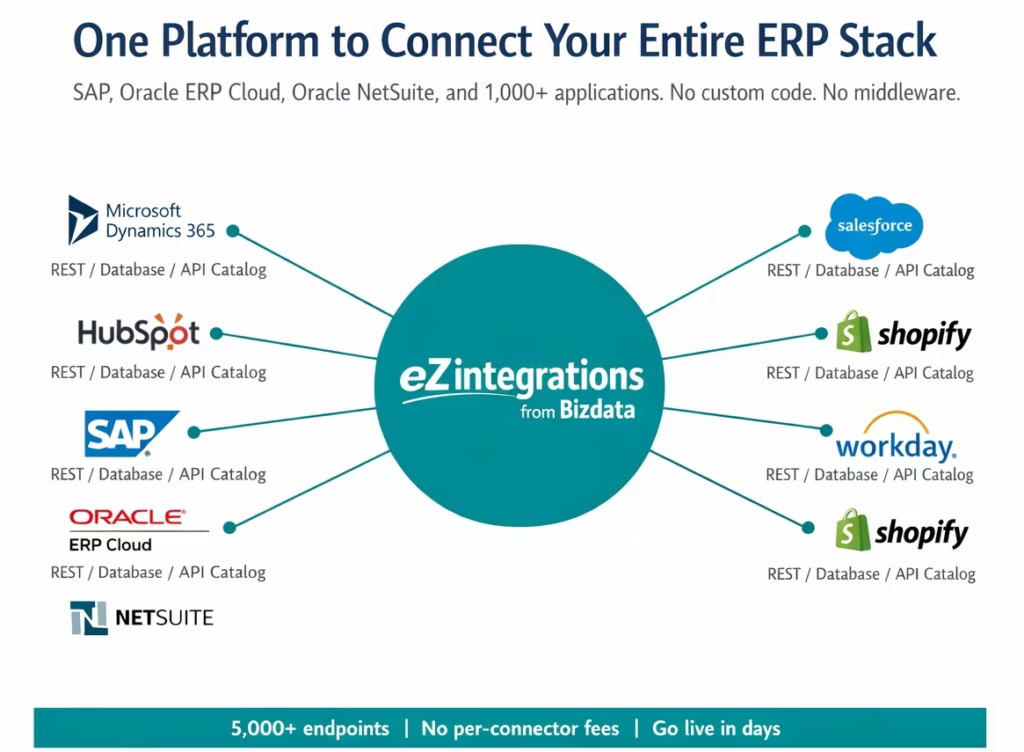
What Can You Do with eZintegrations ERP Connectivity?
eZintegrations connects your SAP, Oracle ERP Cloud, or NetSuite instance to your full enterprise application stack through a 5,000+ endpoint API catalog. Every workflow below runs without custom code, without middleware, and without per-connector licensing fees.
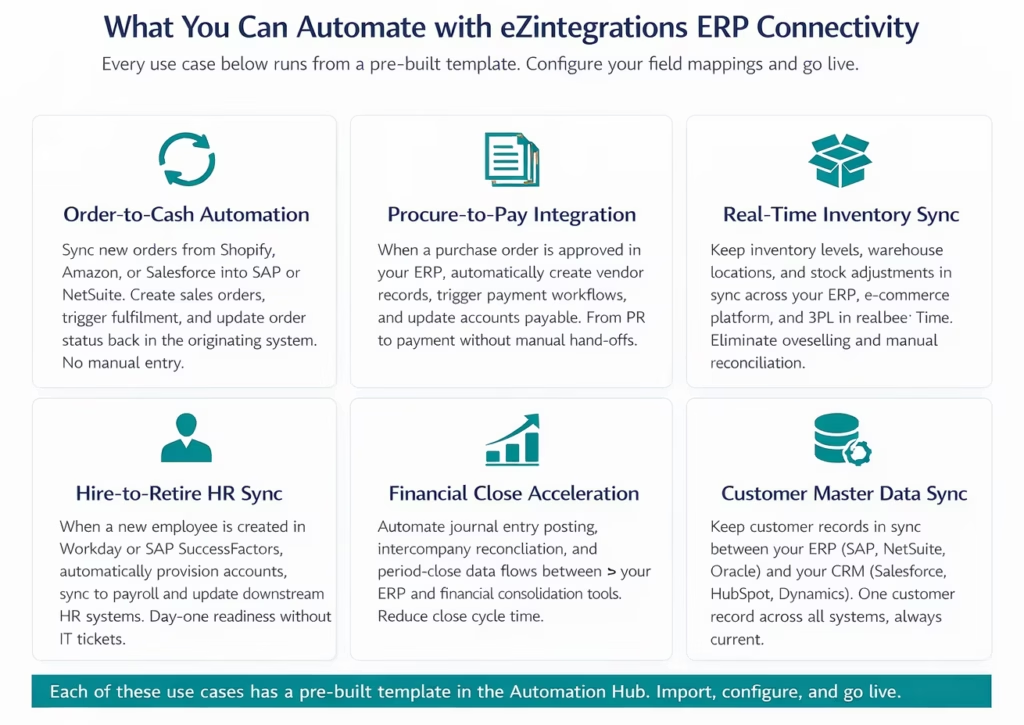
Order to Cash Automation
Your e-commerce orders need to reach your ERP in minutes, not at the end of a business day. eZintegrations pulls new orders from Shopify, Amazon, WooCommerce, or your Salesforce CPQ into SAP, Oracle ERP Cloud, or NetSuite via the API catalog. It creates the sales order, assigns the warehouse, and pushes the fulfilment confirmation and tracking number back into the originating system.
Your finance team sees every order the moment it’s placed. Your warehouse team sees every pick list in real time. Your customer sees accurate delivery ETAs.
Procure to Pay Integration
When your procurement team approves a purchase requisition in SAP or Oracle, eZintegrations can trigger the downstream chain automatically: create the purchase order, notify the vendor, post the goods receipt when delivery is confirmed, and create the accounts payable entry when the invoice arrives. The entire process runs between your ERP and your procurement, AP, and vendor management systems without manual hand-offs.
Real Time Inventory Sync
Inventory discrepancies between your ERP and your e-commerce platform cost you oversold orders and write-offs. eZintegrations keeps inventory counts, warehouse locations, and stock movements in sync across your ERP, Shopify or Magento, your 3PL system, and your demand planning tools. When SAP updates an inventory level, every downstream system sees the change within seconds.
Hire to Retire HR Process Automation
When HR creates a new employee record in SAP SuccessFactors or Workday, eZintegrations triggers the downstream provisioning chain: create the user in Active Directory, provision SaaS application accounts, sync to payroll, and update the ERP cost centre allocation. New joiners are productive on day one. Leavers are deprovisioned in minutes, not days.
Financial Close Acceleration
Month-end close cycles that depend on manual journal entry posting and intercompany reconciliation are a bottleneck. eZintegrations automates the data flows between your ERP’s subledgers, your consolidation tool (Hyperion, Cognos, or Anaplan), and your banking reconciliation. Journal entries post automatically when the source transaction is approved. Intercompany balances reconcile daily, not at month-end.
Customer Master Data Sync
Two customer records in your ERP and three in your CRM means billing errors, duplicate accounts, and customer frustration. eZintegrations maintains a single customer master by keeping SAP, NetSuite, or Oracle ERP customer records in sync with Salesforce, HubSpot, or Microsoft Dynamics 365. When a customer record is created or updated in either system, eZintegrations propagates the change within seconds.
How Does the eZintegrations ERP Integration Work?
eZintegrations connects to SAP, Oracle ERP Cloud, and NetSuite through their REST, SOAP, OData, and database APIs via the 5,000+ endpoint catalog. No client library. No hardcoded connector. Any endpoint your ERP exposes is available to call, with no custom code required.
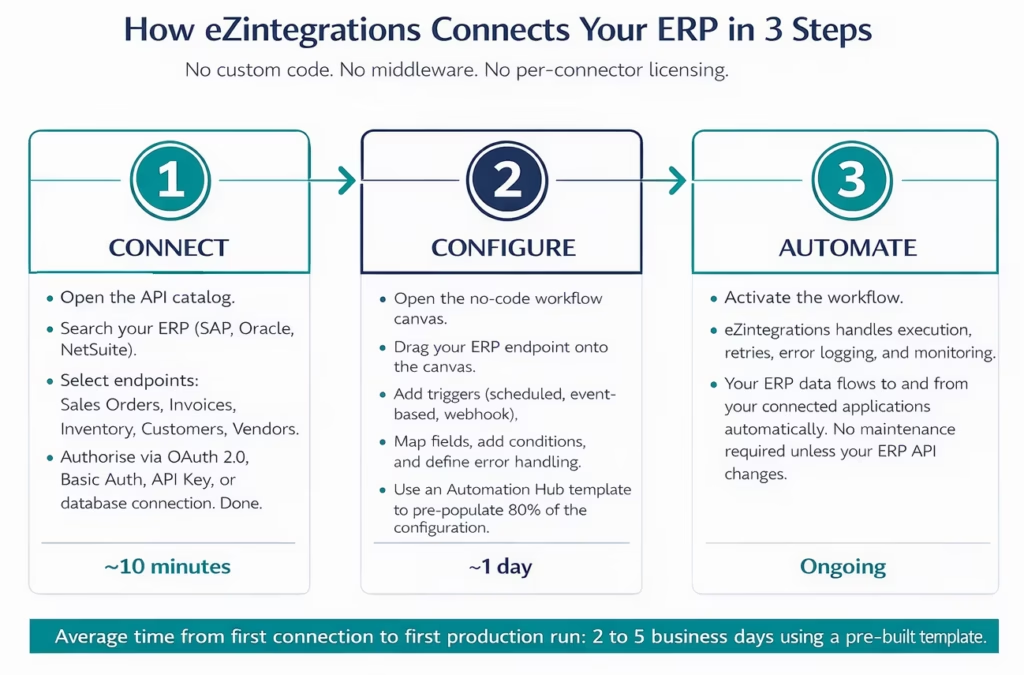
Step 1: Connect Your ERP Through the API Catalog
eZintegrations does not use hardcoded client libraries for ERP systems. Instead, every connection goes through the API catalog, which contains 5,000+ pre-catalogued endpoints from enterprise applications. For SAP, that includes SAP S/4HANA REST APIs, SAP Business One Service Layer, SAP OData services, and SAP SFTP/file-based interfaces. For Oracle, that includes Oracle ERP Cloud REST and SOAP APIs and Oracle OData feeds. For NetSuite, that includes NetSuite REST web services, SuiteTalk SOAP APIs, and the SuiteQL query interface.
If your specific ERP endpoint isn’t in the catalog, you can onboard any REST API or database connection as a self-service action without writing code. You bring the endpoint URL, the auth method, and the schema. eZintegrations handles the rest.
Authentication supports OAuth 2.0, Basic Auth, API Key, JWT, SAML, and database connection strings. Your credentials are stored with environment-scoped encryption. Dev, Test, and Production environments each hold their own credential sets.
Step 2: Configure Your Workflow on the No-Code Canvas
The eZintegrations no-code canvas lets you drag your ERP endpoints into a workflow, define triggers (scheduled batch, real-time event, webhook from the originating system, or database change trigger), map fields between systems, add conditional logic, and define error handling rules.
The Automation Hub contains 1,000+ pre-built templates for common ERP workflows: SAP to Salesforce order sync, NetSuite to Shopify inventory sync, Oracle ERP to Workday HR data, and dozens more. Importing a template pre-populates 80% of the field mappings and workflow logic. Your team configures the remaining 20% for your specific ERP schema and field names.
Step 3: Go Live with Automated Monitoring
Once activated, eZintegrations handles execution, retry logic on transient API errors, error alerting, execution logging, and performance monitoring. Every workflow run is logged with a complete execution record: what data was sent, what the ERP returned, and what happened at each step.
Your team gets alerted when a workflow fails. The error log shows exactly which record failed, why, and what the ERP returned. Most errors can be resolved and the failed record re-processed from the monitoring dashboard without touching the workflow configuration.
eZintegrations ERP Connector Capabilities
Every ERP integration runs through eZintegrations’ API catalog and workflow engine. The capabilities below apply to SAP, Oracle ERP Cloud, Oracle NetSuite, and any other ERP system whose API is accessible via REST, SOAP, OData, or database connection.
| Capability | Details |
|---|---|
| Connection method | REST API, SOAP/XML, OData, SFTP (auto-converted to API), Database (JDBC/ODBC) |
| ERP systems supported | SAP S/4HANA, SAP ECC, SAP Business One, Oracle ERP Cloud, Oracle ERP On-Premises, Oracle NetSuite, Microsoft Dynamics 365, Sage, Infor, Epicor, and any ERP with an accessible API or database |
| API catalog endpoints | 5,000+ pre-catalogued enterprise endpoints. Self-service onboarding for unlisted APIs and databases without code. |
| Authentication | OAuth 2.0, Basic Auth, API Key, JWT, SAML, database connection string. Environment-scoped credential storage. |
| Trigger types | Scheduled (batch), real-time event-driven, webhook-triggered, database change capture (CDC), manual trigger |
| Data direction | Bidirectional, one-way push, one-way pull, or event-triggered, configurable per workflow |
| Field mapping | Visual drag-and-drop field mapper. Transformation functions. Conditional field logic. Custom expressions. |
| Error handling | Automatic retry with configurable backoff. Dead-letter queue for failed records. Per-step error routing. Alert notifications. |
| Bulk data support | Batch processing for large ERP datasets. Pagination handling built in. Queue management for high volume flows. |
| Environment management | Dev, Test, Staging, Production environments with isolated credential sets and approval-gated promotion. |
| Version control | Full flow version history with structured diff. One-click rollback. Audit log for SOX/SOC 2 compliance. |
| Automation Hub templates | 1,000+ pre-built templates including SAP, Oracle, and NetSuite workflows. Import and configure in hours. |
| AI Workflow support | Connect ERP data to AI Workflows for intelligent data enrichment, classification, and anomaly detection. |
| Goldfinch AI (Agentic AI) | Use ERP data as context for Goldfinch AI agents. Trigger agentic workflows from ERP events. Self-service tool extensibility. |
| Pricing | Per automation, annual subscription. No platform fee. No per-connector fee. No per-message charges. |
| Deployment | Cloud-native. Connects to on-premises ERP systems, SAP behind firewall, and legacy databases via secure outbound agent. No eZintegrations installation on premises required. |
Why Choose eZintegrations for Your ERP Integration?
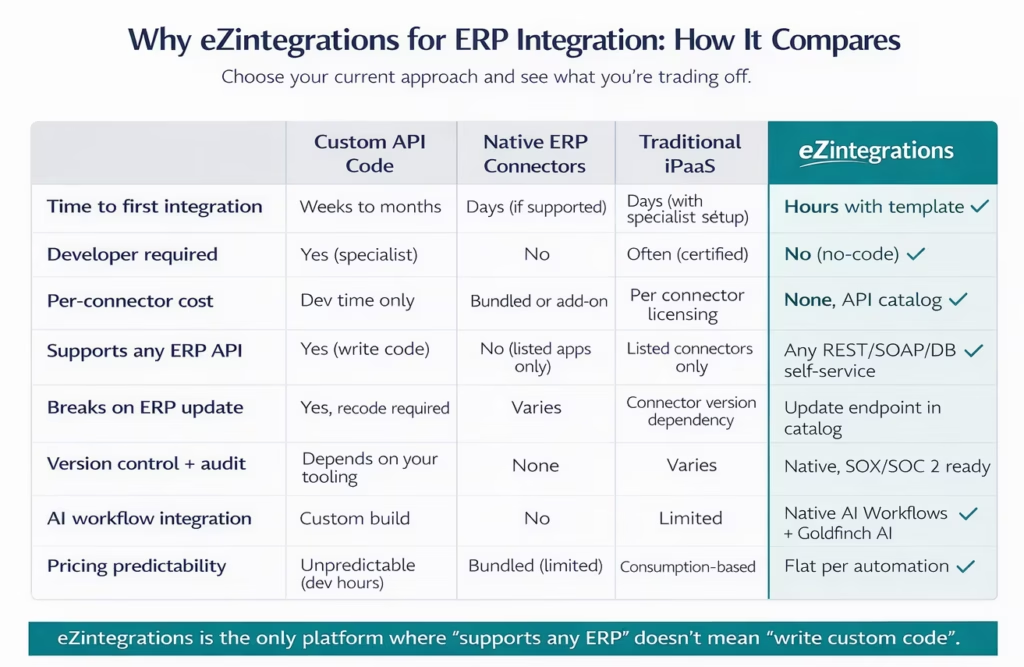
eZintegrations is not a traditional iPaaS with hardcoded ERP connectors. It’s a cloud-native API catalog platform where every ERP endpoint is accessible without custom code, without client library dependencies, and without per-connector licensing fees.
No Hardcoded Connectors. No Vendor Lock-In.
Traditional iPaaS platforms maintain a library of hardcoded ERP connectors. Each connector is built against a specific ERP API version. When SAP releases S/4HANA 2024 or Oracle releases a new Fusion Cloud API version, the connector needs to be updated by the vendor. You wait for the vendor’s release cycle. If the update breaks your workflow, you open a support ticket.
eZintegrations works differently. Every ERP integration is built against the ERP’s published API endpoints through the API catalog. When SAP releases a new API version, you update the endpoint URL and schema in the catalog. The workflow continues. No vendor dependency. No support ticket wait.
Connect Any ERP You Use
The 5,000+ endpoint catalog includes pre-catalogued endpoints for SAP S/4HANA, SAP ECC, SAP Business One, Oracle ERP Cloud, Oracle ERP On-Premises, Oracle NetSuite, Microsoft Dynamics 365 Finance, Sage Intacct, Infor CloudSuite, and Epicor Kinetic. If your ERP variant or custom module isn’t in the catalog, you onboard it yourself as a self-service action by providing the API URL, auth method, and schema. No code. No support ticket. No wait.
If your ERP exposes data only via database access (SAP via database tables, legacy Oracle via direct DB connection), eZintegrations converts that database connection into an API-style interface in the workflow canvas. Your team works the same way regardless of whether the data source is a modern REST API or a 20-year-old database table.
AI-Powered ERP Workflows
eZintegrations connects ERP data to AI Workflows without additional infrastructure. When an invoice arrives with line items in an unstructured format, an AI Workflow can extract and classify the line items before posting to the ERP. When a customer order comes in with missing fields, an AI Workflow can enrich the record from a knowledge base before the ERP receives it. When an inventory anomaly appears in your ERP data, a Goldfinch AI agent can investigate the root cause across connected systems and surface a recommendation.
ERP data becomes AI-ready data, without a separate data pipeline or a data engineering team.
Predictable, Per-Automation Pricing
Most enterprise iPaaS platforms charge per connector, per message, or per transaction volume. Your ERP integration costs scale unpredictably as your order volume grows. eZintegrations charges a flat annual fee per automation, with unlimited transactions for non-AI automations. A high-volume order-to-cash workflow that processes 100,000 orders per month costs the same as one that processes 1,000. Visit eZintegrations pricing to see the full tier structure.
Import an ERP Integration Template and Go Live in Hours
The Automation Hub contains 1,000+ pre-built integration templates, including templates for the most common ERP workflows. Each template ships with pre-configured field mappings, trigger definitions, error handling logic, and documentation.
Top ERP templates available to import today:
| Template | ERP Source | Target System | What It Does |
|---|---|---|---|
| SAP S/4HANA Sales Order to Salesforce Opportunity | SAP S/4HANA | Salesforce | Creates or updates a Salesforce Opportunity when a SAP Sales Order is created or modified |
| NetSuite Invoice to QuickBooks | Oracle NetSuite | QuickBooks Online | Syncs posted invoices from NetSuite to QuickBooks for AR reconciliation |
| Shopify Order to SAP Sales Order | Shopify | SAP S/4HANA / ECC | Creates a SAP Sales Order for every confirmed Shopify order |
| Oracle ERP Cloud AP Invoice Automation | Oracle ERP Cloud | Email + Approval workflow | Captures inbound vendor invoices, creates AP records, routes for approval |
| NetSuite Inventory to Shopify | Oracle NetSuite | Shopify | Real-time inventory level sync from NetSuite to Shopify storefronts |
| SAP SuccessFactors New Hire to Active Directory | SAP SuccessFactors | Azure AD | Provisions new employee accounts when HR creates a new hire record |
| ERP Customer Master to Salesforce Account | SAP / Oracle / NetSuite | Salesforce | Bidirectional customer record sync between ERP and CRM |
Frequently Asked Questions
1. How do I integrate SAP Oracle or NetSuite with eZintegrations
Connect your ERP through the eZintegrations API catalog by selecting endpoints such as SAP S/4HANA REST Oracle ERP Cloud REST NetSuite REST or SuiteTalk or a database connection authorise using OAuth 2.0 API Key or Basic Auth and import a pre built Automation Hub template to deploy a production workflow typically within 2 to 5 business days.
Yes eZintegrations supports SAP S/4HANA REST APIs SAP ECC OData services SAP Business One Service Layer SAP SuccessFactors APIs and SAP SFTP interfaces and any additional SAP module or custom RFC endpoint can be onboarded through self service API catalog configuration without writing code.
3. Does eZintegrations support Oracle NetSuite integration
Yes eZintegrations supports Oracle NetSuite through the REST Web Services API SuiteTalk SOAP API SuiteQL query interface and CSV import export with ready Automation Hub templates for workflows such as inventory sync invoice posting order management and customer data synchronisation.
4. Does eZintegrations support Oracle ERP Cloud integration
Yes Oracle ERP Cloud also called Oracle Fusion Cloud is supported through REST and SOAP APIs for modules including Financials Procurement Order Management Supply Chain and HR and Oracle EBS or JD Edwards can integrate through ORDS or direct database connectivity.
5. How long does an ERP integration take with eZintegrations
A standard ERP integration using a pre built Automation Hub template typically takes 2 to 5 business days from first API connection to live production workflow while more complex multi system workflows with custom logic approvals and transformations usually take 2 to 4 weeks.
6. Is there a free ERP integration template in eZintegrations
Yes the Automation Hub provides more than 1000 pre built integration templates including free templates for common workflows such as SAP to Salesforce order sync NetSuite to Shopify inventory sync and Oracle ERP invoice automation.
7. Can eZintegrations connect to on premises ERP systems like SAP ECC
Yes eZintegrations connects securely to on premises ERP systems including SAP ECC Oracle EBS JD Edwards and legacy ERPs using a secure outbound agent that establishes a connection to the eZintegrations cloud platform without requiring inbound firewall rules.
8. What is the difference between eZintegrations ERP integration and a native ERP connector
Traditional iPaaS ERP connectors are tied to a specific API version and can break after ERP updates whereas eZintegrations uses an API catalog model allowing integrations to connect directly to ERP endpoints so updates only require endpoint changes without waiting for vendor connector releases.
Your ERP Data Should Flow. Not Sit.
25% of organisations cite integration concerns as their top barrier to cloud ERP adoption. That barrier exists because the traditional options for ERP integration, custom code, native connectors, and legacy iPaaS platforms with hardcoded connector libraries, all carry significant cost, time, and maintenance overhead.
eZintegrations was built to eliminate that barrier. A 5,000+ endpoint API catalog means any ERP endpoint is available without custom code. 1,000+ pre-built templates means your first workflow is days away, not months. Per-automation pricing means your integration costs don’t scale with your transaction volume. And cloud-native architecture with on-premises connectivity means you don’t have to choose between your legacy SAP instance and modern automation capabilities.
Your ERP is the system of record for your business. It should be connected to everything else in your stack.
Explore the Automation Hub for ERP Templates
Book a Free Demo to See Your ERP Connected Live

