
AI Agents for Startups: Build Enterprise-Grade Autonomous Workflows Fast
June 16, 2026AI agents for startups replace the Zapier-first, rebuild-at-Series-A cycle by providing a single platform that grows from the first Salesforce webhook (Level 1 iPaaS) through AI-enriched pipelines (Level 2) to autonomous investigation agents (Level 3) and Goldfinch AI multi-agent coordination (Level 4): without platform migration. The startup that deploys AI agents from day one builds compounding automation advantages every system added to the connected estate becomes immediately queryable by agents, without rebuilding the integration layer.
TL;DR
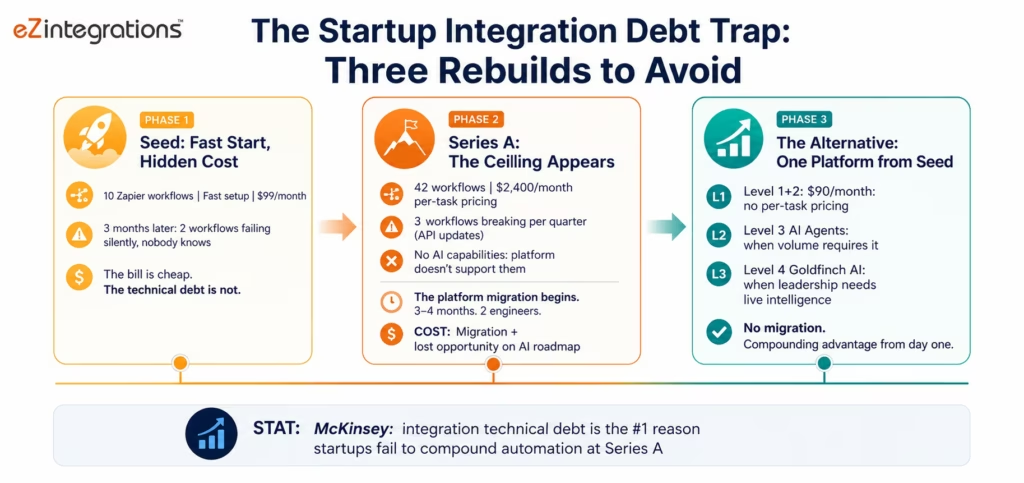
- Most startups follow the same automation journey: Zapier at seed, a Zapier bill crisis at Series A, a platform migration that consumes 3-4 months of engineering, and then the same cycle again when the new platform’s limitations become apparent. This journey creates integration technical debt at every stage debt that compounds faster than engineering capacity can address it.
- The alternative: start with a four-level platform that grows with you. Level 1 iPaaS for the first Salesforce-to-HubSpot sync. Level 2 AI Workflows when you need to process documents and classify support tickets without manual review. Level 3 AI Agents when your exception queues are large enough to need autonomous investigation. Level 4 Goldfinch AI when your leadership team needs live intelligence from the connected stack. One platform. No migration.
- Five AI agent use cases that deliver the most value to startups at Series A and Series B: the sales intelligence agent, the customer onboarding orchestration agent, the revenue exception investigation agent, the product-led growth signal agent, and the operational efficiency agent.
- The compounding advantage: every system you connect today becomes immediately queryable by agents. The startup that connects Salesforce, HubSpot, Stripe, Intercom, and Segment on day one has an agent-ready connected estate from day one no rebuild required when agents become necessary.
- eZintegrations starts at $90/month for Level 1+2. No platform fee. No connector fee. No per-task pricing that scales against you.
The Integration Technical Debt Trap Every Startup Falls Into
It is Monday morning at a 40-person Series A startup. The founder has just finished a weekend deep-dive into their operational metrics. Three things are wrong.
First, the CRM data is stale. Sales reps are updating Salesforce, but the data is not flowing to the finance team’s NetSuite instance because the Zapier workflow that was supposed to handle it has been failing silently for 11 days nobody noticed because the error notifications go to an inbox that nobody monitors.
Second, there are 94 support tickets in Intercom that have been waiting for more than 48 hours. The operations manager has been triaging them manually because the Zapier classification workflow that was supposed to route them by category stopped working when Intercom updated their API three weeks ago. Engineering fixed other things instead.
Third, the investor dashboard shows metrics that do not match the metrics in the board deck: because the data pipeline from Segment to the reporting tool was reconfigured last month and the new configuration applies different attribution logic than the old one. Nobody caught it until an investor asked about the discrepancy.
This is not a scaling problem. The company is 40 people. These are foundational operational failures caused by automation infrastructure that was built to be fast, not to be reliable, observable, or maintainable.
According to McKinsey’s State of AI 2025, the most common reason startups fail to compound their automation advantages at Series A is not lack of AI capability: it is integration technical debt accumulated during the seed-to-Series A phase. Zapier workflows that break silently, manual workarounds that become load-bearing, and data pipelines configured by contractors who have since moved on.
The integration debt trap has a second cost that most founders do not see coming: when the startup wants to deploy AI capabilities. AI agents that investigate customer churn signals, autonomous workflows that process invoices without human review The existing integration estate cannot support them. AI agents require clean, authenticated, observable API connections to the systems they query. A Zapier workflow that has been failing silently for 11 days is not a clean API connection. It is a liability.
The startups that arrive at Series B with compounding automation advantages: where every new system they add immediately becomes quarriable by agents, where the leadership team gets live intelligence from the connected stack on demand, are the ones that chose their integration platform correctly at seed. Not the cheapest platform. The right platform.
Why the “Start Simple, Rebuild Later” Strategy Always Costs More
The conventional startup wisdom on integration tools goes: start with Zapier, it’s fast and cheap and good enough for now. Rebuild when you need more. This strategy looks correct at seed and looks wrong in hindsight at Series B.
Here is why the rebuild costs more than the original platform choice:
The migration cost is always higher than estimated. At 42 workflows, a migration from Zapier to a more capable platform is a 3-4 month engineering project. Every workflow must be rebuilt in the new platform, validated against the existing Zapier behaviour, and run in parallel before the Zapier version is decommissioned. At a fully loaded engineering cost of $200-250K per engineer per year, 3 months of two engineers is $100-125K: plus the opportunity cost of whatever those engineers were not building during the migration.
The AI roadmap cannot start until the migration is complete. If the leadership team wants AI agents for revenue intelligence, customer success investigation, or operational efficiency: and if those AI capabilities require a clean, observable integration estate: then the AI roadmap is blocked by the migration timeline. At a company that has been building momentum toward AI capability deployment, a 3-4 month delay is not just a cost. It is competitive distance from companies that started with the right platform.
The silent failures accumulate faster than teams realise. Zapier’s error notification model (notify on first failure, then silence subsequent failures unless explicitly reconfigured) means workflows can fail for weeks without visible detection. A company with 42 Zapier workflows typically has 4-8 failing silently at any given time. These failures are data quality problems, reporting problems, and customer experience problems that the team attributes to other causes: because the failure is invisible.
The per-task pricing becomes a budget line item by Series A. The company that processes 10,000 support ticket classification events per month on Zapier is spending $300-500/month on that single automation at Zapier’s Professional plan task pricing. The same automation on eZintegrations’ flat per-automation pricing costs the same whether it runs 1,000 times or 1,000,000 times. By Series A, the Zapier bill for a typical automation estate is $2,000-5,000/month: $24,000-60,000/year that funds the migration and two years of eZintegrations licensing with room to spare.
The Four-Level Architecture That Grows With You
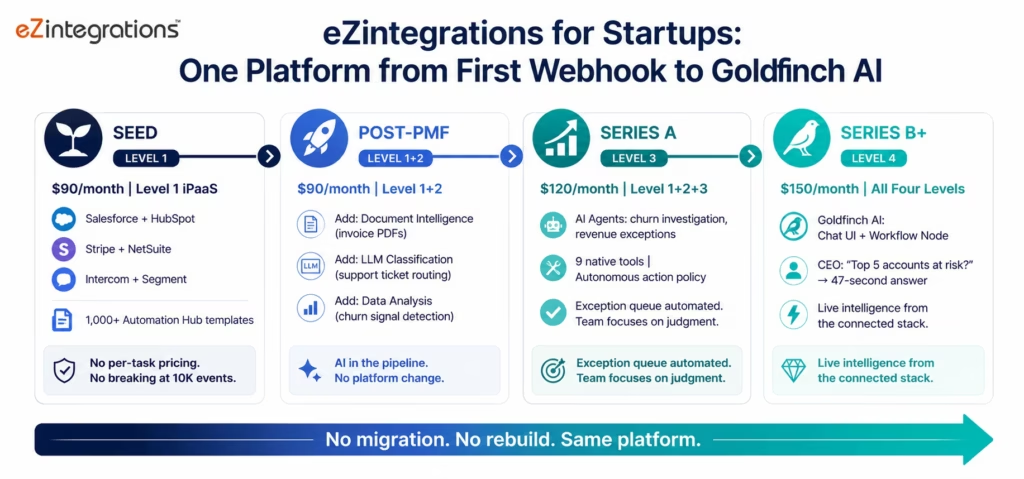
eZintegrations is designed as a progression, not a starting point. The company that connects Salesforce to HubSpot at seed does not need to change platforms when they need Document Intelligence for invoice processing at Series A, or AI Agents for customer churn investigation at Series B, or Goldfinch AI for CEO-level live business intelligence at Series C.
Level 1 (iPaaS, $90/month): the foundation. Connect any two systems via REST, GraphQL, WebSocket, Webhooks, Database, or Message Queue. No per-task pricing. The same first Salesforce webhook that routes a lead to the sales team runs 1,000 times or 1,000,000 times: same cost. 1,000+ Automation Hub templates for the most common SaaS-to-SaaS integration patterns startups need: Salesforce + HubSpot, Stripe + NetSuite, Intercom + Segment, GitHub + Jira.
For startups evaluating the integration foundation behind automation and AI workflows, the Forrester Wave for Integration Platforms as a Service is a useful reference point for understanding how iPaaS providers are assessed across enterprise integration capabilities, platform depth, and provider maturity.
Level 2 (AI Workflows, $90/month combined with Level 1): AI nodes within the Level 1 pipelines. Document Intelligence for invoice PDFs and contract documents. LLM Classification for support ticket routing, lead scoring, and email triage. Data Analysis for anomaly detection in financial data and product usage streams. Semantic Matching for deduplication of leads, customers, and vendors across systems. All AI processing native: no data sent to external AI providers.
Level 3 (AI Agents, $120/month): autonomous investigation agents. When the exception queue is large enough that manual investigation consumes more than one person’s time, Level 3 agents investigate exceptions across connected systems and resolve known patterns without human involvement. The same 9 native tools available from seed: Knowledge Base Vector Search, Document Intelligence, Data Analysis, Data Analytics with Charts/Graphs/Dashboards, Web Crawling, Watcher Tools, API Tool Call, Integration Workflow as Tool, and Integration Flow as MCP. Users can extend the registry beyond these 9 as self-service.
Level 4 (Goldfinch AI, $150/month): coordinator-worker multi-agent architecture. Chat UI for natural language queries across the connected stack: the CEO asks “what are the top 5 accounts at risk this week?” and gets a structured brief in 47 seconds from the Goldfinch AI coordinator dispatching worker agents across Salesforce, Stripe, Intercom, and product analytics. Workflow Node for automated intelligence programmes delivered on schedule.
This approach aligns with the Gartner AI agent layer concept, where CIOs are encouraged to lead enterprise agent adoption with governance, standards, cost transparency, operational baselines, and risk oversight instead of allowing disconnected AI agent deployments to spread across the organisation.
The compounding advantage: every system connected at Level 1 is immediately queryable by agents at Level 3 and Level 4. The startup that connects Salesforce, HubSpot, Stripe, Intercom, and Segment on day one has a fully agent-queryable connected estate on day one. When the Level 3 or Level 4 capability is needed, it is available by configuration: not by platform migration and re-connection.
Before vs After: AI Agents for Startup Operations
| Operational Challenge | Before AI Agents | After AI Agents | When This Matters |
|---|---|---|---|
| Support ticket routing | Ops manager manually triages 80-150 tickets/day | LLM Classification routes by category and urgency automatically | From first 50 customers onward |
| Lead qualification investigation | SDR manually researches each inbound lead (15-25 min) | Sales Intelligence Agent investigates firmographics, intent signals, product usage for ICP scoring | Series A, 50+ inbound leads/week |
| Customer churn signal detection | CS team reviews accounts reactively when customer complains | Product-Led Growth Agent monitors usage signals continuously, flags at-risk accounts proactively | Series A, 100+ active accounts |
| Invoice and contract processing | Finance ops enters vendor invoices manually | Document Intelligence extracts and posts to NetSuite automatically | From first 20 vendor invoices/month |
| Revenue exception investigation | Finance team manually investigates billing anomalies (45-90 min each) | Revenue Exception Agent investigates across Stripe, NetSuite, and CRM in <10 min | Series A, post-revenue |
| Onboarding orchestration | Customer success manually coordinates 8-12 onboarding steps per account | Onboarding Orchestration Agent monitors milestones, triggers next steps, escalates blockers | Series A, 10+ enterprise onboardings/quarter |
| Board/investor data assembly | Analyst compiles metrics from 5 systems each Monday (3-4 hrs) | Goldfinch AI assembles board metrics brief automatically on schedule | Series B+, weekly board reporting |
| Competitor intelligence | Team monitors manually or gets tips from sales | Web Crawling agent monitors competitor pricing, product launches, job postings continuously | Series A+, competitive market |
| Sales-to-CS handoff | Account details manually transferred via email or meeting notes | Agent assembles customer context brief (deal history, product usage, commitments) for CS team | From first enterprise customer |
| Operational exception queue | Operations manager investigates all exceptions manually | Agent investigates and classifies; ops manager reviews the 20% that need judgment | Series A, 5+ ops team members |
How eZintegrations Connects the Startup Tech Stack
eZintegrations connects the startup technology stack at enterprise depth: the same connector capabilities available to SAP implementations and healthcare systems are available at the $90/month entry point.
Common startup SaaS connectors:
Salesforce: REST API, SOQL queries, Bulk API for large data operations, Platform Events for real-time triggers, and custom object support. No per-API-call pricing.
HubSpot: REST API for CRM, Marketing Hub, and Service Hub. Webhook triggers for contact activity, deal stage changes, and form submissions.
Stripe: Webhooks for payment events (payment succeeded, subscription created, invoice payment failed, customer updated) and REST API for subscription management, invoice retrieval, and customer data.
NetSuite: SuiteQL for complex financial queries with Token-Based Authentication. Invoice posting, customer record management, and revenue recognition.
Intercom: REST API and webhook events for conversation management, user events, and company data. Supports both the Inbox and the Messenger workflows.
Segment: Tracking API ingestion and Destinations API for sending processed data to downstream tools. Supports event replay for backfill scenarios.
GitHub / Jira / Linear: REST APIs for issue creation, sprint management, and development workflow triggers. The startup’s product development cycle can trigger operational workflows.
Notion / Airtable / Google Sheets: REST APIs for knowledge base, project management, and operational data management.
Slack: Web API and Events API for notification delivery, interactive approvals, and operational alert routing.
Mixpanel / Amplitude / Heap: REST APIs for product analytics data retrieval: event counts, funnel data, cohort analysis: for use in customer health and churn signal monitoring.
The enterprise connectors available from day one:
SAP S/4HANA (OData V4, CSRF), NetSuite SuiteQL, Oracle ERP Cloud (assertion grant OAuth), FHIR R4 for healthcare startups, and IPSec Tunnel for any on-premises systems. When the startup’s first enterprise customer requires SAP integration, eZintegrations handles it. No additional platform required.
Compliance from day one: SOC 2 Type II certified. GDPR compliant. HIPAA BAA available for healthcare startups. The compliance infrastructure that enterprise customers will require during due diligence is in place at the $90/month entry point.
Use Case 1: Sales Intelligence Agent
The problem in one sentence: your SDR team spends 15-25 minutes per inbound lead researching firmographics, intent signals, and product usage before they know whether the lead is worth pursuing: and that research time is stolen from outbound and relationship-building.
The AI agent solution: the Sales Intelligence Agent receives each new inbound lead and conducts the research automatically: querying Salesforce, your product analytics, intent data sources, and the company knowledge base: delivering an ICP score and a contextual brief to the SDR within minutes of the lead’s arrival.
The Agent Investigation Sequence
Trigger: new lead created in Salesforce (via form submission webhook or SDR manual entry).
Step 1: Firmographic enrichment (API Tool Call): the agent queries your enrichment provider (Clearbit, Apollo, or similar via REST API) for the company’s size, industry, funding stage, tech stack, and geographic location. If no enrichment provider is connected, the agent uses Web Crawling to retrieve public firmographic data from the company’s website and LinkedIn page.
Step 2: ICP scoring (Knowledge Base): the agent compares the enriched firmographic data against your ICP definition stored in the knowledge base (target industries, company size ranges, funding stage, tech stack signals) and assigns a preliminary ICP fit score.
Step 3: Product signal check (API Tool Call): if the lead has an email domain that matches an existing trial or free tier account in your product analytics (Segment, Mixpanel, Amplitude), the agent retrieves the account’s usage data: features used, session frequency, number of users, and any upgrade intent events.
Step 4: Intent signal check (Web Crawling + API Tool Call): the agent checks for intent signals: G2 review page visits (if intent data is connected), job postings on the company’s LinkedIn that signal the relevant buying department is hiring, and any recent funding announcements that indicate budget availability.
Step 5: Historical account check (Salesforce SOQL): the agent queries Salesforce for any prior contact with this company: previous opportunities, prior trial accounts, past churned customers: to provide the SDR with relationship context.
Step 6: Brief delivery: the agent delivers a structured ICP brief to the SDR in Slack or as a Salesforce task: ICP fit score, key matching signals, product usage context (if applicable), intent signals, relationship history, and a recommended outreach approach based on the lead’s profile.
SDR research time: reduced from 15-25 minutes (manual) to 2-3 minutes of brief review. For an SDR team handling 40+ inbound leads per week: saves 8-15 hours of research time per SDR per week. That time goes to outreach and discovery calls.
Use Case 2: Customer Onboarding Orchestration Agent
The problem: enterprise customer onboarding at a Series A startup is a multi-week, multi-stakeholder, multi-system process that nobody has time to coordinate perfectly. The customer success manager is tracking onboarding progress in a spreadsheet, chasing internal teams for technical setup completion, and manually updating the CRM when milestones are hit. When a milestone slips: the customer’s technical integration is three days past the agreed setup window: the CS manager finds out when the customer asks about it, not before.
The AI agent solution: the Customer Onboarding Orchestration Agent monitors every active onboarding against its milestone schedule, detects blockers automatically, and coordinates the resolution: so the CS manager manages the exceptions rather than monitoring all the normal progress.
What the Agent Monitors and Orchestrates
Milestone tracking:
The Watcher Tool monitors each onboarding against its configured milestone schedule:
- Technical integration setup (connector configuration, API key provisioning)
- Data migration or import completion
- User account provisioning and role assignment
- Training session scheduling and completion
- First successful production use event
- Go-live confirmation
For each milestone, the agent knows the SLA window (how many days from contract signing to completion) and the responsible party (internal team, customer technical contact, or both).
Blocker detection and escalation:
When a milestone reaches its SLA window without completion, the agent investigates:
- Queries the relevant system for the milestone’s current status (integration connector status, user provisioning records, training scheduler)
- Identifies whether the blocker is internal (team has not completed a task) or external (waiting on customer action)
- For internal blockers: sends a contextual reminder to the responsible team member via Slack, escalating to the CS manager if no response within the configured window
- For customer blockers: generates a contextual follow-up message for the CS manager to send (or sends directly if the autonomous action policy allows)
Cross-system coordination:
The agent triggers the next-step actions when milestones complete:
- Integration complete → trigger the data migration workflow (Level 1-2 workflow called via “Integration Workflow as Tool”)
- Users provisioned → trigger the welcome email sequence in HubSpot
- Training complete → update the Salesforce opportunity to “Onboarding Complete” and notify the AE for expansion conversation timing
The result: the CS manager’s attention focuses on the high-touch moments and the genuine blockers: not on monitoring every milestone across every active onboarding. Onboarding completion time reduces 20-35% as blockers are detected and escalated within hours rather than days.
Use Case 3: Revenue Exception Investigation Agent
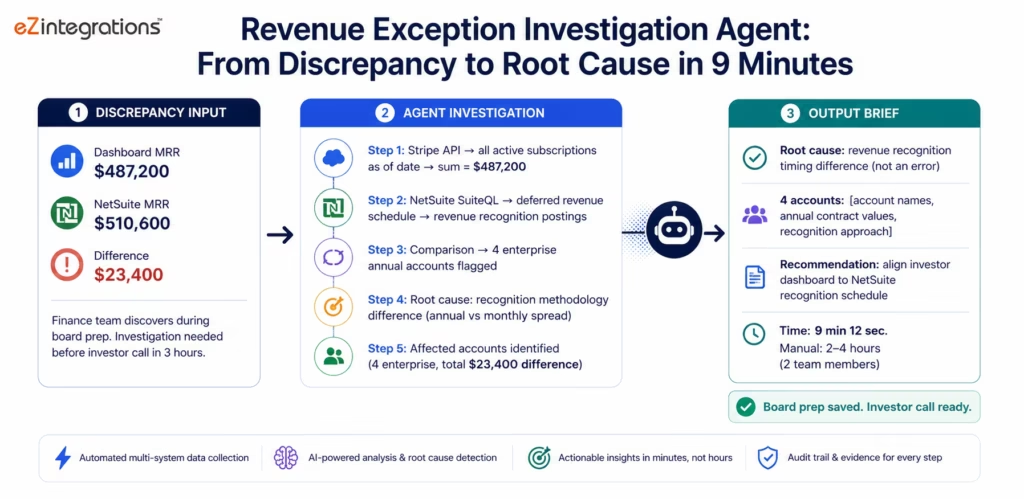
The problem: your finance ops team at Series A has discovered that your MRR number in the investor dashboard does not match the MRR calculation in NetSuite. The difference is $23,400. Tracing this discrepancy requires: querying Stripe for all subscription events in the relevant period, comparing against NetSuite’s revenue recognition postings, checking for any subscription upgrades or downgrades that were applied to the wrong period, and identifying whether the difference is a timing issue or a calculation error.
Manual investigation: 2-4 hours, requiring someone who understands both Stripe’s subscription data model and NetSuite’s revenue recognition logic.
The AI agent solution: the Revenue Exception Investigation Agent receives the discrepancy as a goal and traces it through the connected financial systems: identifying the specific transactions that explain the difference and staging the correction.
The Agent Investigation Sequence
Agent goal: “MRR in the investor dashboard shows $487,200. NetSuite MRR calculation shows $510,600. Difference: $23,400. Investigate and identify the cause.”
Step 1: Stripe subscription data pull: the agent queries Stripe’s Subscriptions and Invoices APIs for all active subscriptions as of the measurement date, calculating the sum of MRR from subscription amounts.
Step 2: NetSuite revenue recognition check: the agent queries NetSuite via SuiteQL for the deferred revenue schedule and the revenue recognition postings for the measurement period.
Step 3: Comparison and gap identification: the agent compares the Stripe subscription total against the NetSuite revenue recognition total. The agent identifies that four enterprise accounts in Stripe have annual billing subscriptions where the ARR has been divided by 12 for MRR: but NetSuite is recognising the full annual amount in the setup month rather than spreading recognition across 12 months.
Step 4: Root cause classification: the discrepancy is a revenue recognition timing difference: not an error in either system, but a difference in the calculation method between the Stripe-based MRR metric and the NetSuite revenue recognition schedule. The $23,400 represents the deferred portion of four enterprise annual contracts being recognised in month 1 in NetSuite but spread across 12 months in the Stripe MRR calculation.
Step 5: Correction staging: the agent assembles a brief for the finance controller: root cause explanation, the four specific accounts involved, the calculation methodology difference, and a recommendation for aligning the investor dashboard metric to the NetSuite recognition schedule (or vice versa, depending on the preferred methodology). No correction is required: the discrepancy is methodological, not an error.
Finance team investigation time: 9 minutes (agent). Previous manual investigation: 2-4 hours requiring two finance team members. The agent delivers the root cause explanation that enables the investor dashboard alignment decision: immediately, rather than at the end of a 4-hour investigation.
Use Case 4: Product-Led Growth Signal Agent
The problem: your product has 1,200 active free tier accounts. Your growth team knows that accounts that hit certain product milestones: inviting a second user, connecting a second integration, reaching a usage threshold: are significantly more likely to convert to paid. But identifying those accounts in real time requires querying Segment (or Mixpanel or Amplitude), cross-referencing against your Salesforce records to see if they have a sales touchpoint, and scoring the conversion probability. At 1,200 accounts, this is too much data for the growth team to monitor manually.
The AI agent solution: the Product-Led Growth Signal Agent monitors all free tier accounts for the configured conversion trigger events and delivers prioritised conversion opportunities to the sales team in real time: before the account’s natural conversion window closes.
The Agent’s Monitoring and Investigation
Trigger events monitored (Watcher Tools):
- Account invites second user (from Segment user identity event)
- Account connects a second integration (from product event stream)
- Account reaches 80% of the free tier usage limit (from Segment usage event)
- Account visits the pricing page 3+ times in 7 days (from Segment page view events)
- Account uses a premium feature during a trial period (from product event stream)
When a trigger fires, the agent investigates:
Step 1: Account context query (Salesforce + Segment): the agent queries Salesforce for any existing sales touchpoints with the account, the account’s firmographic data, and any prior trial or evaluation history. From Segment, the agent retrieves the account’s full usage profile: features used, session frequency, power users within the account.
Step 2: ICP fit reassessment: the agent compares the account’s current firmographic data and usage profile against the ICP definition: accounts that match the ICP and have triggered a conversion signal are highest priority.
Step 3: Conversion probability scoring (Data Analysis): the Data Analysis node applies the conversion probability model to the account’s profile: comparing against the historical conversion patterns of similar accounts at a similar stage of product engagement.
Step 4: Sales context brief: the agent delivers a conversion opportunity brief to the responsible SDR or AE in Slack: account name, trigger event, conversion probability score, key usage data (what they have been doing in the product), firmographic fit, existing relationships, and a suggested outreach message tailored to the specific trigger event.
The result: the sales team receives prioritised, contextualised conversion opportunities in real time: instead of reviewing a weekly product analytics export. Conversion rate from free-to-paid for accounts that receive a timely, contextualised outreach within 24 hours of a trigger event is typically 2-3x the conversion rate for accounts that receive generic nurture sequences.
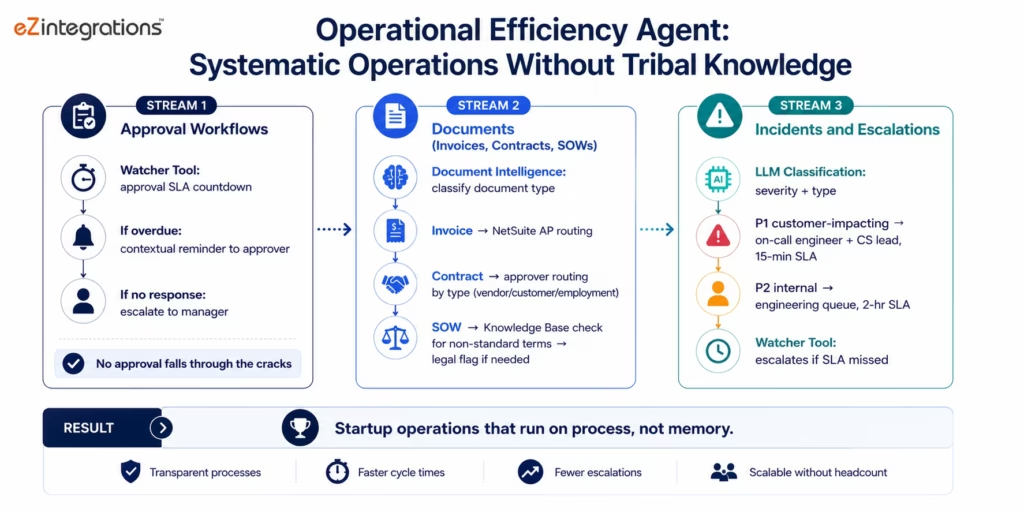
Use Case 5: Operational Efficiency Agent
The problem: a 40-person Series A startup runs on 15-20 operational workflows: expense approvals, vendor onboarding, contract routing, incident response, escalation management. The workflows are a mix of Slack messages, email threads, Google Forms, and ad-hoc processes. The operational complexity of coordinating between the same 15-20 processes while everything else is growing creates invisible friction: the vendor invoice that sat in someone’s inbox for two weeks, the contract that needed three approvals and only received two before being filed, the incident that was escalated to the wrong team because the escalation policy was in a Notion doc nobody reads.
The AI agent solution: the Operational Efficiency Agent handles the coordination layer of internal operations: monitoring approval workflows, escalating delayed items, routing requests to the correct team or individual, and assembling context for decisions that require human judgment.
What the Agent Handles
Approval workflow monitoring:
The Watcher Tool monitors approval chains with SLA windows. For each pending approval past its SLA:
- The agent queries the approver’s availability status (from Slack or calendar API if integrated)
- Sends a contextual reminder with the approval item pre-linked
- Escalates to the approver’s manager if no response within the secondary SLA
Contract and vendor routing:
New vendor invoices, contracts, and SOWs received via email or uploaded to a shared folder are processed by Document Intelligence:
- Invoice: extracted and routed to NetSuite for accounts payable
- Contract: classified by contract type (vendor agreement, customer contract, employment offer) and routed to the appropriate approver based on the Knowledge Base routing policy
- SOW: compared against the master services agreement in the Knowledge Base for non-standard terms flagged for legal review
Incident escalation routing:
Incidents reported via Slack, email, or monitoring tools are classified by LLM Classification:
- Severity and impact classification
- Routing to the appropriate on-call engineer, CS manager, or executive based on the incident type and severity
- Timeline tracking: escalates to the next tier if the configured response SLA is not met
The result: the operational overhead that currently runs on individual attention and tribal knowledge moves to a systematic, monitored, audited process. Items that previously fell through the cracks: the approval that never happened, the incident that went to the wrong team, the contract that was filed without all signatures: are surfaced before they become problems.
Key Outcomes and Results
Startups deploying eZintegrations AI Agents across these use cases report the following within 60-90 days:
Sales Operations:
- SDR research time per inbound lead: 15-25 minutes (manual) → 2-3 minutes (agent-delivered brief)
- SDR capacity for outreach vs research: shifts from 60/40 to 80/20
- Inbound lead ICP scoring accuracy: improves as the agent applies the full ICP definition consistently
Customer Success:
- Onboarding completion time: reduces 20-35% as milestone blockers are detected and escalated within hours
- CS manager manual monitoring: reduces 40-50% as agents handle normal-progress tracking
- Churn-signal-to-action lead time: improves by 7-14 days as agents detect signals before the customer complains
Finance Operations:
- Revenue exception investigation time: 2-4 hours (manual) → 8-12 minutes (agent)
- Board prep data assembly time: reduces 60-70% as Goldfinch AI Workflow Node assembles metrics on schedule
- Silent billing errors discovered: increases as revenue exception agent monitors continuously
Product Growth:
- Free-to-paid conversion rate for triggered accounts: improves 2-3x with timely, contextualised outreach
- Growth team time on manual product analytics review: reduces 50-60%
- Time-to-outreach after conversion trigger: reduces from 2-5 days (weekly review cycle) to same-day
Operations:
- Approval SLA compliance: improves significantly as Watcher Tools monitor all approval chains
- Operational items falling through the cracks: reduces 70-80%
- Incident escalation correctness: improves as LLM Classification applies consistent routing policy
How to Get Started
Starting with eZintegrations at seed or Series A is different from a large enterprise deployment: the goal is to connect the systems you have today in a way that is agent-ready from day one, so the investment in clean connections compounds as the company grows.
Step 1: Import your startup AI agent templates from the Automation Hub
Browse the Automation Hub for startup templates:
- Sales Intelligence Agent (Salesforce + HubSpot + enrichment)
- Customer Onboarding Orchestration Agent
- Revenue Exception Investigation Agent (Stripe + NetSuite)
- Product-Led Growth Signal Agent (Segment/Mixpanel + Salesforce)
- Operational Efficiency Agent (Slack + document routing)
The Level 1-2 integration templates for common startup SaaS connections are included: Salesforce-HubSpot sync, Stripe-NetSuite revenue, Intercom-Segment event routing, and GitHub-Jira issue management.
Step 2: Connect your current tech stack: starting with your most critical systems
Prioritise connections by: which system’s data is most important for business decisions (usually CRM + billing), which connections are currently breaking most often (replace Zapier failures first), and which systems agents will need to query for the use cases above.
Common startup starting connections:
- Salesforce: API key and OAuth (5-10 minutes)
- HubSpot: API key (2-5 minutes)
- Stripe: API key + webhook registration (5-10 minutes)
- NetSuite: account ID and TBA credentials (15-20 minutes)
- Intercom/Zendesk: API key (5 minutes)
Step 3: Start at Level 1-2, not Level 3
For most seed and early Series A startups, the highest immediate ROI is in Level 1-2:
- Replace Zapier workflows with eZintegrations equivalents that have proper error handling, DLQ, and monitoring
- Add Document Intelligence to invoice and contract processing workflows
- Add LLM Classification to support ticket routing and lead enrichment workflows
Configure Level 3 AI Agents when your exception queue volume justifies it: typically when one person is spending more than 30% of their time on investigation work.
Step 4: Load the knowledge base with your operational policies
The knowledge base is what enables the agent to make decisions consistent with your company’s policies rather than asking a human every time. Populate it with:
- ICP definition and lead scoring criteria
- Customer tier policies and SLA definitions
- Escalation procedures for common incident types
- Routing rules for approvals, contracts, and vendor documents
Takes 2-4 hours. Enables consistent, autonomous decision-making across all agents.
Step 5: Set up the Goldfinch AI Workflow Node for leadership intelligence
Even at Series A, the Goldfinch AI Workflow Node delivers value: configure a Monday morning board metrics brief that assembles Salesforce pipeline data, Stripe MRR, Intercom CSAT, and product active user counts from the connected stack and delivers a structured brief to the leadership team’s Slack channel before the week begins. No data team request. No Monday morning spreadsheet assembly.
Import your startup AI agent templates now: all five use case templates with pre-configured connectors for the common startup tech stack.
FAQs
Zapier is the right tool for 5-15 simple automations at seed stage because it is fast to configure, relatively inexpensive, and offers broad SaaS application coverage. The limitations typically appear at Series A scale, where Zapier's per-task pricing compounds significantly for high-volume automation estates, enterprise API requirements such as SAP, NetSuite SuiteQL, and Oracle exceed connector capabilities, and native AI workflow functionality is unavailable. eZintegrations starts at $90 per month with flat per-automation pricing, includes native AI workflow nodes such as Document Intelligence and LLM Classification, extends into Level 3 AI Agents and Level 4 Goldfinch AI multi-agent coordination on the same platform, and supports enterprise-grade connectors from the beginning. Startups adopting eZintegrations early can avoid large-scale migration projects later.
The no-code workflow builder and Automation Hub templates are specifically designed for startups operating without dedicated integration engineering teams. Automation Hub includes pre-configured templates with connector settings, field mappings, and AI node configurations already prepared for deployment. A technical founder or operations lead can typically deploy the initial Level 1-2 integration stack within 4-8 hours. Expanding into Level 3 AI Agents uses the same no-code configuration interface, where the team defines agent goals, tool assignments, and autonomous action policies through configuration rather than custom software development. Most startups deploy their first AI agent within one day of deciding to implement the platform.
The transition point usually occurs when exception investigation volume exceeds the practical capacity of one team member. This typically happens when 20-30% of a person's working week is spent investigating operational exceptions across multiple systems. Common trigger points include 50-100 active customers for customer success operations, 30-50 inbound leads per week for sales operations, or approximately $1-5 million ARR for revenue operations. The exact stage varies between companies, but the signal is consistent: once teams spend substantial time investigating repetitive multi-system exceptions with predictable patterns, AI agents generally deliver immediate operational ROI.
Yes, eZintegrations provides native enterprise-grade connectors for Salesforce, Stripe, HubSpot, and Intercom. Salesforce support includes REST API, SOQL, Bulk API, and Platform Events. Stripe connectivity includes REST APIs and webhook events covering payments, subscriptions, and invoices. HubSpot support covers CRM, Marketing Hub, and Service Hub APIs. Intercom integration includes REST APIs and webhook events. Authentication management, including OAuth flows, API keys, and webhook registration, is handled automatically. These same connectors scale into future enterprise requirements such as SAP OData V4, NetSuite SuiteQL, and FHIR R4 integrations without requiring platform migration.
Goldfinch AI is eZintegrations' Level 4 multi-agent coordination platform. The Workflow Node executes automated intelligence programmes on scheduled intervals or event triggers. A common startup use case is generating an automated Monday morning board metrics brief assembled from Salesforce, Stripe, Intercom, and Segment data and delivering it directly into Slack channels without requiring manual analyst preparation. Goldfinch AI also includes a conversational Chat UI that allows team members to query operational systems in natural language, such as asking which customer accounts are most at risk during the current week. Most startups begin using Goldfinch AI around Series A stage when recurring leadership data requests become a bottleneck for operations and analytics teams.1. Why should a startup use AI agents instead of just Zapier?
2. How does a startup with 3-5 engineers implement AI agents without a dedicated integration team?
3. At what stage does a startup need AI agents rather than just workflow automation?
4. Does eZintegrations work with startup tools like Salesforce, Stripe, HubSpot, and Intercom?
5. What is the Goldfinch AI Workflow Node and when do startups use it?
Conclusion: The Startup That Builds the Right Foundation Compounds Faster
The automation story at most startups follows the same arc: seed (fast, cheap, Zapier), Series A (the Zapier ceiling, the migration project, 3-4 months of rebuilding), Series B (a new platform, a new capability ceiling, and the growing awareness that the integration layer has become a constraint rather than an accelerant).
This arc is not inevitable. It is a consequence of optimising for the cheapest option at each stage rather than the option that compounds.
eZintegrations is designed for compounding: the systems connected at Level 1 today are immediately queryable by agents at Level 3 next quarter and by Goldfinch AI at Level 4 the quarter after that. The Knowledge Base built for the Sales Intelligence Agent serves the Revenue Exception Agent and the Onboarding Orchestration Agent. Every connection and every piece of operational knowledge added to the platform accumulates as an asset rather than as debt.
The startup that starts on eZintegrations at seed arrives at Series B with: a fully agent-queryable connected estate, live intelligence available to the leadership team on demand, an operational exception queue handled autonomously, and no migration debt: while the competitor who started on Zapier is 3-4 months into their second rebuild.
Import your startup AI agent templates now: Sales Intelligence, Onboarding Orchestration, Revenue Exception, Product-Led Growth, and Operational Efficiency agent templates with pre-configured connectors for the common startup tech stack.

