
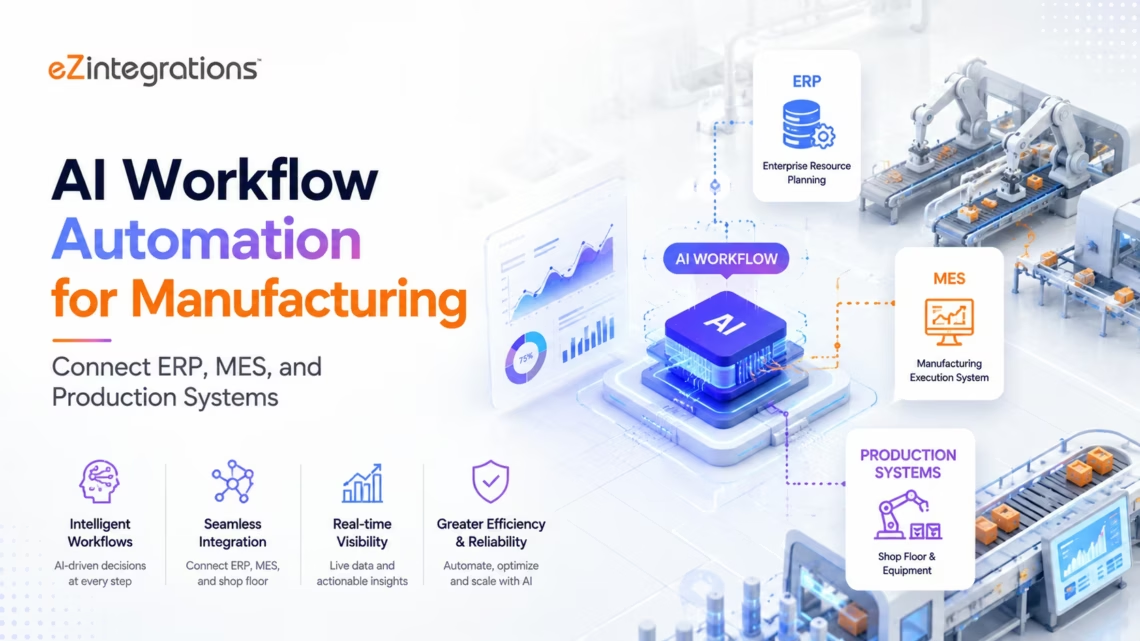
AI Workflow Automation for Manufacturing: Connect ERP, MES, and Production Systems
June 6, 2026AI workflow automation for manufacturing connects ERP systems (SAP S/4HANA, Oracle), MES platforms (Siemens Opcenter, Rockwell Plex), and shop floor data sources (OSIsoft PI, SCADA, OPC-UA) to eliminate the manual data entry and batch sync delays that cause production planning errors, quality holds, and OEE losses. AI nodes classify production exceptions, detect anomalies in sensor data streams, process quality documents, and route shop floor events: reducing the human touchpoints between production and enterprise systems.
TL;DR:
- The manufacturing operations technology stack: ERP (SAP S/4HANA, Oracle), MES (Siemens Opcenter, Rockwell Plex, Aveva), SCADA, and shop floor historian (OSIsoft PI): generates the data that production planners, quality engineers, and maintenance teams need to make decisions. The problem: most of this data stays siloed in the system where it was created.
- Production planners are running SAP on yesterday’s MES actuals. Quality engineers are cross-referencing LIMS results against SAP specifications by hand. Maintenance teams are dispatching technicians based on scheduled PMs rather than real condition data from the historian. The data exists. The connections do not.
- AI workflows connect the manufacturing stack with five capabilities: real-time MES-to-ERP production actuals sync, quality hold automation with AI-powered exception routing, predictive maintenance signal classification, supplier quality document processing, and OEE anomaly detection with intelligent escalation.
- eZintegrations connects SAP S/4HANA (PP, QM, MM modules), Oracle Manufacturing Cloud, Siemens Opcenter MES, Rockwell Plex, OSIsoft PI System, OPC-UA data sources, and quality LIMS systems: with Document Intelligence, LLM Classification, and Data Analysis nodes embedded in the same workflow builder.
- Import an Automation Hub template for your manufacturing stack and go live in days.
The Problem: The Gap Between the Shop Floor and the ERP
It is 6 AM on the factory floor. Shift 2 finished at midnight. The line ran from 10 PM until 3 AM before a 90-minute unplanned downtime: a recurring issue with Line 3’s packaging equipment that every technician on the floor knows about but that has never been formally logged. Production resumed at 4:30 AM and hit 87% of the planned rate for the rest of the shift.
By 7 AM, the production planner opens SAP. SAP shows Line 3 running at plan for the full shift. The production actuals from the MES will not reach SAP until the MES operator manually enters them during the morning handover: which, on a busy morning, happens at 9 AM or later. By then, the production planner has already dispatched replenishment orders and adjusted the next shift’s schedule based on numbers that were wrong.
The quality engineer opens the quality management system. There are three lots on hold: flagged by the LIMS at 2 AM when a release test came back out of specification. The hold notices are in the LIMS. Nobody has told the warehouse. The warehouse team does not know the lots are on hold. Two of the three lots are already picked and staged for outbound shipment.
This is not a data problem. The MES has the production actuals. The LIMS has the quality results. The ERP has the replenishment logic. The data exists, in real time, in each system. The problem is that the systems are not connected: or they are connected through batch syncs, manual data entry, and email notifications that are too slow for the decisions they are supposed to support.
According to McKinsey, manufacturers lose 20-30% of potential OEE from poor data visibility: not from equipment that cannot perform, but from decisions made on stale or incomplete data. Gartner estimates that 60% of manufacturing IT leaders cite “shop floor to ERP data latency” as a top-three operational technology challenge.
![The manufacturing data gap: shop floor data that never reaches the ERP in time to support decisions]](https://ezintegrations.ai/wp-content/uploads/2026/05/123-1.avif "AI Workflow Automation for Manufacturing: Connect ERP, MES, and Production Systems")
Before vs After: AI Workflows for Manufacturing
| Process | Before AI Workflows | After AI Workflows | Impact |
|---|---|---|---|
| MES production actuals to SAP | Manual entry by MES operator during handover (2-9 hour lag) | Event-driven sync within 2 minutes of shift completion | Production planning on current actuals, not yesterday’s |
| Quality hold notification | LIMS hold logged, email sent manually, warehouse discovery variable | Real-time hold propagated to SAP QM, WMS, and shipping automatically | Zero warehouse-hold shipping incidents |
| OEE reporting | Manually compiled from shift logs, production system exports (daily, often next-day) | Continuous calculation from MES + downtime data + production actuals | Shift-level OEE visible in real time |
| Unplanned downtime logging | Technician fills out paper or screen form during or after event | Event detected from PI System/SCADA, auto-created in CMMS with equipment context | Downtime captured at occurrence, not at memory |
| Supplier quality document processing | Quality team manually enters CoA and test result data from supplier documents | Document Intelligence reads CoA PDFs and posts results to QMS/LIMS automatically | 80-90% of supplier CoAs processed without manual entry |
| Production exception routing | Supervisor decides route manually (email, Slack, phone call based on experience) | LLM Classification reads exception context, routes to correct team with priority flag | Consistent, documented exception routing |
| Work order creation (maintenance) | PM schedule only; condition-based triggering manual or not used | Data Analysis on PI/historian data triggers condition-based work orders in CMMS | Maintenance dispatched on condition, not schedule |
| Material variance reporting | Monthly manual comparison of MES consumption vs SAP planned BOM | Continuous Data Analysis: variance flagged within the production run | Scrap and yield variance detected in process, not at month-end |
| Batch record closure | QA manually compiles MES data, LIMS results, SAP order data | Automated aggregation with AI completeness check | Batch record closure time reduces 50-60% |
| Shift handover report | Supervisor types narrative report from memory (variable quality, variable timing) | AI aggregates MES actuals, quality events, downtime log, and maintenance requests into structured shift report | Consistent, complete handover with full data context |
How eZintegrations Connects the Manufacturing Stack
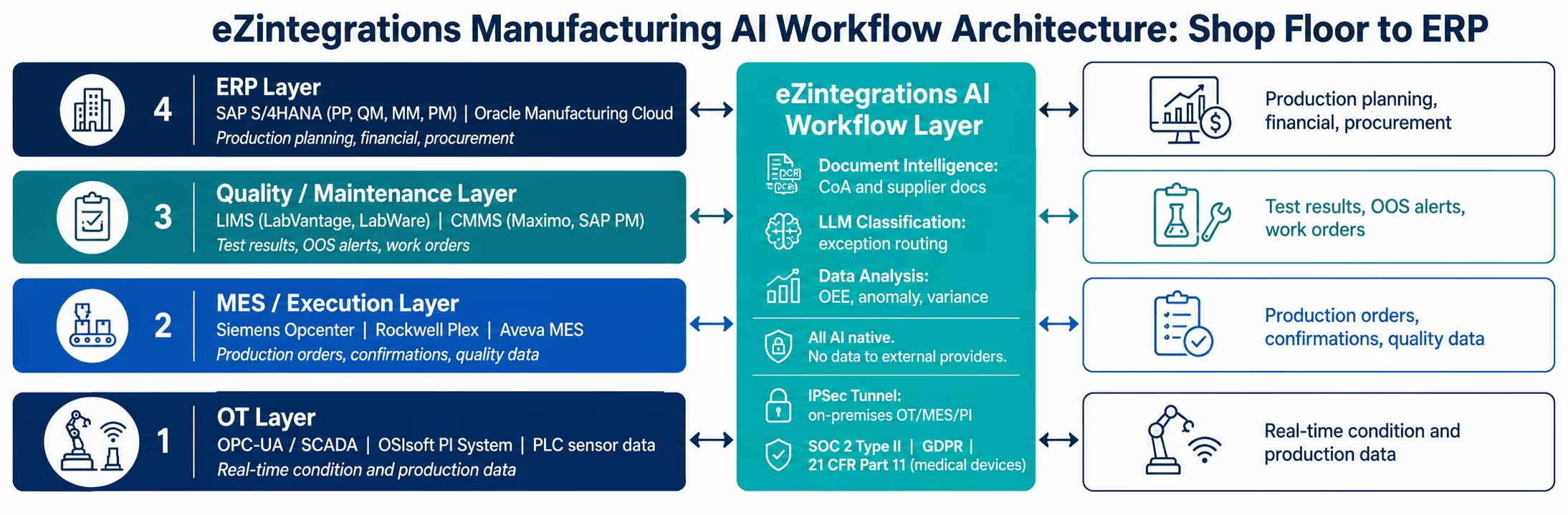
eZintegrations bridges the operational technology (OT) and information technology (IT) layers that manufacturing organizations have traditionally kept separate: connecting the shop floor data sources, the MES layer, and the enterprise ERP and quality systems in a single no-code workflow environment.
SAP S/4HANA connector: OData V4 with automatic CSRF token management for write operations across production planning (PP), quality management (QM), materials management (MM), and plant maintenance (PM) modules. Supports production order confirmation, goods receipt posting, quality notification creation, material document posting, and maintenance order creation.
Oracle Manufacturing Cloud connector: REST API with OAuth 2.0 for Oracle’s discrete and process manufacturing modules: work order management, production dispatching, quality results recording, and supply chain event management.
Siemens Opcenter MES connector: REST API for production order management, operation confirmation, quality data collection, and equipment status. Supports Opcenter Execution for Discrete, Opcenter Execution for Process, and Opcenter Quality modules.
Rockwell Plex connector: REST API for cloud-native MES, production tracking, quality management, inventory, and maintenance management across Plex’s unified manufacturing platform.
OSIsoft PI System connector: PI Web API for real-time and historical data retrieval from the PI historian, tag-based sensor data query, event frame retrieval, and PI notification integration. For on-premises PI deployments, connection via IPSec Tunnel.
OPC-UA connector: OPC-UA client for direct connection to SCADA systems, PLCs, and OPC-UA-enabled manufacturing equipment, real-time tag subscription and data polling.
LIMS connectors: LabVantage, LabWare, and STARLIMS via REST API and database connectors for quality test result retrieval and OOS/OOT flagging.
CMMS connectors: IBM Maximo, SAP PM, Infor EAM via REST API for maintenance work order creation and equipment history retrieval.
The AI workflow layer: Document Intelligence for supplier quality documents (Certificates of Analysis, inspection reports, incoming quality inspection records), LLM Classification for production and quality exception routing, Data Analysis for OEE monitoring and sensor anomaly detection. All AI processing runs natively within eZintegrations: no production data, quality records, or sensor readings sent to external AI providers.
Compliance: SOC 2 Type II certified. GDPR compliant for EU Manufacturing operations data. IPSec Tunnel for on-premises MES, historian, and SCADA systems that cannot be exposed to public internet. For medical device manufacturers: 21 CFR Part 11 and ISO 13485 support.
Use Case 1: Real-Time MES-to-ERP Production Actuals Sync
The problem in one sentence: your production planner is making replenishment, capacity, and scheduling decisions based on SAP data that is 2-9 hours behind the MES actuals, and the delta is large enough to generate planning errors every week.
The AI workflow solution: event-driven integration between the MES and SAP S/4HANA posts production actuals to the ERP within 2 minutes of each production event, order confirmation, goods receipt, scrap booking, and production closure: using SAP’s Production Order Confirmation and Goods Movement APIs.
The Step-by-Step Production Actuals Workflow
Trigger: production event in the MES: production order operation confirmed, goods produced quantity reported, scrap reported, or production order closed.
Step 1: MES data retrieval: the production event payload is retrieved from the MES via REST API (Siemens Opcenter or Rockwell Plex): production order number, operation, confirmed quantity (yield and scrap), machine ID, operator ID, start and end timestamps.
Step 2: SAP production order mapping: the MES production order number is mapped to the corresponding SAP production order number (if numbering differs between systems) via a lookup against the SAP PP API.
Step 3: LLM Classification for exception detection:the confirmed quantities are compared against the planned order quantities. The LLM Classification node reads the variance context,
- Yield below threshold (configurable: e.g. 5% below plan): classify as “Production Shortage,” route to production supervisor with current order status
- Scrap rate above threshold: classify as “Elevated Scrap,” route to quality engineer with machine and operator context
- Confirmation on a closed or cancelled order: classify as “Order Status Exception,” route to production control for investigation
- Normal confirmation: pass through to SAP posting
Step 4: SAP production order confirmation: the MES confirmation data is posted to SAP via the Production Order Confirmation API (OData V4 CSRF-managed write operation), confirmed quantities, scrap quantities, activity times, and machine usage.
Step 5: Goods movement: where the MES confirmation triggers goods movement (goods produced to stock, consumption of components), the goods movement is posted to SAP Materials Management via the Goods Movement API.
The result: SAP reflects current MES actuals within 2 minutes of every production event. The production planner’s replenishment and scheduling decisions are made on data that is current, not data from the prior shift’s manual handover. Variance-flagged events reach the supervisor and quality engineer within the same 2-minute window, before the problem compounds.
Use Case 2: Quality Hold Automation with LLM Classification
The problem: a LIMS out-of-specification (OOS) result is recorded at 2 AM. A quality hold needs to be placed on the affected lot in SAP, the lot needs to be flagged in the WMS to prevent shipment, and the receiving inspection team needs to be notified for investigation. In the current process, the LIMS generates a hold notification that goes to the quality on-call email. The email is read at 7 AM. The SAP hold is placed at 8 AM. The WMS team is notified at 8:30 AM. The lot has been staged for shipment since 6 AM.
The AI workflow solution: the LIMS quality hold event triggers an immediate, multi-system quality hold workflow, SAP QM stock posting, WMS hold flag, shipping restriction, and team notification, within minutes of the LIMS recording the OOS result.
The Quality Hold Workflow
Trigger: LIMS quality hold event, OOS result recorded and lot flagged.
Step 1: Lot identification: the held lot number, material number, and OOS test result details are retrieved from the LIMS.
Step 2: LLM Classification (hold severity and routing): the OOS context is read by the LLM Classification node:
- Critical OOS (safety-related or regulatory specification): immediate hold with escalation to Quality Director and regulatory affairs. Shipping restriction placed within seconds.
- Non-conforming (process specification, not regulatory): hold placed, quality engineer investigation workflow initiated.
- Out of trend (not OOS, but trending toward limit): advisory notification to quality engineer. No hold unless configured for the specific material.
- Confidence threshold routing: below 80% confidence on classification, hold is placed automatically and classification reviewed by quality manager.
Step 3: SAP QM stock posting: the affected lot is placed in SAP Quality Inspection stock (movement type 321: unrestricted to quality inspection) via OData V4, preventing further movement until released by the quality team.
Step 4: WMS hold flag: the lot is flagged in the WMS with a shipping hold, preventing the lot from being included in outbound shipments regardless of pick instructions.
Step 5: Notification and investigation routing: the quality team is notified via Slack or email with full context, lot number, material, OOS result, test and specification, and the recommended investigation action based on the LLM classification.
Step 6: SAP quality notification: a quality notification is created in SAP QM for the investigation, linked to the production order, the LIMS result, and the material.
The result: quality holds propagate from LIMS to SAP QM and WMS within minutes of OOS recording, at any hour. The 5-6 hour gap between OOS detection and hold placement is eliminated. Shipped-held-lot incidents go to zero. Quality investigation time is reduced as all context is assembled automatically.
Use Case 3: Predictive Maintenance Signal Classification
The problem: your maintenance team runs on a preventive maintenance schedule, equipment is serviced on a time-based interval regardless of its actual condition. The PI historian has vibration, temperature, and pressure data from every critical machine on the floor. Your reliability engineers know the signatures that precede bearing failures, motor overheating events, and compressor degradation: but translating those signatures into work orders requires querying the historian, running manual analyses, and submitting a work order through email or the CMMS portal. By the time the analysis is done, the bearing has often already failed.
The AI workflow solution: Data Analysis monitors the PI historian data streams continuously, detecting the statistical signatures that precede common failure modes, without requiring predefined rule thresholds for each machine and condition.
The Predictive Maintenance Workflow
Trigger: continuous Data Analysis monitoring on PI historian tag streams for critical equipment.
Step 1: PI historian data retrieval: the Data Analysis node queries the PI Web API for the current and recent historical values of configured tags for each piece of critical equipment, vibration amplitude (X, Y, Z axes), bearing temperature, motor current draw, pressure differential, and cycle time.
Step 2: Anomaly detection: the Data Analysis node compares current tag values against the historical distribution for that equipment’s normal operating range. Anomalies flagged,
- Single-tag anomaly: one measurement exceeds configured statistical threshold (e.g., 2.5σ above baseline)
- Multi-tag correlation anomaly: a combination of measurements that individually fall within range but in combination match a known failure precursor signature (e.g., moderate vibration increase + bearing temperature rise + current draw elevation)
- Trend anomaly: a gradual degradation trend across multiple consecutive readings, not yet anomalous at any single point but trending outside the normal range
Step 3: LLM Classification (failure mode routing): the anomaly context is read by the LLM Classification node. The failure mode and urgency are classified:
- Imminent failure (multiple correlated anomalies): immediate work order creation in CMMS (IBM Maximo or SAP PM) with priority 1, escalation to maintenance supervisor and production manager
- Emerging condition (trend anomaly or single-tag elevation): condition monitoring work order created with priority 2, scheduled within the next planned maintenance window
- Normal variation (single-tag transient): logged but not actioned, used to refine the statistical baseline
Step 4: CMMS work order creation: the classified maintenance signal creates a work order in the CMMS with the equipment ID, the anomaly context, the recommended action, the relevant tag values and trend chart, and the priority level. The technician receiving the work order has the diagnostic context before they reach the equipment.
Step 5: Production notification: for imminent failure classifications, the production supervisor is notified of the potential unplanned downtime: providing time to reschedule the production run or activate the backup machine before the failure occurs.
The result: unplanned downtime events caused by monitored failure modes reduce by 40-60% as condition signals are detected and acted on before failure. Planned maintenance effort focuses on conditions that actually need attention rather than running PM tasks on equipment that is in normal condition. Mean time between failures (MTBF) increases as equipment is serviced at the right time rather than the scheduled time.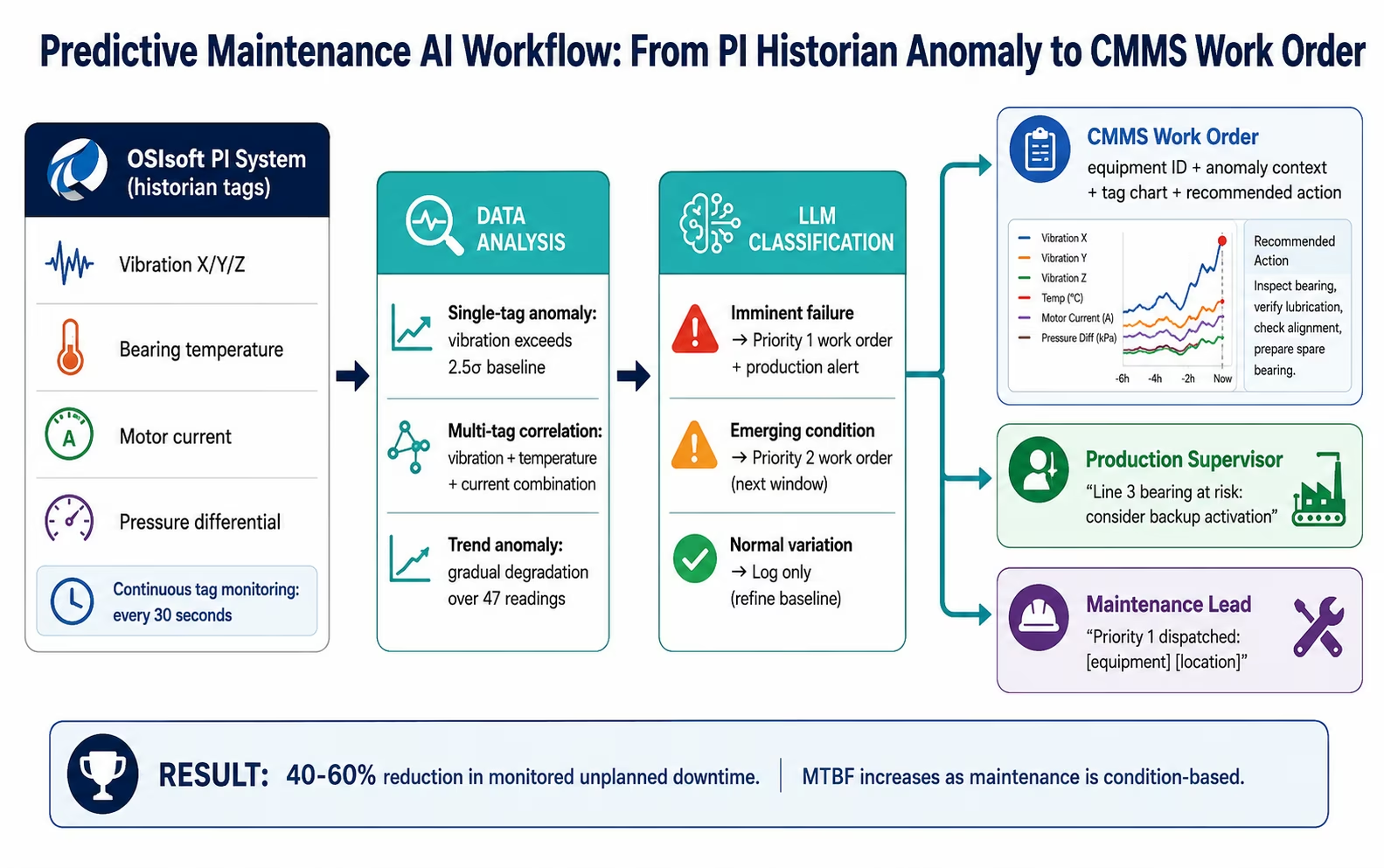
Use Case 4: Supplier Quality Document Processing with Document Intelligence
The problem: your incoming quality inspection team receives Certificates of Analysis (CoAs) from 80+ suppliers for incoming raw materials, components, and packaging. Each CoA arrives in a different format: PDF from Supplier A, Excel from Supplier B, HTML email from Supplier C. The receiving inspection team manually enters the CoA data (lot number, test results, specification limits, expiry dates) into the QMS or LIMS before inspection can proceed. For a high-volume receiving operation, this data entry takes 2-4 hours per day: and incoming material sits uninspected on the dock until the entry is complete.
The AI workflow solution: Document Intelligence reads each CoA regardless of format and extracts the required data fields as structured JSON, posting them to the QMS or LIMS automatically. The inspection team can begin the physical inspection while the document data is being processed, no more dock waiting time for document entry.
The CoA Processing Workflow
Trigger: new email received with CoA attachment, new file in the receiving document folder (SharePoint, S3), or supplier portal webhook event.
Step 1: Document Intelligence: the CoA document is processed. Fields extracted:
- Supplier name and lot number
- Material or part number
- Test name and method
- Result value and unit of measure
- Upper and lower specification limits
- Pass/fail determination from the supplier
- Manufacture date, expiry date, and certificate number
Step 2: Specification cross-reference: the extracted results are compared against the approved specifications stored in SAP QM or the LIMS, the supplier’s reported pass/fail is independently validated against your internal approved specification, not just accepted at face value.
Step 3: Confidence routing:
- High confidence on all fields, results within spec: inspection record created in QMS/LIMS automatically. Receiving team notified to begin physical inspection.
- Results outside your internal specification (even if supplier reports pass): incoming quality hold triggered. Receiving team notified that material requires inspection before acceptance.
- Confidence below threshold on any field: document routed to receiving inspection team with extracted values pre-populated for review.
Step 4: SAP goods receipt posting: when the CoA is accepted and physical inspection passed, the goods receipt is posted to SAP MM automatically, closing the loop from CoA receipt to inventory movement.
Document types supported: PDF CoAs (any supplier layout), EDI 856 ASNs with embedded quality data, Excel-format quality reports, HTML email summaries, and structured XML quality records.
The result: 80-90% of supplier CoAs are processed without manual data entry. Dock waiting time for document entry is eliminated, physical inspection begins as soon as the material arrives, not as soon as the document is entered. Specification cross-reference catches supplier-reported passes that do not meet your internal specifications, a category of incoming quality failure that purely manual processes frequently miss.
Use Case 5: OEE Anomaly Detection with Data Analysis
The problem: OEE (Overall Equipment Effectiveness) is the manufacturing KPI most closely correlated with profitability: but most manufacturers calculate it daily from shift logs, which means they discover OEE problems the day after they occurred. The performance losses (speed loss, micro-stoppages) that drive the difference between 72% OEE and 85% OEE happen in minutes on the shop floor and are invisible in daily reports.
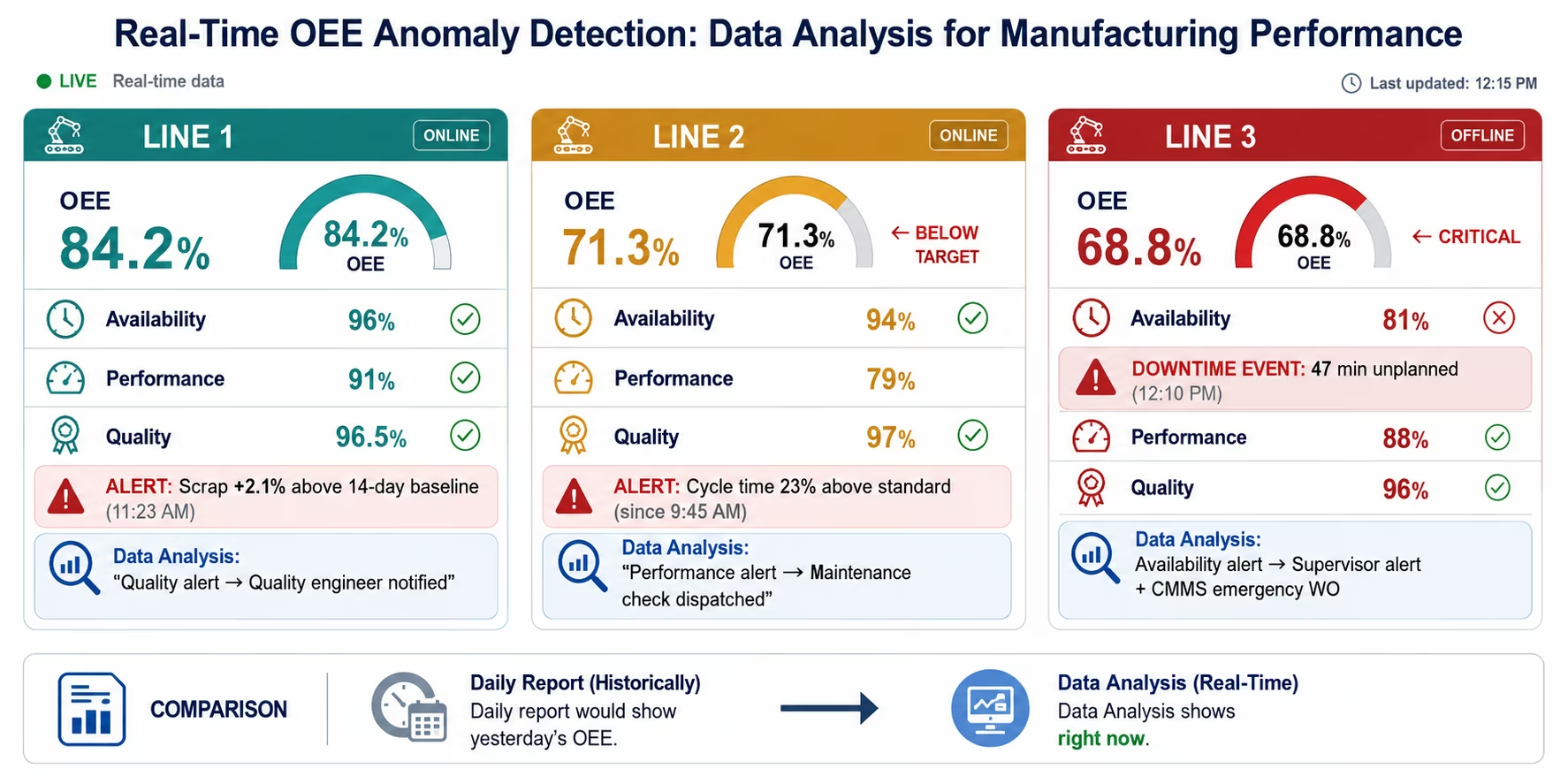
The AI workflow solution: Data Analysis monitors the data streams that compose OEE, production counts, cycle times, downtime events, and quality data: continuously, calculating OEE in real time and detecting deviations before they compound.
What Data Analysis Monitors for OEE
Availability losses:
- Unplanned downtime events: equipment state change from running to stopped, detected from MES or OPC-UA/SCADA data. Duration exceeding the configured micro-stoppage threshold (typically 5-10 minutes) logged as a downtime event with equipment, time, and duration.
- Changeover time anomalies: changeover durations that exceed the standard time for the product/equipment combination flagged as extended changeover.
- Planned vs actual uptime: shift planned uptime vs actual run time calculated per equipment per shift.
Performance losses:
- Cycle time deviation: OPC-UA or MES cycle time data compared against the standard cycle time for the current product. Sustained cycle time elevation (equipment running slower than standard) flagged as speed loss.
- Micro-stoppage clusters: sequences of brief stops that individually fall below the downtime logging threshold but collectively represent significant performance loss.
Quality losses:
- Scrap rate elevation: MES-reported scrap quantities compared against the historical scrap baseline for the product and equipment combination. Elevation above the configured threshold (e.g., 1.5x the 14-day average) triggers a quality alert.
- First-pass yield deviation: shift first-pass yield compared against the standard for the product. Below-threshold yields trigger quality investigation routing.
OEE Anomaly Alert Routing
- OEE below 75% for current shift (rolling calculation): alert to shift supervisor with component breakdown (which of availability, performance, quality is driving the loss)
- Sustained cycle time elevation >15 minutes: maintenance notification to check equipment condition
- Scrap rate elevation: quality engineer notified with product, equipment, and time context
- OEE trending below target for 3 consecutive shifts: plant manager summary with contributing factors identified
The result: OEE visibility changes from daily-lagging to real-time. Supervisors can intervene in the current shift rather than reviewing what happened yesterday. Performance losses that were previously invisible at the daily reporting granularity become actionable within the shift. Plants with continuous OEE monitoring typically achieve 5-10 percentage point OEE improvement within 90 days as supervisors act on within-shift signals rather than retrospective daily reports.
Key Outcomes and Results
Manufacturing operations teams deploying AI workflows with eZintegrations report the following outcomes within 60-90 days:
Production Planning:
- MES-to-SAP production actuals lag: 2-9 hours (manual handover) → under 2 minutes (event-driven)
- Production planning errors from stale data: reduce 60-70%
- Replenishment accuracy: improves 20-30% as planning is based on current actuals
Quality Management:
- Quality hold placement time: hours (next-morning email check) → minutes (event-driven)
- Shipped-held-lot incidents: eliminated for connected warehouse + LIMS environments
- Supplier CoA processing: 80-90% automated: dock waiting time for document entry eliminated
- Incoming quality failures from supplier-reported-pass/internal-fail: detected automatically by specification cross-reference
Maintenance:
- Unplanned downtime (monitored failure modes): reduces 40-60%
- Planned maintenance effort on healthy equipment: reduces as condition-based scheduling focuses PM resources
- MTBF for monitored equipment: improves as maintenance is timed correctly
- Downtime logging completeness: improves significantly, events logged at occurrence from sensor data, not from technician memory
OEE:
- OEE visibility latency: daily (next-day) → real-time (current shift)
- OEE improvement within 90 days of continuous monitoring: 5-10 percentage points typical
- Supervisor intervention speed: within-shift (acting on current signals) vs next-shift (acting on yesterday’s report)
Document Processing:
- Supplier CoA manual entry: reduces 80-90%
- Batch record closure time: reduces 50-60% with automated data aggregation
- Shift handover report quality: improves significantly with structured AI-assembled reports
How to Get Started
The manufacturing AI workflow stack is available as connected Automation Hub templates: MES-to-ERP sync, quality hold automation, OEE monitoring, supplier CoA processing, and predictive maintenance signal routing. Most teams go live on the MES-to-ERP sync and quality hold automation within 3-5 days of implementation.
Step 1: Import your manufacturing workflow templates
Browse the Automation Hub for manufacturing templates:
- SAP PP production order confirmation sync (MES-to-SAP actuals)
- Quality hold propagation template (LIMS → SAP QM → WMS)
- Supplier CoA Document Intelligence template
- OEE Data Analysis monitoring template
- Predictive maintenance signal template (PI Web API → CMMS)
Step 2: Connect your manufacturing systems
Configure connections for your stack:
- SAP S/4HANA: system hostname, client number, service account, OData V4 endpoint
- Siemens Opcenter or Plex MES: REST API URL, authentication credentials
- OSIsoft PI System: PI Web API URL and credentials (or IPSec Tunnel for on-premises PI)
- LIMS: REST API URL or database connection string (IPSec Tunnel for on-premises)
- CMMS (Maximo, SAP PM): REST API URL and authentication
- WMS: REST API and authentication
The connectors manage the CSRF token lifecycle (SAP), OAuth refresh (Oracle), and API rate limits automatically.
Step 3: Configure exception classification rules
Define the LLM Classification categories for your operation in plain language:
- Production exceptions (shortage, elevated scrap, order status mismatch)
- Quality hold severity levels (critical/regulatory, non-conforming, advisory)
- Maintenance priority levels (imminent failure, emerging condition, normal variation)
Takes 30-60 minutes per classification domain.
Step 4: Set anomaly thresholds for Data Analysis
For OEE monitoring (use defaults and refine):
- OEE alert threshold (75% rolling shift default)
- Cycle time deviation threshold (15% above standard)
- Scrap rate elevation threshold (1.5x 14-day baseline)
- Downtime minimum duration for logging (5 minutes)
For predictive maintenance:
- Sigma threshold per tag (2.5σ default for single-tag anomaly)
- Correlation window for multi-tag analysis (rolling 2-hour window)
Step 5: Run parallel for one week, then go live
Run AI workflows in parallel with existing processes for 5-7 days:
- Validate MES-to-SAP actuals against manual handover data
- Verify quality hold propagation timing and accuracy
- Review OEE anomaly alerts for false positive rate and calibrate thresholds
Most manufacturing teams achieve accurate exception routing within 3-5 days and go fully live within 10 business days.
Import your manufacturing AI workflow templates now: SAP, Siemens Opcenter, Plex, PI System, and CMMS templates with pre-configured connectors and AI nodes.
Frequently Asked Questions
AI workflow automation connects MES systems such as Siemens Opcenter and Rockwell Plex, ERP systems such as SAP S/4HANA and Oracle, and shop floor data sources including OSIsoft PI System, OPC-UA, and SCADA through event-driven integration. This replaces batch-based synchronisation with real-time data flows. Production actuals are posted to SAP within minutes of MES confirmation, and quality holds propagate across systems shortly after detection. AI nodes provide the intelligence layer: LLM Classification routes exceptions to the correct teams, Data Analysis detects OEE anomalies and equipment condition signals, and Document Intelligence processes supplier quality documents regardless of format.
Initial setup is rapid using prebuilt templates. MES-to-ERP actuals synchronisation and quality hold automation can be configured in 3–5 business days. SAP connector configuration using OData V4 endpoints and authentication takes approximately 2–4 hours, while MES connector setup and event mapping requires another 2–4 hours. LLM Classification rules for exception routing can be defined within 30–60 minutes. Parallel-run validation typically takes 5–7 days before full go-live. Additional predictive maintenance configuration, including PI System tag selection and anomaly thresholds, takes 2–3 more days.
Yes, eZintegrations integrates with SAP S/4HANA modules including PP (production planning), QM (quality management), MM (materials management), and PM (plant maintenance) using OData V4 with automatic CSRF token handling. Supported operations include production order confirmations from MES, goods movements such as receipts and scrap booking, quality notification and inspection lot creation, and maintenance work order generation. For SAP ECC on-premises environments, connectivity is enabled through a secure IPSec Tunnel without exposing SAP systems to the public internet.
Yes, eZintegrations connects to OSIsoft PI System via the PI Web API, supporting real-time tag queries, historical data access, event frame creation, and notification integration. The Data Analysis node continuously monitors historian data to detect anomalies in vibration, temperature, pressure, and electrical signals that indicate potential failures. For on-premises deployments, connectivity is secured through an IPSec Tunnel. When anomaly thresholds are exceeded, the workflow can automatically create condition-based work orders in systems such as IBM Maximo or SAP PM.
OEE improvement comes from faster detection and response rather than new data sources. Production counts, cycle times, downtime events, and scrap data already exist in MES and historian systems but are often analysed in delayed reports. AI workflow automation monitors these signals continuously: cycle time deviations are identified within minutes, downtime events are captured in real time from sensor data, and scrap rate increases trigger immediate quality alerts. This enables supervisors to act during the current shift rather than retrospectively. Plants adopting continuous OEE monitoring typically achieve 5–10 percentage point improvements within 90 days. 1. How does AI workflow automation work for manufacturing ERP and MES integration?
2. How long does it take to set up manufacturing AI workflow automation?
3. Does eZintegrations work with SAP PP and QM for manufacturing workflows?
4. Can AI workflows connect to OSIsoft PI System for predictive maintenance?
5. How does AI workflow automation improve OEE in manufacturing?
Conclusion: The Gap Between the Shop Floor and the ERP Costs More Than You Measure
The production data sitting in your MES, the condition data in your PI historian, The quality data in your LIMS, and the supplier documents in your receiving dock are all more valuable than their current use suggests: because none of it reaches the enterprise systems and decision-makers who need it in time to act.
The production planner working from yesterday’s actuals makes decisions that are corrected tomorrow. The quality engineer who hears about the 2 AM hold at 8 AM arrives at the dock too late to prevent the staged shipment. The maintenance team dispatching on PM schedules misses the bearing that was showing failure precursors for three days in the historian data nobody was monitoring.
These are not equipment problems. They are data pipeline problems. The manufacturing operations stack generates the right data. AI workflows deliver it to the right place, at the right time, with the right intelligence applied at the handoff.
Five use cases, five data pipelines, five places where the shop floor-to-ERP gap costs production time, quality incidents, and maintenance spend. The Automation Hub templates for SAP, Siemens Opcenter, Plex, PI System, and CMMS integration are configured and ready.
Import your manufacturing AI workflow templates today: SAP PP/QM/MM, Siemens Opcenter, Rockwell Plex, OSIsoft PI, and CMMS templates with pre-configured connectors and AI nodes.
Book a free demo manufacturing AI workflow and bring your current MES-to-ERP integration challenge. We will show you the real-time production actuals sync and quality hold workflow for your specific manufacturing stack.

