
AI Workflow Automation for Retail: From Order to Fulfilment Without Human Touchpoints
June 6, 2026AI workflow automation for retail connects ecommerce platforms (Shopify, Amazon, Walmart), ERP systems (NetSuite, SAP), and warehouse management systems to create end-to-end Order management system pipelines that process without human touchpoints. AI nodes handle the exceptions: LLM Classification routes non-standard orders, Data Analysis detects inventory anomalies, and Document Intelligence processes supplier documents: while real-time webhooks and inventory broadcasts keep all channels in sync within seconds of any change.
TL;DR
- Retail order-to-fulfilment has dozens of steps that still require human involvement: not because the steps are complex, but because the data handoffs between systems are fragile, inconsistent, and exception-prone.
- AI workflow automation removes human touchpoints from five categories of retail operations: order ingestion and routing (across Shopify, Amazon, Walmart, and 3PL channels), inventory broadcasting (real-time sync from WMS to all sales channels), fulfilment exception handling (LLM Classification routing problem orders without human triage), supplier document processing (Document Intelligence for POs, ASNs, and invoices), and demand anomaly detection (Data Analysis identifying stockout and overstock signals before they become problems).
- The before picture: orders take 20-40 minutes to flow from channel to WMS. Inventory updates run nightly. A stockout on Amazon is visible in the morning report, after the lost sales. Fulfilment exceptions sit in a queue until someone looks at them.
- The after picture: orders flow from channel to WMS in under 30 seconds. Inventory updates broadcast to all channels within seconds of a warehouse movement. Exceptions are classified and routed automatically. Stockout signals surface within the hour.
- eZintegrations connects Shopify, Amazon, Walmart, NetSuite, SAP, and 3PL systems via webhooks, REST APIs, and EDI: with AI workflow nodes embedded at the points where unstructured input, ambiguous classification, and anomalous data create the manual work.
The Problem: Where Retail Order-to-Fulfilment Still Breaks
It is a Tuesday at 10 AM. A viral TikTok post goes live featuring your product. By 10:15, 3,000 orders have come in across Shopify, Amazon, and your direct website. Your warehouse management system is still showing yesterday’s inventory levels. Your 3PL partner has not received any of the new pick orders. Your Shopify store is still showing 847 units available: the same number it showed at 9 AM: even though 600 of those units were just sold.
By the time your operations team notices the inventory mismatch, it is 11 AM. The 3PL has received 1,200 of the orders via the batch sync that ran at 10:30. The other 1,800 are stuck in Shopify. Three hundred orders have been accepted that you cannot fulfil. Your customer service queue is building.
This is the retail automation gap. Not in the edge cases. In the standard operating scenario. Retail operations teams are now working in a market where Forrester retail insights show that customer expectations are moving toward faster, more connected digital and physical shopping experiences. That means delayed order fulfilment, outdated inventory visibility, and disconnected retail systems are no longer small backend issues — they directly affect customer trust, order accuracy, and revenue.
According to McKinsey, retail operations teams spend 30-40% of their time managing data handoffs between systems that should be automated: order syncs that run on schedules instead of events, inventory updates that lag by hours instead of seconds, exception queues that require human triage for every non-standard order.
According to Gartner, the median time between a customer placing an order and the warehouse receiving the pick instruction is 47 minutes for mid-sized retailers. For retailers using event-driven integration with real-time order routing, that median drops to under 90 seconds.
The difference is not processing speed inside any individual system. The difference is how the systems talk to each other: and who has to intervene when they do not agree.
eZintegrations replaces the scheduled batch syncs, the manual exception queues, and the fragile custom scripts with event-driven AI workflows: orders flow from channel to WMS in under 30 seconds, inventory broadcasts propagate within seconds of warehouse movement, and exceptions are classified and routed by AI without waiting for a human to look at the queue.
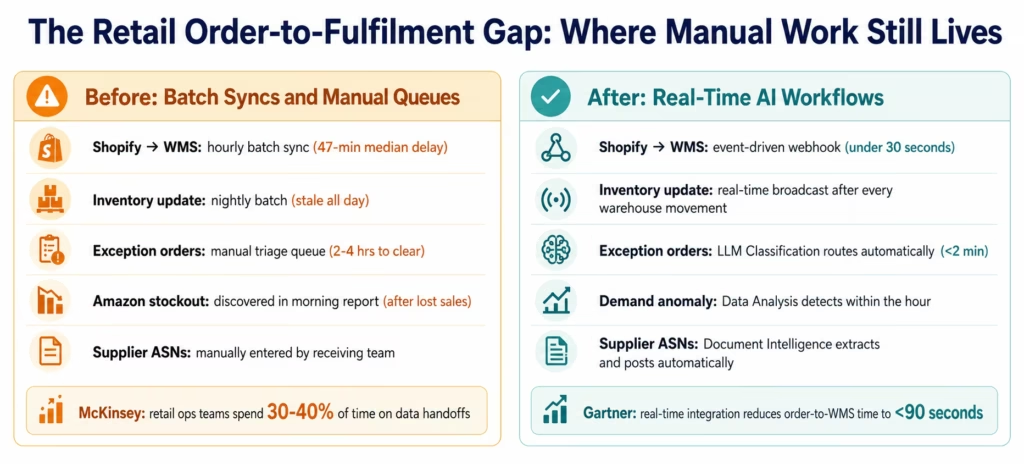
Before vs After: AI Workflows for Retail
| Process | Before AI Workflows | After AI Workflows | Impact |
|---|---|---|---|
| Order ingestion (Shopify/Amazon/Walmart) | Batch sync every 30-60 minutes to WMS | Event-driven webhook: order in WMS within 30 seconds of placement | 47-min delay eliminated |
| Inventory broadcasting | Nightly batch update to all sales channels | Real-time broadcast within seconds of warehouse movement | Channels always in sync |
| Multi-channel inventory oversell | Discovered after the fact, manual correction | Inventory levels broadcast to all channels simultaneously; allocation prevents oversell | Oversell incidents eliminated |
| Order exception triage | 200-300 exceptions per week, human queue (2-4 hrs to clear) | LLM Classification routes by type automatically; 80% resolved without human | 80% reduction in queue work |
| Supplier ASN processing | Receiving team manually enters ASN data | Document Intelligence reads ASN documents and updates WMS automatically | 90% of ASN entries automated |
| Stockout detection | Discovered in morning report (sales already lost) | Data Analysis detects velocity anomaly within the hour and alerts buying team | Proactive, not reactive |
| 3PL pick order transmission | Batch to 3PL, lag creates fulfillment SLA risk | Real-time transmission with order confirmation receipt | 3PL SLA compliance improves |
| Return processing | Manual RMA creation per return request | LLM Classification routes return type, triggers automated RMA + inventory update | 70-80% of returns automated |
| Demand spike response | Ops team notices spike after inventory runs low | Data Analysis detects sell-through velocity change within 1-2 hours | Reorder triggered proactively |
| Channel price/promo sync | Marketing team manually updates each channel | Promotions sync from ERP to all channels within 60 seconds of activation | Zero manual channel updates |
How eZintegrations Solves Retail Automation Challenges
Retail teams comparing modern integration options, the G2 iPaaS software category is a useful reference point for understanding how integration platforms help connect cloud applications, ecommerce systems, ERP, WMS, and workflow automation tools. eZintegrations builds on this same integration need by adding AI workflow nodes for order routing, inventory broadcasting, supplier document processing, and exception handling.
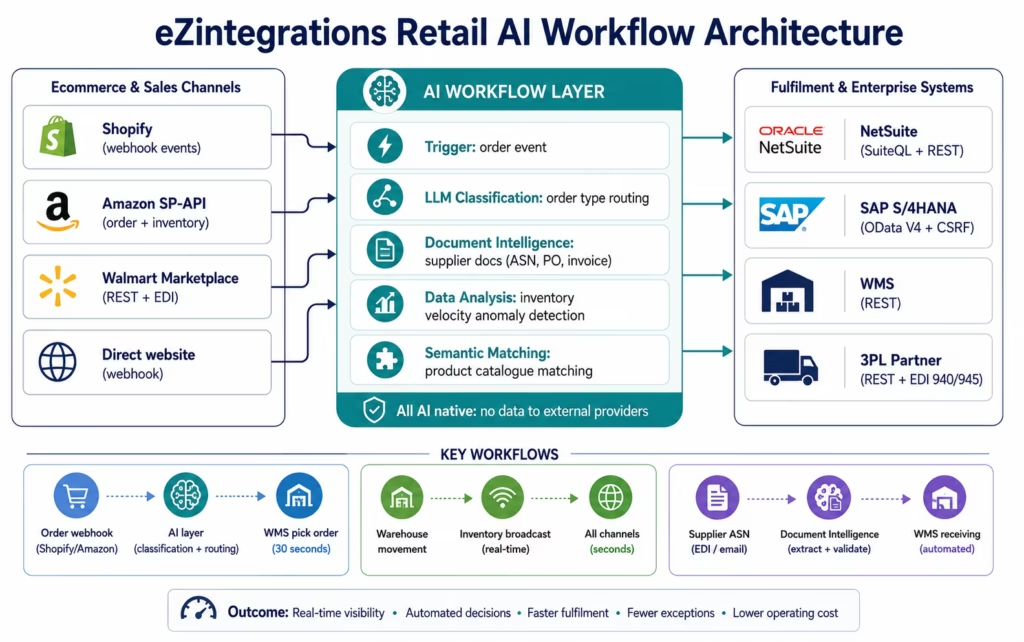
eZintegrations connects the retail technology stack: ecommerce platforms, ERP systems, warehouse management systems, and 3PL partners: via event-driven integration that eliminates the batch sync delays that create most retail operational problems.
Shopify connector: real-time webhook listener for order events (order created, order updated, order cancelled, fulfilment event). REST API for inventory level updates, product data sync, and fulfilment creation. Shopify’s API rate limits (leaky bucket, 40 requests per second on Plus) are managed automatically by the connector.
Amazon Selling Partner API connector: order management, inventory synchronisation, and FBA/FBM fulfilment workflow support. Amazon’s SP-API requires refresh token management and LWA (Login with Amazon) authentication: handled automatically. Amazon’s Restricted Data Token (RDT) flow for PII-containing order data is supported.
Walmart Marketplace connector: order management, inventory sync, and shipping carrier integration via Walmart’s REST API. EDI 850 (purchase orders) and EDI 856 (advance ship notices) supported for wholesale channel.
NetSuite connector: SuiteQL for complex inventory and order queries, REST for CRUD operations. Real-time inventory level update from NetSuite to all channels. Financial posting of retail transactions (revenue recognition, COGS, returns).
SAP S/4HANA connector: OData V4 with CSRF token management for write operations. SAP inventory management, purchase order processing, and goods receipt posting for retail ERP deployments.
3PL connector (via REST and EDI): standardised 3PL integration via REST webhooks and EDI 940 (warehouse shipping order) / EDI 945 (warehouse shipping advice) for 3PL fulfilment workflows.
The AI workflow layer: Document Intelligence for supplier documents (POs, ASNs, invoices), LLM Classification for order exception routing and return triage, Data Analysis for demand anomaly detection and inventory velocity monitoring, Semantic Matching for product catalogue matching across channels. All AI processing runs natively within eZintegrations: no product, order, or inventory data sent to external AI providers.
Compliance: SOC 2 Type II certified. GDPR compliant for EU customer and order data. HIPAA BAA available for retailers in healthcare-adjacent verticals. IPSec Tunnel for on-premises WMS or ERP systems behind corporate firewalls.
Use Case 1: Order Ingestion and Multi-Channel Routing
The problem in one sentence: your orders come from five channels, each in a different format, and your WMS expects a standard pick order: so someone has to normalise each channel’s data and make sure orders reach the warehouse before the customer expects them shipped.
The AI workflow solution: event-driven webhooks on each channel fire the moment an order is placed. LLM Classification reads the order data and classifies it by fulfilment method (owned warehouse, 3PL, dropship, or FBA), shipping priority (standard, expedited, overnight), and any special handling requirements (fragile, hazmat, requires signature). The classification routes the order to the correct fulfilment queue with the correct priority flag: automatically, within 30 seconds of placement.
The Step-by-Step Order Ingestion Workflow
Trigger: order created webhook fires from Shopify, Amazon, Walmart, or direct channel.
Step 1: Data normalisation: the raw order payload (which differs in structure across Shopify, Amazon, and Walmart) is mapped to a canonical order schema: order ID, channel, customer, line items (SKU, quantity, price), shipping address, shipping method, and any special instructions.
Step 2: LLM Classification: the normalised order is classified:
- Fulfilment method: own warehouse, 3PL, dropship, or FBA (based on SKU routing rules, inventory availability, and shipping destination)
- Shipping priority: based on shipping method selected and order value
- Special handling: reads order notes and special instructions in natural language and flags hazmat, fragile, or signature-required orders
- Confidence above 85%: route automatically
- Confidence below 85%: route to order operations with classification pre-suggested
Step 3: Inventory allocation: the order line items are allocated against available inventory in the ERP (NetSuite SuiteQL or SAP OData V4). Inventory is reserved for the order. Available inventory levels updated across all channels immediately (see Use Case 2).
Step 4: Pick order creation: a pick order is created in the WMS via REST API or transmitted to the 3PL via EDI 940, within 30 seconds of the original order placement.
Step 5: Customer notification: order confirmation sent and tracking number queued for transmission once the 3PL or WMS confirms the shipment.
The result: the median order-to-WMS time drops from 47 minutes (batch sync) to under 30 seconds (event-driven with AI classification). During demand spikes, batch syncs create backlogs; event-driven workflows process each order as it arrives, regardless of volume.
Use Case 2: Real-Time Inventory Broadcasting
The problem: your inventory moves continuously: units sold, received, returned, damaged, transferred. Your sales channels need current inventory levels to prevent overselling. Running inventory updates on a batch schedule means your channels are always showing yesterday’s (or this morning’s) stock levels: leading to oversell events, cancelled orders, and customer service cost.
The AI workflow solution: every warehouse movement event triggers an immediate inventory broadcast to all connected sales channels. No batch schedule. No lag. Every pick, receipt, return, and adjustment posts to the WMS and broadcasts to Shopify, Amazon, and Walmart within seconds.
The Inventory Broadcasting Workflow
Trigger: inventory transaction event in the WMS or ERP: pick confirmation, goods receipt, return processing, stock adjustment, or transfer order completion.
Step 1: Inventory calculation: the current available-to-promise (ATP) quantity is calculated per SKU per location: on-hand minus allocated minus safety stock.
Step 2: Channel-specific formatting: the ATP quantity is formatted for each channel’s inventory API:
- Shopify: REST API inventory level update per location
- Amazon: SP-API inventory quantity update
- Walmart: inventory feed update
Step 3: Broadcast: all three channels receive the updated inventory level simultaneously, via parallel API calls from the eZintegrations workflow. Total time from warehouse event to all-channel update: typically under 10 seconds.
Step 4: Data Analysis monitoring: the Data Analysis node monitors the broadcast pipeline for anomalies:
- Inventory level drops below safety stock threshold: alert to buying team
- Sell-through velocity for a SKU increases more than 3x above the 7-day average: demand spike alert with reorder recommendation
- Inventory level in one channel falls to zero while others show available stock: allocation discrepancy alert
The result: oversell incidents caused by stale inventory levels are eliminated. During the viral TikTok scenario from the introduction: 3,000 orders in 15 minutes: the inventory broadcasting workflow processes each pick event and updates all channels in near real time, preventing the inventory mismatch that creates the customer service problem.
Use Case 3: Fulfilment Exception Handling with LLM Classification
The problem: not every order processes cleanly. A customer enters the wrong address. An item is out of stock at the preferred fulfilment location. An order contains a product restricted from shipping to the customer’s state. A bulk order arrives from a B2B customer through the direct-to-consumer checkout, at D2C pricing. Each exception currently requires a human to read the order, understand the problem, and decide what to do.
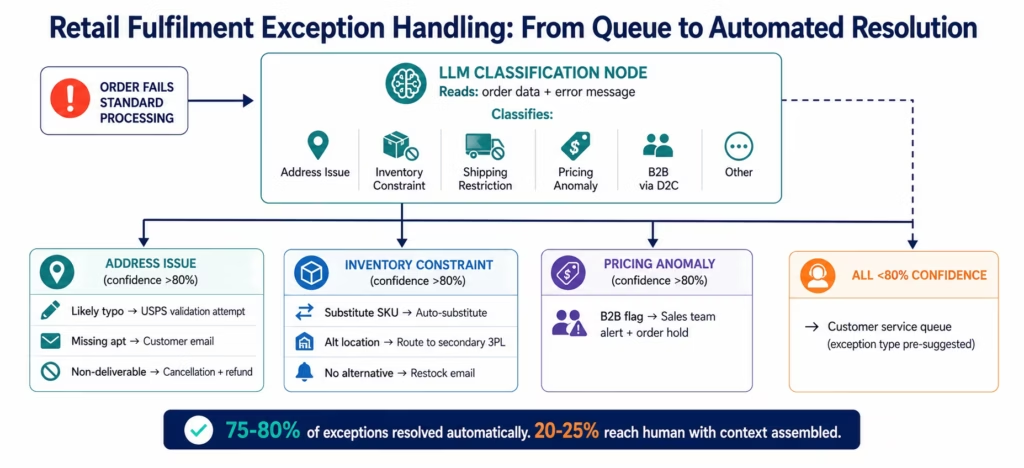
The AI workflow solution: LLM Classification reads every order that fails standard processing and classifies the exception type: address issue, inventory constraint, shipping restriction, pricing anomaly, or other. Each exception type has a configured resolution path: address issues trigger a customer email requesting correction, inventory constraints route to the 3PL for alternate fulfilment, shipping restrictions generate a compliant cancellation with refund trigger, pricing anomalies route to the sales ops team.
Exception Classification in Practice
Exception type routing (with confidence thresholds):
-
Address validation failure: LLM reads the address alongside the failed validation message and classifies: likely typo (routes automated correction attempt via USPS validation), apartment/suite missing (routes customer email), non-deliverable address (routes cancellation workflow). Confidence above 80%: automated action. Below 80%: customer service queue with classification pre-suggested.
-
Inventory constraint: LLM reads the SKU, quantity, and available inventory across all locations and classifies: substitute SKU available and within tolerance (routes auto-substitute), alternative fulfilment location available (routes to secondary 3PL), no alternative available (routes customer email with expected restock date).
-
B2B order through D2C channel: LLM detects orders containing high quantities, commercial shipping addresses, or B2B company names and flags for the sales team to reach out with proper account pricing. Auto-hold prevents incorrect D2C pricing from processing.
The result: 75-80% of fulfilment exceptions resolve without a human opening the order. The 20-25% that reach a human arrive with the exception type identified, the resolution options presented, and the action staged for approval: 5 minutes of review instead of 20 minutes of investigation.
Use Case 4: Supplier Document Processing with Document Intelligence
The problem: your receiving team processes 30-50 advance ship notices (ASNs) per day from suppliers. Each arrives as a PDF or EDI document in a different format: supplier A sends a 6-page PDF, supplier B sends a standardised EDI 856, supplier C sends an Excel spreadsheet with inconsistent column names. Your team enters each ASN manually into the WMS before the shipment arrives. A missed or delayed ASN means the receiving team cannot pre-stage the inbound without manual scrambling.
The AI workflow solution: Document Intelligence reads each ASN document regardless of format and extracts the required fields: supplier name, PO number, expected delivery date, SKU, quantity per SKU, lot number (for products requiring lot tracking), and carrier/tracking information. The extracted data is posted to the WMS as an inbound shipment record automatically.
The Supplier Document Workflow
Trigger: new email in the receiving inbox, new file in the supplier document folder (S3, SharePoint, or EDI mailbox), or supplier portal webhook event.
Step 1: Document Intelligence: the ASN document is processed. Fields extracted: supplier, PO number, shipment date, expected delivery, carrier, tracking number, and line items (SKU, quantity, lot number if applicable). Confidence score per field.
Step 2: PO cross-reference: the extracted PO number is matched against open purchase orders in the ERP (NetSuite SuiteQL or SAP OData V4). Discrepancies between ASN quantities and PO quantities are flagged.
Step 3: WMS inbound creation: an inbound shipment record is created in the WMS with the extracted ASN data. Receiving team can pre-stage putaway locations before the truck arrives.
Step 4: Supplier invoice matching: when the supplier invoice arrives, Document Intelligence processes it and cross-references against the ASN and the goods receipt: a three-way match for accounts payable that prevents payment for goods not received.
Documents supported: PDF ASNs, EDI 856 transactions, supplier-formatted Excel files, structured XML documents, and HTML emails with embedded ASN data.
The result: 85-90% of ASN documents process automatically without manual data entry. The receiving team’s time shifts from document data entry to physical receiving operations: a shift that reduces receiving bottlenecks and improves dock scheduling accuracy.
Use Case 5: Demand Anomaly Detection with Data Analysis
The problem: your buying team manages inventory decisions based on weekly sales reports and gut feel. By the time a stockout appears in the report, you have already lost 2-3 days of sales. By the time an overstock becomes visible in the aging report, you have already missed the markdown timing window. The data exists to predict both problems in near real time: it just sits unanalysed in the order management system.
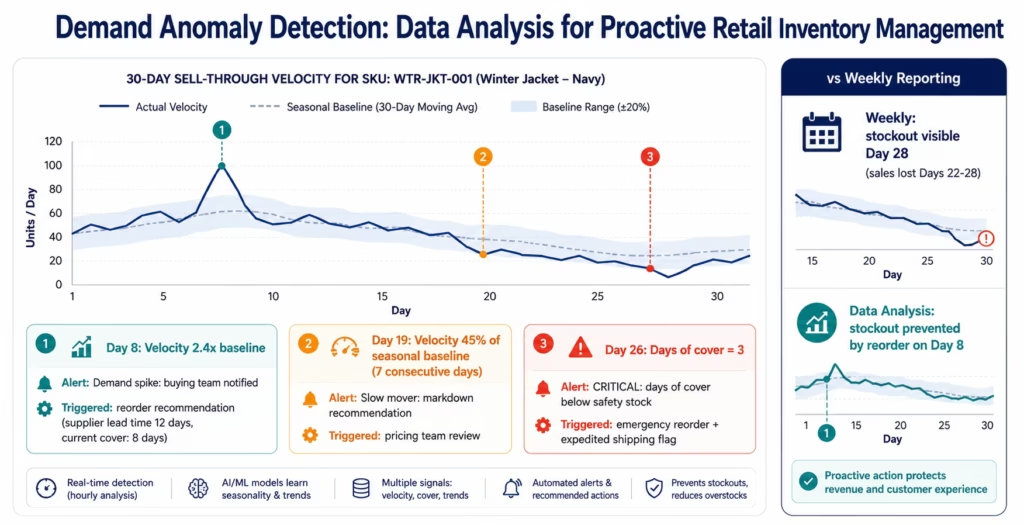
The AI workflow solution: the Data Analysis node monitors sell-through velocity continuously, not weekly. When a SKU’s daily sell-through rate deviates significantly from its historical baseline, the Data Analysis node fires an alert before the problem becomes a business impact.
What Data Analysis Monitors in Retail
Stockout prediction:
- When a SKU’s daily sell-through velocity exceeds 2x its 14-day average, a demand spike alert fires to the buying team with the current days-of-cover calculation and a suggested reorder quantity.
- When days-of-cover for a SKU drops below the configured safety stock threshold, a reorder alert fires with supplier lead time and suggested PO quantity.
Overstock detection:
- When a SKU’s sell-through velocity drops below 50% of its seasonal baseline for 7 consecutive days, a slow-mover alert fires with current on-hand quantity and a markdown timing recommendation.
- When received quantity on a PO creates an on-hand position exceeding 90 days of cover at current velocity, a receiving alert flags potential overstock before the goods are put away.
Demand spike attribution:
- When a significant velocity increase occurs, the Data Analysis node correlates the timing with external signals: promotions active in the ERP, pricing changes, and if Web Crawling is enabled, competitor pricing changes or social media mentions.
The result: buying teams with continuous Data Analysis monitoring report stockout incidents reducing by 40-55% and overstock write-downs reducing by 30-40% compared to weekly reporting cycles. The difference is the detection window: hours versus days.
Key Outcomes and Results
Retail operations teams deploying AI workflows with eZintegrations report the following outcomes within 60-90 days:
Order Processing:
- Order-to-WMS time: 47-minute batch median → under 30 seconds event-driven
- Order processing cost per order: reduces 40-60% as manual steps are eliminated
- Order accuracy rate: improves 15-25% as AI classification reduces human error
- Peak period handling: batch sync backlogs eliminated: event-driven scales with volume
Inventory Management:
- Oversell incidents: eliminated for channels connected to real-time inventory broadcast
- Inventory data freshness: nightly batch → seconds from warehouse event
- Channel inventory discrepancies: reduces 85-90% with continuous broadcasting
- Stockout incidents: reduces 40-55% with Data Analysis velocity monitoring
Exception Handling:
- Fulfilment exception queue: 75-80% of exceptions resolved automatically
- Average exception resolution time: 20-30 minutes (manual) → under 5 minutes (AI-assisted or automatic)
- Human touchpoints per 100 orders: reduces from 12-15 to 2-4
Supplier Operations:
- ASN processing: 85-90% automated with Document Intelligence
- Receiving team time on data entry: reduces 70-80%
- Supplier invoice matching: automated three-way match reduces AP exceptions by 60-70%
Financial:
- Overstock write-downs: reduces 30-40% with proactive velocity monitoring
- Carrying cost: reduces as inventory turns improve
- Customer service cost: reduces 30-40% as oversell and exception rates decline
How to Get Started
The retail AI workflow automation stack is available as a connected set of Automation Hub templates: covering order ingestion, inventory broadcasting, exception handling, supplier document processing, and demand monitoring. Most retail teams go live on the first two use cases (order ingestion and inventory broadcast) within a single implementation day.
Step 1: Import the Retail Order-to-Fulfilment template bundle
Browse the Automation Hub for retail workflow templates:
- Shopify order-to-WMS real-time routing template
- Amazon SP-API order sync + inventory broadcast template
- Walmart Marketplace order and inventory template
- Supplier ASN processing template (Document Intelligence)
- Inventory broadcast multi-channel template
- Fulfilment exception handling template (LLM Classification)
- Demand anomaly detection template (Data Analysis)
Step 2: Connect your channels and systems
Configure the connections for your specific stack:
- Shopify: API key and store URL (webhook registration is automatic)
- Amazon: SP-API credentials (seller ID, LWA app credentials, refresh token)
- Walmart: client ID and client secret
- NetSuite: account ID, TBA credentials (consumer key/secret, token ID/secret)
- WMS: REST API URL and authentication
- 3PL: webhook URL or EDI connection details
The connectors handle the authentication lifecycle (token refresh, rate limit management) automatically.
Step 3: Configure the order classification rules
Define the LLM Classification categories for your operation:
- Fulfilment methods available (own warehouse, 3PL names, dropship suppliers)
- Shipping priority tiers (standard, expedited, overnight)
- Special handling flags (fragile, hazmat, signature required, B2B flag)
- Exception types and resolution paths
This takes 30-60 minutes using the plain-language classification definition interface.
Step 4: Set inventory thresholds and anomaly parameters
For each SKU category (or use defaults and refine):
- Safety stock level (units or days of cover)
- Velocity spike threshold (2x 14-day average is a standard starting point)
- Slow-mover threshold (50% of seasonal baseline for 7 days)
- Days-of-cover alert level
Step 5: Run parallel for one week, then cut over
Run the AI workflow in parallel with your existing process for 5-7 days:
- Compare order routing decisions against your manual routing
- Review exceptions classified by LLM Classification for accuracy
- Validate inventory broadcast timing and accuracy against channel snapshots
At the end of the parallel run, disable the batch syncs and go fully event-driven. Most teams achieve 90%+ routing accuracy in the parallel run and cut over within 7-10 days.
Import your retail AI workflow templates now: Shopify, Amazon, Walmart, NetSuite, SAP, and 3PL templates are available with pre-configured connectors and AI nodes.
[VIDEO PLACEHOLDER: retail AI workflow demo | “AI Workflow Automation for Retail: Real-Time Order Routing and Inventory Broadcasting in eZintegrations” | Embed after How to Get Started section | Show: importing the Shopify order-to-WMS template, configuring the Shopify webhook connection, watching a test order flow from Shopify placement to WMS pick order in under 30 seconds, and the inventory broadcast updating Amazon and Walmart inventory levels simultaneously. Duration: 8-10 minutes.]
Frequently Asked Questions
AI workflow automation connects ecommerce channels such as Shopify Amazon and Walmart with ERP systems including NetSuite and SAP WMS platforms and 3PL partners through event-driven webhooks and real-time APIs while AI nodes handle the steps that require intelligence instead of simple data movement. LLM Classification routes orders to the correct fulfilment queue by analysing order content and applying routing rules automatically. Document Intelligence processes supplier ASNs and invoices regardless of format. Data Analysis monitors sell-through velocity and triggers alerts when anomalies appear eliminating manual touchpoints throughout the order-to-fulfilment process.
Core order ingestion and inventory broadcast workflows can typically be configured in 4-8 hours using Automation Hub templates. The Shopify-to-WMS real-time order routing template includes pre-configured webhook triggers data normalisation and WMS posting requiring only credential connection and routing rule configuration. The inventory broadcast template supports Shopify Amazon and Walmart simultaneously. Supplier document processing through Document Intelligence requires a 15-30 minute calibration using 5-10 sample ASN documents from suppliers. The complete stack covering all major use cases generally goes live within 3-5 business days.
Yes. eZintegrations connects to Shopify through webhooks and REST APIs Amazon Selling Partner API using LWA authentication and RDT for order PII and Walmart Marketplace through REST and EDI simultaneously from the same workflow builder. Inventory broadcasts from the WMS are sent to all three channels through parallel API calls within seconds. Order events from all channels trigger a common order ingestion workflow that normalises each platform's data structure into a canonical order schema before ERP and WMS posting. Rate limits for each marketplace API are managed automatically by the corresponding connector.
Yes through real-time inventory broadcasting combined with reservation-based allocation. When an order is received and allocated the available-to-promise quantity decreases immediately in the ERP. The inventory broadcast workflow then pushes the updated quantity to all ecommerce channels within seconds. During demand spikes such as 3000 orders within 15 minutes each order allocation updates inventory availability in real time and broadcasts the change immediately across channels preventing stale inventory visibility. Combined with Data Analysis demand spike alerts where velocity exceeds 2x baseline the buying team receives proactive notifications to assess whether additional stock sourcing is required.
Yes. eZintegrations supports EDI 940 warehouse shipping orders for transmitting pick requests to 3PL providers and EDI 945 warehouse shipping advice for receiving shipment confirmations from 3PL partners in addition to REST API connectivity for modern 3PL platforms. The order-to-3PL fulfilment workflow triggers automatically on order placement creates the EDI 940 transmission within seconds and processes the EDI 945 confirmation to update order status and generate customer shipping notifications. For 3PL providers with REST APIs the same workflow can be configured entirely through REST without EDI. 1. How does AI workflow automation work for retail order management?
2. How long does it take to set up retail AI workflow automation?
3. Does eZintegrations work with Shopify Amazon and Walmart simultaneously?
4. Can AI workflows prevent overselling during demand spikes?
5. Does eZintegrations support 3PL EDI integration for fulfilment?
Conclusion: The Order Your Customer Placed Should Be at the Warehouse Before They Finish Checkout
The standard for retail order-to-fulfilment in 2026 is not 47 minutes. It is 30 seconds. The gap is not processing speed: your WMS and 3PL can pick and pack as fast as the orders arrive. The gap is integration: how quickly the order moves from the channel where it was placed to the system that fulfils it.
Batch syncs, manual exception queues, and nightly inventory updates are not limitations of the underlying systems. They are limitations of how those systems are connected. AI workflows replace batch with event-driven, replace manual queues with AI classification, and replace nightly updates with real-time broadcasts.
The five use cases in this guide: order ingestion and routing, real-time inventory broadcasting, fulfilment exception handling, supplier document processing, and demand anomaly detection: cover the manual touchpoints that prevent retail operations from scaling during the moments that matter most: the viral moment, the holiday peak, the flash sale.
The Automation Hub templates for Shopify, Amazon, Walmart, NetSuite, SAP, and 3PL integration are pre-configured and ready to deploy. Most retail teams have their first AI workflow live within a day.
Import your retail AI workflow templates today: Shopify, Amazon, Walmart, NetSuite, and 3PL templates with pre-configured AI nodes are available now.
Book a free demo and bring your current order-to-fulfilment flow. We will show you the real-time routing and inventory broadcast workflow for your specific channel and ERP combination.

