
ServiceNow Enterprise Integration: Connect ITSM Across the Whole Business
June 12, 2026To integrate ServiceNow with your enterprise systems using eZintegrations: connect your ServiceNow instance via the native ServiceNow REST API connector (using OAuth 2.0 or Basic Auth with your instance URL), select the ServiceNow table or API endpoint for your use case (Incident, Change Request, Problem, CMDB, Service Catalog, or any custom table), configure your trigger (a new incident in ServiceNow, a webhook from ServiceNow outbound REST, or a scheduled pull), map ServiceNow fields to your destination system (SAP, Oracle, Workday, Salesforce, Slack, or any enterprise app), and activate. Most ServiceNow integrations go live in under 30 minutes using a pre-built Automation Hub template.
TL:DR
ServiceNow Enterprise Integration: Connect ITSM Across the Whole Business
ServiceNow ITSM is your system of record for IT service management. But the incidents it tracks, the changes it approves, the assets it manages, and the employees it provisions are connected to every other enterprise system: your ERP, your HR platform, your security stack, your CRM, your data warehouse.
eZintegrations connects ServiceNow to all of them. Pre-built templates. Native REST API connector aligned with ServiceNow Developer Portal integration standards. Real-time and scheduled sync. No custom integration code to maintain.
Import a ServiceNow Integration Template from the Automation Hub and go live in minutes. Or book a free ServiceNow integration session and we will configure your specific ITSM workflow in the demo.

ServiceNow Connects Everything: Until It Doesn’t
ServiceNow manages incidents, changes, assets, and service requests. But ITSM processes rarely stay inside ITSM.
An incident in ServiceNow is often rooted in an ERP configuration change. A change request requires sign-off from a system owner whose identity lives in Workday. A new employee service request depends on HRIS data from SAP SuccessFactors. A CMDB asset record needs to match the hardware inventory in your procurement system.
When ServiceNow operates as an island, your ITSM team manually updates the ERP after a system change, manually checks Workday for approver details, manually cross-references CMDB with your asset database. Every one of those manual steps is a delay, a risk, and a compliance gap.
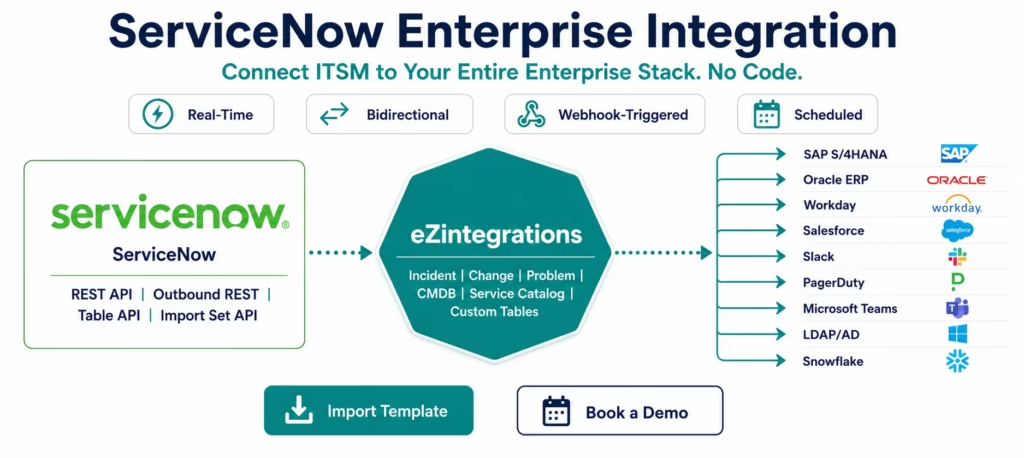
eZintegrations closes each gap with a pre-built integration template. ServiceNow talks to your ERP, your HR platform, your security tools, and your monitoring stack: automatically, in real time, with audit trails.
What You Can Do
Incident Management Across the Enterprise
When a critical incident is created in ServiceNow, your entire organisation needs to know: and act. eZintegrations routes ServiceNow incident events to the right people and systems in real time.
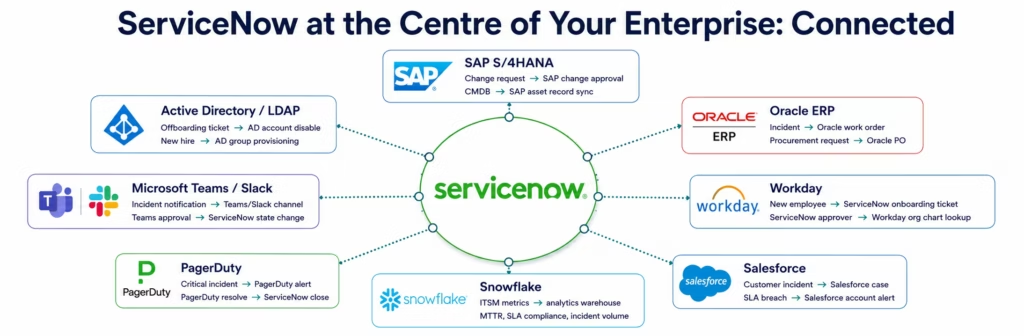
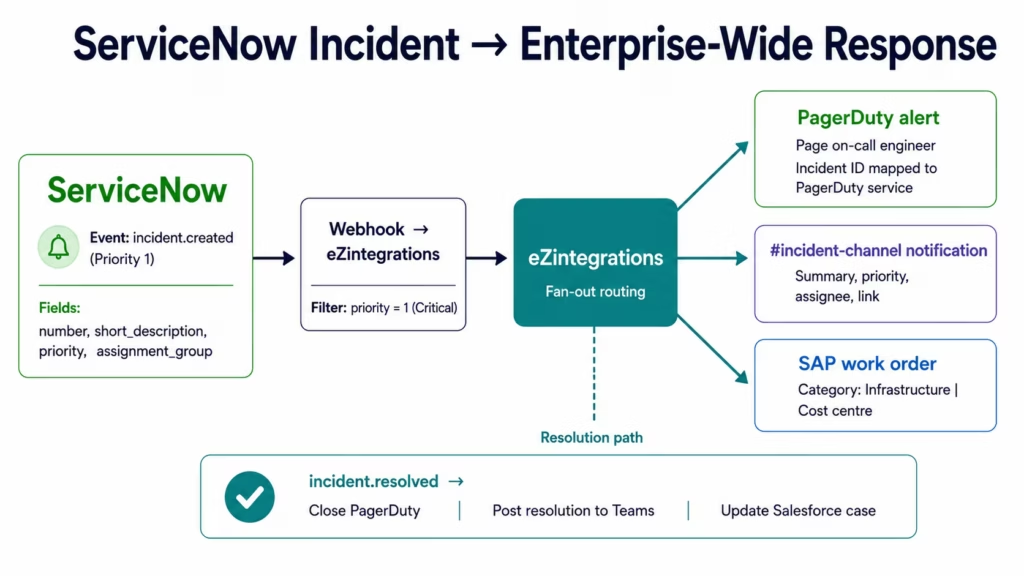
Incident to alerting and operations: A Priority 1 incident in ServiceNow fires a webhook. eZintegrations receives it, filters by priority, and routes to PagerDuty (to page the on-call engineer), Microsoft Teams and Slack (to notify the incident channel), and your SIEM (to correlate with security event data). When the incident is resolved in ServiceNow, a second webhook fires and eZintegrations closes the PagerDuty alert, posts resolution to the Teams channel, and logs the resolution data to Snowflake.
Incident to ERP: An incident related to a production system outage requires tracking in your ERP for cost allocation, warranty claims, or vendor SLA management. eZintegrations creates the corresponding work order or maintenance notification in SAP when the ServiceNow incident is categorised as hardware or infrastructure.
Incident to CRM: When a customer-affecting incident is opened, eZintegrations creates or updates a Salesforce case, notifies the account owner, and logs the incident reference to the customer record. When the incident closes, Salesforce is updated automatically.
Change Management and ERP Coordination
Change requests in ServiceNow drive configuration and infrastructure changes across enterprise systems, consistent with ServiceNow Integration Hub documentation integration patterns. eZintegrations automates the coordination between ServiceNow change management and your downstream ERP and infrastructure tools.
Change request to SAP: when a ServiceNow change request is approved, eZintegrations creates the corresponding change order in SAP (for equipment configuration changes, software licence changes, or infrastructure updates that have financial impact). The SAP change order number is written back to the ServiceNow change record.
CAB approval automation: when a change request moves to the CAB (Change Advisory Board) review state, eZintegrations pulls the approver list from Workday (the CAB members’ manager hierarchy), sends a Microsoft Teams approval card to each approver, and writes the approval decisions back to ServiceNow state fields.
Post-implementation validation: when a change is implemented and marked as Completed in ServiceNow, eZintegrations triggers a validation workflow: queries the affected systems via REST API, compares the expected post-change state to the actual state, and posts a validation summary back to the ServiceNow change record.
Employee Onboarding and Offboarding (ITSM + HR)
The most manual ITSM process in most enterprises is IT onboarding. An HR event in Workday or SAP SuccessFactors (new hire record created) needs to trigger a full set of IT provisioning tasks in ServiceNow.
Onboarding: when Workday creates a new employee record, eZintegrations receives the webhook (or scheduled pull), creates a ServiceNow onboarding task bundle (laptop request, software access, badge provisioning), pre-populates the ServiceNow records with employee data from Workday (department, role, location, start date), and routes each task to the correct IT fulfilment team. The employee’s Active Directory account is provisioned as part of the same automated flow.
Offboarding: when a Workday termination record fires, eZintegrations creates the ServiceNow offboarding task, triggers the Active Directory account suspension, revokes application access across the connected systems, and flags the CMDB asset records associated with the departing employee for return processing.
CMDB Synchronisation
The ServiceNow CMDB (Configuration Management Database) is only valuable when it reflects the actual state of your enterprise assets. eZintegrations keeps the CMDB current by syncing from the authoritative sources in your environment.
Asset database to CMDB: pull hardware and software asset records from your procurement system (SAP, Oracle, or a dedicated asset management database) and create or update the corresponding Configuration Items in ServiceNow on a schedule.
Cloud asset discovery to CMDB: pull running instances, containers, and services from AWS (via AWS Config or EC2 API), Azure (via Azure Resource Manager), and GCP (via Cloud Asset API) and sync the cloud resource records to the ServiceNow CMDB automatically.
CMDB to downstream systems: when a new server CI is added to the CMDB, trigger provisioning in your monitoring system (Datadog, Dynatrace), add it to your network management tool, and create the corresponding record in your asset tracking database.
Security Operations and SIEM Integration
Security incidents detected in your SIEM (Splunk, IBM QRadar, Microsoft Sentinel) need to create ServiceNow security incident records for tracking, SLA compliance, and remediation workflow. eZintegrations routes security events from your SIEM to ServiceNow and routes ServiceNow security incident updates back to your SIEM.
SIEM to ServiceNow: when your SIEM detects a high-severity event (suspicious login, data exfiltration alert, ransomware indicator), eZintegrations creates a ServiceNow Security Incident with the relevant event data, assigns it to the security operations team, and correlates it with the affected CI from the CMDB.
ServiceNow to remediation tools: when the security team updates the ServiceNow incident with a containment action, eZintegrations triggers the corresponding action in your security tooling: isolate the endpoint via an EDR API, revoke credentials via Active Directory, or block an IP via your firewall management API.
How It Works
Three steps from ServiceNow credentials to live enterprise integration.
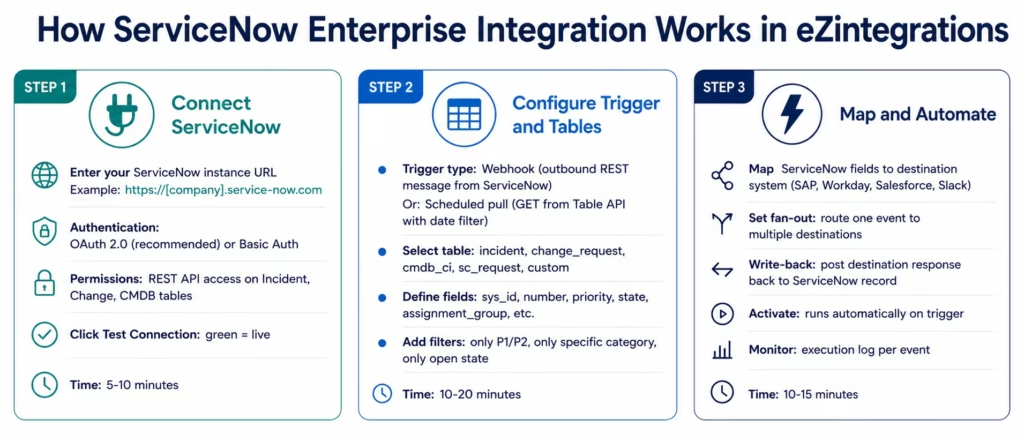
Step 1: Connect ServiceNow
Enter your ServiceNow instance URL in the connector configuration:
https://[your-instance].service-now.com
Select your authentication method:
OAuth 2.0 (recommended): configure an OAuth application in ServiceNow (Application Registry), generate client ID and client secret, and enter them in the eZintegrations connector. OAuth 2.0 provides scoped access with automatic token refresh.
Basic Auth: enter your ServiceNow username and password. Use a dedicated integration user account with the minimum required roles (rest_api_explorer and read/write roles on the tables you need).
Click Test Connection. eZintegrations calls the ServiceNow Table API health check endpoint. A green status confirms the instance is reachable and the credentials are valid.
Step 2: Configure Trigger and Table Selection
Webhook trigger (real-time): Configure ServiceNow to send outbound REST messages to your eZintegrations webhook endpoint when specific record changes occur. In ServiceNow: create a Business Rule or Outbound REST Message for the table and condition you want (for example: when an incident state changes to In Progress, or when a change request is approved). ServiceNow POSTs the record data to your eZintegrations endpoint. Processing begins in under 500 milliseconds.
Scheduled pull (near-real-time): eZintegrations runs a GET request against the ServiceNow Table API on your configured schedule. The query uses the sysparm_query parameter to filter for recent or changed records:
GET /api/now/table/incident (aligned with the ServiceNow REST API reference)

?sysparm_query=sys_updated_on>javascript:gs.dateGenerate('2026-04-20','00:00:00')
&sysparm_fields=sys_id,number,short_description,priority,state,assignment_group
&sysparm_limit=100
&sysparm_offset=0
The platform manages the timestamp watermark automatically: each run uses the maximum sys_updated_on from the previous run as the starting point.
Table selection: every standard ServiceNow table is accessible: incident, change_request, problem, cmdb_ci, sc_request, sc_task, alm_hardware, sys_user, and any custom table in your instance.
Step 3: Map Fields and Automate
Preview the ServiceNow record fields retrieved and map them to your destination system using the visual field mapper. ServiceNow-specific field handling:
- Reference fields (
assignment_group,caller_id,cmdb_ci): these return as GUIDs in the API response. eZintegrations can resolve reference fields to display values automatically or pass the GUID to a lookup step. - Choice fields (
priority,state,category): ServiceNow returns both the numeric value and the label. Map whichever format your destination system expects. - Write-back: after writing to the destination system, post the result (confirmation number, external ID, status) back to the originating ServiceNow record using a second API call within the same workflow.
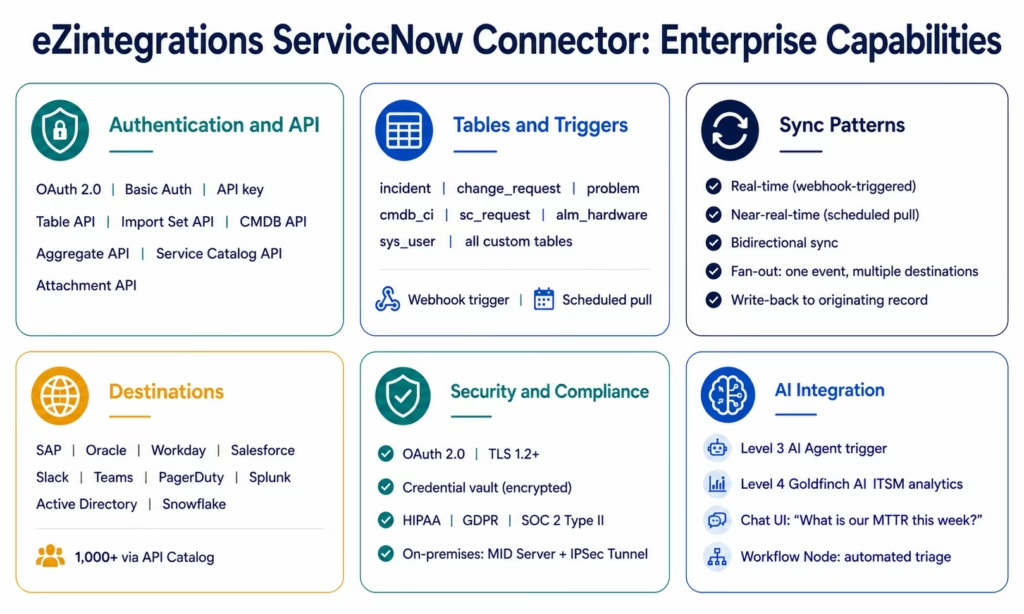
ServiceNow Connector Capabilities
| Capability | eZintegrations ServiceNow Integration |
|---|---|
| Authentication | OAuth 2.0 (recommended), Basic Auth, API key |
| API support | Table API, Import Set API, Aggregate API, CMDB API, Service Catalog API, Attachment API |
| Trigger types | Outbound REST webhook (real-time), scheduled Table API pull (near-real-time), upstream workflow |
| Supported tables | incident, change_request, problem, cmdb_ci, sc_request, sc_task, alm_hardware, sys_user, and all custom tables |
| Query parameters | sysparm_query (filter), sysparm_fields (field selection), sysparm_limit, sysparm_offset, sysparm_display_value |
| Pagination | Offset-based pagination with automatic iteration for large table results |
| Reference field resolution | Automatic display value resolution for reference fields |
| Write operations | POST (create), PATCH (update), PUT (replace), DELETE, Import Set API for bulk insert |
| Write-back | Post destination system response (external ID, status) back to originating ServiceNow record |
| Fan-out routing | Route one ServiceNow event to multiple destinations simultaneously |
| Bidirectional sync | ServiceNow as source and destination in the same or related workflows |
| Destination systems | SAP, Oracle ERP, Workday, Salesforce, HubSpot, Slack, Microsoft Teams, PagerDuty, Splunk, Active Directory, Snowflake, and 1,000+ via API Catalog |
| Error handling | Automatic retry, row-level error logging, dead letter queue |
| Security | OAuth 2.0, TLS 1.2+, credential vault, HIPAA, GDPR, SOC 2 Type II |
| On-premises ServiceNow | MID Server-to-IPSec Tunnel for on-premises ServiceNow instances |
| AI integration | ServiceNow events as Level 3 AI Agent triggers; Goldfinch AI Chat UI for ITSM analytics |
| Templates | 50+ Automation Hub templates for ServiceNow-to-SAP, ServiceNow-to-Workday, ServiceNow-to-Salesforce, and more |
Why eZintegrations for ServiceNow Integration
Pre-Built ITSM Templates That Go Live in Minutes
Building a ServiceNow-to-SAP integration from scratch requires: understanding the ServiceNow Table API query syntax, configuring Business Rules for outbound REST messages, handling ServiceNow’s reference field resolution, writing transformation logic for state and priority fields, and maintaining all of that when your ServiceNow instance upgrades.
eZintegrations provides pre-built templates for every common ServiceNow integration pattern. The Incident-to-PagerDuty template includes the webhook configuration instructions for ServiceNow, the priority filter, the PagerDuty alert payload mapping, and the resolution write-back. Import, configure your credentials, and go live in under 20 minutes.
Native Bidirectional Sync
Most integration tools treat ServiceNow as either a source or a destination. eZintegrations treats it as both simultaneously. An incident can be created in ServiceNow (source), routed to Salesforce to create a case (destination), and the Salesforce case ID written back to the ServiceNow incident (write-back to source). All within the same workflow execution, without any middleware or message queuing.
Reference Field Resolution
ServiceNow’s API returns reference fields (user references, CI references, group references) as GUIDs by default. An assignment_group value of a5b3a6a8db9f934043dbea7bc0b8f00d is not useful in a downstream Slack notification. eZintegrations resolves reference fields to their display values automatically, so your Slack notification shows “Network Operations Team” not the internal GUID.
Write-Back to ServiceNow Records
After creating a work order in SAP, a ticket in Jira, or an alert in PagerDuty, the external system’s reference number should be visible in the originating ServiceNow record. eZintegrations writes the external ID, URL, or status back to the ServiceNow record in the same workflow execution. Your ITSM team sees the SAP work order number, the Jira ticket link, and the PagerDuty incident ID directly from the ServiceNow incident view.
All Four Automation Levels for ITSM
ServiceNow integrations in eZintegrations span all four automation levels:
Level 1 (iPaaS Workflows): rule-based routing. Incident created in ServiceNow → Slack notification → PagerDuty alert → SAP work order. Deterministic, fast, reliable.
Level 2 (AI Workflows): AI-enhanced triage. When a new incident arrives, Document Intelligence classifies the incident description to predict the correct assignment group, and the LLM classification step suggests the priority level based on the description text before human review.
Level 3 (AI Agents): autonomous incident research. The ITSM Exception Agent receives a complex incident and uses the API Tool Call native tool to query the CMDB for affected CIs, checks the change history for recent changes to those CIs, searches the knowledge base for similar past incidents, and produces a structured triage recommendation: routing it to the on-call team with full context in under 2 minutes.
Level 4 (Goldfinch AI): multi-agent ITSM analytics. The CFO asks the Chat UI: “What is our average MTTR for P1 incidents this quarter, broken down by service?” Goldfinch AI queries the ServiceNow incident table and the CMDB via the Workflow Node, aggregates the data across multiple agent calls, and returns the answer with a supporting chart. The COO asks: “Which change requests are pending CAB approval and older than 5 days?” Same mechanism: natural language in, live ServiceNow query, formatted answer out.
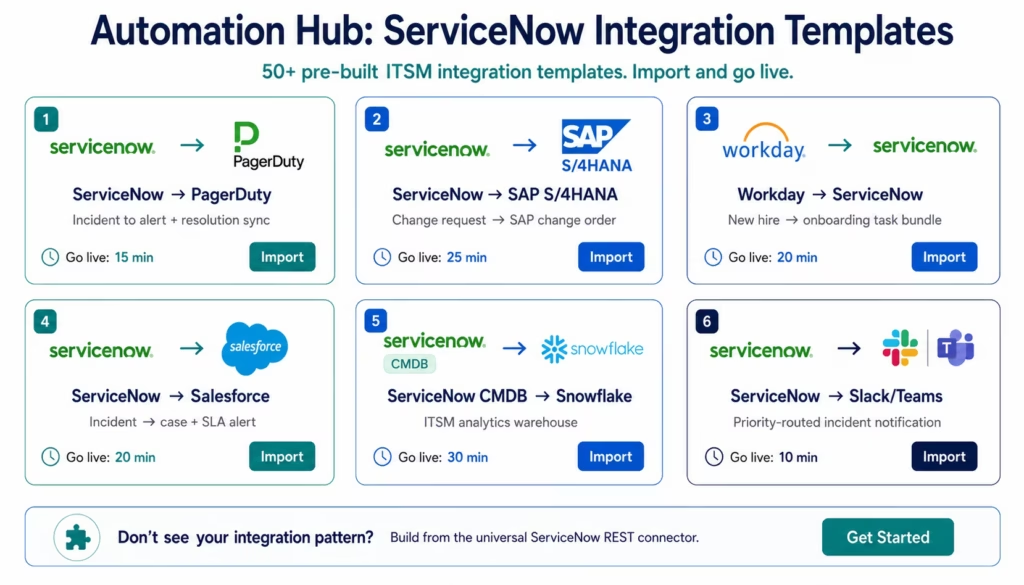
Import a ServiceNow Integration Template
The Automation Hub contains 50+ pre-built ServiceNow integration templates covering every major ITSM-to-enterprise integration pattern.
Popular ServiceNow integration templates:
- ServiceNow incident to PagerDuty alert (real-time, with resolution sync)
- ServiceNow incident to Microsoft Teams notification channel
- ServiceNow incident to Slack with priority-based channel routing
- ServiceNow change request approved to SAP change order
- ServiceNow CMDB sync from AWS asset discovery
- Workday new hire to ServiceNow onboarding task bundle
- ServiceNow security incident to Splunk correlation
- ServiceNow incident to Salesforce case creation
- ServiceNow SLA breach to Salesforce account alert
- PagerDuty incident resolved to ServiceNow close
- ServiceNow request to Active Directory provisioning
- ServiceNow CMDB to Snowflake ITSM analytics warehouse
Browse all ServiceNow templates in the Automation Hub
Import the template for your integration pattern, enter your ServiceNow instance URL and OAuth credentials, configure your destination system, and activate. Most ServiceNow templates go live in under 20 minutes.
FAQs
1. How do I integrate ServiceNow with eZintegrations?
Open eZintegrations and select the ServiceNow connector. Enter your ServiceNow instance URL, choose authentication using OAuth 2.0, configure the client ID and client secret from the ServiceNow Application Registry, and click Test Connection. Select your trigger type: webhook using a ServiceNow Business Rule or Outbound REST Message to send data to an eZintegrations webhook URL, or scheduled pull using the Table API on a defined schedule. Select the table such as incident, change_request, CMDB, or custom tables, define fields and filters, map the data to your destination system, and activate the workflow. Typical setup time is 20-30 minutes using an Automation Hub template or 45-60 minutes for a custom integration.
2. Does eZintegrations support ServiceNow enterprise integration?
Yes, eZintegrations provides a native ServiceNow connector with full support for the Table API, Import Set API, CMDB API, Service Catalog API, and Aggregate API. Every standard ServiceNow table and all custom tables are accessible. Supported integration patterns include real-time webhook-triggered workflows using ServiceNow Outbound REST, scheduled pull integrations using the Table API with timestamp filtering, and bidirectional sync with write-back to ServiceNow records. Supported destinations include SAP, Oracle ERP, Workday, Salesforce, Slack, Microsoft Teams, PagerDuty, Splunk, Active Directory, Snowflake, and 1,000+ additional systems through the eZintegrations API Catalog.
3. How long does ServiceNow integration take in eZintegrations?
Using an Automation Hub template such as ServiceNow-to-PagerDuty, ServiceNow-to-Slack, Workday-to-ServiceNow, or ServiceNow-to-Salesforce, integrations typically go live in 15-25 minutes from template import to production activation. Building a custom integration with the ServiceNow REST connector typically takes 45-60 minutes for a single-table, single-destination workflow. Multi-table workflows with bidirectional synchronisation and write-back generally take 90-120 minutes depending on complexity.
4. Is there a free ServiceNow integration template?
Yes, The Automation Hub contains 50+ pre-built ServiceNow integration templates included in all eZintegrations subscription tiers at no additional charge. Templates cover ServiceNow-to-PagerDuty, ServiceNow-to-SAP, ServiceNow-to-Salesforce, Workday-to-ServiceNow, ServiceNow-to-Slack and Teams, CMDB synchronisation, and additional enterprise workflows. Each template includes connector configuration guidance, field mapping, filter conditions, and destination routing.
5. How does eZintegrations handle ServiceNow reference fields?
ServiceNow reference fields such as assignment group, caller, or CMDB configuration item return as GUIDs in the API response by default. eZintegrations automatically resolves these to human-readable display values by querying the referenced table in a lookup step, ensuring downstream systems and notifications receive meaningful values rather than internal system IDs. You can also configure the sysparm_display_value=true parameter to retrieve display values directly from the ServiceNow API or pass GUIDs through unchanged for systems that use them for their own lookups.
6. Can ServiceNow events trigger AI Agent workflows?
Yes, ServiceNow incidents, change requests, and security events are primary triggers for Level 3 AI Agent workflows. The ITSM Exception Agent receives the incident payload, queries the CMDB for affected configuration items, searches change history for recent modifications, identifies similar past incidents in the knowledge base, and produces a structured triage recommendation with confidence scoring in under 2 minutes. Level 4 Goldfinch AI also exposes ServiceNow data through the Chat UI, enabling operations teams to ask questions such as What is our MTTR for P1 incidents this quarter by service? and receive live answers directly from ServiceNow data sources.
7. How does eZintegrations handle ServiceNow instance upgrades?
ServiceNow releases major platform upgrades twice per year. The eZintegrations ServiceNow connector uses standard REST APIs such as the Table API and Import Set API that maintain backward compatibility across named releases. Standard ServiceNow schema updates do not break existing integrations because new fields are simply ignored unless explicitly mapped. For custom table schema changes introduced within your instance, only the affected field mappings in eZintegrations need review and adjustment. No connector rebuild or code update is required.
Your ITSM Platform, Finally Connected
ServiceNow manages every IT service event across your enterprise. But the value of ITSM is only fully realised when incidents trigger real ERP actions, change approvals pull from real HR data, CMDB reflects real asset inventory, and security incidents correlate with real threat data.
eZintegrations connects ServiceNow to all of it: 50+ pre-built templates, native bidirectional sync, real-time webhook processing, reference field resolution, write-back to source records, and all four automation levels from rule-based workflows to Goldfinch AI natural language ITSM analytics.
Import a ServiceNow integration template from the Automation Hub and have your first ITSM integration live today.
Book a free demo and we will configure your specific ITSM workflow in the demo.

