
REST API Integration Platform: Connect Any Enterprise System Without Code
May 11, 2026To integrate any REST API with eZintegrations, following REST API design principles, open the REST API Connector, enter your endpoint URL and authentication credentials (API Key, Bearer Token, OAuth 2.0, or Basic Auth), configure your request method (GET, POST, PUT, PATCH, DELETE), map the response fields to your destination system, and enable pagination if you are pulling large datasets. Most REST API integrations go live in under 30 minutes. For Salesforce, SAP, Oracle, NetSuite, Infor, EPICOR, and 1,000+ other enterprise and SaaS APIs, pre-built templates are available in the Automation Hub and go live in under 5 minutes.
Connect any REST API to any enterprise system, workflow, or AI agent. No coding required. Thousands of APIs available in the eZintegrations API Catalog, including every major ERP, CRM, data warehouse, and SaaS application in the enterprise market.
Import a REST API Template from the Automation Hub and go live in minutes. Or book a free REST API integration session and we will map your API connection in the demo.
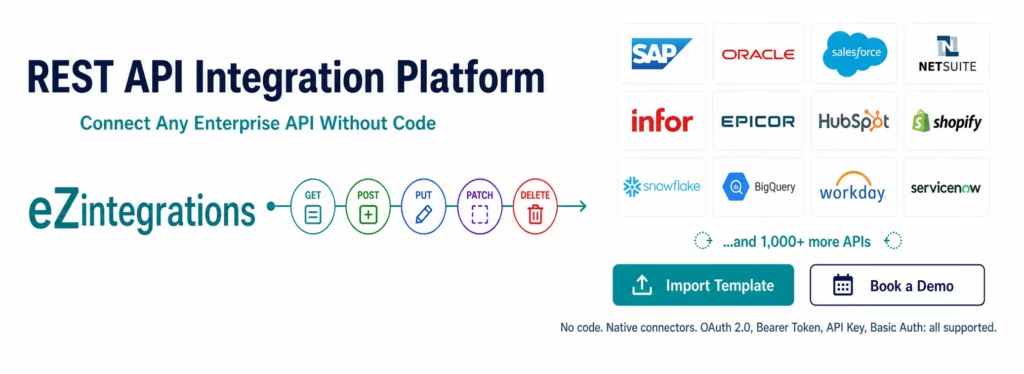
Every Enterprise REST API. One Platform.
eZintegrations connects to every REST API in the enterprise ecosystem through a combination of native enterprise connectors and a universal REST API connector that handles any API your stack includes.
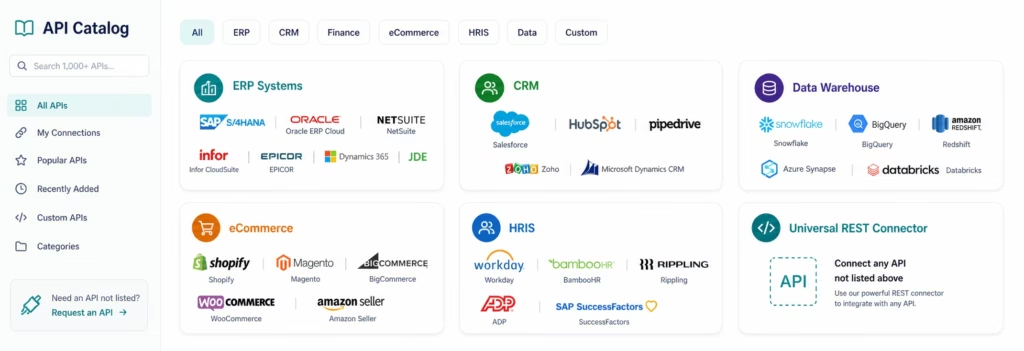
The API Catalog contains every major enterprise and SaaS API: SAP S/4HANA (OData V4), SAP ECC (BAPI and RFC), Oracle ERP Cloud, Oracle Fusion, NetSuite (SuiteTalk REST and SuiteQL), Microsoft Dynamics 365, Infor CloudSuite, EPICOR ERP, Salesforce REST, HubSpot, Shopify, Snowflake, BigQuery, Redshift, Workday, ServiceNow, Zendesk, Stripe, QuickBooks, Xero, and thousands more.
Every API in the catalog is pre-configured with: – The correct authentication method for that system (OAuth 2.0, Token-Based Auth, API Key, or Basic Auth) – Pagination support: numeric pagination, cursor-based pagination, and time-window-based pagination for large dataset retrieval – Request parameter templates for common operations (GET with filters, POST with body, bulk operations) – Error handling and retry logic configured for that API’s specific error codes and rate limits
If your API is not in the catalog, the universal REST connector handles any API that follows OpenAPI Specification conventions. Enter the endpoint URL, configure authentication, define your request, and map the response.
What You Can Do
ERP and Back-Office Integration
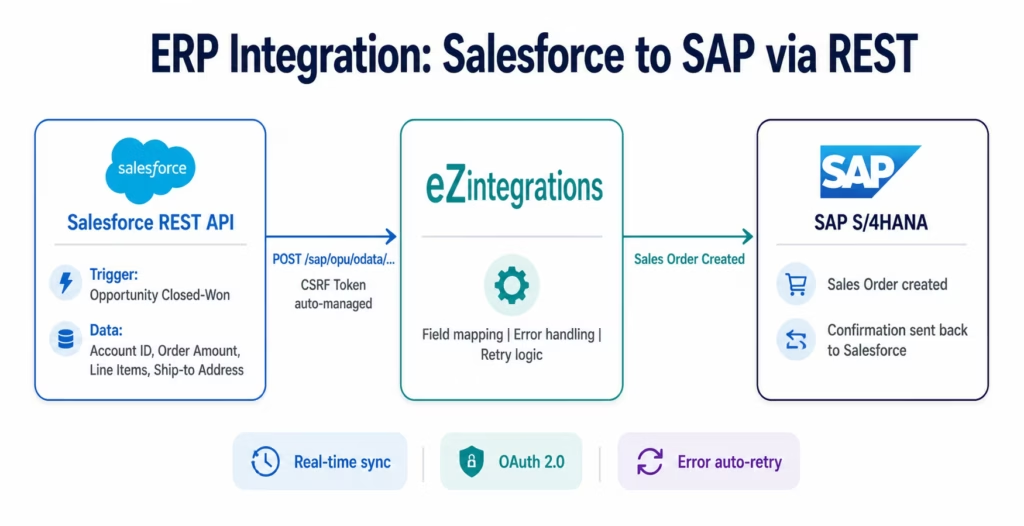
Connect your ERP (SAP, Oracle, NetSuite, Infor, EPICOR, Dynamics 365) to any upstream or downstream system. Pull purchase orders and post invoices via REST. Sync inventory across warehouses and eCommerce platforms in real time. Push sales orders from Salesforce to SAP as soon as a deal closes. Create GR confirmations from 3PL webhook events.
Every ERP API in the catalog includes the specific endpoint paths, authentication patterns, and field structures for common operations. The SAP OData V4 connector includes CSRF token management automatically. The NetSuite SuiteQL connector handles Token-Based Authentication without manual RSA key pair configuration.
CRM and Revenue Operations
Sync contacts, deals, and accounts bidirectionally between Salesforce and HubSpot. Push closed deals from your CRM to your ERP the moment they close. Pull product usage data from Segment or Amplitude and enrich Salesforce contact records. Route leads from your website to Salesforce in real time with field-level data transformation.
The CRM API catalog includes every Salesforce API endpoint (REST, Bulk, Metadata, Streaming, and SOQL), every HubSpot endpoint, and every Pipedrive and Zoho CRM endpoint. Field mapping, custom object support, and relationship lookups are all handled visually.
Data Warehouse and Analytics
Pull structured data from any enterprise system via REST and push it to Snowflake, BigQuery, Redshift, or Azure Synapse. Schedule incremental data pulls using time-window pagination (pull records modified since the last run). Trigger dashboard refreshes when new records arrive. Feed AI analytics workflows with real-time ERP data via the Goldfinch AI Chat UI.
Time-window pagination handles datasets of any size without API rate limit violations. Configure your pull interval (every 15 minutes, hourly, daily) and the platform handles the timestamp management, deduplication, and retry on failure.
eCommerce and Order Management
Connect Shopify, Magento, BigCommerce, or WooCommerce to your ERP for real-time order sync. Pull orders from your eCommerce platform via REST the moment they are placed and post them to SAP or NetSuite. Push inventory updates from your ERP to your store in real time. Sync customer records bidirectionally between your eCommerce platform and your CRM.
AI Workflow and AI Agent Integration
REST API connections are available at every automation level. Level 1 (iPaaS Workflows) uses REST APIs for rule-based data movement. Level 2 (AI Workflows) adds Document Intelligence and LLM classification steps to REST API data streams. Every REST API in the catalog is also available as a tool for Level 3 AI Agents via the API Tool Call native tool. When an AI agent needs to query NetSuite for purchase order status, retrieve Salesforce vendor history, or pull Workday employee data during an exception resolution workflow, it calls the API directly using the pre-configured connector.
Level 4 Goldfinch AI multi-agent workflows can expose live REST API data to the CFO or COO via the Chat UI. “What are our open purchase orders over $50,000 this week?” queries the ERP via REST in real time and returns the answer with supporting data.
How It Works
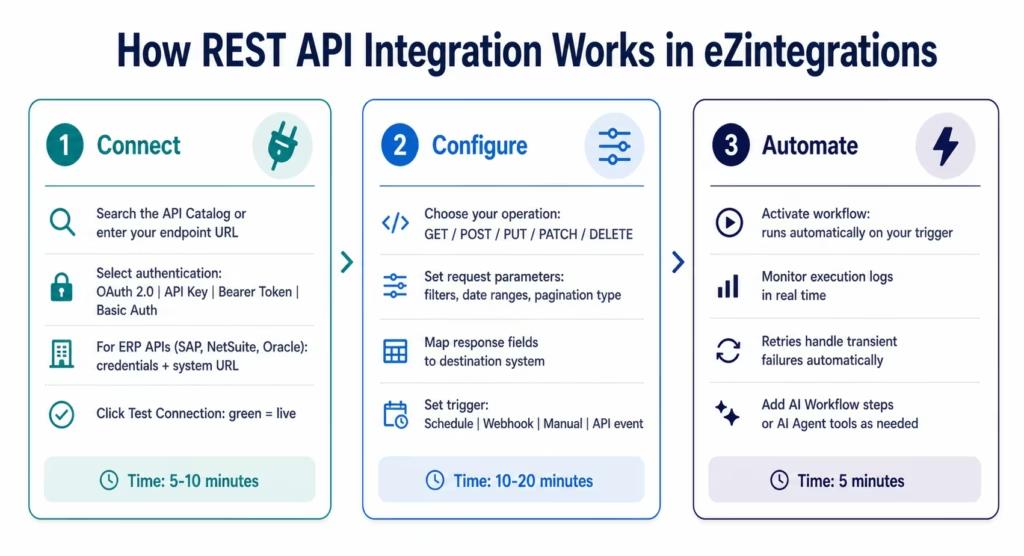
Three steps from API credentials to live automation.
Step 1: Connect
Open the eZintegrations API Catalog and search for your system. For enterprise APIs (SAP, Oracle, NetSuite, Salesforce, Infor, EPICOR, Dynamics 365), select the pre-configured connector. Enter your credentials: the platform configures the authentication method automatically.
For APIs not in the catalog: click Universal REST Connector. Enter your endpoint URL, select your authentication type, and click Test Connection. Connection confirmed in under 30 seconds.
Step 2: Configure
Select your operation (GET, POST, PUT, PATCH, or DELETE). For GET operations: configure query parameters, apply filters, and set your pagination type:
- Numeric pagination:
?page=1&limit=100: platform increments automatically - Cursor pagination:
?after=[cursor]: platform passes the cursor from the previous response - Time-window pagination:
?modified_since=[timestamp]: platform manages the timestamp from the previous run
Map response fields to your destination system fields using the visual field mapper. Set your trigger: a schedule (every 15 minutes, hourly, daily), a webhook, a manual trigger, or an upstream workflow event.
Step 3: Automate
Click Activate. Your workflow runs on the configured trigger. Every execution is logged with status, duration, records processed, and any errors. Failed API calls retry automatically with exponential backoff. Rate limit responses (HTTP 429) respect the API’s Retry-After header.
Connector Capabilities
| Capability | eZintegrations REST API Connector |
|---|---|
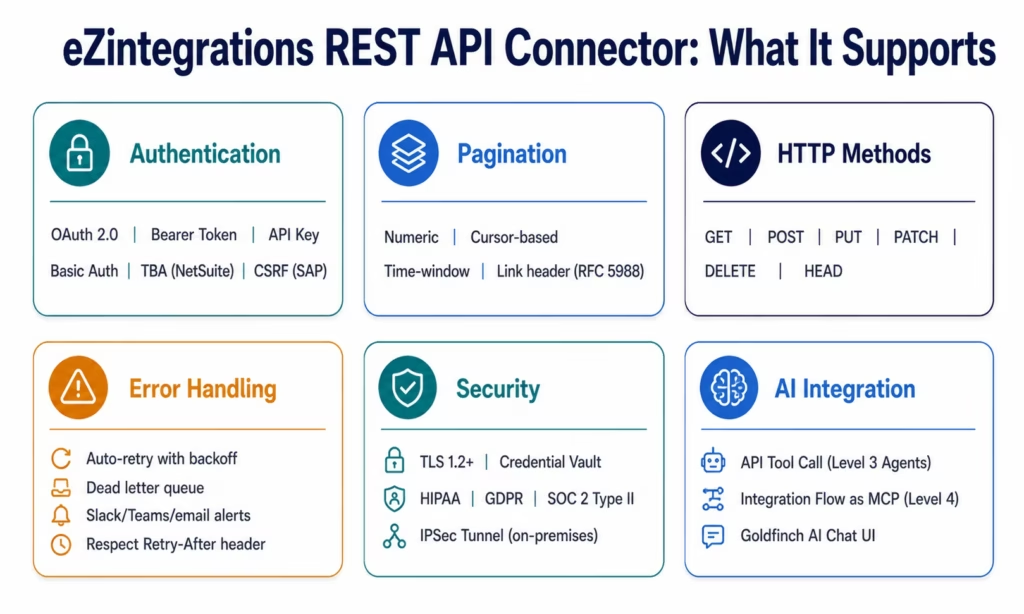
| Authentication methods | OAuth 2.0, Bearer Token, API Key (header/query), Basic Auth, Token-Based Auth (NetSuite TBA), CSRF token management (SAP) |
| HTTP methods | GET, POST, PUT, PATCH, DELETE, HEAD |
| Pagination types | Numeric (page/offset), Cursor-based, Time-window (modified_since), Link header (RFC 5988) |
| Request configuration | Query parameters, path parameters, request body (JSON/XML/form), custom headers |
| Response handling | JSON parsing, XML parsing, nested object extraction, array iteration |
| Field mapping | Visual drag-and-drop mapper, expression editor, transformation functions (format, concat, split, lookup) |
| Error handling | Automatic retry (configurable attempts and backoff), dead letter queue, error notification (Slack, Teams, email) |
| Rate limiting | Respect Retry-After header, configurable rate limit delay, burst handling |
| Bulk operations | Batch request support, parallel execution, configurable concurrency |
| Data volume | No transaction caps. Process any record volume per execution. |
| Scheduling | Cron-based (every minute to monthly), event-triggered, manual |
| Security | TLS 1.2+, credential vault (encrypted at rest), HIPAA, GDPR, SOC 2 Type II |
| On-premises | IPSec Tunnel for on-premises ERP (SAP ECC, Oracle EBS, JDE) |
| AI integration | API Tool Call for Level 3 AI Agents, Integration Flow as MCP for Level 4 Goldfinch AI |
| Monitoring | Execution logs, error alerts, volume anomaly detection, health dashboard |
| Pre-built templates | 1,000+ in Automation Hub covering SAP, Oracle, Salesforce, NetSuite, Infor, EPICOR, and 900+ more |
Why eZintegrations for REST API Integration
Native Enterprise Connectors, Not Generic HTTP Nodes
Most integration platforms give you a generic HTTP Request node and call it a REST API connector. You configure the endpoint, the headers, the CSRF token fetch, the authentication body, and the error parsing yourself. When SAP releases a quarterly update, you update the configuration yourself.
eZintegrations provides native enterprise connectors: the SAP OData V4 connector manages CSRF tokens automatically. The NetSuite TBA connector handles RSA key pair configuration internally. The Salesforce connector manages OAuth token refresh without any configuration. For every enterprise system in the catalog, the connector handles the authentication complexity so your team configures business logic, not HTTP handshakes.
Pagination Built For Enterprise Data Volume
Enterprise REST APIs return large datasets in pages. Salesforce SOQL queries can return millions of records. SAP inventory exports run to hundreds of thousands of line items. NetSuite transaction histories cover years of data.
eZintegrations handles all four pagination patterns that enterprise APIs use: numeric page/offset (most common in SaaS APIs), cursor-based (Shopify, GitHub GraphQL, modern REST APIs), time-window (pull records modified since timestamp, for incremental data sync), and Link header pagination following RFC 5988. The platform manages page iteration automatically: your workflow configures once, and the platform retrieves all pages without any additional logic.
Three API Protocols in One Platform
REST is the most common enterprise API protocol. But enterprise systems use more than REST. eZintegrations supports REST, GraphQL, and WebSocket in the same workflow. You can pull inventory data from a REST API, enrich it with a GraphQL query to Shopify, and push real-time updates via WebSocket, all in a single automation. See the GraphQL API integration guide for the full GraphQL implementation.
AI-Ready API Connections
Every REST API connection in eZintegrations is also available as a tool for Level 3 AI Agents via the API Tool Call native tool. When your AP Exception Agent needs to retrieve purchase order status from SAP or query vendor history from NetSuite, it calls the configured connector directly, with the same authentication and error handling. No separate AI API setup required. No data leaving the platform’s compliance boundary.
Level 4 Goldfinch AI makes REST API data available through the Chat UI. Your CFO or COO asks questions in natural language. Goldfinch AI queries the relevant APIs in real time and returns the answer. The connection is the same REST connector your Level 1 workflows already use.
Pricing That Does Not Penalise API Volume
Most enterprise integration platforms charge by API call volume, transaction count, or data transfer. Your bill grows every time your business grows.
eZintegrations charges per automation, not per API call. One workflow that processes 10,000 orders per month costs the same as one that processes 100. The same workflow that pulls 50 records today and 5,000 records in six months costs the same. See the transparent per-automation pricing for the full model.
Import a REST API Integration Template
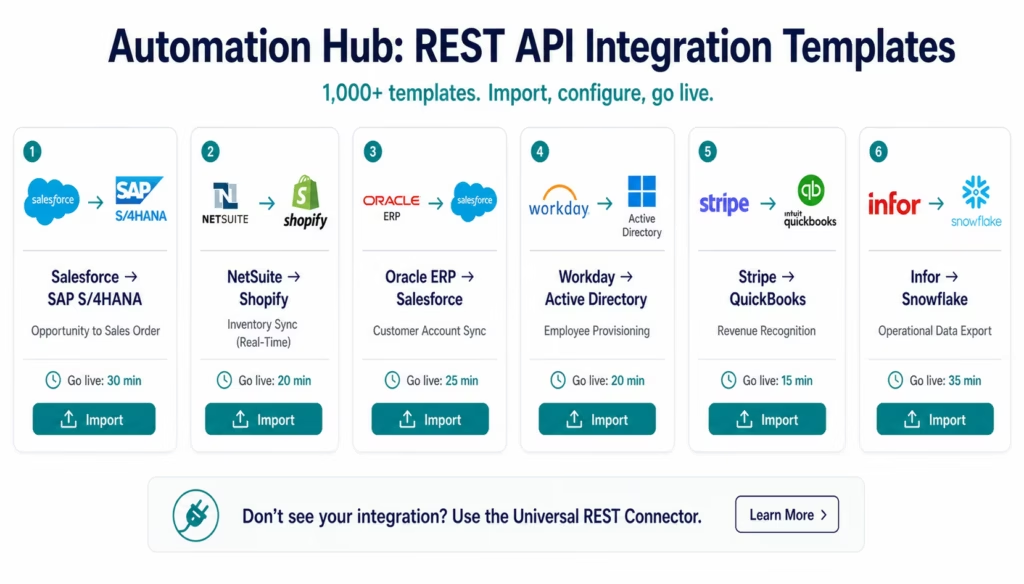
The Automation Hub contains 1,000+ pre-built REST API integration templates covering every major enterprise system, SaaS application, and data warehouse. Each template includes pre-configured authentication, field mapping, pagination, and error handling for the specific API.
Popular REST API integration templates:
- Salesforce REST to SAP S/4HANA: opportunity-to-sales-order automation
- NetSuite REST to Shopify: inventory sync, real-time
- Oracle ERP Cloud to Salesforce: customer account sync
- Infor CloudSuite to Snowflake: operational data export
- EPICOR to HubSpot: order history to CRM enrichment
- Workday to Active Directory: employee provisioning
- Stripe REST to QuickBooks: revenue recognition
- ServiceNow to Slack: incident alerting
- HubSpot to Salesforce: marketing-to-sales lead handoff
- BigQuery to Salesforce: analytics enrichment
Browse all REST API templates in the Automation Hub
Import, configure credentials, test, and go live. Most templates are live in under 30 minutes.
FAQs
1. How do I integrate a REST API with eZintegrations?
Open the eZintegrations platform at app.ezintegrations.ai. Search the API Catalog for your system including SAP, Oracle, Salesforce, NetSuite, Infor, EPICOR, HubSpot, Shopify, and 1,000+ more pre-configured connectors. Select the connector, enter your authentication credentials, configure your request method, parameters, and pagination, map response fields to your destination, and activate. For pre-configured enterprise APIs, the authentication method and endpoint structure are already set. For APIs not in the catalog, use the Universal REST Connector with any endpoint URL and authentication type. Total setup time is typically 15-30 minutes.
2. Does eZintegrations support my specific REST API?
If your API follows REST conventions including HTTP methods, JSON or XML responses, and standard authentication, eZintegrations can connect to it. The API Catalog includes pre-configured connectors for enterprise ERP systems including SAP S/4HANA, SAP ECC, Oracle ERP Cloud, Oracle Fusion, NetSuite, Infor CloudSuite, EPICOR, Microsoft Dynamics 365, and JDE; CRM platforms including Salesforce, HubSpot, Pipedrive, Zoho, and Dynamics CRM; major cloud data warehouses including Snowflake, BigQuery, Redshift, Azure Synapse, and Databricks; plus 1,000+ SaaS applications. APIs not in the catalog are supported through the Universal REST Connector.
3. How long does REST API integration take in eZintegrations?
Using an Automation Hub template for pre-configured systems such as Salesforce, SAP, or NetSuite typically takes 15-30 minutes from import to production. Building from the API Catalog connector for systems without templates usually takes 30-60 minutes for a single-operation integration. Using the Universal REST Connector for a custom or less common API generally takes 45-90 minutes including authentication testing and field mapping. These timelines assume API documentation and credentials are already available.
4. Is there a free REST API integration template?
Yes, The Automation Hub contains 1,000+ integration templates covering common REST API connection pairs across ERP, CRM, eCommerce, data warehouse, and HRIS systems. Browse and import templates at ezintegrations.ai/automation-hub. Templates are included in all eZintegrations subscription tiers at no additional charge. Each template includes pre-configured authentication, field mapping, pagination, and error handling for the APIs involved.
5. How does eZintegrations handle REST API pagination for large datasets?
eZintegrations supports four enterprise pagination patterns automatically. Numeric pagination such as page and limit parameters increments automatically until all pages are retrieved. Cursor-based pagination stores and passes cursor values between requests. Time-window pagination stores the last successful timestamp and uses it for incremental sync. Link header pagination follows RFC 5988 next links automatically until completion. Configure the pagination type once and the platform manages all page iteration regardless of dataset size.
6. Can REST API connections be used by AI Agents and Goldfinch AI?
Yes, Every REST API connector in eZintegrations is available as a tool for Level 3 AI Agents through the API Tool Call native tool. AI agents can retrieve data from SAP, NetSuite, Salesforce, or any configured REST API using the same authentication and error handling rules. Level 4 Goldfinch AI exposes REST API data through the Chat UI for natural language queries and through the Workflow Node for coordinator-driven multi-agent workflows.
7. What is the difference between eZintegrations and building custom REST API integration code?
Custom REST API integration code requires developers to build and maintain HTTP clients, manage OAuth token refresh, implement retry logic, build pagination handling, process API-specific error codes, update integrations when APIs change, and maintain operational documentation. Enterprise REST integrations such as Salesforce-to-SAP commonly cost between 80,000 and 300,000 USD in developer time over three years excluding maintenance overhead. eZintegrations handles these requirements at the platform level.
Connect Your Entire Enterprise Stack via REST
Every enterprise system exposes a REST API. eZintegrations connects them all: ERP to CRM, ERP to data warehouse, eCommerce to ERP, CRM to marketing, HRIS to provisioning, and every combination in between.
The API Catalog removes the setup friction for every enterprise and SaaS system your organisation uses. The Universal REST Connector handles anything not in the catalog. Automation Hub templates let you go live in minutes, not weeks.
One platform. Every REST API in your stack. No code.
Import a REST API template from the Automation Hub and have your first integration live today.
Book a free demo and we will connect your specific API in the demo.

