
Vendor Onboarding Automation for AP Teams: From Supplier Setup to First Invoice
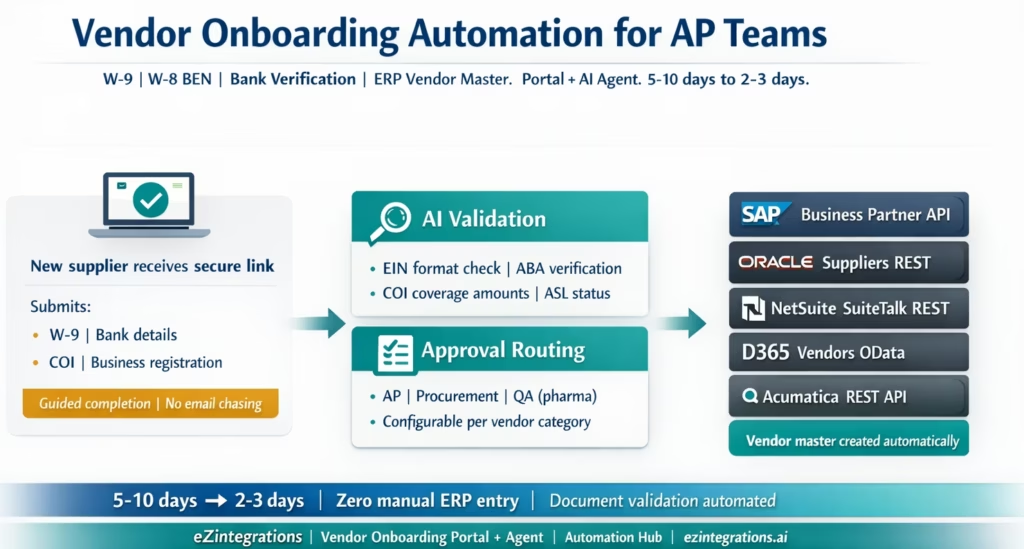
April 5, 2026Vendor onboarding automation for AP teams collects supplier documents (W-9, W-8 BEN, bank details, insurance certificates, diversity certifications) through a structured portal, validates each document automatically (EIN format, ABA routing number, insurance coverage amounts, Approved Supplier List status), routes for internal approval, and creates the vendor master record in SAP, Oracle Fusion Cloud, NetSuite, Dynamics 365, or Acumatica via REST API, reducing a 5-10 day manual onboarding cycle to 2-3 business days and eliminating the risk of paying an unapproved or incorrectly configured vendor.
TL;DR
Vendor onboarding is the process that must complete before any purchase order, goods receipt, or invoice can be processed for a new supplier. Manual onboarding takes 5-10 business days, involves chasing suppliers for missing documents, and frequently results in vendor master data errors that cause payment failures months later. eZintegrations offers two approaches: the Vendor Onboarding Portal (structured supplier self-service, human-reviewed, guided completion) and the Vendor Onboarding Agent (autonomous document extraction, automatic validation, AI-driven approval routing, and ERP master record creation without manual data entry). Document types handled: W-9 (US suppliers), W-8 BEN or W-8 BEN-E (foreign suppliers), bank account instruction letters (ACH and wire), certificates of insurance (COI), business registration certificates, and diversity certifications. Validation checks run automatically: EIN format (XX-XXXXXXX), ABA routing number against the Federal Reserve routing database, insurance coverage amounts vs minimum requirements, active Approved Supplier List status. ERP master record creation: SAP S/4HANA (Business Partner API), Oracle Fusion Cloud (Suppliers REST API), NetSuite (SuiteTalk REST vendor record), Dynamics 365 Finance (Vendors OData entity), and Acumatica (REST API).
Why Vendor Onboarding Is the Bottleneck Nobody Talks About
Your procurement team just negotiated a great deal with a new cleaning services supplier. The contract is signed. The services start Monday. But it is Thursday and the AP team does not have the supplier in NetSuite yet.
Why? Because the new supplier has not responded to the vendor onboarding email your AP team sent last week. The email had a list of required documents: W-9, bank details for ACH payment, certificate of insurance. The supplier’s owner does not know what a W-9 is or why you need one. He is busy setting up for the Monday job. He will get to the email eventually.
Meanwhile, your AP team cannot create a purchase order against a vendor who is not in the system. The contract cannot be fulfilled through your normal procurement channel. Someone on the procurement side is creating an informal work order and promising to “sort out the vendor onboarding later.” By the time the first invoice arrives, nobody remembers which cost centre it should be coded to, and the banking details have not been validated.
This is the vendor onboarding problem. It sits upstream of every other AP automation improvement. You cannot automate invoice matching for a vendor who is not in your ERP. You cannot run payment automation for a vendor whose bank details have not been verified. You cannot enforce Approved Supplier List compliance for a vendor who bypassed the formal onboarding process entirely.
What Vendor Onboarding Actually Involves
Vendor onboarding is the process of collecting, validating, and recording the information your organisation needs before it can legally and operationally pay a supplier. It is a compliance and operational necessity, not an administrative formality.
Why each document is required:
W-9 (US domestic suppliers): The IRS requires companies that pay US vendors above $600 in a calendar year to file a Form 1099. The W-9 collects the vendor’s name, business name, EIN (Employer Identification Number) or SSN, tax classification (individual, LLC, corporation, partnership), and address. Without a valid W-9, your company cannot process year-end 1099 reporting. Paying a supplier without a W-9 exposes your company to backup withholding obligations (24% of payment).
W-8 BEN / W-8 BEN-E (foreign suppliers): Foreign suppliers are subject to US withholding tax (typically 30%, or reduced treaty rates) unless they provide a W-8 form certifying their foreign status and treaty eligibility. The W-8 BEN is for foreign individuals; W-8 BEN-E is for foreign entities. Without this form, your company must withhold at the full 30% rate on applicable payments.
Bank account details: ACH payment requires the vendor’s bank name, 9-digit ABA routing number, account number, and account type (checking or savings). Wire transfer requires SWIFT code, IBAN (where applicable), and beneficiary bank details. Incorrect bank details cause payment failures and, in the case of fraud, can result in funds being sent to the wrong account.
Certificate of Insurance (COI): For service vendors working on your premises, your legal or risk management team requires proof of general liability insurance (typically $1M minimum per occurrence for standard services, higher for contractors and specialised services), workers’ compensation, and commercial auto where applicable. Expired or insufficient coverage creates liability exposure.
Business registration: confirms the legal entity name, registration number, and jurisdiction. Ensures you are contracting with and paying the correct legal entity.
Diversity certification: for procurement teams with supplier diversity programs, certifications (MWBE, HUBZone, veteran-owned, small business) support ESG and spend reporting requirements.
The Two Failure Modes of Manual Vendor Onboarding
Failure Mode 1: The onboarding never fully completes. The AP team sends an email with the list of required documents. The supplier sends back the W-9. The COI is missing. A follow-up email is sent. The supplier sends a COI from 2024 that has expired. Another follow-up. Three weeks later, the supplier is in the system with expired insurance and a W-9 that nobody validated for EIN format. The first invoice arrives. Payment is processed. Nobody knows the COI is expired until a liability incident occurs during a site visit.
Failure Mode 2: Vendor master data errors at ERP entry. The AP coordinator receives the completed documents and manually enters the vendor data into the ERP. The supplier name on the W-9 is “Hartford Building Services LLC.” The ERP entry reads “Hardford Building Service Ltd” (two typos). The ABA routing number is entered as 021000089 (9 digits, looks correct). The actual ABA number on the bank letter is 021000089: same digits, same result. Or it is 021000021, which is a different bank, and the AP coordinator copied the wrong row from the letter. The first payment via ACH fails. The AP team spends 3-5 days tracing the payment failure, reissuing, and re-entering the banking details.
These two failure modes have a combined cost. Payment failure investigation: 2-4 hours per incident. Supplier dispute resolution: 1-3 days of escalation. 1099 reporting errors from missing W-9: correction filings and potential penalties. The cost is not just process time; it is compliance risk and supplier relationship damage.
The Two Approaches: Vendor Onboarding Portal vs Vendor Onboarding Agent
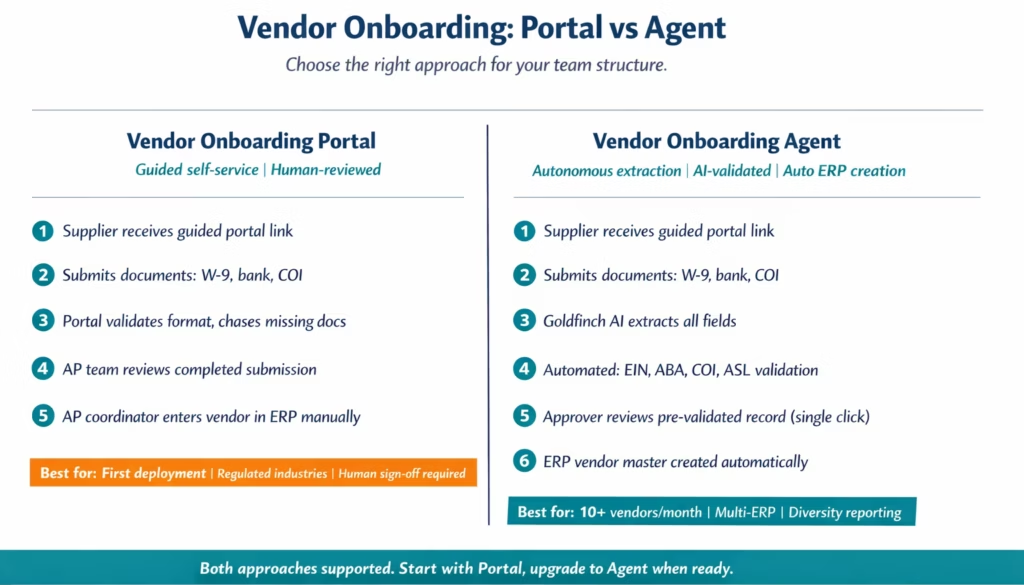
eZintegrations provides two approaches to vendor onboarding automation, designed for different team structures and risk appetites.
Approach 1: Vendor Onboarding Portal (Human-Assisted)
The Vendor Onboarding Portal provides a structured, guided self-service experience for new suppliers. Rather than an email with a document list, the supplier receives a secure link to a portal that:
- Presents each required document in a guided checklist with instructions for each item
- Validates format and basic completeness on submission (EIN format, ABA routing number format, COI certificate dates visible)
- Identifies which documents are missing and sends automated reminders to the supplier
- Routes completed submissions to your AP or procurement team for human review
- Tracks completion status: which suppliers are pending which documents
In the Portal approach, a human reviewer in your AP or procurement team reviews the submitted documents, confirms the data, and enters the vendor into the ERP. The Portal eliminates the document chasing problem and ensures nothing is missing before the AP coordinator starts ERP entry. It does not eliminate the manual ERP data entry step.
Best for: teams that want a structured process with a human review step at ERP entry, companies in regulated industries where human sign-off on vendor records is required, or teams deploying vendor automation for the first time.
Approach 2: Vendor Onboarding Agent (Autonomous)
The Vendor Onboarding Agent adds Goldfinch AI Document Intelligence and autonomous validation to the Portal workflow, eliminating the manual ERP entry step entirely. The Agent:
- Receives the supplier’s submitted documents
- Extracts all data fields from each document using Goldfinch AI Document Intelligence (W-9 fields, bank account fields, COI coverage amounts, business registration details)
- Runs automated validation: EIN format check, ABA routing number verification against the Federal Reserve routing number database, COI coverage amounts vs configured minimums, business registration not expired, supplier not on denied parties lists
- Routes the validated record to the appropriate approver for electronic sign-off
- On approval, creates the vendor master record in the ERP via REST API with all validated fields populated
- Notifies the supplier with their vendor account number
In the Agent approach, the human review step is a structured confirmation: the approver reviews the AI-extracted and validated data, sees any flags, and clicks to approve or reject. They are confirming a pre-validated record, not researching it from scratch. ERP entry is fully automated.
Best for: teams processing 10+ new vendors per month, organisations with multi-ERP environments where the same vendor data must be created in multiple systems, procurement teams with supplier diversity reporting requirements, or any team where the document-to-ERP manual entry step is the primary bottleneck.
The Vendor Onboarding Agent uses the full 4-level eZintegrations platform: Level 1 (iPaaS Workflows) handles document routing, supplier portal connectivity, and ERP API calls. Level 2 (Goldfinch AI Document Intelligence) extracts W-9, W-8 BEN, bank letter, and COI fields without per-supplier template configuration. Level 3 (AI Agents) runs the validation logic, queries the Federal Reserve ABA database, checks the ASL, and routes the approval. Level 4 (Goldfinch AI) orchestrates the full onboarding workflow as a Workflow Node and enables AP managers to query vendor onboarding status in natural language via Goldfinch AI Chat UI.
Documents Collected and Validation Rules
The Vendor Onboarding Agent applies the following validation checks automatically to each document type.
W-9 (US Domestic Suppliers)
Extracted fields: business name, DBA name (if applicable), tax classification (individual, LLC, corporation, partnership, S-corp, other), EIN or SSN, address (street, city, state, ZIP).
Validation checks: – EIN format: must match the pattern XX-XXXXXXX (2 digits, hyphen, 7 digits). An EIN of 1-234567 or 123456789 (without hyphen) will fail validation. – SSN format (individual suppliers): XXX-XX-XXXX. Name match: the business name on the W-9 must match the legal name on the business registration certificate (where both are provided). Signature date: W-9 must be signed within the last 3 years (configurable threshold).
W-8 BEN / W-8 BEN-E (Foreign Suppliers)
Extracted fields: entity name, country of incorporation, treaty article claimed (for reduced withholding rate), Chapter 3 status (corporation, partnership, trust, etc.), signature and date.
Validation checks: Signature date: W-8 forms expire after 3 years from the last date in the calendar year of signing. An expired W-8 triggers a flag. Treaty country: the AI extracts the treaty country claimed and compares it against the current US tax treaty list. Chapter 3 status code: must be a valid IRS code for the entity type claimed.
Bank Account Instruction Letter
Extracted fields: bank name, ABA routing number (9 digits), account number, account type (checking/savings), account holder name.
Validation checks: ABA routing number: the 9-digit ABA is verified against the Federal Reserve’s routing number database (accessible via the FRFS directory API). An invalid ABA (wrong check digit, non-existent bank code) is flagged before the vendor is loaded into the ERP. Account holder name: must match the vendor legal name from the W-9 or W-8. A bank letter in the name of an individual where the W-9 shows a corporation triggers a verification flag. Wire instructions (international): SWIFT code format (8 or 11 characters), IBAN format check for applicable countries (country-specific digit validation).
Certificate of Insurance (COI)
Extracted fields: insurer name, policy number, coverage types (general liability, professional liability, workers’ compensation, commercial auto), coverage amounts (per occurrence, aggregate), effective date, expiry date.
Validation checks: Policy expiry: must not be expired. If expiry is within 60 days, a renewal reminder flag is set (configurable threshold). Coverage amounts: compared against configurable minimums by vendor category (e.g., general contractor: $2M per occurrence; cleaning services: $1M per occurrence; professional services: $1M per occurrence + $1M errors and omissions). Required coverage types: if your company requires workers’ compensation and the COI only shows general liability, the validation flags the missing coverage type.
ERP Vendor Master Record Creation by System
On approval, the Vendor Onboarding Agent creates the vendor master record in the ERP using published REST APIs.
SAP S/4HANA: Business Partner API
SAP S/4HANA uses the Business Partner (A_BusinessPartner) OData V4 API for vendor creation. A vendor is a Business Partner with the role FLVN01 (Vendor) or FLVN00 (FI Vendor):
SAP S/4HANA uses the Business Partner (A_BusinessPartner) OData V4 API for vendor creation. A vendor is a Business Partner with the role FLVN01 (Vendor) or FLVN00 (FI Vendor):
POST /sap/opu/odata/sap/API_BUSINESS_PARTNER/A_BusinessPartner

{
  "BusinessPartnerCategory": "2",
  "BusinessPartnerFullName": "Hartford Building Services LLC",
  "to_BusinessPartnerAddress": [
    {
      "StreetName": "1400 Industrial Drive",
      "CityName": "Cleveland",
      "Region": "OH",
      "PostalCode": "44101",
      "Country": "US"
    }
  ],
  "to_BusinessPartnerTax": [
    {
      "BPTaxType": "TX1",
      "BPTaxNumber": "32-8472910"
    }
  ]
}
Then assign the vendor role and payment data:
POST /sap/opu/odata/sap/API_BUSINESS_PARTNER/A_Supplier

{
  "Supplier": "{BUSINESS_PARTNER_ID}",
  "PaymentTerms": "N030",
  "AccountingClerk": "AP01"
}
Bank account details are added via the BP Bank Account API:
POST /API_BUSINESS_PARTNER/A_BusinessPartnerBankDetails
{
  "BusinessPartner": "{BP_ID}",
  "BankCountryKey": "US",
  "BankNumber": "021000021",
  "BankAccount": "123456789"
}
Oracle Fusion Cloud: Suppliers API
Oracle Fusion Cloud creates suppliers via the Procurement REST API:
POST https://{instance}.oraclecloud.com/fscmRestApi/resources/11.13.18.05/suppliers

{
  "SupplierName": "Hartford Building Services LLC",
  "TaxOrganizationType": "CORPORATION",
  "FederalReportableTaxNumber": "328472910",
  "TaxReportingName": "Hartford Building Services LLC",
  "SupplierType": "VENDOR",
  "SupplierSites": [
    {
      "Site": "HARTFORD-MAIN",
      "PrimaryPay": true,
      "PayGroup": "NET30",
      "BankAccounts": [
        {
          "BranchNumber": "021000021",
          "AccountNumber": "123456789",
          "AccountType": "CHECKING"
        }
      ]
    }
  ]
}
NetSuite: SuiteTalk REST
NetSuite vendors are created via the SuiteTalk REST record API:
POST https://{accountId}.suitetalk.api.netsuite.com/services/rest/record/v1/vendor

{
  "companyname": "Hartford Building Services LLC",
  "vendoridentifier": "HARTFORD-001",
  "entityid": "HARTFORD-001",
  "terms": {
    "id": "5"
  },
  "taxidnum": "32-8472910",
  "is1099eligible": true,
  "defaultaddress": {
    "addr1": "1400 Industrial Drive",
    "city": "Cleveland",
    "state": "OH",
    "zip": "44101",
    "country": "US"
  }
}
Dynamics 365 Finance: Vendors OData Entity
D365 Finance vendors are created via the OData entity endpoint:
POST https://{instance}.cloudax.dynamics.com/data/Vendors

{
  "VendorAccountNumber": "HARTFORD-001",
  "VendorName": "Hartford Building Services LLC",
  "DataAreaId": "USMF",
  "VendorGroupId": "30",
  "PaymentTermsName": "NET30",
  "FederalTaxID": "32-8472910",
  "OneTimeVendor": "No"
}
Bank account details added via the Vendor Bank Account entity:
POST /data/VendorBankAccounts

{
  "DataAreaId": "USMF",
  "VendorAccountNumber": "HARTFORD-001",
  "BankAccountId": "HART-CHECKING-01",
  "RoutingNumber": "021000021",
  "BankAccountNumber": "123456789",
  "BankAccountType": "Checking"
}
Before vs After: Manual Vendor Onboarding vs Automated
| Stage | Manual Vendor Onboarding | Automated with eZintegrations |
|---|---|---|
| Document collection | Email to supplier with list | Secure portal link with guided checklist |
| Supplier instructions | Plain text list, no guidance | Step-by-step instructions per document type |
| Missing document follow-up | Manual AP email chasing | Automated reminders at configurable intervals |
| W-9 EIN validation | Manual visual check (often skipped) | Automated format check: XX-XXXXXXX pattern |
| ABA routing validation | None: wrong number discovered at payment | Verified against Federal Reserve routing database |
| COI coverage validation | Manual comparison to minimum table | Automated: per-category minimums checked |
| W-9 to ERP name match | Manual visual comparison | AI cross-references W-9 name vs registration |
| Approval routing | Email to AP manager, possibly procurement | Configurable multi-level approval with electronic sign-off |
| ERP vendor master entry | Manual data entry by AP coordinator | REST API call on approval: all fields from validated docs |
| Multi-ERP creation | Manual entry in each ERP separately | Single approval triggers creation in all configured ERPs |
| Bank details in ERP | Manual entry, error-prone | Extracted from bank letter, validated, API-posted |
| 1099 eligibility flag | Manual checkbox, often missed | Set automatically from W-9 tax classification |
| Diversity certification | Stored in email or shared folder | Extracted, stored, linked to vendor record |
| Supplier notification | Manual email when complete | Automated: vendor code returned to supplier on approval |
| Onboarding cycle time | 5–10 business days | 2–3 business days (limited by approval response time) |
| Error discovery | At payment failure (weeks later) | At validation (before ERP entry) |
| Audit trail | Email thread, shared folders | Immutable log: all submissions, validations, approvals |
Step-by-Step: A New Supplier Through the Vendor Onboarding Agent
Here is the complete automated onboarding cycle for a new office maintenance supplier.
The scenario: Your procurement team signs a contract with Brightfield Facility Services LLC, a small commercial cleaning company. This is their first contract with your company. The contract starts in 5 days. The AP team needs Brightfield in the ERP before the first invoice arrives.
Step 1: Procurement triggers the onboarding. (Day 1, 9:00 AM) The procurement manager submits the new vendor request in eZintegrations: company name “Brightfield Facility Services LLC,” vendor category “Facilities Services,” contract value $24,000/year. eZintegrations generates a secure, single-use onboarding portal link and emails it to the Brightfield owner with instructions.
Step 2: Brightfield completes the portal. (Day 1, 2:30 PM) The Brightfield owner opens the portal link. The portal guides them through each required document: W-9: the portal shows a sample W-9 with the required fields highlighted. Brightfield uploads their W-9. Bank details: the portal shows an example bank letter format. Brightfield uploads their voided cheque image and a bank letter. Certificate of Insurance: the portal shows the required coverage minimums for Facilities Services vendors ($1M general liability, $500K workers’ compensation). Brightfield uploads their COI PDF.
All three documents submitted. Time for Brightfield: approximately 12 minutes.
Step 3: Goldfinch AI Document Intelligence extracts all fields. (Day 1, 2:31 PM) eZintegrations processes all three documents:
W-9: extracted BusinessName: "Brightfield Facility Services LLC", TaxClassification: "LLC, single-member", EIN: "47-3821904".
Bank letter: extracted BankName: "First National Bank", ABARoutingNumber: "071000013", AccountNumber: "4892017345", AccountType: "Checking".
COI: extracted InsurerName: "State Farm", GeneralLiabilityPerOccurrence: 1000000, GeneralLiabilityAggregate: 2000000, WorkersCompensation: 1000000, ExpiryDate: "2027-03-31".
Time: 18 seconds.
Step 4: Automated validation. (Day 1, 2:31 PM) – EIN format: 47-3821904 matches XX-XXXXXXX pattern. PASS. – W-9 signature date: March 10, 2026 (within 3 years). PASS. ABA routing number 071000013: verified against Federal Reserve routing database. Valid: Associated with First National Bank of Chicago. PASS. COI general liability: $1,000,000 per occurrence meets the $1M minimum for Facilities Services. PASS. COI workers’ compensation: $1,000,000. PASS. COI expiry: March 31, 2027 (more than 60 days from today). PASS. ASL check: no existing vendor record for EIN 47-3821904. No denied parties list match. PASS. Name consistency: W-9 “Brightfield Facility Services LLC” matches business registration “Brightfield Facility Services LLC”. PASS.
All validations passed. Time: under 1 second.
Step 5: Approval routing. (Day 1, 2:31 PM) Brightfield’s vendor category is Facilities Services. The approval rule: Facilities vendors under $50,000/year require AP Manager approval only. The AP manager, Jennifer Okafor, receives: Structured vendor summary: legal name, EIN, tax classification, vendor category, contract value, bank details confirmed . Validation results: all 8 checks PASSED .COI renewal reminder flag: set for January 31, 2027 (60 days before expiry). Diversity status: LLC, single-member, no diversity certifications submitted
Jennifer reviews the pre-validated summary in 4 minutes. No research needed: all data is already extracted and verified. She clicks Approve and enters her password for electronic sign-off.
Step 6: ERP vendor master records created. (Day 1, 3:17 PM) On Jennifer’s approval, eZintegrations calls the NetSuite SuiteTalk REST API:
POST /services/rest/record/v1/vendor

{
  "companyname": "Brightfield Facility Services LLC",
  "vendoridentifier": "BRIG-001",
  "terms": {
    "id": "5"
  },
  "taxidnum": "47-3821904",
  "is1099eligible": true,
  ...
}
NetSuite returns vendor internal ID 4891. Bank account added via second API call. is1099eligible: true set from W-9 single-member LLC classification. Vendor master record complete.
Step 7: Supplier notification. (Day 1, 3:17 PM) Brightfield’s owner receives an automated email: “Your vendor account has been approved. Your vendor code is BRIG-001. Please reference this code on all invoices and communications. Your bank details have been validated and are on file for ACH payment.”
Step 8: First purchase order raised. (Day 2, 9:00 AM) With Brightfield now in NetSuite as vendor BRIG-001, the procurement manager raises Purchase Order PO-2026-NX-4501: Vendor: BRIG-001 (Brightfield Facility Services LLC) . Line item: Monthly cleaning services, 12 months . Unit price: $2,000/month . Total: $24,000 – Payment terms: Net-30 (pulled automatically from vendor master)
The PO is approved and transmitted to Brightfield via the automated PO notification. Brightfield has a vendor code to reference on their invoices.
Step 9: First invoice arrives. (March 31, 2026) Brightfield sends their first invoice by email to the AP shared inbox. The invoice reads: Invoice number: BFS-2026-0001 .Vendor: Brightfield Facility Services LLC – PO Reference: PO-2026-NX-4501 . Service period: March 2026 . Amount: $2,000.00 . Bank: First National Bank, ABA 071000013 (same details already in NetSuite)
Step 10: Invoice processed automatically. (March 31, 2026) Because Brightfield’s vendor master record was created with validated data (correct ABA routing, correct EIN, correct payment terms, is1099eligible: true flag), the invoice processing workflow runs without friction:
- Goldfinch AI Document Intelligence extracts the invoice fields: vendor name “Brightfield Facility Services LLC,” invoice number BFS-2026-0001, PO reference PO-2026-NX-4501, amount $2,000.00.
- The vendor name on the invoice is matched against the NetSuite vendor master. Match confirmed: BRIG-001.
- The PO reference PO-2026-NX-4501 is retrieved from NetSuite. The invoice amount $2,000.00 matches the PO line price. Since this is a service PO with no physical goods receipt, a 2-way match (PO + Invoice) is applied.
- No exceptions. The invoice posts to NetSuite automatically as a bill against vendor BRIG-001, due April 30 per the Net-30 terms on the vendor master.
- Payment runs April 30 via ACH to ABA 071000013, account 4892017345 (the validated bank details from onboarding). Payment succeeds first time. No returned ACH. No payment failure investigation.
This is the full value of getting vendor onboarding right. Every downstream step (invoice matching, payment processing, 1099 reporting) runs cleanly because the vendor master data was accurate from day one. In the manual process, Brightfield might have been entered with a wrong ABA routing number, no 1099 flag, or a name mismatch between the W-9 and the ERP record. Each of those errors would surface as a separate incident weeks or months later.
Total cycle summary: Day 1, 9:00 AM to 3:17 PM (vendor onboarding). March 31, 2026 (first invoice: automatically processed). Zero payment failures. Zero manual intervention on the first invoice.
[VIDEO PLACEHOLDER: vendor onboarding agent demo | “eZintegrations Vendor Onboarding Agent: From New Supplier Request to ERP Vendor Master in One Day” | Embed after step-by-step section | Show: procurement manager submitting new vendor request, Brightfield opening the portal and uploading documents, Goldfinch AI extracting W-9 and COI fields, automated validation results with all 8 checks passing, Jennifer’s approval screen with pre-validated summary, NetSuite vendor creation API call and vendor code returned, and automated supplier notification. Duration: 8-10 minutes.]Why the First Invoice Is the Proof Point
The promise in this guide’s title is “from supplier setup to first invoice.” Here is why that full journey matters and what breaks when vendor onboarding is done manually.
What a clean first invoice looks like: When vendor master data is accurate from onboarding, the first invoice from a new supplier processes identically to any other invoice in your AP workflow. The vendor name matches the ERP record. The ABA routing number is correct. The 1099 flag is set. The payment terms match the contract. Nothing special needs to happen for the first invoice. It is just another invoice.
What a dirty first invoice looks like: Manual onboarding typically produces at least one vendor master error per five to ten new vendors. Common examples: The vendor name on the W-9 was “Brightfield Facility Services LLC” but the AP coordinator entered “Brightfield Facilities Services” (extra ‘s’). When the invoice arrives with the correct name, the name-match step fails. The AP team investigates, notices the ERP typo, corrects it, reprocesses. 45 minutes. The ABA routing number was misread from a photograph of a voided cheque. The first ACH payment bounces back the following week. The AP team spends 3-4 hours tracing the returned payment, correcting the ABA in the ERP, and reissuing via wire. The supplier calls asking where their money is. The 1099 eligibility flag was not set because the AP coordinator did not check the W-9 tax classification. At year-end, the company’s 1099 report is missing this vendor. A correction filing is required.
None of these failures are dramatic on their own. But each one costs 1-4 hours of AP time, creates supplier relationship friction, and involves your AP team doing reactive work instead of proactive work. At 50 new vendors per year, even a 20% error rate means 10 payment failures, 10 name-match investigations, and 5-10 1099 corrections annually.
How automated onboarding prevents each first-invoice failure:
| First-Invoice Failure | Root Cause | Automated Onboarding Prevention |
|---|---|---|
| Vendor name mismatch | AP coordinator typo at ERP entry | AI extracts name from W-9, API posts exact name to ERP, no re-entry |
| ABA routing number wrong | Manual misread of bank letter | ABA extracted by AI, verified against Federal Reserve database, API posts validated number |
| ACH payment returned | Wrong routing or account number | ABA + account number validated before ERP entry |
| 1099 flag not set | AP coordinator skipped checkbox | Flag auto-set from W-9 tax classification at ERP creation |
| Payment terms wrong | AP coordinator used default instead of contract terms | Payment terms from contract mapped at onboarding, posted to vendor master |
| Name match fails on invoice | ERP name differs from invoice name | Exact legal name from W-9 used at ERP creation, vendor alias mapping added |
When these errors are caught at onboarding (before the vendor is in the ERP), the cost is zero: the validation flag is shown to the approver, corrected, and the ERP record is created with accurate data. When the same errors are discovered at the first invoice, the cost is 1-4 hours per error.
Key Outcomes and Results
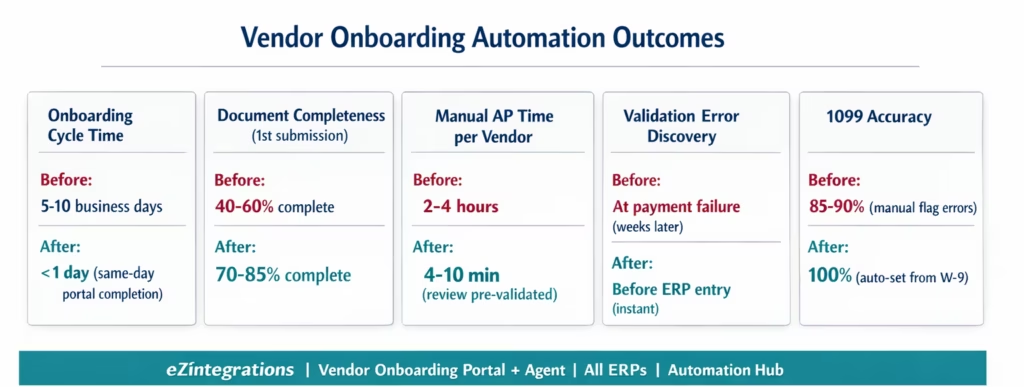
Onboarding cycle time: from 5-10 business days (document chasing, manual entry, back-and-forth) to under 1 business day in most cases (when the supplier completes the portal promptly). The primary variable is the supplier’s response speed to the portal link. For suppliers who complete the portal same-day, onboarding completes in hours. For suppliers who take 2-3 days to complete, onboarding completes in 2-3 days: still faster than the manual median.
Document completeness at first submission: manual onboarding sees 40-60% of vendors submit incomplete document sets on first contact (missing one document, wrong format, expired certificate). The portal’s guided checklist, with instructions and examples per document type, raises first-submission completeness to 70-85%.
Validation error discovery: in manual onboarding, errors (wrong ABA routing number, expired COI, EIN format mismatch) are typically discovered at payment (weeks later), requiring payment reversal, correction, and reprocessing. Automated validation catches 100% of format errors before the vendor is loaded into the ERP.
Manual AP time per vendor: from 2-4 hours (document review, manual ERP entry, multi-ERP replication, email follow-ups) to 4-10 minutes (approver reviewing pre-validated summary). The AP coordinator’s manual ERP entry step is eliminated entirely.
1099 accuracy: the is1099eligible flag is set automatically from the W-9 tax classification (individual, sole proprietor, LLC single-member = 1099 eligible; corporation = not eligible). Manual onboarding results in 1099 eligibility errors in approximately 10-15% of cases (wrong flag set, flag not set at all), requiring year-end corrections.
Multi-ERP onboarding: for organisations with 2-3 ERPs, a single vendor approval triggers vendor master creation in all configured ERPs simultaneously. The AP team previously repeated the manual entry process once per ERP per vendor.
COI monitoring: COI renewal reminders are set automatically at onboarding (configurable lead time: 30-90 days before expiry). The AP team no longer needs to maintain a manual expiry calendar for vendor insurance certificates.
How to Get Started
Step 1: Choose Your Approach: Portal or Agent
If your team is new to vendor onboarding automation, start with the Portal. It eliminates document chasing and ensures completeness without requiring AI validation configuration. If you are processing 10+ vendors per month or have experienced payment failures from incorrect bank details, start with the Agent.
Both approaches are available as Automation Hub templates and can be upgraded: a Portal deployment can be upgraded to include the Agent’s AI validation and auto-ERP-entry features without rebuilding the workflow.
Step 2: Import the Vendor Onboarding Template
Go to the Automation Hub and import the Vendor Onboarding Portal or Vendor Onboarding Agent template. The Agent template includes Goldfinch AI Document Intelligence for W-9, W-8 BEN, bank letter, and COI extraction; the automated validation rules (EIN, ABA, COI coverage); the configurable approval routing; and the ERP vendor master creation API calls for your ERP.
Step 3: Configure Document Requirements and Validation Rules
Set which documents are required for which vendor categories: US domestic suppliers (W-9, bank, COI), foreign suppliers (W-8 BEN/BEN-E, bank with SWIFT/IBAN, COI), service vendors (COI with specific coverage types), product vendors (business registration, potentially COI for delivery vendors). Configure the validation thresholds: COI minimum coverage amounts per vendor category, COI expiry warning lead time, ABA validation (enable/disable for specific use cases).
Step 4: Configure ERP Credentials and Field Mapping
Add your ERP API credentials (SAP BTP Communication Arrangement, Oracle Azure AD OAuth 2.0, NetSuite TBA, Dynamics 365 Azure AD, or Acumatica API key) to the eZintegrations credential vault. Configure the field mapping: which extracted document fields map to which ERP vendor master fields. Standard mappings are pre-configured in the template; custom fields (ERP-specific classification codes, payment group assignments) are added in the mapping configuration.
Step 5: Send Your First Portal Link and Validate the Workflow
Select an existing supplier (who is already in your ERP) and run them through the portal as a test. Confirm document extraction accuracy for their W-9 and COI format. Confirm ABA routing validation works. Confirm the approval notification reaches the correct approver. Confirm the ERP vendor update (test in Dev environment first). Promote to production.
Total configuration time: 4-8 hours from template import to production. Agent validation rule configuration and ERP field mapping typically take the most time.
FAQ
1. How does vendor onboarding automation work for AP teams with eZintegrations
eZintegrations provides two approaches. The Vendor Onboarding Portal enables suppliers to submit documents such as W 9 W 8 BEN bank details and COI through a guided self service interface with automated reminders and completion tracking. The Vendor Onboarding Agent adds Goldfinch AI Document Intelligence for field extraction automated validation such as EIN format ABA routing number and COI checks approval routing and automatic ERP vendor master creation eliminating both document chasing and manual data entry.
2. How long does it take to set up vendor onboarding automation
Setup typically takes 4 to 8 hours from template import to production. Portal only setup takes 2 to 4 hours while full Agent setup with AI validation and ERP integration takes 4 to 8 hours. Key time factors include COI threshold configuration ERP field mapping testing across vendor types and ERP API credential setup.
3. Does eZintegrations work with SAP Oracle NetSuite and Dynamics 365 for vendor onboarding
Yes. eZintegrations integrates with SAP S 4HANA Oracle Fusion NetSuite Dynamics 365 and Acumatica using REST and OData APIs. Vendor master records can be created automatically across multiple ERPs simultaneously with configurable field mapping for each system.
4. How does automated ABA routing number validation work
The Vendor Onboarding Agent extracts the 9 digit ABA routing number from supplier documents using AI Document Intelligence and validates it against the Federal Reserve directory to confirm correctness and bank identity. Invalid numbers such as incorrect check digits or non existent institutions are flagged before ERP entry preventing downstream payment failures.
5. What is the difference between the Vendor Onboarding Portal and the Vendor Onboarding Agent
The Portal focuses on structured document collection and organisation with manual ERP entry by the AP team. The Agent adds AI driven document extraction validation and automatic ERP vendor creation on approval eliminating manual entry errors. The Portal is ideal for quick deployment while the Agent is suited for high volume or error sensitive environments.
Vendor Onboarding Is Where AP Automation Starts. And Where the First Invoice Succeeds.
Every AP automation improvement downstream depends on having accurate vendor master data in the ERP. Invoice matching cannot work if the vendor name on the invoice does not match the ERP record. Payment automation cannot work if the ABA routing number is incorrect. 1099 reporting cannot be accurate if the tax classification flag was not set correctly at onboarding.
The first invoice from a new vendor is the proof. When onboarding data is accurate: the invoice processes automatically, the ACH payment succeeds first time, the 1099 flag is correct at year-end. When onboarding was manual with errors: the first invoice triggers an investigation, a payment failure, a correction filing.
Vendor onboarding automation is not a nice-to-have. It is the foundation that makes every other AP automation capability reliable, from that first invoice onward.
eZintegrations provides both the Portal (guided, human-reviewed) and the Agent (autonomous, AI-validated, ERP-automated) to match your team’s capacity and risk appetite. Both are available as Automation Hub templates. Both connect to SAP, Oracle, NetSuite, Dynamics 365, and Acumatica. And both feed directly into the invoice matching, payment automation, and AP exception management workflows that process every subsequent invoice from your new vendors.
Explore the Vendor Onboarding Templates in the Automation Hub. Portal template, Agent template, and multi-ERP configurations are all available. Or book a free demo with your ERP details and vendor category structure. We will configure the portal and validation rules for your specific onboarding requirements in the session.
For the downstream AP automation that vendor master data enables, see the enterprise AP automation guide and the purchase order automation guide.

