How to Set Exception and Delay Alerts from Shiphawk to Email
$0.00
| Workflow Name: |
Exception & Delay Alerts: Shiphawk → Email/Webhook |
|---|---|
| Purpose: |
Automatically alert stakeholders for shipment delays and damages |
| Benefit: |
Faster response to delays and damages; reduced losses |
| Who Uses It: |
Logistics; Customer Support; IT |
| System Type: |
ERP/Notification Integration Workflow |
| On-Premise Supported: |
Yes |
| Industry: |
E-commerce / Logistics |
| Outcome: |
Real-time delay & damage notifications |
Table of Contents
Description
| Problem Before: |
Manual alerts caused delayed responses |
|---|---|
| Solution Overview: |
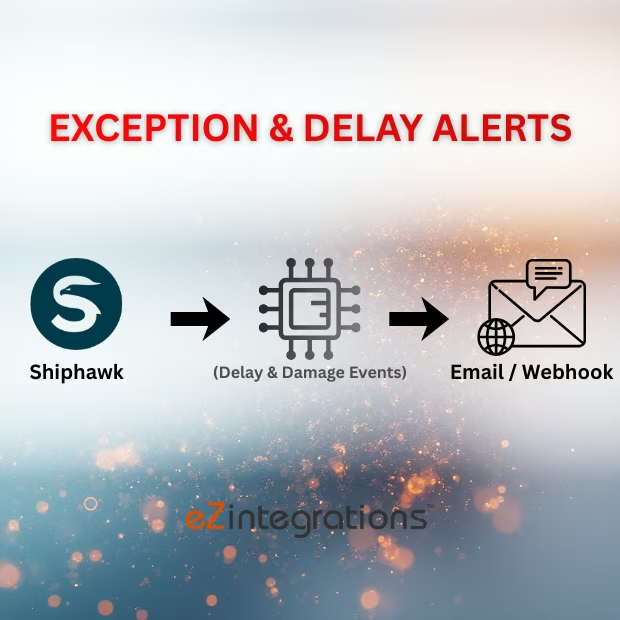
Monitor Shiphawk shipment events and trigger Email/Webhook notifications |
| Key Features: |
Event monitoring; alert triggers; validation; logs |
| Business Impact: |
Improves operational response time and reduces impact |
| Productivity Gain: |
Removes manual alerting |
| Cost Savings: |
Reduces potential loss due to delays/damages |
| Security & Compliance: |
Encrypted API calls; secure creds |
Exception & Delay Alerts – Shiphawk to Email/Webhook
This workflow enables Exception & Delay Alerts by automatically notifying stakeholders of shipment delays or damages via email or webhook. It ensures timely awareness and faster response to operational issues.
Automated Shipment Alerts for Reduced Losses and Improved Response
The system monitors shipment events in Shiphawk, validates exceptions, and sends real-time alerts to relevant teams. This workflow helps logistics, customer support, and IT teams reduce delays, minimize losses, and maintain accurate tracking of shipment exceptions.
Watch Demo
| Video Title: |
Collect data from any Webhook and send to any Data Targets in Real Time |
|---|---|
| Duration: |
5:25 |
Outcome & Benefits
| Time Savings: |
Eliminates manual monitoring |
|---|---|
| Cost Reduction: |
Reduces operational risk |
| Accuracy: |
High via event validation |
| Productivity: |
Faster alerting |
Industry & Function
| Function: |
Exception & delay alerting |
|---|---|
| System Type: |
ERP/Notification Integration Workflow |
| Industry: |
E-commerce / Logistics |
Functional Details
| Use Case Type: |
Delay & Damage Alerting |
|---|---|
| Source Object: |
Shiphawk Shipment Events |
| Target Object: |
Email/Webhook Alerts |
| Scheduling: |
Real-time / event-based |
| Primary Users: |
Logistics; Customer Support |
| KPI Improved: |
Alert speed; responsiveness |
| AI/ML Step: |
Not required |
| Scalability Tier: |
Enterprise |
Technical Details
| Source Type: |
Shiphawk API |
|---|---|
| Source Name: |
Delay & Damage Events |
| API Endpoint URL: |
Shiphawk Events API |
| HTTP Method: |
GET |
| Auth Type: |
OAuth 2.0 / API Keys |
| Rate Limit: |
Based on Shiphawk API limits |
| Pagination: |
Supported via API |
| Schema/Objects: |
Shipment IDs; event type; timestamps |
| Transformation Ops: |
Validation and mapping for alerts |
| Error Handling: |
Retry failed calls; log API errors |
| Orchestration Trigger: |
Event-based |
| Batch Size: |
Single event or batch |
| Parallelism: |
Concurrent alerting |
| Target Type: |
Notification |
| Target Name: |
Email / Webhook |
| Target Method: |
SMTP / Webhook POST |
| Ack Handling: |
Delivery success/failure logged |
| Throughput: |
Thousands/day |
| Latency: |
Seconds per event |
| Logging/Monitoring: |
Event logs; error logs |
Connectivity & Deployment
| On-Premise Supported: |
Yes |
|---|---|
| Supported Protocols: |
HTTPS; REST; SMTP |
| Security & Compliance: |
Encrypted API calls; secure creds |
FAQ
1. What is the Exception & Delay Alerts workflow from Shiphawk to Email/Webhook?
It is an ERP/Notification integration workflow that automatically alerts stakeholders about shipment delays, damages, or exceptions via email or webhook.
2. What type of alerts are generated?
The workflow generates alerts for shipment delays, damaged goods, failed deliveries, or any exceptions identified in Shiphawk shipments.
3. How does the alerting process work?
The workflow monitors shipment status in Shiphawk, identifies exceptions or delays, and automatically sends notifications to designated recipients through email or webhook endpoints.
4. Who uses this workflow?
Logistics teams, customer support, and IT staff use this workflow to respond quickly to shipment issues and maintain operational efficiency.
5. What are the benefits of automating exception and delay alerts?
Automation ensures faster response to shipment issues, reduces potential losses, improves customer satisfaction, and minimizes manual monitoring.
6. Does this workflow support on-premise systems?
Yes, the workflow supports on-premise environments where secure integration with Shiphawk and notification systems is required.
7. What system type does this workflow belong to?
This workflow is an ERP/Notification integration designed to alert stakeholders about shipment exceptions and delays.
8. Which industries benefit from this integration?
E-commerce and logistics industries benefit from timely alerts, faster issue resolution, and improved operational efficiency.
Case Study
| Solution: |
Automated Shiphawk → Email/Webhook Delay & Damage Alerts |
|---|---|
| Customer Name: |
Shiphawk Users |
| Problem: |
Manual alerts caused delayed responses |
| ROI: |
Faster responses; reduced losses |
| Industry: |
E-commerce / Logistics |
| Outcome: |
Real-time delay & damage notifications |