
Top 20 AI Agent Templates for Enterprise Automation in 2026
March 31, 2026The top 20 enterprise AI agent templates from eZintegrations cover finance reconciliation, invoice processing, HR onboarding, sales intelligence, contract review, IT ticket triage, procurement anomaly detection, and 13 other high-value automation patterns. Every template runs on Goldfinch AI with 9 native tools, imports from the Automation Hub in one click, and deploys to production in hours without writing code. Each template uses combinations of Knowledge Base Vector Search, Document Intelligence, Data Analysis, API Tool Call, and Integration Workflow as Tool to deliver autonomous, multi-step decisions across enterprise systems.
TL;DR
20 production-ready AI agent templates ranked by deployment frequency and enterprise impact, all built on Goldfinch AI with 9 native tools. Each template imports from the Automation Hub in one click and goes live in hours, not weeks. Covers finance, HR, sales, IT, legal, supply chain, customer operations, and data intelligence workflows. Every template is configurable: connect your specific systems, set your confidence thresholds, extend with additional tools beyond the 9 native ones. Best for: enterprise ops, IT, and finance teams deploying their first production AI agents without building from scratch.
How We Ranked These Templates
These 20 templates are ranked by three criteria: deployment frequency across enterprise accounts, measurable time-to-value against manual processes, and breadth of Goldfinch AI tool utilisation. Templates ranked higher either solve a problem affecting the largest number of enterprise teams, deliver the most hours saved per week per team, or demonstrate the most sophisticated multi-tool reasoning that showcases what an AI agent can do beyond simple automation.
Each entry shows: the business problem it solves, which Goldfinch AI tools the template uses, the core workflow, and the configuration time required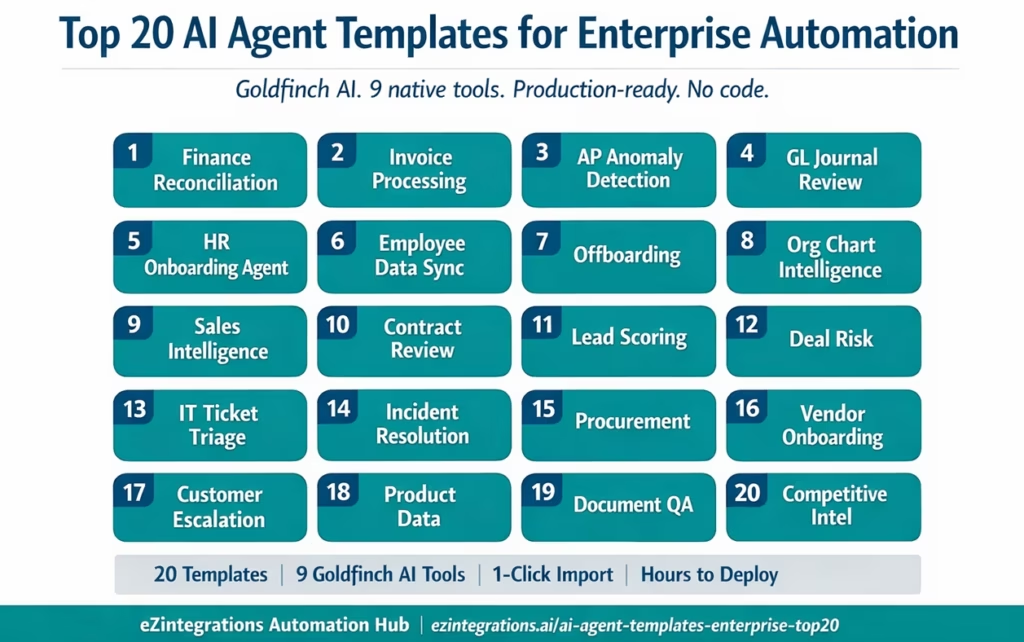
The Goldfinch AI Foundation: What Powers Every Template
Every template in this list runs on Goldfinch AI, eZintegrations’ agentic AI capability. Goldfinch AI ships with 9 native out-of-the-box agent tools that each template draws from:
- Knowledge Base Vector Search: semantic search across your internal documents, runbooks, policy files, and knowledge bases
- Document Intelligence: extract structured data from PDFs, invoices, contracts, and unstructured documents
- Data Analysis: analyse structured datasets, compute statistics, identify patterns and anomalies
- Data Analytics with Charts/Graphs/Dashboards: generate visual outputs from data analysis for reporting and decision support
- Web Crawling: retrieve information from external web sources, competitor sites, and public databases
- Watcher Tools: monitor data sources, systems, and event streams for trigger conditions
- API Tool Call: call any REST, GraphQL, or SOAP API in the eZintegrations API catalog as an agent tool
- Integration Workflow as Tool: invoke complete multi-step integration workflows as a single agent tool call
- Integration Flow as MCP: expose integration flows as MCP (Model Context Protocol) endpoints for external AI agent invocation
Beyond these 9, teams can add custom tools as self-service extensions without platform vendor involvement.
Each template below notes which tools it uses and how they combine to deliver the agent’s autonomous decision capability.
Top 20 Enterprise AI Agent Templates
1. Financial Reconciliation AI Agent
Business problem: Your finance team spends 15-20 hours per week manually matching bank transactions against ERP ledger entries, flagging discrepancies, and routing them to the right approver. Reconciliation errors caught late delay month-end close by 2-3 days.
Goldfinch AI tools used: Data Analysis, API Tool Call, Integration Workflow as Tool, Knowledge Base Vector Search
How the template works: Watcher monitors the bank transaction feed for new entries – Data Analysis compares incoming bank transactions against ERP GL entries (retrieved via API Tool Call to NetSuite, SAP, or Oracle) . Discrepancies above a configurable threshold are classified by type (timing difference, duplicate, missing entry) using Knowledge Base Vector Search against reconciliation policy . Matched transactions are auto-posted via Integration Workflow as Tool; unmatched items are queued to a finance analyst with a pre-populated exception report .Data Analytics generates a daily reconciliation summary dashboard
Configuration time: 3-5 hours
What it replaces: 15-20 hours/week manual bank rec per finance analyst
Connects to: NetSuite, SAP S/4HANA, Oracle Fusion Cloud GL, QuickBooks, any bank feed via API
2. AP Invoice Processing AI Agent
Business problem: Your accounts payable team receives 500-2,000 invoices per month across email, PDF attachments, and supplier portals. Each invoice requires header extraction, PO matching, approval routing, and ERP posting. Manual processing takes 8-12 minutes per invoice.
Goldfinch AI tools used: Document Intelligence, API Tool Call, Integration Workflow as Tool, Data Analysis
How the template works: Document Intelligence extracts invoice fields from PDF or email attachments: vendor name, invoice number, line items, amounts, due date, tax. API Tool Call retrieves the matching PO from the ERP system and validates invoice amount against PO tolerance (configurable: 5%, $500, or custom) .Matched invoices within tolerance are auto-approved and posted via Integration Workflow as Tool to the ERP AP module. Exception invoices (over-tolerance, missing PO, duplicate) are routed to the AP supervisor with the Document Intelligence extraction and PO comparison attached .Data Analysis tracks approval cycle time, exception rate, and vendor performance weekly
Configuration time: 4-6 hours
What it replaces: 8-12 minutes per invoice, manual keying, email-based approval chains
Connects to: SAP, Oracle EBS, NetSuite, QuickBooks, Microsoft Dynamics, Gmail/Outlook for email ingestion
3. AP Spend Anomaly Detection Agent
Business problem: Finance only catches duplicate payments, vendor fraud, and contract rate violations after month-end close, when the damage is already done. Real-time AP spend monitoring requires a dedicated analyst or expensive specialised software.
Goldfinch AI tools used: Data Analysis, Knowledge Base Vector Search, API Tool Call, Watcher Tools
How the template works: Watcher monitors the AP transaction stream from the ERP in near-real-time – Data Analysis detects statistical anomalies: invoices above 2 standard deviations from vendor average, duplicate invoice numbers, payments outside contracted rate ranges. Knowledge Base Vector Search checks flagged transactions against vendor contract terms and payment policy. Anomalies are scored by severity, auto-escalated above a confidence threshold, and sent to the finance controller with supporting evidence. Weekly Data Analytics report shows anomaly trends and resolution rates
Configuration time: 3-4 hours
What it replaces: Month-end exception reviews, manual duplicate checks, post-payment fraud discovery
Connects to: SAP AP module, Oracle Payables, NetSuite, any ERP with API access
4. GL Journal Entry Review Agent
Business problem: Month-end journal entries require a reviewer to check each entry for completeness, coding accuracy, and compliance with posting policy. At volume, reviewers miss errors that require post-close reversals.
Goldfinch AI tools used: Document Intelligence, Knowledge Base Vector Search, Data Analysis, API Tool Call
How the template works: API Tool Call retrieves new journal entries from the ERP as they are posted – Knowledge Base Vector Search checks each entry against the chart of accounts policy, period cutoff rules, and intercompany elimination requirements. Data Analysis validates mathematical accuracy and checks for coding patterns that historically correlate with errors. Entries passing all checks are auto-approved; entries with issues are returned to the preparer with specific correction guidance from the knowledge base. Approval cycle time and error rate tracked weekly
Configuration time: 4-6 hours
What it replaces: Manual journal review queue, post-close error discovery, audit prep rework
Connects to: Oracle Fusion GL, SAP FI, NetSuite, any ERP with GL API
5. Employee Onboarding Orchestration Agent
Business problem: New hire onboarding requires IT to provision 8-15 accounts, HR to complete policy acknowledgements, facilities to assign equipment, and finance to set up payroll. Each step is tracked in a different system and the coordination falls on a single HR ops coordinator.
Goldfinch AI tools used: API Tool Call, Integration Workflow as Tool, Knowledge Base Vector Search, Watcher Tools
How the template works: Watcher monitors HRIS for new hire records created (Workday, SuccessFactors, or BambooHR). Knowledge Base Vector Search retrieves the onboarding checklist for the employee’s role, department, and location from the HR policy knowledge base. API Tool Call provisions accounts in sequence: Active Directory, email, Slack, JIRA, Salesforce, and other role-specific systems per the checklist. Integration Workflow as Tool triggers payroll setup in ADP or Workday Payroll and sends equipment requests to facilities. Watcher monitors completion of each step and sends completion summary to HRBP; escalates stalled steps after configurable SLA.
Configuration time: 5-8 hours (system connection count-dependent)
What it replaces: 8-12 hours of manual coordination per new hire, email chains, missed provisioning steps
Connects to: Workday, SuccessFactors, BambooHR, Active Directory, Okta, Slack, JIRA, Salesforce, ADP
6. Employee Offboarding Compliance Agent
Business problem: Offboarding a departing employee requires deprovisioning 8-15+ accounts within a specific SLA (often 24-48 hours) to prevent data access risk. Missed deprovisioning is a common audit finding and a security incident vector.
Goldfinch AI tools used: API Tool Call, Integration Workflow as Tool, Watcher Tools, Knowledge Base Vector Search
How the template works: Watcher detects termination events in HRIS (status change to Terminated) – Knowledge Base Vector Search retrieves the offboarding deprovisioning checklist for the employee’s role and system access profile. API Tool Call deprovisions accounts in parallel: disable Active Directory, revoke Okta SSO, remove Salesforce user, deactivate email, remove from Slack, revoke GitHub access. Integration Workflow as Tool transfers owned records (Salesforce accounts, JIRA tickets, email aliases) to the designated managerCo. mpletion report sent to IT Security and HR within 1 hour of offboarding trigger; exceptions (accounts that failed deprovisioning) escalated immediately
Configuration time: 4-6 hours
What it replaces: Manual offboarding checklist coordination, missed deprovisioning, 24-72 hour completion lag
Connects to: Workday, Active Directory, Okta, Salesforce, Slack, GitHub, JIRA, Google Workspace
7. Sales Intelligence and Account Research Agent
Business problem: Your sales reps spend 45-90 minutes per account researching company news, funding rounds, technology stack, key contacts, and competitive positioning before each meeting. That research is only as current as the last time they looked.
Goldfinch AI tools used: Web Crawling, Document Intelligence, Knowledge Base Vector Search, API Tool Call, Data Analytics
How the template works: Triggered by a new meeting booked in Salesforce or HubSpot (API Tool Call detects the calendar event). Web Crawling retrieves recent news, press releases, LinkedIn activity, and job postings for the target account. Document Intelligence processes any existing proposal documents, call notes, or attachments in the CRM opportunity. Knowledge Base Vector Search cross-references the account against internal win/loss analysis and similar customer profiles. Data Analytics generates a pre-meeting brief: account news, funding status, tech stack signals, recommended talking points, risk flags. Brief delivered to the rep via Slack or email 2 hours before the meeting
Configuration time: 3-5 hours
What it replaces: 45-90 minutes of manual pre-meeting research per rep per meeting
Connects to: Salesforce, HubSpot, Slack, Gmail, LinkedIn (public data via Web Crawling)
8. Contract Review and Risk Classification Agent
Business problem: Your legal or procurement team reviews 50-200 contracts per month. Each review involves checking for non-standard clauses, missing provisions, liability caps, and SLA terms. Manual review takes 2-4 hours per contract for a junior reviewer.
Goldfinch AI tools used: Document Intelligence, Knowledge Base Vector Search, Data Analysis
How the template works: Document Intelligence extracts contract clauses, defined terms, payment terms, liability caps, SLA commitments, termination provisions, and governing law. Knowledge Base Vector Search compares each extracted clause against the approved playbook stored in the knowledge base: standard language, red lines, fallback positions. Data Analysis scores the contract by risk level across 8 dimensions: liability exposure, auto-renewal risk, IP ownership, data privacy terms, change of control, audit rights, termination triggers, and SLA penalties. Contracts scoring above the risk threshold are flagged with specific clause annotations and routed to senior legal review. Contracts within standard range are marked pre-approved with a summary report attached
Configuration time: 4-8 hours (playbook knowledge base build is the primary investment)
What it replaces: 2-4 hours manual review per contract for junior reviewers
Connects to: Docusign, Ironclad, SharePoint, Google Drive, Box, any document repository
9. IT Help Desk Ticket Triage and Resolution Agent
Business problem: Your IT help desk receives 200-800 tickets per week. L1 triage involves reading each ticket, categorising it, checking for known solutions in the knowledge base, and either resolving or escalating. Triage alone consumes 30-40% of L1 capacity.
Goldfinch AI tools used: Knowledge Base Vector Search, API Tool Call, Integration Workflow as Tool, Document Intelligence
How the template works: Watcher monitors the ITSM queue for new tickets (ServiceNow, JIRA Service Management, Freshservice). Knowledge Base Vector Search searches the IT knowledge base and runbook library for solutions matching the ticket description. If a known solution exists with confidence above the configurable threshold: API Tool Call executes the resolution (password reset, account unlock, software install trigger) and closes the ticket with the solution documented. If no known solution or confidence below threshold: ticket is categorised, priority assigned, and routed to the appropriate L2 queue with the knowledge base search results attached. Integration Workflow as Tool updates the CMDB and sends SLA status updates to the requester
Configuration time: 4-6 hours
What it replaces: 30-40% of L1 triage capacity, 1-4 hour resolution lag for known issues
Connects to: ServiceNow, JIRA Service Management, Freshservice, Zendesk, Active Directory, Okta
10. Procurement Purchase Order Validation Agent
Business problem: Your procurement team manually validates every incoming PO against budget approval limits, preferred vendor lists, contract pricing, and three-way matching requirements. At volume, errors slip through and result in budget overruns and payment disputes.
Goldfinch AI tools used: Data Analysis, Knowledge Base Vector Search, API Tool Call, Document Intelligence
How the template works: Document Intelligence extracts PO fields from incoming PDFs or system-generated POs: vendor, line items, quantities, unit prices, total amount, delivery date, cost centre – Knowledge Base Vector Search checks the vendor against the approved vendor register and contract pricing file. API Tool Call retrieves the current budget position for the cost centre from the ERP and checks the PO against approval limits. Data Analysis validates price per unit against contracted rate and flags variances above tolerance. Approved POs are submitted to the ERP via Integration Workflow as Tool; exceptions are held with a variance report routed to the procurement manager
Configuration time: 3-5 hours
What it replaces: Manual PO validation, budget overrun discovery post-spend, vendor dispute resolution
Connects to: SAP MM, Oracle Procurement, NetSuite, Coupa, Ariba, any ERP with PO API
11. Vendor Onboarding and Risk Assessment Agent
Business problem: Onboarding a new vendor involves collecting documents, running compliance checks, verifying bank details, assessing financial health, and approval routing. The process takes 2-6 weeks manually, blocking procurement on time-sensitive supplier relationships.
Goldfinch AI tools used: Document Intelligence, Web Crawling, Data Analysis, API Tool Call, Knowledge Base Vector Search
How the template works: Document Intelligence extracts data from vendor-submitted documents: W-9/W-8, certificates of insurance, bank details, tax ID, business registration. Web Crawling retrieves vendor financial data, news, regulatory filings, and sanctions list status from public sources. Data Analysis scores the vendor across financial health, compliance, insurance coverage, and sanctions risk dimensions. Knowledge Base Vector Search checks the vendor profile against procurement policy and category specific requirements. API Tool Call creates the vendor record in the ERP for approved vendors; high-risk vendors are routed to procurement leadership with a full risk summary
Configuration time: 5-8 hours
What it replaces: 2-6 week manual onboarding cycles, manual compliance checks, paper-based document collection
Connects to: SAP, Oracle, NetSuite, Coupa, Ariba, any ERP with vendor API
12. Customer Escalation Triage and Resolution Agent
Business problem: Customer support tickets flagged as escalations land in a shared inbox where a senior agent must read the full case history, assess urgency, identify the root cause, and route to the right team. During high-volume periods, escalations sit unread for 2-4 hours.
Goldfinch AI tools used: Document Intelligence, Knowledge Base Vector Search, API Tool Call, Data Analysis
How the template works: Document Intelligence processes the full ticket history: all messages, attachments, and case notes. Knowledge Base Vector Search identifies whether the issue matches a known problem pattern, a product bug, or an escalation path in the support runbook. Data Analysis assesses customer health score, contract tier, outstanding ARR, and historical escalation frequency via API Tool Call to CRM and billing systems. Escalations are scored by urgency and impact: Tier 1 (customer at risk) routed to account manager within 5 minutes; Tier 2 (SLA breach risk) routed to senior support; Tier 3 (standard escalation) routed to standard queue. Root cause hypothesis and recommended resolution actions attached to every routed escalation
Configuration time: 3-5 hours
What it replaces: 2-4 hour manual escalation reading and triage, inconsistent urgency assessment
Connects to: Zendesk, Salesforce Service Cloud, JIRA, HubSpot, any CRM with API access
13. Sales Deal Risk and Forecast Intelligence Agent
Business problem: Your revenue operations team produces weekly pipeline forecasts based on CRM data that reps have not updated since last quarter. Call activity, engagement signals, and deal age are not factored in. The result is a forecast that diverges from actuals by 20-40%.
Goldfinch AI tools used: Data Analysis, API Tool Call, Knowledge Base Vector Search, Web Crawling
How the template works: API Tool Call retrieves the current pipeline from Salesforce or HubSpot: all open opportunities, stage, amount, close date, last activity date. Data Analysis computes deal risk score for each opportunity using a configurable model: days since last activity, engagement score, stage progression velocity, historical win rate for similar deals. Web Crawling checks account-level news for signals that might affect the deal: leadership changes, funding, competitor announcements, earnings reports. Knowledge Base Vector Search compares deals against historical win/loss patterns and known disqualification signals. Weekly forecast report generated with Data Analytics: confidence-weighted pipeline, risk-adjusted forecast, deals requiring immediate rep attention
Configuration time: 4-6 hours
What it replaces: Manual pipeline reviews, subjective rep forecast submissions, 20-40% forecast variance
Connects to: Salesforce, HubSpot, Outreach, Clari, any CRM with pipeline API
14. Competitive Intelligence Monitoring Agent
Business problem: Your product marketing team manually monitors competitor websites, G2 reviews, LinkedIn activity, and press releases to maintain a competitive intelligence database. Updates happen monthly at best, and critical competitive moves are missed in real time.
Goldfinch AI tools used: Web Crawling, Document Intelligence, Knowledge Base Vector Search, Data Analytics
How the template works: Watcher triggers the agent on a configurable schedule (daily, weekly) per competitor. Web Crawling retrieves updated content from competitor websites, pricing pages, product pages, blog posts, LinkedIn company pages, G2 and Capterra profiles, and press release feeds – Document Intelligence extracts structured competitive intelligence: product changes, pricing updates, new features, partnerships, customer wins, key messaging shifts. Knowledge Base Vector Search compares new information against the existing competitive knowledge base and flags what is net-new. Data Analytics generates a weekly competitive brief with change summary, win/loss implications, and recommended positioning adjustments
Configuration time: 3-4 hours
What it replaces: Manual competitive monitoring, monthly update cycles, missed competitor announcements
Connects to: Any web source via Web Crawling, internal wiki (Notion, Confluence) for knowledge base
15. Regulatory Document Compliance Monitoring Agent
Business problem: Your compliance team tracks regulatory changes across multiple jurisdictions and must assess the impact on internal policies, product features, and contractual obligations. Manual tracking across regulatory bodies, publications, and legal updates requires 10-15 hours per week per compliance analyst.
Goldfinch AI tools used: Web Crawling, Document Intelligence, Knowledge Base Vector Search, Data Analysis
How the template works: Watcher triggers the agent on a daily schedule per regulatory body or jurisdiction. Web Crawling retrieves new publications, guidance documents, and enforcement actions from regulatory websites (SEC, GDPR supervisory authorities, HIPAA, FDA, and others per configuration). Document Intelligence extracts key requirements, effective dates, scope definitions, and penalties from regulatory documents. Knowledge Base Vector Search maps each new requirement against the organisation’s internal policy library, product feature set, and active contracts to identify gaps. Data Analysis prioritises findings by impact severity and deadline urgency. Compliance brief generated for the team with specific policy gaps, affected systems, and recommended remediation actions
Configuration time: 5-8 hours (regulatory scope and knowledge base are configuration-intensive)
What it replaces: 10-15 hours/week per analyst for manual regulatory monitoring
Connects to: Any regulatory website via Web Crawling, SharePoint, Confluence, or any policy document repository
16. Product Data Enrichment and Syndication Agent
Business problem: Your eCommerce or product team maintains product data across multiple channels: ERP, PIM, Shopify, Amazon, and retail partner portals. Each channel has different field requirements. Manual enrichment and syndication takes 20-40 hours per week for mid-sized catalogues.
Goldfinch AI tools used: Document Intelligence, Web Crawling, API Tool Call, Integration Workflow as Tool, Data Analysis
How the template works: Watcher monitors the ERP or PIM for new or updated product records. Web Crawling retrieves manufacturer specifications, competitor listings, and standards documentation for product enrichment. Document Intelligence extracts attributes from product specification PDFs, datasheets, and manufacturer content. Data Analysis validates the enriched product record against channel-specific completeness rules and flags missing required attributes. Integration Workflow as Tool syndicates the validated product record to each configured channel: Shopify, Amazon Seller Central, Walmart Marketplace, retailer portals via API Tool Call
Configuration time: 5-8 hours (channel count-dependent)
What it replaces: 20-40 hours/week of manual product data enrichment and copy-paste syndication
Connects to: SAP, NetSuite, Shopify, Amazon SP-API, any PIM with API access
17. IT Incident Root Cause Analysis Agent
Business problem: When a production incident fires, your on-call engineer spends 20-45 minutes pulling logs from multiple systems, correlating events, and identifying the root cause before remediation can begin. Time to root cause directly extends MTTR.
Goldfinch AI tools used: API Tool Call, Data Analysis, Knowledge Base Vector Search, Document Intelligence
How the template works: Watcher detects a production alert from PagerDuty, OpsGenie, or your monitoring platform – API Tool Call simultaneously retrieves logs from Datadog, Splunk, CloudWatch, or the configured observability platform across the affected service and its dependencies. Data Analysis correlates log events, error spikes, and deployment events across the time window surrounding the incident onset – Knowledge Base Vector Search searches the incident runbook and past incident reports for similar error patterns and known resolutions – A root cause hypothesis report is generated within 5-10 minutes of the alert, with correlated evidence, likely cause ranked by confidence, and recommended first remediation steps attached to the incident ticket
Configuration time: 4-6 hours
What it replaces: 20-45 minutes of manual log correlation per incident, inconsistent RCA quality
Connects to: PagerDuty, Datadog, Splunk, CloudWatch, OpsGenie, ServiceNow, JIRA
18. Supply Chain Disruption Early Warning Agent
Business problem: Your supply chain team learns about supplier disruptions, port delays, and logistics bottlenecks from news reports, not from a proactive monitoring system. By the time the disruption is known, inventory buffer has already eroded.
Goldfinch AI tools used: Web Crawling, Data Analysis, API Tool Call, Knowledge Base Vector Search, Watcher Tools
How the template works: – Watcher triggers daily monitoring per supplier, port, and trade route in the configuration – Web Crawling retrieves news, shipping data, port authority bulletins, weather alerts, and geopolitical risk reports relevant to configured supply chain nodes – Data Analysis assesses disruption probability and estimated impact on lead time and inventory coverage – API Tool Call retrieves current inventory positions and open purchase orders from the ERP for affected SKUs – Knowledge Base Vector Search checks disruption patterns against historical supplier performance and approved alternative sourcing options – Early warning report generated with risk-prioritised supplier and SKU list, estimated stock-out dates, and recommended sourcing actions
Configuration time: 5-7 hours
What it replaces: Reactive disruption discovery, manual news monitoring, stock-out events that could have been predicted
Connects to: SAP, Oracle SCM, NetSuite, any ERP with inventory API, web sources via Web Crawling
19. HR Policy Q&A and Employee Self-Service Agent
Business problem: Your HR team answers 50-150 repetitive employee questions per week: leave policies, benefits eligibility, expense reimbursement limits, remote work guidelines. Each question requires an HR analyst to find the policy, draft a response, and send it. 8-12 hours per week in aggregate.
Goldfinch AI tools used: Knowledge Base Vector Search, API Tool Call, Document Intelligence
How the template works: – Employee submits a question via Slack, Teams, or the internal portal – Knowledge Base Vector Search retrieves the relevant policy document, benefit plan summary, or HR guideline from the HR knowledge base – If the question requires personal data (leave balance, payroll, benefit enrolment): API Tool Call retrieves the employee-specific information from the HRIS – A structured response is composed combining the policy context and the personal data, delivered to the employee in the same channel – Questions that cannot be answered with high confidence (new policy areas, complex situations) are routed to an HR analyst with the search results pre-attached
Configuration time: 3-5 hours (HR knowledge base population is the primary investment)
What it replaces: 8-12 hours/week HR analyst time on repetitive policy questions
Connects to: Workday, SuccessFactors, BambooHR, Slack, Microsoft Teams, SharePoint
20. Multi-System Data Quality Monitoring Agent
Business problem: Your data engineering or IT team is responsible for data quality across 8-15 enterprise systems. Mismatched customer records, stale inventory figures, and orphaned data are discovered during downstream reporting, not at the source. Manual data quality audits happen quarterly at best.
Goldfinch AI tools used: Data Analysis, API Tool Call, Integration Workflow as Tool, Watcher Tools, Knowledge Base Vector Search
How the template works: – Watcher runs on a configurable schedule (daily, weekly) per system pair in scope – API Tool Call retrieves comparison datasets from each system in scope: customer records from Salesforce and NetSuite, product records from ERP and eCommerce platform, employee records from HRIS and Active Directory – Data Analysis runs configurable quality rules: duplicate detection, field completeness, referential integrity, value range validation, cross-system consistency – Knowledge Base Vector Search checks detected issues against the data quality policy to determine auto-remediation eligibility – Auto-correctable issues are resolved via Integration Workflow as Tool (update the stale record, flag the duplicate, correct the orphan reference); complex issues are queued to the data steward with full diagnostic context – Data Analytics generates a weekly data quality scorecard by system and by rule
Configuration time: 5-8 hours (rule configuration and system-pair count-dependent)
What it replaces: Quarterly manual data audits, downstream reporting errors from stale data, data steward firefighting
Connects to: Any system with API access: Salesforce, NetSuite, SAP, Workday, Shopify, any database via J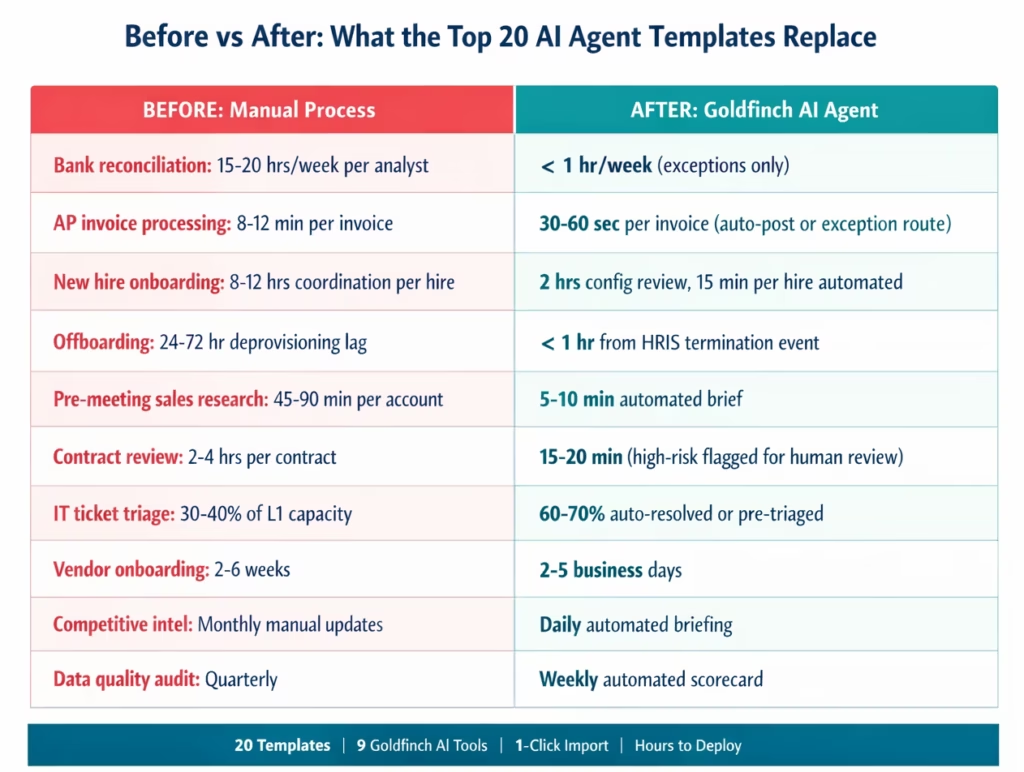
Before vs After: What These Templates Replace
| Use Case | Before (Manual) | After (Goldfinch AI Agent) |
|---|---|---|
| Bank reconciliation | 15–20 hrs/week per analyst | Under 1 hr/week, exceptions only |
| AP invoice processing | 8–12 min per invoice, manual keying | 30–60 seconds, auto-post or exception route |
| New hire onboarding | 8–12 hrs coordination per hire | 15 min per hire, automated provisioning |
| Employee offboarding | 24–72 hr deprovisioning lag | Under 1 hr from HRIS event |
| Pre-meeting sales research | 45–90 min per account | 5–10 min automated brief |
| Contract review | 2–4 hrs per contract (junior reviewer) | 15–20 min, high-risk flagged |
| IT ticket triage | 30–40% of L1 capacity on categorisation | 60–70% auto-resolved or pre-triaged |
| Vendor onboarding | 2–6 weeks manual | 2–5 business days |
| Competitive intelligence | Monthly manual updates | Daily automated brief |
| Data quality audit | Quarterly manual | Weekly automated scorecard |
These figures are ranges based on typical enterprise team configurations. Your actual results depend on volume, system complexity, and configuration specifics.
How to Deploy Your First AI Agent Template
Step 1: Identify Your Highest-Priority Template
From the 20 above, choose the template that addresses your team’s highest-volume manual process. For most finance teams, that is #1 (Financial Reconciliation) or #2 (AP Invoice Processing). For IT teams, it is #9 (Help Desk Triage). For HR, it is #5 (Employee Onboarding).
Step 2: Import the Template from the Automation Hub
Go to the Automation Hub and search for the template by name. Click Import. The template loads into your eZintegrations canvas with the Goldfinch AI agent pre-configured and the tool connections outlined.
Step 3: Connect Your Systems
Add credentials for each system the template connects to. Credentials are stored in the encrypted eZintegrations credential vault and reused across all templates. Most enterprise system connections require: API endpoint, authentication method (OAuth 2.0, API Key, Basic Auth), and permission scope. Average connection setup: 15-20 minutes per system.
Step 4: Configure the Agent Parameters
Each template has configurable parameters: confidence thresholds for auto-action vs human escalation, approval limit amounts, SLA windows, routing rules, and notification channels. These are set in the agent configuration panel without writing code.
Step 5: Run in Dev and Promote to Production
Test the agent in the Dev environment using real or representative data. Validate that auto-actions fire correctly, escalations route to the right people, and the outputs match your expectations. Promote to production when validated.
Total time from template import to production: 2-8 hours depending on template complexity and number of connected systems.
FAQ
1. How does enterprise automation use AI agent templates
Enterprise teams use AI agent templates to replace high volume rule based manual processes that involve document reading multi system queries business rule application and routing decisions. Unlike traditional workflows AI agents use reasoning to handle variability such as mismatched invoices contract deviations or unknown IT issues deciding the best action instead of following fixed rules.
2. How long does it take to set up an enterprise AI agent template
Setup time ranges from 2 to 3 hours for simple templates such as HR Policy Q and A or Sales Intelligence and 5 to 8 hours for complex multi system templates like Vendor Onboarding or Compliance Monitoring. The main effort is knowledge base setup and system credential configuration as the core agent logic is pre built.
3. Does eZintegrations work with existing enterprise systems
Yes, eZintegrations supports over 5000 API endpoints across SAP Oracle NetSuite Salesforce Workday ServiceNow JIRA Slack Microsoft 365 and more. Systems with REST SOAP GraphQL or database APIs can be integrated and new systems can be onboarded through self service API configuration without coding. AI agent templates use API Tool Calls and Integration Workflow as Tool to connect across systems.
4. Can AI agent templates be extended beyond the 9 native Goldfinch AI tools
Yes, Teams can add custom tools beyond the 9 native tools including internal APIs external services or custom business functions. These extensions are added through self service configuration without requiring vendor involvement or custom AI model development.
5. What is the difference between an AI agent template and a workflow automation template
Workflow automation templates connect systems and move data based on predefined rules handling expected scenarios. AI agent templates add a reasoning layer where the agent interprets data searches knowledge bases retrieves context applies flexible rules and decides actions dynamically handling both expected cases and exceptions without separate workflows.
6. How much do AI agent templates cost
AI agent templates are included within eZintegrations AI Workflow and Agentic AI tiers. Pricing starts at 120 dollars per month per automation plus AI credits for model usage. Development and test environments cost approximately one third of production pricing and there is no separate fee for individual templates.
Deploy Your First Enterprise AI Agent Template Today
The 20 templates above cover the highest-impact manual processes in finance, HR, sales, IT, legal, supply chain, customer operations, and data management. Every one of them imports from the Automation Hub in one click and deploys to production in 2-8 hours.
The Goldfinch AI agent foundation is the same across all 20: 9 native tools, a no-code canvas for configuration, and self-service extensibility beyond the native tool set. What changes is the business context: the knowledge base your team loads, the systems you connect, the confidence thresholds you set, and the escalation rules you define.
Your finance team’s reconciliation process is not unique. But the exact tolerance, the ERP schema, and the approval routing are. Templates give you the agent logic. Configuration gives you the specificity.
Explore the full Automation Hub template library and start with the template ranked highest for your function. Or book a free demo and we will identify the two templates that would deliver the most impact for your team in the first 30 days.
For a deeper look at what each AI agent template includes and how to evaluate them against your requirements, see the full AI agent template review.

