
Salesforce Enterprise Integration: Connect Salesforce to Any System
March 26, 2026To integrate Salesforce with any enterprise system using eZintegrations: add your Salesforce Connected App credentials (OAuth 2.0) to the eZintegrations credential vault, select any Salesforce API from the API catalog (REST API, Bulk API 2.0, Streaming API, or Platform Events), import the matching Automation Hub template, configure your SOQL query, field mappings, and pagination parameters, and go live in hours. Every Salesforce object, every standard and custom API endpoint, and every integration direction is available from a single no-code canvas, without per-connector licensing or specialist Salesforce developers.
Your Salesforce org is the centre of your customer data. Every sales motion, every service interaction, every account update lives there. The question your enterprise is trying to answer is not “does eZintegrations support Salesforce?” It is: “Can it access every Salesforce API my team needs, with the pagination, volume control, and time-based parameters required for production enterprise integration, without a Salesforce developer building and maintaining custom code?”
The answer is yes. Here is exactly how it works.
Go Live with Salesforce Integration Today
Connect Salesforce to your ERP, data warehouse, marketing platform, HRIS, or any enterprise system using the full Salesforce API catalog, not a locked-down connector.
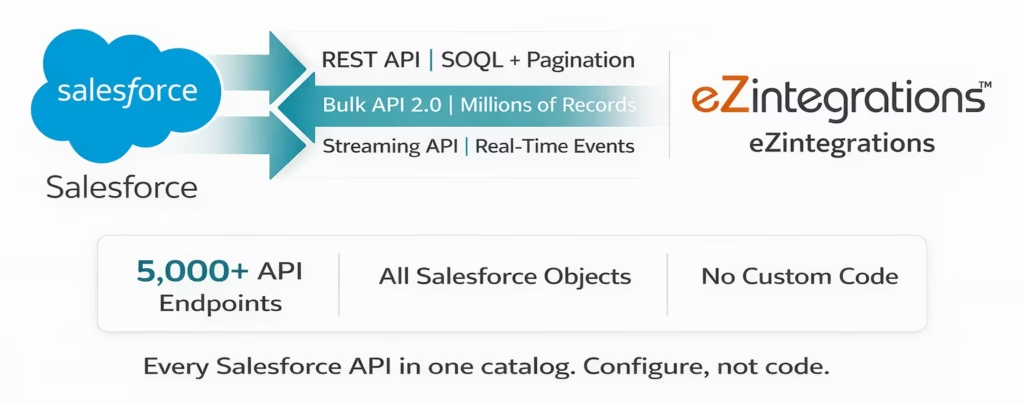
Every Salesforce REST API endpoint, Bulk API 2.0 operation, Streaming API event, and Platform Event is available in the eZintegrations API catalog. You call any endpoint your Salesforce org exposes, with your SOQL queries, your pagination settings, your time-based incremental sync parameters, and your volume-controlled batch sizes, all configured in a no-code canvas without writing a line of code.
Published pricing from $5/month per automation. No Salesforce developer required. No per-connector fee.
Import the Salesforce Integration Template from the Automation Hub | Book a Free Demo
What You Can Do with Salesforce Integration
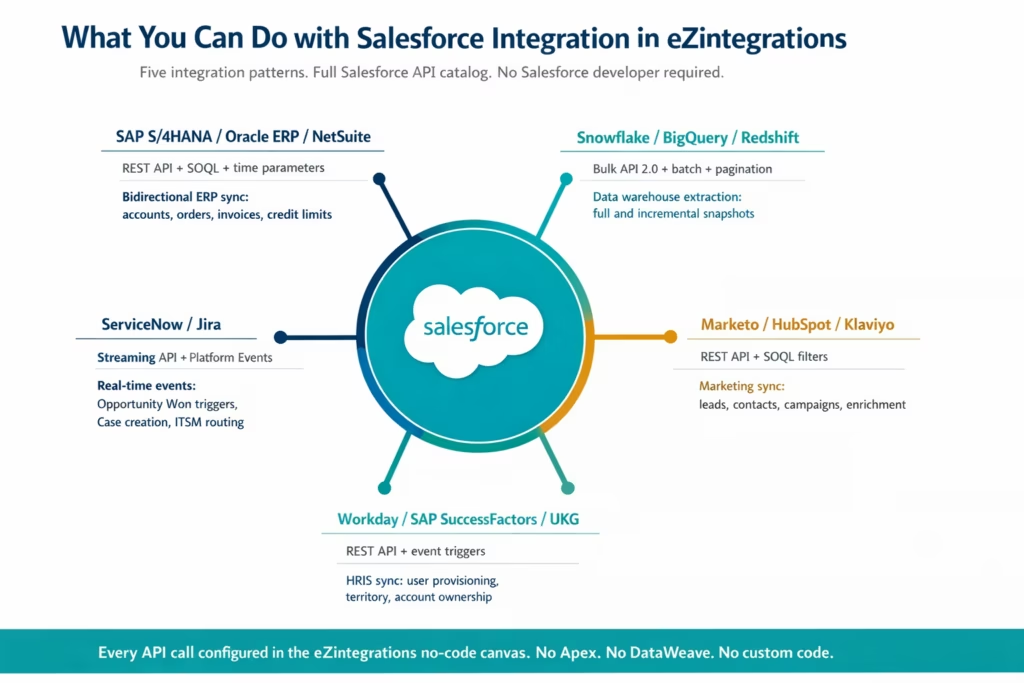
eZintegrations connects your Salesforce org to every enterprise system in your stack using the Salesforce API catalog. These are the five integration patterns your enterprise uses most, each running without Salesforce developer headcount or custom Apex code.
Bidirectional ERP-to-Salesforce Sync (SAP, Oracle, NetSuite) Connect Salesforce Sales Cloud to SAP S/4HANA, Oracle ERP Cloud, or NetSuite. Account and contact records created or updated in the ERP sync to Salesforce in real time. Opportunities won in Salesforce trigger order creation in the ERP. Financial data (invoices, payment status, credit limits) updates Salesforce account fields on a configurable schedule. All via the Salesforce REST API using SOQL queries with time-based incremental parameters so you only pull records changed since the last sync cycle, not the entire org dataset on every run.
Salesforce Data to Data Warehouse (Snowflake, BigQuery, Redshift, Databricks) Extract Salesforce data at any volume using Bulk API 2.0. The API catalog supports asynchronous Bulk API 2.0 query jobs with configurable batch sizes, automatic pagination through the nextRecordsUrl pattern, and scheduled incremental extraction using the LastModifiedDate SOQL parameter. Your CRM data lands in your data warehouse on the schedule your analytics team needs, from hourly incremental deltas to full daily snapshots of millions of records.
Real-Time Event-Driven Workflows (Streaming API and Platform Events) Subscribe to Salesforce Streaming API events via the Pub/Sub API. When a record changes in Salesforce (an Opportunity moves to Closed Won, a Case is created, a Contact is updated), the Platform Event fires the eZintegrations workflow immediately. No polling. No lag. The downstream action in SAP, ServiceNow, Workday, or your notification system fires within seconds of the Salesforce event.
Marketing Platform Sync (Marketo, HubSpot, Pardot, Klaviyo) Keep Salesforce Lead, Contact, and Campaign Member records in sync with your marketing automation platform. The eZintegrations API catalog calls the Salesforce REST API for Lead and Contact objects with SOQL filters (by creation date, last modified date, campaign membership, lead source) and pushes enriched records to your marketing platform on a configurable schedule or on event trigger.
HRIS and Workforce Sync (Workday, SAP SuccessFactors, UKG) Salesforce User and Account data stays aligned with your HRIS: territory assignments, account ownership, user provisioning, and deprovisioning. Employee changes in Workday (new hires, role changes, terminations) update Salesforce User records and team assignments via the REST API. Two-way account ownership sync ensures your CRM reflects your current organisational structure without manual data entry.
How Salesforce Integration Works in eZintegrations
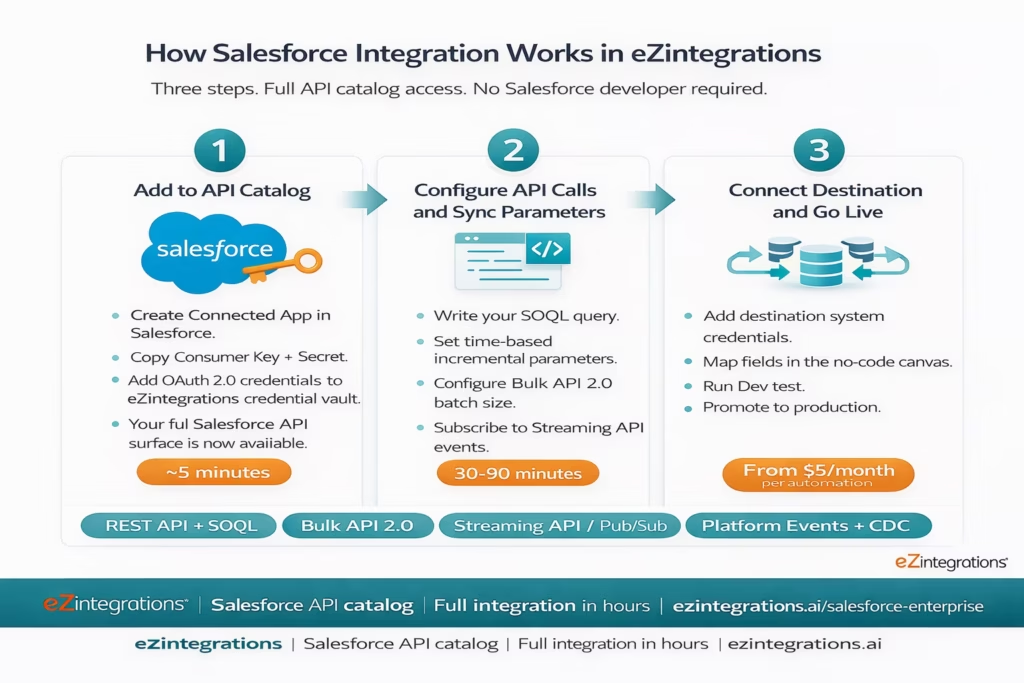
Step 1: Add Salesforce to the API Catalog
Create a Connected App in your Salesforce org (takes 5 minutes). Copy the Consumer Key and Consumer Secret. In eZintegrations, add these credentials to the credential vault using the Salesforce OAuth 2.0 authentication flow. eZintegrations authenticates against your org’s token endpoint and stores the access token securely. Your entire Salesforce API surface is now accessible from the eZintegrations canvas.
This is not a “Salesforce connector” with hardcoded limitations. It is full API catalog access. Every REST API resource, every Bulk API 2.0 operation, every Streaming API subscription, and every Platform Event your org exposes is available as a configurable API call in the canvas.
Step 2: Configure Your API Calls, Queries, and Sync Parameters
In the eZintegrations no-code canvas, configure your Salesforce API calls for each workflow:
For REST API queries: Write your SOQL query directly in the canvas. Apply time-based parameters: WHERE LastModifiedDate > :lastSyncTime for incremental sync, WHERE CreatedDate = LAST_N_DAYS:7 for rolling window extracts, or any other SOQL filter your use case requires. The API catalog handles pagination automatically via the nextRecordsUrl continuation pattern, cycling through result pages until all records matching your query are retrieved, with no manual page-handling code.
For Bulk API 2.0 operations: Configure the bulk job parameters directly: operation type (query, insert, upsert, update, delete), object name, field list, batch size (records per batch for ingest operations), and the async job polling interval. The API catalog supports the complete Bulk API 2.0 lifecycle: job creation, data upload, job close, status polling, and result retrieval, all configurable without code.
For Streaming API and Platform Events: Subscribe to any Salesforce Platform Event topic or Change Data Capture (CDC) channel. The eZintegrations Watcher Tool monitors the event stream and fires the workflow pipeline when the subscribed event fires in your org. No polling. Event-driven.
Step 3: Connect the Destination System and Go Live
Add your destination system credentials to the same credential vault: SAP S/4HANA OData endpoint, Snowflake connection, Workday REST API, or any other system. Configure the field mapping between Salesforce object fields and the destination system’s schema in the no-code transformation step. Run test transactions in the Dev environment. Promote to production when validated.
The Salesforce Connected App credentials you set up in Step 1 are used by every subsequent integration that calls Salesforce. Configure once, reuse across all workflows.
Salesforce API Catalog Capabilities
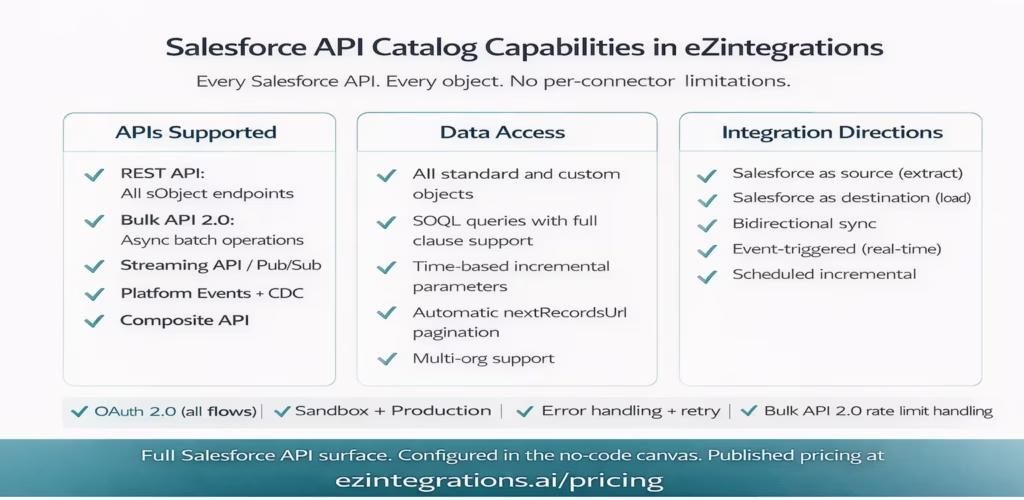
eZintegrations does not provide a hardcoded Salesforce connector with a fixed list of supported objects. The API catalog gives you access to the full Salesforce API surface. Here is what that means in practice.
| Capability | Details |
|---|---|
| Salesforce REST API | All standard and custom sObject endpoints CRUD operations SOQL queries via query and queryAll Composite API for multi request transactions batch requests field level access based on org permissions |
| SOQL query support | Full SOQL queries configurable in no code canvas supports time based parameters incremental sync LAST N DAYS LAST N WEEKS LAST MONTH custom date ranges wildcard and compound WHERE clauses subqueries for related records |
| Pagination | Automatic pagination using nextRecordsUrl continuation pattern configurable page size supports millions of records without manual handling |
| Bulk API 2.0 | Asynchronous batch operations query insert upsert update delete full job lifecycle management create upload close poll retrieve automatic retry error record isolation CSV format configurable delimiters |
| Streaming API Pub Sub API | Subscribe to Platform Events Change Data Capture and PushTopic streaming real time event delivery via Watcher Tool no polling required event driven triggers |
| OAuth 2.0 authentication | Connected App authentication Web Server Flow JWT Bearer Token Flow Client Credentials Flow automatic token management and refresh |
| Custom objects and fields | All custom objects and fields accessible via API names no additional configuration required |
| Salesforce sandbox environments | Separate credentials for Sandbox and Production Dev Test workflows run on Sandbox Production uses live credentials environment separation enforced |
| Error handling | Retry logic for transient errors Bulk API error record isolation webhook failure handling for event subscriptions |
| Numeric and volume parameters | Batch size control SOQL LIMIT support rate limit awareness configurable throttling for high volume workflows |
| Field mapping and transformation | No code mapping date conversion string transformation conditional logic calculated fields in visual canvas |
| Bidirectional integration | Supports both inbound and outbound flows write via REST POST PATCH extract via REST GET and Bulk API query |
| Multi org support | Multiple Salesforce org connections with separate credentials within same environment |
Why eZintegrations for Salesforce Enterprise Integration
The Problem with Traditional Salesforce Integration Options
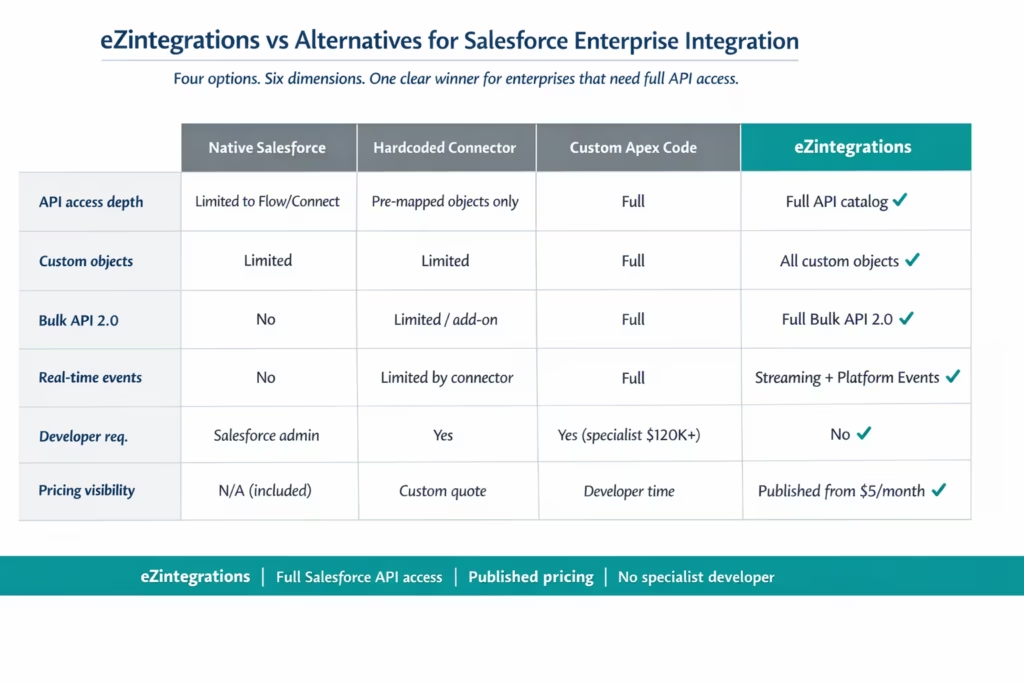
Native Salesforce integration tools (Salesforce Connect, Flow Builder, External Services) are built for Salesforce-centric scenarios. When your integration involves a non-Salesforce system as the primary data source or the primary destination, native tools run into limitations quickly: API call governor limits, inability to handle large batch volumes, no built-in pagination management, and no support for external system event-driven triggers.
Hardcoded connector platforms (including several popular iPaaS tools) provide a “Salesforce connector” with a fixed list of supported objects and operations. These connectors work for the common cases. They break when you need a custom object, a Bulk API 2.0 operation not included in the connector’s supported operations list, a complex SOQL query with time-based parameters, or access to a Streaming API event that the connector vendor has not mapped. You then wait for the vendor to update the connector, or you submit a support ticket, or you build the exception case in custom code.
Custom Apex code and API development works for everything Salesforce exposes. It is also expensive to build (specialist Salesforce developer at $120,000-$180,000+ per year), fragile on API updates, and impossible for non-developer teams to maintain or extend.
What Makes eZintegrations Different
Full API catalog access, not a connector. eZintegrations does not provide a “Salesforce connector.” It provides access to the full Salesforce API catalog: REST API, Bulk API 2.0, Streaming API, Platform Events, and any endpoint your Salesforce org exposes. Your SOQL queries, your batch sizes, your incremental time parameters, your custom object API names: all configurable in the no-code canvas without code.
Pagination built in. The Salesforce REST API paginates results via the nextRecordsUrl pattern. Most integration platforms require the developer to write pagination handling code. The eZintegrations API catalog handles nextRecordsUrl continuation automatically. You write the SOQL query. The catalog retrieves all pages.
Bulk API 2.0 for enterprise volumes. Standard REST API calls are rate-limited (Salesforce imposes per-org API call limits per 24 hours). For large data set extraction or loading, Bulk API 2.0 is the right interface: asynchronous, batch-oriented, designed for millions of records. eZintegrations supports the full Bulk API 2.0 lifecycle without custom code, making large-scale data warehouse extraction and mass data loads practical for operations teams.
Real-time event subscriptions without polling. Salesforce Streaming API and Platform Events deliver real-time change notifications. eZintegrations subscribes to these event streams via the Watcher Tool, firing integration workflows within seconds of the Salesforce event, without polling and without the 30-60 second lag that polling-based integrations introduce.
No Salesforce developer required. Your operations analyst or integration ops team configures Salesforce integrations from the Automation Hub template and the no-code canvas. The SOQL query interface, the Bulk API 2.0 batch configuration, and the Streaming API event subscription are all configured through visual interfaces. No Apex. No DataWeave. No external API wrapper code.
Published pricing. eZintegrations pricing starts at $5/month per automation, published at ezintegrations – Pricing. No per-connector fee. No Salesforce-specific premium tier. No hidden costs for Bulk API 2.0 usage or Streaming API subscriptions.
Import the Salesforce Integration Template
The eZintegrations Automation Hub contains pre-built templates for the most common Salesforce enterprise integration patterns:
Salesforce to SAP S/4HANA: Opportunity-to-Order Sync When an Opportunity reaches Closed Won status in Salesforce (via Platform Event trigger), the workflow creates a Sales Order in SAP S/4HANA via the OData API, with field mapping from Salesforce Opportunity fields to SAP order document fields. Write-back: SAP order number is posted to a custom field on the Salesforce Opportunity.
Salesforce to Snowflake: Daily Incremental Extract Bulk API 2.0 query job extracts all Salesforce records modified since the last run using the LastModifiedDate time parameter. Results are loaded to your Snowflake target table. Supports any standard or custom Salesforce object. Configurable schedule and batch size.
Salesforce to Workday: Account and Territory Sync Salesforce Account updates (territory assignment, ownership change, account tier) trigger Workday worker record updates via the Workday REST API. Ensures CRM account ownership reflects current Workday org structure.
SAP S/4HANA to Salesforce: Customer and Credit Data Sync New Customer records created in SAP S/4HANA sync to Salesforce Account records. Credit limit and payment terms fields in SAP update corresponding Salesforce Account fields on a scheduled incremental basis.
Salesforce Platform Event to ServiceNow: Case-to-Incident Routing Salesforce Case creation fires a Platform Event. The eZintegrations Watcher subscribes to the event and creates a corresponding Incident in ServiceNow via its REST API, with priority and category mapping from Salesforce Case fields.
Import any of these templates in one click. Configure credentials and field mapping. Go live in hours.
Import Salesforce Templates from the Automation Hub
Frequently Asked Questions
1. How do I integrate Salesforce with eZintegrations
Create a Connected App in your Salesforce org to obtain Consumer Key and Consumer Secret credentials. Add these credentials to the eZintegrations credential vault using the Salesforce OAuth 2.0 Connected App flow. Once authenticated the full Salesforce API surface including REST API Bulk API 2.0 Streaming API and Platform Events is available in the API catalog. Import the relevant Automation Hub template configure SOQL queries or Bulk API parameters add destination system credentials and run test transactions in Dev. Standard templates typically go live in sixty to ninety minutes.
2. Does eZintegrations support Salesforce
Yes, eZintegrations provides full access to Salesforce APIs including REST API with SOQL and pagination Bulk API 2.0 for large scale operations Streaming API and Pub Sub API for real time events and the Composite API. All standard and custom objects are accessible with no connector level restrictions and no limitation on endpoints exposed by your Salesforce org.
3. How long does Salesforce integration take
For standard Automation Hub templates setup takes sixty to ninety minutes including credential configuration field mapping testing and production promotion. Custom integrations involving complex SOQL queries or custom objects typically take three to five hours. Salesforce Connected App setup itself takes approximately five minutes.
4. Is there a free Salesforce integration template
Automation Hub templates are included in the eZintegrations subscription which starts at five dollars per month per automation on annual billing. There is no separate template fee or premium Salesforce template tier. You pay only for running the automation not for accessing templates.
Yes, the platform supports the full Bulk API 2.0 lifecycle including job creation data upload job close asynchronous status tracking and result retrieval with failed record handling. This is ideal for data warehouse extraction and large scale data loading without custom code and includes automatic retry handling for transient failures.
6. Can eZintegrations handle real time Salesforce events without polling
Yes, the Watcher Tool subscribes to Salesforce Streaming API and Pub Sub API events including Platform Events Change Data Capture and PushTopic streaming. When events occur the workflow is triggered immediately without polling delivering near real time event driven integration with sub second latency.
Connect Your Salesforce Org Today
Your Salesforce org holds your most valuable customer and revenue data. It deserves an integration layer that can access every API it exposes, handle every data volume it generates, and respond to every event it fires, without requiring a Salesforce developer to build and maintain custom code.
eZintegrations provides full Salesforce API catalog access: REST API with SOQL queries and automatic pagination, Bulk API 2.0 for enterprise-scale data volumes, Streaming API for real-time event-driven workflows, and Platform Events for bidirectional enterprise system coordination. All configured from a no-code canvas. All at published pricing.
Import a Salesforce Integration Template from the Automation Hub and go live today. Or book a free demo and show us your Salesforce integration requirements. We will map your API catalog configuration in the session.

