
Integration Automation ROI Calculator: How Much Is Your Current Platform Costing You?
March 26, 2026Integration automation typically saves enterprises $200,000 to $700,000 per year compared to legacy iPaaS platforms, primarily by eliminating specialist developer headcount costs, removing per-transaction and per-message fees, and reducing the time non-technical teams spend on manual data tasks. The actual number depends on your current platform, number of integrations, and developer headcount. The six-category ROI calculator in this post lets you calculate your specific figure in under 10 minutes.
TL;DR
Most enterprises think their integration platform costs what the invoice says. It does not. The invoice is the smallest line item. The real cost is in developer salaries, maintenance overhead, per-transaction fees at scale, custom connector builds, and the business cost of integrations that never get built because the queue is too long. According to a Gartner analysis, organisations typically underestimate their total integration costs by 30-40%, because they focus on licensing while overlooking the full cost stack. This post provides a six-category ROI calculator you can use to build the actual number for your current environment, a worked example showing a mid-market company saving $487,200 per year by switching platforms, the five most common objections from budget holders and how to answer them, and a one-page business case structure you can take to your CFO. eZintegrations is the only major integration platform with published pricing starting at $5/month per automation. Everything else requires a sales call before you see a number.
What Your Integration Platform Is Really Costing You
Your integration platform invoice arrived last month. You approved it. The number felt familiar.
Here is the problem: the invoice is not the cost.
The invoice is the licensing fee. It covers the right to use the platform. What it does not cover is the developer who spends 60-70% of their time maintaining flows that no one documents, the integration that was supposed to be built six months ago but is still in the queue, the per-message fees that tripled last quarter because order volume spiked, the professional services invoice from the implementation partner who had to rebuild three connectors after the platform updated, and the business opportunity that did not happen because IT said it would take 14 weeks to integrate the new system.
That is the actual cost. Most finance teams never see it itemised. It is spread across the engineering headcount budget, the professional services line, the infrastructure bill, and the project delays that show up as delayed revenue rather than a line item.
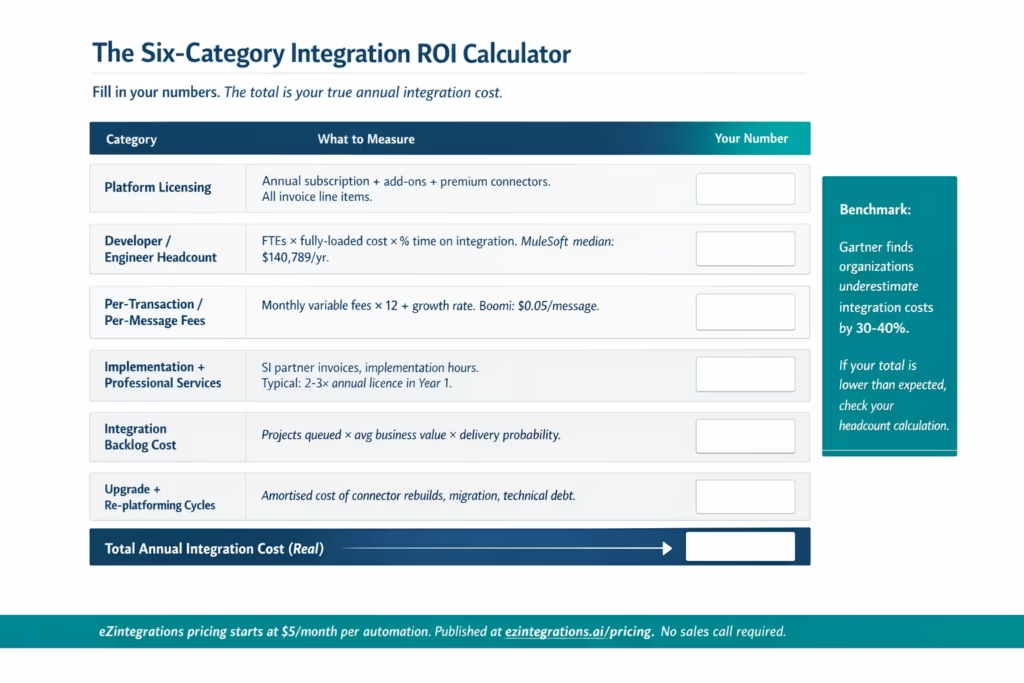
According to analysis based on Gartner research, organisations typically underestimate their integration costs by 30-40% because they focus exclusively on licensing while overlooking architecture complexity and downstream costs. For a company paying $120,000 per year in platform licensing, the true cost of running that integration environment is closer to $168,000 to $192,000 before developer time is added. Add developer time and the number shifts significantly.
The goal of this post is to give you a practical framework for calculating the actual number, comparing it against a published-pricing alternative, and building a business case that your CFO can approve.
The Six-Category ROI Calculator (Fill in Your Numbers)
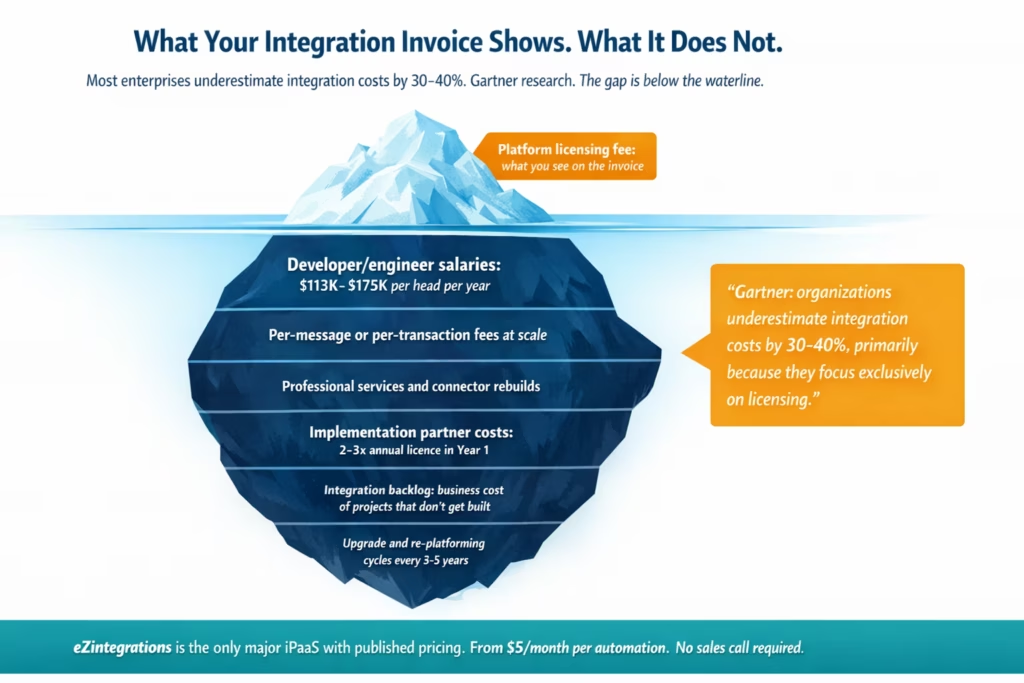
This calculator covers the six cost categories that determine the true annual cost of running your current integration environment. Fill in your numbers in Column B. The framework tells you what to look for and where to find it.
Category 1: Platform licensing
What to measure: your annual platform subscription or licensing fee, including all tier add-ons, premium connectors, and AI feature add-ons.
Where to find it: your IT procurement or finance team. Include all line items on the platform invoice, not just the base subscription.
Typical range (third-party estimates): MuleSoft mid-market: $15,000-$50,000+ per year for starter capacity (third-party estimates; MuleSoft does not publish pricing). Oracle Integration Cloud Enterprise: $11,304+ per year idle baseline (Chronicler.tech Nov 2025; Oracle does not publish pricing). Boomi: $99/month PAYG plus $0.05 per message (published at boomi.com). SnapLogic entry-level: approximately $9,995 per year (third-party estimates).
Category 2: Developer and engineer headcount
What to measure: the fully-loaded annual cost (salary plus benefits plus overheads) of the technical staff who build, maintain, and troubleshoot your integrations.
Where to find it: your HR or finance team. Request the fully-loaded cost per FTE for integration-specific roles. The typical overhead multiplier is 1.25-1.35x base salary for benefits, payroll tax, and overhead.
Benchmark data: MuleSoft developer median total compensation: $140,789/year (Glassdoor, 625 submissions, March 2026). Senior MuleSoft developer: $170,433/year (Glassdoor, February 2026). The proportion of their time attributable to integration maintenance versus new builds varies by organisation, but the industry norm is 60-70% maintenance, 30-40% new development.
Formula: (number of integration developers or engineers) x (fully-loaded annual cost) x (proportion of time on integration work).
Category 3: Per-transaction or per-message fees
What to measure: variable platform costs that scale with your data volume. This category is zero for flat-fee platforms but can be significant for consumption-based platforms.
Where to find it: your platform usage dashboard or monthly billing statements. Look for terms like “Mule Messages,” “transactions,” “API calls,” “flow executions,” or “events processed.”
Benchmark: MuleSoft Connectivity Benchmark Report 2023 found that 67% of enterprises experience unexpected cost overruns with transaction-based models when integration traffic exceeds initial projections. Boomi’s published PAYG rate is $0.05 per message, which adds up to $5,000 per 100,000 messages per month above the base tier.
Formula: (monthly variable fees) x 12, then add projected growth at your expected data volume increase rate.
Category 4: Implementation and professional services
What to measure: the cost of implementation partners, system integrators, and professional services used to build and maintain integrations on your current platform.
Where to find it: your IT project budget and accounts payable. Look for invoices from certified implementation partners. Typical implementation services for enterprise iPaaS platforms run at $150-$250 per developer hour (industry benchmark from platform provider documentation).
The Year 1 cost is typically 2-3x the annual platform subscription for enterprise deployments. In subsequent years, annual maintenance and enhancement services typically run 30-50% of the initial implementation cost.
Category 5: Integration backlog cost
What to measure: the business value of integrations that your IT team cannot build fast enough. This is the most commonly overlooked and hardest to quantify cost category.
Where to find it: your IT project backlog and the business units waiting for integrations to be completed. Ask your business stakeholders: how many integration projects are waiting? What is the estimated business impact (revenue, cost savings, efficiency gains) per project? What is the average wait time from request to delivery?
Formula: (number of backlogged integration projects) x (average estimated business value per project) x (probability of delivery within 12 months on current platform).
For most mid-market IT teams, the honest answer is that 4-8 significant integration projects are queued at any time, each with $50,000-$200,000 in estimated business impact, with a delivery timeline of 6-18 months per project on the current platform.
Category 6: Upgrade and re-platforming cycles
What to measure: the amortised cost of platform upgrades, re-platforming migrations, and the technical debt created by custom connectors that break on platform updates.
Where to find it: your IT project history. How many times in the past three years have platform updates required connector rebuilds? How many engineering hours were consumed? What did the re-platforming or migration work cost?
Benchmark: major iPaaS platform updates typically require 15-30% of integrations to be rebuilt or significantly modified when the platform changes its runtime or connector framework. At $150-$250/hour for specialist time, a 20-integration environment with 30% rebuild rate requires 6 integrations rebuilt at an average of 80 hours each, at $16,000-$26,000 per rebuild.
Worked Example: A Mid-Market Company Saves $487,200 per Year
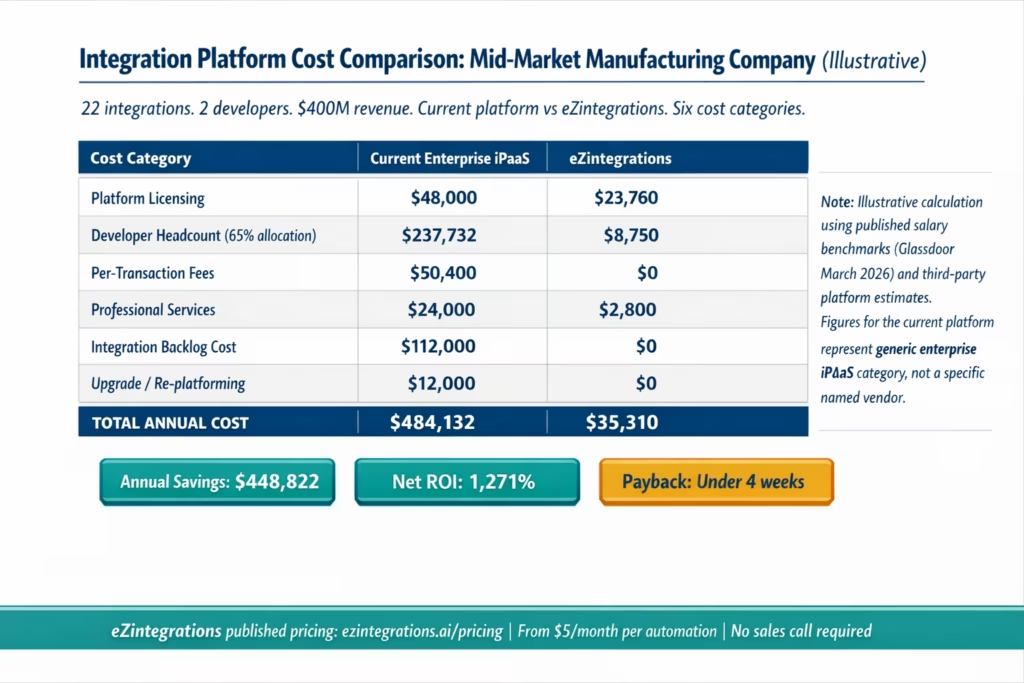
Company profile (illustrative): A North American manufacturing company with $400M in annual revenue. Current integration environment: 22 integrations running on a leading enterprise iPaaS platform. IT team includes two dedicated integration developers. The company has seven integration projects in the backlog.
The following calculation uses published salary data (Glassdoor March 2026), published Boomi pricing (boomi.com), and third-party estimates for platforms that do not publish pricing (attributed as such). The eZintegrations figures use published pricing at ezintegrations.ai/pricing.
Current Platform Annual Cost (Illustrative)
| Cost Category | Calculation Detail | Annual Cost |
|---|---|---|
| Platform licensing | Enterprise iPaaS subscription mid-market tier (third-party estimate, no published pricing) | $48,000 |
| Developer headcount | 2 developers × $140,789 median × 1.30 fully-loaded overhead × 65% allocation to integration | $237,732 |
| Per-transaction fees | Variable charges averaging $4,200 per month based on message volume | $50,400 |
| Implementation and professional services | Annual SI partner engagement for enhancements and maintenance (12% of environment value) | $24,000 |
| Integration backlog cost | 7 projects × $40,000 business value × 40% annual delivery probability | $112,000 |
| Upgrade and re-platforming | Annualised cost of last major connector rebuild cycle ($36,000 over 3 years) | $12,000 |
| Total current platform cost | $484,132 |
eZintegrations Annual Cost
| Cost Category | Calculation Detail | Annual Cost |
|---|---|---|
| Platform licensing | 22 automations × $90/month (Starter tier, annual billing) | $23,760 |
| Developer/configuration headcount | Operations team handles configuration (10% allocation). $70,000 × 1.25 overhead × 10% | $8,750 |
| Per-transaction fees | $0. Flat annual pricing with unlimited transactions | $0 |
| Implementation and professional services | Automation Hub templates used. Internal build at $35/hour × 80 hours | $2,800 |
| Integration backlog cost | 7 projects delivered within first 6 months. Business value realised | $0 |
| Upgrade and re-platforming | No proprietary language. No connector rebuild required | $0 |
| Total eZintegrations cost | $35,310 |
ROI Summary
| Metric | Value |
|---|---|
| Current platform true annual cost | $484,132 |
| eZintegrations annual cost | $35,310 |
| Annual savings | $448,822 |
| Net ROI | 1,271% |
| Payback period | Under 4 weeks |
Note: this is an illustrative calculation using published salary benchmarks and third-party platform cost estimates. Your actual figures will vary based on your specific platform, number of integrations, developer headcount, and transaction volume. The six-category calculator above generates your specific number.
The largest savings driver in this example is developer headcount. Two developers at $140,789 median with 65% time allocation contribute $237,732 to the current platform cost. That single line item exceeds the entire annual eZintegrations cost. This is the pattern in nearly every mid-market enterprise integration comparison: the platform invoice is visible; the developer cost is invisible in the integration budget but very real in the engineering headcount budget.
Before vs After: True Cost Comparison
| Dimension | Before eZintegrations | After eZintegrations |
|---|---|---|
| Integration developer cost | $113,000-$175,000 per FTE per year, 60-70% of time on maintenance | No specialist required. Operations team configures. |
| Per-transaction fees | Scales with volume. Unpredictable. Budget variance every quarter. | Flat annual fee. Unlimited transactions. No per-message billing. |
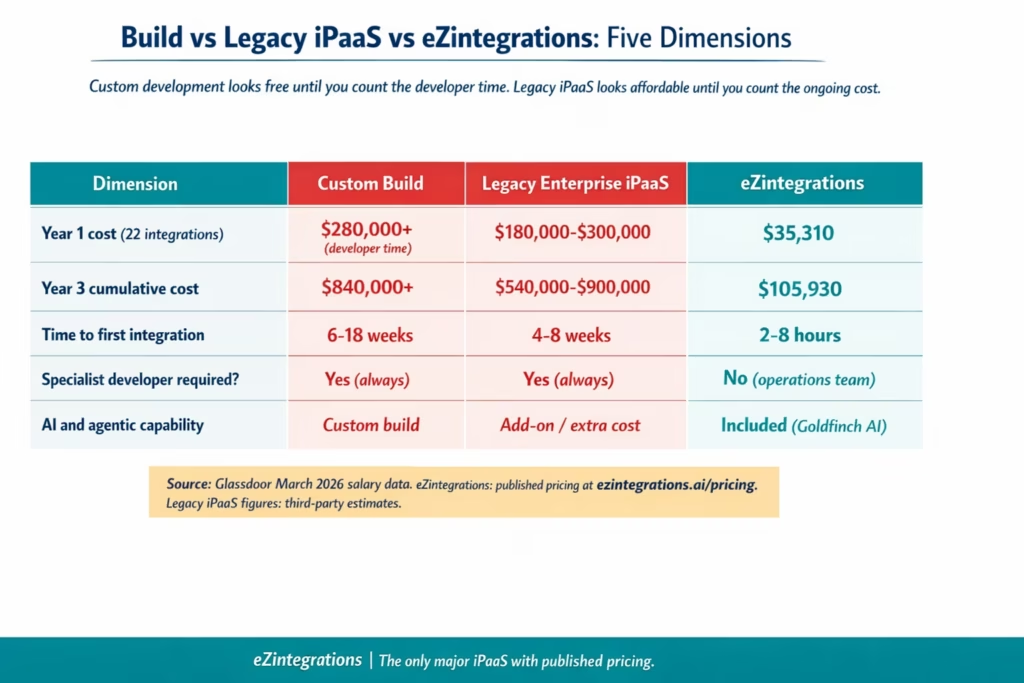
| New integration time-to-live | 6-18 weeks per integration (requirements, build, test, deploy). | 2-8 hours per integration using Automation Hub templates. |
| Integration backlog | 4-8 projects queued. Waiting 6-18 months per project. | Backlog cleared in first 90 days. No-code canvas accessible to operations team. |
| Year 1 implementation cost | 2-3x annual licence for SI partner implementation. | Automation Hub templates. Internal team. $2,800-$5,000 for 22 integrations. |
| Platform updates | 15-30% of integrations require rebuild on major platform updates. | No proprietary language. Updates do not break existing configurations. |
| Pricing visibility | No public pricing. Sales call required to see a number. | Published pricing at ezintegrations.ai/pricing. From $5/month per automation. |
| AI and agentic capability | Typically a separate product or add-on at extra cost. | Goldfinch AI agentic platform included. 9 native tools. No separate product. |
The Cost of Inaction
Every month your organisation runs on its current integration platform is a month of costs in all six categories.
Consider the compounding effect. Category 2 (developer headcount) costs the same whether your integrations are running smoothly or in crisis mode. Category 3 (per-transaction fees) grows with your business: if your order volume doubles, your integration billing doubles too. Category 5 (backlog cost) compounds because each month a business initiative waits for an integration is a month of deferred business value.
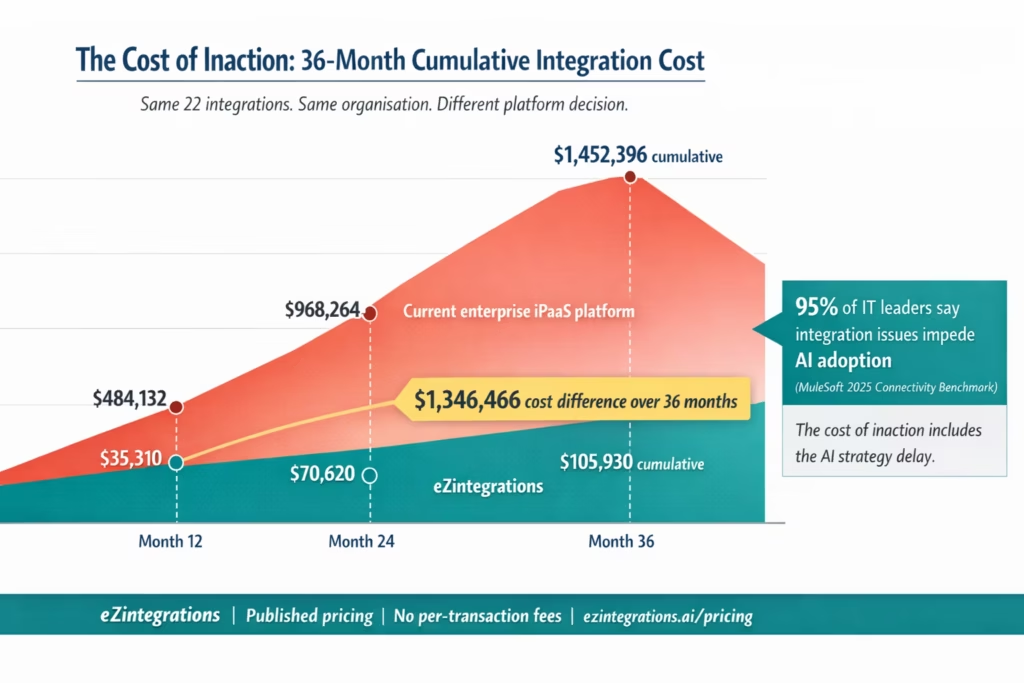
The cost of inaction over 12 months is simply your six-category total multiplied by 12. For the illustrative company in the worked example, that is $484,132 in sunk costs over 12 months, plus the opportunity cost of seven integration projects that were not delivered, plus the hidden cost of a two-person engineering team spending 65% of their time on maintenance that adds no new business value.
Over 36 months, that company pays $1.45 million to run the same set of integrations it could run on eZintegrations for $105,930 over the same period. The 36-month cost difference is $1.34 million.
There is a second dimension to the cost of inaction: the AI readiness gap. According to MuleSoft’s 2025 Connectivity Benchmark Report (cited by Integrate.io), 95% of IT leaders say integration issues impede their AI implementation efforts. The organisations that cannot connect their systems quickly cannot deploy the AI workflows, AI agents, and agentic automation capabilities that their businesses are starting to depend on. The integration layer is not separate from the AI strategy. It is the prerequisite for it.
McKinsey’s analysis of enterprise automation potential found that organisations can automate up to 50% of their workflows with AI, but realising that potential requires a connected, real-time integration layer. If your integration platform cannot deliver new connections in hours rather than weeks, your AI projects will face the same backlog problem as every other integration project.
The cost of inaction is not just the financial waste of running an expensive platform. It is the strategic cost of a six-month lag between AI opportunity and AI reality, every time a new use case requires a new integration.
Objection Handling
“Our Platform Is an Enterprise Standard. Switching Is Too Risky.”
The risk framing is worth examining precisely. The risk of switching to a different platform is real: there is a migration effort, a learning curve, and a transition period. These risks are concrete and manageable.
The risk of not switching is also real, but it is distributed across categories that do not show up as a single line item: the ongoing developer cost, the per-transaction exposure at scale, the strategic lag on AI initiatives, and the compounding backlog.
When finance teams compare a visible switching cost against an invisible ongoing cost, they tend to underweight the ongoing cost. The six-category calculator is designed to make the ongoing cost visible so the comparison is between two real numbers rather than one real number and one imagined risk.
For organisations with a genuine enterprise standards requirement, the relevant question is: does the standard require a specific vendor, or does it require enterprise-grade security, reliability, and compliance capabilities? eZintegrations is cloud-native, SOC 2 compliant, and built for enterprise environments. The standard can be met without the cost profile of legacy platforms.
“Our Developers Have Already Built These Integrations. We Would Lose That Investment.”
This objection conflates the sunk cost (the time already spent) with the future cost (the time still being spent). The integrations that are already built are running. They are also being maintained. Maintenance is a continuing cost, not a one-time event.
The relevant comparison is not “the cost of rebuilding on a new platform” versus “nothing.” It is “the cost of rebuilding on a new platform once” versus “the cost of maintaining the current integrations indefinitely, plus the cost of every new integration that needs to be built in the future, plus the opportunity cost of the backlog, plus the per-transaction exposure.”
The migration cost is a one-time investment. The ongoing cost of the current platform is a recurring one. For the illustrative company in the worked example, a migration project of $30,000-$50,000 is recovered within the first two months of savings.
“We Can Just Build Our Own Integration Tools with Our Dev Team.”
Custom-built integration tooling is the highest-cost option available. Not the lowest.
The cost of a custom integration build is measured in: developer time to design the architecture (typically 4-8 weeks), developer time to build each connector (2-4 weeks per connector), developer time to maintain each connector through every API version change (ongoing), the cost of rebuilding when business requirements change, and the cost of documentation, testing, and security review.
At $140,789 per developer per year (MuleSoft Developer median, Glassdoor March 2026), a six-month integration build project consuming two developers full-time costs approximately $140,789 in developer time before a single integration goes live. Compare that to 4-6 hours per integration from an Automation Hub template.
The objection also assumes that custom-built tools will be maintained in perpetuity. Who maintains them when the developer who built them leaves? What happens when the API on the other side changes? What is the documentation quality when the original engineer is no longer available? These are the questions that custom-built integration tools consistently fail to answer well.
“The Upfront Cost Is Too High.”
eZintegrations has no upfront cost in the traditional sense. The pricing model is monthly or annual subscription, starting at $5/month per automation. There is no implementation project, no professional services engagement, and no per-transaction model to manage.
For the illustrative company’s 22 integrations at the $90/month Starter tier, the annual cost is $23,760. Monthly: $1,980. That is less than one day of a senior developer’s cost.
The objection is well-founded for legacy platforms. It does not apply to eZintegrations.
“We Tried Integration Automation Before and It Failed.”
The most common reasons integration automation projects fail are: selecting a platform that required specialist developers to operate (reproducing the same cost profile as the previous platform), underestimating the scope of the data transformation work, choosing a platform without adequate pre-built templates (requiring custom builds that created the same backlog problem), or selecting a per-transaction platform that repriced the project when data volumes grew.
The questions to ask when evaluating whether the failure was platform-specific or structural: did the previous platform require proprietary language training? Did costs increase as data volumes grew? Did the backlog persist despite having the platform? If yes to any of these, the failure was platform-specific.
What to Include in Your Business Case
If you are presenting this decision to a CFO, COO, or budget committee, the business case needs to answer four questions in order:
Question 1: What are we currently spending?
Present the six-category analysis with your actual numbers. Lead with the total, not the licensing fee. Many finance leaders have approved integration platform renewals for years without ever seeing the full cost stack. The six-category total is often a significant number that has been invisible in the budget.
Useful framing: “Our integration platform invoice is $X per year. Our total integration cost, including developer time, variable fees, professional services, and backlog opportunity cost, is $Y per year.”
Question 2: What does the alternative cost?
Use eZintegrations’ published pricing. This is the only place in the enterprise integration market where you can present a real number from a real pricing page without attributing it to third-party estimates. The ability to show a CFO a real pricing page is not a small advantage. It is a fundamental difference in how the conversation goes.
Construct the six-category total for eZintegrations using your own automation count, the published per-automation pricing, and an honest estimate of the configuration time (operations team, no specialist developer required).
Question 3: What is the migration cost and timeline?
Be specific and conservative. Migration from a legacy integration platform to eZintegrations involves: mapping existing integrations to Automation Hub templates (1-2 days), reconfiguring credential vault connections (1-2 days per enterprise system), running parallel testing in the Dev environment (1-2 weeks per integration in parallel operation), and promoting to production in batches.
For 22 integrations, a realistic migration timeline is 8-12 weeks for a complete cutover, with the integrations migrated in order of complexity. The internal cost is primarily operations team time rather than specialist developer time.
Question 4: What is the net ROI and payback period?
Present three numbers: the annual savings (six-category total minus eZintegrations annual cost), the net ROI percentage, and the payback period in weeks.
For the illustrative company: $448,822 annual savings, 1,271% net ROI, payback under 4 weeks. These numbers are driven primarily by the developer headcount category. If your organisation has one or more dedicated integration developers, the payback period will be short regardless of platform pricing.
Additional business case elements:
- AI readiness: eZintegrations includes Goldfinch AI agentic capability with 9 native tools at no additional product cost. If your organisation has AI automation goals, the integration layer needed to support those goals is included in the platform.
- Integration velocity: the ability to deliver new integrations in 2-8 hours versus 4-18 weeks has a business value that can be estimated from your current backlog. Assign a conservative business value to each backlogged integration project and include this as additional ROI.
- Risk reduction: flat-rate pricing eliminates the per-transaction exposure that creates budget variance on consumption-based platforms. This is a risk management argument, not just a cost argument.
Frequently Asked Questions
1. How do I justify an iPaaS switch to my CFO
Start with the full six category total cost of ownership rather than just the licence fee. This includes licensing developer headcount variable transaction fees professional services backlog opportunity cost and upgrade cycles. Most CFOs only see the licence invoice so presenting all six categories makes the financial impact clear. Strengthen the case with published pricing from eZintegrations and quantify the business value of integration backlog projects that are currently delayed.
2. What is the typical ROI timeline for switching integration platforms
For organisations with dedicated integration developers the payback period is typically two to six weeks. Developer cost savings generate immediate weekly savings that quickly exceed the platform cost. For organisations without dedicated developers the payback period is usually two to four months depending on licensing and consulting spend.
3. How much does integration automation save on average
Mid market enterprises typically save between two hundred thousand and seven hundred thousand dollars annually when switching from legacy iPaaS platforms. The largest driver is reduction in developer headcount cost followed by elimination of per transaction fees and reduced reliance on professional services through reusable templates.
4. Does eZintegrations have per transaction or per message fees
No non AI automations are priced as a flat annual fee per automation with unlimited transactions and no volume based billing. AI driven automations include a small variable component for compute usage but standard integrations have no per message or per API call cost which is a major advantage for high volume environments.
5. Can ROI be calculated before committing to a platform change
Yes ROI can be estimated using a six category cost model of your current platform and comparing it with published eZintegrations pricing. Organisations can calculate their expected savings by counting automations selecting pricing tiers and estimating migration effort without needing a sales process. A detailed estimate can be validated with actual integration inventory during a demo session.
Conclusion
The integration platform decision is not a technology choice. It is a financial decision. The technology question (which platform can connect our systems?) is the same for most enterprise-grade iPaaS platforms. The financial question (what will this cost us for the next three to five years, including everything the invoice does not show?) produces very different answers.
The six-category calculator in this post gives you the framework to calculate your real number. The worked example shows what that number typically looks like for a mid-market enterprise. The objection-handling section gives you the answers to the five questions your CFO or budget committee will ask.
One final data point: eZintegrations is the only major integration platform that publishes its pricing. Every other enterprise iPaaS platform requires a sales conversation before you see a number. The ability to calculate your ROI before talking to a vendor is itself a significant difference in how enterprise software decisions should work.
Calculate your six-category total using the framework in this post and compare it to the published eZintegrations pricing. Or book a free demo and bring your current platform details and integration inventory. We will build the comparison using your real numbers in the session.

