
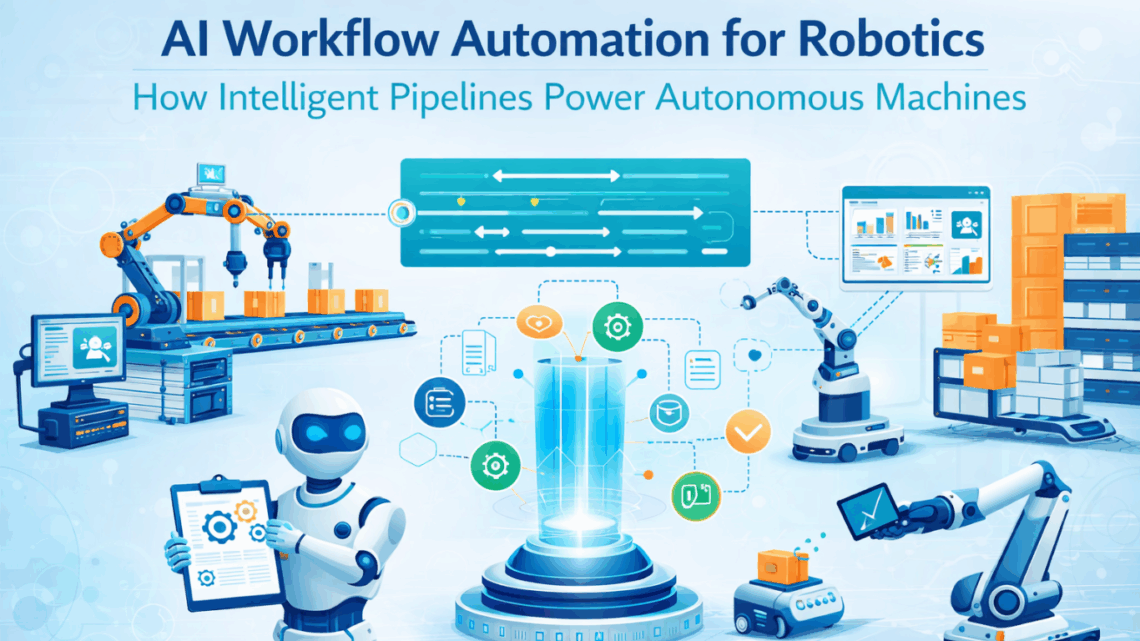
AI Workflow Automation for Robotics: How Intelligent Pipelines Power Autonomous Machines
April 2, 2026AI workflow automation for robotics connects the event streams that humanoid and autonomous robots generate (task completions, faults, quality flags, payload anomalies) to intelligent multi-step pipelines that enrich those events with enterprise data, apply conditional logic, and trigger the right action in the right system without human intervention. eZintegrations builds those pipelines on a no-code canvas: parallel execution branches, AI-enriched decision steps, conditional routing, and real-time write-backs to SAP, WMS, MES, and every other system your robot fleet depends on, all without a custom development sprint for each workflow.
TL;DR
A humanoid or autonomous robot generates dozens of events per hour: task completions, quality flags, fault codes, payload readings, navigation interruptions. Each event needs a pipeline behind it that decides what to do next, not a human. Traditional integration connects systems point-to-point. AI workflow automation connects events to decisions: it takes the robot’s output, enriches it with data from multiple enterprise systems, applies conditional logic, and fires the right action in the right system at machine speed. The difference between a robot that completes a task and a robot that operates autonomously is the workflow pipeline between the robot event and the enterprise response. That pipeline is what eZintegrations builds. This post covers five AI workflow patterns every robotic deployment needs, the pipeline architecture behind each one, a step-by-step example, and how to get your first intelligent robot workflow live from an Automation Hub template.
The Problem: Robots Generate Events. Someone Has to Decide What Happens Next.
Your robot completes a pick. Fine. What happens next?
If the answer is “someone checks the WMS dashboard and manually closes the transfer order,” you do not have an autonomous robot. You have an expensive piece of hardware with a human attached to it.
This is the distinction that separates a pilot from a production deployment. The robot’s physical capabilities, navigation, grasping, payload handling, are not the constraint. The constraint is what happens at the boundary between the robot’s output and the enterprise systems that need to respond to it. Every robot event needs a decision. Every decision needs data from multiple systems. Every action triggered by that decision needs to write back to the correct enterprise record.
When those decisions require a human, your robot is not autonomous. It is supervised.
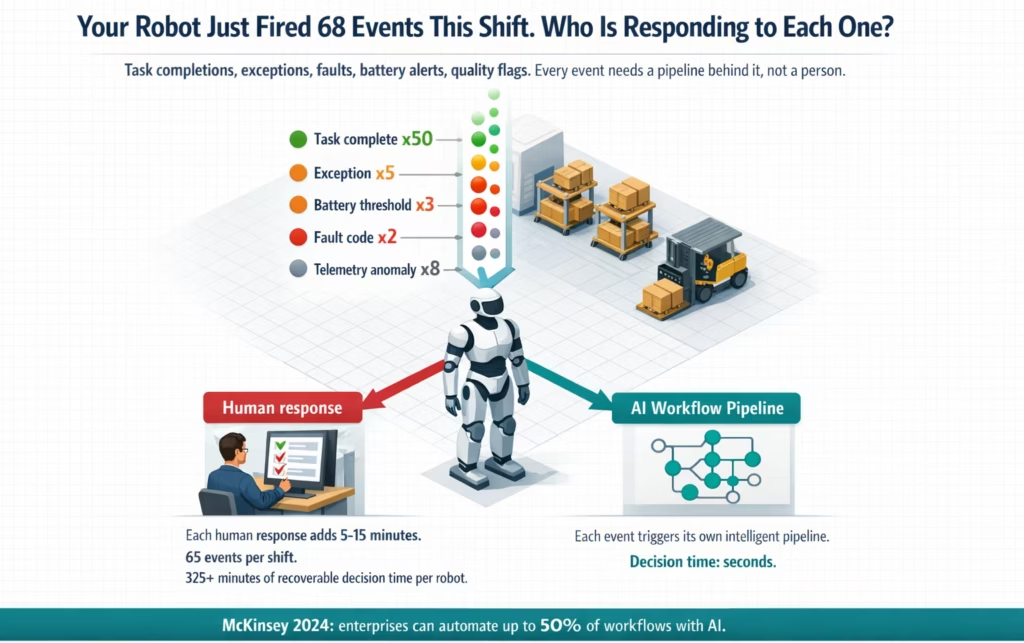
The problem is structural. Robots generate a continuous stream of typed events. A single warehouse robot completing 50 picks per 8-hour shift generates: 50 task completion events, an average of 4-6 exception events (source bin discrepancies, weight anomalies, navigation interruptions), 2-3 battery threshold events, 8-12 telemetry anomaly readings, and 1 end-of-shift reporting event. That is approximately 65-70 events per shift, per robot. A fleet of 10 robots produces 650-700 events per shift.
Each event needs a pipeline. Not a person.
The pipeline has to do several things that simple point-to-point integration cannot do. It needs to read the robot’s event, enrich it with data from other systems (what does the WMS say about this bin? what does the SAP production order say about this material? what is the robot’s current task priority?), apply conditional logic (is this a standard completion or an anomaly? is the exception in category A or category B?), and then fire the right action in the right system, or in multiple systems in parallel, with the correct payload.
That is not integration. That is intelligent workflow automation. And it is the missing layer in most humanoid robot deployments.
McKinsey’s analysis of enterprise automation potential found that organisations can automate up to 50% of their workflows with AI, but that realising this potential requires building the decision logic into the pipeline, not bolting it on after the fact. For robotics deployments, this applies directly: the AI workflow layer is not a nice-to-have feature on top of basic integration. It is the operating infrastructure that determines whether the robot can be trusted to run unsupervised.
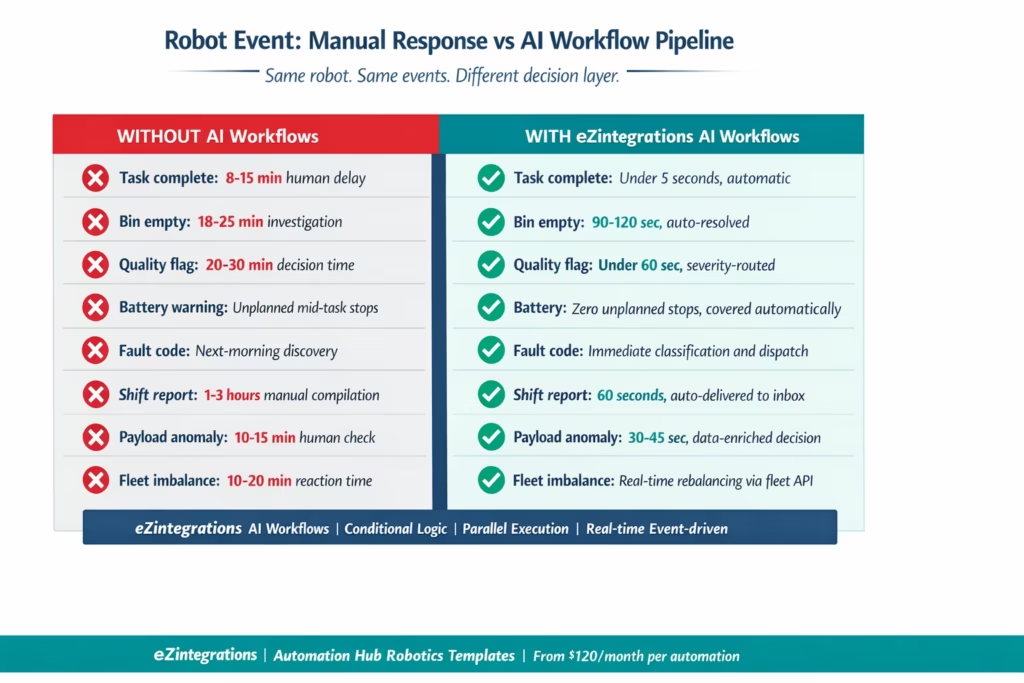
Before vs After: Manual Responses vs Intelligent AI Workflow Pipelines
| Robot Event | Without AI Workflow Automation | With eZintegrations AI Workflow Pipelines |
|---|---|---|
| Task Completion | Robot controller marks task done. Human checks WMS dashboard and manually closes transfer order.
Delay: 8–15 minutes |
Completion event triggers pipeline: WMS transfer order closed, inventory posted, robot released.
Time: under 5 seconds |
| Source Bin Empty | Robot stops. Human investigates via physical check + WMS queries.
Resolution: 18–25 minutes |
Parallel API calls check bin + adjacent bins. Auto re-dispatch or cycle count triggered with supervisor alert.
Time: 90–120 seconds |
| Quality Flag | Human checks SAP QM + inspection records before decision.
Delay: 20–30 minutes |
Event enriched with SAP QM + MES data. Auto decision: continue or trigger line hold + defect record.
Time: under 60 seconds |
| Battery Warning | Robot runs until cutoff. Charging handled manually.
Impact: unplanned stops |
Auto reassignment + guided charging + backup robot dispatch.
Impact: zero unplanned stops |
| Robot Fault Code | Fault reviewed next day by maintenance team. | Auto classification: critical → SAP PM work order + alert. Non-critical → scheduled maintenance.
Improvement: 60–80% faster resolution |
| End-of-Shift Reporting | Manual compilation from WMS, MES, robot systems.
Time: 1–3 hours |
Automated data aggregation + report generation delivered to inbox.
Time: under 60 seconds |
| Payload Anomaly | Human verifies item vs manifest.
Decision time: 10–15 minutes |
Weight auto-checked vs SAP master. Proceed or pause + discrepancy logging + supervisor alert.
Time: 30–45 seconds |
| Fleet Capacity Imbalance | Manual monitoring and redistribution.
Reaction: 10–20 minutes |
Auto monitoring + dynamic task redistribution across zones. |
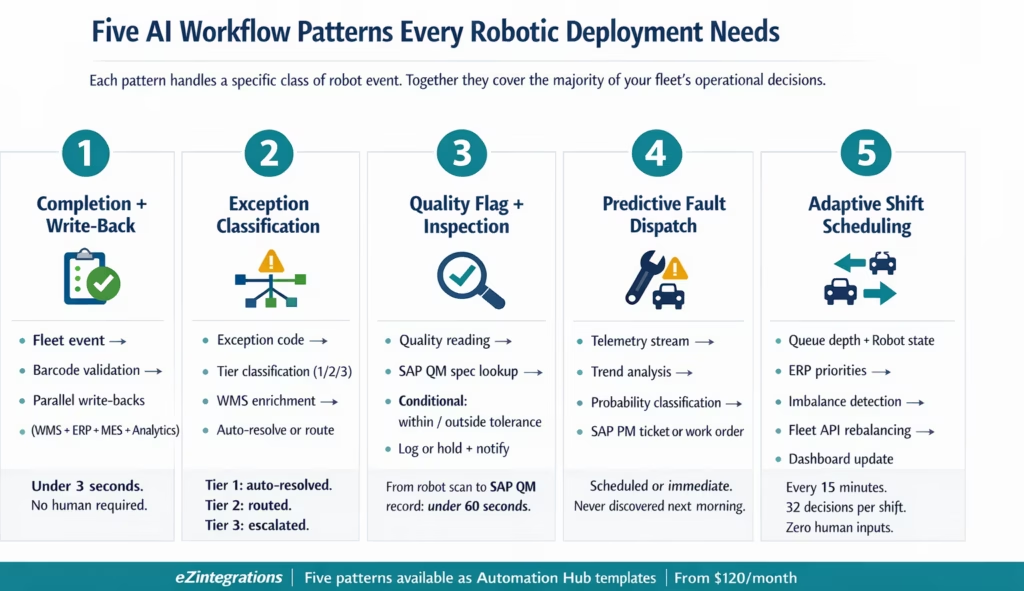
Five AI Workflow Patterns Every Robotic Deployment Needs
An AI workflow pipeline for robotics is not a simple trigger-and-action. It is a structured sequence of steps that reads data, makes decisions, and fires actions, with branching logic at each decision point, parallel execution where multiple actions are needed simultaneously, and error handling that keeps the pipeline running even when individual API calls fail.
Here are the five patterns that cover the majority of robot operational events.
Pattern 1: Completion and Write-Back Pipeline
This is the foundational pattern. The robot completes a task. The pipeline runs.
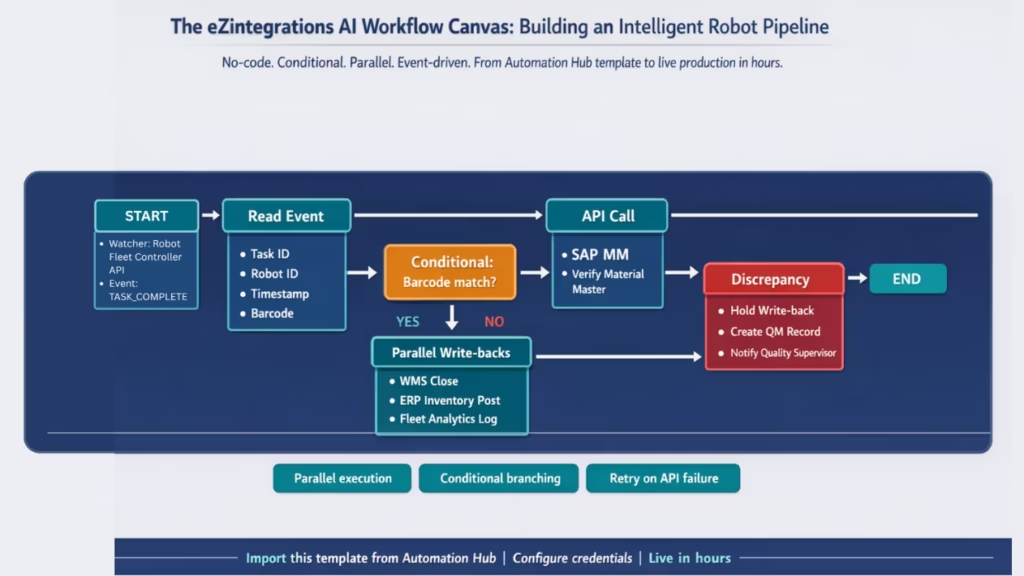
The pipeline reads the completion event from the fleet controller (task ID, robot ID, timestamp, barcode confirmation). It makes parallel write-back calls to every enterprise system that needs to know: WMS transfer order closed, inventory movement posted, MES work order updated, fleet analytics event logged. All four calls execute simultaneously, not sequentially. Total pipeline runtime: under 3 seconds.
The AI element in this pipeline is the validation step: before writing back, the pipeline checks whether the barcode scan result matches the expected material in the WMS task. If it matches, write-back proceeds. If it does not match (wrong item picked), the pipeline branches: hold the WMS write-back, create a discrepancy record, notify quality supervisor. A simple trigger-action integration cannot do this. A workflow pipeline with a conditional branch can.
Systems involved: Robot fleet controller, SAP EWM or WMS, SAP MM or ERP, MES, fleet analytics.
Pattern 2: Exception Classification and Resolution Pipeline
When the robot generates an exception (bin empty, navigation blocked, payload limit, item unrecognisable), the pipeline does not just notify a human. It classifies the exception and attempts resolution first.
Classification step: the exception code is categorised into three tiers. Tier 1: resolvable automatically (bin empty but material found in adjacent bin via WMS query). Tier 2: requires routing to the nearest available robot plus supervisor notification. Tier 3: requires full stop, safety alert, and escalation to shift manager.
For Tier 1, the pipeline resolves the exception without human involvement, logs the resolution, and re-dispatches the robot. For Tier 2, it executes the routing and sends a structured notification with the exception context pre-assembled. For Tier 3, it escalates immediately.
The AI enrichment step between classification and action queries the WMS for alternative pick locations, checks the fleet controller for available robot capacity, and retrieves the task priority from the ERP, before deciding which tier applies. This is data-enriched conditional logic, not a simple IF-THEN rule.
Systems involved: Robot fleet controller, SAP EWM, SAP MM, WMS, HRIS (for supervisor contact data), notification platform.
Pattern 3: Quality Flag and Inspection Pipeline
A robot performing quality checks, dimension verification, weight validation, or visual inspection generates quality events. Each event needs a workflow that does not just log the reading but contextualises it against the expected specification, routes the outcome to the correct system, and triggers the appropriate action.
The pipeline reads the quality event (robot ID, inspection point, reading value, timestamp). An AI enrichment step calls the SAP QM inspection plan API to retrieve the specification range for the current production order and inspection characteristic. A conditional step compares the reading to the specification.
Within tolerance: log to SAP QM, continue. Outside tolerance: create a SAP QM defect record, trigger an MES line hold for the affected work order, notify the quality supervisor with the inspection reading, the specification range, the material, and the work order number. All in one pipeline. Under 60 seconds from robot event to SAP record created and supervisor notified.
Systems involved: Robot fleet controller, SAP QM, MES, quality management database, notification platform.
Pattern 4: Predictive Fault and Maintenance Dispatch Pipeline
Robots generate telemetry data continuously: motor temperature, joint torque readings, battery cell voltages, sensor calibration drift, actuator cycle counts. AI workflow automation processes this data not just as individual readings but as pattern inputs.
The pipeline monitors telemetry streams from the fleet controller API. An AI analysis step checks each reading against the robot’s historical baseline and the manufacturer’s threshold parameters. When readings indicate degrading trend (not just threshold breach), the pipeline classifies the fault probability.
Low probability: log to maintenance dashboard. Medium probability: create a scheduled maintenance ticket in SAP PM or CMMS for the next planned stop. High probability: create an immediate SAP PM work order, notify the on-call maintenance technician, and flag the robot in the fleet controller for priority inspection before the next shift. The classification happens in the pipeline, not in a maintenance engineer’s head.
Systems involved: Robot fleet controller (telemetry API), SAP Plant Maintenance, IBM Maximo or CMMS, HRIS (technician schedule and contact), notification platform.
Pattern 5: Shift Intelligence and Adaptive Scheduling Pipeline
At defined intervals, the pipeline reads the full fleet’s operational state and adjusts task distribution dynamically. This is not a reporting pipeline. It is an adaptive scheduling pipeline.
The pipeline reads current task queue depth per zone from the WMS, current robot availability and battery state from the fleet controller, and current production priorities from the ERP. An AI analysis step identifies zones with queue backlog relative to available robot capacity. A routing step calls the fleet controller API to redistribute pending tasks from overloaded zones to robots available in adjacent zones. A reporting step sends the current fleet utilisation snapshot to the operations dashboard.
This pipeline runs every 15 minutes during a shift. Each run takes under 10 seconds. Over an 8-hour shift, 32 pipeline executions continuously rebalance the fleet without human intervention. Your operations manager sees a balanced fleet. They do not see the 32 decisions that kept it balanced.
Systems involved: Robot fleet controller, SAP EWM or WMS, SAP S/4HANA or ERP, fleet analytics dashboard.
How eZintegrations Builds Intelligent Robot Pipelines
eZintegrations AI Workflows provides the no-code canvas for building every robot workflow pipeline described above. Each pipeline is a visual sequence of typed steps, connected by conditional branches and parallel execution paths, running on event-driven triggers.
Here is how the platform handles each element of a robot AI workflow:
Event triggers: The Watcher Tool monitors your robot fleet controller API for typed event streams. Task completion events, exception events, fault codes, telemetry readings, and shift events each have their own Watcher configuration. When the event fires, the pipeline starts. No polling delay.
Data enrichment steps: After reading the robot event, the workflow adds context from other enterprise systems. An API Tool Call step queries SAP EWM for bin inventory status. Another queries SAP QM for the inspection specification. Another queries the fleet controller for available robots in adjacent zones. These enrichment calls execute in parallel where data is independent, cutting pipeline runtime versus sequential execution.
Conditional branching: After enrichment, the workflow applies your business logic via conditional steps. Bin empty: is the material in an adjacent bin? Yes: re-dispatch. No: cycle count plus supervisor notification. Quality reading: within tolerance? Yes: log. No: line hold plus QM record. Each branch executes only the steps relevant to its condition.
AI-enriched decision steps: For the patterns that go beyond rule-based logic, the pipeline includes a Document Intelligence or Data Analysis step that applies AI reasoning to unstructured or multi-variable inputs. Telemetry trend analysis. Multi-reading quality pattern detection. Exception history correlation for predictive fault classification. These steps run inside the pipeline, not as external AI calls that require a separate system.
Parallel write-back execution: When the pipeline triggers multiple enterprise system updates simultaneously (WMS + ERP + MES + fleet analytics on task completion), it executes those write-back calls in parallel. All four systems receive their updates within the same pipeline execution window, not in sequence.
Error handling and retry: If an individual API call fails (SAP system momentarily unavailable, network interruption), the pipeline retries with configured retry logic. The pipeline does not fail on a single step failure. The completion event is not lost. The write-back is retried and completed when the system is available.
Template import: Every pipeline pattern above is available as an Automation Hub template. Import, configure your enterprise system credentials and fleet controller API endpoint, adjust the conditional logic for your exception categories, and run test transactions in the Dev environment. Your first robot AI workflow pipeline goes live in hours, not weeks.
For deployments that need agentic decision-making beyond rule-based conditional branching, Goldfinch AI extends the workflow layer with autonomous agents that can reason across multi-step scenarios, invoke multiple workflows as tools, and handle exception classes that no predefined rule covers. See the companion post on agentic AI for humanoid robots for the full agentic architecture.
Step-by-Step: Intelligent Quality Exception Workflow (Robot to MES to SAP QM to Supervisor)
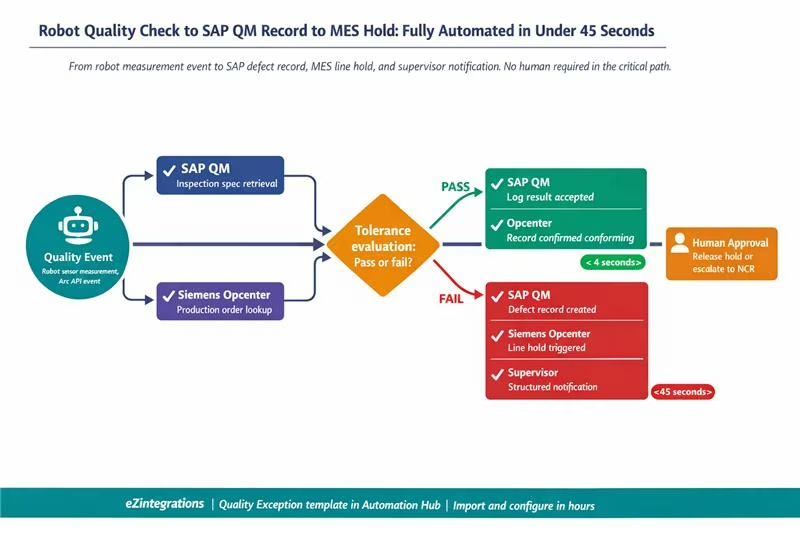
This pipeline handles the quality flag pattern: a humanoid robot performing inline quality checks generates a dimension reading that needs to be evaluated against the SAP QM inspection plan and, if out of tolerance, trigger a coordinated response across MES and SAP QM before any human has to act.
The example uses Agility Robotics Digit as the robot (measuring dimensional accuracy of machined parts using its onboard sensor array), Siemens Opcenter as the MES, and SAP S/4HANA QM as the quality management system. The pipeline runs on eZintegrations.
Step 1: Quality Event Captured (Watcher Tool) The robot completes an inline dimensional check at inspection station 4. The Agility Arc API fires a quality event: robot ID, inspection station, part number 8842-A, measurement values (length 147.3mm, width 49.8mm, height 22.1mm), timestamp. The eZintegrations Watcher, monitoring the Arc API for quality event types, captures the event within seconds.
Step 2: Inspection Specification Retrieved (Parallel API calls) The pipeline makes two simultaneous API calls:
- Siemens Opcenter API: retrieve the current production order at inspection station 4 (order 4418, batch 220, 50 parts in run)
- SAP QM Inspection API: retrieve the inspection plan for part number 8842-A and the current inspection lot (inspection characteristic tolerances: length 147.0-147.5mm, width 49.5-50.0mm, height 22.0-22.5mm, sample frequency: every 10th part)
Both calls return simultaneously. The pipeline now has the robot’s measurement and the specification it should be measured against, in the same execution context.
Step 3: Tolerance Evaluation (Conditional Step) The pipeline evaluates each dimension against its tolerance range:
- Length 147.3mm: within 147.0-147.5mm. Pass.
- Width 49.8mm: within 49.5-50.0mm. Pass.
- Height 22.1mm: within 22.0-22.5mm. Pass.
All dimensions pass. The pipeline takes the IN-TOLERANCE branch.
Step 4a: In-Tolerance Path (Logging) The pipeline makes two write-back calls: – SAP QM API: result logged against inspection lot for order 4418, batch 220, part sequence 30. Characteristic values recorded. Result: accepted. – Siemens Opcenter API: inspection record updated for production order 4418. Part confirmed conforming.
Robot released for next inspection. Pipeline complete. Time from quality event to SAP record: under 4 seconds.
Step 5b: Out-of-Tolerance Path (Exception: what would happen if height read 22.7mm) Height 22.7mm exceeds the 22.5mm upper limit. Pipeline takes the OUT-OF-TOLERANCE branch.
Three parallel actions fire simultaneously:
Action 1: SAP QM API: create a defect record for inspection lot, order 4418, batch 220. Defect code: dimensional nonconformance. Characteristic: height. Actual value: 22.7mm. Specification: 22.0-22.5mm. Defect severity: Major.
Action 2: Siemens Opcenter API: create a line hold event for production order 4418. Status: QUALITY HOLD. Reason: dimensional nonconformance. Batch 220 flagged, no further production until disposition.
Action 3: Notification pipeline: quality supervisor receives a structured notification containing: part number, order, batch, inspection station, robot ID, the specific out-of-tolerance reading, the tolerance range, SAP QM defect record ID, and MES hold status. Everything the supervisor needs to make a disposition decision, pre-assembled. No manual data gathering required.
Time from out-of-tolerance measurement to SAP QM defect record created, MES hold triggered, and supervisor notified: under 45 seconds.
Step 6: Disposition Follow-Through (Optional Human Approval Step) If your quality protocol requires human disposition sign-off before the MES hold is released, the pipeline supports a Human Approval step. The supervisor receives the notification with a “Release Hold” or “Escalate to NCR” action button. Their selection triggers the next pipeline step: MES hold released and SAP QM accepted, or SAP QM nonconformance report initiated for full disposition. The human makes one decision. The pipeline executes the downstream consequences.
Key Outcomes and Results
The outcomes of AI workflow automation for robotics divide into four categories. Each has specific, measurable impact on the metrics your operations manager and plant director care about.
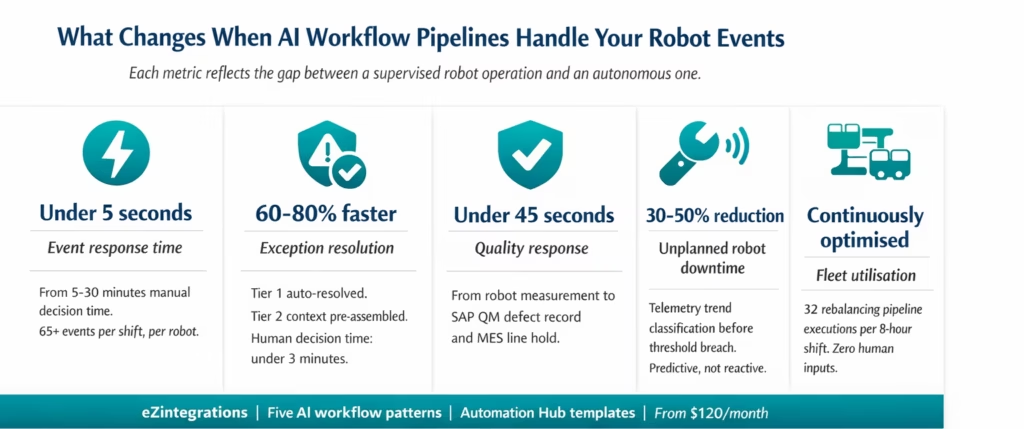
Event response time: Seconds, not minutes Manual responses to robot events add 5-30 minutes of decision time per event depending on event type. Across 65-70 events per shift per robot, that is 325-2,100 minutes of recoverable decision time per robot per shift, depending on the event mix and response speed of the current team. AI workflow pipelines reduce every event response to seconds. The recoverable time is not theoretical. It is operational idle time and manual labour your team is currently consuming. For a 10-robot fleet, the recoverable decision time across a shift is 3,250-21,000 minutes. That is the gap between a supervised robot operation and an autonomous one.
WMS and ERP data accuracy: Real-time versus batch drift Without automated write-backs, enterprise data drifts from robot operational reality. Inventory records lag robot picks by minutes or hours. Production order statuses do not reflect robot completions. Quality inspection records wait for manual entry. With AI workflow write-back pipelines, every completion writes back in seconds. Inventory accuracy is near-real-time. Duplicate task assignments (a common pilot failure mode) are eliminated. Data quality across your enterprise stack reflects actual robot operations.
Exception resolution: 60-80% faster Manual exception investigation (supervisor physical walkthrough, WMS query, adjacent bin check, decision, re-dispatch) takes 18-25 minutes on average. The automated exception classification and resolution pipeline handles Tier 1 exceptions (approximately 60-70% of exceptions in typical deployments) without any human involvement, and presents Tier 2 exceptions to supervisors with context pre-assembled, cutting human decision time from 15-20 minutes to under 3 minutes. Overall exception resolution time drops 60-80%.
Quality response time: From hours to under a minute In manual quality management, a robot quality flag triggers a chain of manual steps that can take 20-45 minutes before a line hold is in place. In the automated pipeline, the line hold is triggered in SAP QM and Siemens Opcenter simultaneously within 45 seconds of the robot’s out-of-tolerance reading. The time between identifying a quality issue and stopping production for that batch drops from potentially 20+ minutes (during which more nonconforming parts may be produced) to under 45 seconds.
Maintenance: Predictive, not reactive Unplanned downtime from robot faults that were not flagged until they became critical is one of the highest-cost failure modes in robotic deployments. Predictive fault workflows that classify telemetry trends and create scheduled maintenance tickets before threshold breach shift the maintenance model from reactive to predictive. Organisations deploying predictive maintenance for robotic fleets report 30-50% reductions in unplanned downtime. Each unplanned stop for a humanoid robot in a production environment represents lost robot-hours, lost production output, and maintenance callout cost.
Fleet utilisation: Continuously optimised The adaptive scheduling pipeline that rebalances task distribution every 15 minutes maintains fleet utilisation rates that manual scheduling cannot match. Zones that develop queue backlogs are identified and rebalanced within one pipeline execution cycle, not at the end of the shift when the imbalance is visible in the reporting data.
How to Get Started
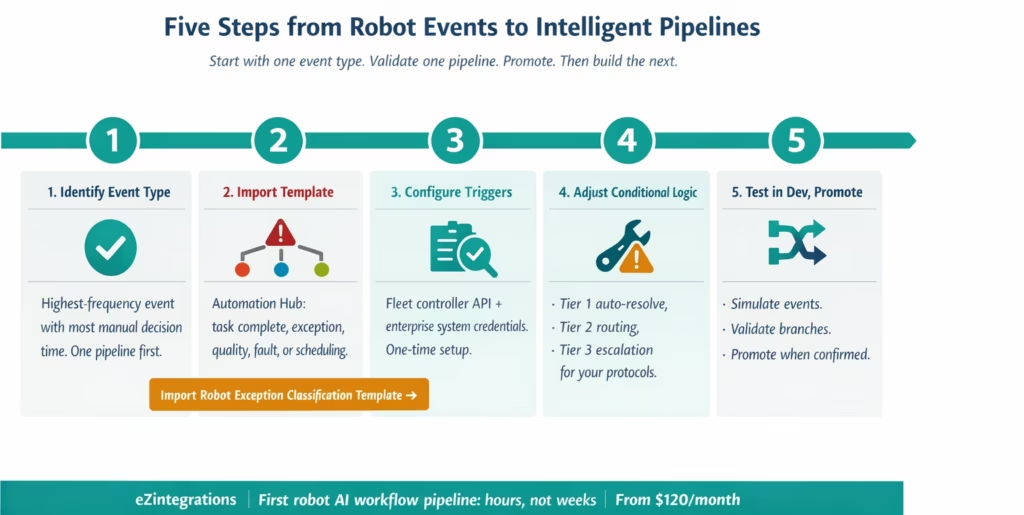
The fastest path to your first live robot AI workflow pipeline is to pick one event type and build one pipeline completely. Not five pipelines simultaneously. One. Validate it. Promote it to production. Then build the next.
Step 1: Identify your highest-frequency robot event type Review your fleet controller logs for the past two weeks. Which event type appears most frequently and currently requires the most manual decision time? For most warehouse deployments, it is task completion with delayed WMS write-back or exception events with long manual investigation time. For manufacturing deployments, it is often the quality flag or the maintenance fault event. Pick the one that creates the most operational friction.
Step 2: Import the matching Automation Hub template Go to the Automation Hub and search for your event type. Templates available include: robot task completion write-back, robot exception classification and resolution, robot quality flag inspection pipeline, robot fault predictive maintenance dispatch, and robot shift scheduling adaptive pipeline. Import the template for your highest-priority event type.
Step 3: Configure triggers and credentials Add your robot fleet controller API endpoint and credentials (Agility Arc, Boston Dynamics Scout, Figure AI, Apptronik, or custom API). Add your enterprise system API credentials: SAP EWM OData endpoint, SAP QM inspection API, Siemens Opcenter REST API, or whichever systems are relevant to your selected pipeline. All credentials are stored once and reused across every workflow.
Step 4: Adjust conditional logic for your exception categories Every deployment has a slightly different exception classification structure. Review the conditional branches in the imported template and adjust the tier definitions to match your operational protocols. Tier 1 auto-resolve: which exception codes should the pipeline attempt to resolve automatically? Tier 2 routing: who receives the structured notification for which exception types? Tier 3 escalation: what constitutes a full-stop safety alert in your environment?
Step 5: Run test events in Dev, then promote eZintegrations provides full Dev/Test/Production separation. Generate test events against your Dev configuration: simulate a task completion event, a source bin empty exception, a quality out-of-tolerance reading. Validate that the pipeline executes the correct branch, writes back to the correct enterprise records, and delivers notifications to the correct recipients. When validation passes, promote to production. Your first robot AI workflow pipeline is live.
Ready to build your first pipeline? Book a free demo and bring your robot fleet controller API documentation and your highest-priority event type. We will build the pipeline in the session and show you the Automation Hub template that covers it.
Frequently Asked Questions
1. How do robotics deployments use eZintegrations AI workflow automation
Robotics teams use eZintegrations to build intelligent event driven pipeline workflows that respond automatically to robot event streams without manual intervention. Common patterns include task completion write back pipelines from robot to WMS inventory updates exception classification and auto resolution pipelines such as empty bin detection to re dispatch or supervisor alert quality inspection pipelines comparing readings to SAP QM specifications predictive fault dispatch pipelines from telemetry to SAP PM work orders and adaptive scheduling pipelines that rebalance fleets based on queue depth monitoring.
2. How long does it take to set up the first robot AI workflow pipeline
The first pipeline typically takes 4 to 8 hours to configure using Automation Hub templates including API credential setup conditional logic configuration and test validation. If enterprise system API access requires IT provisioning it may add 1 to 3 business days. Most teams have their first pipeline running in production within one week.
3. Does eZintegrations work with Agility Robotics Siemens Opcenter and SAP QM simultaneously
Yes, eZintegrations connects to robot fleet controllers MES and ERP systems simultaneously via its API catalog. Agility Robotics Arc Siemens Opcenter and SAP S 4HANA QM can all operate within the same workflow pipeline using REST and OData APIs. Data from MES and ERP systems can enrich robot events to drive conditional logic. Systems not in the catalog can be added through self service API onboarding in under an hour.
4. What is the difference between eZintegrations AI Workflows and Goldfinch AI for robotics
AI Workflows handle structured rule based pipelines where logic is predefined such as tolerance checks or routing decisions. Goldfinch AI handles agentic multi step reasoning where decisions require contextual understanding across multiple inputs such as fleet state order priority and exception history. Most deployments start with AI Workflows and extend to Goldfinch AI for complex decision making scenarios. Both operate on the same platform.
5. Can eZintegrations handle parallel workflow execution for high frequency robot event streams
Yes, The platform uses cloud native architecture to support fully parallel workflow execution. Each robot event triggers an independent pipeline execution allowing hundreds of events per shift to be processed simultaneously without queuing. Parallel steps within each pipeline also execute concurrently enabling high throughput scaling without manual configuration.
6. Does eZintegrations support human approval steps inside robot workflow pipelines
Yes, Pipelines can include Human Approval gates where execution pauses and sends a structured action request to designated approvers through email Slack Microsoft Teams or other systems. Approvers can approve reject or escalate and the pipeline resumes based on the selected action. These gates are used for quality decisions safety escalations and maintenance approvals without requiring manual involvement in every step.
Conclusion
A humanoid or autonomous robot generates dozens of events per hour. Each event is a decision. Each decision requires data from multiple enterprise systems. Each action triggered by that decision needs to write back to the correct record in the correct system.
When those decisions require human intervention, your robot is not autonomous. It is supervised. The question is not whether robots can do the physical work. Most deployed systems already can. The question is whether the decision layer between the robot’s event stream and your enterprise systems is intelligent enough to run without constant human input.
AI workflow pipelines answer that question. Five patterns cover the majority of operational scenarios: completion write-back, exception classification, quality flag inspection, predictive fault dispatch, and adaptive fleet scheduling. Each pattern is a structured, conditional, data-enriched workflow that fires on the robot’s event and produces the right enterprise action, without a human in the critical path.
eZintegrations builds those pipelines on a no-code canvas, with Automation Hub templates for every pattern and a platform built for parallel, high-frequency, event-driven execution.
Import the robot exception classification template from the Automation Hub and run your first test events today. Or book a free demo and bring your highest-priority robot event type. We will build the pipeline together in the session.

