
Integration Platform for Humanoid Robots: Connect Robots to Enterprise Systems
March 18, 2026An integration platform for humanoid robots connects each robot’s fleet controller API to the enterprise systems it depends on: SAP or Oracle ERP for task context, WMS for real-time pick queue assignment, MES for production order data, Salesforce or CRM for field service routing, and HR systems for shift scheduling. eZintegrations provides this connection layer using 5,000+ pre-built API endpoints, Automation Hub robotics templates, and event-driven workflows that deliver task data to robots in real time and log outcomes back to enterprise systems, without custom integration development for each connection.
TL;DR
Approximately 16,000 humanoid robots were deployed globally in 2025. The majority remain in pilot programs. The primary reason pilots stall is not hardware capability or AI model quality. It is the gap between what the robot can physically do and what the enterprise systems around it are telling it to do. SAP has already published real-world integrations between its EWM (Extended Warehouse Management) and humanoid robots from NEURA Robotics and Humanoid at BITZER, Sartorius, and Martur Fompak.
The integration architecture is real. The technical challenge is connecting a robot’s fleet controller API to the enterprise systems your organisation already runs. eZintegrations connects humanoid robot fleet controllers to SAP S/4HANA, Oracle ERP, Salesforce, WMS, MES, HR scheduling systems, and any other enterprise system with an API endpoint, using 5,000+ pre-built connections, Automation Hub templates, and a no-code canvas. No custom development per robot. No per-system integration sprint. This post maps the seven enterprise systems every deployed humanoid robot needs to connect to, the integration pattern for each, and how to get your first robot-to-enterprise integration live in hours.
The Problem: Humanoid Robots Are Ready for Enterprise. Enterprise Systems Are Not Ready for Robots.
Your humanoid robot passed every pre-deployment benchmark. Navigation: pass. Object recognition: pass. Pick accuracy at 35 lbs payload: pass. Autonomous shift duration: pass.
Day one on the warehouse floor. Your WMS assigns the first task at 8:02 AM. The robot’s fleet controller does not receive it until 8:03 AM. Twenty-three seconds. Acceptable.
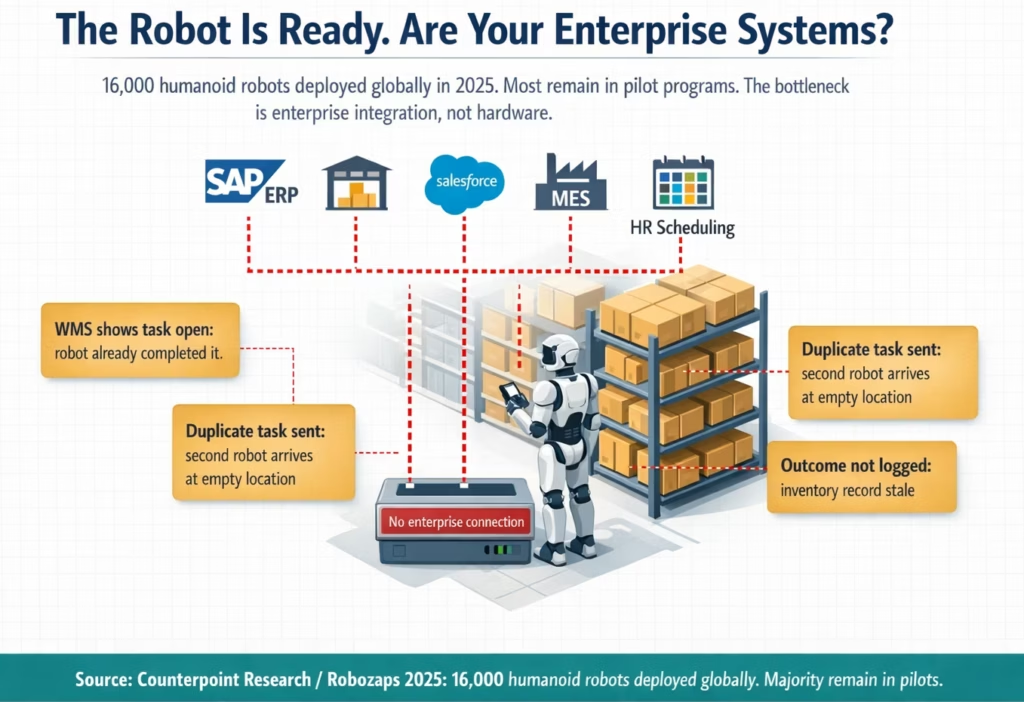
The robot completes the pick at 8:11 AM. Your WMS shows the task as still open. The inventory record shows the item still at the original pick location. A second robot in the fleet is assigned the same task at 8:12 AM and navigates to the same location. There is nothing there. An exception fires. A supervisor walks over to investigate.
It is 8:14 AM on day one.
This scenario plays out in variant forms across every humanoid robot pilot that stalls. The robot does the physical work correctly. The enterprise systems do not receive the outcome. The next action in the sequence fires based on stale data. The human has to step in.
The global humanoid robot market reached approximately 16,000 deployed units in 2025, according to Counterpoint Research data cited by Robozaps. The majority of those units remain in controlled pilots. The constraint is not the robot’s locomotion system or its grasping capability or its onboard AI model. The constraint is the data layer between the robot and the enterprise systems that define its work, validate its actions, and record its outcomes.
SAP’s own CTO, Philipp Herzig, described the required architecture precisely at SAP TechEd Berlin in November 2025, when SAP announced partnerships with NEURA Robotics, Humanoid, and Agibot: “Embodied AI represents a fundamental shift in how robots understand and respond to business needs. The first proof of concept allows us to demonstrate how humanoid robots can act as extensions of an organisation’s operations by providing business context awareness and integration with existing workflows.”
Business context awareness. Integration with existing workflows. Those two phrases describe the same problem. A humanoid robot without enterprise integration is a very sophisticated piece of hardware with no context about what the business needs it to do next.
The enterprise systems that provide that context are the ones your organisation already runs: SAP for production orders and warehouse management, Salesforce for field service routing, Oracle for supply chain planning, your HRIS for shift scheduling, your MES for assembly line work orders. These systems were not designed to talk to robots. The integration platform is what makes that conversation possible.
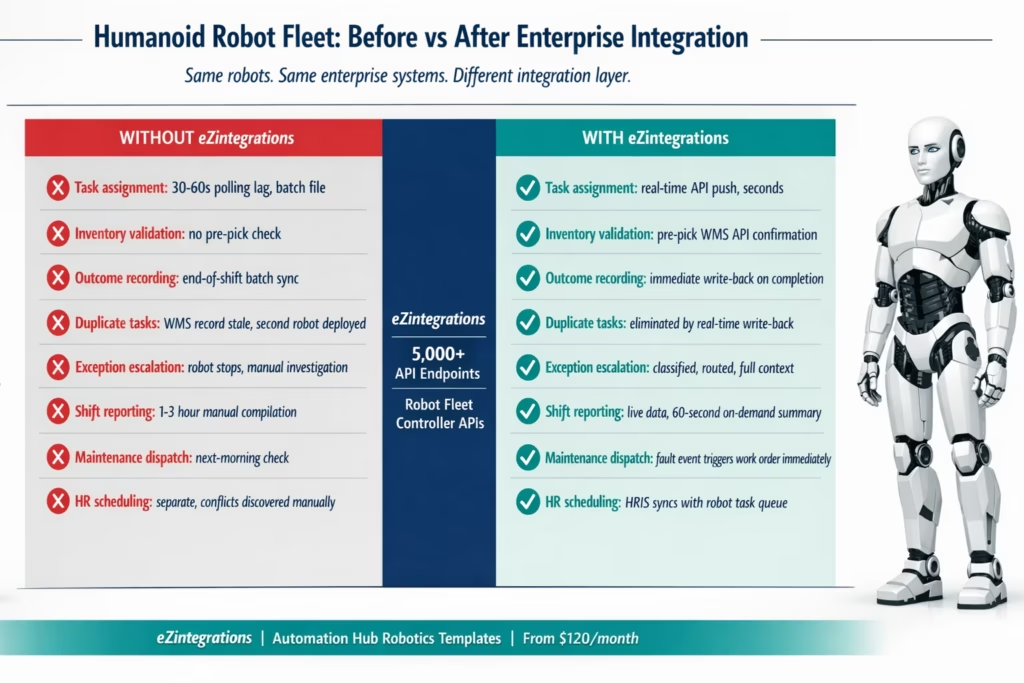
Before vs After: Isolated Robots vs Enterprise-Connected Fleet
| Dimension | Without Enterprise Integration | With eZintegrations |
|---|---|---|
| Task assignment | Robot polls fleet controller at fixed interval (30–60s lag). Tasks come from manual export or batch file from WMS. | WMS or ERP task event triggers real-time API push to robot fleet controller. Task arrives in seconds of assignment. |
| Inventory validation | Robot acts on task data without confirming item is at pick location. Exceptions discovered during execution. | Pre-pick API call to WMS confirms item at location, quantity, and weight before robot begins navigation. |
| Outcome recording | Pick completion logged in robot controller only. WMS inventory updated in batch sync (end of shift or hourly). | Pick confirmation event from robot triggers immediate WMS inventory write-back. Inventory accurate within seconds. |
| Duplicate task prevention | Second robot assigned to already-completed task because WMS record is stale. | Real-time write-back prevents duplicate assignment. Task marked closed in WMS before next assignment fires. |
| Exception escalation | Robot stops. Error code generated. Human investigates from scratch. | Exception event triggers classification, context retrieval, and routed notification to correct supervisor with full task context. |
| Shift reporting | Manual compilation from robot controller logs and WMS exports. 1–3 hours post-shift. | Live data stream from every task and exception. Shift summary available on demand, under 60 seconds. |
| Maintenance dispatch | Robot fault logged in controller. Maintenance team checks dashboard next morning. | Robot fault event triggers maintenance work order in SAP PM or your CMMS. Technician receives notification within minutes. |
| HR and shift scheduling | Robot assignment schedule maintained separately from human workforce schedule. Conflicts discovered manually. | HRIS shift schedule syncs with robot task queue. Robot deployment aligned with human staffing in real time. |
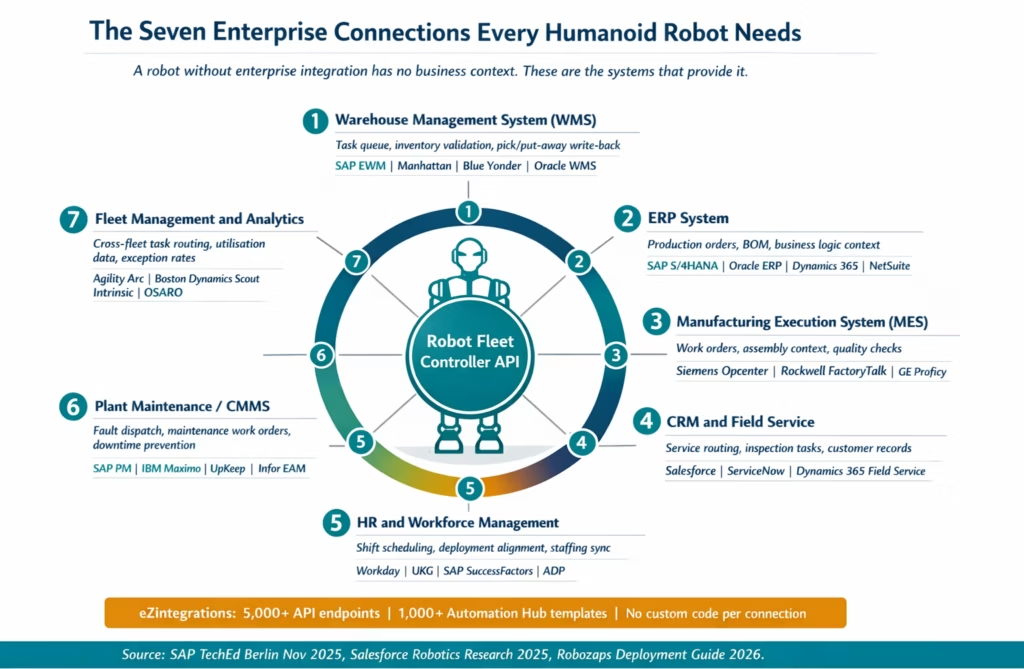
The Seven Enterprise Systems Every Humanoid Robot Needs to Connect To
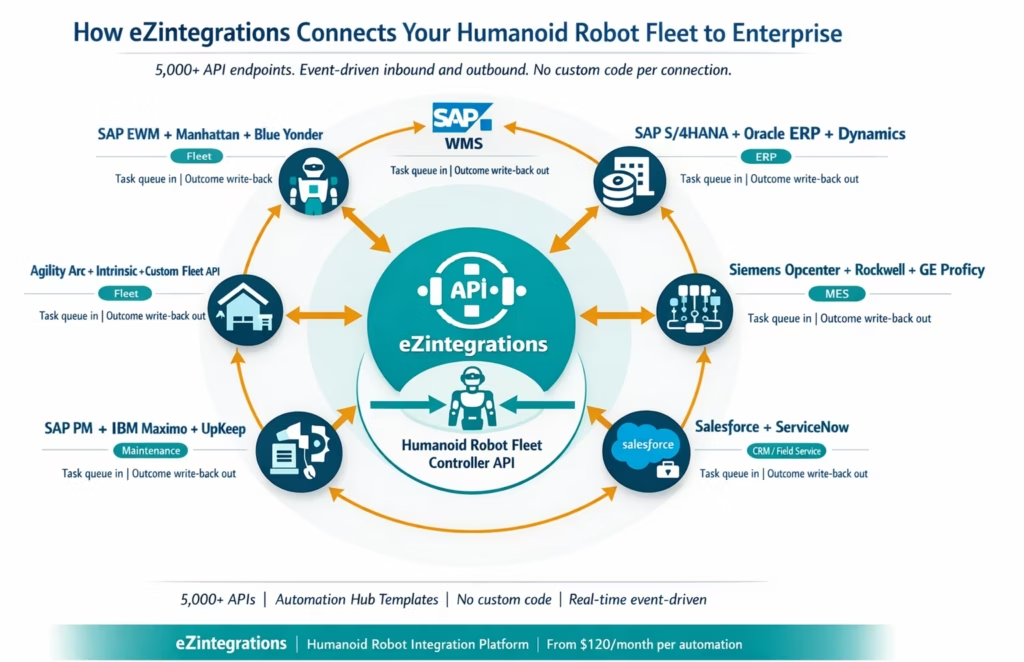
The enterprise integration map for a deployed humanoid robot is specific. It is not the same as connecting software applications. A robot is a physical actor that reads from systems to know what to do, and writes back to systems to record what it did. Both directions matter, and both require real-time connections.
1. Warehouse Management System (WMS): Task Queue and Inventory
The WMS is the primary source of work for a humanoid robot in a warehouse or fulfilment environment. It holds the pick queue, the put-away assignments, the replenishment tasks, and the inventory records that tell the robot what is where.
The integration needs to do two things: push tasks to the robot in real time when they become available, and receive outcome data from the robot the moment a task is completed. The task push is event-driven: when the WMS creates a new task for the robot’s work zone, the integration fires immediately and delivers the task to the fleet controller API. The outcome write-back fires when the robot’s controller confirms task completion.
Systems: SAP Extended Warehouse Management (SAP EWM), Manhattan Associates WMi, Blue Yonder WMS, Oracle WMS Cloud, HighJump, 3PL Central.
2. ERP System: Production Orders, Materials, and Business Logic
For robots operating in manufacturing environments, the ERP holds the production orders, the bill of materials, and the business rules that determine what work the robot should be doing at any given time. SAP’s pilots with BITZER and Sartorius both used SAP S/4HANA as the ERP and SAP EWM as the task orchestration layer.
The integration provides the robot with production-order context: which component to retrieve, where to deliver it, which assembly station needs it, and in what sequence. The robot’s task queue is derived from live production order data rather than a static schedule.
Systems:Humanoid robot integration: SAP S/4HANA, SAP ECC, Oracle ERP Cloud, Oracle EBS, Microsoft Dynamics 365, NetSuite, Infor CloudSuite.
3. Manufacturing Execution System (MES): Work Orders and Assembly Context
In a factory environment, the MES translates the ERP’s production orders into executable work orders at the machine and workstation level. For a humanoid robot performing kitting, component delivery, or quality checks, the MES work order is the specific instruction: which part, which station, in what quantity, at what time.
The integration fires when a MES work order becomes available for the robot’s assigned zone, delivers the work order details to the fleet controller, and receives completion data back to update the MES record.
Systems: Siemens Opcenter, Rockwell FactoryTalk, GE Proficy MES, Werum PAS-X, Dassault DELMIA Apriso.
4. CRM and Field Service Platform: Customer-Facing and Service Routing
For humanoid robots deployed in field service, inspection, or customer-facing roles, the CRM and field service platform provides the routing context: which customer site, what service task, what priority level, what customer history. Salesforce has been active in the robotics space, with its researchers demonstrating Boston Dynamics Spot robots integrated with Salesforce Field Service for facility inspection and service task routing.
The integration connects field service work orders from Salesforce or ServiceNow to the robot’s task queue, and writes inspection outcomes, visit records, and anomaly detections back to the CRM.
Systems: Salesforce Field Service Lightning, Salesforce Service Cloud, ServiceNow Field Service Management, Microsoft Dynamics 365 Field Service.
5. HR and Workforce Management System: Shift Scheduling and Deployment
A humanoid robot fleet operates alongside human workers. The deployment schedule needs to be aligned with human shift staffing: robots fill gaps in coverage rather than creating conflicts. The HRIS holds the human shift schedule. The integration synchronises the robot’s task assignment window with the human workforce schedule, ensuring robots are active when they add most value and human-robot interaction protocols are respected.
Systems: Workday HCM, UKG Pro and UKG Dimensions, SAP SuccessFactors, ADP Workforce Now, Ceridian Dayforce.
6. Plant Maintenance and CMMS: Fault Management and Predictive Maintenance
When a robot generates a fault event (battery below threshold, motor temperature warning, payload limit exceeded, sensor calibration required), that fault needs to reach your maintenance team immediately. In a connected enterprise, the robot’s fault event triggers a maintenance work order in SAP Plant Maintenance or your CMMS, routed to the correct maintenance group with full context.
Without this integration, faults sit in the robot’s controller until someone checks the dashboard. A warning that could have been resolved in 20 minutes becomes a 2-hour unplanned stop.
Systems: SAP Plant Maintenance (SAP PM), IBM Maximo, Infor EAM, UpKeep, Maintenance Connection.
7. Fleet Management and Analytics Platform: Cross-Fleet Visibility
For organisations operating multiple robots or a mixed fleet (humanoids plus AMRs plus traditional automation), the fleet management platform provides the coordination layer. Task assignments need to account for which robot has available capacity, current location, and battery state. Utilisation data, exception rates, and shift performance need to reach the analytics platform for continuous improvement.
Systems: Agility Robotics Arc Fleet Platform, Boston Dynamics Scout, Intrinsic Flowstate, OSARO, Viam, custom fleet management APIs.
How eZintegrations Connects Your Robot Fleet
eZintegrations connects humanoid robot fleet controllers to enterprise systems via an API catalog of 5,000+ endpoints. No custom integration development per robot. No integration sprint for each enterprise system. Every connection uses the same no-code canvas, the same configuration model, and the same event-driven architecture.
The connection works in two directions for every enterprise system:
Inbound to robot (task delivery): eZintegrations monitors your enterprise system for robot-relevant events: new WMS task assigned to robot’s work zone, MES work order created for robot’s station, field service work order dispatched to robot’s location. When the event fires, the workflow reads the task details and delivers them to the robot’s fleet controller API. Real-time. Event-driven. No polling lag.
Outbound from robot (outcome recording): When the robot’s fleet controller confirms task completion, the event fires the write-back workflow: WMS inventory updated, MES work order closed, field service visit recorded, fault event routed to SAP PM. All of this happens within seconds of the robot completing the action.
For each of the seven enterprise systems above, here is how the connection works in eZintegrations:
WMS connections: SAP EWM, Manhattan Associates, Blue Yonder, and Oracle WMS all expose REST APIs for task management, inventory queries, and event webhooks. eZintegrations connects to all of them via the API catalog. The WMS task dispatch template and WMS inventory write-back template are available as Automation Hub imports.
ERP connections: SAP S/4HANA and SAP ECC connect via OData and BAPI interfaces. Oracle ERP Cloud connects via Oracle REST APIs. Microsoft Dynamics 365 connects via OData. All available in the API catalog without custom development.
MES connections: Siemens Opcenter, Rockwell FactoryTalk, and GE Proficy connect via their REST APIs. The Automation Hub includes templates for MES work order dispatch to robot and MES completion write-back from robot confirmation.
CRM and field service connections: Salesforce connects via the Salesforce REST API. ServiceNow connects via the ServiceNow REST API. Both are available in the API catalog with pre-built Automation Hub templates.
HRIS connections: Workday, UKG, SAP SuccessFactors, and ADP all connect via their respective REST APIs. Shift schedule data and staffing events connect to robot deployment windows.
Plant maintenance connections: SAP PM connects via SAP BAPI and OData interfaces. IBM Maximo connects via its REST API. UpKeep connects via its REST API. All available in the API catalog.
Fleet management connections: Any robot fleet controller that exposes a REST API connects to eZintegrations via the API catalog. For controllers not already listed, self-service API onboarding adds the connection in under an hour without custom development.
The Automation Hub provides robotics-specific templates covering the most common patterns: WMS-to-robot task dispatch, robot-to-WMS outcome write-back, MES work order-to-robot, robot fault-to-SAP PM maintenance dispatch, and HRIS shift-to-robot deployment schedule. Import a template, configure your enterprise system credentials and your robot fleet controller API endpoint, and your first robot-enterprise integration is live.
Step-by-Step: SAP EWM Task Assignment to Robot Fleet Controller to WMS Write-Back
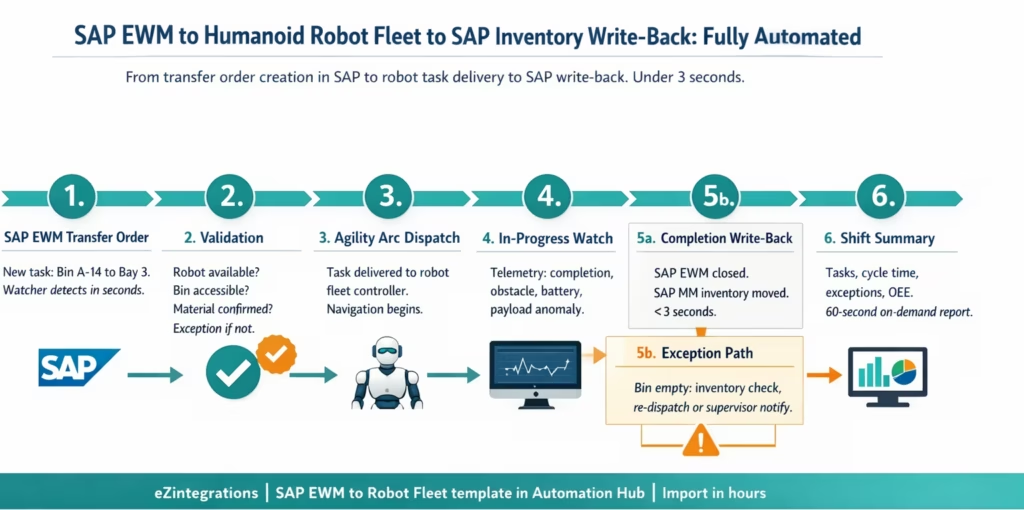
This is the foundational humanoid robot integration workflow: SAP EWM creates a transfer order for a robot-assigned zone, the integration delivers the task to the robot’s fleet controller in real time, the robot executes the pick, and the completion event triggers an immediate SAP EWM inventory update.
The example uses SAP Extended Warehouse Management (SAP EWM) as the WMS, an Agility Robotics Digit fleet as the robot fleet (using the Agility Arc API), and SAP S/4HANA as the ERP. The integration runs on eZintegrations.
Step 1: SAP EWM Transfer Order Created (Watcher Tool) The SAP EWM warehouse management system creates a new transfer order: Source Storage Bin A-14, Material 1000047, Quantity 1, Destination Outbound Bay 3. The eZintegrations Watcher Tool, monitoring the SAP EWM transfer order API for orders assigned to the robot’s work zone, detects the new order within seconds.
Step 2: Robot Availability and Task Validation (API Tool Calls) Before dispatching to the fleet, the workflow runs: Agility Arc API: confirm a robot is available in the zone (not in charging cycle, not handling another task, battery above minimum threshold) . SAP EWM API: confirm Source Storage Bin A-14 is flagged as accessible (not under maintenance hold or aisle restriction) . SAP MM API: confirm Material 1000047 exists at the location and quantity matches the transfer order
All checks pass. Workflow proceeds to dispatch.
Step 3: Task Dispatch to Robot Fleet Controller (Agility Arc API) The workflow calls the Agility Arc API with the validated task data: Source location: Storage Bin A-14 (converted to Agility navigation coordinates) .Target location: Outbound Bay 3 (converted to Agility navigation coordinates) . Material: 1000047 (with barcode reference for robot’s scanner to verify) . Payload weight estimate: 8.2 kg (within Digit’s 35 lb payload) . Task priority: standard . SAP Transfer Order number stored as task reference
The robot receives the assignment. Navigation begins.
Step 4: In-Progress Monitoring (Watcher Tool) A second Watcher monitors the Agility Arc telemetry feed for the active task. It watches for: Task completion event – Navigation interruption (obstacle, floor obstruction) – Battery threshold warning – Payload anomaly (item heavier than expected)
Step 5a: Task Completion (SAP EWM + SAP MM APIs) The robot confirms delivery at Outbound Bay 3. The Agility Arc API fires a completion event: task ID confirmed, timestamp, robot ID, barcode scan result confirming correct material.
The eZintegrations workflow fires three parallel write-backs: SAP EWM: transfer order closed, destination bin updated, pick timestamp recorded . SAP MM: inventory movement posted, Source Bin A-14 decremented, material moved to outbound staging . Agility Arc: task confirmed complete, robot released for next assignment
Time from task completion to SAP update: under 3 seconds.
Step 5b: Exception Path The robot arrives at Storage Bin A-14. The bin is empty. Exception code: SOURCE_BIN_EMPTY.
The exception workflow fires: SAP EWM API: inventory discrepancy check for Bin A-14 and adjacent bins A-13 and A-15 . If material found at A-13: task re-dispatched to robot with corrected source bin , If not found: SAP EWM notified for cycle count investigation, robot released for next task, supervisor notified with full context . Exception logged: transfer order ID, expected location, actual finding, resolution action, timestamp
Step 6: Shift Summary (Data Analytics Tool) At shift end, the operations manager requests the shift summary. The Data Analytics tool queries Agility Arc for task counts, SAP EWM for transfer order completion data, and the exception log for the shift. The summary covers: tasks completed per robot, average task cycle time, exception rate by type, battery cycle data, and overall fleet utilisation rate. Available in under 60 seconds.
Key Outcomes and Results
The case for a humanoid robot integration platform connects directly to the four metrics that define whether a pilot becomes a production fleet.
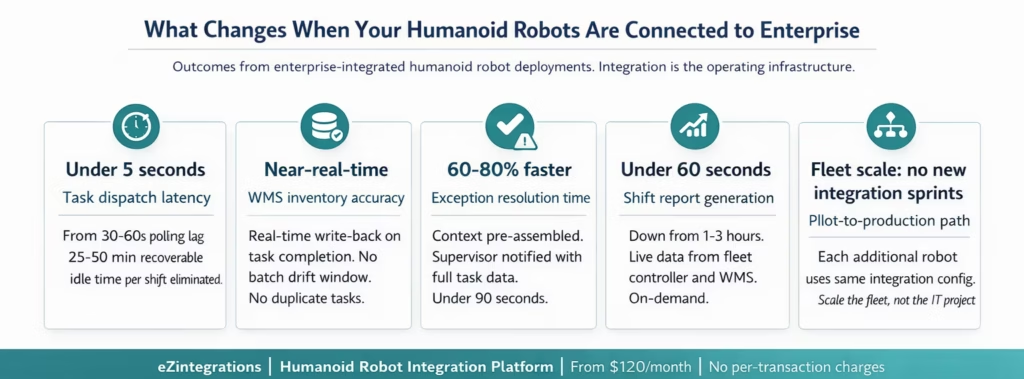
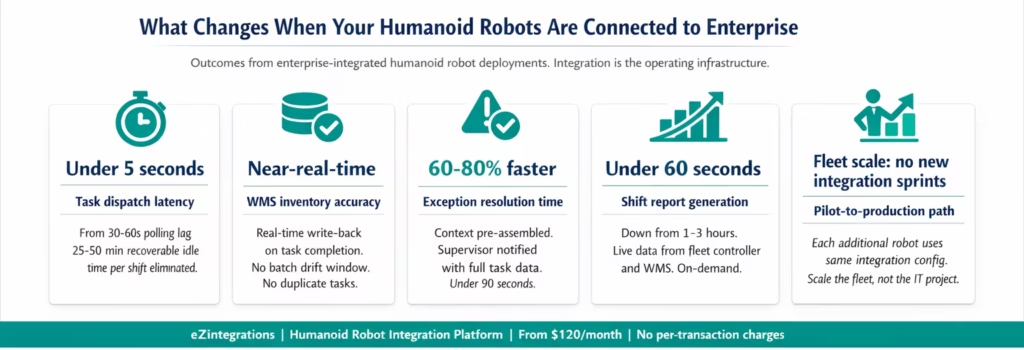
Task dispatch latency: From 30-60 seconds to under 5 seconds Polling-based task delivery, where the robot’s fleet controller checks the WMS on a fixed schedule, creates 30-60 second average task assignment delays per pick cycle. At 50 tasks per 8-hour shift, that is 25-50 minutes of recoverable idle time per robot per shift. Event-driven task delivery via eZintegrations Watcher Tools eliminates this lag. Task data arrives in the robot’s queue within seconds of WMS assignment.
WMS inventory accuracy: Near-real-time Batch sync between robot completion events and WMS inventory records creates a drift window where tasks are assigned to already-picked inventory. Real-time write-back from eZintegrations eliminates this drift. WMS inventory reflects actual robot actions within 3 seconds of task completion.
Exception resolution time: 60-80% faster Without an integrated exception path, a robot stop triggers manual investigation: supervisor notified manually, context gathered manually, decision made manually. With an integrated exception path, the exception is classified, adjacent locations are checked automatically, and the supervisor receives a structured notification with full context within 90 seconds. Human decision time is faster because the context is pre-assembled.
Pilot-to-production transition: The most important metric The global humanoid robot deployment data cited by Axis Intelligence identifies integration complexity as the primary failure mode for pilots that do not reach production. A connected integration platform that handles all seven enterprise system connections removes the primary technical barrier to scaling from one robot to a fleet. Each additional robot in the fleet uses the same integration configuration, not a new integration sprint.
Shift reporting: 1-3 hours to under 60 seconds Manual shift report compilation from robot controller logs and WMS exports typically takes 1-3 hours. Automated shift reporting from live data reduces this to a 60-second on-demand query, available before the shift handover meeting.
ROI timeline: 18-36 months for the hardware; integration accelerates it Early commercial humanoid robot deployments report ROI payback periods of 18-36 months (Robozaps 2026), driven by labour cost savings and 24/7 operation capability. The integration layer is what enables the 24/7 operation: robots that cannot receive tasks overnight do not provide 24/7 value. The integration platform is the operating infrastructure that turns the hardware investment into continuous productivity.
How to Get Started
The fastest path to an enterprise-connected humanoid robot deployment is to connect one system at a time, starting with the connection that creates the most value for your specific use case. For most warehouse deployments, that is the WMS task dispatch connection. For manufacturing, it is the MES or ERP production order connection.
Step 1: Confirm your robot fleet controller’s API documentation Every major humanoid robot vendor provides API documentation for their fleet management platform: Agility Robotics (Arc API), Figure AI, Apptronik, Unitree, and Boston Dynamics Scout all expose REST APIs for task management and telemetry. Confirm the endpoint documentation with your robot vendor before beginning the integration configuration. This is the fastest step: most vendors provide API documentation on request within 24 hours of deployment.
Step 2: Import the relevant Automation Hub template Go to the Automation Hub and search for your enterprise system combination. The WMS-to-robot task dispatch template, the robot-to-WMS outcome write-back template, and the robot fault-to-SAP PM maintenance dispatch template are available for import. Import the template for your highest-priority connection.
Step 3: Configure your enterprise system credentials and robot fleet API Add your SAP EWM, WMS, or ERP API credentials to the eZintegrations credential vault. Add your robot fleet controller API endpoint and authentication token. Both are configured once and reused across every workflow that touches those systems. Adjust the field mapping in the no-code canvas for your specific WMS task schema and fleet controller task format.
Step 4: Run 20-30 test transactions in the Dev environment eZintegrations provides full Dev/Test/Production environment separation. Run test transactions using real WMS data in the Dev environment. Validate that: task data is correctly mapped to the robot fleet controller format, completion events trigger accurate WMS write-backs, exception paths route notifications to the correct recipients, and the shift summary query returns expected data.
Step 5: Promote to production and connect the next system Once your first robot-enterprise connection is validated in production, each subsequent connection uses the same platform configuration. Your SAP EWM credentials are already configured. Your fleet controller API is already tested. The next connection, MES work orders, SAP PM maintenance dispatch, or HRIS shift scheduling, takes less time than the first.
Ready to connect your first robot? Book a free demo and bring your robot fleet controller API documentation and your enterprise system list. We will map the integration architecture and build your first workflow in the session.
Frequently Asked Questions
1. How do enterprises use eZintegrations for humanoid robot integration
Enterprises use eZintegrations to connect humanoid robot fleet controllers including Agility Arc Boston Dynamics Scout Figure AI Apptronik and custom fleet APIs with enterprise systems such as SAP EWM and S 4HANA Siemens Opcenter Rockwell FactoryTalk Salesforce ServiceNow Workday UKG and SAP Plant Maintenance. Common integration patterns include WMS task dispatch to robots robot completion write back to WMS and ERP robot fault integration with SAP PM and MES work order execution with completion acknowledgement.
2. How long does it take to set up the first humanoid robot integration
The first robot enterprise integration typically takes 2 to 8 hours using Automation Hub templates and the no code canvas. The main dependency is API access confirmation from the robot vendor which usually takes 24 to 48 hours along with enterprise credential provisioning. Workflow configuration field mapping and test validation can be completed within a single working session.
3. Does eZintegrations work with Agility Robotics Figure AI and Boston Dynamics fleet controllers
Yes, eZintegrations connects to any humanoid robot fleet controller that exposes REST APIs for task management and telemetry. This includes Agility Robotics Arc Figure AI Boston Dynamics Scout Apptronik and Unitree systems. If a fleet API is not available in the catalog self service onboarding enables connection in under an hour without custom development.
4. How does eZintegrations handle real time data requirements for humanoid robot operations
eZintegrations uses an event driven architecture where Watcher Tools monitor enterprise systems and trigger workflows immediately when events occur instead of relying on polling. This ensures instant task dispatch and eliminates idle time. Robot completion write backs to enterprise systems are executed within seconds maintaining near real time data accuracy.
5. Can eZintegrations scale across multiple robot models and enterprise systems simultaneously
Yes, The platform is cloud native and event driven allowing independent workflow execution for each robot task cycle. Multiple robots and systems operate concurrently without conflict. Adding a new robot is a parameter change using the same workflow while new enterprise systems use the same credential vault and configuration model without requiring new builds.
6. Does eZintegrations support MCP for AI agent invocation of robot workflows
Yes, Goldfinch AI includes Integration Flow as MCP which converts any integration workflow into an MCP server endpoint. AI agents such as Claude ChatGPT and enterprise AI systems can invoke these workflows as native tools enabling coordination between humanoid robots and digital AI systems for task routing exception handling and fleet operations.
Conclusion
The humanoid robot market passed 16,000 deployed units in 2025. SAP, Salesforce, and every major enterprise software vendor is building integrations with humanoid robot hardware. BMW, GXO, Mercedes-Benz, BITZER, and Sartorius are already running production pilots connected to SAP EWM.
The technology is real. The use cases are real. The deployments are real.
What is holding most organisations back from scaling their humanoid robot pilots into production fleets is not the robot itself. It is the enterprise integration layer that turns a piece of sophisticated hardware into a productive member of your operational team. A robot without enterprise integration has no context about what it should do next. A robot with enterprise integration has a continuously updated task queue, validates every action against live enterprise data, logs every outcome in the right system, and escalates every exception to the right person.
eZintegrations provides that integration layer. Seven enterprise connections. 5,000+ API endpoints. Automation Hub robotics templates. No custom development per connection. The first integration goes live in hours.
Import the WMS-to-robot task dispatch template from the Automation Hub and run your first test transaction today. Or book a free demo and bring your robot fleet controller API documentation. We will map the integration architecture in the session.

