
Manufacturing Integration Platform: Connect SAP Oracle MES & Production Systems
March 23, 2026A manufacturing integration platform connects SAP S/4HANA or SAP ECC, MES platforms (Siemens Opcenter, Rockwell FactoryTalk, GE Proficy), SCADA systems, PLM, WMS, and quality systems into a single real-time data flow, eliminating the manual reconciliation and batch-lag gaps that cost manufacturers in unplanned downtime, inventory overruns, and missed production targets. eZintegrations connects the complete manufacturing technology stack using 5,000+ pre-built API endpoints and Automation Hub templates, with the first integration live in hours and no custom development required.
TL;DR
62% of manufacturing enterprises have disjointed SAP and MES systems, according to a 2025 global survey of 500 manufacturing enterprises. The operational cost: an average 24.5-hour delay in production plan updates, 12.7% production downtime from material shortages, and OEE scores that sit at 60-67% versus a world-class benchmark of 85%. The gap between your ERP knowing what to produce and your shop floor knowing how to produce it is an integration problem, not a planning problem. eZintegrations connects your SAP S/4HANA or Oracle ERP, your MES, SCADA, WMS, PLM, and quality systems using 5,000+ pre-built API endpoints and Automation Hub manufacturing templates. No custom development. The first workflow goes live in hours. If you are evaluating manufacturing integration platforms now, the system connection table, the step-by-step SAP-to-MES production order workflow, and the Automation Hub template import link are all in this post.
The Problem: Your ERP and Shop Floor Are Not Talking
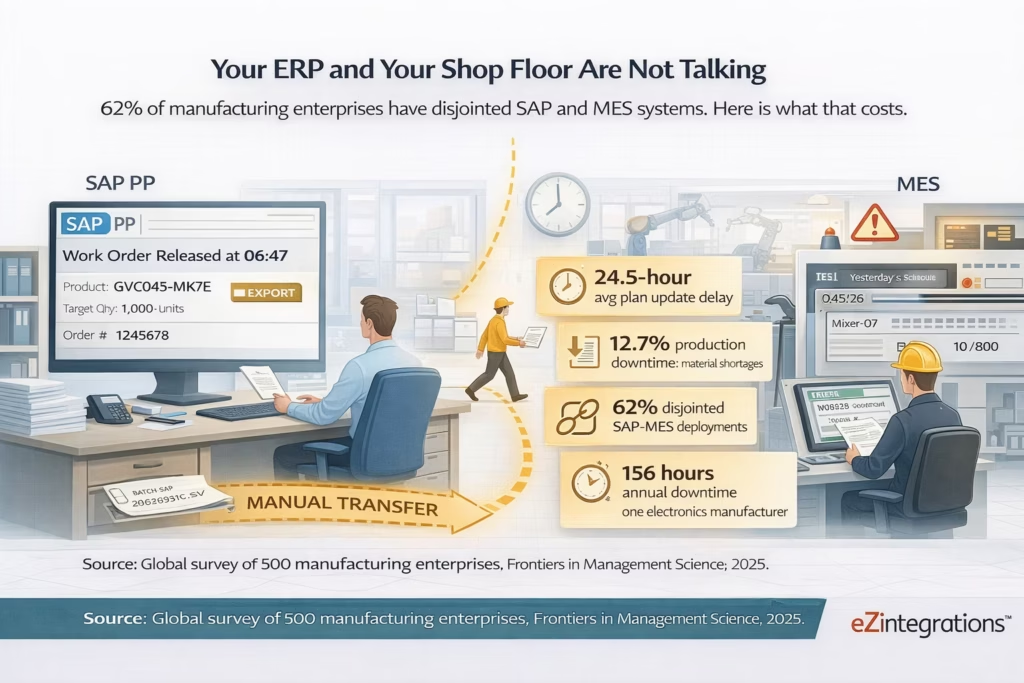
Your production planner releases a work order in SAP PP at 6:47 AM. The night shift supervisor finds out at 8:15 AM, when someone walks the shop floor and physically tells the MES operator. By 8:30 AM, the wrong work order is running on Line 4, because the MES was still pulling from yesterday’s batch export.
Meanwhile, your procurement team ordered components based on the current SAP inventory record. That record was last updated at end-of-day yesterday. Two of those components were actually consumed in a rush job during the night shift. The MES knows. SAP does not. The purchase order went out for stock you already have, and the stock you actually need is sitting below reorder point with no trigger.
This is a Tuesday in most mid-size manufacturing plants that run SAP or Oracle ERP alongside a separate MES.
The research confirms how widespread this is. A 2025 global survey of 500 manufacturing enterprises found that 62% report disjointed SAP and MES systems, with data synchronisation failures creating an average 24.5-hour delay in production plan updates and contributing to 12.7% production downtime from material shortages. A German electronics manufacturer in the same study logged 156 hours of annual downtime directly traceable to MES-ERP synchronisation lag.
Unplanned downtime is the dominant efficiency killer. Research from OEE benchmarking data in 2026 shows it accounts for 34.2% of all manufacturing efficiency losses. Most plants operate at OEE scores of 60-67%. World-class is 85% or above. The gap between those two numbers is not usually a machine problem or a workforce problem. It is a data problem. Specifically, it is an integration problem: the data that would prevent the downtime exists in one system and has not reached the system that could act on it.
Your MES knows that Extruder 3 has been running 8% below target speed for the last two hours. Your SAP plant maintenance system has not received that signal. No maintenance work order has been created. By the end of the shift, you have a partial breakdown and a 6-hour unplanned stop.
Your SAP QM system has a quality notification from a batch that failed incoming inspection. Your MES has not received the hold instruction. That batch material was already pulled and is halfway through Line 2’s production run.
The data flows that would prevent these events exist. They are just not connected.
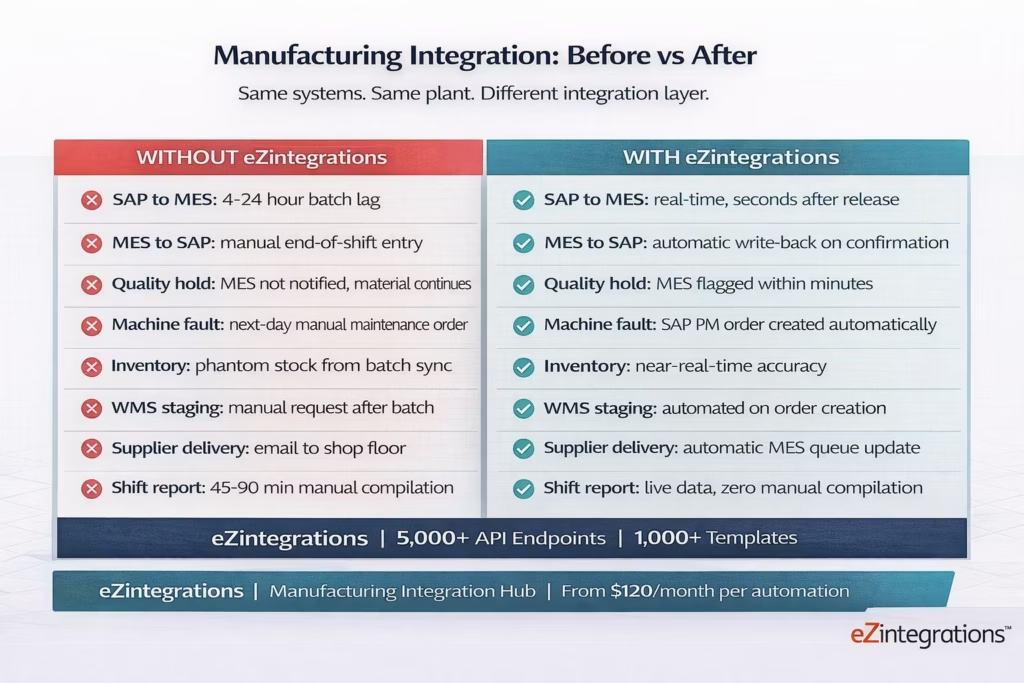
Before vs After: Disconnected Manufacturing Stack vs Integrated Operations
| Dimension | Without eZintegrations | With eZintegrations |
|---|---|---|
| SAP production order to MES | Batch export at shift end or manually pushed by planner. 4-24 hour lag. Wrong orders run. | SAP PP production order release triggers real-time push to MES work order queue. MES receives within seconds. |
| MES actuals to SAP | Manual end-of-shift entry by supervisor into SAP CO or PP. Hours of delay, transcription errors. | MES production confirmation triggers automatic write-back to SAP: quantities, yield, scrap, operator ID. |
| Quality hold propagation | QM notification raised in SAP. MES not notified. Affected material continues in production. | SAP QM quality block triggers MES material hold via API. Affected batches flagged on shop floor within minutes. |
| Machine fault to maintenance | MES logs fault. No integration to SAP PM. Maintenance work order raised manually, often next day. | MES fault event triggers SAP PM notification and maintenance work order creation automatically. |
| Inventory consumption | MES picks material. SAP inventory updated in next batch sync. Phantom stock persists. | MES goods issue triggers real-time SAP inventory movement. Inventory accuracy: near-real-time. |
| Production schedule to WMS | SAP creates production order. WMS not notified to stage materials until batch sync or manual call. | Production order triggers automated WMS material staging request. Materials at line before production starts. |
| Supplier delivery to production | Goods receipt in SAP. MES not notified. Production planner emails shop floor. Materials sit at goods receipt dock. | SAP goods receipt triggers MES material availability update and production queue adjustment automatically. |
| Shift reporting | Supervisor manually compiles SAP and MES data for shift report. 45-90 minutes per shift. | Automated shift summary generated from live SAP and MES data. Available at shift end, no manual compilation. |
The Five Manufacturing Integration Workflows That Cost You Most
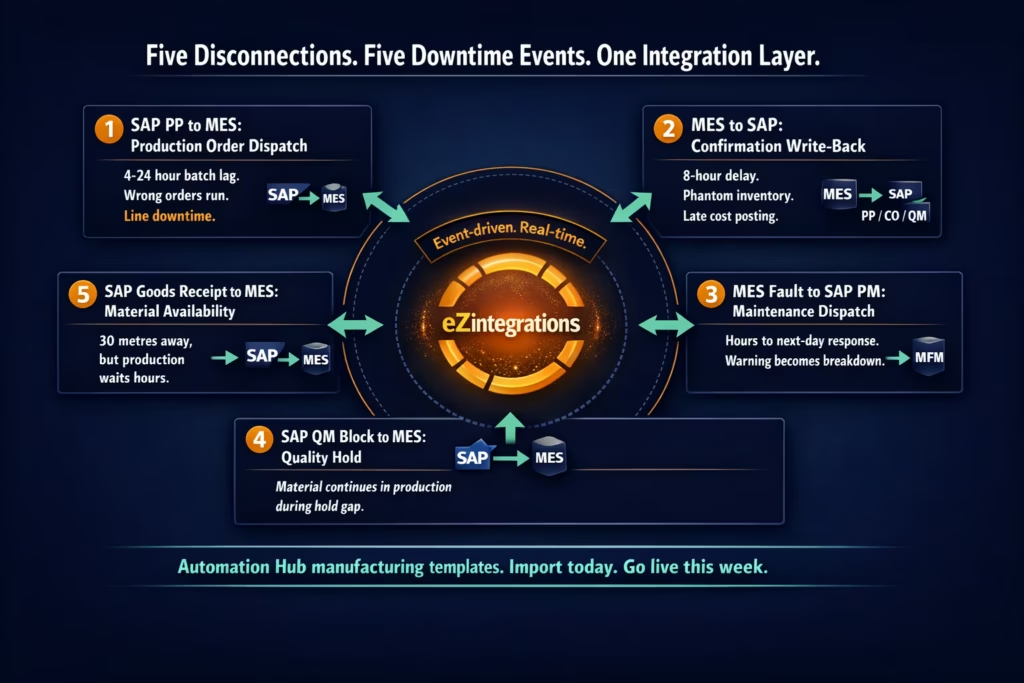
Not all disconnections are equal. Some create minor inefficiencies. Others create the 156-hour annual downtime figure. Here are the five integration gaps where manufacturing plants consistently lose the most, and the specific eZintegrations patterns that close each one.
1. SAP PP to MES: Real-Time Production Order Dispatch
Your SAP PP system creates and releases production orders. Your MES converts them into executable work orders on specific lines and machines. Without integration, this handoff happens in a batch file or a manual entry. Hours pass between the SAP release and the MES operator seeing the order.
With eZintegrations, the SAP PP production order release event triggers a webhook. The workflow reads the order details, maps the SAP fields (material number, quantity, routing, plant, work centre) to the MES work order schema, and creates the work order in the MES in seconds. The MES operator sees the new order in their queue within a minute of the SAP planner releasing it.
2. MES to SAP: Production Confirmation Write-Back
When a production operator confirms a work order in the MES (quantities produced, scrap, yield, operator ID, machine time), those actuals need to reach SAP PP and CO immediately. Without integration, the supervisor enters them manually at shift end. By then, the production data is 8 hours old, the SAP inventory is wrong, and the financial cost centre posting is delayed.
With eZintegrations, the MES production confirmation event fires a workflow. SAP PP receives the actual quantities, the CO module posts the activity confirmation, inventory movements are updated, and the QM system receives yield and scrap data for quality reporting. All of this happens within seconds of the MES operator tapping “Confirm.”
3. MES Fault to SAP PM: Predictive and Reactive Maintenance Dispatch
Your MES captures every machine fault, every speed deviation, and every unplanned stop. Without integration to SAP Plant Maintenance, that data sits in the MES historian. Maintenance decisions are made by supervisors who check dashboards manually, often hours after the fault first occurred.
With eZintegrations, a Watcher Tool monitors the MES for specific fault codes and threshold breaches (speed below target by more than 5% for 15 minutes, temperature sensor reading above limit, fault code in defined critical category). When the threshold is crossed, the workflow creates a SAP PM notification and a maintenance work order, assigns it to the correct maintenance group, and sends a notification to the responsible technician. The maintenance team responds to the fault while it is still a warning, not a breakdown.
4. SAP QM Block to MES: Quality Hold Propagation
When a quality block is applied in SAP QM (incoming inspection failure, process deviation, hold order), the affected material or batch needs to be flagged in the MES immediately. Without integration, there is a gap between the QM block existing in SAP and the shop floor operator receiving the hold instruction. Material continues to move.
With eZintegrations, the SAP QM block event triggers a MES material hold via API. The affected batch is flagged in the MES queue. If the material is already in a work order, the work order is paused and the line supervisor receives a notification with the QM reason code and the affected batch details. The hold is in effect in both systems within minutes.
5. SAP Goods Receipt to MES: Supplier Delivery Notification
When a supplier delivery is received and confirmed in SAP (goods receipt posted), the MES needs to know that the material is available for production. Without integration, the goods receipt posting does not reach the MES until the next batch sync. The production planner calls the shop floor. Or does not. And the production order waits for material that is sitting 30 metres away at the goods receipt dock.
With eZintegrations, the SAP goods receipt event triggers an immediate MES material availability update and a production queue signal: the pending work orders that were waiting for this material are flagged as ready to start. The shop floor can begin production within minutes of the goods receipt confirmation, not hours.
How eZintegrations Connects Your Manufacturing Stack
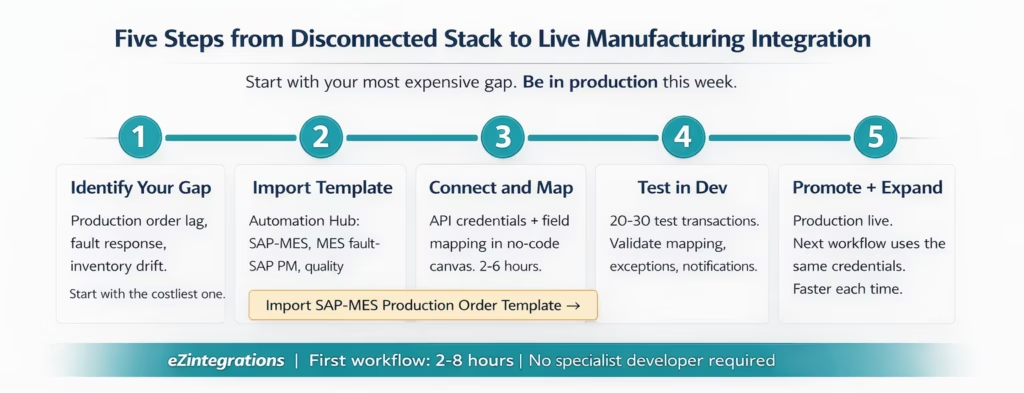
eZintegrations connects manufacturing systems via an API catalog of 5,000+ endpoints. No hardcoded connectors with client libraries. Every integration runs via the API catalog using REST, GraphQL, OData, BAPI, and database connectors. Systems not already in the catalog can be onboarded as self-service connections without writing code.
Here is how the key manufacturing system categories connect:
ERP Systems: SAP S/4HANA, SAP ECC (via OData, BAPI, and RFC), Oracle ERP Cloud, Oracle EBS, Microsoft Dynamics 365 for Finance and Operations, Infor CloudSuite, Epicor. Production orders, inventory movements, goods receipts, purchase orders, plant maintenance notifications, quality management blocks, and cost centre postings all flow bidirectionally.
Manufacturing Execution Systems: Siemens Opcenter (formerly CAMSTAR and Simatic IT), Rockwell FactoryTalk ProductionCentre, GE Proficy MES, Werum PAS-X (pharma), Dassault DELMIA Apriso, Inductive Automation Ignition, and any MES exposing a REST API or OPC-UA interface.
SCADA and IIoT: OSIsoft PI (AVEVA PI System), Wonderware/AVEVA System Platform, iFIX, Kepware, OPC-UA endpoints, MQTT brokers. Real-time sensor data, historian queries, and alarm events connect to ERP and MES workflows.
Quality Management: SAP QM (integrated with SAP ERP), MasterControl, ETQ Reliance, Veeva Vault Quality (pharma). Quality notifications, usage decisions, inspection lots, and CAPA records connect across systems.
Warehouse and Supply Chain: SAP Extended Warehouse Management (EWM), Manhattan Associates WMi, Blue Yonder WMS, Oracle WMS Cloud. Goods receipts, material staging, pick confirmations, and transfer orders connect to MES production queues.
PLM and Engineering: SAP PLM, Siemens Teamcenter, PTC Windchill. Engineering change orders, BOM updates, and routing changes trigger MES work order updates.
Supplier and Procurement: SAP SRM, Ariba, Oracle Procurement Cloud. Purchase order status, delivery confirmations, and quality certificates connect to production scheduling.
The Automation Hub provides 1,000+ pre-built templates for the most common manufacturing integration patterns. Import a template, configure your system credentials and field mapping in the no-code canvas, validate, and promote to production. Your first workflow goes live in hours.
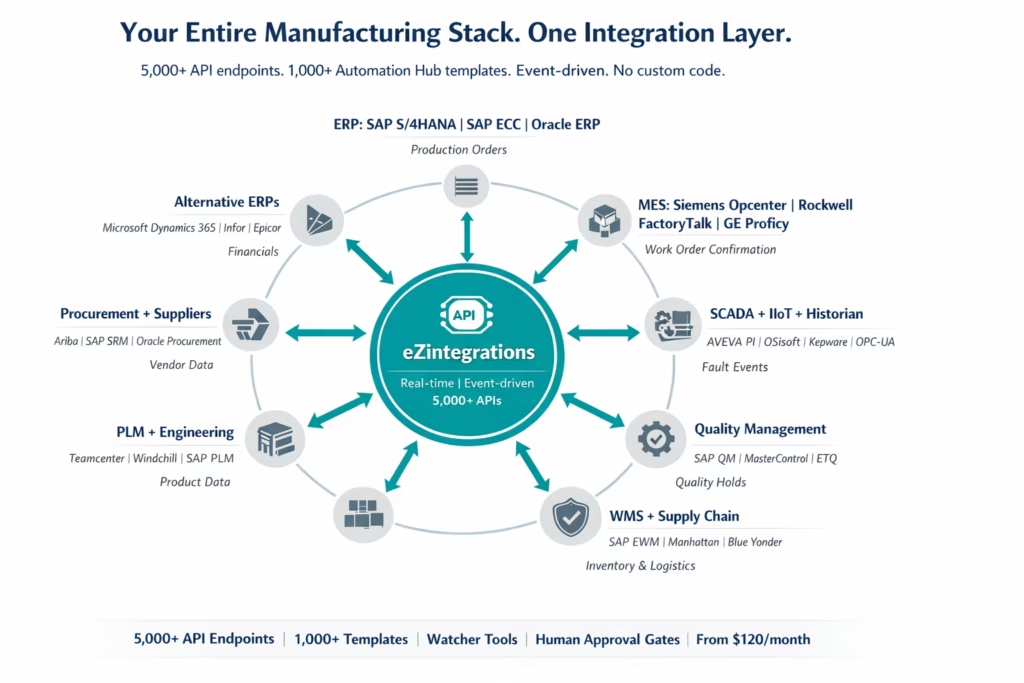
Step-by-Step: SAP Production Order to MES Work Order to Quality Close-Out
This is the core manufacturing integration workflow: a production order is released in SAP PP, the MES receives it and creates a work order on the correct line, production runs, actuals are confirmed back to SAP, and the quality close-out updates both systems. Every step is automated.
The example runs on SAP S/4HANA as the ERP and Siemens Opcenter as the MES. The integration runs on eZintegrations.
Step 1: SAP PP Production Order Released (Watcher Tool)
A production planner releases production order 1000047823 in SAP PP at 06:47. The eZintegrations Watcher Tool, monitoring the SAP production order API for status changes to “Released,” detects the event within seconds. The integration workflow triggers.
Step 2: Order Validation (API Tool Call)
Before sending to the MES, the workflow runs a pre-check: SAP materials management API: confirm all bill-of-material components are available at the production storage location . SAP work centre API: confirm the target work centre is available and not under a maintenance hold . If any component is short or work centre is unavailable: the workflow pauses and routes an exception to the production planner with the specific shortage or maintenance hold detail
All checks pass. Workflow continues.
Step 3: Field Mapping and MES Work Order Creation (Siemens Opcenter API)
The workflow maps SAP production order fields to Siemens Opcenter work order fields in the no-code canvas: SAP Material Number maps to Opcenter Part Number . SAP Order Quantity maps to Opcenter Work Order Quantity . SAP Routing Operation maps to Opcenter Operation steps . SAP Work Centre maps to Opcenter Resource – SAP Scheduled Start maps to Opcenter Planned Start
The Siemens Opcenter API creates the work order. The work order appears in the production operator’s queue on the shop floor terminal.
Step 4: In-Progress Monitoring (Watcher Tool)
A second Watcher monitors the Opcenter work order for status changes and fault events. If the machine reports a fault code during production, the fault workflow fires (see Step 4b). If production completes normally, Step 5 fires.
Step 4b: Machine Fault Path (SAP PM API)
The Opcenter work order receives a fault event: machine temperature exceeded upper limit for 12 minutes. The fault workflow fires: SAP PM notification created with fault code, affected machine, and timestamp . SAP PM maintenance work order created and assigned to the mechanical maintenance group .Supervisor receives notification: fault detail, affected production order, estimated impact on schedule .Opcenter work order status updated to “Interrupted: Maintenance in Progress”
Maintenance responds to the live fault, not a next-day report.
Step 5: Production Confirmation Write-Back (SAP PP + CO APIs)
The production operator confirms the work order in Opcenter: 485 units produced, 12 units scrap, 6.2 hours actual machine time. The confirmation triggers: SAP PP production order confirmation: actual quantities and yield . SAP CO activity confirmation: machine hours posted to cost centre .SAP inventory movement: goods issue for raw materials consumed, goods receipt for finished goods . SAP QM usage decision: quantity and scrap data sent to quality inspection lot
All four SAP transactions happen within seconds of the Opcenter confirmation, triggered by a single operator action on the shop floor.
Step 6: Quality Close-Out (SAP QM API)
The SAP QM inspection lot for this production order receives the yield and scrap data. If yield is within the acceptable range and no defects exceed the threshold, the usage decision fires automatically: batch accepted, goods transferred to unrestricted stock. If yield is outside specification, the Human Approval Gate fires: QA manager receives the inspection lot data with a one-click accept or reject action.
Step 7: Shift Summary (Data Analytics Tool)
At shift end, the data analytics workflow queries SAP PP and Opcenter: orders released, orders completed, yield per order, scrap by reason code, machine fault events, and OEE calculation for the shift. The shift summary is available to the plant manager before the shift handover meeting, compiled automatically from live data.
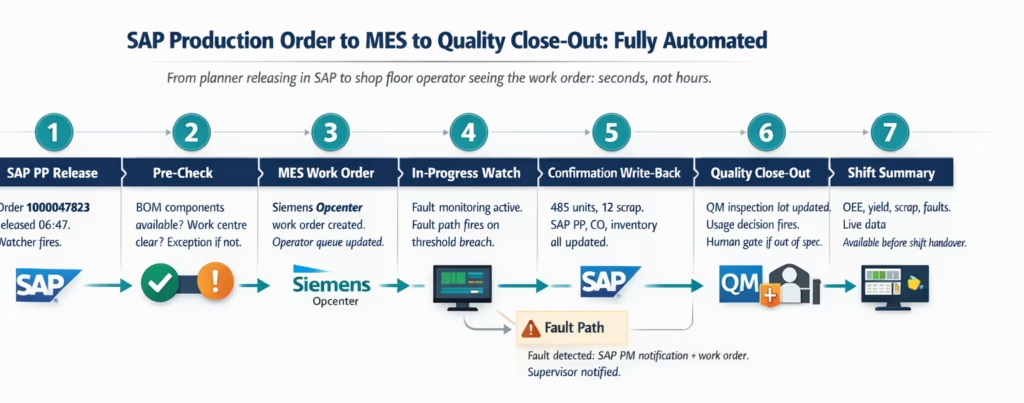
Key Outcomes and Results
Manufacturing integration is not an IT project. It is an OEE project. The business case for connecting SAP, MES, and SCADA connects directly to the three OEE factors: Availability, Performance, and Quality.
OEE improvement: 5-20 percentage points Manufacturers report double-digit OEE improvements after MES-ERP integration projects (D4M International, 2025). The improvement comes primarily from the Availability factor: real-time maintenance dispatch from MES fault events to SAP PM reduces the time from fault detection to maintenance response, cutting the average unplanned stop duration. Plants operating at 60-67% OEE with disconnected systems can realistically target 70-80% OEE with real-time integration as part of a broader continuous improvement programme.
Production downtime from material shortages: Reduced by 50-70% The Frontiers in Management Science 2025 study found that the primary cause of 12.7% production downtime in disconnected deployments was material shortages arising from stale inventory data in SAP. Real-time inventory movement updates from MES to SAP eliminate the phantom stock problem. When the production order pre-check runs against live inventory rather than last-night’s batch, shortage-related stoppages drop significantly.
Production plan update lag: From 24 hours to minutes The same study identified an average 24.5-hour delay in production plan updates for disconnected SAP-MES deployments. Real-time bidirectional integration reduces this to the sub-minute latency of an API call. Production planners see actual shop floor status in SAP. MES operators see updated plan releases the moment the planner acts.
Shift report compilation: 45-90 minutes to under 5 minutes Manual shift report compilation from SAP and MES data typically takes 45-90 minutes per supervisor per shift. Automated shift reporting from live data reduces this to an on-demand query that takes under five minutes to generate. Across three shifts per day at a multi-plant operation, this represents a significant reduction in non-productive supervisor time.
Inventory accuracy: Near-real-time Batch sync between MES and SAP creates inventory drift. Real-time goods issue posting from MES confirmation events keeps SAP inventory accurate to within seconds of the actual material movement. This reduces over-ordering, eliminates emergency requisitions for materials that are physically present but not recorded in SAP, and improves procurement planning accuracy.
Integration setup time: Weeks to hours Custom SAP-MES integration development, including BAPI configuration, interface testing, and error handling, typically takes 6-12 weeks per connection. eZintegrations Automation Hub templates reduce configuration to 2-8 hours. Your SAP Basis team or IT manager can own this, no specialist integration developer required.
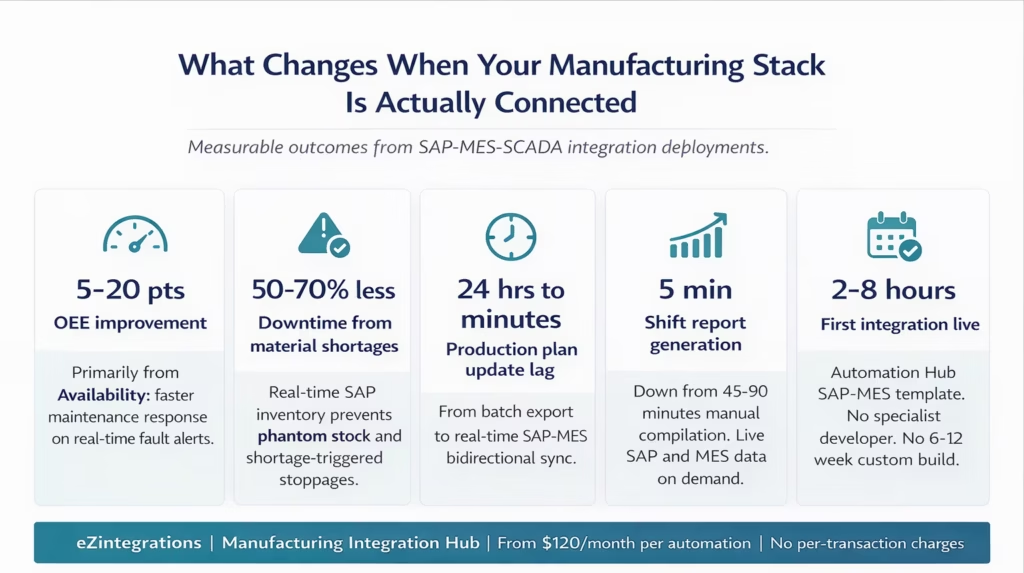
How to Get Started
The fastest path to a connected manufacturing stack is to identify the single highest-cost disconnection and solve it first. Not all 15 integrations at once. One. This week.
Step 1: Identify your most expensive integration gap Use the five-workflow framework above. Which disconnection is causing the most downtime, the most inventory errors, or the most quality escapes? For most plants running SAP and a separate MES, the answer is either the production order dispatch gap (wrong orders running) or the machine fault notification gap (maintenance response too slow). Start with whichever one has the clearest business case.
Step 2: Import the relevant Automation Hub template Go to the Automation Hub and search for your system combination. The SAP PP-to-MES production order dispatch template, the MES confirmation-to-SAP write-back template, and the MES fault-to-SAP PM maintenance dispatch template are available for import. The template arrives with workflow structure, field mapping, error handling, and Watcher Tool configuration pre-built.
Step 3: Connect your API credentials and map your fields Add your SAP API credentials (OData service URL, RFC destination, or BAPI endpoint) and your MES API credentials to the eZintegrations credential vault. Open the imported workflow in the no-code canvas. Review and adjust field mapping for your specific SAP client, plant code, work centre assignments, and MES resource structure. This step typically takes 2-6 hours for a standard SAP-MES integration.
Step 4: Run test transactions in the Dev environment eZintegrations provides full Dev/Test/Production environment separation. Run 20-30 test transactions in Dev against real SAP and MES data. Validate that production orders appear in the MES queue with correct mapping, that confirmation write-backs update SAP correctly, and that exception handling routes notifications to the right people.
Step 5: Promote to production and expand to the next workflow Once the first workflow is validated and running in production, the second integration starts from connected systems rather than a blank canvas. Your SAP credentials are already configured. Your MES endpoint is already tested. The next workflow, quality hold propagation, maintenance dispatch, or goods receipt notification, builds on the same platform in less time than the first.
Ready to build it now? Book a free demo and bring your SAP PP transaction list and MES API documentation. We will build the production order dispatch workflow in the session.
Frequently Asked Questions
1. How do manufacturing companies use eZintegrations
Manufacturing enterprises use eZintegrations to connect ERP systems including SAP S/4HANA SAP ECC Oracle ERP and Dynamics 365 with MES platforms such as Siemens Opcenter Rockwell FactoryTalk and GE Proficy SCADA and IIoT systems including AVEVA PI OSIsoft and OPC UA endpoints quality management systems like SAP QM MasterControl and ETQ WMS platforms PLM systems and procurement tools. Common integration patterns include SAP PP production order to MES dispatch MES confirmation write back to SAP MES fault events to SAP PM SAP QM holds to MES material flags and SAP goods receipt to MES availability updates.
2. How long does it take to set up the first manufacturing integration
The first integration typically takes two to eight hours from template import to configuration in the no code canvas. SAP Basis teams or IT managers can execute this without specialist developers. The longest step is API credential provisioning including SAP OData RFC or BAPI access and MES API credentials which may take one to three business days depending on internal approval processes.
3. Does eZintegrations work with SAP S/4HANA Siemens Opcenter Rockwell FactoryTalk and OSIsoft PI
Yes, SAP S/4HANA and SAP ECC connect via OData BAPI and RFC interfaces Siemens Opcenter and Rockwell FactoryTalk connect via REST APIs and OSIsoft PI connects through the PI Web API. All are available in the eZintegrations API catalog and any additional MES or SCADA system can be added through self service API or database onboarding without writing code.
4. Can eZintegrations handle OPC UA and IIoT protocols for SCADA integration
Yes, OPC UA endpoints connect through REST adapters or middleware gateways such as Kepware Matrikon or Ignition that expose OPC UA as REST APIs. MQTT connectivity is handled through MQTT to REST bridges and historian systems like OSIsoft PI or AVEVA Historian are accessed through their REST interfaces for time series data exchange.
5. Does eZintegrations work with Oracle EBS and Oracle Manufacturing Cloud for manufacturing integration
Yes Oracle E Business Suite connects via REST APIs and direct database connectors while Oracle Manufacturing Cloud connects through Oracle REST APIs. Both systems are available in the API catalog and can operate alongside SAP in the same workspace using a unified no code canvas.
6. How does eZintegrations handle high transaction volumes from MES to SAP integration
eZintegrations is cloud native and scales with transaction volume. Non AI automations operate on a flat annual fee per automation with unlimited transactions so cost does not increase with production volume making it suitable for high frequency MES events and manufacturing environments generating thousands of transactions per shift.
7. What happens when a machine fault occurs outside working hours
The MES to SAP PM workflow runs continuously and automatically creates maintenance notifications and work orders when a fault occurs regardless of time. Alerts can be routed to on call technicians via SMS or email with escalation rules and all events are logged with full context for shift handover. Human approval gates can be configured for high priority maintenance actions.
Conclusion
Your SAP production planner and your shop floor MES operator are working from different data. They always have been. The only question is how long that gap takes to close on any given shift: seconds, if your integration is event-driven; hours, if it relies on batch exports and manual entry.
The five integration patterns in this post, production order dispatch, confirmation write-back, fault-to-maintenance, quality hold propagation, and goods receipt notification, account for the majority of measurable downtime, inventory errors, and quality escapes in plants running SAP alongside a separate MES. Each one closes with a pre-built Automation Hub template. Each one goes live in hours.
The industry benchmark puts world-class OEE at 85%. Most plants operate at 60-67%. The gap is not in the machines or the people. It is in the data flows between the systems that support them.
Import the SAP-to-MES production order dispatch template from the Automation Hub and run your first test transaction today. Or book a free demo and bring your SAP PP transaction list. We will build the workflow in the session.

