
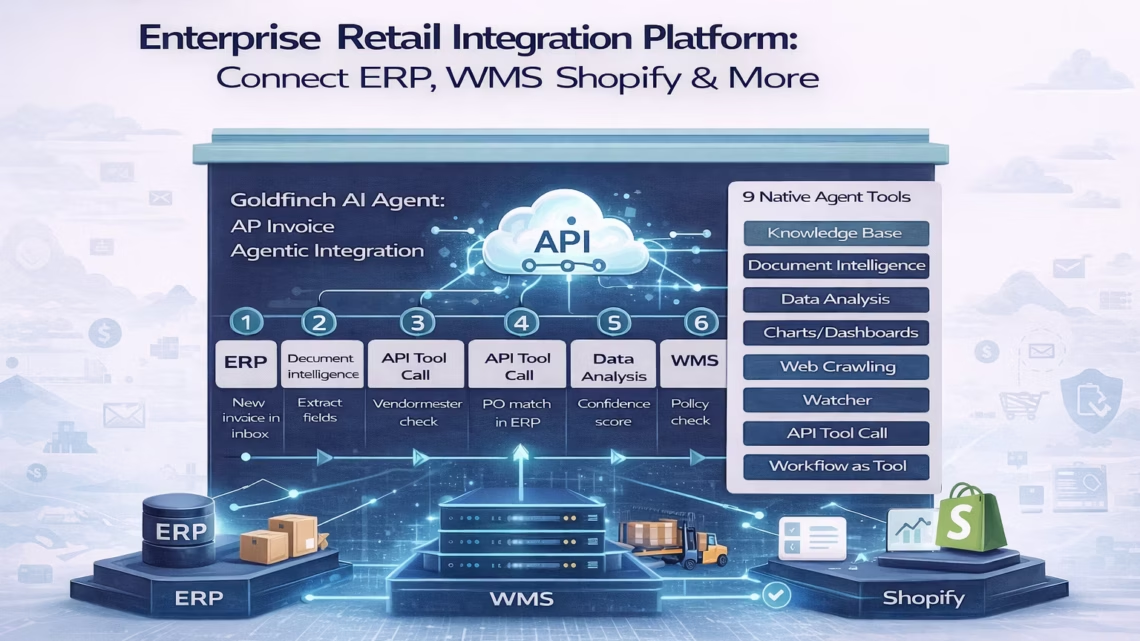
Enterprise Retail Integration Platform: Connect ERP WMS Shopify & More
March 17, 2026Enterprise retailers using eZintegrations connect their ERP, WMS, Shopify store, POS, and marketplace channels using pre-built templates from the Automation Hub, with no custom development required. Inventory, orders, fulfilment status, and financial data sync in real time across all systems, eliminating the manual reconciliation work that costs enterprise retail operations teams 10-20 hours per week and causes the stockouts, oversells, and fulfilment delays that erode customer trust.
TL;DR
The average enterprise retailer manages 15-20 separate systems. Most of them do not talk to each other in real time. That gap costs you in oversells, fulfilment delays, reconciliation hours, and decisions made on stale data. eZintegrations connects your ERP, WMS, Shopify or BigCommerce store, POS, marketplaces (Amazon, Walmart), CRM, and 3PL using 5,000+ pre-built API endpoints and 1,000+ Automation Hub templates. No-code configuration. No custom development. No connector licensing fees. The first integration goes live in hours, not months. If you are evaluating retail integration platforms right now, the five most critical workflows to automate, the system comparison table, and the import link for the Shopify-to-ERP order sync template are all in this post.
The Problem: Fifteen Systems, Zero Real-Time Sync
Your Shopify store just took 47 orders between 11 PM and 7 AM. Your ERP does not know yet. Your WMS is pulling from an inventory count that was last updated at yesterday’s end-of-day batch. Three of those orders are for a SKU that sold out at 2 AM. You will find out when a customer emails to ask where their order is.
Meanwhile, your ops manager is doing what she does every morning: opening the ERP export, the Shopify dashboard, the WMS report, and the marketplace seller portal in four separate browser tabs, cross-referencing order IDs, and updating a spreadsheet that will be out of date before she finishes filling it in.
This is not a technology problem unique to your business. The average enterprise retailer manages between 15 and 20 separate systems that all require data to flow between them, according to research from Integrate.io. Less than half of those retailers have systems providing effective real-time inventory visibility. The result shows up in three specific ways on your P&L: oversells that generate refunds and cancellations, fulfilment delays that generate negative reviews, and reconciliation labour that generates payroll costs with no revenue attached to them.
The problem compounds when you add channels. You opened a Walmart Marketplace listing last quarter. Now you have a third inventory source of truth, and none of the three talk to each other without a human in the middle. You are going to add Amazon Seller Central next. The spreadsheet is going to get longer.
The retailers pulling ahead in 2026 are not the ones with the biggest budgets. They are the ones who invested in a single integration layer that connects all their systems once, and lets data flow in real time across every channel without a human making it happen.
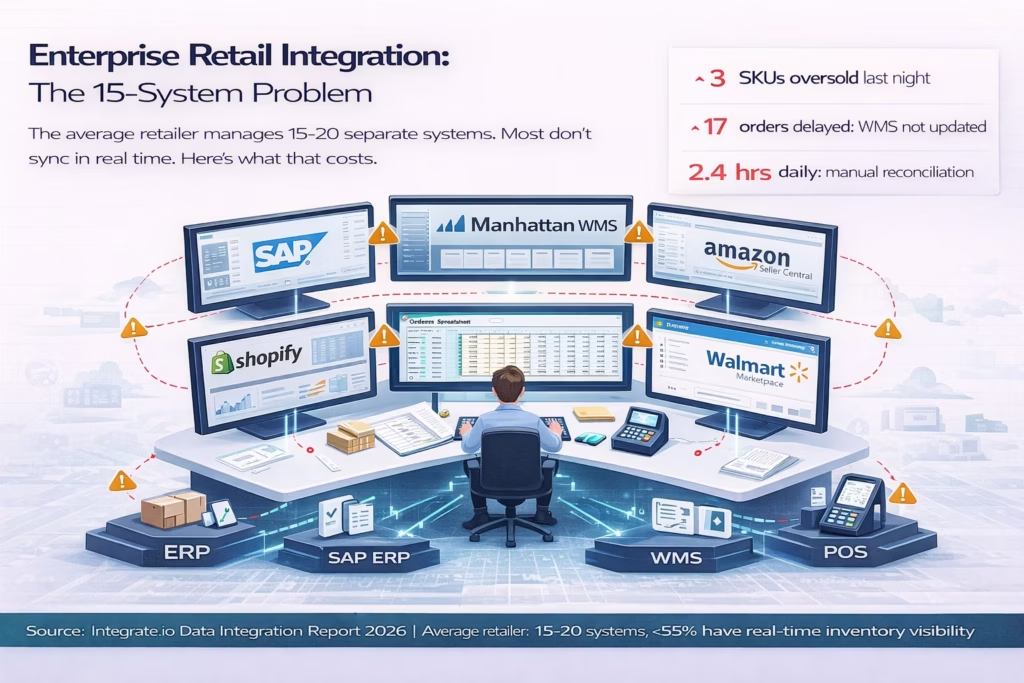
Before vs After: Manual Retail Operations vs Integrated Retail
| Dimension | Before eZintegrations | After eZintegrations |
|---|---|---|
| Inventory sync | End-of-day batch export from ERP to WMS and eCommerce. Lag of 8–24 hours. | Real-time webhook-triggered sync. Inventory updates within seconds of a sale on any channel. |
| Order processing | Manual export from Shopify, Amazon, Walmart. Import into ERP or OMS. 2–4 hours daily. | Orders flow automatically from all channels to ERP the moment they are placed. |
| Fulfilment status | WMS ships the order. Someone manually updates Shopify and the marketplace with tracking. | Fulfilment events from WMS trigger automatic tracking number push to Shopify, Amazon, Walmart, and customer notification email. |
| Oversell prevention | Next-day batch catches it. By then, 3–15 orders are affected. Refunds issued. | Cross-channel inventory reservation on order event. Oversell risk drops to near zero. |
| Pricing updates | Price changes updated manually per channel. Lag means different prices on different channels simultaneously. | Single ERP price update propagates to all channels within minutes. |
| Returns processing | Customer returns to store or ships back. Return manually recorded in POS or WMS. ERP updated next batch. Refund delayed 24–48 hours. | Return event in POS or WMS triggers ERP update and refund initiation within minutes. |
| Financial reconciliation | Daily manual reconciliation of Shopify payouts, marketplace settlements, and ERP revenue records. 2–3 hours per day. | Automated reconciliation workflow. Revenue data flows to ERP from all channels. Exceptions flagged, not hunted. |
| Supplier reorder | Stock-level drop noticed during end-of-day review. Purchase order raised next morning. | Watcher monitors stock levels. When threshold is crossed, reorder workflow fires: PO created in ERP, supplier notified via API. |
| Marketplace listing sync | Product data updated manually per marketplace. Errors common. | Single product update in ERP propagates to Shopify, Amazon, Walmart via API catalog. |
| Setup time | Custom point-to-point integration: 3–6 months per connection. Developer dependent. | Automation Hub template import: first workflow in 2–8 hours. No developer required. |
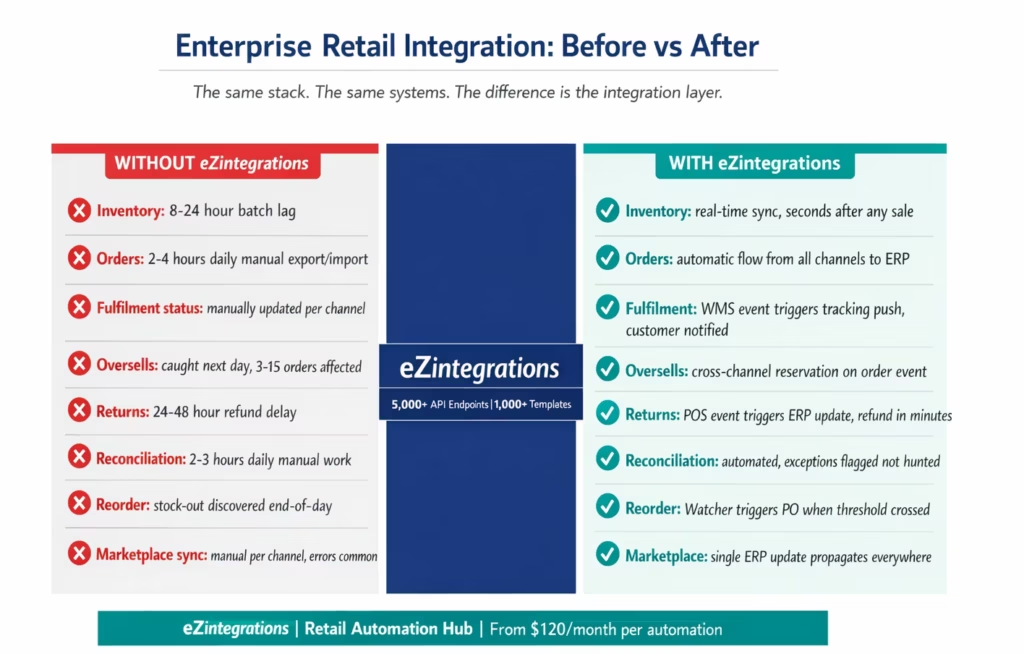
The Five Retail Integration Workflows That Cost You Most
Not all integration gaps are equal. Some are inconvenient. Others directly impact revenue, customer satisfaction, and your cost structure. Here are the five workflows where enterprise retailers consistently lose the most, and the specific eZintegrations integration patterns that close each one.
1. Order Sync: eCommerce to ERP
Every order placed on Shopify, Amazon, or Walmart needs to land in your ERP as a confirmed sales order, in real time, with all the field data mapped correctly: customer ID, SKU, quantity, price tier, ship-to address, channel source, and payment status.
When this does not happen automatically, your fulfilment team is working from Shopify’s order view rather than the ERP, your finance team’s revenue records are perpetually behind, and your customer service team cannot see the full order picture in one system.
eZintegrations connects Shopify, Amazon Seller Central, and Walmart Marketplace to SAP, NetSuite, Microsoft Dynamics 365, or Oracle ERP via the API catalog. Orders flow on placement. Field mapping is configured in the no-code canvas. Custom price tier rules, channel-source tagging, and B2B customer account matching are all configurable without code.
2. Inventory Sync: ERP and WMS to All Channels
Your ERP or WMS is the authoritative source of inventory. Every channel needs to reflect that reality in real time. When a pick in the WMS decrements inventory, Shopify and all active marketplace listings need to update immediately, not at the next batch window.
The most expensive version of this failure is the late-night oversell: your WMS logs a pick at 11:47 PM, but the batch sync does not run until 3 AM. In the gap, seven more orders come in for a SKU that is already picked clean. Seven refund emails get sent in the morning.
eZintegrations Watcher Tools monitor your WMS inventory events. On each pick or receipt, a workflow fires: inventory levels update across Shopify, Amazon, and Walmart in real time. No batch window. No gap.
3. Fulfilment Status and Tracking Push
The WMS generates a tracking number when a shipment is confirmed. That tracking number needs to reach the customer. It also needs to update the Shopify order, close the Amazon order, and update the Walmart fulfilment status so your seller metrics stay green.
Without integration, this is a manual step: someone exports tracking numbers from the WMS, imports them into each channel, and the customer gets notified hours or days after the shipment actually left your dock.
With eZintegrations, the WMS shipment confirmation event triggers a workflow: tracking number pushed to Shopify, pushed to Amazon via SP-API, pushed to Walmart via the marketplace API, and the customer notification email fired via your ESP or CRM. All four steps happen within minutes of the WMS confirmation.
4. Returns and Refund Processing
A customer returns an item in your retail store. The POS processes the return. The inventory needs to go back into the WMS as a receivable. The ERP needs the financial reversal. The refund needs to initiate in Shopify or the marketplace. And if the customer originally bought on a marketplace, the return disposition (resellable, damage write-off, rework) needs to update inventory correctly.
Without integration, returns sit in a queue. The POS event does not reach the WMS until the next batch. The customer’s refund is delayed. The inventory is neither available nor correctly disposed of. The financial record is wrong until the next reconciliation run.
eZintegrations maps the POS return event to a multi-step workflow: disposition classification, WMS stock update, ERP financial reversal, and refund initiation, in one automated chain triggered by the POS webhook.
5. Supplier Reorder on Inventory Threshold
Your WMS shows a fast-moving SKU dropping to reorder point. In a connected system, that triggers a purchase order in the ERP and a notification to the supplier. In most enterprise retail operations, it triggers someone to notice during the morning stock report and raise a manual PO.
eZintegrations Watcher Tools monitor inventory levels against configurable thresholds. When a SKU crosses the reorder point, the workflow fires: PO created in ERP with calculated reorder quantity, supplier notified via API or email, internal buying team alerted. No manual morning review required for the routine reorder decision.
How eZintegrations Connects Your Retail Stack
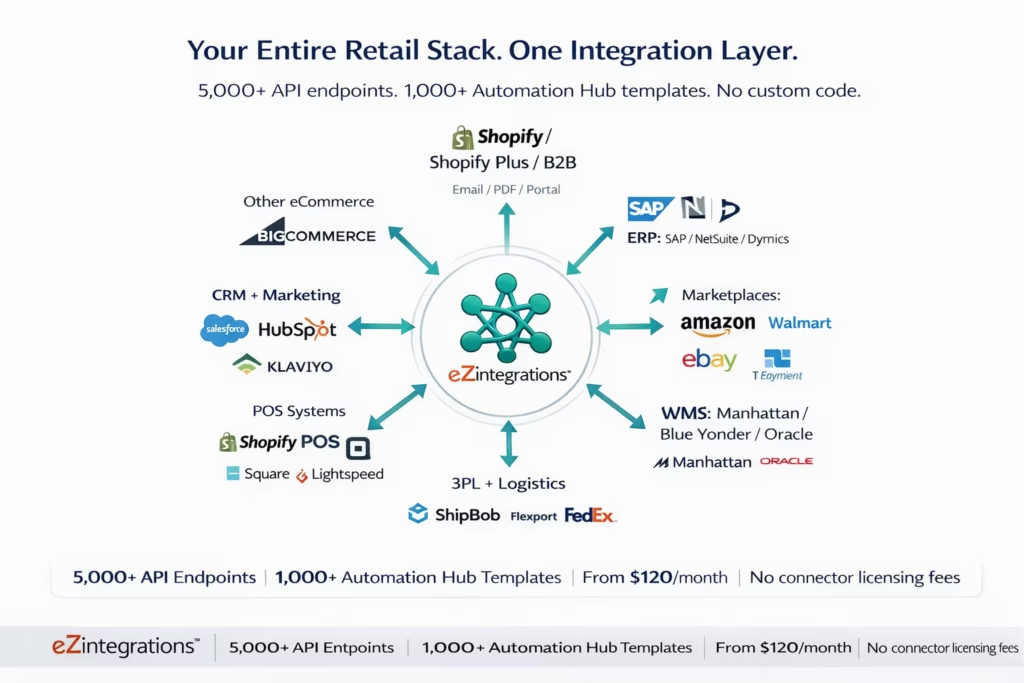
eZintegrations connects enterprise retail systems via an API catalog of 5,000+ endpoints, covering the systems your retail stack actually runs on. No hardcoded connectors with client libraries. Every integration runs via the API catalog, and any system not already listed can be onboarded as a self-service API or database connection without writing code.
Here is how the key retail system categories connect:
eCommerce Platforms: Shopify (including Shopify Plus and Shopify B2B), BigCommerce, WooCommerce, Magento. Every order event, product update, inventory adjustment, and refund triggers available as webhook listeners or polled API queries.
ERP Systems: SAP S/4HANA, SAP ECC, NetSuite, Microsoft Dynamics 365 Business Central and Finance, Oracle ERP Cloud, Sage Intacct. Orders, inventory, financial records, and purchase orders flow bidirectionally.
Warehouse Management Systems: Manhattan Associates WMi, Blue Yonder WMS, Oracle WMS Cloud, HighJump, 3PL Central. Pick confirmations, receipts, stock adjustments, and fulfilment events connect to all downstream systems.
Marketplaces: Amazon Seller Central (SP-API), Walmart Marketplace (Seller API), eBay, Etsy, TikTok Shop. Orders inbound, inventory updates outbound, fulfilment status confirmations bidirectional.
Point of Sale: Shopify POS, Square, Lightspeed, Toast. Sale events, return events, and end-of-day reconciliation data flow to ERP and WMS without manual export.
3PL and Logistics: ShipBob, Flexport, FedEx, UPS, DHL. Fulfilment events, tracking numbers, and shipping cost data connect to your ERP and eCommerce systems.
CRM and Marketing: Salesforce, HubSpot, Klaviyo, Mailchimp. Customer data, order history, and post-purchase triggers sync from your commerce and ERP systems to your CRM for segmentation and personalisation.
Every connection uses the same no-code canvas. The same configuration model applies whether you are connecting your first integration or your fifteenth. And the Automation Hub provides 1,000+ pre-built templates covering the most common retail integration patterns, so you are not building from a blank canvas.
Step-by-Step: Shopify Order to ERP to WMS to Customer Notification
This is the core retail integration workflow: a customer places an order on your Shopify store, and everything that needs to happen next, ERP record creation, WMS pick task, fulfilment tracking push, customer notification, happens automatically without anyone touching a keyboard.
The example below runs on Shopify Plus as the eCommerce layer, SAP S/4HANA as the ERP, Manhattan Associates WMi as the WMS, and Klaviyo as the customer notification platform.
Step 1: Order Placed on Shopify (Webhook Trigger) A customer completes checkout on your Shopify Plus store at 11:43 PM. The Shopify order webhook fires immediately. eZintegrations receives the event: order ID, customer details, line items (SKU, quantity, price), shipping address, and payment status.
Step 2: Inventory Reservation (API Tool Call) Before creating the ERP order, eZintegrations calls the Manhattan WMS API to confirm available inventory for each line item. If inventory is confirmed: proceed to Step 3. If inventory is below the order quantity for any line item: the workflow routes to a low-stock exception handler, which creates a backorder flag in SAP and sends an internal alert to your ops team with full order context.
Step 3: ERP Sales Order Created (SAP API) eZintegrations calls the SAP S/4HANA sales order creation API. Field mapping configured in the no-code canvas: Shopify customer email matches to SAP customer master (or creates a new customer record if no match), line items mapped to SAP material numbers, price tier applied based on customer account type, and Shopify order ID stored as the external reference. SAP returns the sales order number. Confirmed.
Step 4: WMS Pick Task Created (Manhattan API) eZintegrations calls the Manhattan WMi transfer order API with the SAP sales order reference and line items. A pick task is created in WMS, assigned to the correct warehouse zone based on SKU location data. The Shopify order status updates to “Processing” via a write-back API call.
Step 5: Fulfilment Event Received (WMS Webhook) Manhattan WMi fires a shipment confirmation webhook when the pick is packed and a carrier label is generated. eZintegrations receives: order ID, tracking number, carrier, ship date, estimated delivery.
Step 6: Fulfilment Push Across All Channels (Three Parallel API Calls) eZintegrations fires three parallel workflow steps: – Shopify order updated with tracking number and fulfilment status (order marked “Fulfilled”) – SAP sales order delivery document updated with tracking data – Klaviyo shipping confirmation email triggered with order details, tracking number, and estimated delivery link
The customer receives the shipping confirmation email within minutes of the warehouse scanning the label. Not hours. Not the next morning. Minutes.
Step 7: Financial Sync (Scheduled Reconciliation) At midnight, a scheduled workflow pulls confirmed fulfilment records from both Shopify and SAP and runs a reconciliation check: every fulfilled Shopify order should have a matching SAP delivery document. Mismatches are flagged in a Slack notification to your finance team with the specific order IDs requiring review.
Key Outcomes and Results
The case for a retail integration platform is not theoretical. It appears in specific line items: reduced refund rates, lower reconciliation labour cost, shorter time from order to shipping confirmation, and fewer stockout events.
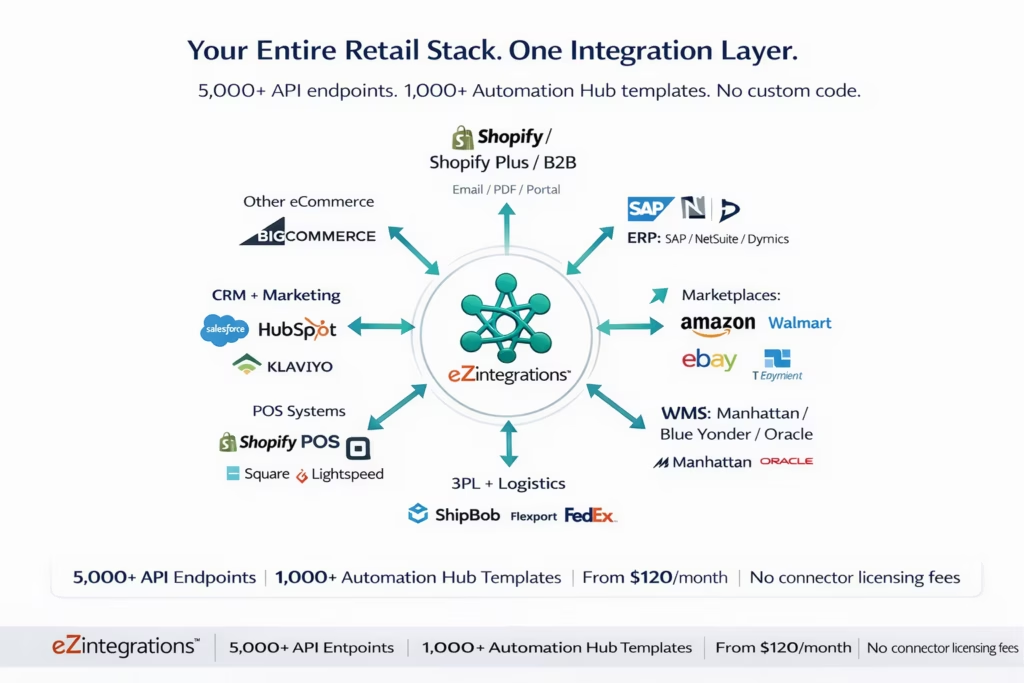
Inventory accuracy: From 55% to 95%+ real-time visibility Research from the ERP Retail Trends analysis shows only about 55% of retailers currently have systems providing effective real-time inventory visibility. Retailers with integrated ERP, WMS, and eCommerce systems report inventory accuracy rates above 95%, because every stock movement, sale, receipt, and adjustment updates all connected systems immediately rather than in batches.
Oversell rate: Near zero with real-time channel inventory sync The most measurable impact of real-time inventory sync is the elimination of oversell events. With batch sync, oversells occur whenever a channel sells inventory that was already committed in another channel or picked in the WMS before the batch ran. With event-driven sync from eZintegrations Watcher Tools, inventory reservation happens at order placement. Oversell rate drops to near zero.
Reconciliation labour: 2-3 hours per day to under 30 minutes Manual reconciliation of orders, inventory, and financial records across disconnected systems typically consumes 2-3 hours of daily operations labour. With automated reconciliation workflows that flag exceptions rather than requiring full manual review, daily reconciliation time drops by 80-90%. Your ops manager spends 20-30 minutes reviewing flagged exceptions instead of rebuilding the picture from scratch.
Time to fulfilment confirmation: Hours to minutes In a manual workflow, the customer typically receives a tracking number 4-24 hours after the shipment leaves the warehouse. With the WMS fulfilment webhook triggering an immediate push to Shopify and the customer notification platform, the gap closes to under 10 minutes in most deployments.
Integration setup time: Months to hours The most frequently cited barrier to retail integration is implementation time. Point-to-point custom integrations typically take 3-6 months per connection. eZintegrations Automation Hub templates reduce the first integration to 2-8 hours of no-code configuration. Subsequent integrations using the same platform take even less time, because the API catalog connections, field mapping conventions, and error handling patterns carry over.
Cost: Predictable, per-automation pricing eZintegrations publishes its pricing: from $120/month per automation on annual billing, with no platform fee and no per-transaction charges. Non-AI automations include unlimited transaction volume, which means your cost does not scale with your order volume the way per-transaction pricing models do. For a retail operation running 50,000 orders per month, this pricing model represents a significant cost advantage over per-record or per-transaction integration billing.
How to Get Started
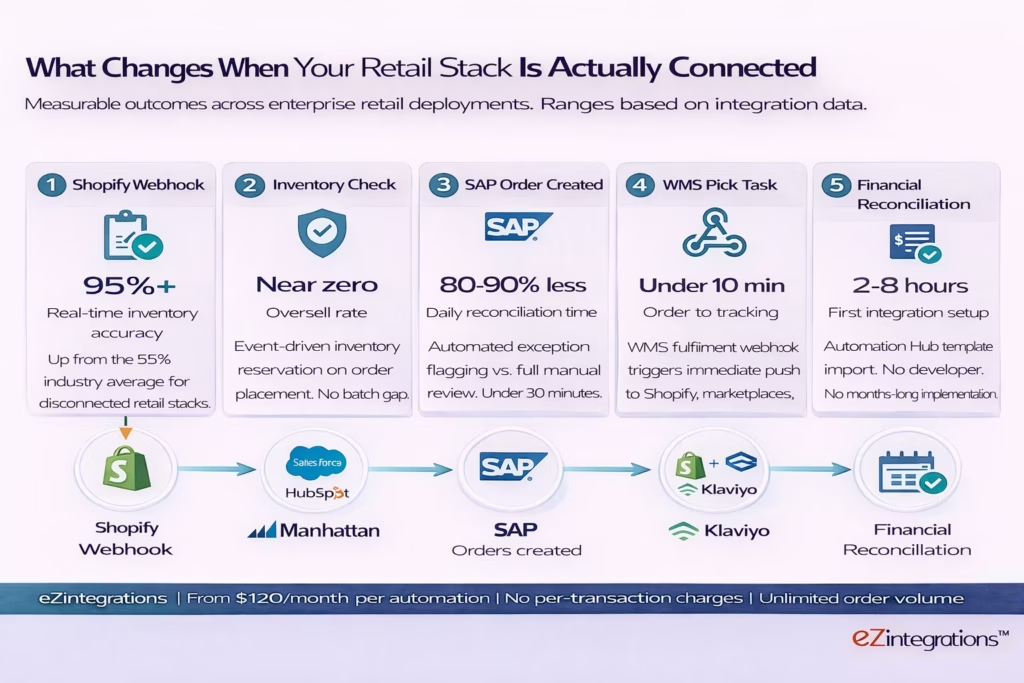
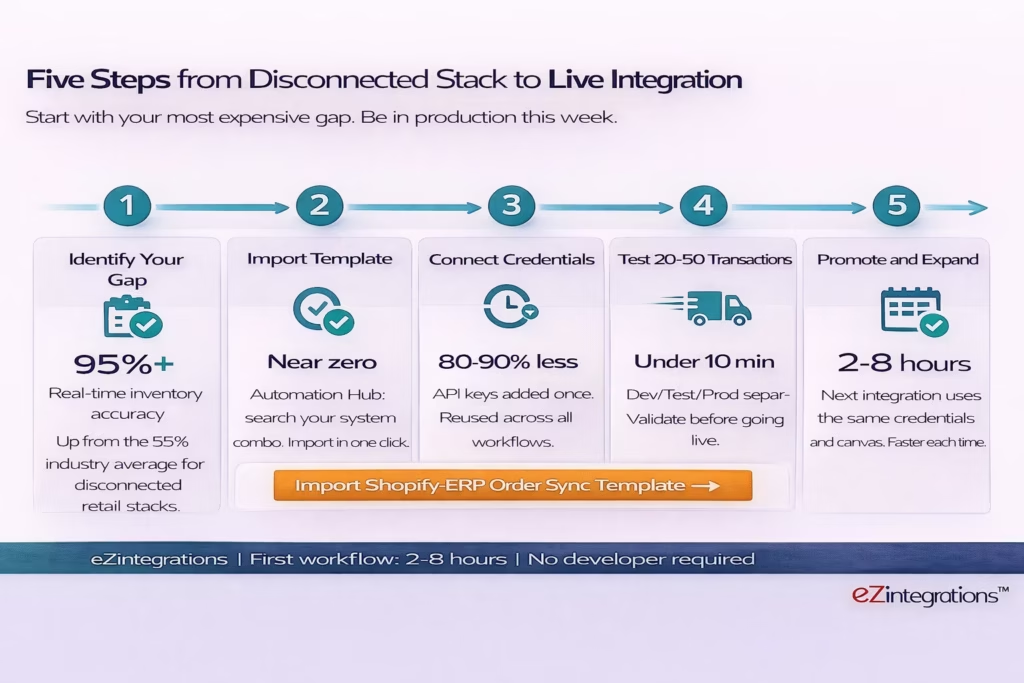
The fastest path to a connected retail stack is not to plan all fifteen integrations at once. It is to identify your highest-cost disconnection, import the relevant template from the Automation Hub, and get it live this week. Then repeat.
Step 1: Identify your most expensive integration gap Use the five-workflow framework above. Which one is costing you most right now? For most enterprise retailers, the answer is either the order sync (ERP records behind by hours) or the inventory sync (oversells happening on the channel-to-channel batch lag). Start there.
Step 2: Import the relevant Automation Hub template Navigate to the Automation Hub and search for your system combination. The Shopify-to-ERP order sync template covers SAP, NetSuite, and Dynamics 365 as ERP targets. The WMS-to-eCommerce inventory sync template covers Manhattan Associates, Blue Yonder, and Oracle WMS as WMS sources. Import the template into your workspace. It arrives with the workflow structure, field mapping configuration, and error handling pre-built.
Step 3: Connect your API credentials Add your Shopify API key, your ERP API credentials, and your WMS API endpoint to the eZintegrations credential vault. These are configured once and reused across every workflow that touches that system. No credential re-entry per integration.
Step 4: Configure field mapping and run 20-50 test transactions Open the imported workflow. Review the field mapping between source and destination. Adjust for your specific SKU naming convention, customer ID format, and price tier rules. Run test transactions in the Dev environment against real system data before promoting to production.
Step 5: Promote to production and add the next integration Once the first workflow is live in production, the second integration starts from a connected system rather than a blank canvas. Your Shopify credentials are already configured. Your ERP API is already tested. The next workflow, inventory sync, returns processing, or supplier reorder, takes less time than the first.
Ready to import now? The Shopify-to-ERP order sync template is available immediately in the Automation Hub. Import it, configure your credentials, and run your first test transaction today. Or book a live demo and bring your specific ERP and WMS. We will build the workflow in the session.\
Frequently Asked Questions
1. How do enterprise retailers use eZintegrations
Enterprise retailers use eZintegrations to connect ERP systems such as SAP NetSuite and Dynamics 365 WMS platforms including Manhattan Associates Blue Yonder and Oracle WMS eCommerce stores such as Shopify Plus and BigCommerce marketplaces including Amazon Walmart and eBay POS systems 3PL providers and CRM platforms into a single automated data flow. The most common use cases include order sync from eCommerce channels to ERP real time inventory sync from WMS to all sales channels fulfilment tracking push from WMS to eCommerce and customer notifications returns and refund processing and supplier reorder automation when inventory thresholds are reached.
2. How long does it take to set up the first retail integration
The first integration from template import to live production typically takes two to eight hours of configuration using the eZintegrations no code canvas and Automation Hub templates. The longest step is confirming API credentials with ERP WMS and eCommerce vendors which may take one to three business days if credentials must be provisioned. The workflow configuration field mapping and test transaction validation can normally be completed in a single day by a non technical operations lead or IT manager.
3. Does eZintegrations work with Shopify Shopify Plus and Shopify B2B
Yes, eZintegrations connects to Shopify Shopify Plus and Shopify B2B through Shopify REST and GraphQL APIs. Order events inventory updates product synchronization fulfilment confirmations refund events and customer data are available as integration triggers and actions. Shopify B2B specific data including company accounts price lists and payment terms can be mapped directly in the visual field mapping canvas.
4. Does eZintegrations connect to SAP NetSuite and Microsoft Dynamics 365
Yes, all three are supported within the eZintegrations API catalog containing more than five thousand endpoints. SAP S 4HANA and SAP ECC connect through SAP OData and BAPI interfaces NetSuite connects through the NetSuite REST and SuiteQL APIs and Microsoft Dynamics 365 Business Central and Finance connect through the Dynamics REST API and OData services. If a specific ERP system or version is not already present in the catalog it can be added through self service API onboarding without writing code.
5. Can eZintegrations handle high order volumes without per transaction charges
Yes, non AI automations in eZintegrations run on a flat annual fee per automation with unlimited transaction volume. Integration costs do not increase with order volume. A retailer processing five thousand orders per month pays the same automation fee as a retailer processing five hundred thousand orders per month for the same workflow. This pricing structure is particularly useful for seasonal retail businesses where peak order volume may increase five to ten times above baseline.
6. How does eZintegrations handle marketplace integrations like Amazon and Walmart
Amazon Seller Central connects through Amazon SP API covering order management inventory updates fulfilment including FBA and FBM product listing synchronization and seller metrics. Walmart Marketplace connects through the Walmart Seller API covering order management inventory updates shipping confirmations and returns. Both integrations are available within the eZintegrations API catalog and the Automation Hub includes templates for common patterns such as marketplace order ingestion into ERP and WMS inventory synchronization and fulfilment status updates back to the marketplace.
7. What governance and error handling does eZintegrations provide for production retail integrations
eZintegrations provides full Dev Test and Production environment separation so configuration changes cannot reach production without controlled promotion through the environment pipeline. Error handling includes configurable retry logic dead letter queues for failed transactions and Slack or email notifications for exceptions requiring human review. Every transaction is logged with timestamp source system destination system payload and outcome providing a complete audit trail for reconciliation and compliance requirements.
Conclusion
Your retail stack is not going to shrink. The channels are going to keep multiplying. The systems are going to keep generating data. The question is not whether you need a retail integration platform. It is which one you choose, and how long you are willing to wait before the first workflow goes live.
eZintegrations gives enterprise retailers a single integration layer that connects every system in the stack, built from pre-built Automation Hub templates rather than custom code, priced per automation rather than per transaction, and configured in hours rather than months.
Your ops manager should be reviewing exception flags, not rebuilding the picture from scratch every morning.
Import the Shopify-to-ERP order sync template from the Automation Hub and run your first test transaction today. Or book a free demo and bring your ERP and WMS documentation. We will build the integration live.

