
AI Agents for Humanoid Robots: Autonomous Workflow Integration for Enterprise Operations
March 24, 2026AI agents act as the software intelligence layer between humanoid robots and enterprise systems like WMS, MES, and ERP, enabling robots to receive task instructions, report completion data, flag exceptions, and trigger downstream workflows autonomously without custom middleware code. With eZintegrations Goldfinch AI, operations teams can deploy this integration layer in days rather than the 500 to 1,000 engineering hours typically required for custom humanoid robot integration.
TL; DR
Humanoid robots are reaching commercial deployment in warehouses, factories, and logistics facilities in 2026. The physical hardware problem is largely solved. The unsolved problem is enterprise systems integration. Most WMS, MES, and ERP platforms have no native humanoid robot integration. Custom API development currently requires 500 to 1,000 engineering hours per deployment, plus ongoing maintenance. AI agents built on eZintegrations Goldfinch AI serve as the intelligent middleware layer: receiving task assignments from WMS, posting completion data to MES, detecting exceptions, triggering downstream workflows, and escalating edge cases to human operators, all without writing custom code. The result is a humanoid robot that doesn’t just move boxes. It participates in your enterprise data ecosystem, as a first-class system of record.
The Problem: Your Humanoid Robot Can’t Talk to Your WMS
Your new humanoid robot arrives on the warehouse floor.
It can walk. It can pick. It can move totes across the facility for 20 hours without a break. The hardware demo impressed everyone in the room. The pilot numbers are promising. Leadership has approved the fleet expansion.
And then your IT team opens the integration ticket.
Your Warehouse Management System was built before humanoid robots existed as a commercial product category. It has no native connector for Digit, Atlas, Optimus, or Figure 03. Your Manufacturing Execution System was not designed to receive telemetry from a bipedal robot with 56 degrees of freedom. Your ERP needs to know when a task is complete, when a unit was moved, when an exception occurred, and why the robot routed itself to a charging station at 2:47 AM rather than continuing the shift.
None of that happens automatically.
This is the problem no one talks about in the humanoid robotics pitch deck.
The hardware manufacturers have done their part. Agility Robotics’ Digit is commercially deployed in Toyota factories and Amazon logistics facilities. Boston Dynamics’ Atlas connects to MES and WMS via its Orbit software platform, but Orbit requires configuration and engineering work to adapt to your specific systems. Tesla targets 100,000 Optimus units by 2026. Chinese manufacturers including Unitree have dropped humanoid robot pricing to under $6,000 per unit. The physical cost barrier is falling fast.
The integration cost barrier is not falling. It is growing.
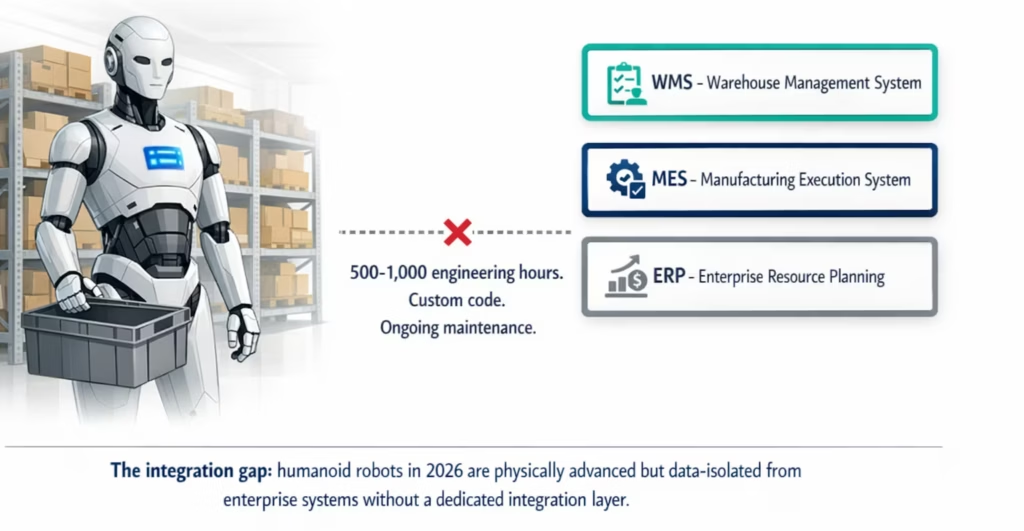
A 2025 deployment guide published by Axis Intelligence documents that most WMS platforms require 500 to 1,000 engineering hours of custom API development for initial humanoid robot integration, plus ongoing maintenance every time either system updates. Amazon’s Digit deployment required six months of custom WMS integration work before the first robot reached production. That engineering burden does not disappear when the robot price drops to $5,900.
The result: your humanoid robot sits on the floor physically capable of replacing three manual pick workers per shift. But it is operationally isolated, waiting for a human to read its status screen, manually update the WMS, and hand it the next task on a paper sheet.
That is not automation. That is expensive manual labor with better hardware.
Before vs. After: Robot Integration with and without AI Agents
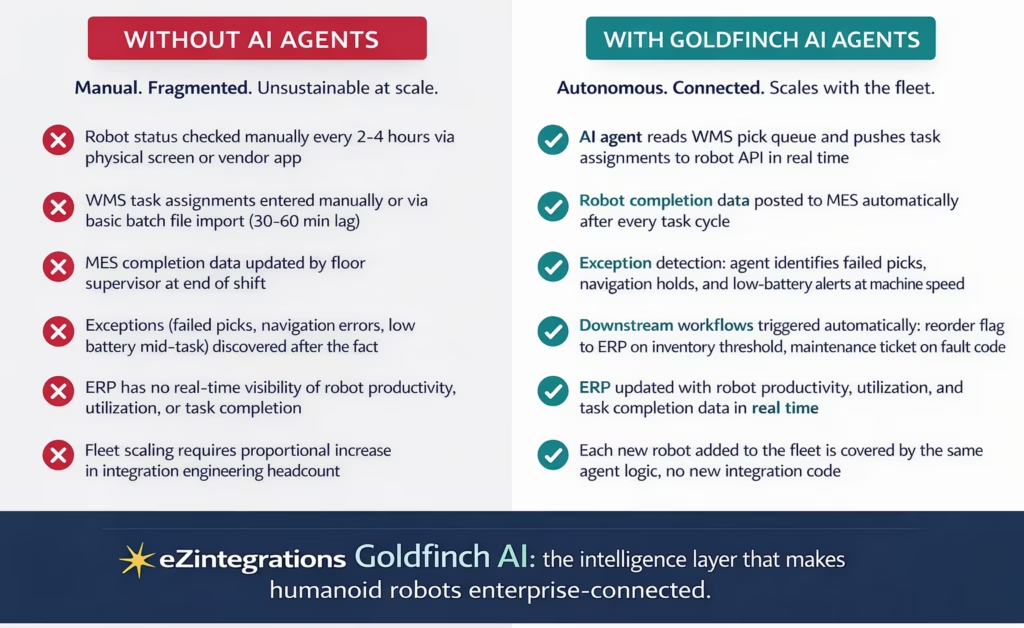
| Dimension | Without AI Agents | With Goldfinch AI Agents |
|---|---|---|
| Task assignment to robot | Manual entry or batch file (30–60 min lag) | Real-time push from WMS via API, seconds |
| Completion data to MES | Manual floor supervisor update (end of shift) | Automatic post after every task cycle |
| Exception handling | Discovered after the fact on physical screen | Detected at machine speed, workflow triggered |
| ERP visibility | None or manual end-of-day entry | Real-time robot productivity and utilization data |
| Low battery / fault codes | Alert on robot screen, manual response | Agent detects, triggers maintenance ticket automatically |
| Fleet scaling | Each robot requires new integration engineering work | Same agent logic covers every new robot added |
| Integration build time | 500–1,000 engineering hours per deployment | Days, not months, using Goldfinch AI templates |
| Ongoing maintenance cost | High: updates to either system break custom code | Low: API catalog handles system version changes |
How AI Agents Bridge Humanoid Robots and Enterprise Systems
The gap between a humanoid robot and your enterprise systems is, at its core, an integration problem. The robot exposes APIs for task assignment, status reporting, and telemetry. Your WMS, MES, and ERP expose APIs for work orders, completion records, and inventory. The missing piece is an intelligent agent that reads from one side, makes decisions, and writes to the other.
That is precisely what eZintegrations Goldfinch AI multi-agent orchestration is built for.
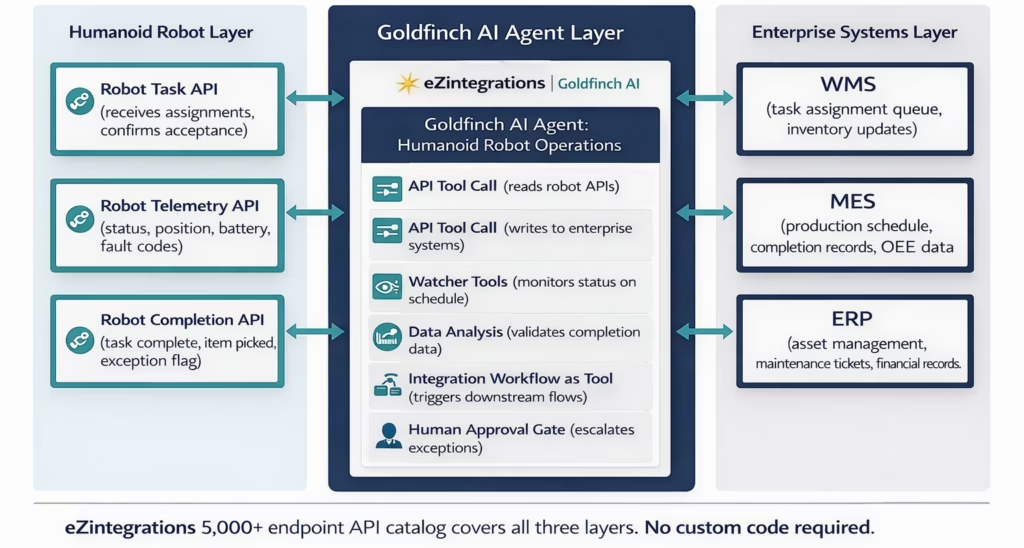
Goldfinch AI uses 9 native agent tools. For humanoid robot integration, the most relevant four are:
API Tool Call. Goldfinch AI reads from your robot’s telemetry and task APIs and writes to your WMS, MES, and ERP APIs. The eZintegrations platform includes an API catalog covering 5,000+ enterprise endpoints. If your WMS or MES endpoint isn’t pre-catalogued, your team can onboard it as a self-service API without writing code.
Watcher Tools. The agent monitors robot status on a defined schedule, or in near-real-time via webhook triggers from the robot platform. When the robot raises a fault code, completes a task cycle, or drops below a battery threshold, Watcher detects it and triggers the appropriate downstream action.
Integration Workflow as Tool. Any existing eZintegrations workflow becomes a tool the Goldfinch AI agent can call. Your existing inventory reorder workflow, your existing maintenance ticket creation workflow, your existing shift supervisor notification workflow: all of these can be invoked by the robot integration agent as needed, without rebuilding them.
Human Approval Gate. Some exceptions need a human decision. When the agent encounters an ambiguous situation (a pick task flagged as failed but the item is not visibly missing, a fault code with multiple possible root causes, a reorder recommendation that exceeds the automated approval threshold), it routes to the operations manager with the exception details pre-filled. The manager approves or redirects in one click.
This architecture means your humanoid robot is not a hardware island. It is a fully connected enterprise data source that sends, receives, and acts on information across your operations systems, at machine speed.
Step-by-Step: How the Integration Workflow Runs
Here is a concrete end-to-end workflow for a humanoid robot performing pick-and-place operations in a warehouse or distribution centre, integrated with WMS, MES, and ERP via a Goldfinch AI agent.
The 8-step workflow in full:
Step 1: WMS generates a pick task. A new order enters the pick queue in your Warehouse Management System. Traditionally, this task would sit in the queue until a human worker (or a manual batch job) pushed it to the robot. With Goldfinch AI, the Watcher tool polls the WMS task API every 30 to 60 seconds and detects the new task immediately.
Step 2: Watcher detects the task. The Goldfinch AI agent reads the new task record from the WMS API. It validates that the task is within the robot’s current operating zone, that the robot’s battery level is sufficient to complete the task, and that no higher-priority tasks are queued ahead of it. This takes seconds.
Step 3: Agent pushes the task to the robot. The agent calls the robot’s Task API with the assignment details: SKU, pick location, destination bin, priority level, and any special handling flags. The robot confirms acceptance. This is a two-way API exchange, not a one-way command.
Step 4: Robot executes. The robot navigates to the pick location, identifies the item, performs the pick, moves to the destination, and places the item. Telemetry streams back to the agent throughout: position, speed, battery level, arm torque. The agent monitors this data in real time.
Step 5: Agent validates completion. When the robot signals task completion via its Completion API, the agent reads the completion record and validates the key fields: task ID matches, item picked matches SKU, quantity is correct, time stamp is within expected range. A Data Analysis step checks the completion data against expected parameters.
Step 6: Agent posts to MES. The agent calls the MES API and posts the completion record: task ID, robot ID, timestamp, item, quantity, outcome (success or exception), and cycle time. The MES production schedule is updated in real time. OEE data is current, not end-of-shift.
Step 7: Agent triggers the ERP workflow. Using Integration Workflow as Tool, the agent triggers your existing inventory deduction workflow in the ERP. It also updates the robot’s asset utilisation record: hours operated, tasks completed, distance travelled, battery cycles used.
Step 8: ERP updated, full visibility confirmed. Your ERP now shows the task as complete, the inventory as updated, and the robot’s productivity metrics as current. No manual data entry. No end-of-shift batch reconciliation. No gap between what happened on the floor and what your systems know.
The exception path: If the robot raises a failed pick flag (item not found, barcode scan failure, navigation hold, fault code), the agent does not silently drop the task. It reads the exception type, looks up the recommended response from the Knowledge Base (routing rules for each exception type), and either resolves it automatically (re-queuing the task to the next available robot) or triggers the Human Approval Gate. The operations manager receives a Slack or email notification with the exception details, the robot’s last telemetry reading, and a one-click resolution option.
Use Cases Across Manufacturing, Warehousing, and Logistics
The workflow above is a pick-and-place baseline. The same Goldfinch AI integration architecture applies across every humanoid robot use case reaching commercial deployment in 2026.
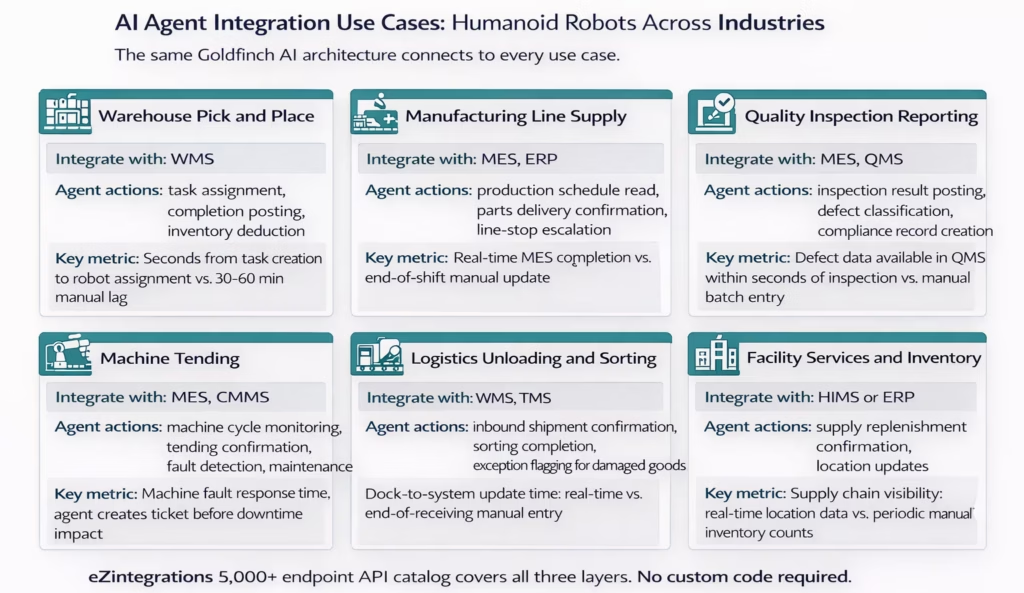
Warehousing and distribution. Pick and place is the most commercially active humanoid deployment in 2026. Agility’s Digit is deployed at Amazon and GXO Logistics. The AI agent integration reads WMS task queues, assigns picks to available robots, receives completion confirmations, and updates inventory records in real time.
Manufacturing assembly and line supply. Apptronik’s Apollo is deployed in Jabil manufacturing operations. Mercedes-Benz acquired an Apptronik stake to accelerate its own humanoid deployments. The integration challenge is MES synchronisation: the robot needs to know the current production schedule, and the MES needs to know what the robot completed and when. Goldfinch AI handles both directions in real time.
Quality inspection. Humanoid robots with vision AI are performing visual quality inspections in controlled manufacturing environments. The integration challenge is getting inspection results from the robot’s vision system into the Quality Management System and, where applicable, the MES. An AI agent reads the inspection data from the robot’s API, classifies the result, and posts to the QMS with the appropriate fields completed.
Machine tending. Loading and unloading CNC machines, injection moulding systems, and other production equipment is one of the safest and highest-ROI applications for early humanoid deployment, because the environment is controlled and the task sequence is well-defined. The AI agent monitors machine cycle completion via MES API, confirms the robot’s tending action, and creates a CMMS (Computerised Maintenance Management System) ticket if the machine raises a fault code during the tending cycle.
Logistics inbound processing. Unloading inbound shipments, sorting items by destination zone, and confirming receipt against purchase orders are high-volume, physically demanding tasks suited to humanoid robots. The integration layer connects the robot’s confirmation signals to the WMS inbound receiving system and the ERP purchase order matching workflow.
Facility services and healthcare supply. Hospitals and large facilities are beginning to evaluate humanoid robots for supply replenishment, medication cart delivery preparation, and linen transport. These deployments require integration with Hospital Information Management Systems (HIMS) or healthcare ERP platforms, with strict exception escalation for restricted items and medication handling.
Key Outcomes and Results
The business case for AI agent-powered humanoid robot integration rests on four outcome categories.
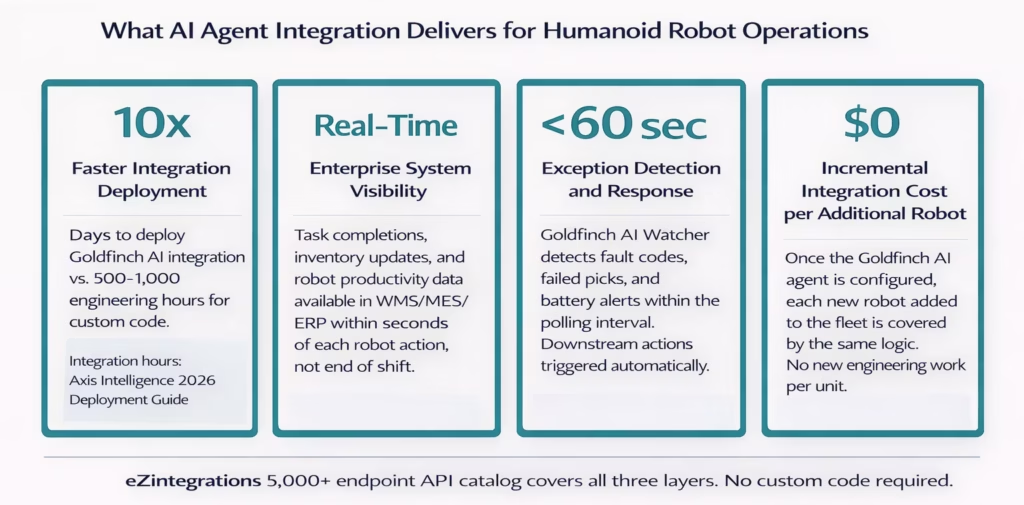
Deployment speed. Custom WMS/ERP integration for humanoid robots currently requires 500 to 1,000 engineering hours of development work per deployment, according to Axis Intelligence’s 2026 deployment guide. An Amazon-Digit integration took six months of custom development. Goldfinch AI integration, built on the eZintegrations API catalog with pre-built templates, reduces that to days for standard WMS, MES, and ERP platforms.
Operational visibility. Without integration, your operations team learns about robot performance from end-of-shift reports or from physically checking the robot’s status screen. With Goldfinch AI, task completion data is in your MES within seconds of each cycle. Robot utilisation is in your ERP in real time. Your production team works from current data, not last night’s export.
Exception response time. In a non-integrated deployment, a fault code on the robot sits unnoticed until someone walks past and reads the screen. With Goldfinch AI Watcher monitoring robot telemetry, a fault code triggers a maintenance ticket in your CMMS and a notification to the floor supervisor within 60 seconds. A failed pick re-queues to the next available robot automatically. The operations manager sees exceptions before they become delays.
Fleet scaling economics. This is the most important financial argument. Custom integration code is written for a specific robot, connected to a specific WMS version, in a specific facility. When you add a second robot, you often write new code. When the WMS updates, you rewrite. When you expand to a second facility, you start again. A Goldfinch AI agent covers your entire fleet: every robot you add is handled by the same agent logic without new integration development.
The DBR77 Robotics Trends 2026 report frames this precisely: the self-correcting factory is not just about better robots. It is about an operating system that connects your machines to your planning systems. The AI agent layer is that operating system.
How to Get Started in eZintegrations
Deploying a Goldfinch AI integration for your humanoid robot operations does not require a dedicated robotics integration engineer. It requires three things: API access to your robot platform, API access to your WMS or MES, and a Goldfinch AI agent workflow configured in eZintegrations.
Here are the five steps to get from zero to first production integration.
Step 1: Confirm your API access. Before opening eZintegrations, confirm that you have API credentials for both your robot platform (task API, telemetry API, completion API) and your target enterprise system (WMS, MES, or ERP). This is the most common deployment bottleneck. IT approval for API access typically takes 1 to 5 business days. Request it before you start configuration.
Step 2: Create your eZintegrations account and open the Automation Hub. Visit the Automation Hub and search for humanoid robot or warehouse operations templates. Import the relevant template for your use case (pick and place, machine tending, quality inspection). The template imports as a pre-configured Goldfinch AI canvas with the agent tool steps already in the correct sequence.
Step 3: Configure your API connections. In the imported canvas, configure your robot platform API connection and your WMS/MES API connection using the eZintegrations API catalog. If your specific platform endpoint is not listed, use the self-service API onboarding to add it without code. Enter your credentials, test the connection, and confirm that the API returns the expected fields.
Step 4: Configure the agent logic. Set your Watcher polling interval (30 to 60 seconds for standard pick operations). Review the field mappings between the robot’s task and completion fields and your WMS/MES record fields. Set your confidence threshold and exception routing rules. Configure the Human Approval Gate with the contact details for your operations manager.
Step 5: Test in Dev, then promote to production. Run 10 to 20 test cycles in the Dev environment using representative task data. Confirm that task assignments reach the robot correctly, that completion data posts to the MES accurately, and that the exception path triggers correctly for a simulated fault code. When test results are consistent, promote to the Production environment. Keep the Dev version active for testing future changes.
For a deeper walkthrough of the Goldfinch AI build process, read our guide on how to build an enterprise AI agent.
Explore the Automation Hub to find humanoid robot and warehouse operations templates. Or book a free demo to see a live configuration session for your specific robot platform and enterprise system combination.
Frequently Asked Questions
1. How does eZintegrations work with humanoid robots for enterprise operations
Goldfinch AI acts as the integration layer between humanoid robot APIs and enterprise systems like WMS MES and ERP automatically managing tasks telemetry completion data and exceptions.
2. How long does it take to set up humanoid robot integration with eZintegrations
A basic robot integration with standard WMS or MES systems typically takes 1 to 3 days while complex multi system integrations usually take 3 to 7 days depending on API access approval.
3. Does eZintegrations work with humanoid robot platforms like Digit Atlas or Optimus
Yes eZintegrations connects to any humanoid robot platform that exposes REST or API endpoints including Digit Atlas Figure robots and Unitree platforms.
4. What happens when a robot raises a fault code or a pick task fails
Goldfinch AI automatically resolves known robot exceptions and escalates complex issues through a Human Approval Gate with alerts sent to operations managers.
5. Can one Goldfinch AI agent manage multiple robots in a fleet
Yes a single Goldfinch AI agent configuration can manage an entire fleet of robots of the same type without additional integration setup.
6. How does the MCP capability relate to humanoid robot integrations in eZintegrations
Integration Flow as MCP allows humanoid robot workflows to be exposed as tools that other AI agents can trigger through the Model Context Protocol.
7. Does eZintegrations require on premises installation near robot hardware
No eZintegrations is a cloud native platform where Goldfinch AI agents connect securely to robot and enterprise APIs over HTTPS.
Conclusion
The humanoid robot market is crossing a threshold that the industrial automation industry has not seen before. Physical capability and cost are no longer the barriers. A commercially deployed humanoid robot performing logistics tasks now costs less than $6,000 per unit at the entry level. Agility’s Digit is in Toyota factories and Amazon warehouses today. Boston Dynamics’ Atlas is shipping to Hyundai’s production facility in 2026. The hardware problem is solved enough to start scaling.
The integration problem is not solved. Most WMS platforms still require 500 to 1,000 engineering hours of custom development to connect a humanoid robot to a production task queue. Most MES systems have no native humanoid robot completion data ingestion. Most ERPs have no real-time robot asset utilisation feed.
That gap is what keeps your humanoid robot physically capable but operationally isolated.
Goldfinch AI from eZintegrations closes that gap. Task assignment from WMS in real time. Completion data to MES after every cycle. Exception detection in under 60 seconds. ERP updates without manual entry. And when your fleet grows from 3 units to 30, the same agent logic covers every robot, with no new integration engineering required.
Your robots can already move at machine speed. Now your data can too.
Book a free demo to see a live Goldfinch AI configuration for your humanoid robot platform and enterprise system combination.
Or explore Goldfinch AI multi-agent orchestration to understand the full 9-tool platform that powers these integrations.
Visit the Automation Hub for humanoid robot and warehouse operations templates you can import and configure today.

