
AI Agents for ERP: Automate SAP, Oracle and NetSuite Without Writing Code
June 6, 2026AI agents (Intelligent Agent) for ERP connect to SAP S/4HANA, Oracle ERP Cloud, and NetSuite and operate autonomously on goal-directed tasks: investigating ERP exceptions by querying multiple systems in sequence, resolving known exception patterns without human involvement, assembling multi-system intelligence for decision-support, and escalating genuinely novel situations with investigation context pre-assembled. Unlike AI-enriched workflows (which process predefined steps with AI nodes), AI agents determine their own investigation path based on what they find at each step.
TL;DR
- ERP systems generate two categories of work: routine data movement (covered by AI Workflow automation, Level 2) and exception handling: the records that fall outside normal rules, require multi-system investigation, and currently land in a human queue.
- Exception queues are where ERP automation stalls. An AP invoice discrepancy requires: querying the purchase order, the goods receipt, the vendor master, and the contract terms. A failed payment run requires: identifying the payment batch, checking the vendor bank details, verifying the GL posting, and assessing whether the failure is transient or systemic. No predefined workflow handles these sequences, because the next step depends on what the prior step found.
- AI agents handle this class of work: they receive a goal (“investigate why this vendor payment failed”), determine what to query, execute the queries across connected ERP systems, synthesise the findings, and either resolve the exception autonomously or deliver a structured investigation brief for human decision.
- Five AI agent use cases for ERP with the highest ROI: AP exception investigation agent, payment failure diagnosis agent, purchase order discrepancy resolution agent, month-end close acceleration agent, and vendor performance intelligence agent.
- eZintegrations delivers Level 3 AI Agents with 9 native enterprise tools, SAP OData V4 CSRF, NetSuite SuiteQL TBA, and Oracle assertion grant OAuth: all in the same no-code platform as Level 1-2 workflows.
- Import an Automation Hub template and deploy your first ERP AI agent without writing a line of code.
The Problem: Where ERP Exception Queues Keep Growing
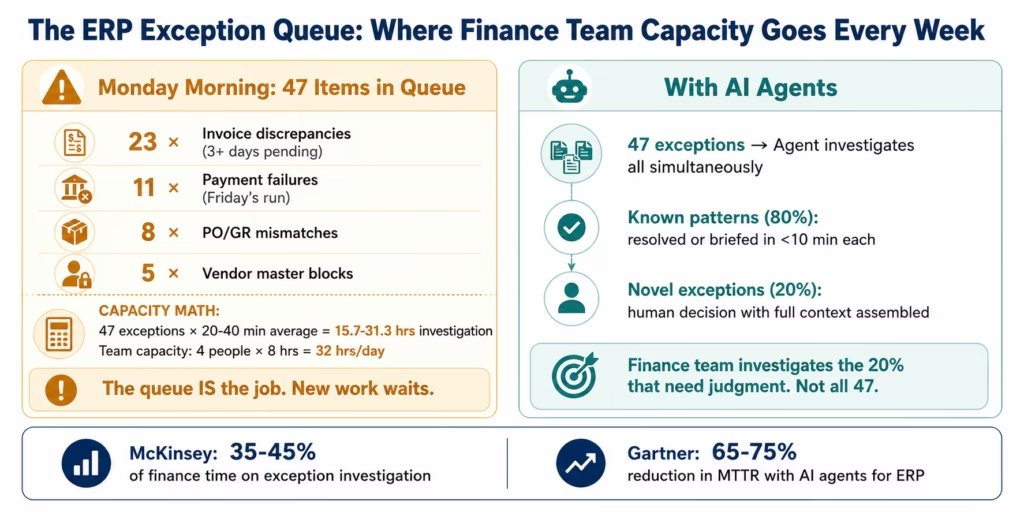
Every Monday morning, the AP manager at a mid-sized enterprise opens the exception queue in the ERP. There are 47 items. Twenty-three are invoice discrepancies that have been sitting for more than three days. Eleven are payment failures from Friday’s payment run. Eight are purchase orders with goods receipt mismatches. Five are vendor master data issues blocking payment.
The AP team has four people. Each exception takes 20-40 minutes to investigate: pull the invoice, check the PO, verify the goods receipt, look up the vendor master, check the contract terms, query the payment log, read the error message, determine the root cause, decide the resolution, and take the action. At 20 minutes per exception, 47 exceptions is 15.7 hours of investigation work: almost two full working days for one person.
The exceptions are not complex. Most have straightforward diagnoses: the invoice quantity does not match the PO quantity because the supplier shipped a partial order. The payment failed because the vendor’s bank account number changed last week and the vendor master was not updated. The goods receipt mismatch exists because the warehouse received the goods against the wrong PO number. These are deterministic investigations: given the right data from the right systems, the diagnosis is clear.
The problem is that gathering the right data from the right systems takes 20 minutes of manual querying per exception because no predefined workflow was built for each specific exception type. And the volume of exceptions grows with the business: more vendors, more invoices, more POs, more payment runs, more exceptions.
According to McKinsey’s State of AI 2025, finance and operations teams spend 35-45% of their working time on exception investigation and resolution: work that does not require human judgment in most cases, but requires the ability to query multiple systems in sequence and synthesise the results. This is precisely the capability that AI agents provide.
According to Gartner, enterprises that deploy AI agents for ERP exception handling report 65-75% reduction in time-to-resolution for known exception patterns: and a corresponding increase in the quality of human decision-making on the genuinely novel exceptions that the agents escalate.
The ERP exception queue is the highest-ROI entry point for AI agent deployment in enterprise finance operations, reflecting broader ERP automation market trends tracked by IDC.
AI Agents vs AI Workflows: Understanding the Difference for ERP
Before describing the use cases, the distinction between AI Workflows (Level 2) and AI Agents (Level 3) is worth stating precisely: because they serve different ERP automation needs and are not interchangeable.
AI Workflows (Level 2): a human defines a sequence of steps in advance. When an invoice PDF arrives, the workflow runs Document Intelligence, compares the extracted data against the PO, and posts to the ERP if it matches: the same steps, every time, regardless of what the Document Intelligence finds. The workflow handles the cases that fit the predefined rules. Cases that do not fit route to the exception queue.
AI Agents (Level 3): the agent receives a goal and determines its own investigation sequence based on what it finds. When an AP exception is flagged, the agent reads the exception context, queries the PO to check the quantity alignment, reads the goods receipt to verify delivery, checks the vendor master for payment details, examines the contract terms for tolerance clauses, and then either resolves the exception (if the investigation reveals a known resolution path) or delivers a structured brief (if human judgment is required). Each step is determined by the prior step’s result: not by a predefined sequence.
The practical implication for ERP automation:
| Task Type | Right Tool | Why |
|---|---|---|
| Invoice PDF extraction and standard ERP posting | AI Workflow (Level 2) | Predefined steps, same sequence every time |
| Investigate why this specific invoice is on hold | AI Agent (Level 3) | Investigation path depends on what the hold reason is |
| Route a standard PO approval through the approval matrix | AI Workflow (Level 2) | Predefined approval logic |
| Diagnose why a $2.4M payment failed on Friday night | AI Agent (Level 3) | Multiple possible causes, each requiring different queries |
| Classify support tickets into 5 categories | AI Workflow (Level 2) | Predefined classification, consistent output |
| Build a vendor performance brief for the supplier review | AI Agent (Level 3) | Multi-system investigation, synthesised narrative |
AI Workflows and AI Agents are complementary, not competing, consistent with broader Forrester Research analysis of ERP integration and agentic AI architecture. The AI Workflow layer handles the routine, predefined processing. The AI Agent layer handles the exceptions, investigations, and intelligence tasks that no predefined workflow was built for: because the correct investigation path was not known in advance.
Before vs After: AI Agents for ERP Automation
| Exception Type | Before AI Agents | After AI Agents | Time Saved |
|---|---|---|---|
| AP invoice discrepancy | AP analyst queries PO, GR, vendor master manually (20-40 min) | Agent investigates, identifies root cause, stages resolution for approval | 75-85% reduction |
| Payment failure diagnosis | AP analyst reads error log, checks vendor bank details, verifies GL (25-45 min) | Agent diagnoses root cause across payment log, vendor master, GL in <5 min | 85-90% reduction |
| PO/GR mismatch | Buyer queries PO, receiving log, supplier communication (20-35 min) | Agent cross-references PO, GR, and supplier ASN, identifies variance type, stages resolution | 70-80% reduction |
| Month-end close exception | Finance analyst investigates each flagged account manually (1-3 hrs each) | Agent investigates account history, identifies posting cause, stages journal entry for review | 60-75% reduction per item |
| Vendor performance brief | Finance/procurement analyst compiles data from 4-5 systems (3-5 hrs) | Agent queries all systems, synthesises narrative, delivers brief in <10 min | 90-95% reduction |
| Blocked vendor payment | AP team investigates block reason across vendor master, open items (30-60 min) | Agent identifies block type, stages resolution (or escalates if manual vendor contact needed) | 80-85% reduction |
| ERP posting error | IT or finance traces posting through transaction log (45-90 min) | Agent reads error context, traces through connected systems, delivers diagnosis | 70-80% reduction |
| Cross-ERP data discrepancy | Finance analyst manually compares SAP and NetSuite records (2-4 hrs) | Agent queries both systems, identifies discrepancy, surfaces reconciliation recommendation | 85-90% reduction |
How eZintegrations AI Agents Connect to SAP, Oracle, and NetSuite
eZintegrations Level 3 AI Agents operate using 9 native enterprise tools: and the ERP connectors that power those tools are the same enterprise-depth connectors used in Level 1 and Level 2 workflows.
The 9 native agent tools available for ERP use cases:
- Knowledge Base Vector Search: semantic search across connected knowledge bases: contract repositories, vendor documentation, ERP configuration guides, escalation policies, and resolution playbooks.
- Document Intelligence: read and extract structured data from any document: vendor invoices, supplier contracts, goods receipts, and remittance advices.
- Data Analysis: statistical computation and anomaly detection across ERP data streams: identifying patterns in payment failure rates, invoice discrepancy volumes, and vendor performance data.
- Data Analytics with Charts/Graphs/Dashboards: generate visual analytical outputs embedded in agent investigation briefs: trend charts, vendor performance dashboards, payment success rate visualisations.
- Web Crawling: retrieve real-time information from external sources: vendor company information, bank routing number validation, supplier news that may explain performance anomalies.
- Watcher Tools: continuous monitoring of ERP metrics with threshold-based alerting: payment failure rate above threshold, exception queue depth exceeding configured maximum.
- API Tool Call: direct REST and GraphQL API calls to any connected ERP system: SAP OData V4, Oracle ERP REST, NetSuite SuiteQL.
- Integration Workflow as Tool: call any Level 1/2 integration workflow as a tool within the agent’s investigation: for example, triggering an existing vendor master update workflow as part of the agent’s resolution action.
- Integration Flow as MCP: expose integration capabilities via Model Context Protocol for external AI tool consumption.
Users extend the tool registry beyond these 9 as self-service: adding custom ERP query tools, custom knowledge bases, and domain-specific APIs as additional agent tools.
ERP connector depth for agent tool calls:
SAP S/4HANA (via API Tool Call): OData V4 with automatic CSRF token management. The agent can query: production orders, purchase orders, goods movements (including movement type 322 for quality inspection stock transfers), vendor master, open items, payment documents, GL accounts, and any custom OData service. Write operations (clearing items, posting journals, updating vendor master) require CSRF: managed automatically.
Oracle ERP Cloud (via API Tool Call): REST API with assertion grant OAuth 2.0. The agent can query: AP invoices, purchase orders, payments, suppliers, GL balances, and subledger accounting.
NetSuite (via API Tool Call): SuiteQL for complex multi-table queries and Token-Based Authentication. The agent can query: vendor bills, purchase orders, item receipts, payments, vendor records, GL impact, and custom fields.
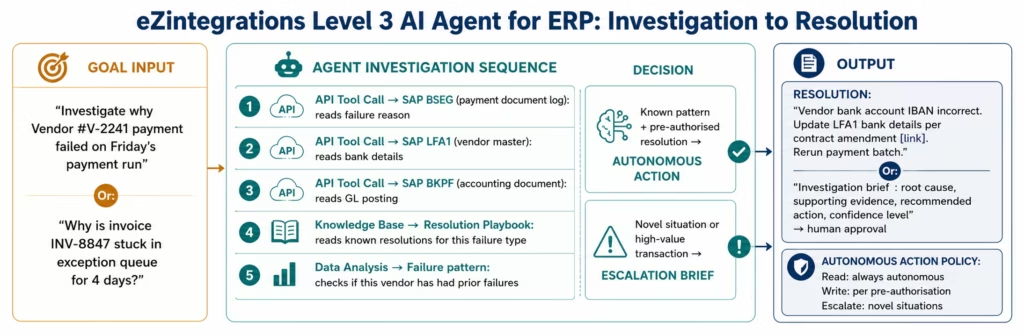
Autonomous action policy: every eZintegrations AI agent has a configurable autonomous action policy: what the agent can do without human approval (read operations universally, and write operations per action type based on explicit pre-authorisation). Read operations are universally autonomous. Write operations (clearing an invoice match, updating a vendor master field, posting a journal entry) require explicit pre-authorisation and are configured per agent and per action type.
Compliance: SOC 2 Type II. HIPAA BAA for agents processing healthcare financial data. GDPR for EU financial records. All agent tool calls that process ERP data run natively within eZintegrations: no financial records, vendor data, or payment information sent to external AI providers.
Goldfinch AI (Level 4) for multi-agent ERP intelligence: for organisations ready to move beyond single-agent exception handling, eZintegrations’ Level 4 Goldfinch AI coordinator-worker architecture dispatches parallel worker agents across SAP, Oracle, and NetSuite simultaneously. A coordinator agent assembles cross-ERP intelligence : consolidated vendor performance across three ERP instances, cross-entity close investigation across multiple legal entities : in minutes. The coordinator uses the same 9 native tools as Level 3 agents, plus a user-extensible registry.
Use Case 1: AP Exception Investigation Agent
The problem in one sentence: your AP exception queue grows faster than your team can clear it: because each exception requires 20-40 minutes of multi-system investigation that no predefined workflow was built to handle.
The AI agent solution: an AP Exception Investigation Agent receives each queued exception as a goal and conducts a multi-system investigation to determine the root cause: querying the invoice, PO, goods receipt, vendor master, and contract as needed, then either resolving the exception autonomously (for known patterns with pre-authorised resolution actions) or delivering a structured investigation brief to the AP analyst (for novel situations).
The Agent Investigation Sequence: Invoice Quantity Discrepancy
Agent goal received: “Invoice INV-8847 from Vendor Acme Corp has been in the exception queue for 4 days. The discrepancy reason is quantity mismatch. Investigate, determine root cause, and stage resolution.”
Step 1: Read the invoice exception: the agent calls the ERP API to retrieve the invoice details: invoice number, vendor, PO reference, invoiced quantity, invoiced amount, and the specific discrepancy flag.
Step 2: Query the purchase order: the agent calls the SAP OData V4 API to retrieve PO-2241: ordered quantity, delivery schedule, partial delivery tolerance (percentage), and any open delivery schedule lines.
Step 3: Query the goods receipt: the agent queries the goods receipt records linked to PO-2241. Result: a goods receipt was posted for 80% of the ordered quantity. A second delivery is expected.
Step 4: Compare invoice quantity vs GR quantity: invoice quantity matches the goods receipt quantity (80% of PO), not the full PO quantity. The vendor has invoiced for what was received, not the full order.
Step 5: Check partial invoice tolerance: the agent queries the vendor master for the configured partial delivery tolerance and the invoice matching tolerance for this vendor.
Step 6: Knowledge Base resolution lookup: the agent searches the AP resolution playbook for “partial delivery invoice match.” Result: “If GR quantity matches invoice quantity and partial delivery tolerance is satisfied, approve the partial invoice and create a residual PO line for the remaining quantity.”
Step 7: Resolution staging: the resolution is within the pre-authorised autonomous action policy for partial invoice approvals below the configured value threshold. The agent:
- Stages the invoice match in SAP with the GR-matched quantity
- Creates a residual PO schedule line for the remaining quantity
- Presents the proposed action to the AP supervisor for one-click approval (or executes autonomously if the value is below the fully autonomous threshold)
Total agent time: 4 minutes 12 seconds. AP analyst review time if the value is above the autonomous threshold: 3-5 minutes. Previous manual investigation: 25-35 minutes.
The investigation trail: every step of the agent’s investigation: every API call, every query result, every reasoning step, every action staged: is logged in the immutable audit trail. The AP auditor reviewing this invoice at year-end sees not just the resolution but the complete investigation.
Use Case 2: Payment Failure Diagnosis Agent
The problem: Friday’s payment run processed 847 payments. Six failed. The payment run log shows “posting error” for each. The AP team arrives Monday morning and begins investigating: which vendors, which amounts, which accounts, what specifically caused each failure.
Each payment failure investigation involves: identifying the payment document, reading the failure message, checking the vendor’s bank details, verifying the GL account configuration, checking whether the error is transient (bank connectivity issue) or systematic (incorrect bank routing number), and determining the corrective action.
The AI agent solution: the Payment Failure Diagnosis Agent is triggered the moment a payment run completes with failures. It investigates all six failures in parallel: each as a separate agent task: and delivers a consolidated diagnosis report before the AP team arrives on Monday morning.
The Agent Investigation Sequence: Payment Failure
Agent goal: “Friday’s payment run ZAHLAUF-2026-04-11 completed with 6 failures. Investigate all 6, identify root cause for each, and stage corrective actions for AP manager review.”
The agent dispatches parallel investigations for each of the 6 failed payments:
For each failed payment:
Step 1: Read the payment document: query the SAP payment document for the failed payment (payment method, bank details used, GL account, clearing document status).
Step 2: Read the error log: query the payment log for the specific error message for this payment document.
Step 3: Classify error type (LLM Classification within the agent’s reasoning): the error message is classified:
- “Bank routing number invalid”: investigate vendor master bank details
- “Duplicate payment detected”: investigate prior payment history for this vendor/invoice combination
- “GL account blocked”: investigate GL account status and posting period
- “Vendor payment block”: investigate vendor master payment block reason
Step 4: Root cause investigation (branch by error type):
For “Bank routing number invalid”: agent queries the vendor master for the bank account on file, compares against the bank details on the original invoice remittance. If the remittance shows a different bank account, the vendor has changed banks without updating the vendor master.
Step 5: Resolution staging:
- Vendor bank account change: agent retrieves the bank details from the remittance document, stages a vendor master update (LFA1) for the bank account field, and stages the payment for re-execution after the vendor master update is approved.
- Transient bank connectivity error: agent stages the payment for immediate re-execution without master data changes.
- GL account blocked: agent identifies the blocking reason and routes to the finance controller with the specific account and period context.
Step 6: Consolidated report: the agent assembles a consolidated report of all 6 failures: root cause per failure, proposed resolution, confidence level, and the action required from the AP manager (approve-and-execute or investigate-further).
The AP manager receives this report Monday morning at 7 AM: automatically, without submitting any request. The six investigation briefs that would have taken the team 3-4 hours to complete manually are pre-assembled. The manager’s decision time: 15-30 minutes of review and approval.
Use Case 3: Purchase Order Discrepancy Resolution Agent
The problem: the three-way match in the ERP: comparing the purchase order, the goods receipt, and the invoice: generates mismatches when quantities, prices, or delivery terms differ between the three documents. Resolving three-way match exceptions requires: reading all three documents, identifying the specific point of difference, determining whether the difference is within the configured tolerance, and deciding whether to approve the match, reject the invoice, or contact the supplier.
At volume: a manufacturer processing 300+ POs per week: three-way match exceptions require a dedicated function. The exceptions that do not fit predefined tolerance rules always land in a human queue.
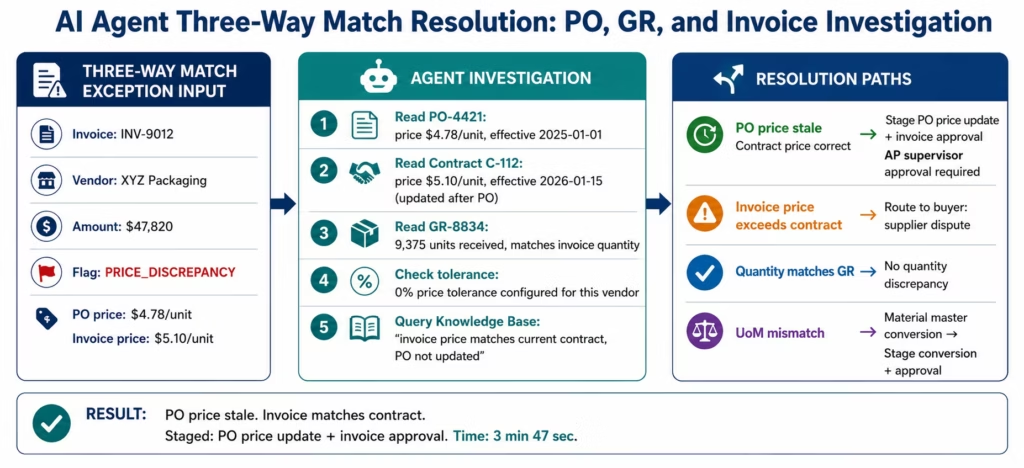
The AI agent solution: the PO Discrepancy Resolution Agent receives three-way match exceptions and investigates each by reading the PO, GR, and invoice in full, identifying the specific discrepancy type and amount, checking tolerance rules and contract terms, and routing to the appropriate resolution path.
Discrepancy Types and Agent Resolution Paths
Price discrepancy (invoice price differs from PO price):
- Agent queries the PO price, the agreed price in the vendor contract (retrieved from the contract management knowledge base), and any approved price adjustments.
- If invoice price matches the contracted price and the PO price is outdated: agent flags the PO price as stale and stages an approval for invoice acceptance at contract price.
- If invoice price exceeds both PO and contract price: agent routes to the buyer with full context for supplier dispute.
Quantity discrepancy (invoice quantity differs from GR quantity):
- Agent queries the GR record, the open delivery schedule on the PO, and the partial delivery tolerance.
- If the invoiced quantity matches the GR quantity but not the full PO: partial delivery scenario (see Use Case 1).
- If the invoiced quantity exceeds the GR quantity: agent flags as over-invoicing, routes to AP for supplier contact.
Unit of measure discrepancy:
- Agent identifies the UoM difference (supplier invoiced in boxes, PO was in units), queries the conversion factor in the material master, and stages the invoice conversion for approval.
The result: 70-80% of three-way match exceptions are resolved by the agent without human involvement in the investigation phase. The buyer and AP analyst see the exceptions that require supplier contact or contract negotiation: not the ones that were simple tolerance decisions.
Use Case 4: Month-End Close Acceleration Agent
The problem: month-end close is a bottleneck in every finance organisation, and the longest phase is not the journal posting: it is the investigation phase. Accounts that are flagged as out of expected range, reconciling items that have no clear explanation, intercompany transactions that do not balance across entities, and accruals that need verification against supporting data. Each flagged item requires a finance analyst to open it, find the relevant transactions, understand the posting history, and determine whether a journal entry, reversal, or escalation is required.
For a 200-account close with 15-20 flagged items, this investigation phase alone takes 3-5 days.
The AI agent solution: the Month-End Close Agent is triggered at the start of the close process and investigates every flagged account item in parallel: querying the transaction history, identifying the posting that created the anomaly, cross-referencing with supporting documentation, and staging the recommended journal entry or escalation.
What the Close Agent Investigates
Unexplained account balance variance:
- Agent queries the GL account transaction history for the close period
- Identifies the specific posting(s) that created the variance from expected balance
- Cross-references the posting to the source document (AP invoice, cash receipt, payroll posting)
- Determines: correct posting (balance expected), incorrect posting (staging reversal recommendation), or missing posting (staging accrual recommendation)
Intercompany imbalance:
- Agent queries intercompany account balances across all entities in the ERP
- Identifies the specific transaction pairs that are not in balance (Entity A posted a charge that Entity B has not recorded)
- Queries both entity books for the relevant transaction period
- Stages the intercompany elimination or reconciliation entry for finance controller review
Accrual verification:
- Agent queries the accrual balance and the underlying obligation (open POs, service contracts, utility estimates)
- Compares the accrued amount against the expected obligation
- If the accrual is understated or overstated by more than the configured threshold: stages an accrual adjustment for approval
Open item aging:
- Agent queries all open items in AP and AR that have been open beyond the configured aging threshold
- For each item: queries the reason for the open status, any communication history in the document, and the recommended disposition (force-clear, dispute, escalate)
The result: the investigation phase of month-end close compresses from 3-5 days (manual investigation of each flagged item) to 4-8 hours (agent investigation in parallel, human review of proposed actions). The finance controller reviews and approves agent-proposed journal entries rather than conducting the investigations from scratch. Month-end close cycle time reduces 35-50%.
Use Case 5: Vendor Performance Intelligence Agent
The problem: the quarterly supplier review requires the procurement team to compile a vendor performance brief for each strategic supplier: payment history, invoice accuracy rate, delivery performance, quality metrics, and any open disputes or credit memos. Assembling this brief for a single vendor requires querying SAP AP (payment history, invoice data), the procurement system (PO fulfillment, delivery performance), the quality management system (quality notifications, defect data), and the contract management repository (contract terms, SLA thresholds).
For a supplier base of 50 strategic vendors, this is 200-250 hours of data assembly per quarter.
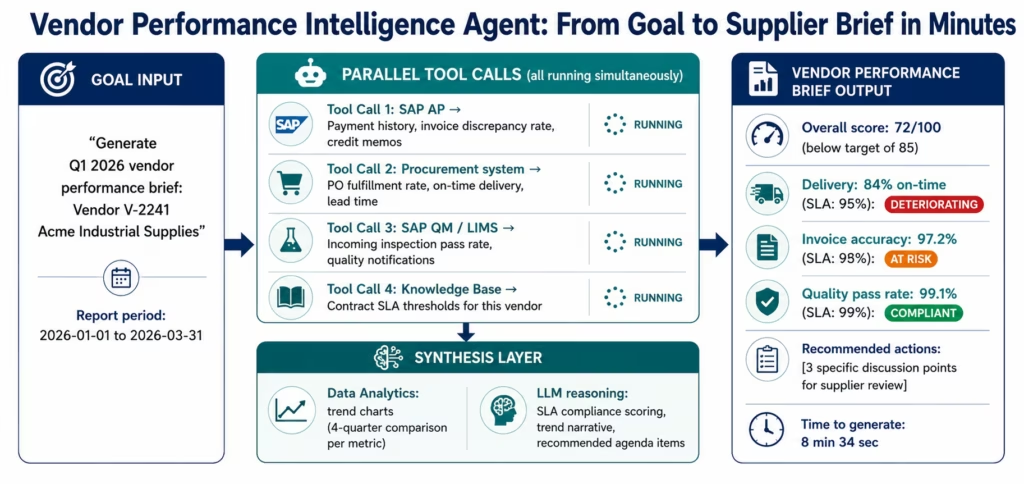
The AI agent solution: the Vendor Performance Intelligence Agent receives a vendor ID and the reporting period, queries all relevant systems, synthesises the findings, and delivers a structured vendor performance brief: with trend analysis, SLA compliance scoring, and recommended actions for the supplier review meeting.
The Agent’s Data Sources and Investigation Path
Goal: “Generate Q1 2026 vendor performance brief for Vendor V-2241 (Acme Industrial Supplies): including payment history, invoice accuracy, delivery performance, and quality metrics.”
Step 1: AP performance (API Tool Call to SAP/NetSuite): the agent queries:
- Invoice volume and total value for Q1
- Invoice discrepancy rate (invoices that required exception handling)
- Payment terms compliance (early payment discount capture rate)
- Credit memo volume (returned goods, disputed invoices)
Step 2: Procurement performance (API Tool Call): the agent queries:
- PO fulfilment rate (quantity delivered vs ordered)
- On-time delivery rate (delivery date vs PO requested delivery date)
- Partial delivery frequency
- Lead time variance
Step 3: Quality performance (API Tool Call to SAP QM or LIMS): the agent queries:
- Incoming inspection pass rate
- Quality notifications raised against this vendor
- Defect categories and recurrence patterns
Step 4: Contract compliance (Knowledge Base search): the agent searches the contract management knowledge base for the vendor’s SLA thresholds (on-time delivery target, invoice accuracy target, quality pass rate target) and compares actual performance against contracted targets.
Step 5: Data Analytics output: the agent generates a vendor performance dashboard with trend charts for each metric across the last four quarters: identifying deteriorating trends that should be flagged in the supplier review.
Step 6: Recommendation synthesis: the agent synthesises the findings into a structured brief with: overall performance score, metric-by-metric SLA compliance status, notable trend changes vs prior quarters, and recommended discussion topics for the supplier review meeting.
The procurement manager receives this brief automatically on the day before the supplier review. 20-minute review instead of 4-5 hours of data assembly. For 50 strategic vendors: the difference between 250 hours of preparation work and 250 minutes of review time.
Key Outcomes and Results
Finance and procurement teams deploying eZintegrations AI Agents for ERP automation report the following within 60-90 days:
AP Exception Handling:
- Investigation time per exception: 20-40 minutes (manual) → 3-8 minutes (agent-investigated, human approves)
- Exception queue clearance: from end-of-week backlog to same-day clearance for 80% of exceptions
- AP team capacity for strategic work: increases 40-50% as investigation work shifts to agents
Payment Operations:
- Payment failure investigation time: 3-4 hours (Monday morning manual) → pre-delivered diagnosis report available by 7 AM
- Payment rerun lead time: reduces 60-70% as root cause is identified before the team starts work
- Payment accuracy: improves as vendor master issues are identified and corrected proactively
Procurement:
- Three-way match exception resolution: 70-80% resolved without human investigation involvement
- Buyer time on PO discrepancy investigation: reduces 60-70%
- Supplier disputes initiated correctly (with evidence assembled): improve significantly as agent provides full documentation
Financial Close:
- Month-end close investigation phase: reduces from 3-5 days to 4-8 hours
- Close cycle time: reduces 35-50% overall
- Finance controller review quality: improves as agent-assembled briefs present full context
Vendor Management:
- Quarterly supplier brief preparation: from 4-5 hours per vendor to 8-12 minutes per vendor
- Supplier review meeting quality: improves with data-complete, trend-annotated briefs
- SLA non-compliance detection: earlier, as continuous monitoring surfaces issues before the quarterly review
How to Get Started
Deploying an ERP AI agent does not require a development project. The eZintegrations Agent Builder configures AI agents through the same no-code interface as Level 1 and Level 2 workflows: defining the agent’s goal, the tools it has access to, its autonomous action policy, and its escalation conditions.
Step 1: Import the relevant AI agent template from the Automation Hub
Browse the Automation Hub for ERP AI agent templates:
- AP Exception Investigation Agent (SAP / NetSuite)
- Payment Failure Diagnosis Agent (SAP / Oracle)
- Three-Way Match Discrepancy Agent (SAP / NetSuite)
- Month-End Close Acceleration Agent
- Vendor Performance Intelligence Agent
Each template includes pre-configured: goal statement format, tool assignments (which ERP APIs the agent calls), a starter resolution playbook in the knowledge base, and autonomous action policy defaults.
Step 2: Connect your ERP systems
The agent uses the same ERP connectors as Level 1-2 workflows. If you already have eZintegrations connected to SAP, Oracle, or NetSuite, the agent inherits those connections. For new deployments:
- SAP: system hostname, client number, service account (OData V4 and CSRF handled automatically)
- Oracle ERP Cloud: base URL, client ID, client secret (assertion grant OAuth handled automatically)
- NetSuite: account ID, TBA credentials (SuiteQL and token lifecycle handled automatically)
Step 3: Define the autonomous action policy
For each action type the agent may take, configure the policy:
- Read any ERP data: universally autonomous
- Stage proposed actions for human approval: autonomous (no write operations executed without human sign-off unless explicitly pre-authorised)
- Execute write operations (vendor master update, invoice match, journal posting): configure the value threshold and action types that are pre-authorised for autonomous execution
Start conservative (all write operations require approval) and expand the pre-authorised action list as the agent’s accuracy is confirmed over the first 30-60 days.
Step 4: Load the resolution playbook knowledge base
The agent searches the resolution playbook when it needs to determine the correct resolution path for a specific exception type. Populate the knowledge base with:
- Your AP exception resolution procedures (partial delivery, price variance, quantity mismatch)
- Payment failure resolution procedures (bank detail update, GL account correction, duplicate check)
- Escalation criteria (which exception types always require human decision regardless of agent findings)
This takes 2-4 hours and is the most important configuration step for agent accuracy.
Step 5: Run supervised for two weeks, then expand
For the first two weeks, configure all agent proposed actions to require human approval: observe the agent’s investigation quality, resolution accuracy, and escalation appropriateness. Expand the pre-authorised action policy gradually as confidence in the agent’s judgment is established.
Most finance teams reach 80%+ autonomous exception resolution within 30-45 days of deployment.
Import your ERP AI agent template now: SAP, Oracle, and NetSuite agent templates with pre-configured tool assignments and resolution playbooks.
[VIDEO PLACEHOLDER: ERP AI agent demo | “AI Agents for ERP in eZintegrations: AP Exception Investigation and Payment Failure Diagnosis: Live Agent Investigation Demo” | Embed after How to Get Started section | Show: the AP Exception Investigation Agent receiving an invoice discrepancy goal, executing the 7-step investigation (PO query, GR query, vendor master, contract terms, knowledge base), and delivering a staged resolution in 4 minutes: then the Payment Failure Diagnosis Agent delivering a pre-assembled 6-failure diagnosis report before the Monday morning team arrival. Duration: 10-12 minutes.]
FAQs
Traditional automation workflows execute predefined steps in a fixed sequence, meaning the same actions run every time regardless of what each step discovers. AI agents, by contrast, receive a goal and dynamically determine their own investigation sequence based on findings at each stage. For example, a traditional AP workflow may always run 'extract invoice data → compare to PO → post if match.' An AI agent instead reads the exception, determines which discrepancy to investigate first, queries the appropriate systems dynamically, and either resolves or escalates the issue based on the investigation results. AI agents are specifically designed to handle exception scenarios where the correct path could not be predefined during workflow design.
Using an Automation Hub template, the first supervised ERP AI agent deployment typically takes 3-7 business days. Day 1-2 covers ERP connector configuration for SAP OData V4, NetSuite SuiteQL, or Oracle REST APIs, usually requiring 2-4 hours each. Day 2-3 focuses on autonomous action policy definition and knowledge base loading, including resolution playbooks and escalation criteria, which generally takes 3-6 hours. Day 3-4 includes template configuration and testing against sample exceptions. Day 5-7 involves supervised deployment with human approval required for all agent actions. By weeks 3-4, organisations typically expand pre-authorised action policies based on observed agent accuracy. Full autonomous operation, where more than 80% of exceptions are handled without human involvement, is commonly achieved within 30-45 days.
Within SAP S/4HANA, an eZintegrations AI agent can query and act across any OData V4-exposed service without requiring custom code development. Read operations include accessing purchase orders, goods receipts, vendor master records, payment documents, GL account balances, open items, and material documents. Pre-authorised write operations can include posting invoice matches, creating quality notifications, updating vendor master records, creating journal entries, and clearing open items. CSRF token management is handled automatically by the API Tool Call layer, meaning developers do not need to write token-handling logic, ABAP code, or involve SAP Basis teams for standard OData operations.
Yes, A single eZintegrations AI agent can interact with SAP, NetSuite, Oracle, and other configured ERP systems within the same investigation sequence. For example, during cross-ERP discrepancy investigations, the agent can compare a vendor record in SAP with the same vendor record in NetSuite, reconcile intercompany transactions across multiple ERP instances, identify discrepancies, and stage corrections automatically. The agent operates through a central tool registry containing authenticated connections to all configured ERP systems.
The autonomous action policy is configured individually for each agent and action type within the eZintegrations Agent Builder. Read operations are typically configured as fully autonomous, while write operations can be restricted by transaction type or financial threshold. For example, invoice approvals below $5,000 may be autonomous, approvals between $5,000 and $50,000 may require AP supervisor approval, and approvals above $50,000 may require Finance Controller approval. Every agent action, whether autonomous or human-approved, generates an immutable audit trail entry including the goal received, tools called, results returned, actions taken, approvals received, and timestamps. These audit trails support internal audit requirements as well as external compliance standards including SOX and 21 CFR Part 11.
Yes, with the appropriate compliance configuration. For healthcare organisations managing HIPAA-regulated financial and patient data, eZintegrations processes all agent tool calls entirely within its HIPAA-compliant infrastructure without sending data to external AI providers. For financial services organisations handling SOX-regulated records, immutable audit trails generated for every agent action support SOX documentation and traceability requirements. For pharma and life sciences organisations, 21 CFR Part 11-compliant audit trails cover agent interactions involving regulated financial records. Additionally, autonomous action policies can be configured to always require human approval for modifications to regulated records, regardless of the agent's confidence level. 1. How do AI agents for ERP differ from traditional automation workflows?
2. How long does it take to deploy an ERP AI agent with eZintegrations?
3. What can an AI agent do in SAP without writing code?
4. Does the AI agent work across multiple ERP systems simultaneously?
5. How is the agent's autonomous action policy configured and audited?
6. Can AI agents handle ERP exceptions for complex industries like healthcare or financial services?
Conclusion: The Exception Queue Is Not a People Problem. It Is an Architecture Problem.
The AP exception queue that grows faster than the team can clear it, the payment failures that wait until Monday morning for investigation, the month-end close investigation phase that takes longer than the close itself: these are not symptoms of an understaffed finance team. They are symptoms of an integration architecture that moves routine data between systems (handled well by Level 1-2 workflows) but has no layer capable of conducting the multi-system investigations that exceptions require.
AI agents are that layer. They receive goals, query systems in the sequence their findings indicate, synthesise results, and either resolve autonomously or escalate with full context. The exception that took 35 minutes of manual investigation takes 4 minutes of agent investigation. The 47-item Monday morning queue becomes a 9-item queue of genuinely novel situations: the ones that actually benefit from human judgment.
eZintegrations delivers Level 3 AI Agents with 9 native enterprise tools, enterprise-depth ERP connectors (SAP OData V4 with CSRF, NetSuite SuiteQL with TBA, Oracle assertion grant OAuth), configurable autonomous action policy, and an immutable audit trail: in the same no-code platform as the Level 1 and Level 2 workflows that handle the routine data movement.
Import your ERP AI agent template now: AP exception, payment failure, three-way match, month-end close, and vendor performance agent templates are available with pre-configured ERP connectors and resolution playbooks.

