How AI Transforms API Integration: Beyond Field Mapping and Static Rules
May 22, 2026AI-powered API integration adds four capabilities that static rule-based integration cannot provide: Document Intelligence (extracting structured data from unstructured documents without predefined templates), LLM Classification (routing data based on meaning, not just field values), Data Analysis (detecting anomalies and patterns in data streams in real time), and Semantic Matching (resolving entity identity across different naming conventions). Together, these eliminate the manual exceptions that static integration rules cannot handle.
TL;DR:
- Traditional API integration handles the cases your rules cover. AI-powered integration handles the cases your rules cannot: unstructured documents, ambiguous classifications, anomalous data patterns, and entity matching across inconsistent naming conventions.
- Four AI capabilities change what integration can do: Document Intelligence (read any document format and extract structured data), LLM Classification (route based on meaning, not field values), Data Analysis (detect statistical anomalies in real time), and Semantic Matching (resolve entity identity across different naming conventions).
- The architectural distinction that matters: native AI integration versus bolt-on AI. Native AI runs within the integration platform’s processing environment: no external API call, no data leaving the integration infrastructure, no additional vendor relationship. Bolt-on AI appends an LLM call to a workflow step and returns a text string you must parse.
- eZintegrations delivers all four AI capabilities as native nodes in the workflow builder: the same interface used for REST, GraphQL, and database integrations. No separate AI platform subscription. No API keys to rotate.
- The practical outcome: integration pipelines that handle exceptions autonomously instead of routing them to human review queues.
What Static API Integration Cannot Do
Static API integration handles the cases your rules define. When the rules are complete and the data is clean, it handles them reliably, at volume, and without human attention. This is the right tool for the majority of enterprise integration scenarios.
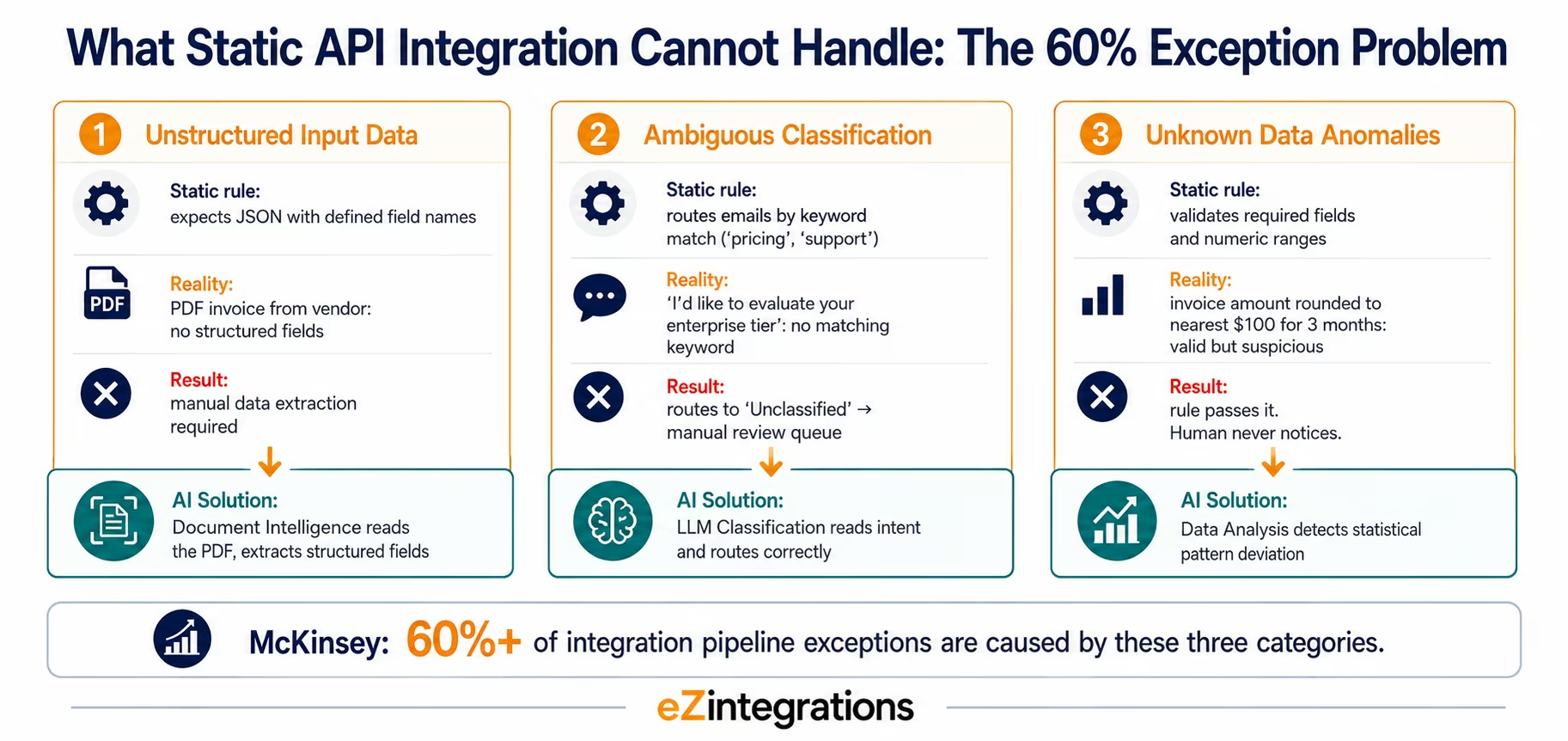
The problem is that production enterprise data is not always clean, structured, or predictable. Three categories of exceptions consistently exceed what static rules can handle.
Category 1: Unstructured input data. Your accounts payable team receives vendor invoices as PDF email attachments. Your integration rule for invoice processing assumes a structured JSON payload with specific field names. The PDF does not match that assumption: it is an unstructured document with layout, typography, and formatting that contains the data your rule expects, but not in the form the rule can read. Static integration fails at the document boundary. Someone must manually extract the data and enter it in the structured form the rule can handle.
Category 2: Ambiguous classification. Your CRM receives 200 inbound inquiry emails per day. Your routing rule examines the subject field and routes based on keyword matching: emails containing “pricing” go to the sales team, emails containing “support” go to the CS team. But many emails contain neither keyword, or contain both, or express intent in ways the keyword list doesn’t anticipate: “I’d like to evaluate your enterprise tier” is a sales inquiry that will never match a keyword rule. Static classification handles the cases the ruleset anticipated. The 30% of emails that don’t match a rule go to a default “unclassified” queue: which becomes a manual review burden.
Category 3: Unknown data anomalies. Your ERP receives financial transactions from a dozen source systems. Your validation rule rejects records with null required fields or values outside a numeric range. But the most costly data quality failures are often not detected by rules: they are statistical anomalies that individually appear valid but represent a systematic error in the source system. A supplier that has billed the same invoice amount to the nearest hundred dollars for three consecutive months. A product’s daily order velocity that has quietly tripled over the past five days. These are signals that rules do not detect because they require statistical context across the data stream, not validation of individual records.
According to McKinsey over 60% of integration pipeline exceptions in enterprise environments are caused by these three categories: data that is structurally valid but semantically ambiguous, unstructured, or anomalous in ways that rules cannot define in advance. AI-powered integration addresses exactly this 60%.
The Four AI Capabilities That Change Integration
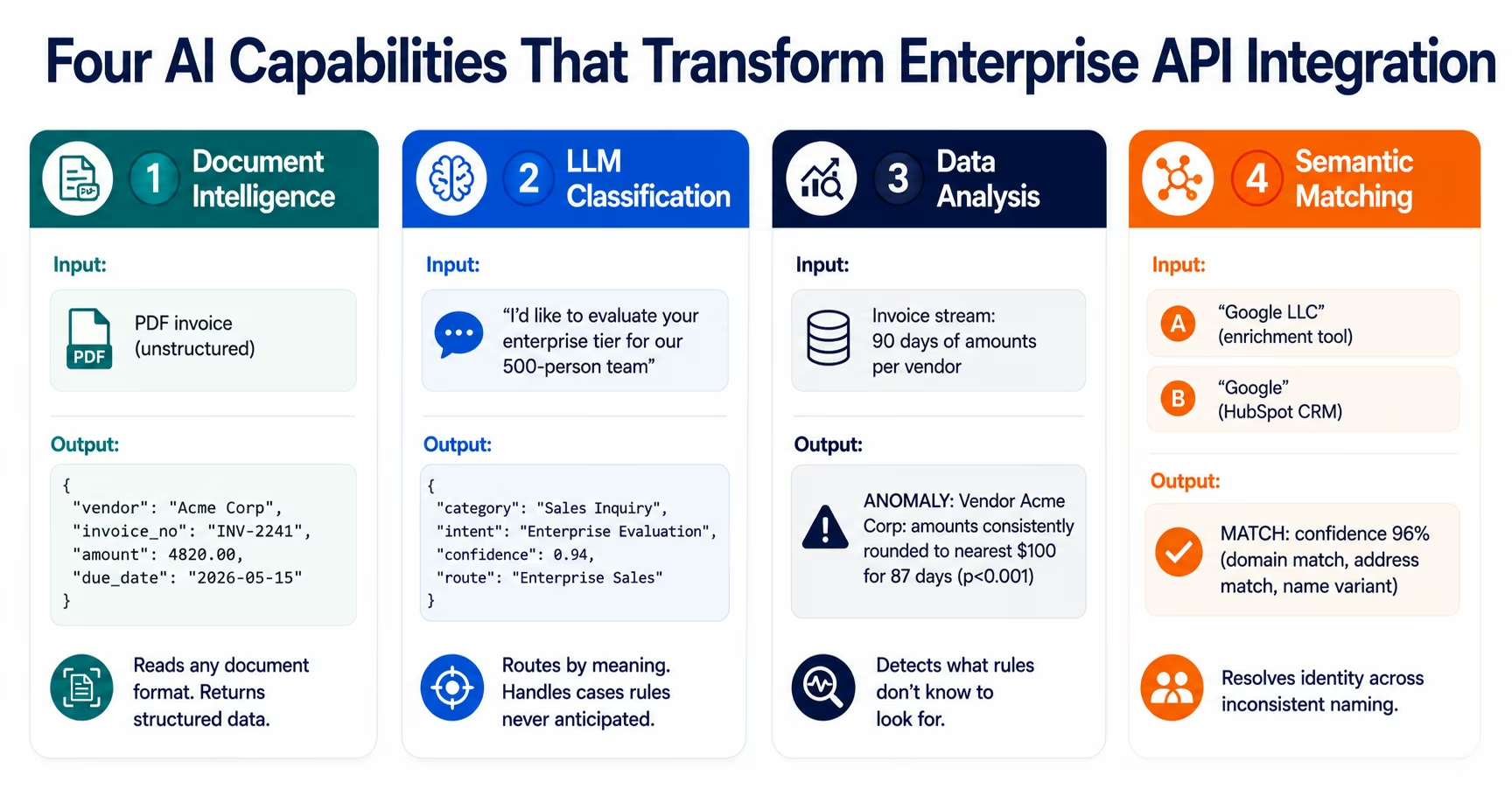
AI-powered integration is not a single technology: it is four distinct capabilities, each addressing a different category of integration exception. Understanding what each capability does, and what it does not do, prevents both under-application (missing use cases where AI would eliminate manual work) and over-application (attempting AI solutions where deterministic rules are simpler and more reliable).
The four capabilities:
- Document Intelligence: reads unstructured documents and extracts structured data
- LLM Classification: routes data based on semantic meaning rather than field values
- Data Analysis: detects patterns and anomalies in data streams
- Semantic Matching: resolves entity identity across different naming conventions
Each is a node in the eZintegrations workflow builder: added to an existing or new integration pipeline the same way a field mapping step or an API call is added. The AI capability does not replace the pipeline; it enhances specific steps within it.
Document Intelligence: Reading What Rules Cannot Parse
Document Intelligence is the AI capability that reads unstructured documents: PDFs, Word documents, scanned images, email attachments: and returns structured, field-mapped data that the rest of the integration pipeline can process.
This is the capability that eliminates the most manual data entry in enterprise integration. The use cases are broad: any integration that currently requires a human to read a document and enter its contents into a system is a Document Intelligence candidate.
How Document Intelligence Works
A Document Intelligence model is trained (or prompted, in the case of large multimodal models) to read a document and extract specified fields. You define what you want extracted: “from this invoice, extract: vendor name, invoice number, invoice date, due date, line items, total amount payable.” The model reads the document: regardless of layout, font, language, or formatting variations: and returns the extracted fields as a structured JSON object.
For standard document types (invoices, purchase orders, contracts, tax forms), Document Intelligence models achieve 90-95% field extraction accuracy on the first configuration, reaching 97-99% after calibration with a sample set of documents from your specific vendor base.
Document Intelligence vs OCR
Traditional OCR (Optical Character Recognition) converts a scanned image or PDF to machine-readable text: it does not understand document structure or extract specific fields. After OCR, the text must be parsed to find the relevant values, which typically requires pattern matching rules (regex) that must be written and maintained for each document format variation.
Document Intelligence combines OCR with field understanding: it knows that “Invoice Total” and “Amount Due” and “Balance Owing” are all the same field in different invoice templates, and extracts the correct value regardless of which label the vendor uses.
Enterprise Document Intelligence Use Cases
Accounts payable automation: vendor invoices arrive as PDF email attachments. Document Intelligence reads each invoice and extracts vendor name, invoice number, date, line items, and total. The extracted data is matched against the purchase order in the ERP and posted as an AP liability entry: without manual data entry. At $5-15 per invoice in manual processing cost, a 500-invoice-per-month operation saves $30,000-$90,000 per year.
Contract intelligence: when a signed contract arrives from DocuSign, Document Intelligence extracts contract value, billing frequency, payment terms, renewal date, and termination notice period: and writes each field to the CRM record and billing system. Zero manual extraction from PDF to CRM.
Loan and financial document processing: mortgage applications, financial statements, tax returns processed by Document Intelligence rather than manual review teams: each document’s key fields extracted and verified against source data automatically.
Clinical trial document intake: pharmacovigilance case reports arriving as paper forms (MedWatch, CIOMS) processed by Document Intelligence and entered into safety databases: eliminating manual transcription errors.
What Document Intelligence Handles Less Well
Documents with highly irregular or freeform layouts (handwritten notes, highly creative design layouts without standard document structure) achieve lower extraction accuracy. For these cases, a confidence threshold should be configured: extractions above 85-90% confidence route automatically; below-threshold extractions route to human review with the extracted values pre-populated for correction.
LLM Classification: Routing by Meaning, Not Field Values
LLM Classification uses a large language model to read any text and categorise it according to criteria you define: routing decisions based on the meaning of the content, not the presence of specific keywords or field values.
This is the capability that handles the 30% of inbound messages that rule-based routing cannot classify. Every enterprise has these: the inbound email that expresses a complaint without using the word “complaint,” the support ticket that describes a billing issue using product language, the contract clause that represents a non-standard term without using the vocabulary the legal team built their classification rules around.
How LLM Classification Works
You define the classification categories in plain language. For a support ticket router: “Classify this support ticket as one of: Product Bug (user reports the product is not working as expected), Billing Issue (user has a question or concern about a payment or invoice), Feature Request (user suggests a new capability), Churn Signal (user expresses dissatisfaction or intent to cancel), General Inquiry (anything else). For each classification, provide the category label and a confidence score from 0 to 100.”
The LLM reads the ticket text and returns a structured classification output: not the raw text response of an unstructured LLM call, but a structured JSON object with the category, confidence score, and optionally a secondary category for ambiguous cases.
The workflow then routes based on the structured output: tickets classified as “Churn Signal” with confidence above 80 route to the CS Director with a high-priority flag; tickets classified as “Product Bug” route to the engineering Jira board; and so on.
LLM Classification vs Keyword Matching
Keyword matching: routes emails containing the word “cancel” to the churn risk queue. Misses: “I’m thinking about other options,” “Not getting the value we expected,” “Our CFO is questioning the spend.” False positives: “Can you tell me how to cancel my free trial?” (a growth signal, not churn).
LLM Classification: reads the full text with semantic understanding. “Not getting the value we expected” → classified as Churn Signal, confidence 87%. “Can you tell me how to cancel my free trial?” → classified as General Inquiry, confidence 91% (the cancel language appears in a free trial context, not a paid subscription concern).
The accuracy improvement over keyword matching is consistent: LLM Classification typically achieves 85-92% routing accuracy on first configuration, reaching 93-97% after one round of criteria refinement based on misclassification review.
Enterprise LLM Classification Use Cases
Customer support ticket routing: classify by type, urgency, sentiment, and churn signal: route to the correct team with the priority pre-set before the ticket enters the queue.
Sales email qualification: classify inbound inquiry emails by intent, buying stage, urgency, and ICP fit: route high-intent ICP-match leads to AE teams immediately, nurture others, discard clear mismatches.
Contract clause classification: classify contract clauses as standard, non-standard, or requiring legal review: flagging non-standard clauses automatically for the legal team’s attention before execution.
Regulatory document classification: classify clinical adverse event reports by seriousness (serious/non-serious) and expectedness (expected/unexpected) for pharmacovigilance: routing each case to the appropriate processing pathway based on regulatory reporting timelines.
Confidence Thresholds and Human Review
The most important LLM Classification configuration decision is the confidence threshold. Classifications above the threshold route automatically; below-threshold classifications route to a human review queue with the AI’s classification pre-populated as a suggestion. This keeps false positive rates low for high-stakes routing while still automating the confident majority.
For a support ticket router, a threshold of 80% confidence routes approximately 70-75% of tickets automatically and sends 25-30% to human review. Within one cycle of reviewing the human-reviewed tickets and refining the classification criteria, the auto-route rate typically increases to 85-90%.
Data Analysis: Detecting What Rules Don’t Know to Look For
Data Analysis is the AI capability that monitors data streams for statistical anomalies: detecting patterns that deviate significantly from established baselines without requiring anyone to define what the anomaly looks like in advance.
This is the distinction between rules that check known conditions and statistical analysis that detects unknown deviations. A rule says “alert if invoice amount exceeds $100,000.” Data Analysis says “this vendor’s invoice amounts have been consistently rounded to the nearest $100 for 87 consecutive days: this is statistically improbable under normal billing conditions”: a signal that rules would never detect because no one defined it in advance.
How Data Analysis Works in Integration
The Data Analysis node monitors a specified data dimension over a rolling time window, calculates the statistical distribution of values, and flags observations that deviate significantly from the distribution.
Configuration parameters:
- The data dimension to monitor: invoice amounts by vendor, product order velocity by SKU, support ticket volume by customer, API call frequency by endpoint
- The rolling window: 30 days, 90 days, or a custom period
- The sensitivity threshold: how many standard deviations from the mean constitute an anomaly (typically 2-3σ for a meaningful signal)
When an anomaly is detected, the Data Analysis node outputs: the anomaly description (which dimension, the observed value, the expected range, the statistical significance), the affected records, and the recommended action if configured.
Data Analysis Use Cases in Enterprise Integration
AP fraud detection: monitor invoice amounts per vendor over a 90-day rolling window. Detect statistically improbable patterns: amounts consistently rounded to the nearest $100 (possible fraud indicator), amounts that consistently arrive at the exact same value (possible duplicate invoice pattern), amounts that increase precisely 3.5% every invoice (possible systematic overbilling).
Inventory velocity anomaly detection: monitor product order velocity per SKU. Detect SKUs whose velocity has increased 3x over 7 days (demand spike signal), SKUs whose velocity has dropped to zero (potential website or catalogue issue), or SKUs with seasonal patterns that deviate from the expected seasonal curve.
Churn risk signal detection: monitor product usage metrics per account. Detect accounts whose login frequency has declined 40%+ compared to their own rolling 30-day baseline (early churn signal), accounts whose feature usage breadth is declining, or accounts whose usage pattern deviates significantly from cohort peers at the same subscription age.
API health monitoring: monitor API call patterns by endpoint and client. Detect unusual call frequency spikes (possible credential compromise or scraping), latency increases above historical baseline, or error rate increases that appear before visible failure.
Statistical Significance vs Business Significance
Not every statistical anomaly is a business-significant event. A Data Analysis configuration that flags every 2σ deviation on high-frequency data streams will produce too many alerts for an operations team to act on. The practical configuration approach: start at 3σ sensitivity (fewer alerts, higher confidence), review the flagged cases for a month, and adjust sensitivity based on the false positive and false negative rates you observe.
Semantic Matching: Resolving Identity Across Inconsistent Data
Semantic Matching identifies when two records in different systems refer to the same real-world entity: even when the names, identifiers, and formats differ across systems.
Every enterprise integration estate eventually produces the same problem: the company that appears as “Google LLC” in the enrichment tool, “Google” in HubSpot, “Google, Inc.” in Salesforce, and account number 84721 in NetSuite. These are all the same company. The static integration rule that tries to match these records fails because none of the string representations match exactly.
Semantic Matching solves this with multi-signal entity resolution: it compares records across dimensions (name similarity, website domain, physical address, phone number, identifier cross-reference) and calculates a confidence score for the match.
How Semantic Matching Works
The Semantic Matching node receives two or more records that may represent the same entity and outputs a match decision and confidence score.
The matching algorithm compares:
- Name similarity: phonetic matching (Soundex, Metaphone), edit distance (Levenshtein), and n-gram similarity for the name field
- Domain match: if both records have associated email addresses or website URLs, matching on the domain
- Address normalisation: standardising address formats (abbreviations, state codes, postal code variations) before comparison
- Identifier cross-reference: if either record has a DUNS number, LEI, or other registered identifier, matching on that
A match confidence above the configured threshold is treated as the same entity and triggers the configured merge or enrichment action. A confidence below the threshold routes to a human deduplication review queue.
Enterprise Semantic Matching Use Cases
CRM deduplication: when a new lead arrives from a content download, Semantic Matching checks whether the lead’s company matches any existing Salesforce account: preventing duplicate accounts from accumulating across the CRM.
Vendor master matching: when a new vendor invoice arrives, Semantic Matching identifies whether the invoicing entity matches an existing vendor record in the ERP: even if the legal entity name on the invoice differs from the vendor master name due to DBA names, subsidiaries, or name formatting variations.
Customer identity across channels: matching customer records across eCommerce (Shopify), CRM (HubSpot), and billing (Stripe): where the same customer may have slightly different name formats across systems: to build a unified customer profile without manual deduplication.
Product catalogue matching: identifying when the same physical product appears in different systems under different names (“16oz Stainless Coffee Mug” vs “Coffee Mug Stainless Steel 16oz”): critical for cross-system inventory reconciliation.
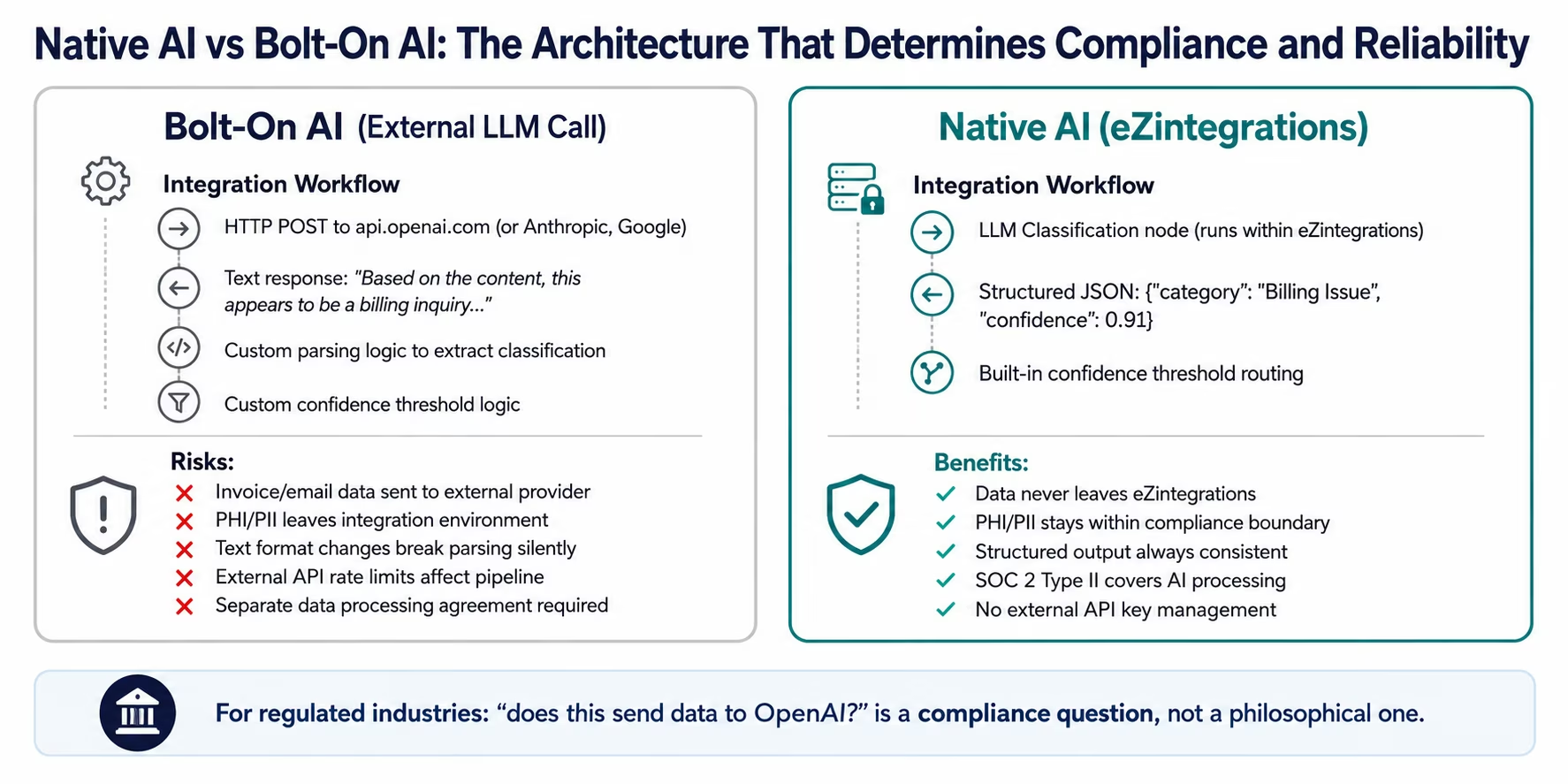
Native AI vs Bolt-On AI: The Architecture That Matters
The most important architectural decision in AI-powered integration is whether the AI capabilities are native to the integration platform or appended as external service calls.
This distinction determines reliability, data compliance, performance, and the actual depth of capability you receive.
Bolt-on AI (the most common current approach):
The workflow calls an external LLM API (OpenAI, Anthropic, Google Gemini) and receives a text response. The workflow then parses that text response to extract the classification or extracted value.
What this means in practice:
- Your integration data (invoice content, email text, customer records) is sent to an external AI provider
- The reliability of the AI step depends on the external API’s availability, latency, and rate limits
- When the LLM provider changes a model version, the text format of responses may change: breaking your parsing logic silently
- The output is a text string that must be parsed: no built-in confidence scores, structured output guarantees, or human review routing
- For regulated industries: PHI, PII, and financial data in the documents or emails being classified travels to the external AI provider
Native AI (the eZintegrations approach):
Document Intelligence, LLM Classification, Data Analysis, and Semantic Matching run within eZintegrations’ own processing infrastructure. The integration data never leaves the eZintegrations environment.
What this means in practice:
- Regulated data (PHI in clinical documents, PII in customer emails, financial data in invoice streams) is processed natively: no data to external AI providers
- The output is always a structured object with defined fields (category, confidence score, extracted values): not a text string to parse
- Confidence thresholds and human review routing are built-in workflow configuration options: not custom logic you build
- SOC 2 Type II certification covers the AI processing environment
- No external AI provider relationship to manage: no API keys, no rate limit monitoring, no cost management for LLM API calls
The compliance implication:
For healthcare organisations processing clinical documents, financial institutions processing transaction data, and legal teams processing contracts: the question “does this AI step send our data to OpenAI?” is not academic. In regulated environments, sending PHI or confidential financial data to an external AI provider requires a separate data processing agreement with that provider and a separate privacy impact assessment.
Native AI eliminates this compliance surface entirely.
The AI-Powered Integration Workflow: A Complete Example
To make the four capabilities concrete, here is a complete AI-powered workflow for accounts payable automation: a use case where all four AI capabilities contribute in sequence.
The scenario: a manufacturing company receives 600 vendor invoices per month via email, from 120 different vendors, in varying PDF formats. The current process: an AP team manually opens each email, reads the invoice, enters the data into SAP, matches it to the purchase order, and routes it for approval. Time per invoice: 15-20 minutes. Total monthly cost: 150-200 person-hours.
The AI-powered workflow:
Step 1: Email arrival trigger: a new email arrives in the AP inbox. eZintegrations detects the new email and starts the workflow.
Step 2: Document Intelligence: the PDF attachment is passed to the Document Intelligence node. The node extracts: vendor name, vendor tax ID, invoice number, invoice date, due date, each line item (description, quantity, unit price), tax amount, and total payable. Output: structured JSON with all extracted fields and confidence scores per field.
Step 3: Semantic Matching: the extracted vendor name is passed to the Semantic Matching node, which compares it against the SAP vendor master. “Acme Industrial Supplies, Inc.” (on the invoice) matches “ACME INDL SUPP” (in SAP) with 94% confidence. The SAP vendor ID is appended to the workflow payload.
Step 4: Data Analysis: the invoice amount ($47,200) is passed to the Data Analysis node, which compares it against the rolling 90-day distribution of invoice amounts from this vendor. The amount is within 2 standard deviations of the mean: no anomaly. The workflow continues.
If the Data Analysis node had flagged an anomaly (invoice amount 340% above historical baseline), the workflow would branch: route the invoice to a senior AP reviewer with the anomaly details, hold the automatic posting.
Step 5: Three-way match: the workflow calls the SAP API to retrieve the corresponding purchase order using the vendor ID and PO reference from the invoice. It compares invoice line items against PO line items: quantities match, unit prices match: full match confirmed.
Step 6: ERP posting: the workflow posts the AP liability entry to SAP using the SAP OData V4 connector. The AP entry is created with all extracted fields populated, referenced to the PO, and routed to the appropriate approver based on the configured approval rules.
Step 7: LLM Classification: any invoices where Document Intelligence extraction confidence was below threshold (say, 80% on any field) are classified by a secondary LLM Classification step that reads the raw invoice text and confirms the extracted values or flags the specific fields that need human review.
The outcome: 85% of invoices process automatically end-to-end. 15% route to human review for specific reasons (low extraction confidence, anomalous amount, no PO match) with the extracted data pre-populated and the specific review reason annotated. Manual work per invoice: near zero for the 85%, 5-10 minutes for the 15%. Total monthly cost: 15-25 person-hours versus the previous 150-200.
What AI Integration Cannot Do (Yet)
Intellectual honesty requires acknowledging what AI-powered integration does not handle well in 2026.
Highly novel document formats with no structural pattern: Document Intelligence achieves 90-97% accuracy on standard enterprise document types (invoices, purchase orders, contracts, tax forms). For truly freeform documents: handwritten field reports, creative-layout marketing materials, non-standard internal forms: accuracy drops significantly. These cases are best handled by a human review step with AI-assisted pre-population.
Classification decisions requiring domain expertise: LLM Classification excels at routing based on semantic meaning in general language. It is less reliable for classifications that require deep domain knowledge that was not in the model’s training data: highly specialised legal clause interpretation, regulatory classification decisions requiring clinical medical judgment. These benefit from AI-assisted pre-classification with mandatory human expert review.
Causality versus correlation in anomaly detection: Data Analysis detects statistical anomalies reliably. It does not explain why the anomaly exists: it identifies that invoice amounts from Vendor X are unusually rounded but cannot determine whether this is fraud, a billing system quirk, or a pricing model change. The anomaly detection provides the signal; human judgment determines the cause and the response.
Exactly-once AI processing guarantees: native AI processing in integration pipelines provides at-least-once processing guarantees (the same document may be processed twice if a workflow retry occurs). For applications where duplicate AI processing would produce incorrect outcomes (financial transaction classification where duplicate processing produces duplicate postings), idempotency controls must be explicitly implemented.
How eZintegrations Implements AI-Powered API Integration
eZintegrations delivers the four AI capabilities as native workflow nodes: configured in the same visual workflow builder as REST API calls, database queries, and data transformations. The AI is infrastructure, not an add-on.
Document Intelligence node: specify the document type (invoice, contract, purchase order, or custom) and the fields to extract. Upload 5-10 sample documents for calibration if the document format is non-standard. The node returns a structured JSON object with extracted field values and per-field confidence scores. Confidence threshold configuration routes low-confidence extractions to a human review queue.
LLM Classification node: define the classification categories and criteria in plain language. The node returns a structured JSON object with the category label, confidence score, and optional secondary category. Confidence threshold routing is built-in: high-confidence classifications route automatically; low-confidence route to a configured human review queue.
Data Analysis node: specify the data dimension to monitor, the rolling window, and the anomaly sensitivity (number of standard deviations). The node outputs: anomaly detected (boolean), anomaly description (natural language), statistical significance (p-value), and affected record identifiers. Integrates with the workflow’s conditional branching to route anomalous records to investigation workflows.
Semantic Matching node: specify the match fields, the matching algorithm weights (name similarity vs domain match vs address match), and the confidence threshold for automatic match vs human review. The node returns a match decision, confidence score, and the matched record’s identifier in the target system.
SOC 2, GDPR, and HIPAA compliance: all four AI capabilities run natively within eZintegrations’ HIPAA-compliant and GDPR-compliant infrastructure. No data is sent to external AI providers. A signed BAA covers all AI processing for healthcare customers. SOC 2 Type II certification covers the full AI processing environment.
On-premises document sources: for organisations where documents (invoices, contracts, clinical records) reside on on-premises systems behind corporate firewalls, eZintegrations connects via IPSec Tunnel: the same encrypted tunnel used for on-premises ERP and database connectivity.
Book a free Demo AI-powered integration demo and bring your specific exception-handling use case. We will show you the Document Intelligence, LLM Classification, or Data Analysis configuration for your specific document types and routing requirements.
Frequently Asked Questions
AI-powered API integration adds semantic understanding to data pipelines, enabling workflows to process unstructured data, route based on meaning rather than fixed field values, detect anomalies without predefined rules, and resolve entity identity across inconsistent naming conventions. Traditional integration handles deterministic rule-based cases reliably, while AI-powered integration addresses the majority of enterprise exceptions that cannot be predefined.
Document Intelligence extracts structured data from unstructured documents such as PDFs, Word files, and scanned images. It recognises equivalent fields across varying formats such as Invoice Total, Amount Due, or Balance Owing and maps them consistently. Typical accuracy ranges from 90-95 percent initially and improves to 97-99 percent after calibration.
LLM Classification generally achieves 85-92 percent accuracy on first configuration and improves to 93-97 percent after refinement. Confidence thresholds are used to automatically process high-confidence outputs while routing lower-confidence cases to human review queues, ensuring reliability in critical workflows and minimising false positives.
Native AI operates within the integration platform infrastructure, keeping data within compliance boundaries and producing structured outputs with confidence scores. Bolt-on AI relies on external APIs, sending data to third-party providers and returning unstructured text that requires parsing. Native AI improves security, reliability, and operational simplicity compared to bolt-on approaches.
Document Intelligence supports structured and semi-structured documents including invoices, purchase orders, contracts, tax forms, shipping manifests, customs declarations, financial statements, clinical reports, and loan applications. Accuracy is highest for documents with consistent layouts, while highly unstructured or handwritten documents may require human review assistance.
No, All AI processing including Document Intelligence, LLM Classification, Data Analysis, and Semantic Matching runs within eZintegrations infrastructure. No data is shared with external AI providers such as OpenAI or Google. The platform is SOC 2 Type II certified and supports GDPR compliance and HIPAA requirements where applicable. 1. What is AI-powered API integration and how is it different from traditional integration?
2. What is Document Intelligence in enterprise integration?
3. How accurate is LLM Classification for enterprise routing decisions?
4. What is the difference between native AI and bolt-on AI in integration platforms?
5. What types of documents can Document Intelligence process?
6. Does AI-powered integration in eZintegrations send data to external AI providers?
Conclusion: AI Integration Is Not About Making Integration Smarter. It Is About Handling the Cases That Were Never Handleable.
Traditional integration is not broken. For the 40% of integration scenarios where data is clean, structured, and predictable, rule-based integration handles it reliably, at volume, and without human attention. That is the right tool for that task.
AI-powered integration is for the other 60%: the vendor invoice that arrives as a PDF, the inbound email that expresses intent without matching a keyword, the invoice amount that is statistically consistent with fraud but individually valid, the company that appears under three different name formats across four connected systems.
These are not niche edge cases. They are the majority of the manual exceptions that operations, AP, CS, and integration teams handle every day: the queue items that “fall through” the automation, the tasks that were never worth automating because rules could not define them, the data quality problems that nobody notices until they cause a downstream business failure.
Document Intelligence, LLM Classification, Data Analysis, and Semantic Matching: applied natively within the integration pipeline, with structured outputs, configurable confidence thresholds, and human review routing for low-confidence cases: handle these exceptions autonomously. Not perfectly. But at 85-97% accuracy, they eliminate the majority of the manual exception handling that currently sits between your integration rules and the outcomes those rules were supposed to achieve.
Book a free Demo AI-powered integration demo and bring your specific exception-handling use case. We will show you the AI node configuration for your document type, classification problem, or anomaly detection requirement.