Enterprise Integration Patterns: The Definitive 2026 Guide
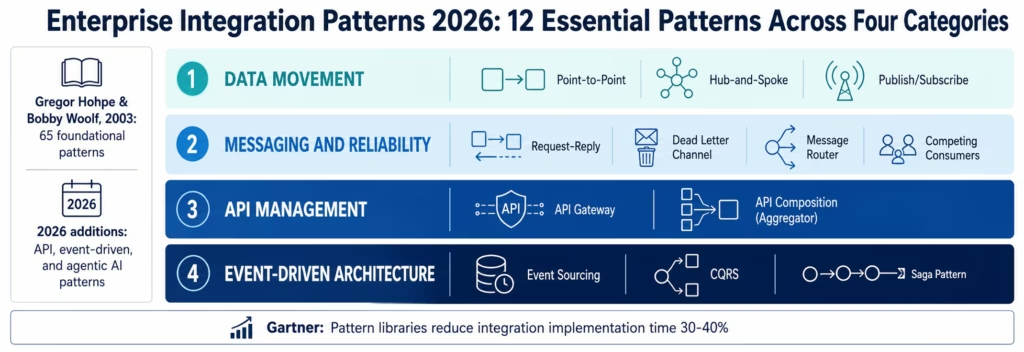
May 21, 2026Enterprise integration patterns are reusable architectural solutions for connecting enterprise systems and data. The 12 most important patterns in 2026 span four categories: data movement (point-to-point, hub-and-spoke, publish/subscribe), messaging (request-reply, dead letter channel, message router), API (API gateway, API composition), and event-driven (event sourcing, CQRS, saga, choreography vs orchestration). Each pattern addresses a specific connectivity problem at scale.
TL;DR
- Enterprise integration patterns are proven, reusable architectural solutions for connecting systems, routing data, and coordinating processes across the enterprise stack.
- The original Enterprise Integration Patterns (EIP) book by Gregor Hohpe and Bobby Woolf documented 65 foundational messaging patterns. In 2026, the pattern language has expanded to include event-driven architecture, API-first design, and agentic AI coordination patterns that Hohpe and Woolf could not have anticipated.
- This guide covers 12 essential patterns across four categories: Data Movement, Messaging and Reliability, API Management, and Event-Driven Architecture: each with a definition, when to use it, when not to, and a concrete enterprise example.
- Gartner estimates that enterprises with a documented pattern library for integration decisions reduce integration implementation time by 30-40% compared to those designing each integration from scratch.
- eZintegrations’ Automation Hub provides templates implementing the most common enterprise integration patterns: deployable in hours rather than the weeks a custom pattern implementation typically requires.
What Are Enterprise Integration Patterns and Why Do They Matter?
Enterprise application integration patterns are named, documented solutions to recurring problems in connecting enterprise systems: the integration equivalent of software design patterns. Just as software engineers use patterns like Singleton, Observer, and Factory to solve recurring object-oriented design problems, integration architects use patterns like Pub/Sub, Dead Letter Channel, and Saga to solve recurring connectivity and coordination problems.
The concept was formalised by Gregor Hohpe and Bobby Woolf in their 2003 book “Enterprise Integration Patterns,” which documented 65 patterns for messaging-based integration systems. That pattern catalogue is now the canonical reference for integration architects. The online companion at enterpriseintegrationpatterns.com extends and updates the original work.
Why patterns matter:
Shared vocabulary: when an architect says “we need a Dead Letter Channel here,” every integration engineer on the team knows what that means: the message, the retry behaviour, the failure routing, and the monitoring requirements. Patterns compress complex architectural decisions into shared terminology.
Proven solutions: each pattern represents a solution that has been applied, debugged, and refined across thousands of production deployments. You inherit that refinement rather than discovering the same failure modes from scratch.
Faster decision-making: a pattern library reduces the decision space. Rather than designing the fan-out architecture from first principles, you recognise the Pub/Sub pattern, apply the known implementation approach, and move on.
According to Gartner, enterprises with a documented integration pattern library reduce integration implementation time by 30-40% and experience 25-35% fewer production failures in new integrations compared to those without a formal pattern approach.
In 2026, the enterprise integration pattern landscape has expanded beyond Hohpe and Woolf’s original messaging focus to encompass API management patterns (API Gateway, API Composition), event-driven architecture patterns (Event Sourcing, CQRS, Saga), and emerging agentic AI patterns (coordinator-worker, tool-calling orchestration), consistent with broader Forrester Research integration and API management analysis. This guide covers the 12 patterns that enterprise architects encounter most frequently in modern integration projects.
Category 1: Data Movement Patterns
Data movement patterns address the fundamental question: how should data flow between source and destination systems? They are the most foundational patterns: every enterprise integration is built on one of these three structural models.
Pattern 1: Point-to-Point
The Point-to-Point pattern creates a direct, dedicated connection between one source system and one destination system. Data flows from producer to consumer without intermediaries. One source, one destination, one connection.
When to Use Point-to-Point
Point-to-point is the right pattern when: the integration has exactly one source and one destination, the connection is relatively stable (the two systems are unlikely to be replaced), the data volume is low to moderate, and the transformation logic is simple and specific to this one source-destination pair.
Examples: a payment processor webhook that updates a specific billing system, a single ERP exporting financial data to a specific accounting tool, or a sensor device that sends readings to one specific monitoring system.
When Not to Use Point-to-Point
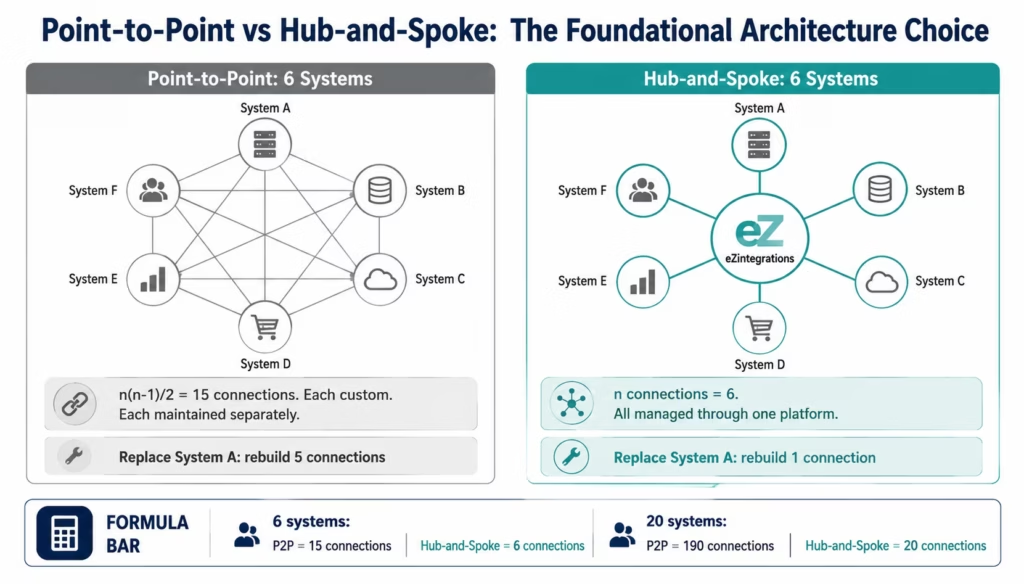
Point-to-point breaks down at scale. Twelve systems with point-to-point connections have up to 66 possible pairs (n × (n-1) / 2). Each connection is a custom integration that must be built and maintained independently. When any system is replaced, every point-to-point connection to that system must be rebuilt.
The spaghetti integration anti-pattern is what point-to-point becomes at enterprise scale: an unmaintainable web of custom connections that no single team fully understands, reflecting broader McKinsey & Company enterprise architecture analysis.
Concrete example: a startup connecting its Stripe billing system to its QuickBooks accounting tool via a direct API integration. Simple, fast to build. Works well at this scale: and needs to be rethought as a hub-and-spoke pattern when the company adds five more financial data sources.
Pattern 2: Hub-and-Spoke
The Hub-and-Spoke pattern routes all integration traffic through a central hub: every system connects only to the hub, not to each other. N systems require N connections (to the hub), not N × (N-1) / 2 connections.
How Hub-and-Spoke Works
Each system in the enterprise connects once to the central integration hub. The hub handles routing: when System A sends data, the hub receives it, transforms it as required, and delivers it to System B (or multiple systems). When System A is replaced, only the A-to-hub connection needs to be rebuilt: all other systems’ connections remain untouched.
This is the architecture that enterprise service buses (ESBs) and iPaaS platforms implement. The hub is the iPaaS platform; the spokes are the system connectors.
When to Use Hub-and-Spoke
Hub-and-spoke is the standard enterprise integration architecture pattern: use it when you have five or more systems to integrate, when systems will be added or replaced over time, or when centralised monitoring, security, and governance of data flows is required.
Limitations of Hub-and-Spoke
The hub is a single point of failure if not built with high availability. The hub adds latency to every data flow (the data must pass through the hub rather than going directly). In extremely high-throughput scenarios where microsecond latency matters, hub-and-spoke introduces overhead that direct connection would not.
Concrete example: eZintegrations as the integration hub connecting Salesforce, NetSuite, Shopify, HubSpot, Marketo, and Snowflake. Each system connects once to eZintegrations. Data flows between any pair of systems via the hub with transformation, routing, and monitoring applied centrally.
Pattern 3: Publish/Subscribe (Pub/Sub)
The Publish/Subscribe pattern decouples event producers from event consumers: a producer publishes an event to a channel (topic, exchange, or event bus) without knowing who consumes it. Any number of subscribers receive the event and process it independently.
How Pub/Sub Works
The publisher sends a message to a named channel. The message broker (Kafka topic, RabbitMQ fanout exchange, AWS SNS topic, Azure Service Bus topic) delivers a copy of the message to every active subscriber. Each subscriber processes independently: subscriber failures, slowdowns, or absence do not affect the publisher or other subscribers.
When to Use Pub/Sub
Pub/Sub is the right pattern when: multiple systems need to react to the same event, the set of consumers will change over time (new subscribers added without changes to the publisher), or producer and consumer need to evolve independently.
The canonical enterprise use case: an order placed event is published once. The WMS, inventory system, customer notification service, revenue recognition service, analytics pipeline, and fraud check each subscribe independently. Adding a new subscriber (a loyalty points service, for example) requires no changes to the order system.
When Not to Use Pub/Sub
Pub/Sub adds complexity when the event has exactly one consumer and will always have exactly one consumer. If an order placed event will only ever go to the WMS: never any other system: point-to-point is simpler and pub/sub introduces unnecessary broker infrastructure.
Concrete example: a retail enterprise using an AWS SNS topic for order events. The WMS, inventory system, and analytics pipeline each subscribe via separate SQS queues. When the loyalty points service is added six months later, it subscribes to the same SNS topic: zero changes to the order management system.
Category 2: Messaging and Reliability Patterns
Messaging and reliability patterns address how data is exchanged reliably between systems: handling failures, routing complexity, and consumer scaling. These patterns come directly from Hohpe and Woolf’s EIP catalogue.
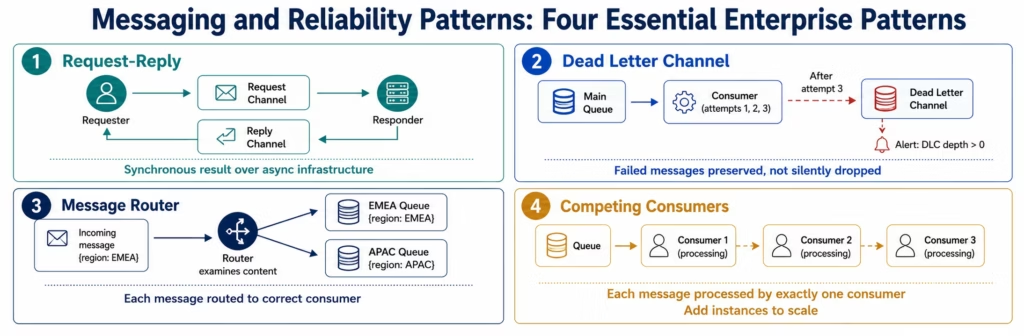
Pattern 4: Request-Reply
The Request-Reply pattern implements synchronous two-way messaging: the sender publishes a request and waits for a reply before continuing. This is the messaging equivalent of a synchronous API call, but implemented over an asynchronous messaging infrastructure.
How Request-Reply Works
The requester sends a message to a request channel and specifies a reply channel (either a dedicated reply queue or a correlation ID that the responder echoes). The responder processes the request and sends the reply to the specified reply channel. The requester waits on the reply channel until the response arrives or a timeout expires.
When to Use Request-Reply
Use Request-Reply when the caller must know the result before proceeding (an order placement that needs an order ID in the response), when the integration must be implemented over messaging infrastructure rather than direct HTTP (for decoupling and reliability benefits), or when the response time is acceptable within the timeout window.
Request-Reply vs Direct REST API
The practical difference: a direct REST call depends on the receiving service being available at the moment of the call. Request-Reply over a message queue allows the responder to process requests at its own pace: the requester submits the request and waits, but the underlying transport is decoupled.
Concrete example: a financial transaction service submitting payment authorisation requests via a message queue to a fraud detection service, waiting for an approval or rejection reply before releasing the transaction. The message queue provides durability; the request-reply pattern provides the synchronous result the transaction service requires.
Pattern 5: Dead Letter Channel
The Dead Letter Channel pattern provides a safe destination for messages that cannot be delivered or processed: preventing failed messages from blocking pipelines or disappearing silently.
How the Dead Letter Channel Works
When a message consumer fails to process a message after the configured maximum retry attempts (or when the message cannot be delivered to any consumer), the message broker moves the message to the Dead Letter Channel (DLC): a dedicated queue or topic for failed messages.
The DLC serves three purposes: it prevents failed messages from blocking the processing of subsequent messages, it preserves the failed message content for investigation and potential reprocessing, and it provides the basis for failure alerting (a non-zero DLC depth should always trigger an alert).
Dead Letter Channel vs Retry Queue
These are related but distinct patterns. The retry queue is for messages that failed transiently (network timeout, service temporarily unavailable) and should be retried with a delay. The dead letter channel is for messages that have exhausted their retries: the failure is either permanent or requires human investigation to resolve.
A mature reliability architecture uses both: a retry queue for transient failures (retry after 1 second, 4 seconds, 16 seconds, 64 seconds) and a dead letter channel for messages that exhausted all retries.
Concrete example: an order processing pipeline where messages that fail after 3 retry attempts are moved to a dead letter queue. An alert fires when the DLQ depth exceeds zero. A separate consumer reads the DLQ, classifies the failure reason (malformed order data, downstream service permanently unavailable, business rule violation), and routes to the appropriate resolution workflow: data correction and requeue, manual review, or discard.
Pattern 6: Message Router
The Message Router pattern examines the content or metadata of each message and routes it to the appropriate channel based on routing rules: replacing the need for each consumer to filter out messages they do not want.
Types of Message Routing
Content-based router: routes based on message content fields. An order event with region: EMEA routes to the EMEA fulfilment queue; an order with region: APAC routes to the APAC queue.
Recipient list: routes a single message to a dynamically determined list of recipients. Used when the recipient list varies per message and is not known statically at design time.
Splitter: decomposes a single message containing multiple items (an order with 10 line items) into 10 individual messages for independent processing.
Aggregator: the inverse of splitter: collects multiple related messages and combines them into a single composite message when all parts have arrived.
When to Use Message Router
Use Message Router when: different consumers need different subsets of a message stream, routing rules are known at design time, or when you want to avoid consumers filtering their own input streams (which adds processing load to consumers).
Concrete example: a retail enterprise routes order events to different WMS instances based on the shipping zone in the order. The message router examines the shipping_zone field and routes to the correct WMS queue without the WMS systems needing to filter incoming messages.
Pattern 7: Competing Consumers
The Competing Consumers pattern deploys multiple consumer instances that all read from the same queue: with each message processed by exactly one consumer, distributing load across all instances.
How Competing Consumers Works
Multiple consumer instances are connected to the same queue. The message broker delivers each message to exactly one consumer (using the visibility timeout mechanism in SQS, or message acknowledgement in RabbitMQ). Each consumer instance processes independently. If one consumer is slow or fails, the others continue processing. Adding consumer instances increases throughput proportionally (up to the limit of the message generation rate).
When to Use Competing Consumers
Competing Consumers is the standard pattern for horizontally scalable message processing. Use it when: message processing is CPU-intensive and benefits from parallelisation, processing latency is important and a single consumer creates a backlog, or when fault tolerance through redundancy is required.
Concrete example: an enterprise processing vendor invoice PDFs via Document Intelligence. Invoice arrival is unpredictable in volume: 10 invoices per day normally, 500 invoices during month-end. Three Document Intelligence consumer instances run in parallel during normal periods; autoscaling adds 5 more instances during month-end surge, all consuming from the same invoice processing queue.
Category 3: API Management Patterns
API management patterns address how enterprise systems expose and consume capabilities through APIs: managing security, aggregation, and versioning at scale.
Pattern 8: API Gateway
The API Gateway pattern places a single entry point in front of all backend services: handling cross-cutting concerns (authentication, rate limiting, routing, logging, SSL termination) centrally rather than duplicating them in every service.
What an API Gateway Does
An API gateway sits between API clients (internal systems, external partners, mobile apps) and the backend services they call. Every inbound API request passes through the gateway,
which handles:
- Authentication: verifying the caller’s identity (API key validation, OAuth 2.0 JWT verification, mTLS)
- Authorisation: checking whether the authenticated caller has permission to call this endpoint
- Rate limiting: enforcing per-client request quotas to prevent abuse
- Request routing: forwarding requests to the correct backend service based on path, method, or headers
- Request/response transformation: translating between client-facing and internal API formats
- SSL termination: handling TLS at the gateway so backend services can use plain HTTP internally
- Logging and observability: capturing every API call for audit, analytics, and debugging
API Gateway in Enterprise Integration
In enterprise integration, the API gateway pattern appears in two contexts. First, as the external API management layer (Kong, Apigee, AWS API Gateway, Azure API Management) that manages external partner and developer access to enterprise APIs. Second, as an internal service mesh entry point for microservices architectures.
When to Use API Gateway
AMQP (Advanced Message Queuing Protocol) is the wire protocol underlying RabbitMQ and most enterprise message brokers. When evaluating which message broker to use for the pub/sub, dead letter channel, or competing consumers patterns, AMQP-compatible brokers (RabbitMQ, Azure Service Bus) provide rich routing semantics; Kafka’s custom protocol provides log-based streaming. The choice between them is documented in the enterprise message queue integration guide.
Use the API gateway pattern when: multiple clients consume the same backend services, security and rate limiting must be consistent across all API consumers, or when the backend API contract must be decoupled from the contract exposed to clients.
Concrete example: a retailer exposes its order management API to 50 logistics partners. An API gateway handles authentication (each partner has an API key), rate limiting (no partner can exceed 1,000 requests per minute), and routing (all requests to /orders go to the OMS, /inventory goes to the WMS). The backend services know nothing about the 50 partners.
Pattern 9: API Composition (Aggregator)
The API Composition pattern aggregates data from multiple backend APIs into a single response: sparing the client from making multiple round trips to assemble composite data.
How API Composition Works
The client makes a single request to the composition layer. The composition layer makes multiple calls to backend services in parallel (or in sequence when dependencies exist), assembles the responses, and returns a unified composite response to the client.
This pattern is sometimes called the Backend for Frontend (BFF) pattern when the composition layer is tailored to a specific client type (mobile app, web app, partner API).
API Composition vs GraphQL
GraphQL implements a specific flavour of API Composition natively: the client specifies exactly which fields from which services it needs, and the GraphQL layer resolves and assembles the response. API Composition as a general pattern covers both GraphQL implementations and custom composition layers built without GraphQL.
When to Use API Composition
Use API Composition when: a client needs data from multiple services in a single interaction, reducing round trips is important (mobile clients on poor network connections, time-sensitive operations), or when different client types need different subsets of composite data.
Concrete example: a customer service portal that shows a customer’s full account view, profile from the CRM, order history from the OMS, support ticket history from Zendesk, and subscription status from the billing system. Without composition, the portal makes four separate API calls. With an API Composition layer, the portal makes one call and receives all four datasets in a single response.
Category 4: Event-Driven Architecture Patterns
Event-driven architecture (EDA) patterns address the design of systems where state changes are communicated as events: moving beyond request-response and direct integration to asynchronous, event-triggered architectures.
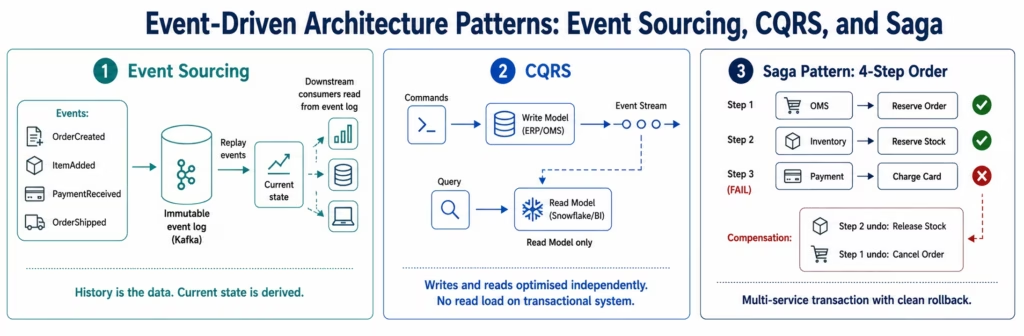
Pattern 10: Event Sourcing
Event Sourcing stores the complete history of state changes as an immutable sequence of events, rather than storing only the current state. The current state of any entity is derived by replaying its event history from the beginning (or from a snapshot).
How Event Sourcing Works
In a traditional database, when a customer’s address changes, the old address is overwritten with the new one. In event sourcing, the system records an AddressChanged event containing the old address, the new address, and the timestamp. The customer’s current state is derived by applying all events in sequence. The full history is preserved and queryable.
Benefits of Event Sourcing in Enterprise Integration
For integration architects, Event Sourcing’s most important property is its natural integration with event streaming: the event log (typically a Kafka topic) is the integration interface. Downstream systems subscribe to the event stream and maintain their own projections of the current state. No API polling, no change data capture (CDC) on the source database: the event stream is the canonical data source.
Event Sourcing also provides audit trails natively: every state change is a timestamped, attributed event. This is particularly valuable in regulated industries (financial services, healthcare, pharma) where the audit trail is a compliance requirement.
When Not to Use Event Sourcing
Event Sourcing adds significant complexity: event schema versioning (events stored for years must remain processable after schema evolution), snapshot management (replaying millions of events to reconstruct current state is slow without periodic snapshots), and the query complexity of eventually consistent read models. It is the right pattern for the entities in your system where the history of changes is as important as the current state.
Concrete example: a financial services firm implementing Event Sourcing for its trade order book. Every order creation, modification, partial fill, and cancellation is an event. The current order state is derived from the event sequence. The Kafka topic containing the order event stream is the integration interface for risk management, analytics, and compliance systems.
Pattern 11: CQRS (Command Query Responsibility Segregation)
CQRS separates the write model (commands that change state) from the read model (queries that read state): allowing each to be optimised independently for its specific access pattern.
How CQRS Works
In a traditional system, the same data model handles both writes and reads. In CQRS, commands (create order, update customer, process payment) go to the write side, which is optimised for transactional consistency. Queries (show customer order history, generate sales report) go to the read side, which is typically a denormalised, read-optimised projection of the write model.
The read side is kept in sync with the write side via events: when the write side processes a command, it emits an event that updates the read model asynchronously.
CQRS in Enterprise Integration
CQRS is a common pattern when integrating between a transactional system and an analytics or reporting system. The transactional system owns the write model; the analytics platform maintains a read projection that is updated via event streaming from the write model. The analytics team queries the projection without imposing load on the transactional system.
Concrete example: an enterprise ERP (the write model for financial transactions) feeds a Kafka topic with financial event streams. An analytics data warehouse (Snowflake) maintains a read projection of the financial data: a denormalised schema optimised for business intelligence queries. The ERP and the data warehouse are independent: the ERP’s schema can evolve without breaking the analytics queries.
Pattern 12: Saga Pattern (Distributed Transaction Coordination)
The Saga pattern coordinates a multi-step business transaction across multiple services: each step in the saga is a local transaction, and the saga manages the sequence and compensating transactions for rollback.
Why Sagas Exist
Distributed systems cannot use ACID database transactions across service boundaries: there is no two-phase commit that spans microservices or SaaS platforms. Yet enterprise business processes frequently span multiple systems: placing an order touches the OMS (reserve the order), the inventory service (reserve the stock), the payment service (charge the card), and the fulfilment service (create the pick order). If any step fails after previous steps have succeeded, the previous steps must be undone.
The Saga pattern solves this by defining a compensating transaction for each step: if the payment charge fails, the inventory reservation is released and the OMS order is cancelled. The saga orchestrator (or choreography) ensures that compensating transactions are executed in the correct reverse order.
Choreography vs Orchestration (for Sagas)
Choreography: each service publishes events when it completes its step, and the next service subscribes and reacts. There is no central coordinator: the saga emerges from the event chain. Simpler to implement for straightforward sagas; complex sagas become difficult to trace and debug.
Orchestration: a central saga orchestrator explicitly calls each service in sequence, handles responses, and triggers compensating transactions on failure. More visible and debuggable; the orchestrator is a single point of complexity (and potentially failure).
Concrete example: a B2B order management saga:
- Step 1: OMS creates the order (reserve)
- Step 2: Inventory service reserves stock
- Step 3: Payment service charges the card
- Step 4: WMS creates the pick order
If Step 3 (payment) fails: compensating transactions run in reverse: inventory reservation released (Step 2 compensation), OMS order cancelled (Step 1 compensation). The customer’s payment card is not charged, no stock is held, and the order is cancelled cleanly.
Bonus: Choreography vs Orchestration
This is the most frequently debated architectural decision in event-driven system design: and the answer depends on the complexity and observability requirements of your specific process.
Choreography: services react to events published by other services. No central coordinator exists. The Order service publishes OrderCreated. The Inventory service subscribes and reacts. The Payment service subscribes to InventoryReserved and reacts. The process emerges from the event chain.
Benefits: no single point of failure, services are more loosely coupled, each service owns its own logic completely.
Drawbacks: the overall process flow is distributed across services and is difficult to observe, trace, and debug. “What state is Order #12345 in right now?” requires querying multiple services.
Orchestration: a central orchestrator explicitly controls the process: calling each service in sequence, handling responses, and making routing decisions.
Benefits: the process flow is visible and traceable in one place. The orchestrator provides a single point for monitoring, retry, and compensation logic.
Drawbacks: the orchestrator is additional infrastructure that must be built and maintained. It can become a bottleneck if the orchestrator is synchronous.
The practical guideline: use choreography for simple linear flows (3-4 steps, happy path is the common path). Use orchestration for complex flows (5+ steps, multiple error conditions, compensation logic, long-running processes that span hours or days). Goldfinch AI’s Workflow Node is an example of the orchestration pattern applied to agentic AI: a coordinator agent explicitly dispatches and controls worker agents rather than agents reacting to each other’s events.
Which Patterns Does eZintegrations Support?
eZintegrations’ integration platform natively implements the majority of the patterns covered in this guide: through its Automation Hub templates, connector architecture, and Goldfinch AI coordination layer.
Data Movement Patterns:
- Point-to-Point: every point-to-point API connector template in the Automation Hub
- Hub-and-Spoke: the fundamental eZintegrations platform architecture: every system connects to eZintegrations as the hub
- Pub/Sub: native support for Kafka topics, AWS SNS, Azure Service Bus topics, and Google Pub/Sub as both publisher and subscriber
Messaging and Reliability Patterns:
- Dead Letter Channel: DLQ monitoring native to all message queue connectors (Kafka, RabbitMQ, SQS, Service Bus, Pub/Sub)
- Message Router: conditional routing logic built into the workflow builder: LLM Classification can be used as the content-based routing decision for unstructured message content
- Competing Consumers: horizontal scaling of eZintegrations consumer workers on all message queue integrations
API Management Patterns:
- API Gateway: eZintegrations connects to and through API gateways (Kong, Apigee, AWS API Gateway) as an API consumer
- API Composition: the Goldfinch AI Chat UI implements the API Composition pattern natively: a single natural language query dispatches parallel worker agents to multiple data sources and returns a composite answer
Event-Driven Architecture Patterns:
- Event Sourcing: eZintegrations consumes from Kafka-based event log architectures and publishes events to Kafka topics for downstream consumers
- CQRS: eZintegrations implements the write-to-event-stream → read-projection pattern in its Kafka-to-data-warehouse pipeline templates
- Saga Pattern: the Goldfinch AI Workflow Node implements orchestrated sagas: the coordinator dispatches steps in sequence, monitors responses, and triggers compensating workflows on failure
FAQs
Enterprise integration patterns are named reusable architectural solutions for connecting enterprise systems and data. Originally documented by Gregor Hohpe and Bobby Woolf in their 2003 book Enterprise Integration Patterns, the pattern library has expanded to include API management, event-driven integration, and AI coordination patterns. These patterns provide shared vocabulary, proven architectural approaches, and faster decision-making for enterprise integration teams.
Point-to-point integration sends a message from one producer to one specific consumer. Publish-subscribe integration sends a message from one producer to all subscribers of a topic. Point-to-point is appropriate when exactly one downstream system should process each message. Publish-subscribe is appropriate when multiple independent systems need to react to the same event without changing the publisher when new consumers are added.
The Saga pattern coordinates multi-step business transactions across multiple distributed services using compensating transactions to reverse completed steps if a later step fails. Because distributed systems cannot use a single ACID transaction across service boundaries, Saga patterns maintain business consistency by undoing prior actions when necessary. Saga implementations generally use either choreography where services react to events independently or orchestration where a central coordinator controls each transaction step.
Event Sourcing should be used when the history of state changes is as important as the current state or when multiple downstream systems need to build independent views from the same event stream. It is especially valuable in regulated industries such as financial services healthcare and pharmaceuticals where audit trails are mandatory. Event Sourcing is usually unnecessary for simple CRUD entities where historical replay and event reconstruction are not required.
CQRS stands for Command Query Responsibility Segregation. It separates the write model handling commands from the read model handling queries so each can be optimised independently. In enterprise integration this is commonly used when operational systems such as ERP or OMS platforms generate transactional events that feed read-optimised analytics or reporting systems. The read side becomes eventually consistent with the transactional write side.
eZintegrations implements hub-and-spoke integration through its central integration platform architecture, publish-subscribe integration through native Kafka SNS Azure Service Bus and Google Pub/Sub connectors, dead letter channel support through DLQ monitoring across queue integrations, content-based routing through workflow conditions and LLM Classification nodes, and Saga orchestration through the Goldfinch AI Workflow Node acting as the orchestration coordinator. Automation Hub templates provide pre-configured implementations of common enterprise integration pattern combinations for specific system pairs and business workflows. 1. What are enterprise integration patterns?
2. What is the difference between pub/sub and point-to-point integration?
3. What is the Saga pattern in enterprise integration?
4. When should I use Event Sourcing in enterprise integration?
5. What is CQRS and when does it apply to enterprise integration?
6. How does eZintegrations implement enterprise integration patterns?
Conclusion: Patterns Are the Common Language of Enterprise Integration Architecture
Every integration architect at some point reinvents one of the patterns in this guide: building a fan-out mechanism that turns out to be pub/sub, implementing retry-and-DLQ logic that is the Dead Letter Channel pattern, designing a distributed transaction coordinator that is the Saga pattern. The patterns exist because these problems are universal.
The value of the pattern language is not that it tells you how to implement something you would never have thought of. It is that it tells you what the thing is called so you can look up every prior implementation, understand the known trade-offs, apply the known failure modes, and communicate the design to your team in three words rather than three paragraphs.
The 12 patterns in this guide: three data movement patterns, four messaging and reliability patterns, two API management patterns, and three event-driven architecture patterns: cover the architectural decisions that determine whether an enterprise integration estate is maintainable, reliable, and scalable.
eZintegrations implements these patterns as Automation Hub templates: pre-built, pre-tested implementations of the most common pattern combinations, deployable in hours rather than the weeks that a custom pattern implementation typically requires. The hub-and-spoke architecture is the platform itself. The Goldfinch AI Workflow Node implements saga orchestration. The Kafka, RabbitMQ, SQS, and Service Bus connectors implement pub/sub, competing consumers, and dead letter channel.
Book a free demo and bring your integration architecture challenge. We will identify the applicable patterns and show you the Automation Hub templates that implement them.
eZintegrations is SOC 2 Type II certified. For enterprises implementing integration patterns that carry regulated data , HIPAA-covered health event streams (Event Sourcing for patient records, Saga patterns for clinical trial workflows) or GDPR-covered EU customer data in pub/sub event pipelines : all pattern implementations within eZintegrations operate within its HIPAA-compliant and GDPR-compliant infrastructure. For on-premises message brokers and event streaming platforms (on-premises Kafka, RabbitMQ, IBM MQ) that participate in hub-and-spoke or pub/sub patterns, eZintegrations connects via IPSec Tunnel without requiring internet-exposed broker ports.
Explore Automation Hub templates for hub-and-spoke, pub/sub, event sourcing, and saga pattern implementations across your specific system combinations.