Message Queue Integration: Build Reliable High-Volume Enterprise Pipelines
May 24, 2026A message queue is a durable, asynchronous communication buffer that decouples message producers from consumers in enterprise data pipelines. It stores messages until the consumer is ready to process them: ensuring no data is lost during traffic spikes, system failures, or downstream slowdowns. Major enterprise message queues include Apache Kafka, RabbitMQ, AWS SQS, and Azure Service Bus.
TL;DR
- A message queue is a durable, asynchronous buffer that decouples the systems that produce data from the systems that consume it: preventing data loss during traffic spikes, system failures, and processing slowdowns.
- Enterprise message queues (Apache Kafka, RabbitMQ, AWS SQS, Azure Service Bus, Google Pub/Sub) are the backbone of high-volume, reliable data pipelines, consistent with Gartner enterprise integration research. Without them, direct system-to-system integration breaks under load.
- The key architectural concepts that determine which queue you need: durability (does the queue survive a broker restart?), delivery guarantees (at-most-once, at-least-once, exactly-once), ordering (FIFO or partition-keyed ordering), consumer groups (multiple consumers processing the same stream independently), and retention (how long messages are kept after consumption).
- eZintegrations supports all major enterprise message queues natively: Apache Kafka, RabbitMQ, AWS SQS, Azure Service Bus, and Google Pub/Sub: as both message producers and consumers within the same no-code workflow builder used for REST, GraphQL, and WebSocket integrations.
- Four production patterns covered: the Fan-Out Pipeline, the Dead Letter Queue, the Event Sourcing Bridge, and the Backpressure Buffer.
What is a Message Queue and Why Do Enterprise Pipelines Need One?
A message queue is a durable, asynchronous communication buffer that stores messages from a producer system and delivers them to a consumer system when the consumer is ready: decoupling the timing, speed, and availability requirements of the two systems from each other.
The concept, documented in Wikipedia’s definition of message queuing, has existed since the 1960s in mainframe environments (IBM MQ traces its origins to this era). The modern enterprise message queue serves the same fundamental purpose: a producer sends a message, it lands in the queue, and the consumer processes it on its own schedule without the producer needing to wait.
Why does this matter for enterprise integration? Consider three scenarios that expose the limitations of direct system-to-system integration.
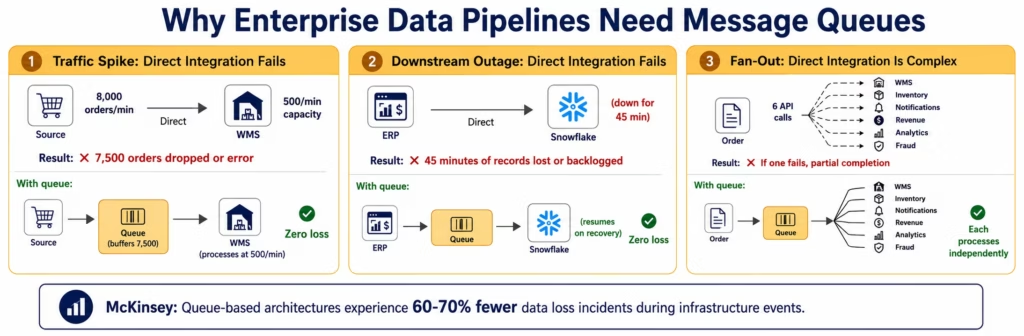
Scenario 1: The traffic spike. Your eCommerce platform processes 200 orders per minute on a normal day. On Black Friday it processes 8,000 orders per minute: 40 times the normal rate. Your WMS picks orders at a fixed rate of 500 per minute. Without a buffer, the 7,500 orders per minute the WMS cannot immediately process are either dropped (lost orders), cause the source system to queue internally (unbounded memory growth), or fail with backpressure errors (order placement failures during peak hours). With a message queue: the 8,000 orders/minute land in the queue. The WMS consumes at 500 orders/minute. The queue absorbs the 7,500-per-minute overflow and delivers them to the WMS over the following 15 minutes without any order loss.
Scenario 2: The downstream outage. At 2 AM, your data warehouse (Snowflake) undergoes a 45-minute maintenance window. During this time, your ERP continues to generate transaction records. Without a queue, those transaction records have nowhere to go: either they accumulate in memory and risk loss if the ERP process restarts, or they fail and require manual recovery. With a message queue: transaction records continue flowing into the queue during the maintenance window. When Snowflake comes back online, the consumer resumes processing from where it left off. Zero data loss.
Scenario 3: The multi-system fan-out. An order event needs to trigger six downstream processes: WMS pick order creation, inventory level update, customer notification, revenue recognition, analytics event, and fraud check. Without a queue, you either make six sequential synchronous API calls from the order system (slow, and if one fails you must handle partial completion), or you build a complex fan-out orchestration layer. With a message queue: the order event is published once. Six independent consumers each process the event on their own: independently, at their own pace, with their own retry logic.
McKinsey research on enterprise data architecture shows that organisations with event-driven, queue-based data pipeline architecture experience 60-70% fewer data loss incidents during infrastructure events compared to those using direct synchronous integration.
Direct Integration vs Message Queue Architecture: The Reliability Difference
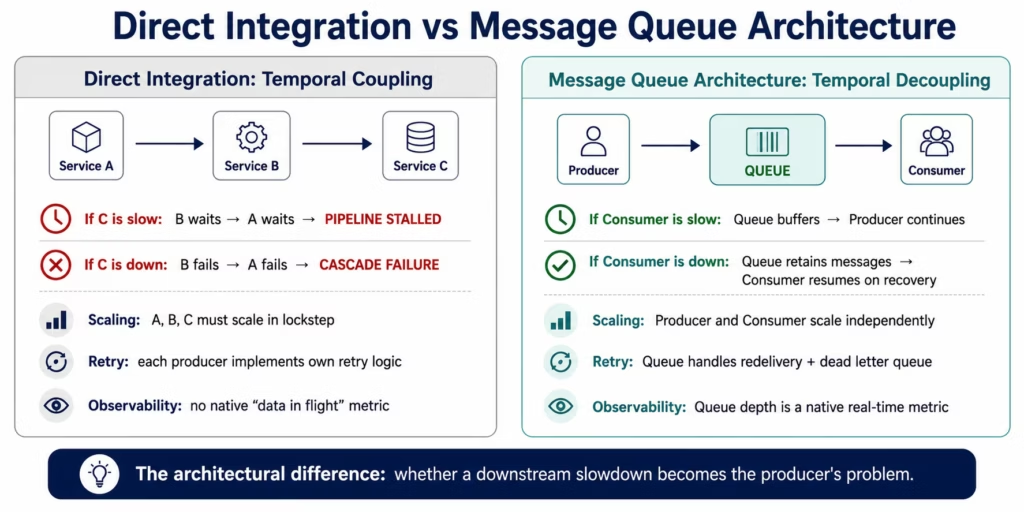
The fundamental difference between direct integration and queue-based integration is temporal decoupling: the producer does not need the consumer to be available, ready, or fast enough to receive the data the moment it is sent.
In direct integration (synchronous API calls, webhook deliveries, direct database writes), the producer and consumer are coupled: the producer must wait for the consumer to confirm receipt. If the consumer is slow, the producer waits. If the consumer is down, the producer fails. If the producer sends data faster than the consumer processes it, the producer must implement backpressure logic or the consumer must scale up to match.
This coupling is fine for low-volume, non-critical data flows. It becomes an engineering problem at scale.
The coupling problems that emerge at enterprise scale:
Cascade failures: in a directly integrated system, if Service C is slow or unresponsive, Service B backs up waiting for C, then Service A backs up waiting for B. One slow component brings down the entire pipeline. A message queue isolates this cascade: B publishes to the queue regardless of C’s state. C consumes when it is ready.
Retry complexity: in direct integration, the producer owns the retry logic. If the API call to the downstream system fails, the producer must decide when to retry, how many times, and what to do on permanent failure. This retry logic is duplicated across every producer in the system. Message queues centralise this: the queue handles redelivery to consumers on acknowledgement timeout, and dead letter queues capture permanently failed messages for investigation.
Scaling asymmetry: in direct integration, producer and consumer must scale together: if the producer generates data 10x faster than before, the consumer must scale 10x to keep up. With a message queue, they scale independently: the queue absorbs the difference and the consumer scales based on queue depth, not producer throughput.
Observability: in direct integration, understanding “how much data is in flight right now?” requires instrumenting every point-to-point connection. With a message queue, the queue depth is a native metric: the queue tells you exactly how many messages are waiting, how long the oldest message has been waiting, and how fast consumers are processing.
Core Message Queue Concepts Every Integration Architect Needs
Five concepts determine which message queue technology is right for your enterprise use case and how to configure it for production reliability.
Durability
Durability is whether a message survives a broker restart. A non-durable queue stores messages in memory: fast, but messages are lost if the broker process restarts or the server reboots. A durable queue writes messages to disk before acknowledging receipt to the producer, ensuring messages survive broker restarts.
For enterprise production pipelines, durability is non-negotiable. The rare exception: ephemeral event streams where the loss of a few events during a broker restart is acceptable (some real-time analytics use cases). For any pipeline carrying financial transactions, order events, or customer data, always use durable queues.
Delivery Guarantees
Three delivery guarantee levels exist across enterprise message queues:
- At-most-once: the message is delivered zero or one time. No redelivery on failure. Use for non-critical telemetry or metrics where occasional data loss is acceptable.
- At-least-once: the message is delivered one or more times. On consumer failure or timeout, the message is redelivered. Consumers must be idempotent: processing the same message twice must not corrupt the data (a database upsert rather than an insert prevents duplicate records).
- Exactly-once: the message is delivered exactly once, even across consumer failures and broker restarts. This is the most expensive delivery guarantee in terms of latency and broker complexity. Kafka’s transactional API provides exactly-once semantics (EOS) for Kafka-to-Kafka pipelines.
Most enterprise integration pipelines use at-least-once delivery with idempotent consumers: this is simpler to implement than exactly-once and provides the reliability most use cases require.
Consumer Groups and Topic Partitions
A consumer group is a set of consumer instances that collectively process a message stream, each consuming a distinct subset of the messages. This is the mechanism that enables horizontal scaling of consumers.
In Kafka: a topic is divided into partitions. Each partition is assigned to exactly one consumer within a consumer group. Adding more consumers (up to the partition count) increases throughput proportionally.
In RabbitMQ: multiple consumers on the same queue receive messages in round-robin distribution. This is equivalent to Kafka consumer groups for simple scaling, but without the ordering guarantees that Kafka’s partitioned model provides.
The practical implication for integration architects: if you need strict ordering (all events for Customer A processed in sequence), use Kafka with a partition key set to the customer ID. All Customer A events land on the same partition, processed in order by the same consumer.
Dead Letter Queues
A dead letter queue (DLQ) is a special queue that receives messages the consumer could not process after the configured maximum retry attempts. It is the message queue equivalent of an error table in a database pipeline.
Without a DLQ, a message that the consumer cannot process (malformed data, dependency service unavailable, business logic exception) either blocks the entire queue (if the consumer fails and does not acknowledge the message, blocking all subsequent messages) or is silently discarded (if the queue is configured to discard on max retries).
With a DLQ: the failed message is moved to the DLQ after N retries. The main queue continues processing subsequent messages unblocked. The DLQ accumulates failed messages for investigation and manual reprocessing. Alerting fires when the DLQ depth exceeds zero, ensuring that failed messages do not accumulate silently.
Message Retention
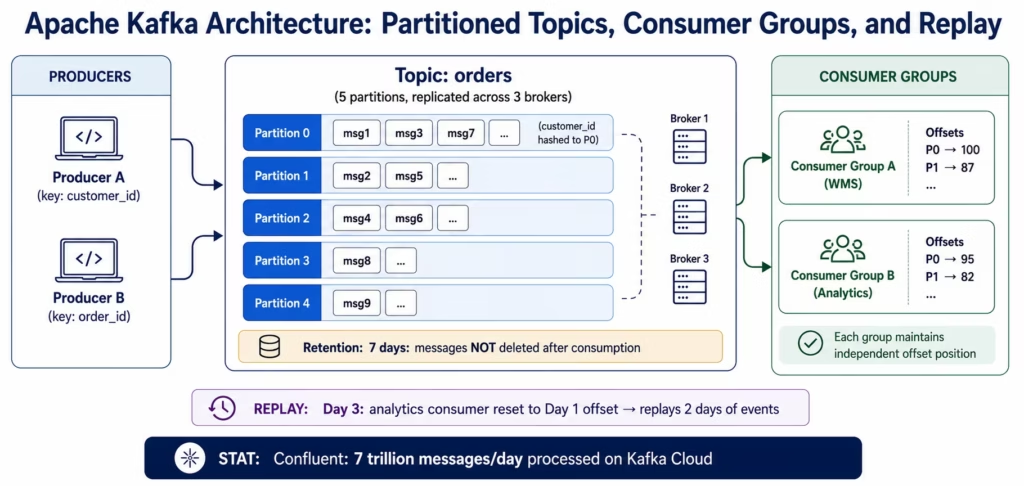
Retention determines how long the queue keeps a message after it has been consumed. For traditional queues (RabbitMQ, SQS), messages are deleted after successful acknowledgement. For streaming platforms (Kafka), messages are retained for a configured period (default 7 days) regardless of consumption status. This retention model enables replay: a consumer can re-read messages from any point in the retention window.
Retention-based replay is one of Kafka’s most powerful capabilities for integration architectures: if a downstream system is misconfigured for a week, you can point a new consumer at the Kafka topic with an offset of 7 days ago and reprocess all messages.
Apache Kafka: The Enterprise Streaming Platform
Apache Kafka is the dominant enterprise streaming platform, designed for durably storing and processing high-throughput, ordered event streams at scale. Confluent, the commercial Kafka company, reports that Kafka processes over 7 trillion messages per day across its cloud platform.
What Makes Kafka Different
Kafka is architecturally distinct from traditional message brokers. It stores messages as a distributed, replicated, ordered log. Consumers read from the log at their own offset: they do not “consume and remove” messages. Multiple consumer groups can read the same topic simultaneously, each maintaining its own offset. Messages are retained for the configured retention period (7 days by default) regardless of whether they have been consumed.
This log-based architecture gives Kafka properties that traditional queues do not have:
- Replayability: reprocess any time window of events by resetting a consumer’s offset
- Multiple independent consumers: add a new consumer group to an existing topic without affecting existing consumers
- Event sourcing: the Kafka topic becomes the authoritative record of all events
When to Use Kafka for Enterprise Integration
Kafka is the right choice for:
- High-throughput event streams (millions of events per day to billions per day)
- Use cases requiring event replay (consumer deployment, data migration, audit)
- Multiple independent consumers reading the same event stream
- Ordered processing where event sequence matters (financial transaction logs, state machine events)
- Event sourcing architectures where the event stream is the source of truth
Kafka is overengineered for:
- Simple task queues (a few thousand messages per day)
- Use cases where FIFO ordering across all messages is required (Kafka guarantees ordering within a partition, not across partitions)
- Teams without Kafka operational expertise (Kafka cluster management has significant operational complexity: Confluent Cloud or AWS MSK reduce this)
Key Kafka Concepts for Integration
Topics and partitions: a topic is the named event stream. Partitions are the ordered, replicated shards within a topic. The partition count determines the maximum consumer parallelism within a consumer group.
Producer key: when a producer sends a message with a key (customer ID, order ID), Kafka routes all messages with the same key to the same partition: guaranteeing ordered processing for that key across all consumer instances.
Consumer offset: the position in the topic log where a consumer has read up to. Consumers commit their offset after processing. On restart, the consumer resumes from its last committed offset.
Replication factor: each partition is replicated across N broker nodes (typically 3 in production). Replicas provide fault tolerance: if one broker fails, a replica on another broker takes over.
RabbitMQ: The Flexible Enterprise Message Broker
RabbitMQ is the most widely deployed open-source message broker, with over 35,000 production deployments reported. Unlike Kafka’s log-based model, RabbitMQ implements the AMQP protocol with a rich routing model based on exchanges, queues, and bindings.
The RabbitMQ Exchange Model
RabbitMQ’s routing flexibility comes from its exchange model. Producers publish messages to exchanges, not directly to queues. Exchanges route messages to queues based on routing rules:
- Direct exchange: routes messages to queues whose binding key exactly matches the message’s routing key. Used for point-to-point routing where message type determines destination.
- Topic exchange: routes messages based on wildcard pattern matching against the routing key (e.g.,
order.#matchesorder.created,order.fulfilled,order.cancelled). Used for flexible event routing. - Fanout exchange: routes messages to all bound queues regardless of routing key. Used for broadcast patterns where all consumers receive every message.
- Headers exchange: routes based on message header attributes rather than routing key. Used for complex routing logic.
This exchange model makes RabbitMQ highly flexible for complex enterprise routing scenarios: routing the same event to different queues based on region, priority, or message attributes.
When to Use RabbitMQ
RabbitMQ is the right choice for:
- Complex routing requirements (different message types routed to different consumers)
- Task queue patterns (workers consuming from a shared queue with round-robin distribution)
- Use cases requiring message TTL (messages automatically expired after N seconds)
- Lower-throughput enterprise use cases (up to tens of millions of messages per day)
- Teams more familiar with AMQP than Kafka’s log-based model
RabbitMQ limitations compared to Kafka:
- No message replay after consumption (messages are deleted on acknowledgement by default)
- Lower maximum throughput than Kafka for pure write-intensive workloads
- No native consumer group offset management (tracking where each consumer is in the stream)
RabbitMQ Dead Letter Exchange
RabbitMQ’s dead letter exchange (DLX) is a mature, configurable facility. When a message is rejected by a consumer (explicit rejection), expires (TTL exceeded), or reaches the maximum delivery count, it is routed to the dead letter exchange. From the DLX, it is routed to the dead letter queue for investigation.
This per-queue configurable DLX means different queues can route dead letters to different destinations: a high-priority order queue might route DLQ messages to an emergency operations Slack alert, while a low-priority analytics queue routes to a batch reprocessing queue.
AWS SQS and SNS: Cloud-Native Queue and Fan-Out
AWS SQS (Simple Queue Service) and AWS SNS (Simple Notification Service) form the cloud-native messaging duo for AWS-centric enterprise architectures. SQS is the queue; SNS is the fan-out.
AWS SQS
SQS provides two queue types:
- Standard queue: at-least-once delivery, best-effort ordering. Extremely high throughput (nearly unlimited messages per second). Messages can occasionally be delivered out of order or more than once: consumers must be idempotent.
- FIFO queue: exactly-once delivery, strict ordering within a message group. Limited to 3,000 transactions per second with batching (compared to nearly unlimited for standard). Use FIFO queues when ordering and deduplication are required.
Visibility timeout: SQS’s mechanism for preventing concurrent processing. When a consumer reads a message, the message becomes invisible to other consumers for the configured visibility timeout period. If the consumer successfully processes and deletes the message within this window, it never reappears. If the consumer fails (timeout or crash), the message becomes visible again for redelivery.
AWS SNS + SQS Fan-Out
The SNS+SQS fan-out pattern is a standard AWS architecture: publish once to an SNS topic, fan out to N SQS queues. Each SQS queue subscribes to the SNS topic. When an event is published to SNS, it is simultaneously delivered to all subscribed SQS queues. Each queue’s consumers process independently.
This pattern is the cloud-native equivalent of Kafka’s multiple consumer groups: each SQS queue has its own consumer group that processes the event stream independently without affecting other consumers.
Azure Service Bus: Enterprise Messaging for Microsoft Environments
Azure Service Bus is Microsoft’s fully managed enterprise messaging service, providing both queue and topic semantics with a feature set designed for enterprise integration scenarios.
Queues vs Topics in Azure Service Bus
Queue: point-to-point messaging. One producer, one consumer (or competing consumers from the same queue for load balancing). FIFO delivery within a session. Messages are locked to a consumer on read (similar to SQS visibility timeout) and deleted on completion or dead-lettered on repeated failure.
Topic with subscriptions: pub/sub messaging. One producer publishes to a topic. Multiple subscriptions each receive a copy of every message. Subscriptions can have filters: a subscription can be configured to receive only messages where Region = 'EMEA', for example. This filter-based subscription model is useful for regional processing or tiered processing of the same event stream.
Azure Service Bus Sessions
Sessions are Azure Service Bus’s mechanism for ordered processing of related messages. When messages are published with the same session ID (customer ID, order ID), Azure Service Bus guarantees that all messages with that session ID are processed by the same consumer in sequence. This is functionally equivalent to Kafka’s partition key routing for ordered processing.
Dead Letter Subqueue
Every Azure Service Bus queue and subscription has a built-in dead letter subqueue. Messages exceeding the maximum delivery count or explicitly dead-lettered by the consumer are moved to this subqueue automatically. The dead letter subqueue can be monitored independently and messages can be inspected, modified, and resubmitted.
Google Pub/Sub: Globally Distributed Message Streaming
Google Pub/Sub is Google Cloud’s fully managed messaging service, designed for globally distributed, high-throughput event streaming with at-least-once delivery across Google’s global infrastructure.
Google Pub/Sub’s distinctive characteristic is its global distribution: a topic published to in the US is immediately available to subscribers in Europe and Asia without any explicit replication configuration. For enterprises with globally distributed operations, this eliminates the need to manage cross-region replication.
Pub/Sub for enterprise integration:
- No infrastructure to manage: fully managed by Google, no cluster management
- At-least-once delivery with configurable acknowledgement deadlines
- Push delivery (Google pushes messages to a webhook endpoint) or pull delivery (consumer polls)
- Message ordering within a region when ordering key is specified
- Deadletter topics supported via subscription dead letter policy
Pub/Sub vs Kafka: Pub/Sub is simpler to operate and globally distributed by default. Kafka (on GCP via Confluent or managed Kafka) provides message replay, consumer offset management, and higher partition-level throughput control. For teams already on GCP who want a fully managed queue without Kafka’s operational overhead, Pub/Sub is the default choice.
Four High-Volume Enterprise Pipeline Patterns Using Message Queues
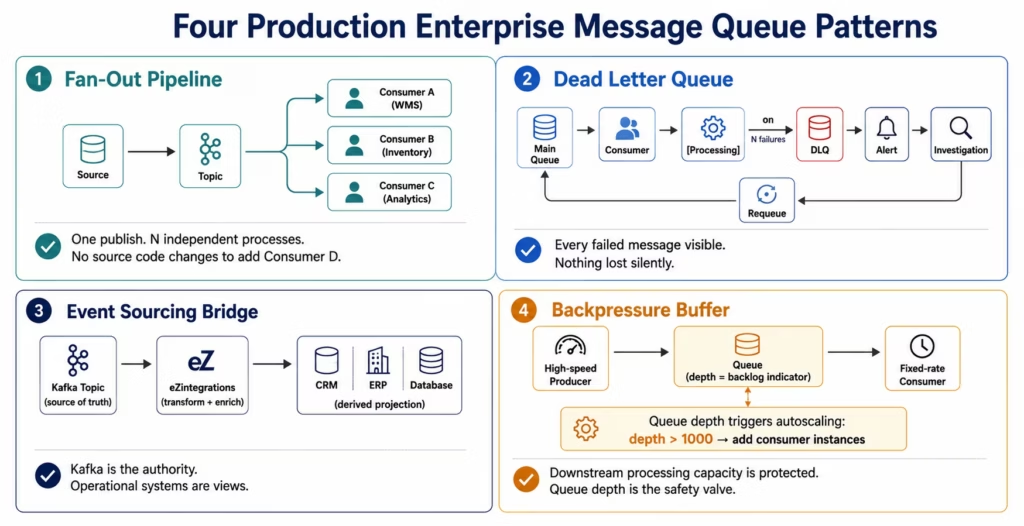
Four architectural patterns emerge consistently in production enterprise message queue deployments.
Pattern 1: The Fan-Out Pipeline
Use case: a single business event (order placed, customer signed up, invoice created) must trigger multiple independent downstream processes.
Architecture: the source system publishes one message to the queue/topic. N independent consumers each receive the message and process it according to their own logic. Adding a new consumer (a new downstream process) requires no changes to the source system.
Production considerations: each consumer must have independent error handling and dead letter queue configuration. A failure in Consumer A should not affect Consumer B’s processing. In Kafka, use separate consumer groups. In RabbitMQ, use fanout exchange with separate queues per consumer. In SNS+SQS, each SQS queue is an independent consumer.
Pattern 2: The Dead Letter Queue Pattern
Use case: ensure that messages that cannot be processed do not block the pipeline and do not disappear silently.
Architecture: the main processing queue has a dead letter queue configured. When a consumer fails to process a message after N retries (configurable), the message is moved to the DLQ. An alert fires when the DLQ depth exceeds zero. A separate consumer on the DLQ processes messages for investigation, correction, and requeue.
Production alert rule: every production message queue in an enterprise integration should have a DLQ, and the DLQ should have a real-time alert. A non-zero DLQ depth means real business events are not being processed. eZintegrations’ message queue integration monitors DLQ depth as part of the pipeline health dashboard and routes DLQ alerts to the configured Slack channel or email address.
Pattern 3: The Event Sourcing Bridge
Use case: bridge between a Kafka-based event streaming architecture and operational systems (CRM, ERP, databases) that need the events translated into their own data model.
Architecture: eZintegrations consumes from the Kafka topic, applies the transformation (field mapping, data enrichment, business rule application), and writes to the operational system via its native API or database connector. The Kafka topic is the source of truth; the operational system is a derived projection.
Production considerations: the consumer must track its Kafka offset reliably. If eZintegrations’ Kafka consumer group commits offsets only after successful delivery to the destination system, messages are guaranteed to be delivered at-least-once. For exactly-once semantics, use Kafka’s transactional API at the producer side and idempotent writes at the destination.
Pattern 4: The Backpressure Buffer
Use case: protect a downstream system with a fixed processing capacity from upstream traffic spikes.
Architecture: the upstream producer publishes at its natural rate. The message queue accumulates messages during spikes. The downstream consumer reads at its maximum processing capacity, never exceeding the rate that the downstream system can handle. Queue depth is the observable measure of how far behind the consumer is.
Autoscaling trigger: in cloud environments, queue depth can trigger autoscaling of consumer instances. When queue depth exceeds a threshold (e.g., 1,000 messages), additional consumer instances are spun up. When queue depth falls below a threshold, consumers are scaled back. This dynamic scaling matches processing capacity to load rather than provisioning for peak capacity at all times.
How eZintegrations Connects to Enterprise Message Queues
eZintegrations supports Apache Kafka, RabbitMQ, AWS SQS, Azure Service Bus, and Google Pub/Sub as native first-class connectors: within the same no-code workflow builder used for REST, GraphQL, WebSocket, and Database integrations. You can build pipelines that consume from Kafka and write to Salesforce, publish to SQS from a webhook event, or consume from RabbitMQ and post to a REST API: all in the same workflow interface.
As a message consumer (reading from a queue):
eZintegrations subscribes to your configured Kafka topic, RabbitMQ queue, SQS queue, Azure Service Bus subscription, or Google Pub/Sub subscription. Received messages trigger the configured integration workflow: transformation, enrichment, routing, and delivery to configured destination systems. Consumer acknowledgement is sent only after the full workflow execution succeeds: at-least-once delivery by default.
As a message producer (writing to a queue):
Any trigger that eZintegrations can receive: REST webhook, database change event, scheduled poll result, another queue message: can publish to a configured message queue. The publish action is a workflow step: specify the topic or queue, the message format, the routing key (for RabbitMQ) or partition key (for Kafka), and the message attributes.
Dead letter queue monitoring:
eZintegrations includes native monitoring of DLQ depth for all connected message queues. The pipeline health dashboard shows main queue depth, consumer lag, and DLQ depth for all active message queue integrations. Configurable alerts fire when DLQ depth exceeds zero or consumer lag exceeds a threshold.
Kafka-specific capabilities:
- Consumer group management with configurable offset commit strategy (after processing, after delivery, or explicit commit)
- Configurable starting offset (latest, earliest, or specific timestamp) for new consumer groups
- SSL/TLS and SASL authentication (PLAIN, SCRAM-SHA-256, SCRAM-SHA-512, GSSAPI/Kerberos) for Kafka clusters requiring enterprise authentication
- Schema Registry support (Confluent Schema Registry) for Avro and Protobuf message deserialisation
On-premises message queues:
For enterprises running RabbitMQ, Kafka, or IBM MQ on-premises (within the corporate network), eZintegrations connects via IPSec Tunnel: the same encrypted tunnel used for on-premises ERP and database connectivity. No changes to the on-premises firewall rules to expose the message broker on the public internet.
SOC 2, GDPR, and HIPAA:
All message queue integration processing in eZintegrations is covered by eZintegrations’ SOC 2 Type II certification. For pipelines carrying PII (customer data in event streams), GDPR compliance applies to all data processed within eZintegrations. For healthcare pipelines where message queue events carry PHI (patient admission events, clinical data streams), a signed BAA is available and all processing stays within eZintegrations’ HIPAA-compliant infrastructure.
FAQs
A message queue is a durable asynchronous buffer that stores messages from a producer system and delivers them to a consumer when the consumer is ready. In enterprise integration, message queues decouple source and destination systems, enabling traffic spike absorption, downstream failure tolerance, and fan-out to multiple consumers from a single published event. Major enterprise message queue technologies include Apache Kafka, RabbitMQ, AWS SQS, Azure Service Bus, and Google Pub/Sub.
Kafka is a distributed log-based streaming platform optimised for high-throughput ordered event streams with message replay capability. RabbitMQ is an AMQP message broker optimised for flexible routing patterns, task queues, and traditional enterprise messaging workflows. Kafka is best suited for large-scale streaming, event replay, and multiple independent consumer groups. RabbitMQ is better suited for complex routing rules, task distribution, and lower-throughput enterprise queue processing.
A dead letter queue, commonly called a DLQ, stores messages that could not be processed successfully after the configured retry attempts are exhausted. Without a DLQ, failed messages may block the primary queue or disappear silently. With a DLQ in place, the main queue continues processing successfully while failed messages are isolated for investigation, alerting, and manual reprocessing.
A message queue should be used when the producer generates data faster than the consumer can process it, when downstream systems may be temporarily unavailable and data loss is unacceptable, or when multiple independent systems need to process the same event stream. For low-volume reliable synchronous communication, direct REST API integration is usually sufficient and simpler to maintain.
Enterprise message queues generally provide three delivery guarantees. At-most-once delivery means a message is delivered zero or one time and is acceptable for non-critical telemetry. At-least-once delivery guarantees one or more deliveries and requires idempotent consumer design to handle duplicates. Exactly-once delivery guarantees a single successful delivery but introduces additional architectural complexity. Most enterprise integration pipelines use at-least-once delivery with idempotent consumers because it balances reliability and operational simplicity.
eZintegrations supports Apache Kafka, RabbitMQ, AWS SQS, Azure Service Bus, and Google Pub/Sub as native connectors operating as both producers and consumers within the no-code workflow builder. The platform handles consumer acknowledgement, Kafka offset management, dead letter queue monitoring, retry logic, and rate limiting automatically. For on-premises message brokers, connectivity is established through IPSec Tunnel. eZintegrations is SOC 2 Type II certified and supports GDPR and HIPAA compliance requirements for regulated event streams. 1. What is a message queue and how is it used in enterprise integration?
2. What is the difference between Kafka and RabbitMQ for enterprise integration?
3. What is a dead letter queue and why does every enterprise pipeline need one?
4. When should an enterprise use a message queue instead of direct API integration?
5. What delivery guarantees do enterprise message queues provide?
6. How does eZintegrations connect to enterprise message queues?
Conclusion: The Message Queue Is Not an Optimisation. It Is the Architecture.
Direct synchronous integration works at low volume. It fails at the exact moments that matter most: the traffic spike on your highest-revenue day, the downstream maintenance window at 2 AM, the new use case that needs to consume the same event stream without touching the source system.
Message queues are not a performance optimisation for enterprise integration. They are the architectural pattern that makes integration reliable at scale: by decoupling the timing, speed, and availability requirements of producer and consumer systems from each other.
The five enterprise message queue platforms covered in this guide: Apache Kafka for high-throughput event streaming with replay, RabbitMQ for flexible AMQP routing, AWS SQS for cloud-native queue simplicity, Azure Service Bus for Microsoft enterprise environments, and Google Pub/Sub for globally distributed messaging: cover every production enterprise use case.
Getting message queue integration right requires more than installing a broker: consumer group management, dead letter queue configuration and monitoring, delivery guarantee selection, ordering requirements analysis, and the authentication and encryption controls that enterprise security requirements demand.
eZintegrations handles all of this natively: Kafka, RabbitMQ, SQS, Azure Service Bus, and Google Pub/Sub as first-class connectors in the same no-code workflow builder. Consumer, producer, DLQ monitoring, offset management, SASL authentication, IPSec Tunnel for on-premises brokers, and SOC 2 Type II certified infrastructure.
Book a free demo and bring your current queue architecture. We will show you the consumer, producer, and monitoring configuration for your specific broker and use case.
Explore message queue integration templates in the Automation Hub for Kafka, RabbitMQ, SQS, Azure Service Bus, and Google Pub/Sub pipeline patterns.