API Pagination for Enterprise: Handle Large Datasets Without Breaking Pipelines
May 23, 2026API pagination is the mechanism that splits large dataset responses from an API into smaller, manageable pages: preventing timeouts, memory overload, and dropped records when fetching thousands or millions of rows. Enterprise integration platforms must handle all major pagination types automatically: offset, cursor, encoded next token, next URL, total page count, pagination with body, and custom pagination.
TL;DR
- API pagination is how APIs deliver large datasets in manageable chunks: without it, a single request for 500,000 CRM contacts would either time out, return an error, or exhaust your integration platform’s memory.
- There are seven distinct pagination methods used across enterprise APIs: Offset Pagination, Cursor Pagination, Encoded Next Token Pagination, Next URL Pagination, Total Page Count Pagination, Pagination with Body, and Custom Pagination. Each works differently and requires different handling logic.
- Most integration platforms support one or two pagination types: forcing your team to write custom code for the rest. eZintegrations supports all seven natively, with configurable key names. You specify the field names your API uses; the platform handles the traversal logic.
- Broken pagination handling is one of the most common causes of silent data loss in enterprise integration pipelines: the pipeline appears to complete successfully, but only the first page of results was fetched.
- CTA: Import an Automation Hub template with built-in pagination support for your specific API and go live without writing pagination logic from scratch.
What is API Pagination and Why Does It Matter for Enterprise?
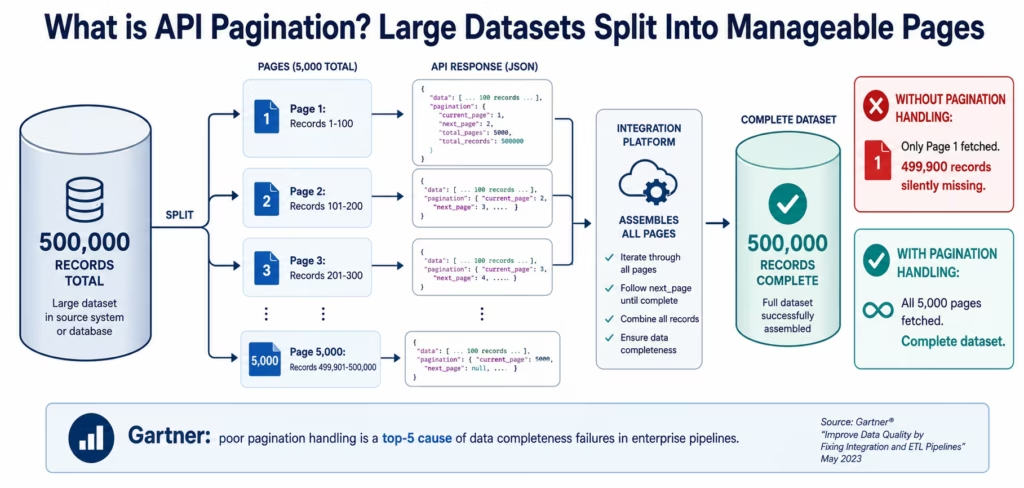
API pagination is the mechanism by which an API splits a large dataset into smaller sequential pages: delivering a manageable chunk per request rather than the entire dataset at once.
Without pagination, an API request for all customer records in a Salesforce org with 800,000 contacts would attempt to return all 800,000 records in a single HTTP response. The response body would be hundreds of megabytes of JSON. The request would time out before the payload completed. The memory required to hold the full response would crash most integration processes. And even if it succeeded, you would have a single monolithic payload with no error recovery boundary: if anything went wrong processing record 750,000, you would need to restart the entire fetch from scratch.
Pagination solves this by slicing the dataset: return 100 (or 200, or 1,000) records, then provide a mechanism for the client to request the next 100, and the next, until the dataset is exhausted. The client makes multiple smaller requests and assembles the complete dataset from the pages.
According to Gartner, poorly handled API pagination is among the top five causes of data completeness failures in enterprise integration pipelines. The failure mode is deceptive: the pipeline completes without error: but only the first page of results was fetched. The integration platform received a valid response with 100 records, processed them successfully, and did not know there were 4,900 more pages it never requested.
For enterprise integration, pagination matters across every system that holds large datasets: CRM contacts (Salesforce, HubSpot), ERP transactions (NetSuite, SAP), product catalogues (Shopify, Magento), marketing lists (Marketo, Klaviyo), financial records (QuickBooks, Xero), and analytics event streams. Understanding which pagination method each API uses: and configuring your integration platform to handle it correctly: is the difference between a pipeline that fetches complete data and one that silently fetches the first page and stops.
What Happens When Pagination Is Not Handled Correctly
Silent data incompleteness is the most dangerous failure mode in enterprise API integration: more dangerous than a visible error, because you don’t know the data is wrong.
Here are three real-world scenarios where pagination failure causes downstream business problems.
Scenario 1: The incomplete marketing list Your Marketo integration fetches the lead list for a campaign segment. The API returns 1,000 leads per page and your segment has 47,000 leads. Your integration platform fetches the first page, processes the 1,000 records, and stops: because the pagination continuation token was not picked up. 46,000 leads do not receive the campaign. You see a campaign delivery rate of 2.1%, assume it is the subject line, and spend two weeks testing variants.
Scenario 2: The incomplete financial reconciliation Your NetSuite integration fetches all invoices for the monthly reconciliation. NetSuite’s API returns 200 records per page. You have 8,400 invoices. The integration fetches pages 1-5 (1,000 records) but the offset counter in the continuation logic has an off-by-one error that produces an empty result set on page 6. The integration interprets the empty result as the end of the dataset. 7,400 invoices are not reconciled. Your finance team discovers the discrepancy three weeks later during the audit.
Scenario 3: The phantom inventory data Your product catalogue integration fetches all active SKUs from Shopify to broadcast to your WMS. Shopify paginates using cursor-based pagination (page info tokens). Your integration platform uses offset-based pagination logic (page=1, page=2). The Shopify API does not support offset pagination; it returns the first page for every request. Your WMS receives only the first 250 SKUs, repeated, and never receives the remaining 14,750. Inventory discrepancies accumulate for weeks before the root cause is identified.
These scenarios share a common characteristic: the integration platform logged a successful completion. No error was thrown. The pipeline ran on schedule. The data was simply incomplete.
The Seven Enterprise API Pagination Methods
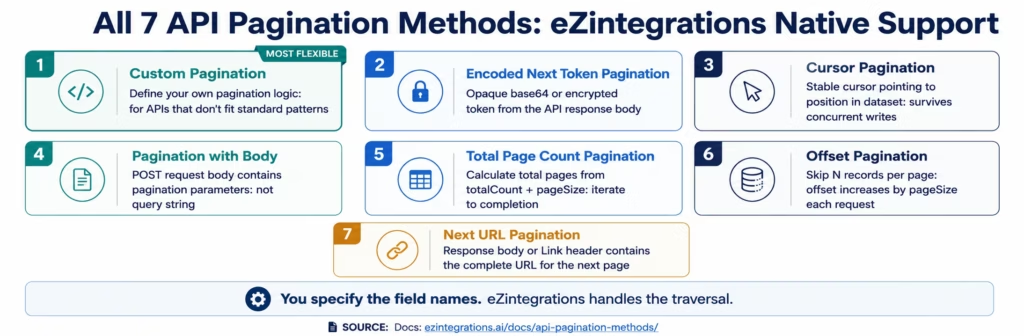
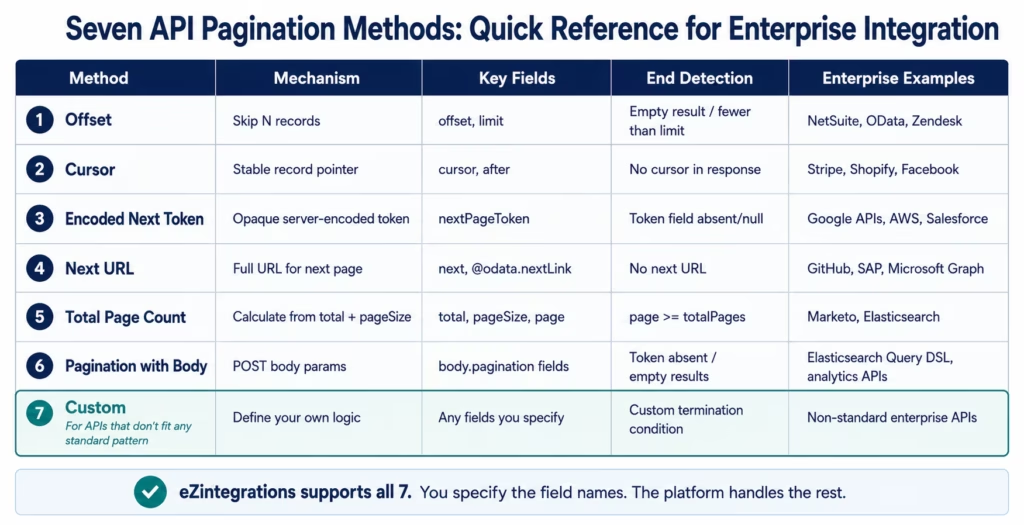
Enterprise APIs implement pagination in seven distinct patterns: each with different client traversal logic. An integration platform that supports only one or two of these requires custom code for the rest, which reintroduces the maintenance and reliability risk that an iPaaS is supposed to eliminate.
eZintegrations supports all seven pagination methods out of the box, as documented in the API Pagination Methods documentation. You configure the field names your specific API uses; eZintegrations handles the traversal logic for each type automatically.
Offset Pagination: The Classic Approach
Offset pagination is the most widely recognised pagination method: and also the one with the most well-known performance limitations at large scale.
How it works: The client requests a specific number of records (the limit or pageSize) starting from a specific position in the dataset (the offset). The first request fetches records 0-99 (offset=0, limit=100). The second request fetches records 100-199 (offset=100, limit=100). The client increments the offset by the page size on each request until the response returns fewer records than the page size (signalling the last page) or returns an empty result.
Common field names across APIs:
- Offset + limit:
offset,limit(most common) - Page + per page:
page,per_page(GitHub, many REST APIs) - Skip + take:
$skip,$top(OData APIs including SAP and Microsoft) - Start + count:
startIndex,count
The performance limitation: Offset pagination requires the database behind the API to scan and discard the first N records to return the Nth page. For page 1,000 of a 1,000-record page size, the database must scan and discard 999,000 records before returning the 1,000 you requested. This is why large offsets on large datasets produce slow API responses: offset pagination is inherently O(N) in database scan cost.
Enterprise API examples using offset pagination:
- NetSuite REST API:
limitandoffsetparameters - HubSpot CRM API:
limitandafter(HubSpot uses cursor-style offset) - Microsoft Graph API (some endpoints):
$skipand$top(OData) - Zendesk API:
pageandper_page
eZintegrations configuration: You specify the names of the offset field and the limit field as used by your specific API. eZintegrations automatically increments the offset by the page size on each request and detects the end of the dataset from the response.
Cursor Pagination: The Scalable Alternative
Cursor pagination replaces the offset counter with a pointer to a specific record in the dataset: solving the performance problem of large offsets while adding the ability to paginate through datasets that are changing concurrently, consistent with the JSON:API Cursor Pagination Profile.
How it works: Rather than calculating where to start from an integer offset, the API returns a cursor value: a unique identifier or encoded position marker: in each response. This cursor points to the last record on the current page. The client passes this cursor value in the next request, and the API returns the records that come after the cursor’s position.
The client does not need to know the total record count or calculate an offset. It simply passes the cursor it received in the last response until the API returns no cursor (indicating the final page).
Why cursor pagination is better for large, live datasets: If records are inserted or deleted between page requests, offset pagination can skip records or return duplicates (a new record inserted before the current offset shifts all subsequent records). Cursor-based position is stable: the cursor points to a specific record, not a numerical position that shifts when the dataset changes.
Common cursor field names:
cursor,next_cursor,after,beforepageInfo.endCursor,pageInfo.hasNextPage(GraphQL pagination pattern)starting_after,ending_before(Stripe’s cursor model)
Enterprise API examples using cursor pagination:
- Stripe API:
starting_after(cursor is the last record’s ID) - Facebook/Meta Graph API:
aftercursor in paging object - Shopify Admin API:
page_infocursor token - Salesforce Bulk API 2.0: job result pagination with cursor
eZintegrations configuration: You specify the cursor field name in the response and the cursor parameter name in the request. eZintegrations extracts the cursor from each response and passes it in the next request automatically, stopping when the response contains no cursor field.
Encoded Next Token Pagination: Opaque Cursors
Encoded next token pagination is a variant of cursor pagination where the continuation token is an opaque, encoded string: base64, JWT, or an encrypted value: that the client must treat as an atomic unit without parsing its contents.
How it works: The API response body contains a field with the next page token: an encoded string that the client does not inspect or modify. The client takes this token value exactly as received and passes it as a request parameter on the next call. The API server decodes the token internally to determine where to continue.
The encoding serves two purposes: it hides the internal pagination state from the client (preventing clients from constructing arbitrary tokens to jump to specific pages), and it allows the server to encode richer state than a simple record ID cursor (timestamps, shard identifiers, multi-key positions).
Common field names:
nextPageToken,next_page_token(Google APIs, AWS APIs)continuationToken,continuation_tokenX-Next-Token,nextTokenpageToken
Enterprise API examples using encoded next token pagination:
- Google APIs (Gmail, Drive, Calendar, BigQuery):
nextPageTokenin response,pageTokenin request - AWS API responses (DynamoDB, S3 ListObjects, CloudWatch):
NextTokenorMarker - Azure REST APIs:
nextLinkwith token encoded in URL - Salesforce SOQL queries with cursor:
nextRecordsUrl
Critical implementation rule: Never attempt to decode, inspect, or modify an encoded token. Treat it as an opaque string. Modifying the token produces unpredictable API behaviour: most APIs return an error or silently return incorrect results.
eZintegrations configuration: You specify the response field containing the next token and the request parameter name. eZintegrations passes the token value unchanged on each subsequent request and stops when the token field is absent or null in the response.
Next URL Pagination: Follow the Link
Next URL pagination is the simplest pagination method conceptually: the API response tells you exactly where to make the next request by providing the complete URL.
How it works: The API response includes the full URL for the next page, either in the response body as a JSON field or in the HTTP Link header (defined in RFC 5988). The client does not need to construct any parameters: it simply follows the provided URL.
The Link header approach (used by GitHub, among others) encodes the relationship type defined in the Internet Assigned Numbers Authority link relation registry:
Link: <https://api.github.com/repos?page=2>; rel="next",
      <https://api.github.com/repos?page=34>; rel="last"
The response body approach embeds the URL in a JSON field:
{
  "data": [...],
  "pagination": {
    "next": "https://api.example.com/contacts?cursor=abc123&limit=100",
    "previous": null
  }
}
Common field names and locations:
- Response body:
next,next_url,nextPageUrl,links.next - HTTP Link header:
rel="next"relation - Embedded in
_links.next.href(HAL format) @odata.nextLink(OData APIs including SAP and Microsoft)
Enterprise API examples using Next URL pagination:
- GitHub REST API: Link header with
rel="next" - SAP OData services:
@odata.nextLinkfield in response - Microsoft Graph API (most endpoints):
@odata.nextLink - Jira REST API:
nextPageURL field
eZintegrations configuration: You specify the field path to the next URL in the response body, or indicate that eZintegrations should read the Link header. The platform follows each next URL in sequence until no next URL is present.
Total Page Count Pagination: Calculate Your Way Through
Total page count pagination provides the client with the information needed to calculate how many pages exist: enabling parallel fetching, progress tracking, and deterministic completion detection.
How it works: The API response includes two key fields: the total number of records in the complete dataset and the page size (or the current page number and page count). From these, the client can calculate: total pages = ceiling(totalCount / pageSize), and can determine exactly when the dataset is exhausted.
{
  "data": [...],
  "total": 47300,
  "page": 1,
  "pageSize": 100,
  "totalPages": 473
}
Advantages over cursor and next-URL methods: The client knows upfront how many requests are needed. This enables progress tracking (you are on page 127 of 473), parallel fetching (fetch pages 2-10 concurrently while processing page 1), and early termination if a partial dataset is sufficient.
Common field names:
- Total count:
total,totalCount,count,total_count,X-Total-Count(HTTP header) - Total pages:
totalPages,total_pages,pageCount - Current page:
page,currentPage,current_page - Page size:
pageSize,per_page,limit,size
Enterprise API examples using total page count pagination:
- Marketo REST API:
total,count,moreResultboolean - Zendesk API (older):
countandnext_pagecombined - Elasticsearch / OpenSearch:
hits.total.valuewithfromoffset - Many legacy enterprise REST APIs built on Java Spring or .NET frameworks
eZintegrations configuration: You specify the field names for the total record count and page size (or total pages and current page). eZintegrations calculates the full page count and iterates automatically.
Pagination with Body: POST-Based Page Traversal
Pagination with body applies when the API uses HTTP POST requests for data retrieval: embedding pagination parameters in the request body rather than query string parameters.
How it works: Some enterprise APIs, particularly those with complex query structures or that require sending large filter criteria, use POST endpoints for retrieval operations. The pagination state (current page, cursor, offset) is passed in the JSON or XML request body alongside the query parameters.
POST /api/v2/data/query
{
  "query": {
    "filter": {"status": "active", "createdAfter": "2026-01-01"},
    "pagination": {
      "pageSize": 200,
      "pageToken": "eyJhbGciOiJIUzI1NiJ9..."
    }
  }
}
This pattern is common in search APIs, analytics query APIs, and any API where the query complexity requires a structured request body that a simple GET query string cannot express.
Enterprise API examples using pagination with body:
- Elasticsearch / OpenSearch Query DSL:
fromandsizein POST body - Salesforce SOQL with complex queries submitted via POST
- Many enterprise reporting and analytics APIs
- Custom enterprise APIs built around POST-centric design patterns
Why this requires special handling: Standard HTTP caching infrastructure (CDNs, proxies) treats POST requests as non-cacheable. Integration platforms that naively apply GET-style pagination query parameter injection to a POST endpoint will break the request body structure. eZintegrations handles POST-body pagination by injecting or updating the pagination fields within the request body on each iteration.
eZintegrations configuration: You specify the JSON path to the pagination fields within the request body, and the pagination type (token, offset, cursor). eZintegrations updates the body’s pagination fields on each request while preserving all other request body content.
Custom Pagination: When Standard Methods Don’t Fit
Custom pagination is the escape hatch for enterprise APIs that implement pagination in ways that don’t match any of the six standard patterns.
Every enterprise integration estate has at least one API that does something unusual with pagination: a proprietary continuation header, a pagination state encoded in a cookie, a two-step process that first fetches a session ID and then uses that ID in subsequent page requests, or a pagination mechanism that depends on values from multiple response fields combined.
Custom pagination in eZintegrations allows you to define your own page traversal logic using the platform’s expression language: specifying exactly how to extract the continuation state from each response and how to inject it into the next request. This gives you the flexibility to handle any pagination pattern while still benefiting from the platform’s execution engine, retry logic, monitoring, and error handling.
Common custom pagination scenarios:
- APIs that return a session token on the first request and require it for subsequent pages
- APIs where the “next page” indicator is a combination of multiple response fields
- APIs with non-standard HTTP headers controlling pagination state
- Legacy enterprise APIs with pagination mechanisms tied to a SOAP/XML structure
- APIs that require a preliminary request to determine the total record count before pagination begins
eZintegrations custom pagination: The custom pagination option in eZintegrations lets you specify:
- The expression that extracts the continuation value from the current response
- The request parameter, header, or body field that carries the continuation value
- The condition that indicates the final page (expression evaluates to true when pagination should stop)
This covers every edge case without requiring you to write and maintain a custom integration script outside the platform.
How eZintegrations Handles All Seven Pagination Types
eZintegrations is one of the few enterprise iPaaS platforms that supports all seven API pagination methods natively: without requiring custom code, workarounds, or external pagination scripts.
Configuration, not code:
When you configure an API connector in eZintegrations that retrieves data from a paginated endpoint, you select the pagination type from the seven supported methods and specify the field names your specific API uses. eZintegrations handles the entire traversal loop:
- Makes the first request with the configured parameters
- Processes the response (transforms, routes, or writes the records from this page)
- Extracts the continuation value for the next page (cursor, token, next URL, or calculated offset)
- Detects whether this is the final page (no continuation value, empty response, or total pages reached)
- If not the final page: increments or updates the pagination state and makes the next request
- Repeats until the final page
You do not write this loop. You configure the field names.
Handling API-specific field name variations:
The same pagination mechanism can have different field names across APIs. Offset pagination uses offset and limit in some APIs, $skip and $top in OData APIs, startIndex and count in others. eZintegrations’ configurable field name approach means you specify exactly what your API uses: the platform is not hardcoded to specific field names.
Rate limiting during pagination:
Paginating through a large dataset generates many sequential API requests. Enterprise APIs enforce rate limits: Salesforce allows 100,000 API calls per day on standard plans, HubSpot enforces 100 requests per 10 seconds, and many APIs have concurrent request limits. eZintegrations manages rate limit compliance during pagination automatically: it monitors the rate limit headers in each response (X-RateLimit-Remaining, Retry-After) and adds the appropriate delay between page requests to stay within the API’s limits.
Error handling and retry in paginated fetches:
If a single page request fails (network timeout, transient API error, rate limit exceeded), eZintegrations retries that specific page request with exponential backoff: without restarting the entire pagination sequence from page 1. The platform tracks which pages have been successfully processed and resumes from the last successful page.
Parallel page fetching (where supported):
For pagination methods that expose the total page count upfront (Total Page Count Pagination), eZintegrations can fetch multiple pages concurrently: running page 2, page 3, and page 4 requests simultaneously rather than sequentially. This significantly reduces the total time to fetch large datasets from APIs that support it.
Documentation:
Full configuration reference for all seven pagination types is available in the eZintegrations API Pagination Methods documentation.
Import an Automation Hub template with pagination pre-configured for your specific API: Salesforce, NetSuite, HubSpot, Marketo, Shopify, Google APIs, and more.
Book a free demo and bring your specific paginated API challenge.
FAQs
API pagination splits large datasets into sequential pages so they can be fetched reliably. Without pagination handling, an integration retrieving hundreds of thousands of records may time out, exhaust memory, or receive a single monolithic payload without any recovery boundary. Enterprise integrations require correct pagination handling to guarantee complete data retrieval because fetching only the first page while silently missing remaining records creates reporting errors, reconciliation gaps, and incomplete downstream processing.
The seven common enterprise API pagination patterns are Offset, Cursor, Encoded Next Token, Next URL, Total Page Count, Pagination with Body, and Custom Pagination. Offset pagination using skip and limit parameters is common in legacy APIs. Cursor pagination using stable record pointers is used by systems such as Stripe, Shopify, and Facebook for scalable traversal of large datasets. Encoded Next Token pagination is used by Google APIs, AWS APIs, and Salesforce. Next URL pagination is commonly used by GitHub, SAP OData, and Microsoft Graph APIs.
Offset pagination retrieves records by skipping a numeric number of rows, while cursor pagination uses a stable pointer to a specific record position. Offset pagination becomes slower at large offsets and can introduce duplicate or skipped records when datasets change during traversal. Cursor pagination maintains a stable position that survives concurrent inserts and deletes, and database performance remains consistent regardless of dataset size or traversal depth.
eZintegrations supports all seven pagination methods natively. You select the pagination pattern and configure the field names used by the API such as offset, limit, cursor, nextPageToken, or next URL. The platform automatically performs the traversal loop including page requests, continuation token extraction, end-of-pagination detection, rate limit handling, retry logic for failed pages, and recovery without restarting the entire sequence.
Encoded next token pagination uses an opaque server-generated continuation token such as a Base64 string, JWT, or encrypted value. The API response returns the token and the client passes it unchanged into the next request. Google APIs using nextPageToken, AWS APIs using NextToken, and Salesforce SOQL query result sets all use this pattern. The token should always be treated as an opaque string and never decoded or modified because changing the token can cause unpredictable API behaviour.
Custom pagination is designed for enterprise APIs that do not follow standard pagination patterns. Common scenarios include session-token pagination where the first request returns a session identifier, APIs where continuation state spans multiple response fields, legacy SOAP or XML APIs with proprietary structures, or APIs requiring a preliminary count query before pagination begins. eZintegrations custom pagination lets you define extraction expressions, request injection points, and end conditions so that any pagination structure can be automated without external custom code. 1. What is API pagination and why do enterprise integrations need it?
2. What are the most common API pagination types used by enterprise systems?
3. What is the difference between cursor pagination and offset pagination?
4. How does eZintegrations handle API pagination automatically?
5. What is encoded next token pagination and when is it used?
6. What is custom pagination in eZintegrations and when do I need it?
Conclusion: Pagination Is the Silent Data Quality Problem Most Teams Discover Too Late
A pipeline that fetches the first page of 500 and stops is indistinguishable from a pipeline that fetches all 500 pages: until someone checks the record counts.
The seven API pagination types covered in this guide represent the full range of mechanisms you will encounter across enterprise systems: the offset arithmetic of legacy ERP APIs, the stable cursors of modern SaaS platforms, the opaque tokens of cloud-native APIs, the embedded URLs of OData services, the total page counts of analytics platforms, the POST-body parameters of search APIs, and the edge cases that require custom logic.
Getting pagination right requires that your integration platform understands all of them: not just the two or three that are most common. And it requires that the platform handles rate limiting, retry logic, and error recovery within the pagination loop automatically, without custom code that your team has to maintain.
eZintegrations supports all seven pagination methods natively. You specify the field names your API uses; the platform handles the traversal. Every Automation Hub template for paginated APIs comes with pagination pre-configured for the specific system it connects to.
Import an Automation Hub template with pagination pre-configured for Salesforce, NetSuite, HubSpot, Marketo, Shopify, Google APIs, AWS, and more.
eZintegrations is SOC 2 Type II certified. All data processed through eZintegrations’ API connectors, including paginated data fetches containing PII or regulated data, is handled within eZintegrations’ HIPAA-compliant and GDPR-compliant infrastructure. For healthcare APIs (FHIR, HL7) and financial APIs where paginated responses contain sensitive data, all processing stays within the eZintegrations compliance boundary.
Read the full API Pagination Methods documentation to configure any of the seven pagination types for your specific API.
Book a free demo and bring your specific paginated API. We will show you the configuration for your pagination type and field names.