
Veeva Integration Platform: Connect Veeva to SAP, Salesforce & Your Life Sciences Stack
June 6, 2026To integrate Veeva with your enterprise systems using eZintegrations: connect your Veeva Vault or Veeva CRM instance using the native Veeva REST API connector (OAuth 2.0 or username/password session token for Vault; OAuth 2.0 for Veeva CRM), configure your trigger (a document lifecycle state change in Vault, a new HCP record in Veeva CRM, or a scheduled pull from Vault objects), select the Veeva objects you need (Vault Documents, Vault Objects, Binders, Veeva CRM Accounts, HCPs, Calls, Medical Inquiries), map fields to your destination system (SAP, Salesforce, Oracle, Workday, ServiceNow, or any enterprise app), and activate. Most Veeva integrations go live in under 30 minutes using a pre-built Automation Hub template.
TL;DR
- Connect Workday with ERP, CRM, ITSM, payroll, analytics, and identity systems using native REST API, RaaS, SOAP, and EIB integrations without custom code.
- Automate employee lifecycle workflows in real time: new hire provisioning, role changes, payroll journal posting, and employee offboarding across systems like SAP, Oracle, NetSuite, Salesforce, ServiceNow, and Active Directory.
- eZintegrations supports real-time Workday event processing, scheduled RaaS reporting, bidirectional data sync, row-level error handling, and AI-powered HR and finance workflows.
- Level 2 AI Workflows, Level 3 AI Agents, and Level 4 Goldfinch AI enable natural language HR analytics, compensation reviews, payroll insights, and automated HR operations directly from Workday data.
- With 60+ pre-built Automation Hub templates, most Workday integrations go live in under 30 minutes using a fully managed enterprise automation platform.
Veeva Integration Platform: Connect Veeva to SAP, Salesforce & Your Life Sciences Stack
Veeva is the system of record for life sciences commercial, clinical, and regulatory operations. Veeva CRM manages your field force and HCP relationships. Veeva Vault manages your documents, clinical data, quality records, and regulatory submissions. Veeva Quality manages your deviation, CAPA, and audit workflows.
None of these operate in isolation. Your commercial data needs to reach your SAP ERP. Your regulatory documents need to sync to your clinical systems. Your quality deviations need to trigger workflows in ServiceNow. Your HCP engagement data needs to enrich Salesforce and feed your analytics platform.
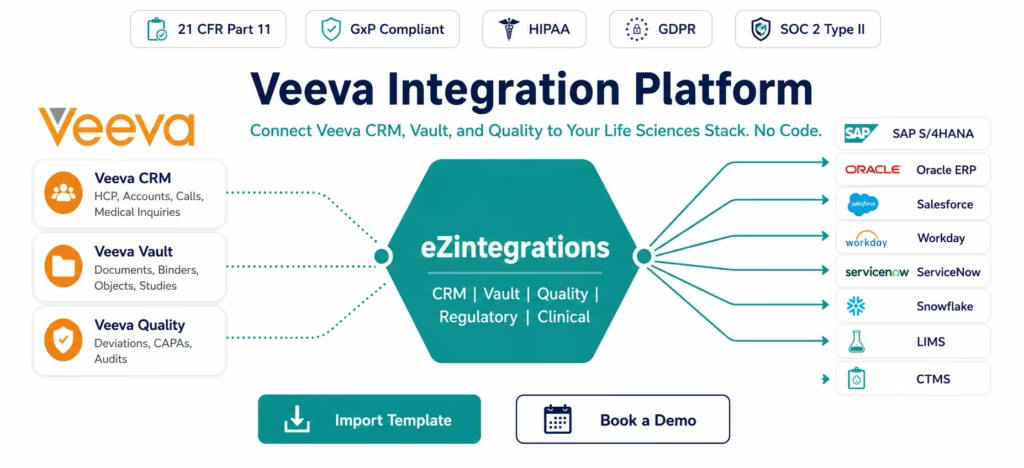
eZintegrations connects the entire Veeva ecosystem to your life sciences enterprise stack: with built-in support for the compliance requirements, audit trail standards, and data governance needs that pharma and biotech integration demands.
Import a Veeva Integration Template from the Automation Hub and go live in minutes. Or book a free Veeva integration session and we will configure your specific life sciences workflow in the demo.
The Veeva Ecosystem Is Broad: And Siloed by Default
A typical life sciences company runs three or more Veeva products: Veeva CRM for commercial operations, Veeva Vault for document management and regulatory submissions, Veeva Quality for GxP quality management. Each product is a best-in-class solution for its domain.
The integration challenge: each Veeva product is a separate system with its own API, its own data model, and its own integration requirements, as documented in the Veeva Vault Developer Portal. And each one needs to exchange data with systems outside the Veeva ecosystem: SAP for financial and supply chain data, Salesforce for CRM data outside the life sciences field force, Oracle for clinical and ERP operations, Workday for HR data, ServiceNow for ITSM, and specialist systems like LIMS, CTMS, and pharmacovigilance platforms.
When these integrations do not exist, life sciences companies rely on manual processes: spreadsheet exports from Vault, CSV imports to SAP, manual HCP data entry in multiple systems, and disconnected quality workflows that slow regulatory submissions.
eZintegrations provides pre-built templates for every major Veeva-to-enterprise integration pattern, handling the API complexity, the compliance requirements, and the audit trail demands that life sciences integration requires.
What You Can Do
Veeva CRM: Commercial Data Integration
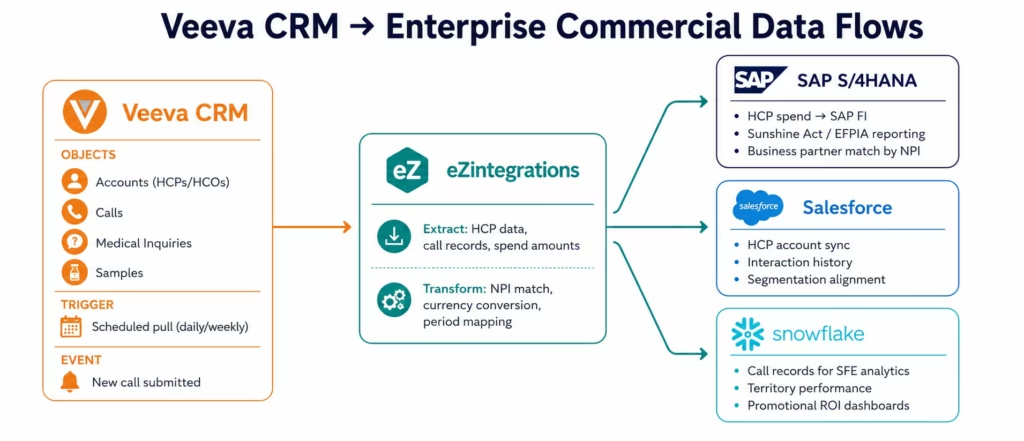
Veeva CRM is the system of record for HCP (Healthcare Professional) and HCO (Healthcare Organisation) relationships, field force call activity, medical inquiries, and promotional material tracking. eZintegrations connects Veeva CRM data to the enterprise systems that need it.
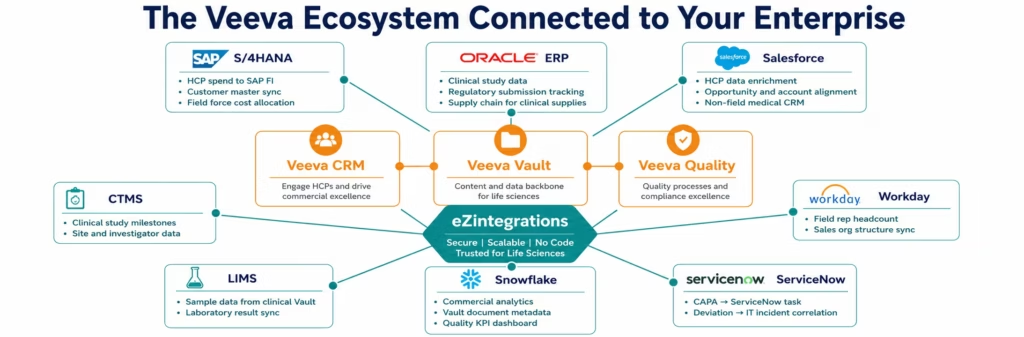
HCP data to SAP (aggregate spend reporting): Regulations in the US (Sunshine Act), EU (EFPIA transparency), and other markets require pharmaceutical companies to report aggregate spend with HCPs: meals, speaker fees, travel, educational grants. Veeva CRM captures the HCP interactions. eZintegrations extracts HCP spend data from Veeva CRM on a scheduled basis, transforms it to the SAP reporting format, and posts the spend records to SAP FI for aggregate spend compliance reporting. The HCP reference data (NPI, DEA number, address) is matched to the SAP business partner record.
Veeva CRM to Salesforce (commercial and medical alignment): Many life sciences companies use Veeva CRM for field force commercial operations and Salesforce for medical affairs, market access, or non-field CRM operations. eZintegrations synchronises HCP and HCO account data between Veeva CRM and Salesforce, ensuring account managers in both systems work from the same HCP profile, the same interaction history, and the same segmentation data.
Call data to analytics: Field force call records in Veeva CRM (call date, HCP visited, product discussed, samples delivered, outcomes) feed commercial analytics platforms. eZintegrations schedules incremental pulls from Veeva CRM’s call object and loads the data to Snowflake, BigQuery, or Redshift for sales force effectiveness dashboards, territory management, and promotional ROI analytics.
Veeva Vault: Document and Regulatory Integration
Veeva Vault manages documents, binders, and structured data objects across the full document lifecycle: from authoring to review, approval, distribution, and archival. In a life sciences organisation, Vault is where clinical study reports, regulatory submissions, promotional materials, and quality SOPs live.
Vault document lifecycle to regulatory tracking: When a regulatory submission document in Vault moves to Approved state, eZintegrations creates or updates the corresponding regulatory submission record in your CTMS or regulatory tracking system. The document metadata (title, version, product, region, submission date) flows automatically, eliminating manual data entry in the regulatory affairs team’s tracking spreadsheet.
Vault to SAP for clinical supply management: Clinical supply requests generated as Vault objects need to trigger procurement actions in SAP. When a clinical supply request object reaches Approved status in Vault, eZintegrations creates the corresponding purchase requisition in SAP, pre-populating the material, quantity, delivery site, and clinical study reference from the Vault object fields.
Promotional material (PromoMats) to DAM: When a promotional material is approved in Veeva Vault PromoMats, eZintegrations retrieves the approved document, extracts the rendition, and pushes it to your Digital Asset Management (DAM) system or your marketing automation platform. Field reps in markets outside Veeva CRM receive the approved promotional content automatically through their content management system.
Medical, Legal, Regulatory (MLR) workflow to approval tracking: MLR review workflows in Vault trigger notifications and task creation in enterprise systems. When a promotional piece enters MLR review, eZintegrations notifies the reviewers in Microsoft Teams or Slack, creates review tasks in ServiceNow or Jira, and posts the Vault document link. When the MLR review is complete, eZintegrations updates the downstream tracking systems automatically.
Veeva Quality: GxP and CAPA Integration
Veeva Quality manages GxP quality processes: deviation records, CAPA (Corrective and Preventive Action) investigations, change controls, and audit findings. These quality events need to propagate to ERP, ITSM, and analytics systems.
Deviation to SAP batch record: When a manufacturing deviation is created in Veeva Quality, the affected batch needs to be placed on hold in SAP Batch Management. eZintegrations receives the deviation event from Vault (via webhook or scheduled pull), identifies the affected batch number, and calls the SAP API to update the batch status. When the CAPA is closed in Veeva Quality and the batch is cleared, eZintegrations releases the SAP batch hold.
CAPA to ServiceNow: CAPA investigations often involve IT systems and infrastructure changes. When a CAPA requiring an IT change is approved in Veeva Quality, eZintegrations creates the corresponding change request in ServiceNow, populates it with the CAPA reference, the affected system, and the required action, and links the CAPA document from Vault. When the ServiceNow change is implemented and closed, eZintegrations updates the CAPA record in Veeva Quality with the change reference number.
Quality metrics to analytics: Deviation counts, CAPA open/close rates, audit findings by site, and change control cycle times all need to feed your quality dashboard. eZintegrations schedules pulls from Veeva Quality objects (deviations, CAPAs, audits, change controls) and loads the structured data to Snowflake or BigQuery for your quality KPI dashboards and regulatory inspection readiness reporting.
How It Works
Three steps from Veeva credentials to live enterprise integration.
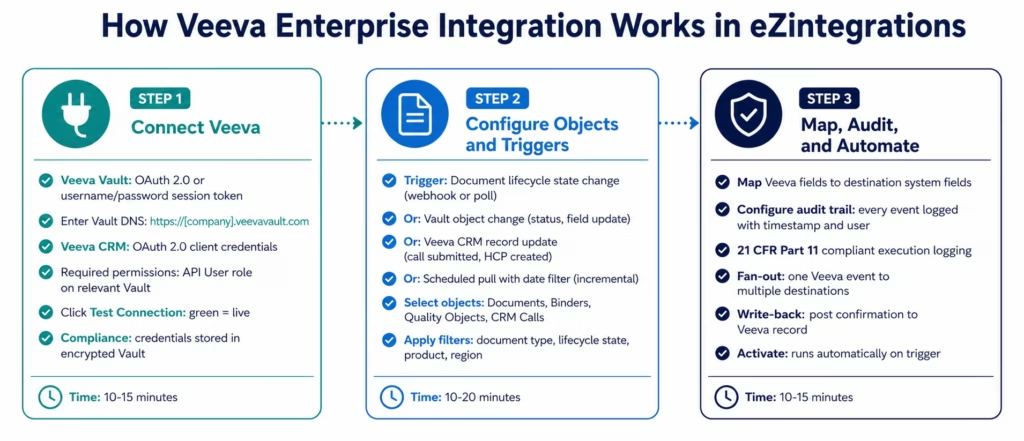
Step 1: Connect Veeva Vault or Veeva CRM
Veeva Vault connection:
Veeva Vault uses two authentication methods:
OAuth 2.0 (recommended): configure an OAuth 2.0 profile in Vault Admin (Security → OAuth 2.0 / OpenID Connect), create an API user with the required security profile, and generate client credentials. Enter your Vault DNS (https://[company].veevavault.com), client ID, and client secret in the eZintegrations Vault connector.
Username/password session token: enter your Vault API user credentials, aligned with the Veeva Vault REST API authentication reference. eZintegrations calls the Vault authentication endpoint to obtain a session token (X-VaultAPI-SessionID) and manages token refresh automatically. This method is supported but OAuth 2.0 is recommended for production integrations.
Veeva CRM connection:
Veeva CRM uses OAuth 2.0 client credentials flow. Register an integration application in Veeva CRM, obtain the client ID and client secret, and enter them in the eZintegrations Veeva CRM connector with your Veeva CRM instance URL.
Required permissions:
For Vault: the API user needs the relevant security profiles for the Vault types you are integrating (eTMF Vault, QMS Vault, PromoMats Vault, RIM Vault). The minimum required permission is API access on the document types and object types you need to read or write.
For Veeva CRM: the integration user needs Read access on the CRM objects (Account, Call, Medical Inquiry, Product) and Write access for any write-back operations.
Step 2: Configure Vault Objects, Documents, and Triggers
Document lifecycle triggers:
Vault documents move through lifecycle states (Draft, In Review, Approved, Superseded). Configure a trigger in eZintegrations to fire when a document of a specific type reaches a specific lifecycle state.
eZintegrations polls the Vault Document Lifecycle API on your configured interval, or you configure a Vault Document Action (in Vault Admin) to call an eZintegrations webhook when a lifecycle state transition occurs. The webhook approach provides real-time processing; the scheduled poll provides near-real-time with simpler Vault configuration.
Vault object queries:
Vault objects (quality objects, study objects, site objects, custom objects) are queried using the Vault Query Language (VQL), similar to SOQL in Salesforce:
SELECT id, name__v, status__v, deviation_type__v, affected_batch__v, created_date__v
FROM deviation__c
WHERE status__v = 'open'
AND created_date__v >= ':last_watermark'
ORDER BY created_date__v ASC
LIMIT 500
The platform manages the last_watermark timestamp automatically: incremental pull of only new and modified Vault objects since the previous run.
Veeva CRM object queries:
Veeva CRM uses a REST API with SOQL-like query syntax, aligned with the Veeva CRM Developer Documentation. Common objects for integration: Account (HCPs and HCOs), Call (field force call records), Medical_Inquiry_vod__c (medical information requests), Sample_Transaction_vod__c (sample activity).
Step 3: Map Fields, Configure Audit Trail, and Activate
Map Veeva fields to your destination system. Veeva-specific field handling:
- Document version fields: Vault documents have version metadata (major version, minor version, status). Map these to your downstream system’s version tracking fields.
- Vault object custom fields: custom fields follow the naming convention
field_name__c. These are accessible and mappable in the same way as standard fields. - Document renditions: eZintegrations can retrieve the document rendition (PDF viewable, native file) from Vault and route it to a file storage system, DAM, or email distribution.
- Lifecycle state codes: Vault lifecycle states are stored as internal codes. eZintegrations maps these to human-readable values in the destination system.
Compliance-ready audit logging:
Every eZintegrations execution log for a Veeva integration includes: timestamp, Vault record ID, document version, lifecycle state at time of processing, destination system confirmation, and the identity of the integration user. This audit trail satisfies 21 CFR Part 11 requirements for computerised system audit trails in GxP environments.
Veeva Connector Capabilities
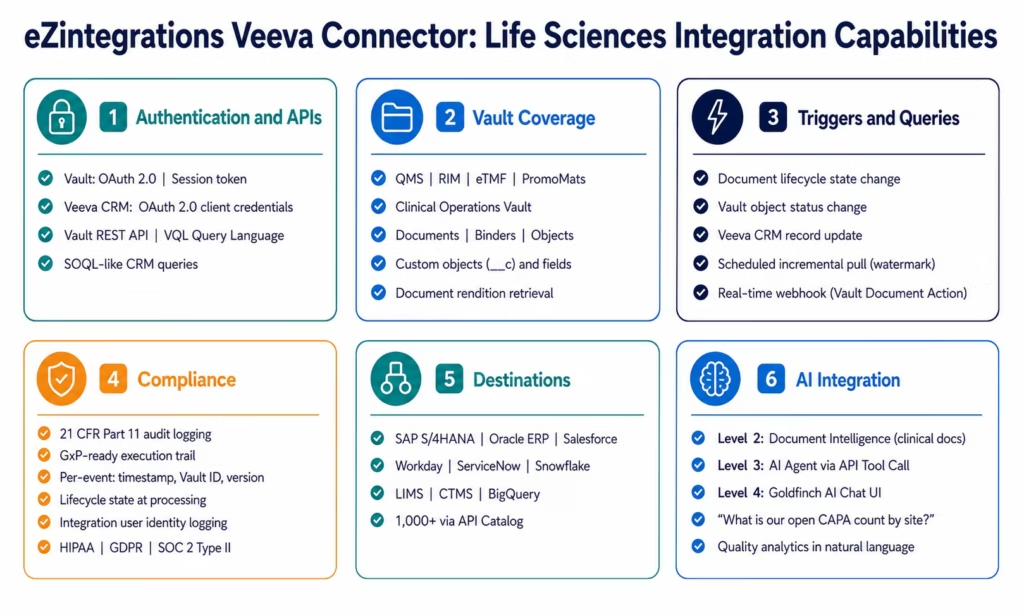
| Capability | eZintegrations Veeva Integration |
|---|---|
| Supported products | Veeva Vault (all Vault types: QMS, RIM, eTMF, PromoMats, Clinical Operations), Veeva CRM |
| Authentication | Vault: OAuth 2.0 (recommended), username/password session token; Veeva CRM: OAuth 2.0 client credentials |
| Vault API operations | Document CRUD, Document Lifecycle Actions, Vault Object CRUD, Binder operations, Document Rendition retrieval, VQL query |
| Veeva CRM API operations | Account, Call, Medical Inquiry, Sample Transaction, Product Catalog read and write |
| Trigger types | Document lifecycle state change (webhook or scheduled poll), Vault object status change, Veeva CRM record update, scheduled incremental pull |
| Query language | VQL (Vault Query Language) for Vault objects; SOQL-like REST queries for Veeva CRM |
| Incremental pull | Created/modified date watermark: platform-managed |
| Document renditions | Retrieve PDF viewable, native file, or thumbnail renditions from Vault |
| Custom objects and fields | All Vault custom objects (__c) and custom fields accessible and mappable |
| Write operations | Create and update Vault documents and objects; update Veeva CRM records; write-back confirmation fields |
| Fan-out routing | One Veeva event to multiple destinations simultaneously |
| Destination systems | SAP S/4HANA, Oracle ERP, Salesforce, Workday, ServiceNow, Snowflake, BigQuery, LIMS, CTMS, and 1,000+ via API Catalog |
| Compliance | 21 CFR Part 11 compliant audit logging, GxP-ready execution trail, HIPAA, GDPR, SOC 2 Type II |
| Audit trail | Full execution log per event: timestamp, Vault record ID, document version, lifecycle state, integration user, destination response |
| Error handling | Automatic retry with backoff, dead letter queue, row-level error logging |
| Security | OAuth 2.0, TLS 1.2+, credential vault (encrypted), HIPAA, GDPR, SOC 2 Type II |
| AI integration | Veeva Vault document events as Level 3 AI Agent triggers; Document Intelligence for clinical document extraction; Goldfinch AI Chat UI for quality analytics |
| Templates | 40+ Automation Hub templates for Veeva CRM-to-SAP, Vault-to-ServiceNow, Vault-to-Snowflake, CAPA workflows, and more |
Why eZintegrations for Veeva Integration
Pre-Built Life Sciences Integration Templates
Veeva integration requires understanding Vault’s document-centric data model, VQL query syntax, lifecycle state APIs, and the compliance requirements that govern every integration touching GxP data. Building this from scratch takes weeks of specialist development time.
eZintegrations provides 40+ pre-built templates that encode this knowledge: the correct Vault API endpoints, the VQL query patterns, the lifecycle state mapping tables, the SAP field alignments for HCP spend and batch management, and the compliance logging configuration. Import the template, connect your credentials, and go live in under 30 minutes without needing a Vault integration specialist on your team.
21 CFR Part 11 and GxP Compliance by Design
Every eZintegrations workflow that touches Veeva data generates a compliance-grade audit trail automatically. The execution log records: the Vault record ID and version, the document type and lifecycle state at the time of processing, the fields extracted and transformed, the destination system confirmation, the timestamp, and the identity of the integration service account.
This audit trail is not an add-on: it is generated for every workflow execution, stored with full metadata, and accessible for regulatory inspection. When a GxP auditor asks for evidence that your Vault-to-SAP integration operated correctly during a specific period, the execution logs provide the complete record without any additional work.
VQL Query Support for Complex Vault Data
Vault’s query language (VQL) allows precise extraction of Vault objects with complex filters. eZintegrations supports the full VQL query syntax in the Vault object connector: multi-condition WHERE clauses, date range filters, object relationship joins, and lifecycle state filters.
SELECT id, name__v, status__v, assigned_to__vr.name__v,
       root_cause_category__c, affected_product__cr.name__v,
       target_completion_date__v
FROM capa__c
WHERE status__v IN ('Open', 'In Progress')
AND target_completion_date__v < '2026-06-30'
ORDER BY target_completion_date__v ASC
This flexibility allows your Vault admin to define exactly which records and fields are extracted, without requiring the integration platform to retrieve entire object datasets.
Document Rendition Retrieval and Distribution
Veeva Vault stores documents with multiple renditions: the native file, a PDF viewable version, a thumbnail, and any custom renditions your Vault configuration defines. eZintegrations can retrieve any document rendition from Vault and route it to a downstream system: a DAM for marketing content, an email distribution for approved materials, a LIMS for method documents, or an archival system for submission packages.
When a regulatory submission package is approved in Vault, eZintegrations retrieves the PDF rendition, packages it, and delivers it to your eCTD publishing system. When a promotional material is approved in PromoMats, eZintegrations retrieves the approved rendition and pushes it to your content management system for field force distribution.
AI-Ready Life Sciences Data Pipelines
Veeva Vault documents and quality records are rich data sources for AI automation.
Level 1 (iPaaS Workflows): rule-based Veeva integration. Vault document approved triggers CTMS update and SAP supply request. Veeva Quality deviation triggers SAP batch hold. Deterministic, audit-logged, GxP-compliant.
Level 2 (AI Workflows): Document Intelligence extracts structured data from clinical documents, SOPs, and protocols in Vault. When a new clinical study report is approved, the AI extraction step pulls key data points (study indication, endpoint results, patient population) and populates your regulatory tracking database without manual data entry.
Level 3 (AI Agents): the Quality Exception Agent receives a deviation record from Veeva Quality, queries the CAPA history for similar deviations using the API Tool Call tool, searches the SOP knowledge base for relevant procedures, and produces a structured root cause recommendation for the quality team. The agent can also query SAP for affected batch status and ServiceNow for related IT change history.
Level 4 (Goldfinch AI): the Quality VP asks the Chat UI: “What is our open CAPA count by site and overdue rate this quarter?” Goldfinch AI queries the Veeva Quality object via the Workflow Node, aggregates the data, and returns the answer with a site-by-site breakdown. The Regulatory Affairs Director asks: “Which RIM submissions are past their due date this month?” Same mechanism: natural language in, live Vault query, formatted regulatory tracking answer out.
Import a Veeva Integration Template
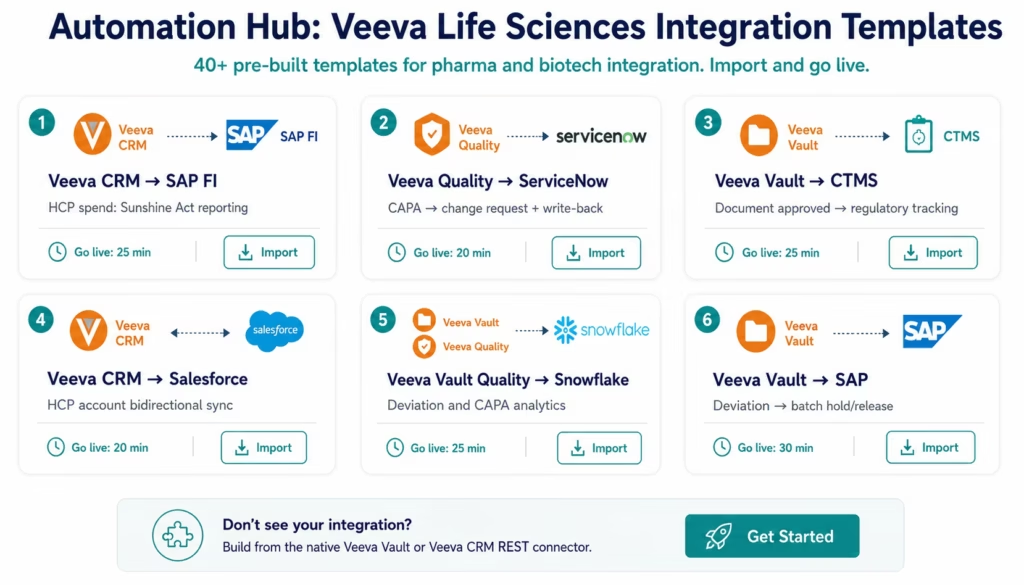
The Automation Hub contains 40+ pre-built Veeva integration templates covering the major commercial, regulatory, and quality integration patterns for life sciences organisations.
Popular Veeva integration templates:
- Veeva CRM HCP spend to SAP FI (Sunshine Act / EFPIA transparency reporting)
- Veeva CRM call records to Snowflake (sales force effectiveness analytics)
- Veeva CRM to Salesforce HCP account sync (bidirectional)
- Veeva Vault document approved to CTMS regulatory tracking
- Veeva Vault quality deviation to SAP batch hold
- Veeva Quality CAPA to ServiceNow change request (with write-back)
- Veeva Vault PromoMats approved to DAM distribution
- Veeva Vault clinical study report to Oracle ERP clinical billing
- Veeva Quality deviation to Snowflake quality analytics
- Veeva RIM submission status to regulatory tracking database
- Veeva Vault object (custom) to Salesforce record sync
Browse all Veeva templates in the Automation Hub
Import the template for your integration pattern, enter your Vault DNS, OAuth 2.0 credentials, and destination system credentials, adjust the VQL query and field mapping for your Vault configuration, and activate. Most Veeva templates go live in under 30 minutes.
FAQs
For Veeva Vault: in Vault Admin, configure an OAuth 2.0 client application and create an API user with the required security profiles for your Vault types. In eZintegrations, enter your Vault DNS (https://your-company.veevavault.com), OAuth 2.0 client ID and client secret, and click Test Connection. For Veeva CRM: register an OAuth 2.0 integration application in Veeva CRM and enter the client credentials in eZintegrations. Select your trigger type (document lifecycle state change, Vault object status, Veeva CRM record update, or scheduled incremental pull using VQL). Map fields to your destination system and activate. Total time: 25-40 minutes with an Automation Hub template, 60-90 minutes for a custom integration.
Yes, eZintegrations provides native connectors for Veeva Vault including QMS, RIM, eTMF, PromoMats, and Clinical Operations Vaults, plus Veeva CRM. Supported operations include document CRUD, document lifecycle actions, Vault object queries using VQL, Vault object CRUD, document rendition retrieval, and Veeva CRM account, call, medical inquiry, and sample transaction operations. Destinations include SAP, Oracle ERP, Salesforce, Workday, ServiceNow, Snowflake, LIMS, CTMS, and 1,000+ more through the API Catalog. The connector generates 21 CFR Part 11 compliant audit logs for every GxP workflow.
Using an Automation Hub template such as Veeva CRM to SAP HCP spend, Vault approval to CTMS, or Quality CAPA to ServiceNow: 25-35 minutes total from template import to live production. Building a custom integration with the Veeva Vault REST connector: 60-90 minutes for a single object type or document type. Complex multi-Vault or cross-product integrations such as CRM plus Vault plus Quality to multiple destinations: 2-4 hours for full configuration.
Yes, The Automation Hub contains 40+ pre-built Veeva integration templates included in all eZintegrations subscription tiers at no additional charge. Browse and import at ezintegrations.ai/automation-hub. Templates cover Veeva CRM commercial integration, Veeva Vault document lifecycle workflows, Veeva Quality CAPA and deviation management, and Veeva RIM regulatory tracking. Each template includes VQL query configuration, field mapping for common Vault object schemas, and compliance logging setup.
Every eZintegrations workflow touching Veeva data generates an audit trail that satisfies 21 CFR Part 11 requirements for computerised system audit trails. The execution log records the Vault record ID, document version, lifecycle state at the time of processing, the data extracted and transformed, the destination system response and confirmation number, the timestamp in UTC, and the identity of the integration service account. These logs are immutable, timestamped, and retained for the duration you configure. For GxP validation purposes, eZintegrations provides execution log export and IQ/OQ/PQ documentation support for integration system validation.
Yes, Veeva Vault document lifecycle events and quality object status changes are primary triggers for Level 2 and Level 3 AI workflows. Level 2: when a new clinical study report is approved in Vault, the Document Intelligence step extracts key data points from the PDF and populates your regulatory tracking database. Level 3: the Quality Exception Agent receives a deviation record from Veeva Quality, uses the API Tool Call tool to retrieve related batch and CAPA history, searches the SOP knowledge base, and produces a root cause recommendation. Level 4 Goldfinch AI Chat UI answers natural language quality and regulatory analytics questions from live Veeva data.
Veeva Vault Query Language (VQL) is accessible directly in the eZintegrations Vault object connector query editor. Enter the full VQL query including SELECT fields, FROM object, WHERE conditions such as lifecycle state, date ranges, product filters, and custom field values, plus ORDER BY and LIMIT. The :last_watermark parameter is supported for incremental pull: the platform substitutes the maximum created_date__v or modified_date__v from the previous run automatically. Object relationships accessed via __vr suffix for related record fields and __cr for child relationships are supported in VQL queries, and the related field values are returned and mappable in the field mapper. 1. How do I integrate Veeva with eZintegrations?
2. Does eZintegrations support Veeva enterprise integration?
3. How long does Veeva integration take in eZintegrations?
4. Is there a free Veeva integration template?
5. How does eZintegrations handle 21 CFR Part 11 and GxP compliance requirements?
6. Can Veeva events trigger AI Agent workflows?
7. How does eZintegrations handle Veeva Vault's VQL query language?
Connect Your Veeva Ecosystem to Your Enterprise
Life sciences integration demands more than technical connectivity. It demands audit trails, compliance logging, GxP-ready data handling, and the ability to move sensitive clinical, quality, and commercial data across enterprise systems with full traceability.
eZintegrations delivers all of it: 40+ pre-built Veeva templates, native Vault REST and VQL support, 21 CFR Part 11 compliant audit logging, document rendition retrieval, full Veeva Quality CAPA integration, and all four automation levels from rule-based commercial data sync to Goldfinch AI natural language quality analytics.
Import a Veeva integration template from the Automation Hub and have your first life sciences integration live today.
Book a free demo and we will configure your specific Veeva workflow in the demo.

