
AI Workflow Automation vs Traditional iPaaS: What Enterprise Ops Teams Need to Know in 2026
May 9, 2026Traditional iPaaS handles deterministic, rule-based integration: if this event happens in system A, do this specific action in system B. AI workflow automation handles processes where the right action depends on the content, context, or intent of the data: classify this document, assess this risk, decide which of these three paths is correct for this specific case. Enterprise operations teams need both. eZintegrations delivers all four levels in one platform: Level 1 (iPaaS Workflows), Level 2 (AI Workflows), Level 3 (AI Agents), and Level 4 (Goldfinch AI), with 1,000+ templates and native ERP connectors, so teams do not need to maintain separate platforms for rule-based and AI-powered automation.
TL;DR
- Traditional iPaaS (rule-based, deterministic integration) remains a foundational layer in enterprise integration architectures, as reflected in Gartner research and AI workflow automation (context-sensitive, reasoning-based) are not competing categories. They solve different parts of the same enterprise automation problem.
- Traditional iPaaS is the right tool when the logic is fully predictable: if PO status changes to Approved, release the order and notify the vendor. AI workflows are the right tool when the logic requires understanding: classify this invoice as duplicate or legitimate, assess whether this expense claim is within policy, decide which fulfilment path best serves this customer given their history.
- Most enterprise operations have both types in the same process. The invoice receipt automation starts with rule-based detection (check the inbox, extract the attachment), moves through AI classification (is this a valid invoice? does it match a PO? is the amount within tolerance?), returns to rule-based action (post the goods receipt, update the ERP), and may invoke an AI agent for exception handling (research the vendor, draft a query response, decide whether to escalate).
- eZintegrations delivers all four levels in one platform: Level 1 (iPaaS Workflows), Level 2 (AI Workflows), Level 3 (AI Agents), and Level 4 (Goldfinch AI, the agentic engine with Chat UI and Workflow Node). You do not need a separate platform for AI workflows and a separate platform for ERP integration.
- This guide: what each level is, when to use each, how they combine in real enterprise processes, and how to evaluate whether your current automation stack covers the full spectrum.
The Question Every Enterprise Ops Team Is Asking in 2026
Your operations team has been using a workflow automation platform (Zapier, n8n, MuleSoft, Boomi, or a homegrown integration layer) for the past 3-5 years. It handles your ERP integrations, your approval notifications, your order routing, and dozens of other rule-based processes. It works. You paid for it. People depend on it.
Now your CITO or digital transformation lead is asking about AI workflows, reflecting a broader shift toward AI-driven enterprise operations and automation (McKinsey). Should you add an AI layer to your existing platform? Buy a separate AI automation tool? Replace the whole stack? Do nothing and wait for AI workflow capabilities to mature?
The honest answer: it depends on which part of your process stack requires AI and which part is already handled correctly by rule-based automation. Buying an AI workflow platform and abandoning your iPaaS investment is likely unnecessary. Assuming your existing iPaaS can handle AI classification, contextual decision-making, and autonomous exception handling is also likely wrong.
The right answer for most enterprise operations teams is a platform that operates at all four levels: deterministic rule-based automation, AI-enhanced workflow validation, autonomous AI agents, and multi-agent agentic AI, all connected to the same ERP and SaaS ecosystem, all managed in one place.
What Traditional iPaaS Does and Where It Excels
Traditional iPaaS (Integration Platform as a Service) solves the deterministic integration problem: connecting two or more systems with a defined, repeatable logic that executes the same way every time.
Classic iPaaS use cases:
- When a new order is placed in Shopify, create a sales order in NetSuite
- When an employee’s status changes to Active in Workday, provision their accounts in Azure AD and Slack
- When a vendor invoice arrives via EDI 810, create a vendor bill in SAP and route for approval
- When an inventory item hits its reorder point, create a purchase order in Dynamics 365
In every one of these cases: the trigger is specific, the action is defined, the data mapping is fixed, and the outcome is always the same. The logic is fully expressible as a set of IF-THEN rules. There is no ambiguity, no content interpretation, and no contextual judgment required.
Traditional iPaaS is extremely good at this. It is reliable, auditable, and fast. When an enterprise workflow is deterministic, iPaaS is the correct tool and no AI is needed.
Where traditional iPaaS reaches its limit:
Traditional iPaaS breaks down when the correct action depends on the content of the data, not just its structure. Consider these scenarios:
- A vendor invoice arrives. Is it a duplicate of a previous payment? A rule-based system can check for an exact match on invoice number, but what about a vendor who re-uses invoice numbers across fiscal years, or changes their numbering format mid-contract?
- An expense report is submitted. Do all the individual line items comply with the travel policy? A rule check can verify the amount is below a threshold, but what about an expense item described as “team dinner, 4 people, $240” which requires judgment about context and legitimacy?
- A customer service email arrives. Which of 12 possible response templates is the best fit? A rule-based router can match keywords, but it will fail on paraphrasing and intent.
These scenarios require reasoning about content. That is where AI workflows start.
What AI Workflow Automation Does and Where It Excels
AI workflow automation adds a reasoning layer to the process, enabling systems to interpret content and context rather than just execute predefined rules (Deloitte): steps where an AI model evaluates content, classifies intent, validates context, or makes a decision that a fixed rule cannot handle.
AI workflow use cases:
- Document classification: is this incoming email an invoice, a support request, a sales inquiry, or spam? Route accordingly.
- Data validation with context: does this purchase order match the contract terms, including price tolerances and delivery conditions that vary by supplier relationship?
- Anomaly detection: does the pattern of transactions from this vendor over the last 90 days show any unusual clustering that might indicate billing irregularities?
- Content generation: draft the purchase order rejection notice with the specific reason this PO was declined, tailored to the vendor relationship.
- Semantic matching: which ERP product record best matches this unstructured description in the incoming EDI 810?
In each of these cases, a fixed rule cannot produce the right answer consistently. The correct output depends on understanding the content, the context, or the relationship between pieces of data.
Where AI workflows reach their limit:
AI workflows, like traditional iPaaS, are still single-pass: the AI evaluates the input and produces an output, which the workflow then acts on. What AI workflows cannot do: take a sequence of actions based on the initial result, adapt when the first action produces unexpected output, use tools to gather more information before deciding, or maintain state across multiple interactions with the same problem.
For that level of autonomous, multi-step problem-solving, you need AI agents.
The Four-Level Automation Spectrum
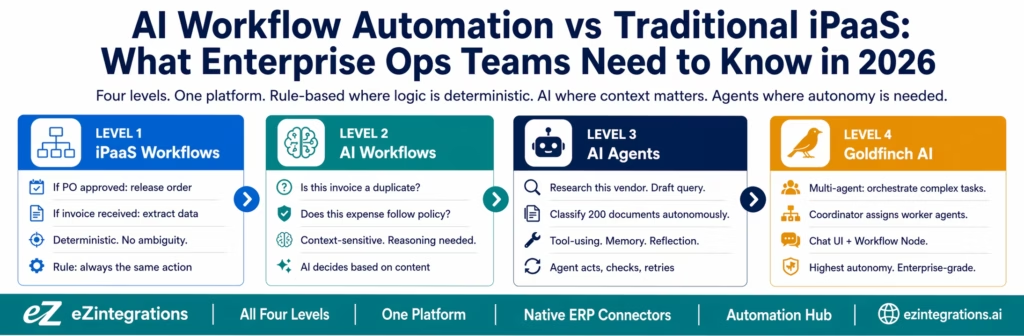
eZintegrations organises automation into four levels, each with a distinct role in enterprise operations:
| Level | Type | Decision Style | What It Handles |
|---|---|---|---|
| Level 1 | iPaaS Workflows | Rule-based, deterministic | Integrations where logic is fully defined: triggers, mappings, actions |
| Level 2 | AI Workflows | AI-enhanced, context-sensitive | Steps where content or context determines the correct action |
| Level 3 | AI Agents | Autonomous, tool-using | Multi-step processes requiring tools, memory, and judgment |
| Level 4 | Goldfinch AI | Agentic, multi-agent | Complex tasks requiring coordination of multiple specialised agents |
Most enterprise processes span multiple levels. The skill is knowing which part of the process belongs at which level, and having a platform that handles all four without requiring separate tools or architectures.
Level 1: iPaaS Workflows (Rule-Based, Deterministic)
Level 1 is the direct equivalent of any traditional iPaaS: a trigger fires, a set of defined steps executes, a result is produced. The logic is explicit and the outcome is always the same for the same input.
Characteristics:
- Trigger: a specific event in a system (webhook, polling, schedule, API event)
- Steps: data retrieval, transformation, conditional routing, API calls
- Decision logic: IF-THEN rules with specific conditions and thresholds
- Outcome: always the same for the same input
- Latency: milliseconds to seconds
- Auditability: complete (every step logged, every input and output recorded)
When Level 1 is the right choice:
- The logic is fully known and stable (does not change with each execution)
- The data is structured (fields with defined types and formats)
- The action is deterministic (one right answer for each possible input state)
- Compliance requires exact reproducibility (every execution of the same input produces the same output)
Level 1 examples from the Automation Hub:
- PO approval: when PO enters pending state, send Slack notification, await approval, release PO
- Employee onboarding: when new hire record created in BambooHR, provision Azure AD, Slack, Jira
- Order fulfilment routing: when order received from Amazon, route to warehouse based on zone and stock
- Invoice receipt: when EDI 810 received, parse fields, match PO, create vendor bill in ERP
Level 2: AI Workflows (Context-Sensitive, Reasoning-Based)
Level 2 adds AI classification, validation, and generation steps within otherwise rule-based workflows. The workflow still has defined triggers and actions, but some steps involve an AI model reasoning about content rather than applying a fixed rule.
Characteristics:
- Trigger: same as Level 1 (event-based)
- AI steps: classification, validation, extraction, matching, generation
- Decision logic: the AI evaluates content and produces a structured output (a category, a confidence score, a yes/no with reasoning, a generated text block)
- Outcome: varies based on content (two invoices with identical structure may get different classifications based on their content)
- Latency: seconds to tens of seconds (includes LLM inference time)
- Auditability: structured (the AI output, confidence score, and reasoning are logged alongside the trigger data)
When Level 2 is the right choice:
- The logic depends on the content or meaning of the data, not just its structure
- A human expert would look at the data and apply judgment, not a lookup table
- Edge cases are common enough that a rule-based router produces too many false results
- The AI decision is an intermediate step in a larger workflow, not the final output
Level 2 examples:
- Invoice duplicate detection: AI checks the incoming invoice against the last 90 days of vendor invoices using semantic matching, not just exact invoice number match
- Expense policy validation: AI evaluates each expense line against the travel policy, accounting for context (a $300 business dinner for 5 people is different from a $300 dinner for 1 person)
- Lead scoring enrichment: AI evaluates the lead’s email content, website behaviour, and company context to produce an ICP fit score
- Document intelligence: AI extracts structured data from an unstructured PDF contract, including fields with non-standard labels across different vendor templates
Level 3: AI Agents (Autonomous, Tool-Using)
Level 3 introduces autonomous agents that use tools, maintain memory within a session, reflect on their own outputs, and adapt their approach based on intermediate results. Agents are not single-pass: they iterate.
Characteristics:
- Trigger: event-based or natural language instruction
- Tools: the agent can call APIs, query databases, run sub-workflows, search the web, analyse documents, generate content
- Decision logic: the agent decides which tools to use, in what order, based on the task and the results so far
- Reflection: the agent evaluates its own output against a success criterion and retries with a different approach if unsatisfied
- Memory: the agent maintains context within the session (what it has already tried, what it has learned)
- Human-in-the-loop: configurable gates where human approval is required before the agent proceeds
- Latency: seconds to minutes
- Auditability: detailed (every tool call, every intermediate result, every retry logged)
9 native eZintegrations tools available to Level 3 agents:
- Knowledge Base Vector Search
- Document Intelligence
- Data Analysis
- Data Analytics with Charts, Graphs, and Dashboards
- Web Crawling
- Watcher Tools
- API Tool Call
- Integration Workflow as Tool
- Integration Flow as MCP
Teams can extend beyond these 9 with self-service custom tools.
When Level 3 is the right choice:
- The task requires multiple steps that are not fully predictable in advance
- The agent needs to gather information before it can decide what to do next
- The correct action depends on the results of earlier actions in the same session
- Human oversight is needed at specific decision points but not at every step
Level 3 examples:
- Vendor research and onboarding: agent receives a new vendor request, researches the vendor (web crawl, financial data lookup, sanctions list check), drafts the vendor onboarding form pre-filled with findings, routes for human review before onboarding proceeds
- Exception resolution: agent receives a 3-way match exception on an invoice, retrieves the original PO, the receiving document, and the invoice, identifies the discrepancy type, drafts a query to the vendor, routes for AP manager review
- Contract review: agent receives a vendor contract, extracts key terms, compares against the company’s standard terms, flags non-standard clauses, drafts a summary for the legal team with a recommendation
Level 4: Goldfinch AI (Multi-Agent, Agentic)
Level 4 (Goldfinch AI) is the agentic AI engine: a coordinator-worker multi-agent architecture where a coordinator agent breaks complex tasks into sub-tasks and assigns them to specialised worker agents, each equipped with its own tools and operating in parallel.
Goldfinch AI has two interfaces:
- Chat UI: natural language interaction with the agentic system. “Which of our open invoices are at risk of missing payment terms?” “Prepare a weekly spend analysis for the CFO.”
- Workflow Node: Goldfinch AI deployed as a node within a larger Level 1 or Level 2 workflow, providing agentic intelligence at specific decision points in an otherwise rule-based process.
Characteristics:
- Multi-agent: coordinator decomposes tasks, worker agents execute in parallel
- Persistent memory: context maintained across sessions, not just within one execution
- Chat UI: natural language access to enterprise data and processes
- Workflow Node: embedded agentic intelligence within traditional workflows
- Human-in-the-loop: configurable gates at coordinator and worker levels
When Level 4 is the right choice:
- The task is too complex for a single agent (multiple specialised domains are involved)
- Parallel execution of agent sub-tasks significantly reduces total processing time
- The business user needs to interact with enterprise data in natural language without knowing the underlying workflow structure
- A high-autonomy process needs to be embedded within a rule-based workflow at a specific decision point
Level 4 examples:
- Quarterly close preparation: coordinator agent assigns sub-tasks to worker agents (bank reconciliation agent, accruals analysis agent, inter-company reconciliation agent, variance analysis agent), each running in parallel, results consolidated by coordinator for CFO review
- Procurement intelligence: “Find all vendors where we are paying above market rate for comparable goods, and draft renegotiation talking points for the top 10.” Coordinator assigns market research to a web crawl agent, spend analysis to a data analysis agent, and draft generation to a content agent.
- Customer escalation management: “Review all open customer escalations from this week and produce a prioritised action plan.” Multiple agents research each escalation, classify severity, and draft response recommendations simultaneously.
Why Most Enterprise Processes Need All Four Levels
The temptation when evaluating automation is to categorise processes as either “rule-based” (needs iPaaS) or “AI-powered” (needs AI automation). Real enterprise processes rarely fit neatly into either category.
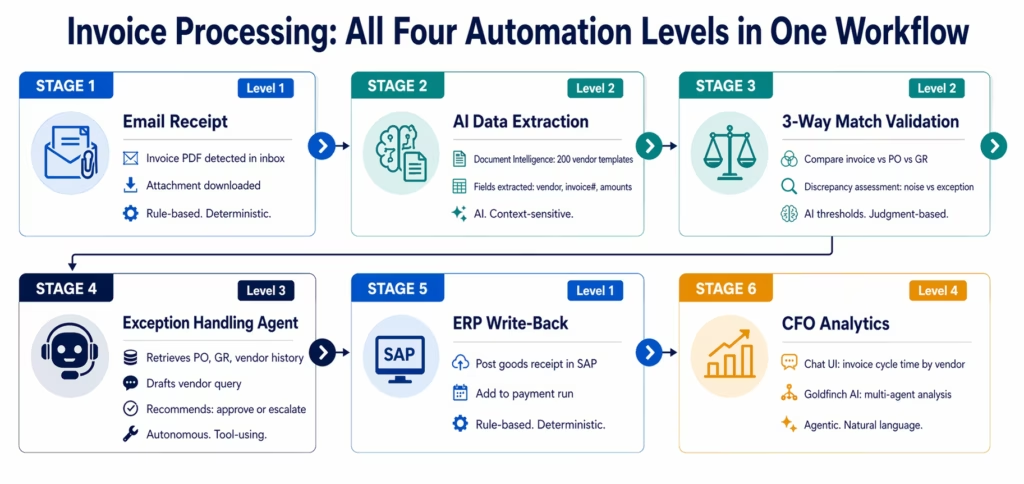
Consider the end-to-end invoice processing workflow:
Stage 1: Invoice receipt (Level 1) An email arrives with an invoice PDF. The workflow detects the email, downloads the attachment, and stores it. Rule-based. Deterministic. Level 1.
Stage 2: Data extraction (Level 2) The PDF may be from 200 different vendor templates, each with different field layouts. Extracting vendor name, invoice number, line items, and amounts requires Document Intelligence, not field mapping. AI. Level 2.
Stage 3: 3-way match validation (Level 2) Compare the extracted invoice data against the PO and the goods receipt. Flag discrepancies. But “discrepancy” requires judgment: a $0.50 rounding difference is noise, a 15% price variance on a high-value line item is a real exception. AI-assessed thresholds. Level 2.
Stage 4: Exception handling (Level 3) An exception is flagged. An AI agent retrieves the original PO, the goods receipt, and the vendor’s payment history. It identifies the discrepancy type, drafts a vendor query, and recommends either approve-with-note or escalate-to-AP-manager. Level 3.
Stage 5: Approval routing (Level 1) If approved, post the goods receipt in SAP and add the invoice to the payment run. Rule-based, deterministic. Level 1.
Stage 6: Analytics and reporting (Level 4) The CFO asks via Chat UI: “What is our invoice-to-payment cycle time by vendor category this quarter, and which vendors are consistently submitting invoices with errors?” Goldfinch AI retrieves, analyses, and presents the answer. Level 4.
One process. Four levels. One platform.
The Platform Architecture Question: One or Two?
The central architectural question for enterprise ops teams evaluating this space: should you use one platform that covers all four levels, or connect a traditional iPaaS with a separate AI automation platform?
The Two-Platform Approach: Costs and Risks
Many enterprises currently run a traditional iPaaS (Boomi, MuleSoft, Dell Boomi, or a cloud-native integration layer) alongside an AI automation tool (OpenAI-connected workflow builder, a custom LangChain deployment, or a point solution for document intelligence). On paper, this combines the best of both worlds.
In practice, the two-platform architecture introduces costs and risks that are not always visible at the evaluation stage:
The integration tax: every time an iPaaS workflow needs to hand off to an AI tool, there is an API call between the platforms. This means authentication management, payload serialisation, latency, error handling across two systems, and potential data residency issues if the AI tool processes data in a different cloud region than the iPaaS.
Double the governance surface: two platforms means two sets of access controls, two audit log systems, two compliance certifications to maintain, two vendor relationships, and two sets of pricing negotiations. For regulated industries, this doubles the compliance documentation burden.
Context loss at handoff: when a Level 1 workflow hands data to an external AI tool, the context of the workflow execution (which trigger fired, what the input data was, what transformations were applied) is not automatically available to the AI tool. Context must be explicitly packaged and passed in the API call, which adds complexity.
Dependency on both platforms being operational: a two-platform architecture introduces a new category of failure mode: both platforms must be operational simultaneously for end-to-end processes to work. If the AI tool has downtime, every workflow that depends on it stalls, even the purely rule-based parts that do not need AI.
The One-Platform Approach: The eZintegrations Architecture
eZintegrations handles all four levels natively, within a single platform:
- Level 1 and Level 2 share the same trigger and action infrastructure. A workflow can have Level 1 steps (poll the ERP, retrieve the record) followed immediately by Level 2 steps (classify the document, validate the data) without any API handoff between platforms.
- Level 3 agents can call Level 1 workflows as tools (Integration Workflow as Tool). An agent can invoke a complete iPaaS workflow as one of its tool calls, without the workflow needing to be in a separate system.
- Level 4 Goldfinch AI can be embedded as a Workflow Node inside a Level 1 process, or accessed via Chat UI for natural language access to the same workflows and data.
- All four levels share the same credential store, the same audit trail, the same compliance certification (HIPAA, GDPR, SOC 2 Type II), and the same ERP connectors.
Traditional iPaaS + AI: The Integration Tax
To make the cost of the two-platform architecture concrete, consider a mid-sized enterprise finance team running invoice processing:
Current state (two-platform):
- iPaaS (n8n Cloud, Enterprise): detects invoice emails, routes to AI tool
- AI tool (custom LangChain deployment): extracts data from PDFs, validates against PO
- iPaaS again: receives AI output, creates ERP records
Every invoice goes through three systems: iPaaS → AI tool → iPaaS. The integration tax:
- Two separate API credential sets to maintain
- Data residency: invoice PDFs containing vendor PII traverse from iPaaS cloud to AI tool cloud and back
- Latency: additional round-trip API calls between platforms
- Error handling: if the AI tool returns an error or times out, the iPaaS workflow must handle it, adding complexity to an otherwise simple process
- Cost: two platform licences, two infrastructure bills (if self-hosted), two compliance certifications
- Monitoring: errors in the middle AI step are reported in a different monitoring system than the iPaaS steps around it
eZintegrations single-platform:
- Level 1: email detection, attachment extraction
- Level 2: Document Intelligence (native tool, same platform), 3-way match validation
- Level 1: ERP write-back
No inter-platform API calls. No credential set duplication. No data residency gap between platforms. One audit trail. One compliance certification. One platform to monitor.
Decision Framework: Which Level for Which Process?
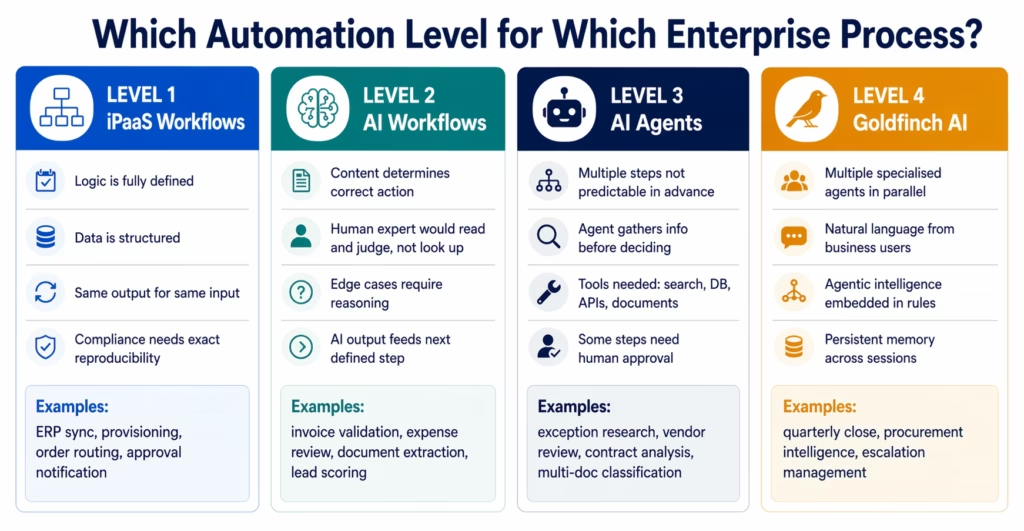
Use this framework to determine which automation level applies to each step in your enterprise processes:
Apply Level 1 (iPaaS) when:
- The trigger event is specific and well-defined
- The data transformation is a defined mapping (field A in system X maps to field B in system Y)
- The routing logic is a set of known conditions (IF value > threshold THEN route to X, ELSE route to Y)
- The output is always the same for the same input
- Compliance requires exact reproducibility
Apply Level 2 (AI Workflows) when:
- The correct action depends on the content or meaning of the data
- A human expert would look at the data and make a judgment, not apply a lookup
- Edge cases require reasoning that rules cannot capture
- The AI decision is a step in a larger workflow (not the full process)
- The AI output is structured enough to feed directly into a Level 1 downstream action
Apply Level 3 (AI Agents) when:
- The task requires multiple steps that cannot all be defined upfront
- The agent needs to gather information before deciding what to do next
- The correct action depends on the results of prior actions in the same session
- Tools (web search, database query, API calls, document analysis) are needed
- Some steps require human approval before the agent proceeds
Apply Level 4 (Goldfinch AI) when:
- The task requires multiple specialised agents working in parallel
- Business users need natural language access to enterprise data and processes
- A high-autonomy process needs to be embedded at a decision point in a larger rule-based workflow
- The task requires persistent memory across multiple sessions or interactions
Before vs After: Rule-Based iPaaS vs Full Four-Level Automation
| Process Characteristic | Traditional iPaaS Only | eZintegrations Four-Level Platform |
|---|---|---|
| Invoice data extraction | Requires fixed field positions per template | Level 2 Document Intelligence: 200+ vendor templates, adaptive |
| Expense policy validation | Rules: amount thresholds only | Level 2 AI: full policy reasoning per line item |
| 3-way match exception handling | Creates exception queue for manual review | Level 3 agent: researches, drafts query, recommends action |
| Vendor risk assessment | Not automated | Level 3 agent: web crawl, sanctions check, financial review |
| Cross-system analytics | Requires separate BI tool | Level 4 Chat UI: natural language access to process data |
| Document classification (200 types) | Keyword rules (high false positive rate) | Level 2 classification: semantic understanding, low false rates |
| Contract term extraction | Not possible with rules | Level 2 Document Intelligence: extracts from unstructured PDFs |
| Multi-step procurement research | Manual: procurement analyst | Level 3 agent: autonomous multi-step research |
| Exception pattern detection | Not available | Level 3 monitors patterns, Level 4 analyses trends |
| Agentic task coordination | Not available | Level 4 Goldfinch AI: coordinator-worker parallel agents |
| Natural language process interaction | Not available | Level 4 Chat UI: “what are my overdue approvals?” |
| ERP connectivity (SAP, NetSuite, JDE) | Varies: may need HTTP workarounds | Native connectors, all four levels |
| Audit trail | Per-step execution logs | Unified: all four levels, all steps, all AI reasoning |
| Compliance (HIPAA, GDPR, SOC 2) | Platform-dependent | Platform-certified, all levels |
| Cost model | Per-task or per-execution | Per-automation, flat, all levels included |
Real Enterprise Use Cases: How the Levels Combine
Accounts Payable Automation
Level 1: ERP polls for invoices in the pending queue. Rule-based scheduling, structured data retrieval.
Level 2: AI validates each invoice: duplicate check, 3-way match with tolerance assessment, policy compliance on expense categories.
Level 3: Exception agent researches discrepancies, drafts vendor queries, recommends approval or escalation.
Level 1: Approved invoices posted to ERP, added to payment run.
Level 4: CFO asks: “Which vendors are generating the most exceptions this quarter?” Goldfinch AI retrieves and analyses.
Customer Order Escalation Management
Level 1: Order management system triggers on order status change to “Exception.”
Level 2: AI classifies the exception type (inventory shortage, address problem, payment issue, shipping delay) and assesses urgency based on order value and customer tier.
Level 3: Agent retrieves customer order history, current inventory status, and carrier tracking data. Drafts customer communication based on exception type and customer profile.
Level 1: Sends drafted communication for human review, updates CRM with status.
Level 4: Operations director asks: “What are the top 5 causes of order exceptions this week and which carriers are most frequently involved?” Goldfinch AI analyses and presents.
Contract Lifecycle Management
Level 1: New contract document arrives via email or legal platform webhook.
Level 2: AI extracts key terms (payment terms, termination clauses, liability caps, governing law, renewal dates). Flags non-standard clauses against the company playbook.
Level 3: Legal agent compares extracted terms against 50 prior contracts with the same vendor, identifies pattern of term creep, drafts negotiation memo.
Level 1: Memo routed to legal counsel via approval workflow.
Level 4: General Counsel asks: “Which of our contracts have automatic renewal clauses expiring in the next 90 days?” Goldfinch AI retrieves and presents a prioritised list.
How to Evaluate Your Current Automation Stack
Ask these four questions about each of your current enterprise processes to identify the level at which your automation is limited:
Question 1: Are there steps where a human expert makes judgment calls that your automation cannot capture?
If yes: you need Level 2. Your rule-based automation is forcing exceptions that could be resolved automatically if the system could reason about content.
Question 2: Are there exceptions or edge cases that require gathering additional information before a decision can be made?
If yes: you need Level 3. Exceptions that require research, analysis, and multi-step investigation are agent tasks.
Question 3: Do your business users need to ask questions about process data in natural language?
If yes: you need Level 4. Business users who interact with Goldfinch AI Chat UI can ask operational questions without knowing the underlying workflow structure.
Question 4: Are you maintaining two or more platforms to cover rule-based integration and AI automation separately?
If yes: you are paying the integration tax described above. A unified four-level platform eliminates it.
How to Get Started
Step 1: Map Your Process Portfolio to the Four Levels
Take your top 10 automation processes and classify each step by level using the decision framework above. Identify: which steps are deterministic (Level 1), which require content reasoning (Level 2), which require autonomous multi-step action (Level 3), and which require natural language access or multi-agent coordination (Level 4). This mapping typically takes 2-4 hours and becomes the blueprint for your automation architecture.
Step 2: Identify the Highest-Value AI Uplift Opportunities
Within your current Level 1 processes, find the steps that currently route to a human exception queue. These are your highest-value Level 2 and Level 3 upgrade targets: the steps where adding AI reasoning would eliminate the most manual work and the most delay.
Step 3: Explore the Automation Hub Templates by Level
Go to the Automation Hub and browse templates by level. Level 1 templates cover traditional integration patterns. Level 2 templates show AI workflow steps embedded in otherwise rule-based processes. Level 3 templates show agent workflows for exception handling, research, and content generation. Level 4 templates show Goldfinch AI configurations for specific operational domains.
Step 4: Book a Platform Architecture Demo
Book a free demo. Bring your current automation stack (what platforms you use, what your top 10 processes are, where your current exceptions and manual steps are). The eZintegrations team will map your processes to the four-level framework and show you where AI uplift adds the most value with the least disruption to your existing automation.
Most teams find that 30-40% of their current Level 1 workflows have at least one step that would benefit from Level 2 AI enhancement, and 10-15% of processes involve exception patterns that are strong Level 3 agent candidates.
FAQs
Traditional iPaaS (Level 1) executes deterministic, rule-based integration: if a specific event occurs, execute a defined sequence of actions with fixed data mappings. The outcome is always the same for the same input. AI workflow automation (Level 2) adds steps where an AI model reasons about content: classify this document, assess whether this expense is within policy, extract structured data from an unstructured PDF. The correct output depends on the content of the data, not just its structure. Most enterprise processes need both: deterministic steps for triggers, data retrieval, and ERP write-backs, combined with AI steps for validation, classification, and context-dependent decisions.
eZintegrations delivers four automation levels within a single platform. Level 1 (iPaaS Workflows) handles rule-based, deterministic integration with native connectors for SAP, NetSuite, Oracle, Dynamics 365, JD Edwards, and 1,000+ SaaS applications. Level 2 (AI Workflows) adds AI classification, validation, and generation steps within those workflows. Level 3 (AI Agents) provides autonomous agents with 9 native tools that can take multi-step actions, use tools, and apply judgment. Level 4 (Goldfinch AI) adds coordinator-worker multi-agent orchestration with a Chat UI for natural language interaction and a Workflow Node for embedding agentic intelligence within Level 1 processes. All four levels share the same credentials, audit trail, compliance certification, and ERP connectors.
Use Level 2 (AI Workflows) when the AI task is a single-pass evaluation: classify this document, validate this expense, extract these fields. The AI produces an output that feeds into the next defined workflow step. Use Level 3 (AI Agents) when the task requires multiple steps that are not fully predictable in advance: the agent may need to gather information before deciding what to do, adapt based on what it finds, use tools to research or act, and apply judgment at multiple points within the same task. Exception handling, vendor research, contract review, and multi-document analysis are typically Level 3 tasks, while document classification and data validation are Level 2.
Adding a Level 2 AI step to an existing Level 1 workflow typically takes 2-4 hours using an Automation Hub template. The template provides the AI step configuration (model selection, prompt structure, output format, confidence threshold) with pre-built connectors to the input and output steps of the existing workflow. Building a Level 3 agent workflow for a new exception handling process typically takes 1-3 days. Goldfinch AI Chat UI deployment for a specific operational domain (procurement analytics, finance close support) typically takes 2-4 days to configure with the relevant data sources and tool connections.
eZintegrations can replace traditional iPaaS platforms for teams whose current automation stack is growing beyond the capabilities of rule-based integration. It provides all Level 1 iPaaS functionality (REST, GraphQL, WebSocket, webhooks, database integration, native ERP connectors) plus the three AI levels above it. For teams migrating from Zapier, n8n, or a simpler iPaaS, it offers a more scalable and cost-efficient architecture. For teams evaluating alongside MuleSoft or Boomi, the primary differences are deeper AI capabilities, flat per-automation pricing instead of per-message pricing, and a no-code interface that enables operations teams to build and manage workflows without heavy developer involvement. 1. What is the difference between traditional iPaaS and AI workflow automation?
2. How does eZintegrations combine traditional iPaaS and AI workflows in one platform?
3. When should an enterprise use AI agents (Level 3) rather than AI workflows (Level 2)?
4. How long does it take to add AI workflow steps to an existing iPaaS process?
5. Does eZintegrations replace existing iPaaS platforms like Boomi or MuleSoft?
The Answer Is Not Either-Or. It Is All Four.
The question that opened this guide, “Should we use traditional iPaaS or AI workflow automation?”, contains a false premise. Enterprise operations processes do not fit neatly into one category. They span rule-based detection, AI-enhanced validation, autonomous exception handling, and natural language analytics, often within the same end-to-end process.
The teams that maintain a separate iPaaS and a separate AI automation tool are paying the integration tax: double governance, context loss at handoffs, double the compliance surface, and a failure mode that affects both platforms simultaneously.
The teams that recognise all four levels as parts of the same platform question are moving faster: configuring AI enhancements to existing rule-based workflows, deploying agents for exception handling that previously required human intervention, and giving operations leaders natural language access to process intelligence.
Book a free demo. Bring your current automation stack and your top 10 processes. We will map the four levels to your specific process portfolio and show you where the AI uplift opportunities are.
For specific examples of the four levels in action, see the approval workflow automation guide and the Automation Hub.

