
Why Enterprise Teams Are Moving from n8n to a Managed Workflow Automation Platform
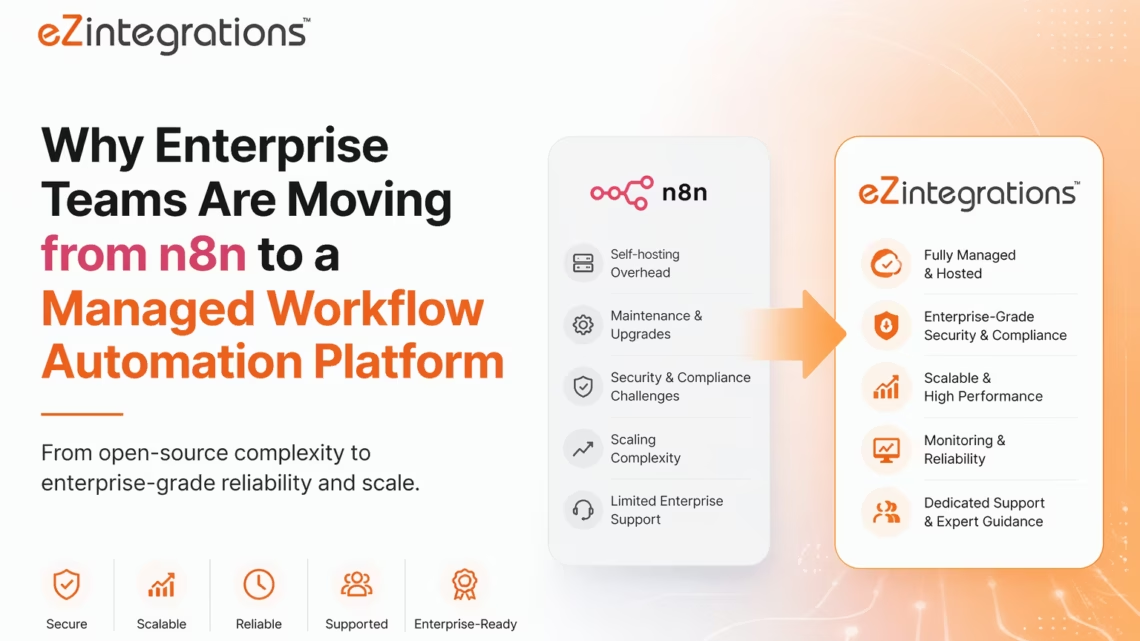
May 7, 2026Enterprise teams move from self-hosted n8n to a managed workflow automation platform when the infrastructure and maintenance overhead outweighs the cost savings of the free licence. A production n8n self-hosted environment typically costs $200-$500 per month in cloud infrastructure (servers, database, Redis, monitoring, backups) before any DevOps time is factored in. Adding 10-20 hours of developer maintenance per month at typical DevOps rates, the true cost of self-hosted n8n often exceeds the cost of a managed platform. eZintegrations eliminates all infrastructure overhead, provides native ERP connectors that n8n lacks (SAP S/4HANA, Oracle, JDE), full compliance (HIPAA, GDPR, SOC 2 Type II), and adds three AI layers (AI Workflows, AI Agents, Goldfinch AI) that go beyond n8n’s current agent capabilities.
TL;DR
- n8n is genuinely good Open-source software, with strong community support and flexibility. The workflow builder is flexible, the connector library is broad, the execution-based pricing is fairer than per-task pricing, and the open-source lineage means a large community and extensive documentation.
- The problem is not n8n. The problem is self-hosting n8n at enterprise scale. Every hour your DevOps engineer spends on server maintenance, certificate renewal, database backup management, n8n version upgrades (including breaking changes), and incident response for 2 AM workflow failures is an hour not spent on the workflows themselves.
- This guide covers: the true cost of self-hosted n8n at enterprise scale, the five operational problems that appear between 6 and 18 months into a self-hosted n8n deployment, and the migration path to a fully managed enterprise workflow automation platform.
- eZintegrations four automation levels: Level 1 (iPaaS Workflows), Level 2 (AI Workflows), Level 3 (AI Agents), Level 4 (Goldfinch AI) with Chat UI and Workflow Node as the agentic interfaces.
- eZintegrations provides: fully managed infrastructure (no servers, no containers, no database management), native ERP connectors (SAP, NetSuite, Oracle, Dynamics 365, JDE) that n8n lacks or requires HTTP workarounds for, four automation levels (Level 1 iPaaS through Level 4 Goldfinch AI), and HIPAA/GDPR/SOC 2 Type II compliance without additional configuration.
- Migration time: 2-4 weeks for a complete n8n workflow estate.
n8n’s Genuine Strengths and Why Teams Choose It
Before anything else: n8n deserves credit for what it does well.
The visual workflow builder is among the best in the category. Node-based interfaces that actually feel fast to use are rare, and n8n’s is one of them. The execution-based pricing model (paying per workflow run, not per step) is significantly fairer than Zapier’s task-based model for complex, multi-step workflows. A 10-step workflow that runs 1,000 times is 1,000 executions on n8n; the same workflow would be 10,000 tasks on Zapier. That is a meaningful cost difference.
The developer community is large and active. n8n reached $40M in annual recurring revenue by 2025, raised $180M at a $2.5B valuation, and serves over 3,000 enterprise customers. The documentation is thorough. The custom code node (JavaScript and Python execution inside a workflow) is genuinely powerful for cases where a pre-built node does not cover the logic needed.
And the self-hosted Community Edition is free to use for internal business purposes, which means a team with existing DevOps capabilities can run n8n on its own infrastructure with no licence cost.
So why are enterprise teams moving away?
Because the gap between “works on your laptop” and “runs reliably in production for 200 workflows serving 5 business units” is filled with infrastructure work that the n8n licence cost does not cover.
The “Free” Self-Hosting Problem: The True Cost Calculation
“The most expensive part of self-hosting isn’t the server; it’s the developer time required to maintain it.”
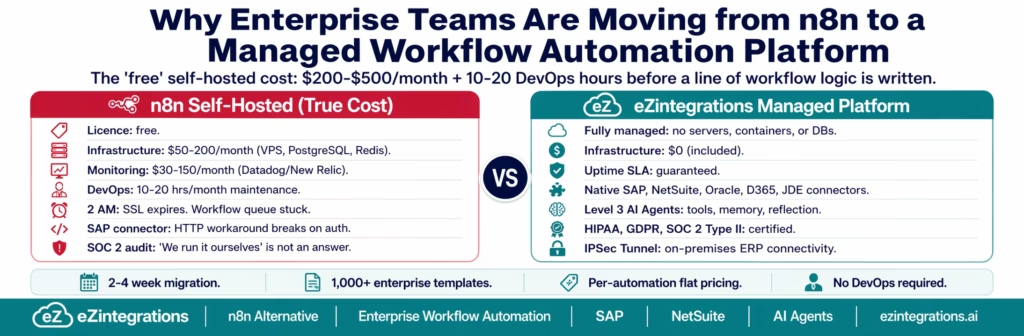
This observation from the DevOps community cuts to the heart of the self-hosting calculus. Let us work through the numbers for a mid-sized enterprise running n8n in a production environment with 50-100 active workflows serving 4-6 business units.
Infrastructure Costs
Compute: A production n8n instance handling moderate workflow volume needs at minimum 2 vCPUs and 4 GB RAM. Infrastructure costs typically run $50-200/month for servers, databases, and maintenance. On AWS (t3.medium), this is approximately $30-40/month for the instance alone.
Database: n8n requires PostgreSQL for production (SQLite is development-only). An RDS db.t3.small runs approximately $25-35/month.
Queue: Redis is required for scaled deployments with worker separation. An ElastiCache cache.t3.micro adds approximately $15-25/month.
Storage and backups: S3 for execution logs and workflow exports, with automated backup retention: approximately $10-20/month.
Monitoring: You need visibility into workflow execution health. Datadog, New Relic, or self-hosted Prometheus/Grafana: $30-$150/month depending on level of observability required.
Load balancer and networking: ALB (Application Load Balancer) for HTTPS termination: approximately $20/month.
SSL certificate management: AWS Certificate Manager or Let’s Encrypt with auto-renewal (which requires its own maintenance when it breaks).
Total infrastructure: $130-$470/month before any human time is counted.
DevOps Labour
Running n8n in a production environment involves regular maintenance, updates, and troubleshooting. This operational overhead can demand 10-20 hours of DevOps work each month.
What those hours cover:
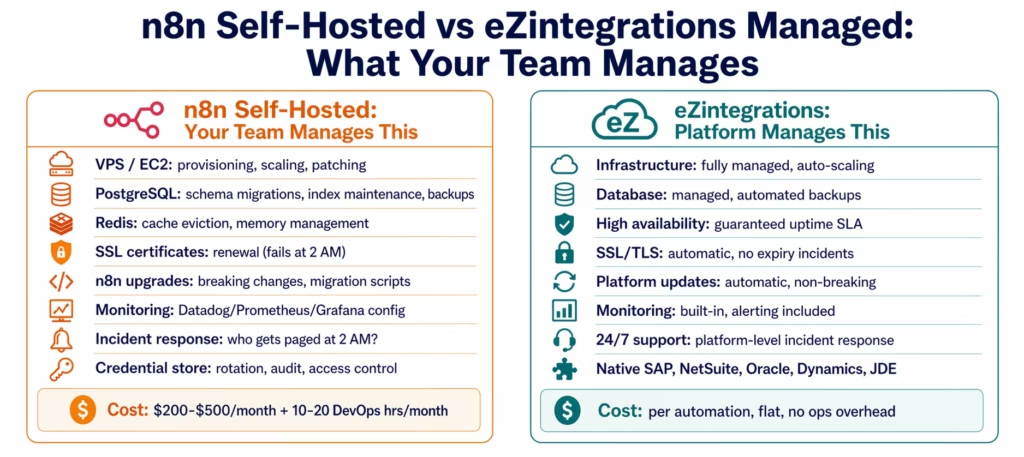
- n8n version upgrades (n8n releases frequently; enterprise teams cannot skip versions when breaking changes occur)
- Database maintenance (index bloat, execution log pruning to prevent disk fill)
- Worker scaling decisions (when workflows queue up, who notices and who acts?)
- Incident response (the 2 AM notification that the n8n queue is stuck)
- Security patching (the underlying Node.js and container base image)
- Credential rotation (API keys in n8n’s credential store need periodic rotation with audit trail)
- Backup validation (are the backups actually restorable? Testing this takes time)
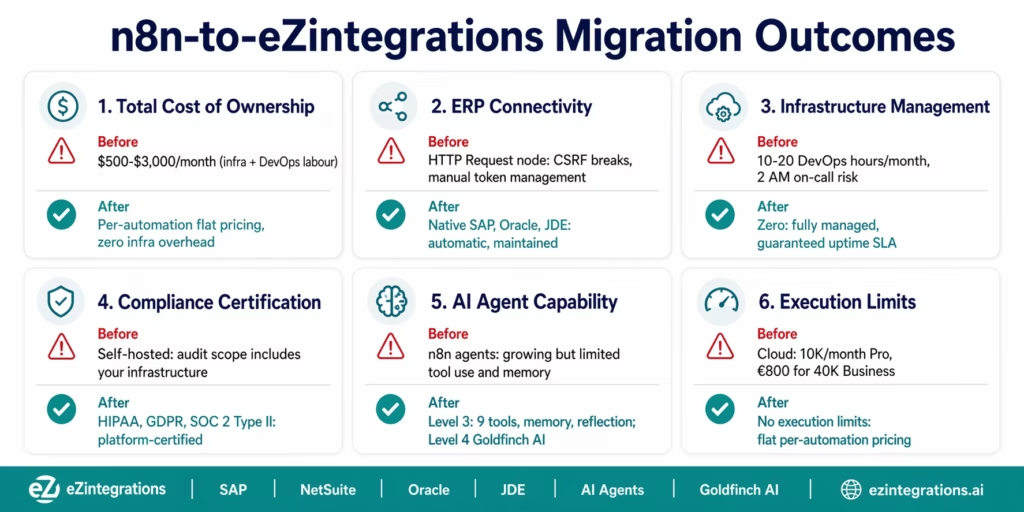
At a mid-market DevOps rate of $75-$150/hour, 10-20 hours/month represents $750-$3,000/month in labour cost.
True total cost of self-hosted n8n: $880-$3,470/month for a production deployment with 50-100 workflows.
This is not a knock on n8n. It is a reality of self-hosting any production application. But the comparison point is not “n8n licence cost vs enterprise workflow automation platform licence cost.” It is “total cost of ownership vs managed platform cost.”
The Five Operational Problems That Appear After 6 Months
Teams that self-host n8n typically have a honeymoon period: the first 3-6 months when everything works, the workflows are straightforward, and the infrastructure is fresh.
Then reality arrives, as organisations move from experimentation to platform-level automation maturity and operational scale. (McKinsey)
Problem 1: The n8n Version Upgrade Trap
n8n releases new versions frequently, which is a strength for feature development but a maintenance challenge for self-hosted teams. Major version upgrades sometimes include breaking changes to node configurations, credential formats, or database schema migrations. Skipping versions to avoid the maintenance burden means falling behind on security patches. Staying current means dedicating engineering time to upgrade testing, migration validation, and rollback planning.
Self-hosting is “free” until you factor in infrastructure and maintenance. Version management is the aspect that most underestimates this.
Problem 2: The Single Point of Knowledge
Self-hosted n8n deployments tend to develop a single “n8n person”: the engineer who originally set it up, knows how the infrastructure is configured, understands the quirks of the custom credential store, and can diagnose why the webhook queue is backing up at 3 AM. When that person leaves, goes on holiday, or is simply unavailable at the moment of a production incident, the organisation discovers that the automation infrastructure that 4 departments now depend on is effectively unmaintained.
Problem 3: Execution Limits Are a Ceiling, Not a Floor
For teams that chose n8n Cloud rather than self-hosted, execution limits become the primary operational concern. A single polling trigger checking for new data every 5 minutes uses about 8,640 executions per month on its own. The Starter plan’s 2,500 executions runs dry in 9 days from a single polling workflow. The Pro plan’s 10,000 executions supports roughly one polling workflow plus a handful of event-driven ones.
When a new business process requires a polling trigger (because the source system does not support webhooks), the execution budget tightens. Teams face a choice: upgrade to the Business plan (€800/month) or architect workarounds that reduce polling frequency and accept delayed processing.
Problem 4: The Compliance Gap
When the compliance or IT security team conducts an annual review, the questions self-hosted n8n cannot easily answer include: Who has access to the n8n credential store? What credentials are stored there and when were they last rotated? Provide a complete log of every workflow that accessed patient data in the last 12 months. Is this infrastructure HIPAA-compliant? Who signed the BAA? What is the data residency configuration for our EU personal data?
The answers to these questions require custom audit logging, access control configuration, and compliance documentation that the n8n Community Edition does not provide out of the box. The n8n Enterprise licence addresses some of these (SSO, audit logs), but then you are paying for a licence on top of your infrastructure costs.
Problem 5: The ERP Integration Gap
n8n has a broad connector library. What it lacks are native, deeply integrated connectors for the ERP systems that enterprise workflows need most: SAP S/4HANA, Oracle ERP Cloud, JD Edwards, and Infor. Connecting to SAP from n8n means using the HTTP Request node with manual configuration of SAP’s OData endpoints, OAuth token management, CSRF token handling, and error parsing. When SAP releases an API update or the auth configuration changes, the HTTP node breaks and someone needs to debug it.
This is the same ERP connectivity gap that Zapier has, but it is perhaps more surprising in n8n because the platform has a reputation for developer depth. The depth applies to JavaScript logic and custom code nodes. It does not extend to pre-built, maintained, enterprise-grade ERP connectors.
n8n Cloud vs Self-Hosted: The Execution Limit Reality
The Cloud path avoids infrastructure maintenance but introduces execution limits. Understanding the real-world execution consumption is essential before choosing a tier.
n8n overhauled its pricing model in 2025, removing active workflow limits and shifting fully to execution-based billing.
Execution consumption examples:
| Workflow Type | Trigger Frequency | Monthly Executions |
|---|---|---|
| Polling trigger (every 5 min) | 8,640 polls/month | 8,640 executions |
| CRM sync (every 15 min) | 2,880 polls/month | 2,880 executions |
| Order processing webhook | 500 orders/day × 30 days | 15,000 executions |
| Employee onboarding | 20 new hires/month | 20 executions |
| Lead scoring handoff | 200 MQLs/month | 200 executions |
| Invoice approval (batch) | 400 invoices/month | 400 executions |
A team with two polling triggers (CRM sync every 15 min + webhook listener every 5 min) and moderate event-driven volume consumes:
- CRM polling: 2,880 executions
- Webhook polling: 8,640 executions
- Event workflows: 5,000 executions
- Total: ~16,520 executions/month
This exceeds the Pro plan (10,000 executions) and is nowhere near the Business plan threshold (40,000 executions at €800/month). The team is caught between Pro (insufficient) and Business (expensive jump).
What n8n Cannot Connect Natively (The ERP Gap)
n8n’s connector library is extensive for SaaS applications. The gaps appear at the enterprise infrastructure layer:
SAP S/4HANA: No native SAP connector. Connection requires the HTTP Request node with manual OData endpoint configuration. You must manage the OAuth 2.0 client credentials flow, handle the x-csrf-token fetch-and-submit pattern required for all SAP write operations, and parse SAP’s OData error responses manually. When SAP releases a new API version or the Communication Arrangement changes, the HTTP node configuration breaks.
Oracle ERP Cloud: No native connector. The Oracle REST APIs (for Fusion Finance, SCM, HCM) require OAuth 2.0 with JWT assertion or client credentials, plus Oracle’s specific endpoint pattern for each module. The FBDI (File-Based Data Import) process for bulk data loading is not automatable from n8n without a complex sequence of HTTP calls and file handling.
JD Edwards: No connector. JDE’s Orchestrator API (the modern REST interface) and the older Business Services (BSSV) framework are not in n8n’s connector catalogue.
Infor: No connector. Infor’s various ERPs (CloudSuite, LN, M3) each have different API architectures and are not covered by n8n’s connector library.
SAP ECC (on-premises): n8n has no native on-premises connectivity support. Accessing an on-premises SAP ECC system from n8n Cloud would require exposing the SAP system to the public internet or maintaining a self-hosted n8n instance inside the corporate network.
n8n vs eZintegrations: Direct Feature Comparison
| Feature | n8n (Cloud Pro / Enterprise) | eZintegrations |
|---|---|---|
| Deployment model | Self-hosted (Community/Business) or Cloud | Fully managed cloud |
| Infrastructure overhead | Self-hosted: $200-$500/month + DevOps | Zero: fully managed |
| Pricing model | Execution-based (per workflow run) | Per automation, annual flat |
| n8n Cloud execution limits | Pro: 10K/month; Business: 40K/month at €800 (based on n8n’s published pricing tiers) | No execution limits |
| Version management | Self-hosted: manual; Cloud: managed | Fully managed, automatic |
| SAP S/4HANA native connector | No (HTTP Request node workaround) | Yes: OData V4, all SAP APIs |
| Oracle ERP Cloud | No (HTTP workaround) | Yes: REST, FBDI, OTBI |
| JD Edwards | No connector | Yes: Orchestrator API, BSSV |
| NetSuite SuiteQL | No (NetSuite connector exists but limited) | Yes: full SuiteQL support |
| On-premises ERP | Self-hosted only (not Cloud) | Yes: IPSec Tunnel from Cloud |
| Audit logs | Enterprise plan: advanced audit logging | Full immutable trail, all plans |
| HIPAA compliance | Enterprise plan (with BAA) | Yes (all enterprise tiers) |
| GDPR data residency | Cloud: EU (Frankfurt); self-hosted: configurable | Configurable: US, EU, APAC |
| SOC 2 Type II | Enterprise | Yes |
| SAML SSO | Enterprise plan | Yes |
| AI Workflow layer | AI nodes within workflows | Dedicated Level 2 AI Workflow layer |
| AI Agents | Available (growing capability) | Production Level 3 Agents: 9 native tools, memory, reflection |
| Multi-agent (agentic AI) | Not available | Level 4 Goldfinch AI: coordinator-worker |
| MCP server output | Not available | Every workflow publishable as MCP endpoint |
| GraphQL native | Limited | Native GraphQL connector |
| WebSocket native | Not available | Native WebSocket connector |
| Template library | 1,000+ community templates | 1,000+ enterprise Automation Hub templates |
| 24/7 uptime SLA | Self-hosted: your responsibility | Yes: guaranteed |
| Platform fee | None (licence-based) | None |
| Connector fees | None | None |
| Single workflow expertise risk | High (self-hosted: one person knows the setup) | None: platform managed centrally |
The AI Layer: n8n’s Agent Capabilities vs eZintegrations
n8n has invested heavily in AI capabilities since 2023. The AI node library is extensive, and n8n’s agent workflow model (using LangChain-based agent nodes) allows reasonably sophisticated agent patterns.
Where n8n’s AI capabilities are strong:
- LLM calls within workflow steps (OpenAI, Anthropic, Groq, local models via Ollama)
- RAG (Retrieval Augmented Generation) pipelines using vector store nodes
- Simple agent patterns with tool use defined within the workflow
- Code generation and execution within custom code nodes
Where the gap opens:
- Production-grade agent reliability: n8n’s agent execution is within a workflow context. When an agent step fails (the LLM returns unexpected output, a tool call errors, or confidence is below threshold), error handling requires manual configuration per agent node. eZintegrations’ Level 3 agents have built-in reflection loops: the agent evaluates its own output against a success criterion and retries with a different approach.
- Native enterprise tools: n8n agents use LangChain tool definitions. eZintegrations Level 3 ships with 9 pre-built enterprise tools (Knowledge Base Vector Search, Document Intelligence, Data Analysis, Data Analytics with Charts/Graphs/Dashboards, Web Crawling, Watcher Tools, API Tool Call, Integration Workflow as Tool, Integration Flow as MCP), each optimised for enterprise operations use cases and self-extensible.
- Multi-agent coordination: n8n does not have a native multi-agent coordinator-worker architecture. Complex agentic tasks that benefit from parallel specialised agents require custom implementation. eZintegrations Level 4 (Goldfinch AI) provides a coordinator-worker architecture where a coordinator agent decomposes tasks and delegates to specialised workers.
- Persistent memory: n8n agent workflows do not persist memory across separate workflow executions by default. Each execution starts fresh. eZintegrations Level 3 and Level 4 maintain persistent memory across sessions.
Compliance and Audit Requirements at Enterprise Scale
When a healthcare system, a financial services firm, or a GDPR-regulated European enterprise evaluates automation platforms, compliance is a first-class requirement, not an afterthought.
n8n’s approach:
- Community Edition: no compliance features (SSO, audit logs, advanced permissions)
- Cloud Enterprise: SAML SSO, audit logs, advanced permissions, EU data residency (Frankfurt)
- Self-hosted Business/Enterprise: SSO and audit features with licence key, compliance documentation is the customer’s responsibility for the infrastructure layer
The challenge with self-hosted n8n for HIPAA compliance is that the BAA (Business Associate Agreement) can be signed with n8n for the software component, but the infrastructure (your AWS account, your RDS instance, your network configuration) must also be HIPAA-compliant, which requires HIPAA-eligible AWS services, encrypted storage, access logging, and ongoing compliance management.
eZintegrations is HIPAA, GDPR, and SOC 2 Type II compliant across the full stack: the platform, the infrastructure, the data processing, and the connectivity. Compliance is a platform feature, not a customer-managed configuration.
Migration Approach: From n8n Workflows to eZintegrations
Phase 1: Export and Inventory (Week 1)
n8n allows exporting workflows as JSON files. Export every active workflow and create an inventory:
- Number of active workflows
- Monthly execution count per workflow (from n8n’s execution log or cloud analytics)
- Which workflows use the HTTP Request node to connect to ERPs (these are your highest-migration-value candidates)
- Which workflows use polling triggers (these are your highest execution-cost candidates on n8n Cloud)
- Which workflows have had execution errors in the last 90 days (these are your most fragile ones)
Categorise:
- Tier 1: ERP-connected, high execution volume, or business-critical
- Tier 2: Operational, moderate volume, SaaS-to-SaaS
- Tier 3: Low-volume, unknown owner, possibly redundant
Phase 2: Template Matching (Week 1-2)
For each Tier 1 and Tier 2 workflow, identify the matching template in the eZintegrations Automation Hub. Workflows that currently use HTTP Request nodes to reach SAP, NetSuite, or Oracle map directly to eZintegrations’ native ERP connector templates. The migration for these is not a like-for-like rebuild: it is a simplification, replacing the multi-step HTTP configuration in n8n with a structured API call in eZintegrations’ native connector.
Phase 3: Parallel Running (Week 2-3)
Import and configure the eZintegrations workflows. Connect the same data sources and destinations. Run both the n8n workflow and the eZintegrations workflow simultaneously for 5-7 business days, triggering from the same events. Compare outputs: does the eZintegrations workflow produce the same result for the same trigger event? For ERP workflows, compare the SAP, NetSuite, or Oracle records created by each path.
Phase 4: Cutover and Decommission (Week 3-4)
Disable the n8n workflow (do not delete it immediately: keep it as a rollback reference for 2 weeks). Confirm the eZintegrations workflow is processing correctly in production. Monitor for one week. Decommission the n8n workflow once stable. Work through Tier 2 and Tier 3 in subsequent weeks.
Step-by-Step: Migrating an n8n Workflow
Here is a complete migration example: an n8n workflow that processes new Salesforce opportunities and creates corresponding quotes in SAP, using the HTTP Request node for SAP connectivity.
Current n8n workflow (Salesforce Opportunity to SAP SD Quotation):
Node 1: Salesforce Trigger: new opportunity, stage "Proposal"
Node 2: HTTP Request: GET Salesforce account details
Node 3: HTTP Request: GET Salesforce opportunity line items
Node 4: Code Node (JavaScript): map Salesforce fields to SAP quotation format
Node 5: HTTP Request: GET SAP CSRF token (required before any SAP write)
Node 6: HTTP Request: POST SAP API_SALES_ORDER_SRV (create quotation, type QT)
Node 7: HTTP Request: GET SAP quotation number (poll until created)
Node 8: Salesforce Action: update opportunity with SAP quotation number
Node 9: Slack: notify account manager
This workflow has 9 nodes. Every time it runs: 1 execution. But maintaining nodes 4-7 (the SAP HTTP configuration) is where operational pain lives. Node 5 (CSRF token fetch) breaks whenever SAP’s token endpoint changes configuration. Node 6 requires updating when the SAP API version changes. The Code Node in step 4 is a JavaScript file that only one person truly understands.
The eZintegrations equivalent:
Trigger: Salesforce webhook: new opportunity, stage "Proposal"

Step 1: Salesforce connector: GET account and opportunity details
  (native connector, no HTTP configuration)

Step 2: SAP connector: GET customer master (BP_MASTERDATA_SRV)
  (native OData V4, automatic CSRF token management)

Step 3: Level 2 validation
  - Check: does this customer exist in SAP?
  - Check: is the opportunity value within the rep's approval limit?

Step 4: SAP connector: POST API_SALES_ORDER_SRV, type QT
  (native connector, returns quotation number directly)

Step 5: Salesforce connector: update opportunity with SAP quotation reference
Step 6: Slack: notify account manager with quotation link
The eZintegrations version is 6 steps versus 9 nodes. The SAP CSRF token complexity is handled internally by the native connector. The JavaScript field mapping (Code Node in n8n) becomes a visual field mapping in eZintegrations’ connector configuration.
What the migration eliminates:
- Manual CSRF token management (breaks on SAP auth changes)
- JavaScript Code Node maintenance (undocumented field mappings)
- HTTP Request node credential management (multiple separate API credential configurations)
- The “only one person understands this workflow” problem
Before vs After: Self-Hosted n8n vs Managed eZintegrations
| Dimension | Self-Hosted n8n | Managed eZintegrations |
|---|---|---|
| Infrastructure cost | $130-$470/month (server, DB, Redis, monitoring) | $0 (included in platform) |
| DevOps maintenance | 10-20 hours/month ($750-$3,000 labour cost) | Zero (platform-managed) |
| Version management | Manual: upgrade testing, breaking change handling | Automatic, non-breaking updates |
| SSL certificate management | Manual renewal risk (fails at 2 AM) | Automatic, no expiry incidents |
| 2 AM incident response | Your on-call DevOps engineer | Platform SLA, support team |
| SAP connectivity | HTTP Request node (manual CSRF, token, error handling) | Native OData V4 connector, automatic |
| Oracle ERP | HTTP workaround | Native REST, FBDI, OTBI |
| JD Edwards | No connector | Native Orchestrator API |
| NetSuite SuiteQL | Limited (NetSuite connector lacks full SuiteQL) | Full SuiteQL support |
| n8n Cloud execution limits | 10K/month (Pro) or 40K/month (€800 Business) | No execution limits |
| HIPAA compliance | Self-managed infrastructure compliance required | Platform-certified |
| GDPR data residency | Cloud: EU Frankfurt; self-hosted: your config | Configurable: US, EU, APAC |
| SOC 2 Type II | Enterprise plan + your infrastructure audit | Platform-certified |
| Audit logs | Enterprise plan; self-hosted: custom configuration | Full immutable trail, all tiers |
| Single point of knowledge risk | High: the person who set it up | None: platform-documented, supported |
| AI Agents | Available (growing, LangChain-based) | Level 3: 9 native tools, memory, reflection, L4 Goldfinch AI |
| MCP server endpoints | Not available | Every workflow exportable as MCP |
| On-premises ERP from Cloud | Not possible | IPSec Tunnel |
| Template library | 1,000+ community (varying quality) | 1,000+ enterprise Automation Hub (maintained) |
Common Migration Scenarios
Scenario 1: Finance team using n8n self-hosted for AP automation
Current state: 12 active n8n workflows handling invoice receipt, approval routing, and QuickBooks entry. The infrastructure runs on a t3.medium EC2 instance ($35/month) with RDS PostgreSQL ($28/month) and Redis ElastiCache ($20/month). Two engineers share responsibility for maintenance. One just resigned.
Migration driver: the departing engineer is the only person who understands the n8n upgrade history, the custom CSRF token handling in the SAP HTTP node, and the backup restoration process.
Migration path: 4 Tier 1 workflows (SAP-connected) move to eZintegrations native SAP connectors in 2-3 days each. 8 Tier 2 workflows (QuickBooks, Slack, email) import from Automation Hub templates in 1-2 hours each. Total migration: 2 weeks. Infrastructure can be decommissioned after parallel running period.
Scenario 2: Operations team on n8n Cloud hitting execution limits
Current state: 3 n8n Cloud Pro plan instances. The polling-heavy CRM sync (every 10 minutes) is consuming 4,320 executions/month on its own. The team has 15 active workflows and is at 9,800 of 10,000 monthly executions. Adding a new product launch automation would exceed the limit.
Migration driver: the next tier is the Business plan at €800/month for 40,000 executions. The 3 Pro instances ($180/month) would become $800/month for one Business instance plus continued Pro instances for other workflows.
Migration path: eZintegrations per-automation pricing for 15 workflows is significantly less than €800/month, with no execution limits. Polling trigger workflows that burn executions in n8n run continuously in eZintegrations at no additional cost.
Scenario 3: Enterprise IT team on n8n Enterprise needing compliance certification
Current state: self-hosted n8n Enterprise with SSO and audit logs. The IT security team is preparing for SOC 2 Type II certification. The auditor has asked for evidence that the automation platform handling employee data is compliant.
Migration driver: the self-hosted infrastructure needs to be covered by the SOC 2 audit scope, requiring AWS configuration evidence, access logs, change management documentation, and incident response procedures specific to the n8n deployment. This adds 40-80 hours of compliance preparation.
Migration path: eZintegrations provides SOC 2 Type II certification documentation for the platform. The customer’s scope does not need to include the automation platform infrastructure. The compliance gap closes without additional engineering work.
How to Get Started
Step 1: Export Your n8n Workflow Inventory
In n8n, go to Settings → Workflows and export all active workflows as JSON. For n8n Cloud, use the API to retrieve execution counts per workflow: GET /api/v1/executions?limit=100&workflowId={id}. Build your inventory spreadsheet: workflow name, monthly execution count, whether it uses HTTP Request nodes for ERP connectivity, whether it has had errors in the last 90 days.
Step 2: Calculate Your True n8n Cost
Sum your current infrastructure costs (server, database, Redis, monitoring, load balancer) and add an estimate of monthly DevOps maintenance hours multiplied by your internal DevOps rate. Compare this to eZintegrations per-automation pricing for the same workflow count. The breakeven analysis is usually the most compelling part of the migration case for finance stakeholders.
Step 3: Book a Migration Assessment Demo
Book a free demo with your n8n workflow inventory. The eZintegrations team will map each workflow to the closest Automation Hub template, identify which HTTP Request ERP nodes become native connector calls (the highest-value migration candidates), and produce a side-by-side cost comparison between your current n8n total cost of ownership and eZintegrations per-automation pricing.
Step 4: Migrate in Tiers Over 2-4 Weeks
Start with Tier 1 (ERP-connected, business-critical). Import templates. Connect data sources. Run in parallel. Cut over when stable. Work through Tier 2 (operational SaaS workflows) and Tier 3 (low-volume, non-critical) in subsequent weeks.
Total migration time: 2-4 weeks for a typical n8n estate of 20-80 active workflows.
FAQs
Four reasons appear consistently. First: running n8n in a production environment involves regular maintenance, updates, and troubleshooting that demands 10-20 hours of DevOps work each month, and the true total cost of ownership (infrastructure plus labour) typically exceeds $500-$3,000/month. Second: n8n has no native connectors for SAP S/4HANA, Oracle ERP Cloud, or JD Edwards, which means any workflow touching these systems requires brittle HTTP Request node workarounds. Third: compliance requirements (HIPAA, GDPR, SOC 2 Type II) for self-hosted infrastructure require significant additional engineering work that the n8n licence does not cover. Fourth: n8n's AI agent capabilities, while growing, do not yet match production-grade enterprise agent requirements for tools, persistent memory, and multi-agent coordination.
n8n cloud pricing ranges from €24/month (Starter, 2,500 executions) to €60/month (Pro, 10,000 executions) to €800/month (Business, 40,000 executions). A team running 15-20 workflows with any polling triggers will likely hit the Pro plan's 10,000 execution limit quickly. eZintegrations charges per automation annually (Free → $5 → $90 → $120 → $150/month per automation) with no execution limits. For a team with 15 workflows, eZintegrations is typically comparable to the n8n Pro plan cost but without execution ceiling risk, with native ERP connectors, and with managed infrastructure. For teams that would need n8n Business (€800/month), eZintegrations is typically significantly less expensive.
2-4 weeks for a typical enterprise n8n estate of 20-80 active workflows. Simple SaaS-to-SaaS workflows (Slack, CRM, email) migrate in 1-4 hours using Automation Hub templates. Workflows using HTTP Request nodes for ERP connectivity take 1-3 days to rebuild using native ERP connectors (and typically come out simpler than the original). The migration follows four phases: inventory and export (Week 1), template matching (Weeks 1-2), parallel running (Weeks 2-3), and cutover (Weeks 3-4).
Yes, SAP S/4HANA and SAP ECC: native OData V4 connector covering all published SAP APIs (purchasing, inventory, finance, HR, logistics), with automatic CSRF token management and OAuth token refresh. Oracle ERP Cloud: REST API endpoints for all Fusion modules, FBDI for bulk data loading, OTBI for reporting. JD Edwards: Orchestrator API and Business Services (BSSV). NetSuite: SuiteTalk REST, full SuiteQL support, SuiteScript triggers. Microsoft Dynamics 365: Finance, SCM, Sales. These are maintained native connectors, not HTTP Request node configurations.
Yes, Level 1 (iPaaS Workflows) covers all the SaaS-to-SaaS automation that n8n currently handles: webhook triggers, event-driven workflows, data transformation, conditional routing, error handling, and retry logic. The Automation Hub contains 1,000+ enterprise templates for the most common workflow patterns across CRM, ERP, HR, finance, marketing, and IT. The migration for SaaS workflows is typically the fastest part of the process: most import and configure in under 4 hours using Automation Hub templates. 1. Why are enterprise teams moving away from self-hosted n8n?
2. How does eZintegrations pricing compare to n8n Cloud?
3. How long does a migration from n8n to eZintegrations take?
4. Does eZintegrations have native SAP, Oracle, and JDE connectors?
5. Can eZintegrations also handle the SaaS workflows currently running on n8n?
The “Free” Licence Has a Bill. It Just Comes From Your DevOps Team.
n8n’s Community Edition is genuinely free to licence. The infrastructure is not free. The maintenance is not free. The 2 AM incident that your on-call engineer has to respond to is not free. The compliance documentation you have to produce for your SOC 2 audit is not free. And the SAP HTTP connector that breaks every time the auth configuration changes is costing someone their Friday afternoon.
A managed workflow automation platform is not cheaper because the software is simpler. It is cheaper when you count everything: infrastructure, maintenance, incident response, compliance preparation, and the opportunity cost of the engineers who could be building workflows instead of maintaining servers.
The migration takes 2-4 weeks. Most Tier 1 workflows come out cleaner on the other side, because replacing an HTTP Request node with a native SAP connector is a simplification, not just a substitution.
Book a free demo. Bring your n8n workflow export and your current infrastructure bill. We will produce the comparison.

