
How to Replace Zapier with an Enterprise Workflow Automation Platform: Migration Guide
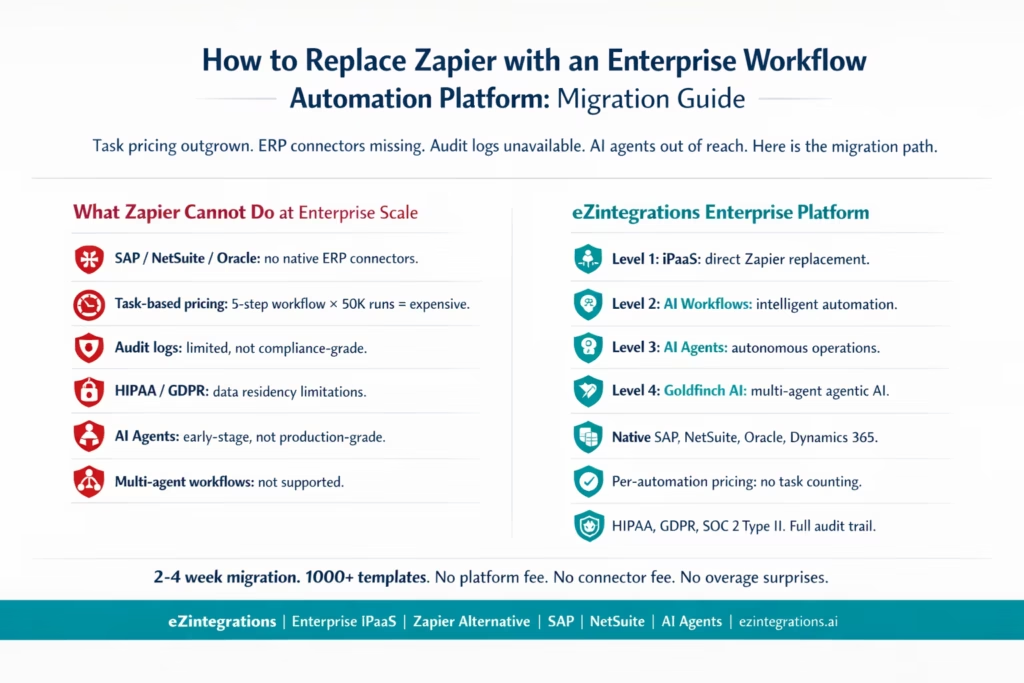
May 8, 2026Enterprise teams outgrow Zapier when their workflows require native ERP connectors (SAP, NetSuite, Oracle, Dynamics 365), compliance-grade audit logs, role-based access control, data that must not leave a defined cloud region, or predictable pricing that does not scale with task volume. Enterprise teams outgrow Zapier when their workflows move beyond simple app connections into Enterprise application integration (EAI) requirements such as ERP connectivity, compliance logging, and cross-system orchestration. eZintegrations replaces Zapier for these teams: it provides all four automation levels (iPaaS, AI Workflows, AI Agents, and Agentic AI), native ERP and CRM connectors, full audit trail, HIPAA/GDPR/SOC 2 Type II compliance, and per-automation annual pricing with no task counting, no connector fees, and no overage surprises.
TL;DR
- Zapier is an excellent tool for simple, point-to-point SaaS automations. Most teams who outgrow it hit the same four walls: task-based pricing that becomes unpredictable at volume, missing native ERP connectors (SAP, NetSuite, Oracle), insufficient audit logging for compliance teams, and a workflow architecture that does not support AI agents or multi-step agentic processes.
- This guide covers: the five signals that you have outgrown Zapier, a direct feature comparison, and a migration path from Zaps to enterprise workflows.
- eZintegrations operates at four levels: Level 1 (iPaaS Workflows, direct Zapier replacement), Level 2 (AI Workflows), Level 3 (AI Agents), and Level 4 (Goldfinch AI, agentic multi-agent engine). Zapier operates primarily at Level 1 (iPaaS-style automation), while enterprise platforms extend into AI-driven and agentic orchestration layers, as reflected in broader Gartner research on integration platforms.
- Pricing model: eZintegrations charges per automation annually, with no platform fee, no connector fee, and no task counting. The bill is the same whether a workflow runs 100 times or 100,000 times per month.
- Migration time: 2-4 weeks for a full Zapier-to-eZintegrations migration, depending on the number and complexity of active Zaps.
When Zapier Stops Being Enough
Zapier built the market for no-code automation. If you are running it today, there is a strong chance Zapier is where your team learned that automation was possible without a developer. That is its genuine contribution.
The problem is not that Zapier is bad. The problem is that Zapier was built for a specific problem: connecting two SaaS apps with a simple if-this-then-that logic. When your automation needs stay within that boundary, Zapier is a reasonable choice.
Enterprise workflows do not stay within that boundary. They involve ERPs. They involve compliance requirements. They involve thousands of records processed daily. They involve AI classification, multi-step approval chains, and audit trails that your IT security team demands. They involve workflows where a single run could touch 8-12 systems, and counting each touch as a billable task produces an invoice your CFO will question.
When you hit these requirements, the tool that introduced you to automation is no longer the right tool for where you need to go.
The Five Signals That You Have Outgrown Zapier
Signal 1: Your Zapier Bill Is Unpredictable
Zapier’s task-based pricing model means that costs grow with usage. A 5-step Zap consumes 5 tasks per run. If that Zap processes 10,000 records per month, it consumes 50,000 tasks. The Team plan starts at $69/month for only 2,000 tasks per month (based on Zapier’s published pricing).
The math breaks down quickly for any workflow that processes meaningful volume. An order processing workflow that handles 500 orders per day, each requiring 6 steps (receive order, enrich, route, create ERP record, notify warehouse, confirm back to channel) consumes 3,000 tasks per day, or 90,000 tasks per month. At that volume, the Zapier bill is a conversation your CFO is having with IT.
If you exceed your plan’s task limit, Zapier automatically switches to pay-per-task billing for the remainder of your pay period. This means a surge in order volume (a flash sale, a product launch, a peak season) produces a bill spike that was not in the budget.
The eZintegrations model: per automation, annual billing. A workflow that runs 100 times or 100,000 times per month costs the same. No task counting. No overage. The bill is predictable regardless of volume.
Signal 2: You Need an ERP Connector That Does Not Exist in Zapier
Zapier has thousands of connectors, nearly all of them SaaS-to-SaaS. The apps it does not connect natively are the ones most enterprises depend on: SAP S/4HANA, SAP ECC, NetSuite (limited), Oracle ERP Cloud, JD Edwards, Microsoft Dynamics 365 (limited), and Infor. These are not minor gaps. They are the systems of record for your financial data, inventory, purchasing, and supply chain.
When an enterprise workflow needs to:
- Create a purchase order in SAP when a form is submitted
- Post a goods receipt in NetSuite when a 3PL confirms delivery
- Trigger an approval workflow in Oracle when a PO exceeds a threshold
Zapier either cannot do it at all (no native connector), or requires a workaround so complex it defeats the purpose of no-code automation.
Signal 3: Your Compliance Team Is Asking About Audit Logs
Zapier’s Enterprise Plan includes observability tools and advanced admin permissions. But for teams operating under HIPAA, GDPR, SOC 2 Type II, or financial services regulations, “observability tools” is not the same as a full, immutable audit trail covering every workflow execution, every data transformation, every API call, every user change, and every error, with timestamps and actor attribution.
When your IT security auditor asks: “Show me a complete log of every time this workflow accessed patient data over the last 12 months, with the specific fields accessed and the user who last modified the workflow,” Zapier’s logging is not designed to answer that question.
Signal 4: Your Workflows Are Getting Fragile
Zapier workflows (Zaps) are designed for simple, linear flows. Each Zap has one trigger and a sequence of actions. When business logic requires:
- Conditional branches (if this account is enterprise tier, do these 6 steps; if SMB, do these 3 steps)
- Error handling with retry and fallback logic
- Sub-workflows called from a parent workflow
- Dynamic looping over arrays of records
- Parallel execution paths that converge
You end up with a web of dozens of Zaps calling each other, each dependent on the previous, with no centralised view of the overall process. When one Zap fails or changes, it breaks downstream Zaps you may not even remember exist.
Signal 5: You Want AI Agents, Not Just If-This-Then-That
Zapier’s Enterprise Plan includes AI orchestration features. But there is a significant difference between Zapier’s Zap-based automation with AI steps inserted, and a purpose-built AI agent architecture designed for autonomous, multi-step decision-making with tools, memory, reflection loops, and human-in-the-loop gates.
When you want an AI agent that: monitors your order queue, classifies each order by priority and exception type, routes exceptions to the right team, drafts responses, executes ERP actions autonomously, and escalates to a human only when confidence is below a threshold, you are describing a Level 3 AI Agent, not a Zap with an AI step.
Zapier vs eZintegrations: Direct Feature Comparison
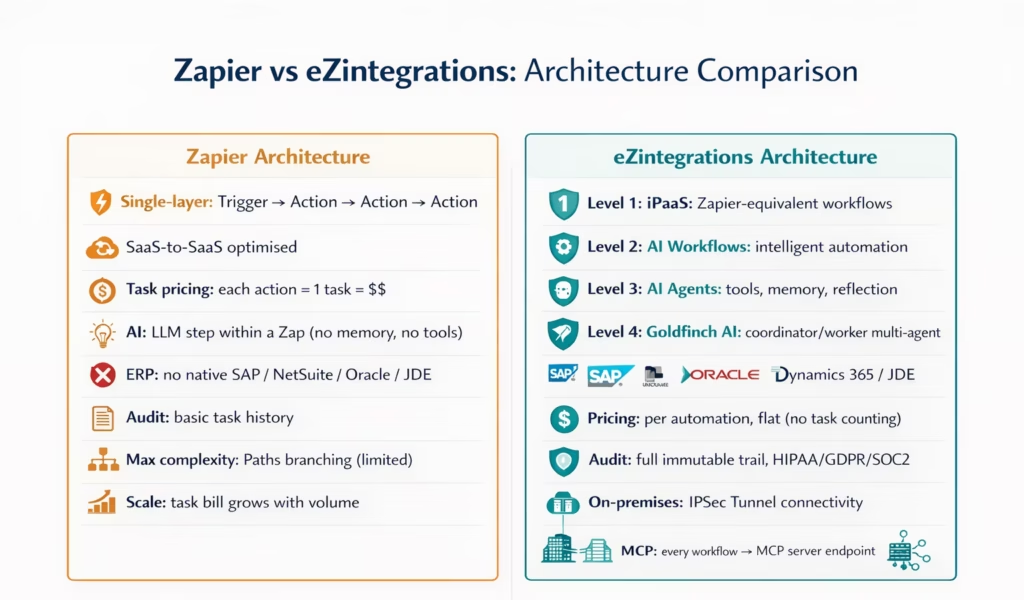
| Feature | Zapier (Teams/Enterprise) | eZintegrations |
|---|---|---|
| Automation levels | Level 1 (iPaaS) + early Level 3 | Level 1 + Level 2 + Level 3 + Level 4 (Goldfinch AI) |
| Pricing model | Task-based (per action executed) | Per automation, annual billing |
| Volume pricing | Scales with task count: higher volume = higher bill | Flat: same price at 100 or 100,000 runs/month |
| Platform fee | Included in plan tier | None |
| Connector fees | Premium apps require paid plan | None (all connectors included) |
| SAP S/4HANA native | No native connector | Yes: OData V4, all SAP APIs |
| NetSuite native | Limited (via Zapier connector, not SuiteTalk direct) | Yes: SuiteTalk REST, SuiteQL, SuiteScript triggers |
| Oracle ERP Cloud | No native connector | Yes: REST API, FBDI, OTBI |
| Dynamics 365 | Limited | Yes: full D365 Finance, SCM, CRM |
| JD Edwards | No connector | Yes: Orchestrator API, BSSV |
| Audit logs | Basic task history; Enterprise: observability tools | Full immutable audit trail: every execution, field access, user |
| HIPAA compliance | Enterprise plan (with BAA) | Yes: HIPAA, GDPR, SOC 2 Type II |
| Data residency | Limited options | Configurable: US, EU, APAC |
| On-premises connectivity | Not supported | Yes: IPSec Tunnel for on-premises ERP |
| AI Workflow (Level 2) | AI steps within Zaps | Dedicated AI Workflow layer: classification, enrichment, validation |
| AI Agents (Level 3) | Zapier Agents (early stage) | Production-grade AI Agents with tools, memory, reflection |
| Multi-agent (Level 4) | Not available | Goldfinch AI: coordinator-worker architecture, Chat UI + Workflow Node |
| MCP server output | Not available | Every workflow exportable as MCP server endpoint |
| GraphQL support | Not supported | Native GraphQL connector |
| WebSocket support | Not supported | Native WebSocket connector |
| Database integration | Via third-party DB connectors | Native: PostgreSQL, MySQL, SQL Server, Cosmos DB |
| Error handling | Basic retry; manual review in task history | Configurable retry, fallback, dead-letter queue, alerting |
| Branching logic | Paths (limited) | Full conditional branching, switch-case, loop constructs |
| API Marketplace | 8,000+ app integrations | 1,000+ enterprise templates + full REST/GraphQL/WebSocket |
| Template library | 6,000+ Zap templates | 1,000+ enterprise Automation Hub templates |
| Pricing transparency | Published for Free/Professional/Teams; Enterprise: custom | Published: Free→$5→$90→$120→$150/month per automation |
Why Task-Based Pricing Fails at Enterprise Scale
Let us work through a real example.
Your procurement team builds a purchase order approval workflow in Zapier. The workflow has 7 steps:
- Trigger: new purchase requisition form submitted
- Look up the requestor’s approval level in the HR system
- Look up the budget remaining for this cost centre
- Route to the correct approver (L1 for under $5K, L2 for under $25K, L3 for over $25K)
- Wait for approval response
- Create the approved PO in NetSuite
- Send confirmation email to requestor
That is 7 tasks per run (minus the trigger). Your team submits 400 purchase requisitions per month. That is 2,800 tasks for this one workflow.
At the Zapier Teams plan ($69/month for 2,000 tasks), this single workflow exceeds the plan limit on its own. Add your other workflows (CRM sync: 5 steps × 200 daily contacts = 30,000 tasks/month; order routing: 8 steps × 150 daily orders = 36,000 tasks/month) and you are deep into custom Enterprise pricing territory.
And none of this accounts for peaks: a product launch week where order volume triples, a quarter-end where purchase requisitions double.
With eZintegrations: the procurement workflow, the CRM sync, and the order routing each count as one automation each. The monthly bill is three automation fees, regardless of run volume.
The ERP Connector Gap: What Zapier Cannot Connect
For enterprise teams, the absence of native ERP connectors is not a minor inconvenience. It is a fundamental architectural gap.
SAP S/4HANA: The SAP Integration Suite exists, but the Zapier SAP connector is not a native OData V4 implementation with the full breadth of SAP’s published APIs. Workflows that need to create purchase orders (API_PURCHASEORDER_PROCESS_SRV), post goods receipts (API_GOODS_RECEIPT_FOR_PURCHASEORDER_SRV_01), or query material stock (API_MATERIAL_STOCK_SRV) cannot be built in Zapier without significant workarounds.
NetSuite: Zapier has a NetSuite connector, but it does not support SuiteQL (the SQL-style query language that makes NetSuite reporting practical), does not support SuiteTalk REST full endpoints, and does not support event-based triggers from NetSuite (saved search-based triggers with polling is what Zapier provides).
Oracle ERP Cloud: No native connector. Oracle’s REST APIs (FBDI for data loading, OTBI for reporting, and the individual module REST endpoints) are not accessible through Zapier’s connector catalogue.
JD Edwards: No connector at all. JDE’s Orchestrator API, Business Services (BSSV), and the REST connector framework that JDE World customers use are outside Zapier’s integration catalogue entirely.
For any team whose workflows touch these systems, replacing manual processes with automation requires a platform built for enterprise connectivity.
Audit Logs, Compliance, and Data Residency
Enterprises operating under regulatory frameworks (HIPAA for healthcare data, GDPR for EU personal data, SOC 2 Type II for SaaS security audits, PCI DSS for payment data, FINRA for financial services) have specific requirements for their automation platform:
Requirement 1: Immutable audit trail. Every workflow execution must be logged: which workflow ran, when, triggered by what event, which data fields were accessed or modified, what the input and output values were, which user last modified the workflow, and what the execution result was. Logs must be retained for the defined retention period (often 7 years for financial services).
Requirement 2: Role-based access control. Different users should have different levels of access to workflow configuration, execution logs, and connection credentials. An operations analyst should be able to view workflow results but not modify the workflow or access the API credentials it uses.
Requirement 3: Data residency. For GDPR compliance, personal data processed by the automation platform must not transit through or be stored in non-approved regions. The ability to specify that EU personal data stays within EU infrastructure is a hard requirement for many European enterprises.
Requirement 4: Business Associate Agreement (BAA). For HIPAA-covered workflows, the automation platform must be willing to sign a BAA as a Business Associate.
eZintegrations is compliant with HIPAA, GDPR, and SOC 2 Type II, connects to on-premises systems via IPSec Tunnel (so data never needs to traverse the public internet), and provides a full, immutable audit trail at every execution level.
AI Agents and Agentic Workflows: Beyond Zap-Style Automation
The most significant architectural gap between Zapier and an enterprise automation platform is at the AI layer, reflecting a broader shift toward autonomous, AI-driven enterprise operations.
Zapier’s approach: insert AI steps (OpenAI, Anthropic, or other LLM providers) into a Zap as actions. The LLM receives input from the previous step, returns output, and the Zap continues. This is useful for simple text processing tasks (classify this email, summarise this document, generate this response draft).
What this model cannot do:
- Maintain memory across executions (the LLM has no knowledge of previous runs or accumulated context)
- Use tools autonomously (call an API, query a database, run a sub-workflow) based on its own decision
- Reflect on its own output and retry with a different approach when the result is not satisfactory
- Coordinate multiple specialised agents working in parallel on different parts of a task
- Gate on human approval for specific decisions within an otherwise autonomous flow
eZintegrations’ Level 3 (AI Agents) provides a production-grade agent architecture:
- 9 native tools: Knowledge Base Vector Search, Document Intelligence, Data Analysis, Data Analytics with Charts/Graphs/Dashboards, Web Crawling, Watcher Tools, API Tool Call, Integration Workflow as Tool, and Integration Flow as MCP
- Self-service extensibility: teams can add custom tools beyond the 9 native ones without developer involvement
- Reflection and retry loops: agents evaluate their own output against a success criterion and retry with a different approach when the criterion is not met
- Human-in-the-loop gates: specific decision points within an otherwise autonomous workflow can require human approval before proceeding
- Level 4 Goldfinch AI: coordinator-worker multi-agent architecture where a coordinator agent breaks complex tasks into sub-tasks and assigns them to specialised worker agents, with persistent memory across the entire session
This is the difference between a Zap that calls an AI API and an enterprise AI agent that operates autonomously with tools, memory, and judgment.
Migration Approach: From Zaps to Enterprise Workflows
Phase 1: Inventory and Prioritise (Week 1)
Before migrating any Zaps, export a complete inventory of your current automation estate:
- Total number of active Zaps
- Current monthly task consumption per Zap (available in Zapier’s usage analytics)
- Which Zaps are business-critical vs. nice-to-have
- Which Zaps involve ERP systems (currently using workarounds)
- Which Zaps have had recurring errors in the last 90 days
- Which Zaps are “zombie workflows” (configured years ago, still running, unknown owner)
Categorise each Zap:
- Tier 1 (migrate first): business-critical, high-volume, or currently using workarounds for ERP connectivity
- Tier 2 (migrate second): operational, moderate volume, clean logic
- Tier 3 (migrate last or decommission): low-volume, unknown owner, possibly redundant
Phase 2: Map to eZintegrations Automation Hub Templates (Week 1-2)
For each Tier 1 and Tier 2 Zap, identify the matching eZintegrations Automation Hub template. Most common Zapier use cases (form-to-CRM, email-to-task, webhook-to-notification) have pre-built templates in the Automation Hub that are ready to import and configure.
For Zaps that involve ERP systems (currently using HTTP connectors or workarounds in Zapier): these map directly to eZintegrations’ native ERP connectors and are often rebuilt faster than the original Zapier workaround took to configure.
Phase 3: Parallel Running (Week 2-3)
For business-critical workflows, run the eZintegrations version in parallel with the existing Zap for 5-7 business days. Compare outputs: does the eZintegrations workflow produce the same result for the same trigger? This parallel running period validates the migration before you decommission the Zap.
Phase 4: Cutover and Decommission (Week 3-4)
Disable the Zap and confirm the eZintegrations workflow is the live version. Monitor for the first week post-cutover. Decommission the Zap from Zapier once stable. Work through the Tier 2 and Tier 3 inventory.
Step-by-Step: Migrating a Complex Zapier Workflow
Here is how a Zapier workflow that current uses workarounds for SAP connectivity migrates to eZintegrations.
Current Zapier workflow (a purchase requisition approval):
The Zapier workflow has 11 steps and uses 3 workarounds to connect to SAP (a Google Sheet maintained manually as a proxy for SAP data, a Zapier HTTP connector making SAP calls that break every time the SAP auth token expires, and a manual step where a human checks SAP and updates the Google Sheet):
Step 1: Trigger: Google Forms (new PR submitted)
Step 2: Filter: check if over $5,000 (uses Paths)
Step 3: Lookup: Google Sheets (budget lookup: manual proxy)
Step 4: Action: Slack (notify approver)
Step 5: Wait: wait for approval response in Slack
Step 6: Action: Gmail (send confirmation to requestor)
Step 7: Action: HTTP (SAP API call, breaks when token expires)
Step 8: Action: Google Sheets (update "SAP Created" column manually)
Step 9: Action: Jira (create implementation task)
Step 10: Action: Slack (notify procurement team)
Step 11: Action: Gmail (send PO number to requestor)
This is 11 tasks per run. At 400 PRs per month: 4,400 tasks for this single workflow.
The eZintegrations equivalent (Level 1 + Level 2):
Trigger: Google Forms webhook → new PR submitted

Level 1 actions:
Step 1: SAP API_MATERIAL_STOCK_SRV: check current stock (native connector, no token management needed)
Step 2: SAP API_ProductPlant: look up MRP data
Step 3: Conditional: PR value > $5,000 → route to L2 approver; < $5,000 → L1 approver

Level 2 validation:
Step 4: AI Workflow: validate PR: is the requested item in the approved vendor catalogue? Is the cost centre budget sufficient? Flag any anomalies.

Level 1 continues:
Step 5: Slack notification to correct approver with budget context (from SAP, not from Google Sheets proxy)
Step 6: Wait for approval (Slack workflow button, webhook callback)
Step 7: SAP API_PURCHASEORDER_PROCESS_SRV: create PO directly in SAP (native, not HTTP workaround)
Step 8: Jira: create implementation task
Step 9: Slack: notify procurement
Step 10: Email: send PO number to requestor
The eZintegrations version:
- Removes the Google Sheets proxy (data comes from SAP directly)
- Removes the broken HTTP workaround (replaced by native SAP connector with automatic token refresh)
- Adds Level 2 budget and vendor validation that Zapier cannot do
- Counts as 1 automation fee (not 11 tasks × 400 runs = 4,400 tasks/month)
Before vs After: Zapier vs eZintegrations for Enterprise Use Cases
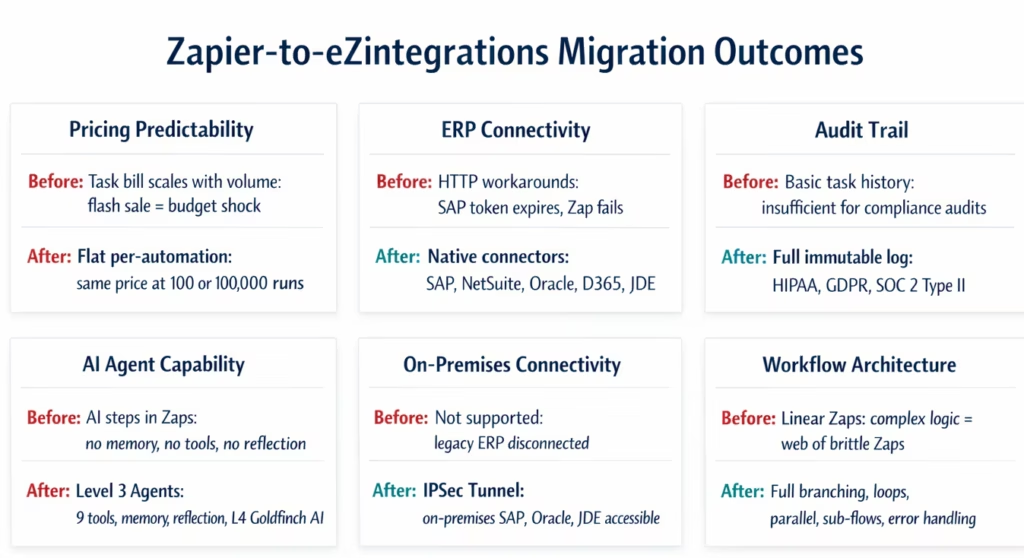
| Enterprise Requirement | With Zapier | With eZintegrations |
|---|---|---|
| SAP PO creation | HTTP connector (manual token management, breaks on SAP auth changes) | Native API_PURCHASEORDER_PROCESS_SRV connector, auto token refresh |
| NetSuite SuiteQL | Not supported | Native SuiteQL query step |
| Oracle FBDI data load | No connector | Native Oracle FBDI integration |
| JD Edwards Orchestrator | No connector | Native JDE Orchestrator API |
| Goods receipt posting | Not possible | Native API_GOODS_RECEIPT_FOR_PURCHASEORDER_SRV_01 |
| 400 PRs × 11-step workflow | ~4,400 tasks/month = significant cost | 1 automation fee/month regardless of volume |
| Flash sale: order volume 3× | Bill triples (pay-per-task overage) | No change to bill |
| Full audit trail | Basic task history | Full immutable log: every field, every execution |
| HIPAA BAA | Enterprise plan | Available |
| GDPR data residency EU | Limited | Configurable: EU infrastructure |
| On-premises ERP | No IPSec support | IPSec Tunnel to on-premises SAP, Oracle, JDE |
| Complex branching | Paths (limited) | Full conditional logic, switch-case, loops |
| AI Agent with tools | Early-stage Zapier Agents | Production Level 3 Agents: 9 native tools + extensible |
| Multi-agent coordination | Not available | Level 4 Goldfinch AI coordinator-worker |
| Workflow as MCP endpoint | Not available | Native: every workflow publishable as MCP server |
| Error handling | Basic retry + manual check | Configurable retry, fallback, dead-letter, alerting |
| Parallel execution | Limited | Native parallel branches with convergence |
| Governance: who changed what | Limited | Full user attribution on every change |
Common Migration Scenarios
Scenario 1: Finance operations team using Zapier for AP automation
Current state: Zapier Zaps connect invoice receipt (email → Gmail trigger), data extraction (Zapier Formatter), and GL coding (manual Google Sheets lookup) before creating an entry in QuickBooks. The team wants to move to SAP as the ERP.
Migration path: the eZintegrations Invoice Approval workflow template connects directly to SAP API_SUPPLIERINVOICE_PROCESS_SRV. Level 2 handles the GL coding (AI classification against the chart of accounts). The Google Sheets proxy is eliminated. Migration time: 2-3 days.
Scenario 2: Operations team using Zapier for multi-channel order routing
Current state: Zapier pulls orders from Shopify and routes to a fulfilment Google Sheet. The team wants to add Amazon and Walmart channels and route to a 3PL’s REST API.
Migration path: eZintegrations multi-channel order fulfilment template (Row 173 in this blog series). Amazon SP-API, Walmart Marketplace API, and Shopify are all connected natively. The 3PL routing replaces the Google Sheet proxy. The task count for this workflow (8 steps × 150 daily orders) would have been 36,000 tasks/month in Zapier. In eZintegrations, it is 1 automation fee. Migration time: 3-5 days.
Scenario 3: IT team using Zapier for employee provisioning
Current state: Zapier handles parts of the onboarding flow (form → create Jira ticket → send Slack message). The AD and M365 provisioning is still manual.
Migration path: eZintegrations employee onboarding template handles the full flow including Azure AD Graph API, M365 licence assignment, and Slack SCIM provisioning. The Level 2 validation layer checks for duplicate accounts and licence availability. The Zapier partial automation is replaced with a complete, end-to-end flow. Migration time: 2-4 days.
How to Get Started
Step 1: Export Your Zapier Workflow Inventory
In Zapier, go to your account’s usage analytics and export the list of all active Zaps with their monthly task consumption. Identify your top 10 by task volume: these are your highest-cost Zaps and your highest-priority migration candidates.
Step 2: Book a Migration Assessment Demo
Book a free demo with your Zapier workflow inventory. In the demo, the eZintegrations team will map each high-priority Zap to an equivalent Automation Hub template, identify which Zaps benefit from eZintegrations’ native ERP connectors (eliminating existing workarounds), and produce a migration timeline and projected cost comparison between your current Zapier bill and eZintegrations per-automation pricing.
Step 3: Start with Three Tier 1 Workflows
Import the matching eZintegrations templates for your three highest-priority workflows. Connect your data sources. Run in parallel with the existing Zaps for 5 business days. Compare outputs. When stable, disable the Zaps.
Step 4: Migrate in Tiers Over 2-4 Weeks
Work through Tier 2 and Tier 3 workflows systematically. Most Tier 2 Zaps (simple SaaS-to-SaaS automations) migrate in under 2 hours using the Automation Hub templates. Tier 1 workflows with ERP connectivity or complex logic take 1-3 days each.
Total migration time: 2-4 weeks for a complete Zapier estate. Typical enterprise teams have 20-60 active Zaps at the time of migration.
FAQs
Four reasons appear consistently. First: task-based pricing becomes unpredictable and expensive at volume. A 10-step workflow processing 300 records daily consumes 90,000 tasks per month, pushing teams into Enterprise pricing. Second: missing native ERP connectors for SAP, Oracle, NetSuite (beyond basic), and JD Edwards mean that any workflow touching the system of record requires brittle HTTP workarounds. Third: audit logging and compliance requirements (HIPAA, GDPR, SOC 2 Type II) exceed what Zapier provides on standard plans. Fourth: AI agent capabilities in Zapier are early-stage and do not support the production-grade tool use, memory, and multi-agent coordination that enterprise automation teams need.
Zapier's pricing is task-based: every action executed counts as one task, and higher task volumes require higher-tier plans. A 5-step workflow running 10,000 times per month consumes 50,000 tasks. eZintegrations charges per automation annually (Free → $5 → $90 → $120 → $150/month per automation, annual billing) with no platform fee, no connector fee, and no task counting. For high-volume workflows, eZintegrations is typically 60-80% less expensive than Zapier's equivalent task tier. For low-volume workflows (under 500 runs per month), Zapier's Professional plan may be comparable or less expensive: the breakeven depends on step count and run frequency.
2-4 weeks for a complete migration of a typical enterprise Zapier estate (20-60 active Zaps). Simple Zaps (3-5 steps, SaaS-to-SaaS) migrate in 1-2 hours using Automation Hub templates. Complex Zaps with ERP connectivity or multi-step conditional logic take 1-3 days each. The migration follows four phases: inventory and prioritisation (Week 1), Automation Hub template mapping (Weeks 1-2), parallel running for validation (Weeks 2-3), and cutover with decommission (Weeks 3-4).
Yes, SAP S/4HANA and SAP ECC: native OData V4 connectors covering all published SAP APIs (purchasing, inventory, finance, HR, logistics). NetSuite: SuiteTalk REST, SuiteQL, and SuiteScript triggers with automatic token refresh. Oracle ERP Cloud: REST API, FBDI for data loading, OTBI for reporting. Microsoft Dynamics 365: Finance, SCM, Sales, and CRM. JD Edwards: Orchestrator API and Business Services (BSSV). Infor: available via REST API connectors. These are native, pre-built connectors with field mapping, error handling, and automatic credential management. No HTTP workarounds needed.
Yes, Level 1 (iPaaS Workflows) is the direct Zapier equivalent: webhook triggers, polling triggers, REST API actions, data transformation, conditional routing, and notification sending for any SaaS application. The Automation Hub contains 1,000+ pre-built templates covering the most common SaaS-to-SaaS use cases (form-to-CRM, CRM-to-ERP, email-to-task, approval routing, data sync, and more). For teams who are currently on Zapier's Professional or Teams plan and not yet hitting the ERP or compliance limits, the migration still makes financial sense once volume exceeds roughly 5,000 tasks per month: at that point, eZintegrations' flat per-automation pricing is typically less expensive and the operational overhead of monitoring task consumption disappears. 1. Why do enterprise teams outgrow Zapier?
2. What is the pricing difference between Zapier and eZintegrations?
3. How long does it take to migrate from Zapier to eZintegrations?
4. Does eZintegrations have a connector for SAP, NetSuite, and Oracle?
5. Can eZintegrations replace Zapier for simple SaaS-to-SaaS workflows too?
You Outgrew Zapier. That Is a Good Sign.
It means your automation programme worked. The team that started with a simple Gmail-to-Slack Zap is now running workflows that touch your ERP, your compliance processes, and your operational core. That is progress.
But the tool you used to get here is not the tool you need for where you are going. A task bill that scales with volume, an app catalogue without SAP or Oracle, and an audit log that does not satisfy your security team are not bugs in Zapier. They are design choices made for a different user and a different use case.
eZintegrations is built for the workflows you are trying to build now: ERP-connected, compliance-grade, AI-assisted, and priced for the volume you actually run.
Book a free demo. Bring your Zapier workflow list. We will map the migration, identify the ERP connector opportunities, and show you what the bill comparison looks like.
For examples of the enterprise workflows eZintegrations powers at Level 1 and above, see the purchase requisition to PO automation guide and the Automation Hub.

