
How to Automate Marketing Lead Scoring and Sales Handoff Without a Developer
May 8, 2026To automate the marketing-to-sales handoff, eZintegrations monitors HubSpot or Marketo for contacts that cross a configurable lead score threshold (marking them as Marketing Qualified Leads), enriches each MQL with firmographic data (company size, industry, revenue range) from Clearbit or Apollo, creates a Salesforce Lead or Opportunity with the enriched data and the complete lead activity history, assigns the record to the correct sales rep based on territory or round-robin rules, and notifies the rep via Slack or email with full context. The entire handoff completes in under 2 minutes from the moment the lead score threshold is crossed.
TL;DR
- Marketing generates leads. Sales works leads. The handoff between them is where revenue leaks, a challenge consistently highlighted in modern Gartner sales and lead management research: the MQL sits in the marketing automation platform for days before a sales rep knows it exists, arrives in Salesforce without activity context, or gets assigned to the wrong rep.
- The typical MQL-to-SQL handoff has four manual steps: marketing manager notices the high-scoring lead, exports or forwards it to RevOps, RevOps creates the opportunity in Salesforce with whatever context they have, and the assigned rep receives a notification that is either too late or missing key context.
- eZintegrations monitors HubSpot or Marketo for leads crossing the MQL threshold, enriches them automatically, creates the Salesforce record with full context, assigns the rep, and delivers a Slack notification within 2 minutes of the score threshold being crossed.
- Level 1 (iPaaS Workflows) handles MAP score threshold monitoring, lead data extraction, enrichment API call, Salesforce record creation, owner assignment, and rep notification. Level 2 (AI Workflows) validates the MQL quality: checks for disposable emails, validates company domain, verifies the lead’s job title is decision-maker or influencer level, and scores firmographic fit against the ICP definition. Level 3 (AI Agents) monitors the sales handoff pipeline for rep response SLA (how long until the rep first contacts the MQL), flags leads that have gone cold (no activity in N days after handoff), and generates weekly pipeline health reports. Level 4 (Goldfinch AI) provides the Goldfinch AI Chat UI as a Workflow Node: “Which MQLs from this month have not been contacted by a rep?”, “What is our average time from MQL to first sales contact?”, or “Which lead sources are producing the highest-scoring MQLs?”
- Works with HubSpot Marketing Hub, Marketo, Pardot, and ActiveCampaign as the MAP, and Salesforce CRM, HubSpot CRM, and Pipedrive as the receiving system.
- Configuration time: 1-2 days.
The MQL-to-SQL Gap: Where Revenue Leaks Between Marketing and Sales
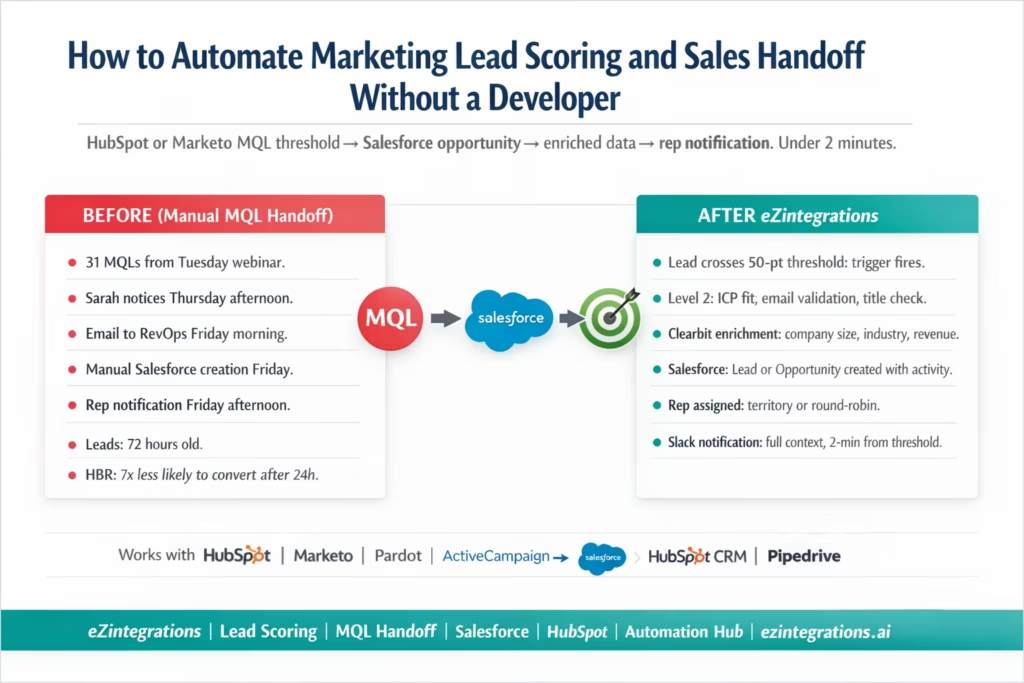
Your marketing manager Sarah ran a product webinar on Tuesday. 340 people registered. 218 attended. 47 of those attendees already had a lead score above 40 before the webinar. After attending, 31 of them crossed the 50-point MQL threshold.
It is Thursday afternoon. Sarah is reviewing the campaign results in HubSpot. She notices the 31 MQLs. She sends an email to the RevOps team: “Hey, 31 new MQLs from Tuesday’s webinar. Can someone move these to Salesforce?”
RevOps gets to it Friday morning. They batch-export the 31 leads, create Salesforce leads manually (or use HubSpot’s native sync, which creates Contact records but not Opportunities), and send the list to the sales manager. The sales manager assigns reps. The reps receive a Salesforce notification Friday afternoon.
The leads are now 72 hours old.
Harvard Business Review research found that leads contacted within 1 hour of showing buying intent are 7 times more likely to convert than leads contacted after 24 hours. At 72 hours, the conversion probability has dropped significantly. And these are your warmest leads from a product webinar.
What Lead Scoring Is and Why the Threshold Matters
Lead scoring assigns numerical values to prospect behaviours and attributes to indicate how ready a contact is for sales engagement. A contact accumulates points based on:
Behavioural scores (actions taken):
- Opened email: +2
- Clicked email link: +5
- Visited pricing page: +15
- Attended webinar: +20
- Requested a demo: +30
- Visited website 3+ times in 7 days: +10
- Downloaded a product guide: +8
Demographic/firmographic scores (who they are):
- Job title: VP or C-suite: +15
- Job title: Manager or Director: +10
- Company size: 200-1,000 employees: +10
- Company size: 1,000+ employees: +15
- Industry: matches ICP industry list: +10
Negative scores (disqualification signals):
- Free email domain (gmail, yahoo): -15
- Company size < 10 employees: -10
- Job title: student, intern: -20
- Unsubscribed from email: -50
This structure of behavioural, demographic, and negative scoring follows widely adopted models used in marketing automation platforms like Marketo.
The MQL threshold is the score at which marketing considers a contact ready for sales engagement. Most B2B companies set this between 40 and 75 points, depending on the sales cycle length and the volume of leads being generated.
The threshold is only useful if sales knows a lead has crossed it, within the window where the lead is still warm.
The Three Handoff Failures That Kill Qualified Leads
Failure 1: Time delay. The lead crosses the MQL threshold at 9 PM on a Tuesday after visiting the pricing page for the third time. Nobody checks HubSpot until Wednesday morning. The lead receives a sales call 18 hours later. By then, they may have already spoken to a competitor who contacted them via a different channel.
Failure 2: Missing context. The sales rep receives a Salesforce lead record with a name, email, company, and phone number. No activity history. No record of which webinar they attended, which pages they visited, or what content they downloaded. The rep’s first call is cold, even though the lead is warm.
Failure 3: Wrong assignment. The MQL goes to the enterprise team because the account name sounds large, but it is actually a 25-person company. Or it goes to the wrong territory rep because the routing rules are based on company name rather than actual company location. The rep contacts the lead, realises it is not their territory, and forwards it. Three more days pass.
Detecting MQL Threshold Crosses in HubSpot and Marketo
HubSpot: Webhook on Lead Score Change
HubSpot fires a webhook when a contact property changes. Configure a workflow in HubSpot to fire an outbound webhook when hs_lead_status changes to MQL or when the hubspotscore property exceeds the threshold:
HubSpot Workflow configuration:
- Trigger: Contact property
hubspotscoreis greater than or equal to 50 (your MQL threshold) - Action: HTTP Request (webhook) → POST to eZintegrations webhook URL
- Payload: contact ID, email, company, current score, lifecycle stage
Or polling the HubSpot API for new MQLs:
GET https://api.hubapi.com/crm/v3/objects/contacts/search
Authorization: Bearer {hubspot_token}
Content-Type: application/json

{
  "filterGroups": [{
    "filters": [
      { "propertyName": "hubspotscore", "operator": "GTE", "value": "50" },
      { "propertyName": "hs_lead_status", "operator": "EQ", "value": "MQL" },
      { "propertyName": "hs_last_modified_date", "operator": "GT", "value": "{last_check_timestamp}" }
    ]
  }],
  "properties": [
    "firstname", "lastname", "email", "company", "jobtitle",
    "hubspotscore", "hs_lead_status", "phone", "website",
    "num_unique_pageviews", "hs_email_open_count",
    "recent_conversion_event_name", "hs_latest_source"
  ]
}
This returns contacts that crossed the MQL threshold since the last check, with activity summary fields included.
Getting the full activity timeline from HubSpot:
GET https://api.hubapi.com/crm/v3/objects/contacts/{contact_id}/associations/engagements
Authorization: Bearer {hubspot_token}
Then for each engagement:
GET https://api.hubapi.com/engagements/v1/engagements/{engagement_id}
Returns a list of all interactions: emails opened, pages visited, forms submitted, meetings scheduled. This activity list goes into the Salesforce record.
Marketo: Smart List with Webhook Trigger
In Marketo, create a Smart Campaign triggered when Lead Score >= 50:
Marketo trigger setup:
- Smart List trigger: Score is changed, new value is at least 50
- Flow step: Call Webhook (registered webhook URL in Marketo Admin → Webhooks)
The webhook payload can include all lead fields and custom fields as Marketo tokens:
{
  "leadId": "{{lead.Id}}",
  "email": "{{lead.Email Address}}",
  "company": "{{lead.Company}}",
  "score": "{{lead.Lead Score}}",
  "jobTitle": "{{lead.Job Title}}",
  "firstName": "{{lead.First Name}}",
  "lastName": "{{lead.Last Name}}",
  "leadSource": "{{lead.Lead Source}}"
}
For the full activity history from Marketo, call the Marketo Activities API after receiving the webhook:
GET https://{marketo_instance}.mktorest.com/rest/v1/activities.json
    ?access_token={marketo_token}
    &leadIds={lead_id}
    &activityTypeIds=1,2,3,6,10,12,46
    &nextPageToken={token}
Activity type IDs: 1=Visit Webpage, 2=Fill Out Form, 3=Click Link, 6=Send Email, 10=Open Email, 12=Click Email, 46=Register for Event.
Level 2 MQL Quality Validation
Before creating a Salesforce record, Level 2 validates the MQL. Not every lead that crosses a score threshold is worth a sales rep’s time. Level 2 filters out low-quality MQLs automatically.
Validation 1: Email Quality
# Check for disposable or free email domain
if email.split('@')[1] in disposable_email_domains:
    FLAG: "Disposable email domain. Likely not a business contact."
    route_to = "nurture_queue"  # Do not create Salesforce record

if email.split('@')[1] in free_email_domains:  # gmail, yahoo, hotmail, outlook
    SCORE_PENALTY: "Personal email domain. Lower ICP fit."
    flag_for_review = True  # Create record but flag
Validation 2: Company Domain Enrichment
Level 2 looks up the company from the email domain or the company name field. If the company cannot be identified: the record is flagged as low confidence.
Validation 3: Job Title ICP Check
decision_maker_titles = [
    "VP", "Vice President", "Director", "Chief", "CTO", "CFO", "CEO",
    "Head of", "President", "Owner", "Founder", "Manager", "Lead"
]

is_decision_maker = any(title.lower() in job_title.lower()
                        for title in decision_maker_titles)

if not is_decision_maker:
    FLAG: "Job title not in decision-maker list. Lower priority handoff."
Validation 4: ICP Firmographic Fit Score
Level 2 calculates an ICP fit score based on industry, company size, and geography (from the enrichment data):
icp_fit_score = 0
if company_industry in icp_industries: icp_fit_score += 30
if 200 <= company_employees <= 5000: icp_fit_score += 25
if company_country in icp_geographies: icp_fit_score += 20
if is_decision_maker: icp_fit_score += 25

if icp_fit_score >= 70: priority = "HIGH"
elif icp_fit_score >= 40: priority = "MEDIUM"
else: priority = "LOW"
The priority level determines: HIGH goes directly to a senior SDR or AE with immediate notification. MEDIUM goes to the standard SDR queue. LOW goes to nurture sequence rather than direct sales contact.
Lead Enrichment: Adding Firmographic Context Before the Handoff
The sales rep’s first interaction quality depends on how much context they have about the lead. Enrichment adds the data that the lead form typically cannot capture (company size, revenue, technology stack, recent news) without asking for it.
Clearbit Enrichment
GET https://company.clearbit.com/v2/companies/find
    ?domain={company_domain}
Authorization: Bearer {clearbit_api_key}
Returns (when available):
{
  "name": "Acme Corp",
  "description": "Software tools for enterprise procurement",
  "industry": "Technology",
  "employeesRange": "501-1000",
  "annualRevenue": 50000000,
  "location": "San Francisco, CA",
  "tech": ["Salesforce", "HubSpot", "NetSuite", "AWS"],
  "metrics": {
    "employees": 750,
    "estimatedAnnualRevenue": 50000000
  },
  "linkedin": { "handle": "acme-corp" }
}
Apollo.io Enrichment
For companies not in Clearbit’s database:
POST https://api.apollo.io/v1/people/match
Authorization: Bearer {apollo_api_key}

{
  "email": "{contact_email}",
  "reveal_personal_emails": false,
  "reveal_phone_number": false
}
Returns matched contact and organisation data including job seniority, company size, and funding stage.
Creating the Salesforce Record with Full Context
When Level 2 validation passes, eZintegrations creates the Salesforce record. The choice between Lead and Opportunity/Contact depends on your sales process:
Standard flow for new prospects:
- Create a Salesforce Lead (initial record before qualification call)
- Attach the enriched data and activity history
For ABM (Account-Based Marketing) scenarios:
- Check if the account already exists in Salesforce
- If Account exists: create a Contact and an Opportunity
- If Account does not exist: create Account, Contact, and Opportunity
Creating the Salesforce Lead with Full Context
POST https://{instance}.salesforce.com/services/data/v59.0/sobjects/Lead/
Authorization: Bearer {salesforce_token}
Content-Type: application/json

{
  "FirstName": "Emma",
  "LastName": "Thompson",
  "Email": "emma@acmecorp.com",
  "Company": "Acme Corp",
  "Title": "VP of Operations",
  "Phone": "+14155550122",
  "LeadSource": "Webinar - Product Demo",
  "Status": "MQL",
  "OwnerId": "{assigned_rep_id}",
  "Description": "MQL triggered by webinar attendance + pricing page visit. Lead score: 67. ICP fit: HIGH.",

  "Lead_Score__c": 67,
  "ICP_Fit_Score__c": 85,
  "ICP_Priority__c": "HIGH",
  "MQL_Date__c": "2026-03-14T21:15:00Z",
  "Clearbit_Employees__c": 750,
  "Clearbit_Industry__c": "Technology",
  "Clearbit_Revenue__c": 50000000,
  "Activity_Summary__c": "Attended Product Webinar (Mar 12), Visited Pricing Page (3x, Mar 14), Downloaded Integration Guide (Mar 10), Opened 4 emails in last 30 days",
  "Recent_Intent_Signal__c": "Pricing page visit (3x, last 24 hours)",
  "Company_Tech_Stack__c": "Salesforce, HubSpot, NetSuite, AWS"
}
The Activity_Summary__c and Recent_Intent_Signal__c are custom fields that give the rep immediate context without needing to research the lead. The tech stack field is especially useful: if the lead uses Salesforce and NetSuite, the rep knows they are speaking to someone who understands enterprise software.
For Account-Based Marketing (Opportunity Creation)
# Check if Account exists
GET /services/data/v59.0/query
    ?q=SELECT+Id,Name+FROM+Account+WHERE+Website+LIKE+'%acmecorp.com%'

# If Account exists: create Contact
POST /services/data/v59.0/sobjects/Contact/
{ "AccountId": "{account_id}", "FirstName": "Emma", ... }

# Create Opportunity
POST /services/data/v59.0/sobjects/Opportunity/
{
  "AccountId": "{account_id}",
  "Name": "Emma Thompson - Acme Corp",
  "StageName": "MQL - Marketing Qualified",
  "CloseDate": "{today + 90 days}",
  "Amount": 0,
  "OwnerId": "{assigned_rep_id}",
  "LeadSource": "Webinar",
  "MQL_Score__c": 67
}
Sales Rep Assignment: Territory, Product, or Round-Robin
After creating the Salesforce record, the assignment determines which rep receives the lead. Assignment rules are the same as the lead routing rules in the lead-to-CRM automation guide:
IF icp_priority = "HIGH" AND company_employees > 500:
    assign_to = enterprise_ae_team (round-robin)

IF icp_priority = "HIGH" AND company_employees <= 500:
    assign_to = mid_market_sdr_team (round-robin)

IF lead_source = "Partner Referral":
    assign_to = channel_manager

IF company_geography = "EMEA":
    assign_to = emea_sdr_team

IF icp_priority = "MEDIUM":
    assign_to = sdr_team (round-robin, lower priority queue)

IF icp_priority = "LOW":
    assign_to = nurture_sequence (no rep assignment)
Rep Notification: The Alert That Actually Gets Action
The rep notification is the step that turns an automated record creation into an actual sales interaction. A Salesforce lead record that the rep discovers on their own hours later is worse than a proactive alert that tells them to act now.
Slack Notification
New HIGH-priority MQL: Emma Thompson | VP Operations | Acme Corp

Score: 67 | ICP Fit: 85/100 | Priority: HIGH
Email: emma@acmecorp.com | Phone: +1 415 555 0122
Company: Acme Corp | 750 employees | $50M revenue | Technology
Stack: Salesforce, HubSpot, NetSuite, AWS

Recent intent signals:
• Visited pricing page 3x in last 24 hours
• Attended Product Webinar (March 12)
• Downloaded Integration Guide (March 10)
• Opened 4 emails in last 30 days

Lead source: Webinar - Product Demo March 12
SLA: Contact within 1 hour for HIGH priority MQLs

[View in Salesforce] [Log a Call] [Send Email]
The notification lands in the rep’s Slack with action buttons. They do not need to log into Salesforce to see the context. The 1-hour SLA reminder is built into the notification.
Level 3 monitors whether the rep acts within the SLA. If the rep has not logged any activity in Salesforce within 1 hour of a HIGH priority notification: a second alert goes to the rep and their manager.
Closing the Loop: Pushing Salesforce Activity Back to the MAP
For complete pipeline visibility, activity data from Salesforce should push back to HubSpot or Marketo:
- When a sales rep logs a call in Salesforce: create an engagement in HubSpot on the same contact
- When a deal moves to a stage in Salesforce: update the lifecycle stage in HubSpot
- When a deal is won: mark the contact in HubSpot as a customer and suppress from marketing nurture
HubSpot engagement creation from Salesforce call log:
POST https://api.hubapi.com/crm/v3/objects/calls
Authorization: Bearer {hubspot_token}
{
  "properties": {
    "hs_call_title": "Discovery call - Emma Thompson",
    "hs_call_direction": "OUTBOUND",
    "hs_call_duration": "1800000",
    "hs_call_status": "COMPLETED",
    "hs_call_body": "{call_notes_from_salesforce}",
    "hs_timestamp": "{call_timestamp}"
  }
}
Then associate with the contact:
PUT /crm/v3/objects/calls/{callId}/associations/contacts/{contactId}/call_to_contact
This bidirectional sync means marketing can see the full lifecycle of every lead: from initial website visit through MQL, handoff, first contact, and deal outcome, all in one system.
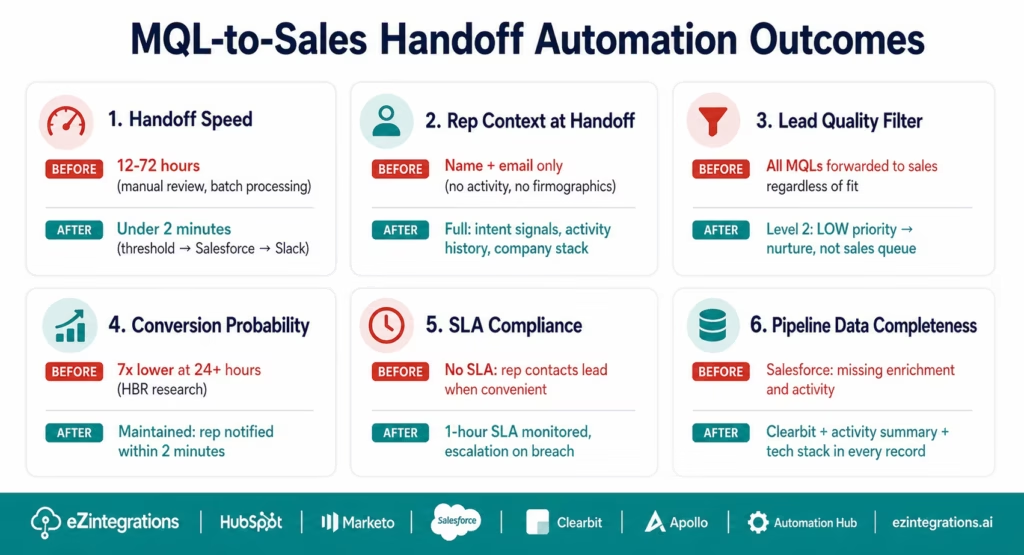
Before vs After: Manual MQL Handoff vs Automated
| Handoff Step | Manual MQL Handoff | Automated with eZintegrations |
|---|---|---|
| MQL detection | Marketing manager reviews MAP daily/weekly | Webhook: detected within minutes of threshold cross |
| Handoff delay | 12-72 hours (depends on when marketing checks) | Under 2 minutes |
| Lead quality check | None or manual | Level 2: email, title, ICP fit, firmographic validation |
| Disposable email filter | Not done | Level 2: filtered before Salesforce record created |
| Firmographic enrichment | Manual: sales rep researches the company | Clearbit/Apollo: automatic at handoff |
| Activity history in Salesforce | Not included or manually summarised | Activity_Summary__c: full engagement timeline |
| Intent signal context | Not captured | Recent_Intent_Signal__c: most recent high-intent action |
| Tech stack context | Not provided | Company_Tech_Stack__c: from Clearbit |
| Rep assignment | Manual: manager assigns batch | Rules-based: company size, geography, product interest |
| Rep notification | Email or Salesforce notification (low urgency) | Slack with full context + SLA reminder |
| SLA monitoring | None | Level 3: 1-hour SLA check, alert on breach |
| Nurture vs sales split | Manual: all MQLs forwarded regardless of fit | Level 2: LOW priority → nurture, not sales queue |
| Activity push-back to MAP | Manual or not done | Automated: Salesforce call logs → HubSpot engagement |
| Time from threshold to rep call | 12-72 hours | Minutes to hours (rep acts on Slack notification) |
| HBR conversion probability | 7x lower than 1-hour response | Maintained: rep notified within 2 minutes |
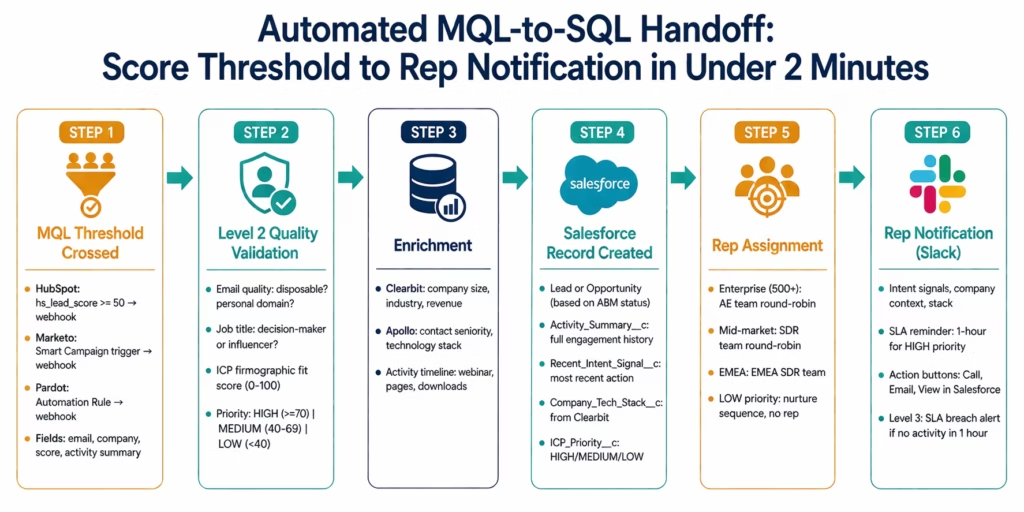
Step-by-Step: An MQL Crossing Threshold to Rep Notification in Under 2 Minutes
Emma Thompson (VP Operations, Acme Corp) visited the eZintegrations pricing page for the third time at 9:14 PM on a Tuesday. Her HubSpot score was 47 before the visit. Each pricing page visit is worth +8 points. Her score is now 63: above the 50-point MQL threshold.
Setup: eZintegrations monitors HubSpot every 5 minutes for contacts crossing the MQL threshold. Clearbit enrichment connected. Salesforce connected. Rep assignment: companies 200-1,000 employees → mid-market SDR team (round-robin). High-priority (ICP fit >= 70) → notify immediately via Slack.
9:14 PM: Emma visits pricing page. HubSpot score: 47 → 63 (3 pricing page visits = +16 points total). hs_lead_status changes to MQL.
9:15 PM: eZintegrations detects MQL. HubSpot API poll detects Emma’s score >= 50 with updated hs_last_modified_date. Contact retrieved with all properties and engagement history.
9:15 PM: Level 2 validation (4 seconds).
- Email: emma@acmecorp.com. Domain acmecorp.com: business domain, not disposable. Pass.
- Job title: “VP of Operations”: decision-maker level. Pass.
- Clearbit lookup: Acme Corp, Technology, 750 employees, $50M revenue, San Francisco CA.
- ICP fit score: Technology industry (+30) + 501-1,000 employees (+25) + US geography (+20) + VP title (+25) = 100. Priority: HIGH.
9:15 PM: Activity history retrieved. Last 30 days: Attended Product Webinar (March 12), Downloaded Integration Guide (March 10), Visited Pricing Page 3x (March 14), Opened 4 emails, Clicked 2 email links. Recent intent: Pricing Page × 3 today.
9:15 PM: Salesforce Lead created.
POST /sobjects/Lead/
{
  "FirstName": "Emma", "LastName": "Thompson",
  "Email": "emma@acmecorp.com", "Company": "Acme Corp",
  "Title": "VP of Operations", "OwnerId": "SF_USER_SDR1",
  "LeadSource": "HubSpot - Organic",
  "Status": "MQL",
  "Lead_Score__c": 63,
  "ICP_Fit_Score__c": 100,
  "ICP_Priority__c": "HIGH",
  "Clearbit_Employees__c": 750,
  "Activity_Summary__c": "Webinar (Mar 12), Pricing Page ×3 (today), Guide Download (Mar 10)",
  "Recent_Intent_Signal__c": "Pricing page: 3 visits in last 24 hours",
  "Company_Tech_Stack__c": "Salesforce, HubSpot, NetSuite, AWS"
}
Salesforce Lead ID: 00Q5f00000AbC999.
9:16 PM: SDR Marcus Chen receives Slack notification.
HIGH-priority MQL: Emma Thompson | VP Operations | Acme Corp

Score: 63 | ICP Fit: 100/100 | Priority: HIGH ⭐
Email: emma@acmecorp.com | Phone: +1 415 555 0122
Company: Acme Corp | 750 employees | $50M revenue | Technology | San Francisco

Recent intent:
• Pricing page × 3 TODAY (last visit: 9:14 PM)
• Attended Product Webinar March 12
• Downloaded Integration Guide March 10

Stack: Salesforce, HubSpot, NetSuite, AWS
Source: HubSpot Organic
SLA: Contact within 1 hour (HIGH priority)

[View in Salesforce] [Call Emma] [Send Email]
Total elapsed time from pricing page visit to Slack notification: 2 minutes.
Marcus sees the notification on his phone at 9:16 PM. He sends Emma a personalised email at 9:22 PM referencing the webinar she attended and the pricing page visit. Emma replies at 9:41 PM: “Yes, actually, we are evaluating solutions right now.”
Previous process: Emma’s MQL would have been noticed by the marketing manager the next morning, forwarded to RevOps by noon, entered into Salesforce by 3 PM, and Marcus would have received a notification by 4 PM. Emma’s active evaluation window would have been 19 hours old before Marcus contacted her.
Key Outcomes and Results
Handoff speed: manual MQL handoffs take 12-72 hours from threshold crossing to rep notification. Automated handoffs complete in under 2 minutes. For HIGH-priority MQLs, this directly impacts conversion: the HBR 7x improvement in lead qualification applies within the first hour.
Lead quality at handoff: manual handoffs send every MQL to sales regardless of quality, creating noise in the sales pipeline (reps work low-quality leads and ignore the queue). Level 2 filtering routes LOW-priority MQLs to nurture sequences and only passes HIGH and MEDIUM priority leads to sales, improving rep focus and pipeline quality.
Context quality at handoff: reps who receive enriched MQLs with activity history and intent signals have more relevant first conversations. Research shows that personalised outreach based on intent signals significantly outperforms cold call approaches.
Rep response rate: the Slack notification with immediate context is significantly more actionable than a Salesforce notification email or a batch assignment. Reps act faster on contextual Slack alerts than on generic CRM notifications.
Pipeline coverage: Level 3 monitoring of the 1-hour SLA closes the gap where MQLs fall through because the rep was in meetings when the notification arrived. Escalation to the manager ensures every HIGH-priority MQL receives a response within the SLA window.
How to Get Started
Step 1: Define Your MQL Threshold and ICP Criteria
Before building the automation, align marketing and sales on: what score constitutes an MQL (typically 40-75 in most B2B companies)? What firmographic criteria define a HIGH-priority versus MEDIUM-priority lead (company size, industry, geography, job title seniority)? What is the SLA for rep response to a HIGH-priority MQL (typically 1 hour for HIGH, 24 hours for MEDIUM)? Documenting these definitions takes 1-2 hours and is the foundation of the routing and notification logic.
Step 2: Import the MQL Handoff Template
Go to the Automation Hub and import the Marketing Lead Scoring Handoff template for your MAP (HubSpot, Marketo, or Pardot) and CRM (Salesforce or HubSpot CRM). The template includes: MAP webhook or polling configuration, Level 2 quality validation (email, title, ICP fit), Clearbit or Apollo enrichment, Salesforce Lead or Opportunity creation with custom fields, rep assignment rules, and Slack notification with intent signals.
Step 3: Configure Custom Fields, Assignment Rules, and Notification Templates
Add your MAP API credentials (HubSpot private app token, Marketo OAuth, or Pardot credentials). Add Salesforce credentials (OAuth 2.0). Add Clearbit or Apollo API keys. Configure the Level 2 validation thresholds (ICP industry list, company size ranges, decision-maker title keywords). Map your custom Salesforce fields (Activity_Summary__c, Recent_Intent_Signal__c, etc.). Configure rep assignment rules in the visual condition builder. Customise the Slack notification template to match your sales team’s communication style.
Step 4: Test with 5-10 Real Leads Across Priority Levels
Create test leads in HubSpot or Marketo that cross the MQL threshold: at least one HIGH priority (matching ICP), one MEDIUM priority (partial ICP fit), and one LOW priority (no ICP fit, free email domain). Verify that HIGH leads create Salesforce records with full enrichment, that MEDIUM leads create records with standard enrichment, and that LOW leads route to the nurture queue without creating Salesforce records. Verify the Slack notifications arrive with correct context. Allow 30-60 minutes for test validation.
Start your free trial to import the MQL handoff template. No credit card required. Most teams are live within 1-2 days.
FAQs
eZintegrations monitors HubSpot (via search API polling or workflow webhook) or Marketo (via Smart Campaign webhook) for contacts that cross a configured MQL score threshold. When detected, Level 2 validates the lead quality (email domain, job title seniority, ICP firmographic fit) and calculates a priority score. Clearbit or Apollo enriches the lead with company size, industry, revenue, and technology stack. A Salesforce Lead or Opportunity is created via REST API with all enriched data, the complete activity history, and recent intent signals populated in custom fields. The lead is assigned to a sales rep based on configurable territory or round-robin rules. The rep receives a Slack notification with full context and a 1-hour SLA reminder. Level 3 monitors SLA compliance and escalates to the rep's manager if no activity is logged within the SLA window.
1-2 days for a standard HubSpot-to-Salesforce or Marketo-to-Salesforce configuration. Key steps: MAP API credentials and webhook configuration (1-2 hours), Salesforce custom field setup (1-2 hours if fields do not yet exist), Clearbit or Apollo credentials (30 minutes), Level 2 validation rule configuration (1-2 hours), rep assignment rules (30-60 minutes), Slack notification template (30-60 minutes), and test validation with 5-10 test leads (1-2 hours). The total is typically 6-10 hours of active configuration, spread over 1-2 days.
Yes, HubSpot: Marketing Hub API with contacts search (POST /crm/v3/objects/contacts/search) and workflow-triggered webhooks for real-time detection. Marketo: REST API for lead data and activities, Smart Campaign webhook for threshold triggers. Pardot: Automation Rules with webhook action for threshold triggers. Salesforce: REST API for Lead and Opportunity creation (POST /sobjects/Lead/, POST /sobjects/Opportunity/), SOQL for existing account lookup. Also supports HubSpot CRM, Pipedrive, and Zoho CRM as the receiving system. Pre-built templates for HubSpot-to-Salesforce and Marketo-to-Salesforce are available in the Automation Hub.
Level 2 calculates an ICP fit score (0-100) for each MQL using enrichment data: industry match (+30 if in ICP list), company size match (+25 if in ICP range), geography match (+20 if in ICP geography), and job title seniority (+25 if decision-maker or influencer level). Scores of 70 or above are HIGH priority (immediate Salesforce record, immediate Slack notification). Scores of 40-69 are MEDIUM priority (Salesforce record, standard queue notification). Scores below 40 are LOW priority (no Salesforce record, route to nurture sequence). The thresholds and weights are configurable per company ICP definition.
Level 3 monitors each HIGH-priority Salesforce Lead or Opportunity for any sales activity (call logged, email sent, task completed) within the configured SLA window (default: 1 hour). The check runs every 15 minutes. If no activity is logged within the SLA window: a first reminder goes to the assigned rep. If still no activity after 90 minutes: an escalation alert goes to the rep's manager with the lead details and the elapsed time. For MEDIUM priority leads: the SLA is 24 hours. Level 3 generates a weekly SLA compliance report showing rep response rates and average time-to-contact per rep. 1. How does eZintegrations automate the marketing-to-sales lead handoff?
2. How long does it take to set up the MQL handoff automation?
3. Does eZintegrations work with HubSpot, Marketo, Pardot, and Salesforce?
4. How does the ICP priority scoring work to filter low-quality MQLs?
5. How does the SLA monitoring work for rep response after handoff?
Emma Emailed Back at 9:41 PM. Marcus Sent the Email at 9:22 PM.
The 2-minute handoff made the difference. Not because Marcus is a better sales rep than he would have been at 4 PM the next day. Because the lead was warm. Emma had just visited the pricing page three times. She was actively evaluating. And Marcus had all the context he needed to send a personalised, relevant email that referenced exactly what she had been doing.
The 72-hour manual process would have caught a cold lead. The 2-minute automated process caught an active one.
No developer required. No MAP customisation. No Salesforce consultant. A visual workflow builder connecting HubSpot, Clearbit, Salesforce, and Slack in the right sequence with the right data.
Start your free trial to import the MQL handoff template. No credit card required.
For the upstream lead capture automation (web form to CRM entry), see the lead-to-CRM data entry automation guide. For the full library of revenue operations templates, see the Automation Hub.

