
Amazon FBA Inventory Replenishment Automation: Stop Monitoring Seller Central and Let SAP or NetSuite Do It
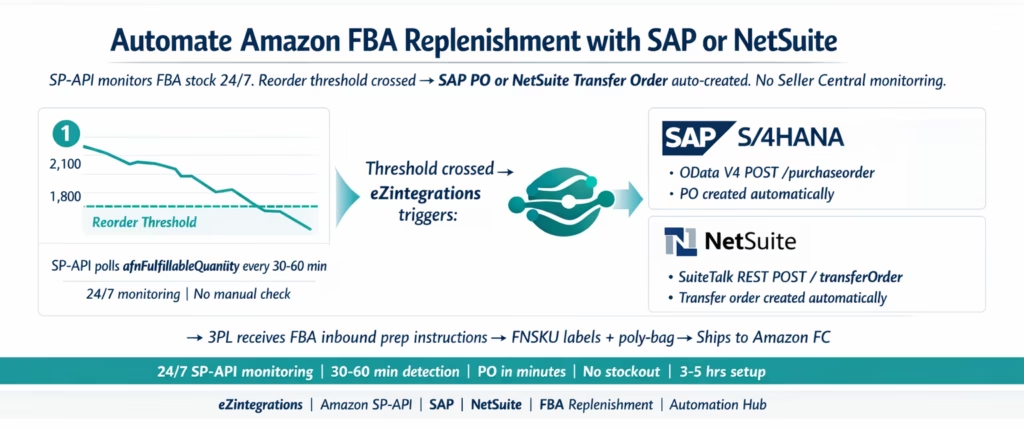
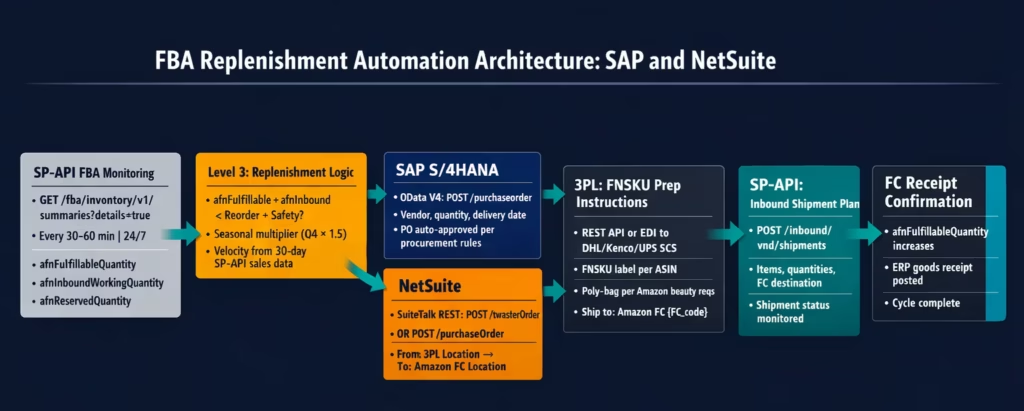
April 9, 2026To automate Amazon FBA inventory replenishment with SAP or NetSuite, eZintegrations monitors FBA fulfillable quantity via the SP-API GET /fba/inventory/v1/summaries endpoint every 30-60 minutes, compares it against a configurable reorder threshold per ASIN, and when the threshold is crossed automatically creates a Purchase Order in SAP S/4HANA (via the OData V4 POST /sap/opu/odata4/.../purchaseorder endpoint) or a Transfer Order or Purchase Order in NetSuite (via SuiteTalk REST POST /services/rest/record/v1/purchaseOrder), generates FBA inbound shipment instructions for the 3PL, and creates the FBA inbound shipment plan via SP-API POST /inbound/vnd/shipments. The full replenishment cycle runs 24/7 without manual monitoring of Seller Central.
TL;DR
Amazon FBA stockouts are expensive and hard to recover from: Amazon’s search algorithm deprioritises recently out-of-stock listings, and rank recovery takes weeks. The manual replenishment process: someone checks Seller Central or the Inventory Health report, notices stock is low, checks the 3PL for available units, creates a PO in SAP or NetSuite, coordinates with the 3PL to prep and ship to Amazon FCs. It takes 1-3 days from stock alert to shipped replenishment. Most beauty and CPG brands stockout before the replenishment arrives. The automated process: eZintegrations monitors afnFulfillableQuantity via SP-API 24/7, triggers a SAP PO or NetSuite Transfer Order when the reorder threshold is crossed, and sends FBA inbound prep instructions to the 3PL within minutes. Key SP-API endpoint: GET /fba/inventory/v1/summaries?details=true returns afnFulfillableQuantity (shippable units), afnInboundWorkingQuantity (units in transit to FC), and afnReservedQuantity (units reserved for pending orders). ERP integration: SAP S/4HANA uses the OData V4 Purchasing API; NetSuite uses SuiteTalk REST purchaseOrder or transferOrder records. Automation Hub template: FBA Inventory Replenishment. Covers both SAP and NetSuite ERP backends. 3-5 hours to configure.
Why FBA Stockouts Kill Amazon Rankings and How to Prevent Them
You opened Seller Central on Monday morning and Rose Gloss ASIN B09X4JT2Z1 shows zero FBA units. It sold out over the weekend. The listing is still live (it is FBM-switchable), but it lost its Prime badge. Amazon’s algorithm has already started de-ranking it for your target keywords.
You send a replenishment order to your 3PL on Monday. The 3PL needs two days to prep (FNSKU labelling, poly-bagging). Shipping takes 3-5 days to the Amazon FC. Amazon receiving takes 1-4 days. You are back in stock in 8-12 days, best case.
For those 8-12 days, your listing is effectively invisible for Prime shoppers. Your organic rank for “rose lip gloss” drops from position 7 to position 34. It takes 3-4 weeks to climb back to position 7 after restocking. The revenue lost during the stockout plus the rank recovery period is significantly larger than the cost of carrying more inventory.
This is why FBA stockout prevention is the highest-ROI operational focus for any brand that sells through FBA at scale. And the most effective prevention is not checking Seller Central more frequently. It is automating the replenishment trigger so it fires before the stockout.
How the Manual FBA Replenishment Process Fails
The typical manual FBA replenishment workflow at a beauty or CPG brand running SAP or NetSuite:
Step 1 (Monday, 9 AM): someone on the ops team opens Amazon Seller Central and checks the Inventory Health report. They notice Rose Gloss has 180 FBA units remaining. They estimate this will last about 9 days at current velocity (20 units/day). They flag it for replenishment.
Step 2 (Monday, 10 AM): the ops person logs into SAP or NetSuite to check available stock at the 3PL. They find 800 units available. They manually create a Purchase Order (SAP) or Transfer Order (NetSuite) for 1,500 units: enough for 75 days of FBA stock. The PO creation takes 10-15 minutes in the ERP.
Step 3 (Monday, 11 AM): the ops person emails or messages the 3PL team: “Please prep 1,500 units of Rose Gloss for Amazon FBA. FNSKU is B09X4JT2Z1. Standard poly-bag prep. Shipping to Amazon FC TEB4 in New Jersey.”
Step 4 (Tuesday-Wednesday): the 3PL preps the shipment: pulls units from shelves, applies FNSKU labels, poly-bags each unit, packs into master cartons. This takes 1-2 days for 1,500 units.
Step 5 (Wednesday-Thursday): the 3PL ships the cartons to Amazon FC TEB4. Transit time: 2-3 days by ground, 1-2 days by expedited.
Step 6 (Friday-Sunday): Amazon FC receives the shipment. Processing time at FC: 1-4 days. Units appear as “Receiving” and then as “Available” in Seller Central.
Total time from reorder decision to FBA available: 7-12 days. During this time, the 180 units at 20/day will last exactly 9 days. You will be out of stock for 1-3 days before the replenishment arrives.
Three places where this breaks down: 1. The ops check happens weekly instead of daily: the reorder is noticed when only 40 units remain, with no time for replenishment. 2. The ERP PO creation is forgotten in the flow: the 3PL is instructed verbally without an ERP record, which means the inventory commitment is not reflected in SAP or NetSuite. 3. The velocity changes: a promotion, a viral moment, or a competitor stockout doubles daily sales. The 9-day estimate becomes 4 days, and the replenishment arrives 5 days after stockout.
The Three Numbers That Drive FBA Replenishment
Effective FBA replenishment requires tracking three SP-API inventory metrics simultaneously.
1. afnFulfillableQuantity (the live sell number) Units at Amazon FCs that Amazon can immediately ship to customers. This is the primary metric: when this number crosses your reorder threshold, replenishment must be triggered. This number decreases as Amazon ships orders. It can also decrease when units become unsellable (expired, damaged). Polled via SP-API GET /fba/inventory/v1/summaries?details=true.
2. afnInboundWorkingQuantity (units in the pipeline) Units that are in the process of being shipped to Amazon FCs: either being prepped at your 3PL, in transit, or being received at the FC. This number is critical for the replenishment logic: if afnFulfillableQuantity is below the threshold but afnInboundWorkingQuantity is large enough to cover expected demand before the in-flight stock arrives, you may not need to trigger another replenishment cycle.
The combined logic: reorder_needed = afnFulfillableQuantity + afnInboundWorkingQuantity < reorder_threshold + safety_stock
3. afnReservedQuantity (committed but not yet shipped) Units at Amazon FCs that are reserved for pending customer orders being processed. These units are not available to other customers but they are committed and will be shipped. For velocity calculations, reserved quantity represents demand that has already been captured: it reduces your effective available stock.
Effective fulfillable for planning purposes: afnFulfillableQuantity - afnReservedQuantity
The replenishment trigger should use all three numbers to avoid both stockout (not ordering soon enough) and overstock (ordering when afnInboundWorkingQuantity already covers expected demand).
Calculating Your FBA Reorder Point and Safety Stock
The reorder point formula for FBA:
Reorder Point = (Average Daily Sales × Lead Time Days) + Safety Stock

Lead Time Days = 3PL prep days + transit days + Amazon FC receiving days
Safety Stock = (Peak Daily Sales - Average Daily Sales) × Lead Time Days
Example for Rose Gloss (beauty brand, FBA hero SKU): – Average daily sales: 22 units/day (30-day rolling average from SP-API sales data) – Peak daily sales: 47 units/day (highest day in last 30 days, or estimated for Q4) – Lead time: 2 days prep + 3 days transit + 2 days FC receiving = 7 days – Safety stock: (47 – 22) × 7 = 175 units – Reorder point: (22 × 7) + 175 = 154 + 175 = 329 units
When afnFulfillableQuantity drops below 329, trigger replenishment.
Replenishment quantity:
Replenishment Quantity = Target Days of Cover × Average Daily Sales - (Current FBA + Inbound)
For 60 days cover: (22 × 60) – (current afnFulfillableQuantity + afnInboundWorkingQuantity).
If current FBA is 310 and inbound is 0: 1,320 – 310 = 1,010 units to order.
Seasonal adjustment: For beauty brands with Q4 surges (Halloween, holiday gift sets, Valentine’s Day), the reorder point and replenishment quantity should adjust dynamically. eZintegrations supports seasonal multipliers per ASIN per calendar period: double the reorder point from October-December relative to the annual baseline.
SAP vs NetSuite input: – SAP: average daily sales calculated from SAP CE_INTERNALORDER_0001 or sales order history via API_SALESORDER_SRV – NetSuite: average daily sales from SuiteQL SELECT AVG(quantity) FROM transactionline WHERE item = {item_id} AND trandate >= {30daysago}
How eZintegrations Automates the Full FBA Replenishment Cycle
eZintegrations handles all four stages of the FBA replenishment cycle across all four platform levels.
Level 1 (iPaaS Workflows): handles SP-API polling (GET /fba/inventory/v1/summaries), ERP PO or Transfer Order creation (SAP OData V4 or NetSuite SuiteTalk REST), FBA inbound shipment plan creation via SP-API (POST /inbound/vnd/shipments), and 3PL prep instruction delivery.
Level 2 (AI Workflows): handles velocity analysis using rolling sales data from SP-API and ERP sales history to dynamically adjust reorder thresholds. For seasonality (beauty Q4, Walmart promotional windows), Goldfinch AI adjusts reorder points based on historical patterns rather than static thresholds.
Level 3 (AI Agents): the core replenishment agent. Monitors all FBA ASINs simultaneously, evaluates the three-number replenishment logic (afnFulfillableQuantity + afnInboundWorkingQuantity < reorder_threshold + safety_stock), triggers the ERP PO creation on threshold breach, and routes FBA prep instructions to the 3PL. Also monitors FC receiving confirmation: when Amazon receives the inbound shipment and afnFulfillableQuantity increases, the agent posts the corresponding goods receipt to the ERP.
Level 4 (Goldfinch AI): orchestrates the full replenishment workflow as a Workflow Node and provides the Goldfinch AI Chat UI for ops managers: “Which FBA ASINs are below reorder threshold?”, “What is the expected stockout date for Velvet Foundation at current velocity?”, “How many units are in transit to Amazon FCs this week?”
The SP-API FBA Inventory Endpoint: What It Returns
GET https://sellingpartnerapi-na.amazon.com/fba/inventory/v1/summaries
  ?details=true
  &granularityType=Marketplace
  &granularityId=ATVPDKIKX0Der
  &marketplaceIds=ATVPDKIKX0Der

Authorization: Bearer {lwa_access_token}
x-amz-access-token: {lwa_access_token}
Response (per ASIN/FNSKU):
{
  "asin": "B09X4JT2Z1",
  "fnSku": "X001RGLOSS4",
  "sellerSku": "LGLOSS-04-ROSE",
  "inventoryDetails": {
    "fulfillableQuantity": 1847,
    "inboundWorkingQuantity": 0,
    "inboundShippedQuantity": 0,
    "inboundReceivingQuantity": 0,
    "reservedQuantity": {
      "totalReservedQuantity": 23,
      "pendingCustomerOrderQuantity": 23,
      "pendingTransshipmentQuantity": 0,
      "fcProcessingQuantity": 0
    },
    "unfulfillableQuantity": {
      "totalUnfulfillableQuantity": 4,
      "customerDamagedQuantity": 2,
      "warehouseDamagedQuantity": 1,
      "distributorDamagedQuantity": 0,
      "carrierDamagedQuantity": 0,
      "defectiveQuantity": 0,
      "expiredQuantity": 1
    },
    "researchingQuantity": {
      "totalResearchingQuantity": 0
    }
  }
}
Key fields for replenishment logic: – fulfillableQuantity: units Amazon can ship now. The primary monitoring metric. – inboundWorkingQuantity: units being prepped or in transit to FCs. Include in reorder calculation to avoid over-ordering. – inboundShippedQuantity: units in transit to FCs. – inboundReceivingQuantity: units at FC being processed. Will become fulfillableQuantity soon. – reservedQuantity.pendingCustomerOrderQuantity: units committed to orders being processed. – unfulfillableQuantity.expiredQuantity: beauty-specific metric. If this is non-zero, near-expiry units are being quarantined at the FC. This can indicate your next inbound shipment needs fresher lots.
The inboundWorkingQuantity + inboundShippedQuantity + inboundReceivingQuantity combined represents all units in the replenishment pipeline. The effective remaining supply is: fulfillableQuantity + (inbound total).
SAP S/4HANA: Automatic PO Creation on FBA Reorder Trigger
When the replenishment agent determines that an FBA reorder is needed, it creates a Purchase Order in SAP S/4HANA using the OData V4 Purchasing API.
SAP PO creation for FBA replenishment:
The vendor on the PO is your 3PL (they are the source of the inventory you are transferring to Amazon). The plant is the virtual “Amazon FC” plant you have set up in SAP to represent your FBA inventory position.
POST https://{sap-instance}.s4hana.ondemand.com/sap/opu/odata4/sap/api_purchaseorder_2/srvd_a2x/sap/purchaseorder/0001/PurchaseOrder
Authorization: Bearer {sap_token}
Content-Type: application/json

{
  "CompanyCode": "1000",
  "PurchaseOrderType": "NB",
  "Supplier": "VENDOR-3PL-DHL",
  "PurchasingOrganization": "1000",
  "PurchasingGroup": "AMZ",
  "DocumentCurrency": "USD",
  "to_PurchaseOrderItem": [{
    "PurchaseOrderItem": "00010",
    "Material": "LGLOSS-04-ROSE",
    "Plant": "AMZFC",
    "OrderQuantity": "1010",
    "NetPriceAmount": "2.80",
    "PurchaseOrderItemText": "FBA Replenishment: B09X4JT2Z1 Rose Gloss. Inbound shipment to Amazon FC."
  }]
}
Note: Plant: "AMZFC" is the SAP plant code representing Amazon FC inventory. This is a virtual plant in SAP used to track inventory that is physically at Amazon FCs but financially owned by the brand. The plant-to-plant transfer (from the physical 3PL plant to the virtual AMZFC plant) is how SAP tracks the FBA inventory movement.
SAP approval routing for FBA POs:
If your SAP procurement rules require approval for POs above a value threshold, the auto-generated FBA replenishment PO goes through the same approval workflow. For most beauty and CPG brands, FBA replenishment POs for standard-velocity SKUs are configured with auto-approval (no manual sign-off required) via a dedicated purchasing organisation or document type that bypasses the standard approval workflow.
Goods receipt posting when Amazon receives the shipment:
When Amazon’s inboundReceivingQuantity transitions to fulfillableQuantity (FC processing complete), eZintegrations posts the SAP goods receipt:
POST /sap/opu/odata/sap/API_GOODSMVT_SRV/A_GoodsMovement
Content-Type: application/json

{
  "GoodsMovementCode": "01",
  "items": [{
    "Material": "LGLOSS-04-ROSE",
    "Plant": "AMZFC",
    "StorageLocation": "FBA1",
    "Quantity": "1010",
    "QuantityUnit": "EA",
    "MovementType": "101",
    "PurchaseOrder": "{PO_NUMBER}",
    "PurchaseOrderItem": "00010"
  }]
}
Movement type 101 closes the PO line and increases the AMZFC plant inventory.
NetSuite: Transfer Order and PO Creation on FBA Reorder Trigger
For NetSuite, FBA replenishment uses either a Transfer Order (when the inventory is already in a NetSuite-tracked 3PL location) or a Purchase Order (when the replenishment requires a new manufacturing run or external supplier).
NetSuite Transfer Order (3PL to Amazon FC Location)
When you have sufficient inventory at your 3PL to fulfil the FBA reorder (the most common case), a Transfer Order moves inventory from the 3PL location to the Amazon-FC location in NetSuite:
POST https://{accountId}.suitetalk.api.netsuite.com/services/rest/record/v1/transferOrder
Content-Type: application/json

{
  "fromLocation": { "id": "1" },
  "toLocation": { "id": "5" },
  "tranDate": "2026-03-30",
  "memo": "FBA Replenishment: B09X4JT2Z1 Rose Gloss. Threshold: 329 units. Current FBA: 310.",
  "item": {
    "items": [{
      "item": { "id": "4821" },
      "quantity": 1010,
      "description": "Amazon FBA Replenishment | FNSKU X001RGLOSS4"
    }]
  }
}
fromLocation: {id: "1"} = the 3PL warehouse location in NetSuite. toLocation: {id: "5"} = the Amazon FC location in NetSuite. This transfer reduces the 3PL location inventory by 1,010 and increases the Amazon FC location by 1,010, keeping NetSuite’s total inventory accurate.
NetSuite Purchase Order (from Supplier or Contract Manufacturer)
When the 3PL does not have sufficient inventory for the FBA reorder (the 3PL needs to receive new production before the Amazon shipment), a Purchase Order is created in NetSuite:
POST /services/rest/record/v1/purchaseOrder
Content-Type: application/json

{
  "entity": { "id": "{supplier_internal_id}" },
  "tranDate": "2026-03-30",
  "memo": "FBA Replenishment PO: LGLOSS-04-ROSE. FBA stock critical.",
  "item": {
    "items": [{
      "item": { "id": "4821" },
      "quantity": 2000,
      "rate": 2.80,
      "description": "Rose Gloss FBA Replenishment",
      "expectedreceiptdate": "2026-04-15"
    }]
  }
}
SuiteQL for Velocity Calculation
Before creating the Transfer Order or PO, the agent calculates the required replenishment quantity from NetSuite sales history:
SELECT
  AVG(tl.quantity) AS avg_daily_qty,
  MAX(tl.quantity) AS peak_daily_qty
FROM transactionline tl
JOIN transaction t ON tl.transaction = t.id
WHERE t.recordtype = 'salesorder'
  AND tl.item = 4821
  AND t.trandate >= TO_DATE(SYSDATE - 30)
  AND t.subsidiary = 1
avg_daily_qty feeds the reorder point formula. peak_daily_qty feeds the safety stock calculation.
FBA Inbound Shipment Plan Creation via SP-API
After the ERP PO or Transfer Order is created, eZintegrations creates the FBA inbound shipment plan via SP-API:
POST https://sellingpartnerapi-na.amazon.com/inbound/vnd/shipments
Authorization: Bearer {lwa_access_token}
Content-Type: application/json

{
  "body": {
    "marketplaceId": "ATVPDKIKX0Der",
    "items": [{
      "msku": "LGLOSS-04-ROSE",
      "quantity": 1010
    }],
    "sourceAddress": {
      "name": "DHL Supply Chain Memphis",
      "addressLine1": "1400 Distribution Drive",
      "city": "Memphis",
      "stateOrProvinceCode": "TN",
      "postalCode": "38118",
      "countryCode": "US"
    },
    "packingOption": "SINGLE_SKU"
  }
}
Amazon responds with the shipment plan: the assigned FC destination(s), the number of shipping boxes recommended, and any splitting (Amazon may split one shipment into multiple FCs for their placement optimisation).
The FC destination is returned in the response: "destinationFulfillmentCenterId": "TEB4". This is passed to the 3PL prep instructions: “Ship 1,010 units of LGLOSS-04-ROSE to Amazon FC TEB4, Carteret NJ.”
FBA inbound shipment monitoring:
eZintegrations monitors the inbound shipment status via SP-API. When the status transitions from SHIPPED to IN_TRANSIT to DELIVERED to RECEIVING to CLOSED, the corresponding ERP records are updated: – CLOSED: goods receipt posted to SAP (movement type 101) or NetSuite (Transfer Order received). – Any units rejected by Amazon at receiving (damaged, wrong item, wrong FNSKU) are posted as a return to the 3PL location in the ERP.
Beauty and CPG-Specific FBA Replenishment Considerations
Expiry Date Check Before Every Replenishment
Before triggering the SAP PO or NetSuite Transfer Order, the replenishment agent checks the available lots at the 3PL for the requested SKU. Only lots with 90+ days remaining shelf life are eligible for FBA inbound (Amazon’s minimum requirement for beauty products). If all available lots at the 3PL are below 90 days, the agent: 1. Flags the replenishment as blocked on expiry grounds 2. Alerts the ops team 3. Checks if a new production lot is expected at the 3PL within the MABD window 4. If not: evaluates FBM routing for the near-expiry stock and creates a procurement alert for fresh stock
Velocity Spike Detection
For beauty brands, viral moments (TikTok feature, celebrity mention, press coverage) can multiply daily sales 5-10x overnight. A reorder point calculated for 22 units/day provides no protection if the SKU suddenly sells 150 units/day.
Level 3 monitors velocity anomalies: when the 7-day rolling average exceeds the 30-day rolling average by more than 50%, it triggers an emergency replenishment check regardless of the current FBA count. If the current FBA count cannot cover the estimated 7-day demand at the new velocity, an urgent replenishment is triggered with express transit instructions to the 3PL.
Seasonal Reorder Point Multipliers
eZintegrations supports seasonal multipliers per ASIN per time period. For beauty brands: – Q4 (October-December): reorder point × 1.8 (holiday gift season) – Valentine’s Day window (January 15-February 7): reorder point × 1.5 – Mother’s Day window (April 20-May 7): reorder point × 1.4
These multipliers are configured per brand and are applied automatically to the reorder threshold calculation during the designated periods.
Multi-FC Inventory Consideration
When Amazon splits your FBA inventory across multiple FCs (Amazon optimises for proximity to customer demand), the afnFulfillableQuantity in the SP-API response reflects the total across all FCs. For replenishment purposes, the total is the relevant metric. However, Amazon may direct your inbound shipment to a specific FC that does not have adequate stock even while another FC is overloaded. Monitor the per-FC distribution if this causes uneven coverage.
Before vs After: Manual FBA Replenishment vs Automated
| Process Step | Manual FBA Replenishment | Automated with eZintegrations |
|---|---|---|
| FBA stock monitoring | Weekly or daily Seller Central check | SP-API polls every 30-60 min, 24/7 |
| Reorder trigger | Visual: someone notices low stock | Level 3: threshold crossed → trigger fires |
| Velocity calculation | Manual estimate or rough calculation | 30-day rolling average from SP-API sales + ERP history |
| Safety stock | Often not calculated; eye-balled | Formula: (peak – avg) × lead time, updated dynamically |
| Inbound stock check | Checked separately and manually | afnInboundWorkingQuantity factored into trigger logic |
| SAP purchase order creation | Manual: 10-15 min ERP navigation | OData V4 POST /purchaseorder: auto-created in seconds |
| NetSuite transfer order | Manual: 5-10 min ERP navigation | SuiteTalk REST POST /transferOrder: auto-created in seconds |
| 3PL preparation instructions | Email or phone communication | REST/EDI instruction sent automatically on PO creation |
| FNSKU specification | Ops team looks up in Seller Central | ASIN-to-FNSKU mapping table: applied automatically |
| FBA inbound shipment plan | Manual: Seller Central flow | SP-API POST /inbound/vnd/shipments: created automatically |
| Fulfilment center assignment monitoring | Manual: check Seller Central | Auto-triggered when inboundReceivingQuantity → fulfillableQuantity |
| Goods receipt in ERP | Manual: after Amazon receiving email | Level 3: lot check before every replenishment |
| Expiry date check | Often skipped: risk of FC rejection | Automated lot validation before replenishment |
| Seasonal adjustment | Manual: ops team increases order size | Seasonal multiplier applied to reorder threshold automatically |
| Velocity spike detection | Reactive: stockout often occurs first | Level 2: velocity anomaly triggers emergency check |
| Weekend and holiday coverage | Gap: no monitoring during off hours | 24/7: replenishment triggers fire any time of day |
Step-by-Step: An Automated FBA Replenishment Cycle
Here is the complete automated FBA replenishment cycle for Rose Gloss (B09X4JT2Z1, FNSKU X001RGLOSS4) in a brand using NetSuite as ERP and DHL Supply Chain as 3PL.
Background setup: – Average daily FBA sales: 22 units (from 30-day SP-API and NetSuite sales history) – Peak daily sales: 47 units – Lead time: 7 days (2 prep + 3 transit + 2 FC receiving) – Safety stock: (47-22) × 7 = 175 units – Reorder point: (22 × 7) + 175 = 329 units – Target 60-day cover: 22 × 60 = 1,320 units – 3PL available at DHL Memphis: 1,400 units (confirmed from DHL Supply Chain WMS API)
11:45 PM Thursday (nobody in the office): SP-API poll runs automatically. afnFulfillableQuantity: 328 for B09X4JT2Z1. One unit below the 329 reorder threshold. afnInboundWorkingQuantity: 0 (nothing in pipeline). Combined: 328 + 0 = 328. Below threshold of 329 + 175 safety = 504.
11:45 PM: Level 3 replenishment agent activates. Replenishment quantity calculation: (1,320 target) – (328 current + 0 inbound) = 992 units. Rounded to master carton multiple: 1,008 units (42 cartons × 24 units).
Expiry check: Level 3 queries DHL WMS inventory for Rose Gloss lots. Available: 1,400 units in lot LOT-2025-0882, expiry November 2027 (19 months remaining). Well above 90-day Amazon minimum. Expiry check: PASS.
Seasonal check: current date is late March. No seasonal multiplier active (Q4 multiplier starts October 1). Standard reorder.
11:46 PM: NetSuite Transfer Order created.
POST /services/rest/record/v1/transferOrder
Content-Type: application/json

{
  "fromLocation": { "id": "1" },
  "toLocation": { "id": "5" },
  "tranDate": "2026-03-27",
  "memo": "Auto FBA Replenishment: B09X4JT2Z1 Rose Gloss. Threshold: 329. Current: 328.",
  "item": {
    "items": [{
      "item": { "id": "4821" },
      "quantity": 1008
    }]
  }
}
NetSuite Transfer Order TO-2026-AMZ-0441 created. DHL 3PL location: 1,400 – 1,008 = 392 remaining. Amazon FC location: 328 + 1,008 = 1,336 (once in-transit + received). Time: 3 seconds.
11:46 PM: FBA inbound shipment plan created via SP-API.
POST /inbound/vnd/shipments
Content-Type: application/json

{
  "items": [{
    "msku": "LGLOSS-04-ROSE",
    "quantity": 1008
  }],
  "sourceAddress": {
    "name": "DHL Supply Chain Memphis",
    "addressLine1": "1400 Distribution Drive",
    "city": "Memphis",
    "stateOrProvinceCode": "TN",
    "postalCode": "38118",
    "countryCode": "US"
  },
  "packingOption": "SINGLE_SKU"
}
Amazon responds: send to FC MDT1 (Carlisle, PA). 42 cartons, 24 units each.
11:46 PM: DHL prep instructions sent. REST API call to DHL Supply Chain: “Pick 1,008 units of LGLOSS-04-ROSE, lot LOT-2025-0882. Apply FNSKU label X001RGLOSS4. Poly-bag each unit. Pack in 42 master cartons of 24. Ship to Amazon FC MDT1, Carlisle PA. Reference: TO-2026-AMZ-0441.”
11:47 PM: Goldfinch AI Chat UI notification. At 6 AM, the ops manager sees in the Goldfinch AI Chat UI: “FBA Replenishment triggered overnight: Rose Gloss B09X4JT2Z1. 1,008 units. NetSuite TO-2026-AMZ-0441 created. DHL prep instructions sent. Target FC: MDT1. Estimated FBA restocked: April 3.”
Saturday (Day 3): DHL ships. DHL completes FNSKU prep and ships 42 cartons to MDT1. Carrier confirmation triggers SP-API inbound shipment status update: SHIPPED.
Monday (Day 5): Amazon FC receiving begins. inboundReceivingQuantity: 1008 appears in SP-API. MDT1 is processing the inbound.
Tuesday (Day 7): Amazon confirms receipt. afnFulfillableQuantity for B09X4JT2Z1 increases from 194 (remaining from original stock) to 1,202 (194 + 1,008 received). inboundReceivingQuantity drops to 0.
Level 3 detects the inventory increase. eZintegrations posts the NetSuite Transfer Order receipt: TO-2026-AMZ-0441 marked as received. Amazon FC location in NetSuite: 1,202 units confirmed. Goods receipt record posted.
Total elapsed time from reorder trigger to FBA restocked: 7 days (matching the modeled lead time). FBA fulfillable never reached zero. No stockout.
Key Outcomes and Results
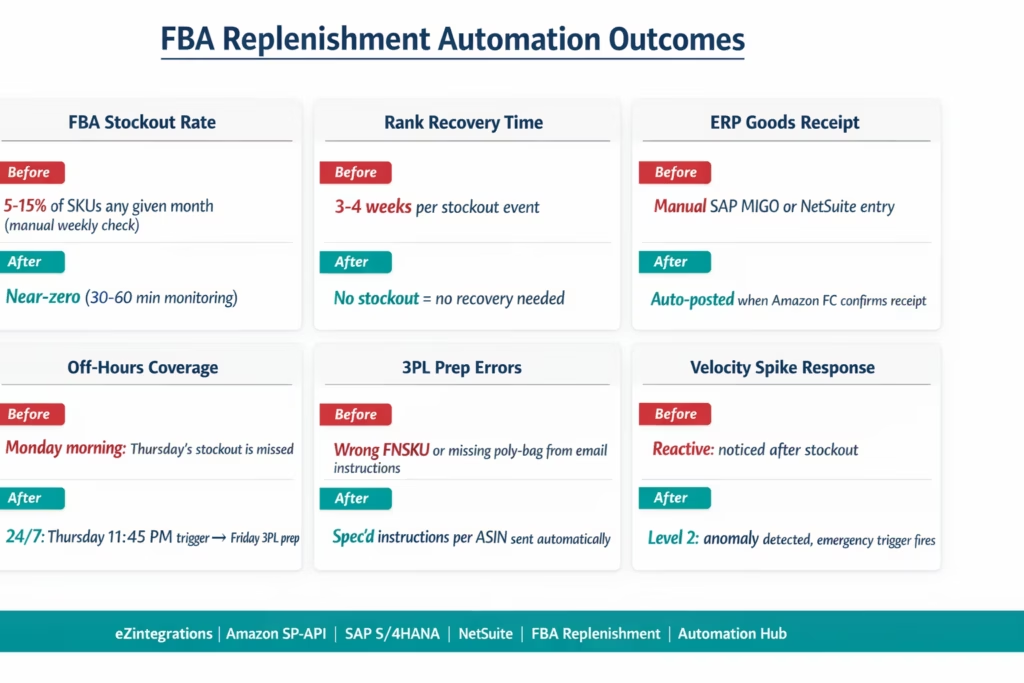
FBA stockout rate: brands with manual weekly replenishment checks typically experience FBA stockouts on 5-15% of their active SKUs in any given month. Automated 30-60 minute monitoring brings this to near-zero for SKUs with stable or predictable velocity. Velocity spike detection handles the remaining risk from viral or promotional events.
Rank recovery time eliminated: each FBA stockout event typically costs 3-4 weeks of rank recovery time. For a hero SKU ranking at position 7 for a high-value beauty keyword with 30,000 monthly searches, a single stockout and recovery cycle can cost $15,000-$50,000 in lost organic revenue, depending on the keyword and conversion rate.
ERP accuracy: automated goods receipt posting when Amazon FCs complete receiving means the ERP inventory is accurate without manual SAP MIGO entry or NetSuite Transfer Order receiving. For brands with multiple FBA ASINs (50+), manual goods receipt posting is a significant recurring workload that accumulates errors.
Off-hours coverage: FBA sells 24/7. Velocity peaks on evenings and weekends. Reorder points are crossed most often when the ops team is not in the office. Automated 24/7 monitoring means a Thursday evening reorder triggers a Friday morning 3PL prep start, arriving at the FC 7 days later. Manual processes trigger the same replenishment on Monday morning, arriving 10+ days later.
3PL coordination: automated prep instructions with specific FNSKU, quantity, lot number, poly-bag requirements, and FC destination reduce 3PL prep errors (wrong FNSKU, missing poly-bag, incorrect destination). Manual instruction delivery via email or phone is a common source of FBA prep non-compliance fees.
How to Get Started
Step 1: Set Your Reorder Points and Safety Stock Per FBA ASIN
Before importing the template, calculate the reorder point and safety stock for each FBA ASIN: average daily sales (from SP-API GET /reports/2021-06-30/reports with reportType=GET_SALES_AND_TRAFFIC_REPORT or from SAP/NetSuite sales history), lead time (3PL prep + transit + FC receiving), and safety stock (peak daily × lead time – average daily × lead time). For a starting point, calculate for your top 20 FBA ASINs by revenue. The template can be activated for additional ASINs without reconfiguration.
Step 2: Import the FBA Replenishment Automation Template
Go to the Automation Hub and import the Amazon FBA Inventory Replenishment template for your ERP (SAP S/4HANA or NetSuite). The template includes: SP-API FBA summaries polling with all three inventory metrics, the three-number replenishment logic, SAP OData V4 PO creation or NetSuite Transfer Order/PO creation on trigger, FBA inbound shipment plan creation via SP-API, 3PL prep instruction delivery (REST or EDI), lot expiry check before every replenishment, and inbound shipment status monitoring with ERP goods receipt posting.
Step 3: Configure Credentials, ASIN/FNSKU Mapping, and ERP Connection
Add your SP-API credentials (LWA Client ID and Secret, Seller ID, Marketplace ID). Add your ERP credentials (SAP BTP Communication Arrangement or NetSuite TBA). Add your 3PL connection (DHL Supply Chain REST API, Kenco EDI, or UPS SCS REST). Upload your ASIN-to-FNSKU mapping and ASIN-to-ERP-SKU mapping. Upload the reorder point and safety stock table per ASIN. Configure the 3PL source address (for the SP-API inbound shipment plan sourceAddress field). Set expiry minimum threshold (default: 90 days).
Step 4: Test with Low-Risk ASINs and Activate Monitoring
Start with 3-5 FBA ASINs that have non-critical reorder urgency. Set the test reorder threshold artificially high (above the current afnFulfillableQuantity) to trigger a test replenishment cycle without a real stock emergency. Verify: SP-API poll returns correct quantities, replenishment logic calculates correctly, SAP PO or NetSuite Transfer Order is created with correct fields, 3PL prep instruction is delivered, SP-API inbound shipment plan is created. Then set the thresholds to the calculated values and activate 24/7 monitoring.
Total configuration time: 3-5 hours from template import to 24/7 FBA replenishment monitoring live.
FAQs
1. How does eZintegrations automate Amazon FBA inventory replenishment with SAP or NetSuite
eZintegrations automates FBA replenishment by polling the Amazon Selling Partner API inventory endpoint every thirty to sixty minutes to retrieve fulfilable inbound and reserved quantities. When inventory drops below the configured reorder point plus safety stock the system creates a purchase order in SAP S 4HANA or a transfer or purchase order in NetSuite sends inbound preparation instructions to the 3PL and generates the Amazon inbound shipment plan. Once Amazon fulfilment centers receive the stock the ERP goods receipt is posted automatically.
2. How long does it take to set up FBA replenishment automation
Setup typically takes three to five hours from template import to full monitoring live. This includes SP API credentials ERP and 3PL connection ASIN and FNSKU mapping reorder and safety stock configuration and testing with a small set of SKUs. After setup the replenishment process runs continuously without manual intervention.
3. Does eZintegrations work with both SAP S 4HANA and NetSuite for FBA replenishment
Yes, SAP S 4HANA uses OData APIs for purchase order creation and goods receipt posting while NetSuite uses SuiteTalk REST APIs for transfer orders and purchase orders. Both systems maintain Amazon fulfilment center inventory as a separate location from 3PL inventory enabling accurate tracking and replenishment logic.
4. What happens if the 3PL does not have enough stock for replenishment
The system checks available 3PL inventory before creating replenishment orders. If stock is insufficient it creates a partial replenishment based on available inventory and simultaneously triggers a procurement alert or supplier purchase order for the remaining quantity. If a stockout risk is detected an urgent escalation is generated with estimated stockout timing and required replenishment quantities.
5. How does FBA replenishment automation handle expiry dates for beauty products
The system validates lot expiry dates before creating replenishment orders by checking remaining shelf life against Amazon ninety day requirements adjusted for transit time. Only eligible lots are sent to Amazon fulfilment centers while near expiry inventory is routed to FBM or clearance. If no compliant inventory is available procurement alerts are triggered based on projected stockout risk.
No More Monday Morning Fire Drills
An FBA stockout that happens Thursday night and is noticed Monday morning has already cost you 3-4 days of suppressed visibility on Amazon’s search results. For a hero SKU ranking in the top 10 for a competitive beauty keyword, those 3-4 days are measurable in lost revenue. The 3-4 weeks it takes to recover your organic rank are even more measurable.
The monitoring problem is simple: you cannot watch Seller Central 24/7. But an automated system can poll the SP-API every 30-60 minutes around the clock, evaluate the replenishment math, create the SAP PO or NetSuite Transfer Order, send the 3PL prep instructions, and create the Amazon inbound shipment plan while your ops team sleeps.
eZintegrations handles the complete FBA replenishment cycle from stock monitoring to ERP to 3PL to Amazon FC, with expiry date compliance, velocity spike detection, and seasonal reorder adjustments built in.
Explore the FBA Inventory Replenishment Templates in the Automation Hub. SAP S/4HANA and NetSuite versions are both available. Or book a free demo with your top 20 FBA ASINs, ERP type, and current replenishment process. We will calculate your reorder points and walk through the SAP or NetSuite configuration in the session.
For broader FBA strategy context, see the Amazon FBA vs FBM guide for beauty brands and the Amazon Seller Central integration guide.

