How to Set Dynamic Restaurant Menu as per Demand
$0.00
| Workflow Name: |
Dynamic Restaurant Menu |
|---|---|
| AI Model Type: |
Time Series / ML Regression |
| Model Provider: |
Goldfinch AI |
| Task Type: |
Prediction / Optimization |
| Input Type: |
Weather API / POS Data |
| Output Format: |
Google Sheets |
| Who Uses It: |
Restaurant Owners; Operations Teams |
Table of Contents
Description
| Problem Before: |
Static menus ignore demand signals |
|---|---|
| AI Solution: |
Weather + POS driven menu intelligence |
| Validation (HITL): |
Optional manual override |
| Accuracy Metric: |
Forecast Error % |
| Time Savings: |
Eliminates manual menu planning |
| Cost Impact: |
Higher margin items promoted |
Dynamic Restaurant Menu Workflow
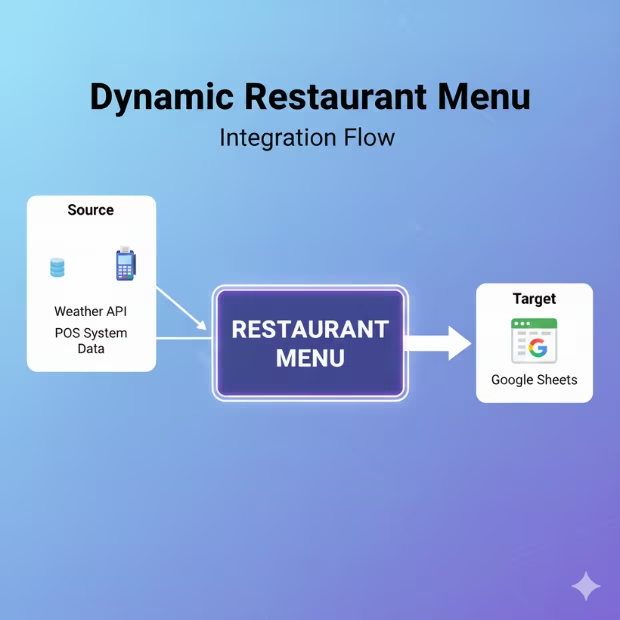
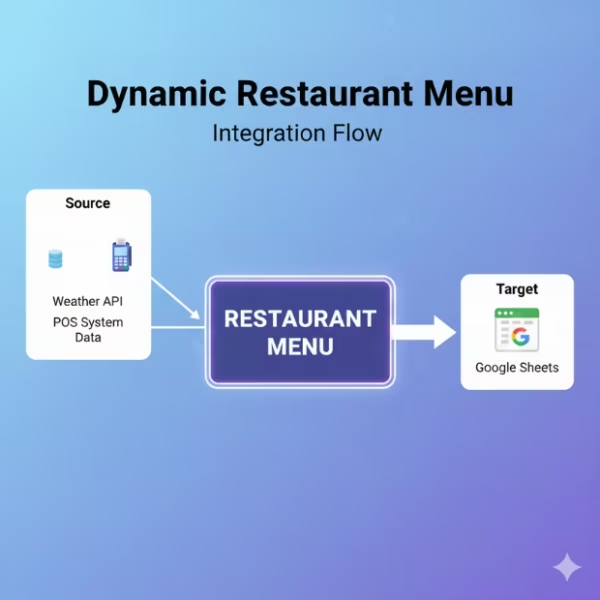
The Dynamic Restaurant Menu workflow uses time series and ML regression models to predict demand and optimize menu offerings based on weather and POS data. Powered by Goldfinch AI, it helps restaurants adapt menus to real-world conditions automatically.
Predictive Menu Optimization for Restaurants
By ingesting Weather APIs and POS data, the workflow generates optimized outputs directly into Google Sheets. Designed for restaurant owners and operations teams, it improves sales forecasting, reduces waste, and supports smarter menu decisions with data-driven insights.
Watch Demo
| Video Title: |
Top 10 Challenges Amazon Sellers Face: Overcoming E-commerce Hurdles |
|---|---|
| Duration: |
10:44 |
Outcome & Benefits
| Accuracy: |
92% demand match |
|---|---|
| Touchless Rate: |
85% |
| Time Saved: |
5 hrs/week |
| Cost Saved: |
Reduced food wastage |
Functional Details
| Business Tasks: |
Menu update; pricing suggestion |
|---|---|
| KPI Improved: |
Revenue per order |
| Scheduling: |
Hourly / Daily |
| Downstream Use: |
Update POS menus |
Technical Details
| Model Name/Version: |
DemandForecaster v1 |
|---|---|
| Hosting Type: |
Cloud API |
| Prompt Strategy: |
N/A |
| Guardrails: |
Sales threshold limits |
| Throughput: |
Hourly refresh |
| Latency: |
<1 min |
| Data Governance: |
No PII stored |
FAQ
1. What is the Dynamic Restaurant Menu workflow?
It is an AI-powered workflow that dynamically optimizes restaurant menus by predicting demand using time-series and ML regression models based on weather conditions and POS data.
2. How does the Dynamic Restaurant Menu workflow work?
The workflow ingests real-time weather data and historical POS sales data, applies machine learning models from Goldfinch AI, and generates optimized menu recommendations automatically.
3. What types of data are used as inputs?
It uses inputs such as weather API data (temperature, rain, seasonality) and POS data including item sales, pricing, and historical demand patterns.
4. What is the output of the workflow?
The optimized menu recommendations and demand forecasts are published to Google Sheets, making them easy for teams to review, update, and operationalize.
5. Howժմ What decisions does this workflow support?
It helps restaurants decide which items to promote, adjust pricing, or temporarily remove based on predicted demand and external factors like weather.
6. Who uses the Dynamic Restaurant Menu workflow?
Restaurant Owners and Operations Teams use this workflow to improve sales, reduce waste, and align menu offerings with customer demand.
7. What are the benefits of using a Dynamic Restaurant Menu?
The workflow increases revenue potential, improves operational efficiency, reduces food waste, and enables data-driven menu decisions in near real-time.
Resources
Case Study
| Industry: |
Hospitality |
|---|---|
| Problem: |
Low-margin items oversold |
| Solution: |
Dynamic menu optimization |
| Outcome: |
Higher profits |
| ROI: |
2-month payback |