How to Sync PDF and Scanned Lab Reports to Meditech Automatically
$0.00
| Workflow Name: |
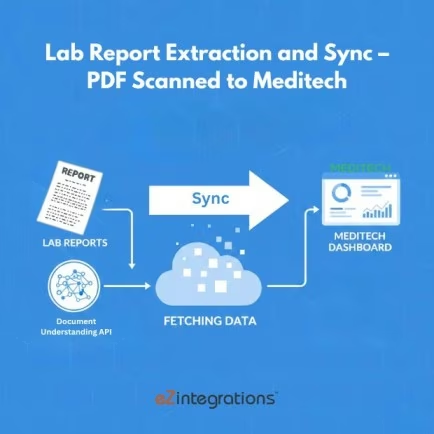
Lab Report Extraction and Sync – PDF Scanned to Meditech |
|---|---|
| Purpose: |
Extract lab values from PDF/scanned lab reports and sync them into Meditech EHR. |
| Benefit: |
Ensures accurate and fast lab result entry in Meditech. |
| Who Uses It: |
Clinical Data Teams, Labs, Nursing Staff |
| System Type: |
EHR Integration Workflow |
| On-Premise Supported: |
Yes |
| Supported Protocols: |
HL7, HTTPS, MLLP |
| Industry: |
Healthcare |
| Outcome: |
accurate lab updates in Meditech, Fast |
Table of Contents
Description
| Problem Before: |
Meditech lab updates required manual data entry from paper/PDF. |
|---|---|
| Solution Overview: |
OCR/AI extracts structured lab values and sends them into Meditech via HL7 ORU or interface engine. |
| Key Features: |
HL7 ORU messages, OCR, validation, value mapping |
| Business Impact: |
Faster chart completion and reduced manual errors |
| Productivity Gain: |
Removes repetitive manual work for lab clerks |
| Cost Savings: |
Reduces admin overhead for Meditech facilities |
| Security & Compliance: |
HIPAA-compliant |
Scanned Lab Report Extraction and Sync – PDF Scanned to Meditech
This workflow automates the extraction of lab values from PDF or scanned lab reports and synchronizes the results into Meditech EHR. It ensures real-time processing of lab data, delivering accurate and structured results directly into the system for faster and more reliable clinical documentation.
Benefits of Real-Time Lab Data Processing
The solution securely retrieves information from PDF or scanned lab reports, validates the data, and transforms it before syncing to Meditech. By minimizing manual entry, clinical data teams, lab personnel, and nursing staff gain access to precise lab results, improving operational efficiency, data accuracy, and patient care.
Watch Demo
| Video Title: |
Pharma Industry Document Automation: Use Cases & Data Flow |
|---|---|
| Duration: |
13:18 |
Outcome & Benefits
| Time Savings: |
No manual data typing needed |
|---|---|
| Cost Reduction: |
Lowers operational workload |
| Accuracy: |
High accuracy with validation |
| Productivity: |
Faster provider access to results |
Industry & Function
| Function: |
Extraction + Sync |
|---|---|
| System Type: |
EHR Integration Workflow |
| Industry: |
Healthcare |
Functional Details
| Use Case Type: |
Lab Result Integration |
|---|---|
| Source Object: |
Lab Reports |
| Target Object: |
Meditech Lab Results |
| Scheduling: |
Real-time or batch |
| Primary Users: |
HIM, Lab, Providers |
| KPI Improved: |
Accuracy, Lab turnaround |
| AI/ML Step: |
OCR + extraction models |
| Scalability Tier: |
Hospital-grade |
Technical Details
| Source Type: |
PDF/Scanned Document |
|---|---|
| Source Name: |
Lab Report PDFs |
| API Endpoint URL: |
Meditech HL7 ORU endpoint |
| HTTP Method: |
POST |
| Auth Type: |
Secure channel (VPN/TLS) |
| Rate Limit: |
Depends on interface engine |
| Pagination: |
Not applicable |
| Schema/Objects: |
codes, Lab results, ranges |
| Transformation Ops: |
LOINC mapping, unit validation |
| Error Handling: |
NACK handling, OCR retry |
| Orchestration Trigger: |
Real-time or batch |
| Batch Size: |
Single file or folder batch |
| Parallelism: |
Multi-threaded processing |
| Target Type: |
EHR |
| Target Name: |
Meditech |
| Target Method: |
HL7 ORU |
| Ack Handling: |
ACK/NACK logs |
| Throughput: |
Up to thousands/day |
| Latency: |
<10 seconds/report |
| Logging/Monitoring: |
Extraction logs, HL7 logs |
Connectivity & Deployment
| On-Premise Supported: |
Yes |
|---|---|
| Supported Protocols: |
HL7, HTTPS, MLLP |
| Cloud Support: |
Hybrid |
| Security & Compliance: |
HIPAA-compliant |
FAQ
1. What is the Lab Report Extraction and Sync workflow for Meditech?
It is an automated workflow that extracts lab values from PDF or scanned lab reports and synchronizes them into the Meditech EHR, eliminating manual data entry.
2. How does the workflow extract and sync lab reports?
The workflow reads lab values from scanned documents or PDFs, validates the data, and automatically updates the corresponding patient records in Meditech in real-time or on a scheduled basis.
3. What types of lab information are captured?
It captures lab test results, reference ranges, units, and relevant metadata from scanned reports to ensure accurate and complete patient records in Meditech.
4. How frequently does the workflow run?
The workflow can run in near real-time or on a configured schedule, depending on lab reporting frequency and organizational requirements.
5. What happens if a lab report cannot be processed?
If a report cannot be read or contains incomplete data, the workflow logs the issue, notifies the relevant staff, and continues processing other reports without disruption.
6. Who uses this workflow?
Clinical Data Teams, Lab Staff, and Nursing Staff use this workflow to maintain accurate and timely lab results in Meditech.
7. What are the benefits of the Lab Report Extraction and Sync workflow?
It ensures accurate and fast lab result entry in Meditech, reduces manual transcription errors, supports real-time clinical decisions, and improves patient care.
Resources
Case Study
| Customer Name: |
Hospitals using Meditech |
|---|---|
| Problem: |
Manual lab entry into Meditech was slow |
| Solution: |
Automated extraction and HL7 sync |
| ROI: |
Faster workflows + reduced admin cost |
| Industry: |
Healthcare |
| Outcome: |
accurate lab updates in Meditech, Fast |