How to Sync PDF and Scanned Lab Reports to Cerner Automatically
$0.00
| Workflow Name: |
Lab Report Extraction and Sync – PDF Scanned to Cerner |
|---|---|
| Purpose: |
Automatically extract lab values from scanned documents and sync them into Cerner. |
| Benefit: |
Provides timely and accurate lab data in Cerner for clinical decision-making. |
| Who Uses It: |
Care Providers, Health Information Management, Lab Teams |
| System Type: |
EHR Integration Workflow |
| On-Premise Supported: |
Yes |
| Supported Protocols: |
FHIR, HL7, HTTPS |
| Industry: |
Healthcare |
| Outcome: |
Real-time structured lab data in Cerner |
Table of Contents
Description
| Problem Before: |
Lab entry into Cerner was manual and error-prone. |
|---|---|
| Solution Overview: |
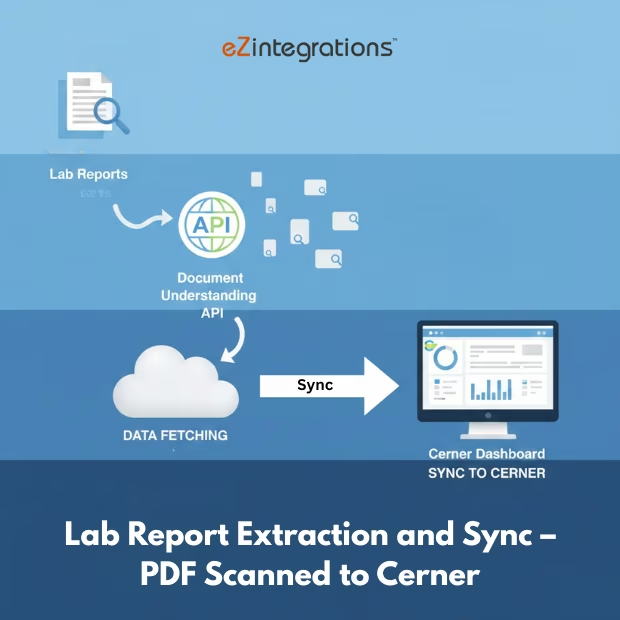
AI reads PDF/scanned reports, and delivers them to Cerner via FHIR/HL7., converts them to structured results |
| Key Features: |
Cerner FHIR/HL7 submission, LOINC mapping, OCR extraction, validation |
| Business Impact: |
faster charting, Improved patient safety, reduced manual effort |
| Productivity Gain: |
Thousands of hours saved in manual entry |
| Cost Savings: |
Reduces staffing requirements for chart updates |
| Security & Compliance: |
encrypted data flow, HIPAA |
Lab Report Sync – PDF Scanned to Cerner
Lab Report Sync automates the extraction of lab values from PDF or scanned documents and ensures accurate synchronization into Cerner EHR. It processes lab data in real time, delivering structured information for clinical use.
Real-Time Lab Data Processing for Clinical Accuracy
The solution securely retrieves information from scanned lab reports, validates and transforms it, and updates Cerner with precise results. By reducing manual entry, care providers, health information management staff, and lab teams gain timely access to reliable lab data, supporting faster clinical decision-making and operational efficiency.
Watch Demo
| Video Title: |
Pharma Industry Document Automation: Use Cases & Data Flow. |
|---|---|
| Duration: |
13:18 |
Outcome & Benefits
| Time Savings: |
Eliminates manual typing of lab results |
|---|---|
| Cost Reduction: |
Saves labor cost and reduces rework |
| Accuracy: |
High accuracy with auto-validation |
| Productivity: |
Faster updates for clinicians |
Industry & Function
| Function: |
Document Extraction and Sync |
|---|---|
| System Type: |
EHR Integration Workflow |
| Industry: |
Healthcare |
Functional Details
| Use Case Type: |
Lab Result Updating |
|---|---|
| Source Object: |
Lab Reports |
| Target Object: |
Cerner Observations |
| Scheduling: |
On-demand or scheduled |
| Primary Users: |
HIM, Lab, Providers |
| KPI Improved: |
Lab accuracy, turnaround time |
| AI/ML Step: |
OCR + confidence scoring |
| Scalability Tier: |
Enterprise-grade |
Technical Details
| Source Type: |
PDF / Scanned Document |
|---|---|
| Source Name: |
Lab Report PDFs |
| API Endpoint URL: |
Cerner FHIR Observation / HL7 ORU |
| HTTP Method: |
POST |
| Auth Type: |
Cerner OAuth 2.0 |
| Rate Limit: |
Dependent on Cerner configuration |
| Pagination: |
Not applicable |
| Schema/Objects: |
code mappings, Lab results, reference ranges |
| Transformation Ops: |
LOINC mapping, normalization, validation |
| Error Handling: |
HL7 NACK handling, OCR re-run |
| Orchestration Trigger: |
Real-time or scheduled |
| Batch Size: |
Single or multiple reports |
| Parallelism: |
Parallel extraction threads |
| Target Type: |
EHR |
| Target Name: |
Cerner |
| Target Method: |
FHIR/HL7 ORU |
| Ack Handling: |
ACK/NACK stored for audit |
| Throughput: |
Thousands of reports per day |
| Latency: |
<10 seconds per document |
| Logging/Monitoring: |
Extraction logs, NACK logs, validation logs |
Connectivity & Deployment
| On-Premise Supported: |
Yes |
|---|---|
| Supported Protocols: |
FHIR, HL7, HTTPS |
| Cloud Support: |
Hybrid |
| Security & Compliance: |
encrypted data flow, HIPAA |
FAQ
1. What is the Lab Report Extraction and Sync workflow for Cerner?
It is an automated workflow that extracts lab values from PDF or scanned lab reports and synchronizes them into the Cerner EHR, eliminating the need for manual data entry.
2. How does the workflow extract and sync lab reports?
The workflow reads lab values from scanned documents or PDFs, validates the extracted data, and automatically updates patient records in Cerner in real-time or on a scheduled basis.
3. What types of lab information are captured?
It captures lab test results, units, reference ranges, and any relevant metadata from scanned reports to ensure accurate and complete patient records.
4. How frequently does the workflow run?
The workflow can run in near real-time or according to a configured schedule, depending on lab reporting frequency and organizational requirements.
5. What happens if a lab report cannot be processed?
If a report cannot be read or contains incomplete data, the workflow logs the issue, notifies the relevant staff, and continues processing other reports without interruption.
6. Who uses this workflow?
Care Providers, Health Information Management (HIM), and Lab Teams use this workflow to maintain accurate and timely lab data in Cerner.
7. What are the benefits of the Lab Report Extraction and Sync workflow?
It ensures timely and accurate lab data in Cerner, reduces manual transcription errors, supports real-time clinical decision-making, and improves overall patient care.
Resources
Case Study
| Customer Name: |
Hospitals using Cerner |
|---|---|
| Problem: |
Manual lab entry delayed patient care |
| Solution: |
Automated lab extraction and Cerner sync |
| ROI: |
Improved care coordination and lower costs |
| Industry: |
Healthcare |
| Outcome: |
Real-time structured lab data in Cerner |