- You cannot add another "10X Faster Sunrise EHR to NetSuite Integration" to your cart. View cart
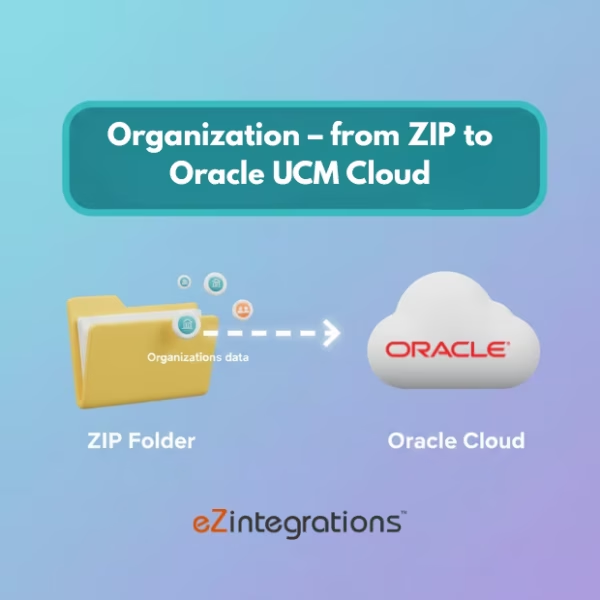
How to Automate Organization FBDI File Uploads to Oracle UCM Cloud
$0.00
| Workflow Name: |
Automated FBDI File Upload to Oracle UCM Cloud |
|---|---|
| Purpose: |
Automatically upload ZIP files with FBDI data to Oracle UCM Cloud |
| Benefit: |
Faster file processing and accurate uploads |
| Who Uses It: |
Finance; IT; Data Integration Teams |
| System Type: |
ERP/Cloud Integration Workflow |
| On-Premise Supported: |
Yes |
| Industry: |
Enterprise / IT |
| Outcome: |
Real-time FBDI uploads in Oracle UCM Cloud |
Table of Contents
Description
| Problem Before: |
Manual file uploads caused delays and errors |
|---|---|
| Solution Overview: |
Upload ZIP files with FBDI data automatically into Oracle UCM Cloud |
| Key Features: |
Automated file transfer; validation; logging |
| Business Impact: |
Reduces manual effort and errors |
| Productivity Gain: |
Eliminates manual uploads |
| Cost Savings: |
Reduces labor time |
| Security & Compliance: |
Encrypted transport; secure credentials |
FBDI File Uploads – Organization to Oracle UCM Cloud
This workflow enables file upload automation by automatically uploading ZIP files containing FBDI data from organizational systems to Oracle UCM Cloud. It removes manual upload steps and ensures timely availability of integration files.
Automated FBDI Uploads for Faster ERP Processing
The system prepares FBDI ZIP files, validates them, and securely uploads them to Oracle UCM Cloud. This workflow helps finance, IT, and data integration teams speed up file processing, reduce upload errors, and maintain consistent ERP integration flows.
Watch Demo
| Video Title: |
Integrate files from Oracle Database to Oracle UCM Cloud |
|---|---|
| Duration: |
12:20 |
Outcome & Benefits
| Time Savings: |
Eliminates manual uploads |
|---|---|
| Cost Reduction: |
Lowers manual effort |
| Accuracy: |
High via automated validation |
| Productivity: |
Faster file processing |
Industry & Function
| Function: |
File synchronization |
|---|---|
| System Type: |
ERP/Cloud Integration Workflow |
| Industry: |
Enterprise / IT |
Functional Details
| Use Case Type: |
FBDI Integration |
|---|---|
| Source Object: |
ZIP Files |
| Target Object: |
UCM File Repository |
| Scheduling: |
Real-time or batch |
| Primary Users: |
Finance; IT |
| KPI Improved: |
File upload speed; accuracy |
| AI/ML Step: |
Not required |
| Scalability Tier: |
Enterprise |
Technical Details
| Source Type: |
Organization File System |
|---|---|
| Source Name: |
ZIP Files |
| API Endpoint URL: |
Oracle UCM Cloud Upload Endpoint |
| HTTP Method: |
POST |
| Auth Type: |
OAuth 2.0 / Oracle Credentials |
| Rate Limit: |
Based on Oracle UCM configuration |
| Pagination: |
Not applicable |
| Schema/Objects: |
ZIP with FBDI data |
| Transformation Ops: |
Validation; mapping; formatting |
| Error Handling: |
Retry failed uploads; log errors |
| Orchestration Trigger: |
On file creation or scheduled |
| Batch Size: |
Single ZIP or batch folder |
| Parallelism: |
Multi-file concurrent uploads |
| Target Type: |
ERP/Cloud |
| Target Name: |
Oracle UCM Cloud |
| Target Method: |
UCM API |
| Ack Handling: |
Response logged |
| Throughput: |
Thousands of files/day |
| Latency: |
Few seconds per file |
| Logging/Monitoring: |
Upload logs; error logs |
Connectivity & Deployment
| On-Premise Supported: |
Yes |
|---|---|
| Supported Protocols: |
HTTPS; REST |
| Cloud Support: |
Hybrid |
| Security & Compliance: |
Encrypted transport; secure credentials |
FAQ
1. What is the FBDI File Uploads workflow to Oracle UCM Cloud?
It is an automated workflow that uploads ZIP files containing FBDI data from organizational systems into Oracle UCM Cloud for ERP processing.
2. How does the workflow upload FBDI files to Oracle UCM Cloud?
The workflow collects FBDI ZIP files from the source system, validates file structure, and uploads them securely to Oracle UCM Cloud automatically.
3. What types of FBDI files are supported?
It supports standard Oracle FBDI ZIP files for ERP objects such as suppliers, customers, invoices, journals, assets, and other business data.
4. How frequently can the workflow run?
The workflow can run on a schedule or on-demand based on ERP integration and business requirements.
5. What happens if a file upload fails?
The workflow logs upload errors, retries automatically, and notifies IT or finance teams if manual intervention is required.
6. Who uses this workflow?
Finance teams, IT teams, and data integration teams use this workflow to automate FBDI file uploads into Oracle UCM Cloud.
7. What are the benefits of automating FBDI file uploads?
Automation reduces manual effort, ensures accurate and timely uploads, and accelerates ERP data processing.
8. What system type does this workflow belong to?
This is an ERP and cloud integration workflow designed to connect organizational systems with Oracle UCM Cloud.
Case Study
| Customer Name: |
Organization Users |
|---|---|
| Problem: |
Manual uploads caused delays |
| Solution: |
Automated ZIP file upload to Oracle UCM Cloud |
| ROI: |
Faster processing; fewer errors |
| Industry: |
Enterprise / IT |
| Outcome: |
Real-time FBDI uploads in Oracle UCM Cloud |
Related products
-
Transform Your Shopify Customer Data to Acumatica Integration – No Coding Needed
 $0.00
Download
$0.00
Download
-
Boost Outreach – Automate Lead Data Enrichment using AI
 $0.00
Download
$0.00
Download
-
Sync Oracle Fusion Products to Shopify – 3X Faster
 $0.00
Download
$0.00
Download
-
How to Automate Amazon Settlement Report to ERP in 3 Easy Steps
 $0.00
Download
$0.00
Download