How to Automate Invoice Processing with AI
$0.00
| Workflow Name: |
Automate Invoice Processing with AI |
|---|---|
| Purpose: |
Automate invoice data extraction and posting |
| Benefit: |
Automated invoice extraction and ERP posting with improved accuracy |
| Who Uses It: |
Finance; Accounts Payable |
| System Type: |
Document Understanding Workflow |
| On-Premise Supported: |
Yes |
| Industry: |
E-commerce / Retail |
| Outcome: |
Invoice processing time reduced by 80% and manual data entry eliminated for most invoices. |
Table of Contents
Description
| Problem Before: |
Manual invoice entry from PDFs and scans |
|---|---|
| Solution Overview: |
AI extracts invoice data and syncs to ERP invoice module |
| Key Features: |
AI extraction; validation; ERP sync |
| Business Impact: |
Reduced invoice processing time and improved accounts payable efficiency |
| Productivity Gain: |
Eliminates manual data entry |
| Cost Savings: |
Reduces processing cost per invoice |
| Security & Compliance: |
Role-based access; audit logs |
Automate Invoice Processing with AI
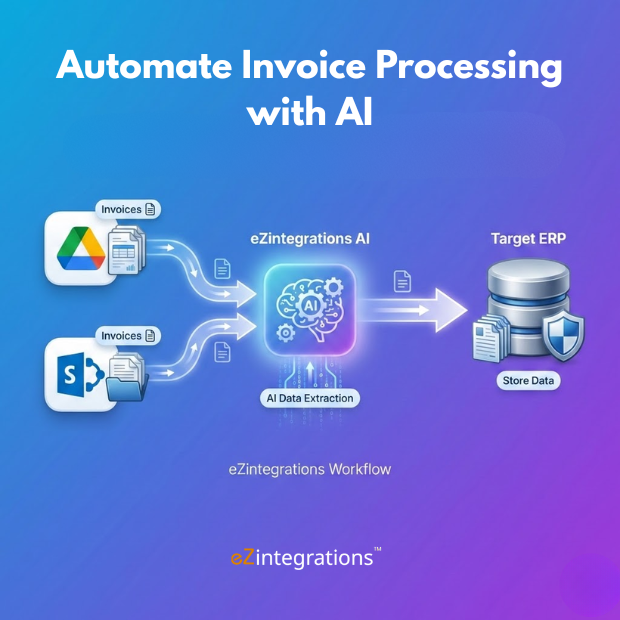
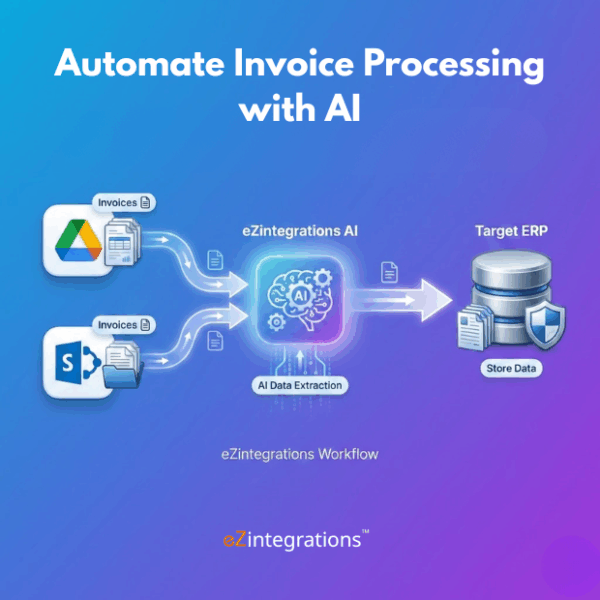
The Automate Invoice Processing with AI workflow uses document understanding and AI-based extraction to automatically capture invoice data and post structured records into ERP systems. By eliminating manual data entry from PDFs, scanned invoices, and email attachments, the workflow improves accuracy, reduces processing delays, and streamlines finance operations using the eZintegrations platform.
AI Invoice Automation for Faster Finance Operations
The system uses AI extraction to identify key invoice fields such as vendor details, invoice numbers, line items, and totals. Extracted data is validated and synchronized with ERP invoice modules in near real time. This automation helps finance and accounts payable teams accelerate invoice processing cycles, reduce operational costs, and maintain accurate financial records.
Watch Demo
| Video Title: |
AI Invoice Data Extraction and ERP Posting using eZintegrations |
|---|---|
| Duration: |
03:41 |
Outcome & Benefits
| Time Savings: |
Invoice processing reduced from hours to minutes |
|---|---|
| Cost Reduction: |
Up to $40K annual savings in AP operations |
| Accuracy: |
95%+ data extraction accuracy with AI validation |
| Productivity: |
Processes hundreds of invoices automatically per batch |
Industry & Function
| Function: |
Invoice Automation |
|---|---|
| System Type: |
Document Understanding Workflow |
| Industry: |
E-commerce / Retail |
Functional Details
| Use Case Type: |
Document Automation |
|---|---|
| Source Object: |
Invoice Documents |
| Target Object: |
ERP Invoices |
| Scheduling: |
Real-time or batch |
| Primary Users: |
AP Teams |
| KPI Improved: |
Invoice cycle time; accuracy |
| AI/ML Step: |
invoice recognition with AI field extraction |
| Scalability Tier: |
Enterprise |
Technical Details
| Source Type: |
Document Repository |
|---|---|
| Source Name: |
Google Drive / SharePoint |
| API Endpoint URL: |
POST /invoices/process |
| HTTP Method: |
POST |
| Auth Type: |
OAuth |
| Rate Limit: |
Configurable |
| Pagination: |
Not applicable |
| Schema/Objects: |
Invoice fields |
| Transformation Ops: |
OCR; AI extraction; normalization |
| Error Handling: |
Flag exceptions for review |
| Orchestration Trigger: |
File upload or schedule |
| Batch Size: |
Configurable |
| Parallelism: |
Multiple invoices |
| Target Type: |
ERP |
| Target Name: |
ERP – Invoice Module |
| Target Method: |
ERP API / Connector |
| Ack Handling: |
ERP response logged |
| Throughput: |
High invoice volume |
| Latency: |
Seconds per invoice |
| Logging/Monitoring: |
Invoice processing logs |
Connectivity & Deployment
| On-Premise Supported: |
Yes |
|---|---|
| Supported Protocols: |
API; File |
| Cloud Support: |
Hybrid |
| Security & Compliance: |
Role-based access; audit logs |
FAQ
1. What is the 'Automate Invoice Processing with AI' workflow?
It is a document understanding workflow that automatically extracts invoice data and posts structured information to ERP systems without manual intervention.
2. What invoice data can this workflow extract?
The workflow extracts key invoice fields such as invoice number, vendor details, line items, amounts, taxes, dates, and payment terms.
3. How does the workflow improve invoice processing?
By automating data extraction and validation, the workflow reduces manual effort, minimizes errors, and significantly speeds up invoice processing cycles.
4. Who typically uses this workflow?
Finance teams and Accounts Payable teams use this workflow to streamline invoice processing and improve operational efficiency.
5. Is on-premise deployment supported?
Yes, the workflow supports on-premise deployment, making it suitable for organizations with strict data security requirements.
6. What systems can the workflow integrate with?
The workflow can integrate with ERP systems and accounting platforms to post structured invoice data automatically.
7. What are the key benefits of using AI for invoice processing?
It enables faster processing, improves data accuracy, reduces operational costs, and ensures consistent, audit-ready invoice records.
8. How does the workflow handle exceptions or low-confidence data?
Invoices with missing fields or low-confidence extractions are flagged for review, allowing human validation before posting to the ERP.
Resources
Case Study
| Customer Name: |
Mid-size ecommerce retailer |
|---|---|
| Problem: |
Manual invoice processing from supplier PDFs caused delays, data entry errors, and increased AP workload. |
| Solution: |
Deployed the AI Invoice Processing workflow to automatically extract invoice data using OCR and synchronize validated records with the ERP invoice module. |
| ROI: |
Approximately $40K annual savings in accounts payable operations. |
| Industry: |
E-commerce / Retail |
| Outcome: |
Invoice processing time reduced by 80% and manual data entry eliminated for most invoices. |