How to Automatically Process Vendor Invoices into SAP FI or Oracle Payables?
$90.00
| Workflow Name: |
AP Invoice Auto-Posting |
|---|---|
| Purpose: |
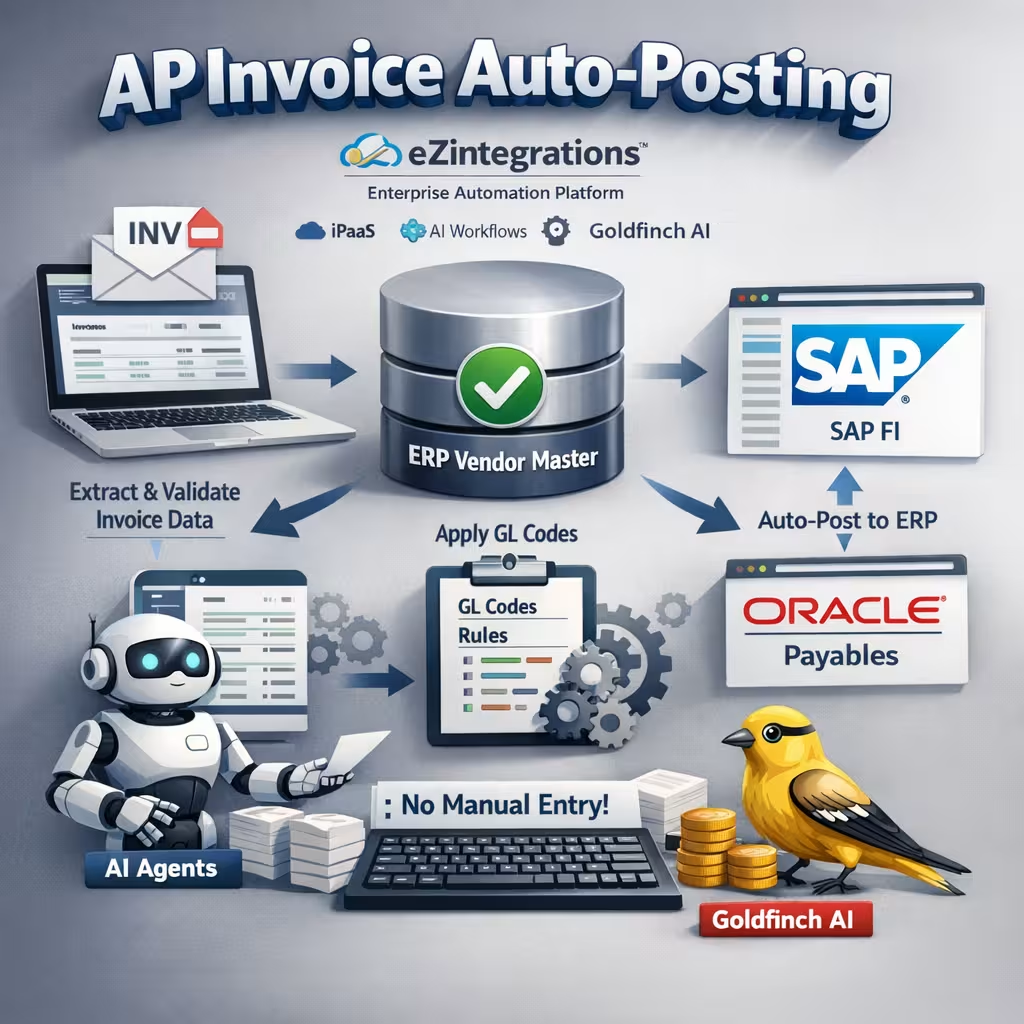
Receive vendor invoices from email or supplier portal; extract header and line-item data via OCR; validate against the ERP vendor master; apply GL codes by rule; and post directly to SAP FI or Oracle Payables – without manual keying |
| Benefit: |
Eliminates manual invoice keying; captures early payment discounts consistently; prevents duplicate entries; and reduces invoice processing time from 3 to 5 days to under 4 hours per invoice |
| Who Uses It: |
AP Specialist; Finance Manager; Accounts Payable Director |
| System Type: |
Email and Portal Ingestion with OCR Extraction, Rule-Based GL Coding, ERP API Posting Workflow |
| On-Premise Supported: |
Yes – eZintegrations connects to on-premises SAP FI; Oracle EBS Payables; and other ERP systems via IPSec Tunnel. eZintegrations is a browser-based; cloud-hosted platform and does not require any on-premises software installation. |
| Industry: |
Professional Services / Management Consulting |
| Outcome: |
88% touchless rate achieved in month 1. Invoice processing time reduced from 18 minutes to under 90 seconds for auto-posted invoices. Month-end AP close time reduced by 1.5 days due to elimination of GL coding rework. AP Specialist time reallocated to vendor dispute resolution and payment forecasting. |
| Tags: |
AP invoice auto-posting; accounts payable automation; invoice processing automation; SAP FI invoice posting; Oracle Payables automation; OCR invoice extraction; GL coding automation; vendor invoice automation; AP automation ERP; touchless invoice processing; early payment discount; finance automation |
| AI Credits Required: |
No – all seven workflow steps are standard iPaaS operations (email/portal ingestion; OCR-based data extraction via built-in engine; ERP API validation; rule-based GL coding; ERP AP posting; approval routing; SMTP notification). Covered fully under the Unlimited plan. No Goldfinch AI tools are invoked. |
Table of Contents
| Problem Before: |
Finance teams receive vendor invoices via email attachments; supplier portals; and fax – and manually key each invoice into SAP FI or Oracle Payables. At 500 invoices per month; this consumes 15 to 25 FTE hours weekly. APQC benchmarks the median cost to process one invoice manually at $10.18. Late payment penalties and missed early payment discounts (typically 1 to 2% for 10-day terms) add $30,000 to $80,000 annually at mid-enterprise volumes. Duplicate invoice entries average 0.5% of invoice volume without deduplication controls; creating reconciliation work and overpayment risk. |
|---|---|
| Solution Overview: |
The AP Invoice Auto-Posting workflow from eZintegrations ingests vendor invoices from email or supplier portal; runs OCR extraction on invoice header and line-item fields; validates the vendor and invoice data against the ERP vendor master; applies GL codes using configurable business rules; posts the approved invoice to SAP FI or Oracle Payables via REST API; routes high-value invoices to the approval queue; and triggers a confirmation notification. |
| Key Features: |
Automated invoice ingestion from email (SMTP/IMAP) and supplier portal via REST API or SFTP OCR-based extraction of invoice header (vendor name; invoice number; invoice date; due date; total amount; currency) and line items (description; quantity; unit price; amount) Vendor master validation in ERP before posting – duplicate invoice number check; vendor status verification; currency and tax validation Configurable GL coding rules – map vendor category; cost center; and line-item description to GL account codes without custom development Approval routing for invoices above configurable threshold (default $10,000) with full invoice context sent to approver via email Exception queue with field-level validation errors and AP Specialist alert for non-conforming invoices |
| Business Impact: |
Eliminates manual invoice keying entirely; captures early payment discounts on invoices reaching the ERP within hours of receipt; and removes duplicate entry risk with vendor-invoice number deduplication enforced before every ERP write. |
| Productivity Gain: |
AP teams processing 500 invoices per month reclaim 15 to 25 FTE hours per week previously spent on manual data entry; validation; and GL coding – shifting AP Specialist time to exception resolution; vendor dispute management; and cash flow reporting. |
| Cost Savings: |
Organizations processing 500+ invoices per month typically realize $80,000 to $150,000 in annual savings from labor reduction (APQC $10.18/invoice benchmark); early payment discount capture (1 to 2% on 10-day terms); and eliminated duplicate payment exposure. |
Description
AP invoice auto-posting from eZintegrations extracts vendor invoice data from email or supplier portal, validates against your ERP vendor master, applies GL codes by rule, and posts directly to SAP FI or Oracle Payables — without any manual keying. eZintegrations is an enterprise automation platform covering iPaaS, AI Workflows, AI Agents, and Goldfinch AI agentic automation.
How Does AP Invoice Auto-Posting Work to Automatically Extract and Post Vendor Invoices to SAP or Oracle Payables?
When a vendor invoice arrives via email or supplier portal, the eZintegrations AP invoice auto-posting workflow picks it up immediately. OCR extraction pulls every invoice field — vendor name, invoice number, date, due date, line items, amounts, and currency. The vendor is validated against the ERP vendor master, a duplicate invoice number check runs, and configured GL coding rules assign the correct accounts. Invoices below the approval threshold are posted directly to SAP FI or Oracle Payables via REST API. Invoices above threshold route to the approver with the full invoice context.
APQC benchmarks manual invoice processing at $10.18 per invoice. At 500 invoices per month, your team is spending $5,090 on data entry alone — before factoring in missed early payment discounts and duplicate payment remediation. AP invoice auto-posting eliminates all three costs.
Deploy this AP invoice auto-posting workflow in under 2 business days. No middleware platform required.
Watch Demo
| Video Title: |
AP Invoice Auto-Posting Demo: Email to SAP FI Posting with GL Coding and Approval in Under 4 Hours |
|---|---|
| Duration: |
3 to 5 minutes |
Outcome & Benefits
| Time Savings: |
Invoice processing time from 3 to 5 days (manual queue) to under 4 hours for auto-posted invoices; AP team weekly hours on manual entry reduced from 15 to 25 hours to under 2 hours of exception review |
|---|---|
| Cost Reduction: |
$80,000 to $150,000 annual savings from labor reduction (APQC $10.18/invoice benchmark); early payment discount capture (1 to 2% for 10-day terms); and eliminated duplicate payment exposure at 500+ invoices/month |
| Accuracy: |
99%+ posting accuracy with vendor master validation; 0.5% duplicate invoice rate eliminated via vendor-invoice number deduplication; GL coding error rate from 3 to 5% manual to under 0.3% rule-based |
| Productivity: |
85%+ of invoices processed touchlessly (no human review for standard invoices below approval threshold); AP Specialist time redirected from data entry to exception resolution and vendor management |
Performance Metrics
| Metric | Before (Manual/Batch) | After (Real-Time Sync) | Improvement |
|---|---|---|---|
| Invoice Processing Time | 3 to 5 days average | Under 4 hours (auto-posted) | 90%+ faster |
| Weekly FTE Hours on Invoice Entry | 15 to 25 hours/week | Under 2 hours/week (exceptions) | 85%+ reduction |
| Touchless Processing Rate | 0% (100% manual) | 85%+ auto-posted | 85 percentage points |
| GL Coding Error Rate | 3 to 5% | Under 0.3% (rule-based) | 90%+ reduction |
Industry & Function
| Function: |
Accounts Payable; Finance Operations; Shared Services Finance |
|---|---|
| System Type: |
Email and Portal Ingestion with OCR Extraction, Rule-Based GL Coding, ERP API Posting Workflow |
| Industry: |
Professional Services / Management Consulting |
Functional Details
| Use Case Type: |
Document Ingestion; OCR Extraction; Rule-Based Processing; ERP AP Posting Workflow |
|---|---|
| Source Object: |
Vendor invoice document – PDF; scanned image (JPEG; PNG; TIFF); or structured data file (XML; CSV) from email attachment or supplier portal |
| Target Object: |
ERP AP posting record – SAP FI vendor invoice document (FI-AP module) or Oracle Payables invoice (AP Invoices table) with full header and line-item data; GL code assignment; and posting status |
| Scheduling: |
Event-driven on email arrival (SMTP/IMAP polling) or supplier portal new invoice event; polling interval configurable at 5 to 15 minutes; batch processing available for end-of-day invoice queues |
| Primary Users: |
AP Specialist; Finance Manager; Accounts Payable Director |
| KPI Improved: |
Invoice processing time; touchless processing rate; early payment discount capture rate; duplicate payment rate; GL coding error rate; AP cycle time; cost per invoice |
| AI/ML Step: |
N/A – standard OCR engine for structured and semi-structured invoice extraction; rule-based GL coding; no Goldfinch AI tools invoked; covered under Unlimited plan. Goldfinch AI Document Intelligence available as upgrade for unstructured/handwritten invoices. |
| Scalability Tier: |
Enterprise – supports 2,000+ invoices per month at standard configuration; scales to 10,000+ per month at enterprise tier with parallel processing threads |
Technical Details
| Source Type: |
Email inbox (SMTP/IMAP) and Supplier Portal (REST API or SFTP) Source Name (Email): Microsoft Exchange / Microsoft 365 (https://learn.microsoft.com/en-us/exchange/clients-and-mobile-in-exchange-online/clients-and-mobile-in-exchange-online) or Google Workspace Gmail (https://developers.google.com/gmail/api) – IMAP polling or webhook on new message with attachment Source Name (Portal): Supplier portal REST API or SFTP directory polling for new invoice files |
|---|---|
| API Endpoint URL: |
Microsoft Graph: /v1.0/users/{userId}/mailFolders/Inbox/messages?$filter=hasAttachments eq true | Gmail API: /gmail/v1/users/me/messages with has:attachment filter | SFTP: configurable host; port; directory |
| HTTP Method: |
GET (IMAP/Graph polling); POST (webhook on new invoice event from portal where supported) |
| Auth Type: |
OAuth 2.0 (Microsoft 365 / Gmail); SFTP with SSH key or username/password; REST API Key for supplier portal |
| Rate Limit: |
Microsoft Graph: 10,000 requests per 10 minutes per tenant; Gmail: 250 quota units per user per second; SFTP: not applicable |
| Pagination: |
Microsoft Graph: @odata.nextLink continuation tokens for inbox polling; Gmail: pageToken for message list pagination |
| Schema/Objects: |
Invoice header fields: vendor name; vendor ID; invoice number; invoice date; due date; payment terms; currency; total amount; tax amount; PO reference number. Line item fields: line description; quantity; unit price; line total; GL account hint (if present); cost center hint. OCR confidence score per field. |
| Transformation Ops: |
Vendor name fuzzy match to ERP vendor master (vendor ID resolution); invoice number format normalization; currency code validation (ISO 4217); date format normalization (ISO 8601); duplicate invoice check (vendor ID + invoice number hash); GL code assignment via configurable rule engine (vendor category + line description keyword + cost center = GL account); tax code assignment; payment terms mapping to ERP payment condition; amount tolerance validation (invoice total vs. line item sum) |
| Error Handling: |
Vendor not found in ERP vendor master routes to exception queue with extracted vendor name for AP Specialist review. Duplicate invoice number detected routes to exception with existing ERP document reference. GL code rule match fails routes to exception for manual GL assignment. ERP API posting failures retry up to 3 times with exponential backoff; persistent failures alert AP Specialist via email within 10 minutes. No invoice is silently dropped. |
| Orchestration Trigger: |
Email arrival with attachment (SMTP/IMAP polling at configurable interval); supplier portal new invoice event (REST webhook or SFTP polling); scheduled batch at configurable time for end-of-day processing |
| Batch Size: |
1 invoice per email event (standard); up to 100 invoices per SFTP batch at scheduled interval |
| Parallelism: |
Up to 50 concurrent workflow threads per tenant; supports simultaneous processing from multiple email aliases and portal sources |
| Target Type: |
Cloud ERP or On-Premises ERP (connected via IPSec Tunnel) |
| Target Name: |
SAP S/4HANA FI-AP module (https://help.sap.com/docs/SAP_S4HANA_ON-PREMISE) or Oracle Fusion Cloud Payables (https://docs.oracle.com/en/cloud/saas/financials/payables.html) |
| Target Method: |
SAP FI: OData REST API POST – /API_SUPPLIER_INVOICE_PROCESS_SRV/A_SupplierInvoice (MIRO equivalent via API); Oracle Payables: REST API POST – /fscmRestApi/resources/latest/invoices |
| Ack Handling: |
SAP FI returns accounting document number on successful posting; Oracle Payables returns invoice ID. Both reference numbers logged to workflow audit trail and written to the invoice-level processing log. Confirmation email sent to accounts payable inbox and; where configured; to the submitting vendor. |
| Throughput: |
2,000+ invoices per month at standard configuration; scales to 10,000+ per month at enterprise tier |
| Latency: |
Under 4 hours end-to-end from email receipt to ERP posting for auto-approved invoices; invoices requiring approval depend on approver response time |
| Logging/Monitoring: |
Full execution log per invoice (timestamp; source; vendor ID; invoice number; OCR confidence scores per field; GL codes assigned; ERP document reference; posting status; approval status); real-time monitoring dashboard in eZintegrations console; configurable aging alerts if invoice remains unposted after 24 hours from receipt |
Connectivity & Deployment
| Supported Protocols: |
SMTP; IMAP; REST API; OData v2/v4; SFTP; HTTPS; OAuth 2.0; SSH; API Key; IPSec Tunnel (on-premises ERP connectivity) |
|---|---|
| Security & Compliance: |
HIPAA-eligible configuration available; GDPR-compliant data handling with configurable invoice data retention and PII masking; SOC Type II certified. TLS 1.3 encryption in transit; AES-256 at rest. Invoice documents encrypted in the processing pipeline and at rest. RBAC enforced on GL coding rule management; approval threshold configuration; exception queue; and audit log access. Full immutable invoice audit trail per posting event. |
| Tenancy Model: |
Both single-tenant and multi-tenant deployments are available. Single-tenant provides dedicated infrastructure with full data isolation – recommended for healthcare and financial services with strict AP data segregation requirements. Multi-tenant is the default shared-cloud deployment. Both support on-premises ERP connectivity via IPSec Tunnel. |
| On-Premise Supported: |
Yes – eZintegrations connects to on-premises SAP FI; Oracle EBS Payables; and other ERP systems via IPSec Tunnel. eZintegrations is a browser-based; cloud-hosted platform and does not require any on-premises software installation. |
FAQ
1. What is the AP Invoice Auto-Posting workflow?
AP invoice auto-posting by eZintegrations automatically ingests vendor invoices from email or supplier portal, extracts header and line-item data via OCR, validates against the ERP vendor master, applies GL codes by configurable rule, and posts directly to SAP FI or Oracle Payables — without manual keying. Invoices above a configurable threshold are routed to an approver with the full invoice context before posting. The workflow achieves 85%+ touchless processing with 99%+ posting accuracy.
2. What data does this workflow process?
This workflow processes vendor invoice documents in PDF, scanned image (JPEG, PNG, TIFF), XML, or CSV format, extracting invoice header fields (vendor name, invoice number, invoice date, due date, payment terms, currency, total amount, tax, PO reference) and line items (description, quantity, unit price, line total). All fields are validated against the ERP vendor master and a duplicate invoice number check runs before any ERP posting.
3. How does AP invoice auto-posting improve the accounts payable process?
AP invoice auto-posting eliminates manual keying that causes the 3 to 5% GL coding errors and 0.5% duplicate entries that drain AP team hours and create reconciliation risk. APQC benchmarks manual invoice processing at $10.18 per invoice — at 500 invoices per month that is $5,090 in monthly data entry cost alone. Invoices that previously sat in a queue for 3 to 5 days now reach the ERP within 4 hours, enabling consistent capture of early payment discounts worth 1 to 2% of invoice value for 10-day payment terms.
4. Who typically uses this workflow?
AP Specialists and Finance Managers in manufacturing, professional services, healthcare, and distribution organizations configure and monitor this workflow. Accounts Payable Directors use the workflow dashboards and audit trail for period-end reporting and AP performance metrics. The exception queue is the primary daily touchpoint — your team reviews only invoices that failed vendor match, GL code assignment, or ERP posting, not the full invoice volume.
5. Can eZintegrations connect to on-premises systems like SAP on-prem or Oracle EBS?
Yes. eZintegrations connects to on-premises SAP FI, Oracle EBS Payables, and other ERP systems via IPSec Tunnel — no on-premises software installation is required. eZintegrations is a browser-based, cloud-hosted platform, so your on-premises ERP participates in the AP invoice auto-posting workflow securely through the encrypted tunnel without any agent deployed on your servers.
6. What systems does this workflow connect?
This workflow connects email inboxes (Microsoft 365 or Google Workspace Gmail) and supplier portals (via REST API or SFTP) as invoice sources to SAP S/4HANA FI-AP module or Oracle Fusion Cloud Payables as the posting target via REST API and OData. Approval routing uses SMTP email. On-premises ERP deployments connect via IPSec Tunnel.
7. What are the key benefits of AP invoice auto-posting?
Key benefits include 85%+ touchless invoice processing, 99%+ posting accuracy with ERP vendor master validation, processing time from 3 to 5 days to under 4 hours, GL coding error rate from 3 to 5% to under 0.3%, and $80,000 to $150,000 in annual savings at 500+ invoices per month from labor reduction, early payment discount capture, and eliminated duplicate payment exposure (APQC $10.18/invoice benchmark basis). Deploys in under 2 business days.
8. How does the AP invoice auto-posting workflow handle exceptions or errors?
When an invoice fails vendor master lookup, duplicate invoice number check, GL code rule match, or ERP API posting, eZintegrations routes the invoice with field-level error detail to a monitored exception queue. The AP Specialist receives an alert email within 10 minutes with the invoice reference and specific error description. ERP posting failures retry automatically up to 3 times with exponential backoff before alerting. No invoice is silently dropped — every invoice is accounted for in the workflow audit trail.
Resources
Case Study
| Customer Name: |
Mid-market professional services firm (name withheld – reference available on request) |
|---|---|
| Problem: |
The AP team processed 650 vendor invoices per month across 3 entities. Each invoice was manually keyed into SAP FI by an AP Specialist – header data and 2 to 8 line items per invoice. Average processing time per invoice was 18 minutes. GL coding errors averaged 4.2%; requiring rework during monthly close. Duplicate invoice entries occurred on 0.6% of invoices (roughly 4 per month); discovered during reconciliation. Early payment discount terms (1.5% net 10) were captured on fewer than 20% of eligible invoices due to processing delays. |
| Solution: |
Deployed eZintegrations AP invoice auto-posting in 3 business days; connecting the AP team’s Microsoft 365 shared mailbox as the invoice source and SAP S/4HANA FI-AP as the posting target. GL coding rules configured for the firm’s 12 vendor categories covering 94% of invoice volume. Approval routing set at $15,000 for Finance Manager review. Duplicate invoice number deduplication active against the SAP vendor-document index. |
| ROI: |
Annual labor savings: $79,300 (650 invoices/month x 18 min/invoice x $10.18 blended AP cost equivalent x 12 months; net of 15% exception handling). Early payment discount capture improved from 20% to 88% of eligible invoices ($46,000 additional annual cash benefit). GL coding rework eliminated (4.2% error rate to 0.1%). Duplicate payment exposure eliminated. |
| Industry: |
Professional Services / Management Consulting |
| Outcome: |
88% touchless rate achieved in month 1. Invoice processing time reduced from 18 minutes to under 90 seconds for auto-posted invoices. Month-end AP close time reduced by 1.5 days due to elimination of GL coding rework. AP Specialist time reallocated to vendor dispute resolution and payment forecasting. |