
Make vs Workato vs eZintegrations: Choosing the Right iPaaS for Enterprise-Scale Integration and Automation
December 18, 2025TL; DR
iPaaS Overview
-
Connects systems, automates workflows, and eliminates data silos
-
Supports cloud, on-premises, and legacy environments
Platform Comparison
Make
-
Best for small teams and simple SaaS automations
-
Struggles with scale, hybrid systems, and enterprise governance
Workato
-
Suited for mid-to-large enterprises focused on SaaS-based integrations
-
Costs can rise with workflow complexity and data volume
eZintegrations
-
Designed for enterprise-scale, hybrid, and data-intensive environments
-
Supports cloud apps, legacy systems, databases, data warehouses, APIs, and IoT
When to Choose Each
-
Make: For simple automation of cloud SaaS apps
-
Workato: For SaaS-centric enterprise workflows
-
eZintegrations: For future-proof iPaaS that handles complex, hybrid, large-scale enterprise integrations
Why eZintegrations Stands Out
-
Broad connectivity across cloud, on-premises, legacy, and IoT systems
-
Low-code/no-code usability for business users
-
Enterprise-grade scalability, security, and compliance
-
Unified platform for integration, automation, and analytics
-
Predictable pricing and lower long-term total cost of ownership
Introduction: Why iPaaS Matters for Modern Enterprises
Modern Enterprise Challenges
-
Enterprises use CRMs, ERPs, data warehouses, marketing platforms, SaaS apps, legacy systems, and IoT devices
-
Without integration:
Data remains siloed
Workflows become manual
Operational efficiency declines
What is iPaaS?
-
Definition: Integration Platform as a Service (iPaaS) is a cloud-based middleware solution
Functionality:
- Connects applications and data sources using prebuilt connectors, APIs, and workflows
- Automates processes and synchronizes data in real time or batches
- Maintains consistent data flow across the enterprise
As enterprises evaluate iPaaS solutions, Make, Workato, and eZintegrations are frequently compared. While all three enable automation and integration, they differ significantly in scalability, enterprise readiness, security, and long-term cost efficiency.
This article provides a detailed, enterprise-focused comparison and explains why eZintegrations is often better suited for complex, scalable, and hybrid integration environments.
Company Overview: Make vs Workato vs eZintegrations
What is the primary difference between Make, Workato, and eZintegrations?
Short answer:
Make focuses on lightweight SaaS automation, Workato targets enterprise SaaS orchestration, and eZintegrations is built for full-scale enterprise and hybrid data integration.
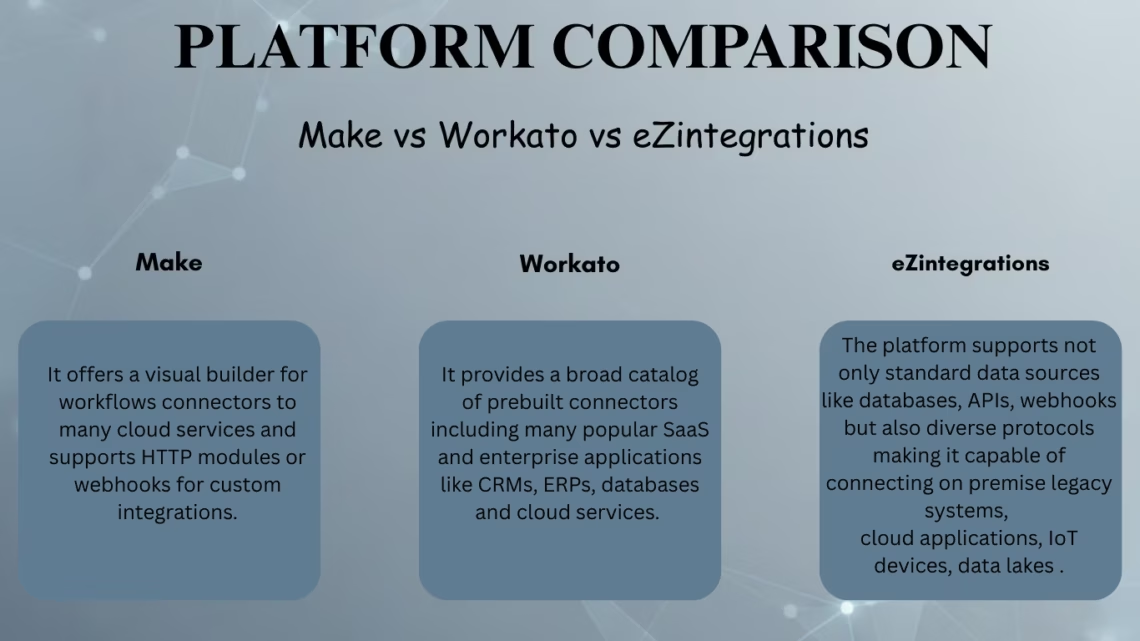
Make
-
Type: Visual automation platform for small/mid-sized businesses
-
Connectivity: Prebuilt connectors for SaaS tools, REST APIs, HTTP modules, webhooksBest for:
- Teams working mainly with cloud SaaS apps
- Low to moderate data volumes
- Simple, linear automation workflows
-
Limitation: Not optimized for high-volume data, hybrid deployments, or complex enterprise governance
Workato
-
Type: Enterprise-ready iPaaS with large connector ecosystem
-
Connectivity: Integrates CRMs, ERPs, databases, cloud platforms; templates for workflow creation
-
Best for:
Mid-to-large enterprises using primarily SaaS systems
Department-level automation (finance, HR, customer success)
API-driven workflows with moderate complexity
-
Limitation: Costs rise at scale; complex analytics or data engineering may require additional tools
eZintegrations
-
Type: Cloud-based enterprise iPaaS for hybrid, data-intensive, mission-critical environments
-
Connectivity: Databases, APIs, legacy systems, IoT, data warehouses, unstructured data
-
Best for:
Enterprises with legacy + cloud systems
High-volume real-time or batch data integration
Centralized automation, analytics, and data pipelines
-
Advantage: Low-code/no-code interface; supports full enterprise-scale operations
Product and Integration Capabilities
How do integration capabilities differ across platforms?
Short answer:
Make focuses on SaaS automation, Workato offers enterprise SaaS connectors, and eZintegrations supports full-spectrum enterprise data integration.
Definition:
-
Measures how many systems a platform can connect, how data is transformed, and how reliably workflows operate at scale
Make
-
SaaS-focused connectors: CRM, marketing, productivity tools
-
REST, HTTP, and webhook support
-
Visual workflow builder
-
Best for: Simple automation with limited data complexity
-
Not ideal for: Large datasets, legacy databases, or real-time enterprise synchronization
Workato
-
Enterprise SaaS connectors: CRM, ERP, databases
-
Custom connector SDK
-
Built-in error handling and orchestration
-
Best for: Enterprise SaaS integration with departmental automation needs
eZintegrations
-
Connectivity across cloud apps, on-premises systems, SQL/NoSQL databases, data warehouses, APIs (REST, SOAP, GraphQL), IoT streams, files, and logs
-
Supports ETL, ELT, real-time sync, and event-driven workflows
-
API Marketplace with enterprise templates
-
Enterprise advantage: One platform for integration, automation, and analytics pipelines
Deployment Models and Hybrid Readiness
Which iPaaS platforms support hybrid environments?
Short answer:
Workato and eZintegrations support hybrid deployments; Make is primarily cloud-only.
Definition:
-
Hybrid deployment enables integration between cloud applications and on-premises or firewall-protected systems
Make
-
SaaS-only
-
Best for cloud-native stacks
Workato
-
Cloud iPaaS with private agents for on-premises connectivity
eZintegrations
-
Built for hybrid and complex enterprise IT environments
Why it matters:
According to Gartner’s iPaaS Market Guide, over 70% of large enterprises operate hybrid architectures, making hybrid support a critical requirement.
Scalability and Performance
Which platform handles enterprise-scale data best?
Short answer:
eZintegrations and Workato scale for enterprise workloads; Make is better suited for smaller volumes.
Definition:
-
Scalability is a platform’s ability to handle growing data volumes, concurrent workflows, and real-time integrations
Make
-
Limited by operation-based quotas and execution limits
-
Best for smaller data volumes
Workato
-
Enterprise-grade orchestration
-
Supports scalable throughput for mid-to-large enterprises
eZintegrations
-
Designed for high-volume real-time and batch data pipelines
-
Handles ERP, CRM, data warehouses, and IoT at enterprise scale
Example:
-
Enterprise iPaaS platforms can process millions of records per day across operational and analytical systems
Security, Compliance, and Governance
How secure are these iPaaS platforms?
Definition of Key Security Features:
-
Encryption at rest and in transit: Protects data during storage and transfer
-
Role-Based Access Control (RBAC): Limits access based on user roles
-
Audit trails: Tracks integration activity for compliance
Make
-
Basic protections
-
Adequate for SMB use cases
Workato
-
Enterprise-grade governance
-
Regional data centers and compliance alignment
eZintegrations
-
Encryption, RBAC, secure connectors
-
Compliance support for regulated industries
Use case:
Healthcare, finance, and insurance organizations require platforms aligned with standards such as NIST security frameworks.
Customization and Development Flexibility
How customizable are these platforms?
Short answer:
Workato and eZintegrations offer high flexibility; Make supports limited customization.
Make
-
Manual API connections using HTTP modules
-
Limited customization
Workato
-
SDK for private connectors
-
Supports advanced logic and workflow customization
eZintegrations
-
No-code/low-code workflow creation
-
Advanced data transformation capabilities
-
Enterprise benefit: Minimizes custom code while supporting complex workflows
Connectivity Protocols and Enterprise System Support
Which platform supports the widest range of systems?
Short answer:
eZintegrations supports the broadest range of protocols and enterprise systems.
-
Make: REST, HTTP, webhooks for SaaS APIs
-
Workato: SaaS, enterprise apps, custom APIs
-
eZintegrations: REST, SOAP, GraphQL, gRPC, databases, data warehouses, IoT, files, and unstructured data
Supported systems include:
ERP, CRM, eCommerce, EHR platforms, Microsoft, Oracle, Salesforce, and enterprise databases.
Business Process Automation, Analytics, and Monitoring
Which platform supports end-to-end automation and analytics?
Short answer:
eZintegrations provides the most unified automation-to-analytics capability.
Make
-
REST, HTTP, webhooks for SaaS APIs
-
Best for cloud-native applications
Workato
-
Connects SaaS apps, enterprise applications, and custom APIs
-
Supports departmental and cross-system integrations
eZintegrations
-
REST, SOAP, GraphQL, gRPC, databases, data warehouses, IoT, files, unstructured data
-
Supported systems include ERP, CRM, eCommerce, EHR platforms, Microsoft, Oracle, Salesforce, and enterprise databases
-
Enterprise benefit: Broadest protocol and system coverage for complex, hybrid environments
Pricing Transparency and Total Cost of Ownership (TCO)
Which platform offers better long-term cost efficiency?
Short answer:
eZintegrations often delivers lower enterprise TCO.
Make
-
Operation-based pricing
-
Costs scale poorly with increasing volume
-
Best for small teams or low-volume workflows
Workato
-
Higher enterprise pricing
-
Offers robust enterprise capabilities
-
Suitable for mid-to-large SaaS-centric enterprises
eZintegrations
-
Usage- and complexity-based pricing
-
Designed to scale with enterprise workloads
-
Predictable costs for large, hybrid, or high-volume operations
Community, Ecosystem, and Support
How mature is the ecosystem for each platform?
Make
-
Active SMB-focused community
-
Provides templates for quick workflow setup
Workato
-
Mature enterprise ecosystem
-
Strong partner network for integration and support
eZintegrations
-
Rapidly growing marketplace
-
Many prebuilt connectors and APIs
-
Enterprise benefit: Structured vendor support and migration assistance
While eZintegrations’ community is still expanding, enterprise customers benefit from structured vendor support and migration assistance.
Comparison Table (Make vs Workato vs eZintegrations)
| Feature / Criterion | Make | Workato | eZintegrations |
|---|---|---|---|
| Primary Use Case | Cloud app automation for small and medium business teams | Enterprise automation across SaaS and enterprise systems with scalable integration | Enterprise integration for complex data flows, legacy and cloud systems, data warehouses, and IoT |
| Deployment | SaaS cloud only | Cloud with options for hybrid or private agent deployment | SaaS supporting hybrid, cloud, and complex enterprise environments |
| Connectivity | SaaS connectors, REST APIs, and webhooks | Large catalog of connectors with custom connector support | Broad connectivity including databases, REST, SOAP, GraphQL, APIs, data warehouses, IoT, and on-premises systems |
| Ease of Use | Suitable for basic to moderately complex automations with minimal technical skills | Templates and UI with enterprise features accessible to business teams | No-code drag-and-drop mapping with minimal coding, designed for business users |
| Scalability & Performance | Moderate, may struggle with high-volume workflows | High, enterprise-grade orchestration and throughput | High, designed for large-volume real-time synchronization and hybrid workloads |
| Security & Compliance | Basic security adequate for small to medium workloads | Enterprise-grade security and compliance | Data encryption in transit and at rest, role-based access, and enterprise compliance |
| Customization & Flexibility | Limited connectors and custom API calls | High flexibility with custom connectors, workflows, and APIs | High flexibility with custom connectors, broad protocols, and advanced data transformations |
| Analytics, Reporting & Monitoring | Basic automation monitoring | Strong workflow monitoring, logs, and orchestration | Integrated dashboards, error logs, data lineage, real-time monitoring, and data warehouse connectivity |
| Integration with ERP, CRM & Major Systems | Limited, depending on available connectors | Broad support including major enterprise applications | Broad support for ERP, CRM, data warehouses, eCommerce, IoT, on-premise, and cloud systems |
| Pricing & TCO | Operation-based pricing that may increase with heavy usage | Higher enterprise pricing but scalable | Usage- and complexity-based pricing with potentially lower total cost of ownership |
| Community & Ecosystem | Moderate community support | Mature and well-established ecosystem | Growing ecosystem with prebuilt connectors, partner integrations, and an expanding marketplace |
| Ideal For | Small to medium business teams needing simple automation | Mid to large enterprises with cloud and SaaS integration needs | Enterprises with hybrid systems, complex data flows, and requirements for flexibility, scalability, and security |
Why Choose eZintegrations Over Make or Workato?
Key Reasons in Brief
-
Broad connectivity across cloud, legacy, IoT, and unstructured data
-
Low-code/no-code accessibility for business users
-
Enterprise-grade scalability, security, and compliance
-
Unified platform for integration, automation, and analytics
-
Transparent pricing with reduced total cost of ownership
-
Faster deployment via prebuilt connectors and templates
Conclusion: Choosing the Right iPaaS for Future Growth
When comparing Make vs Workato vs eZintegrations, the right choice depends on both current requirements and future scalability.
-
Make: Small teams, simple SaaS automation
-
Workato: Mid-to-large enterprises, SaaS-centric workflows
-
eZintegrations: Complex, hybrid, data-intensive enterprise environments
Why eZintegrations Stands Out:
-
Future-proofs integration strategy
-
Reduces operational complexity
-
Enables enterprise-wide automation with minimal coding
-
Provides a strong foundation for sustainable growth
References
FAQ’s
1. Is coding required to use eZintegrations?
No eZintegrations is designed as a low code no code platform. Business users can map data create workflows and manage integrations through a browser-based drag and drop interface.
2. Can eZintegrations connect to both cloud SaaS apps and legacy on premise systems?
Yes. The platform supports hybrid environments databases on premise applications cloud SaaS APIs and more. It allows real time or batch data transfers across diverse systems.
3. How does security and data governance work with eZintegrations?
eZintegrations offers data encryption for data at rest and in motion role-based access control and support for compliance requirements important for regulated industries.
4. Is the platform suitable for high volume and enterprise scale data workflows?
Yes. eZintegrations is built for scalability capable of handling large data volume transfers real time syncing batch processing and complex workflows across systems.
5. What are common limitations or challenges with eZintegrations?
Some users report occasional performance issues under heavy loads or difficulties with extremely complex or custom workflows. The community and documentation ecosystem can be less mature for edge cases.

